warning Hyundai Elantra 2018 Owner's Manual
[x] Cancel search | Manufacturer: HYUNDAI, Model Year: 2018, Model line: Elantra, Model: Hyundai Elantra 2018Pages: 526, PDF Size: 17.2 MB
Page 290 of 526
5-7
Driving your vehicle
5
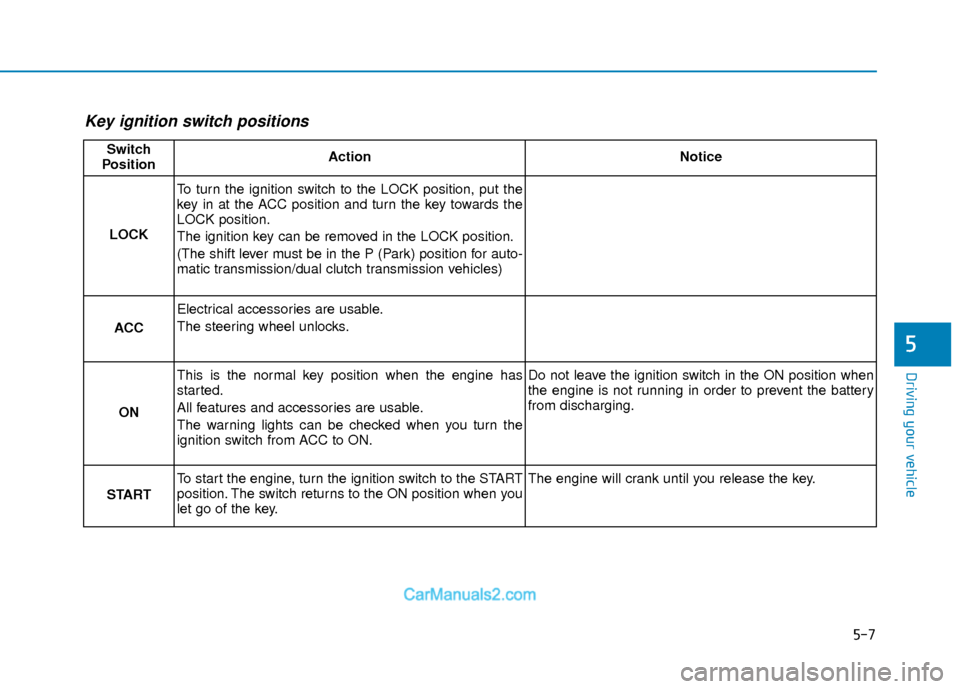
Key ignition switch positions
Switch
PositionActionNotice
LOCK
To turn the ignition switch to the LOCK position, put the
key in at the ACC position and turn the key towards the
LOCK position.
The ignition key can be removed in the LOCK position.
(The shift lever must be in the P (Park) position for auto-
matic transmission/dual clutch transmission vehicles)
ACC
Electrical accessories are usable.
The steering wheel unlocks.
ON
This is the normal key position when the engine has
started.
All features and accessories are usable.
The warning lights can be checked when you turn the
ignition switch from ACC to ON.Do not leave the ignition switch in the ON position when
the engine is not running in order to prevent the battery
from discharging.
START
To start the engine, turn the ignition switch to the START
position. The switch returns to the ON position when you
let go of the key.The engine will crank until you release the key.
Page 291 of 526
5-8
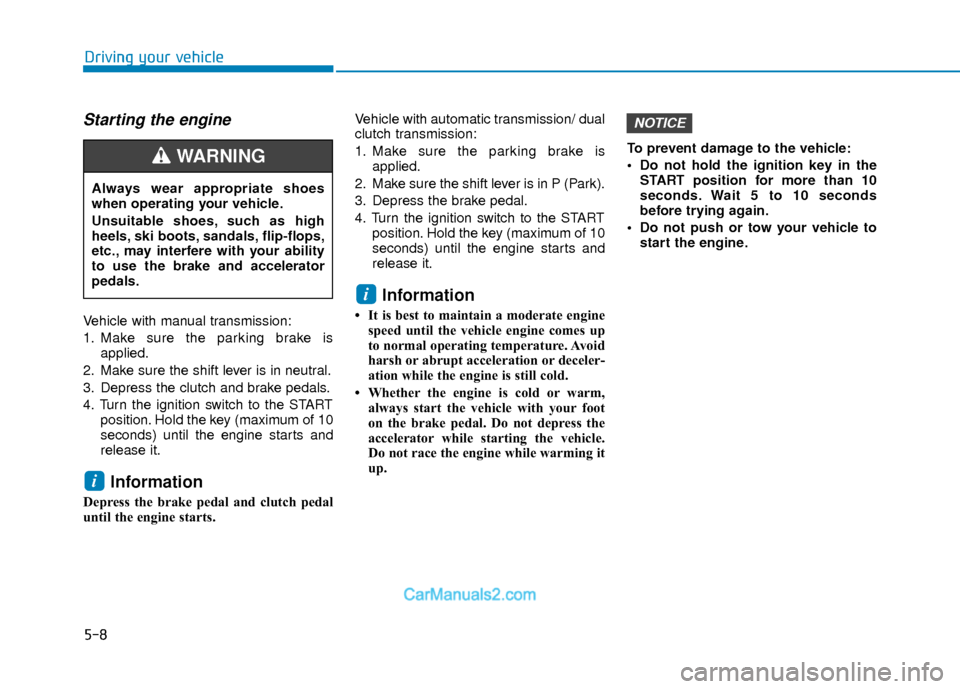
Starting the engine
Vehicle with manual transmission:
1. Make sure the parking brake isapplied.
2. Make sure the shift lever is in neutral.
3. Depress the clutch and brake pedals.
4. Turn the ignition switch to the START position. Hold the key (maximum of 10
seconds) until the engine starts and
release it.
Information
Depress the brake pedal and clutch pedal
until the engine starts. Vehicle with automatic transmission/ dual
clutch transmission:
1. Make sure the parking brake is
applied.
2. Make sure the shift lever is in P (Park).
3. Depress the brake pedal.
4. Turn the ignition switch to the START position. Hold the key (maximum of 10
seconds) until the engine starts and
release it.
Information
• It is best to maintain a moderate enginespeed until the vehicle engine comes up
to normal operating temperature. Avoid
harsh or abrupt acceleration or deceler-
ation while the engine is still cold.
• Whether the engine is cold or warm, always start the vehicle with your foot
on the brake pedal. Do not depress the
accelerator while starting the vehicle.
Do not race the engine while warming it
up. To prevent damage to the vehicle:
Do not hold the ignition key in the
START position for more than 10
seconds. Wait 5 to 10 seconds
before trying again.
Do not push or tow your vehicle to start the engine.
NOTICE
i
i
Driving your vehicle
Always wear appropriate shoes
when operating your vehicle.
Unsuitable shoes, such as high
heels, ski boots, sandals, flip-flops,
etc., may interfere with your ability
to use the brake and accelerator
pedals.
WARNING
Page 292 of 526
5-9
Driving your vehicle
5
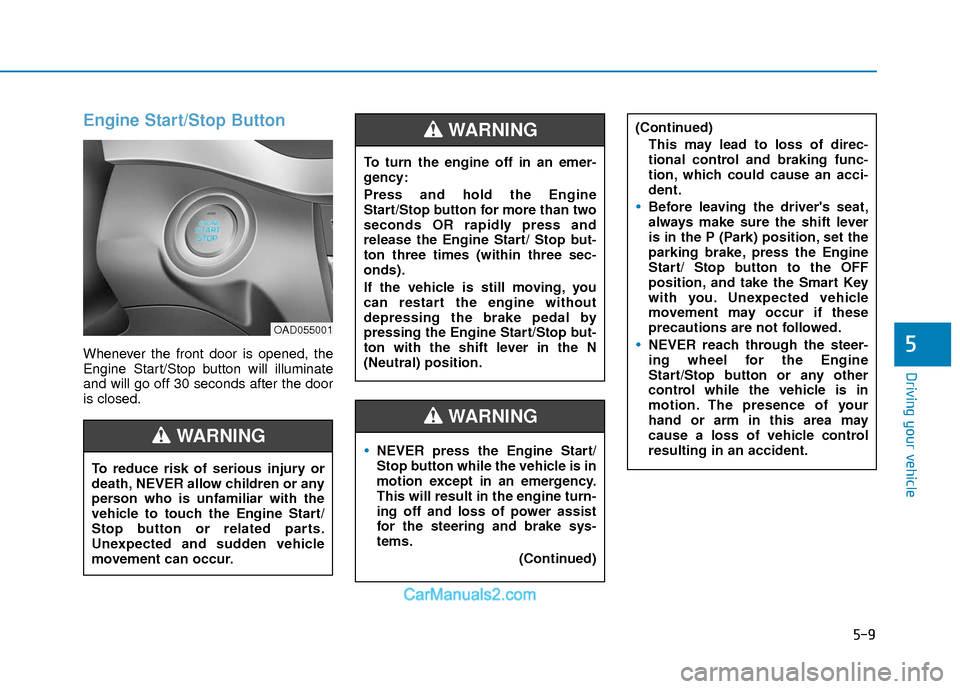
Engine Start/Stop Button
Whenever the front door is opened, the
Engine Start/Stop button will illuminate
and will go off 30 seconds after the door
is closed.
NEVER press the Engine Start/
Stop button while the vehicle is in
motion except in an emergency.
This will result in the engine turn-
ing off and loss of power assist
for the steering and brake sys-
tems.(Continued)
WARNING
To turn the engine off in an emer-
gency:
Press and hold the Engine
Start/Stop button for more than two
seconds OR rapidly press and
release the Engine Start/ Stop but-
ton three times (within three sec-
onds).
If the vehicle is still moving, you
can restart the engine without
depressing the brake pedal by
pressing the Engine Start/Stop but-
ton with the shift lever in the N
(Neutral) position.
(Continued)This may lead to loss of direc-
tional control and braking func-
tion, which could cause an acci-
dent.
Before leaving the driver's seat,
always make sure the shift lever
is in the P (Park) position, set the
parking brake, press the Engine
Start/ Stop button to the OFF
position, and take the Smart Key
with you. Unexpected vehicle
movement may occur if these
precautions are not followed.
NEVER reach through the steer-
ing wheel for the Engine
Start/Stop button or any other
control while the vehicle is in
motion. The presence of your
hand or arm in this area may
cause a loss of vehicle control
resulting in an accident.
WARNING
To reduce risk of serious injury or
death, NEVER allow children or any
person who is unfamiliar with the
vehicle to touch the Engine Start/
Stop button or related parts.
Unexpected and sudden vehicle
movement can occur.
WARNING
OAD055001
Page 294 of 526
5-11
Driving your vehicle
5
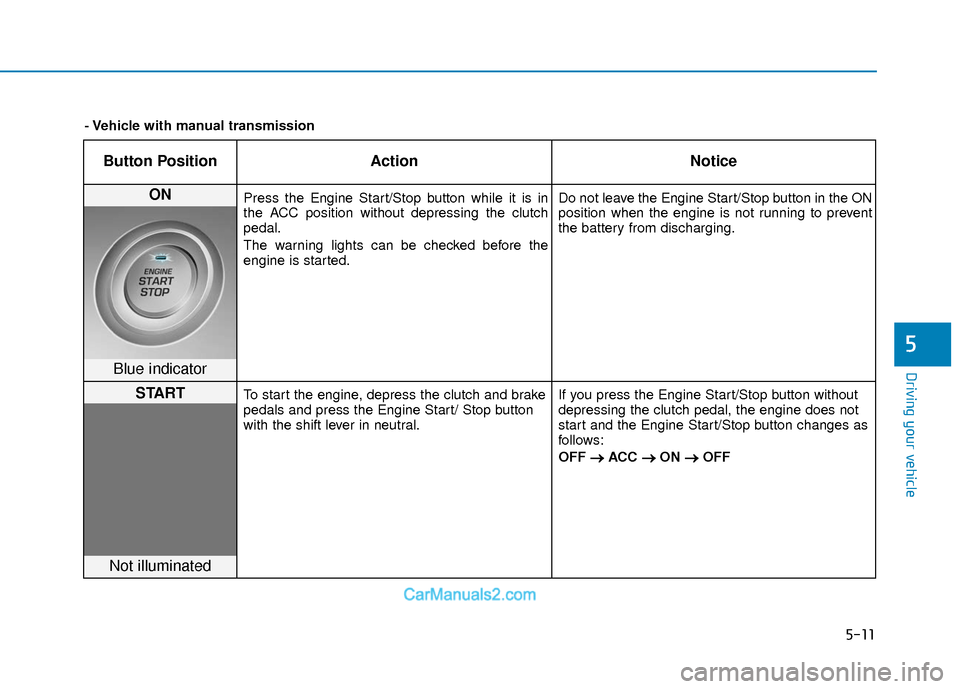
Button PositionAction Notice
ON Press the Engine Start/Stop button while it is in
the ACC position without depressing the clutch
pedal.
The warning lights can be checked before the
engine is started. Do not leave the Engine Start/Stop button in the ON
position when the engine is not running to prevent
the battery from discharging.
Blue indicator
STARTTo start the engine, depress the clutch and brake
pedals and press the Engine Start/ Stop button
with the shift lever in neutral.
If you press the Engine Start/Stop button without
depressing the clutch pedal, the engine does not
start and the Engine Start/Stop button changes as
follows:
OFF
→ →
ACC →
→
ON →
→
OFF
Not illuminated
- Vehicle with manual transmission
Page 296 of 526
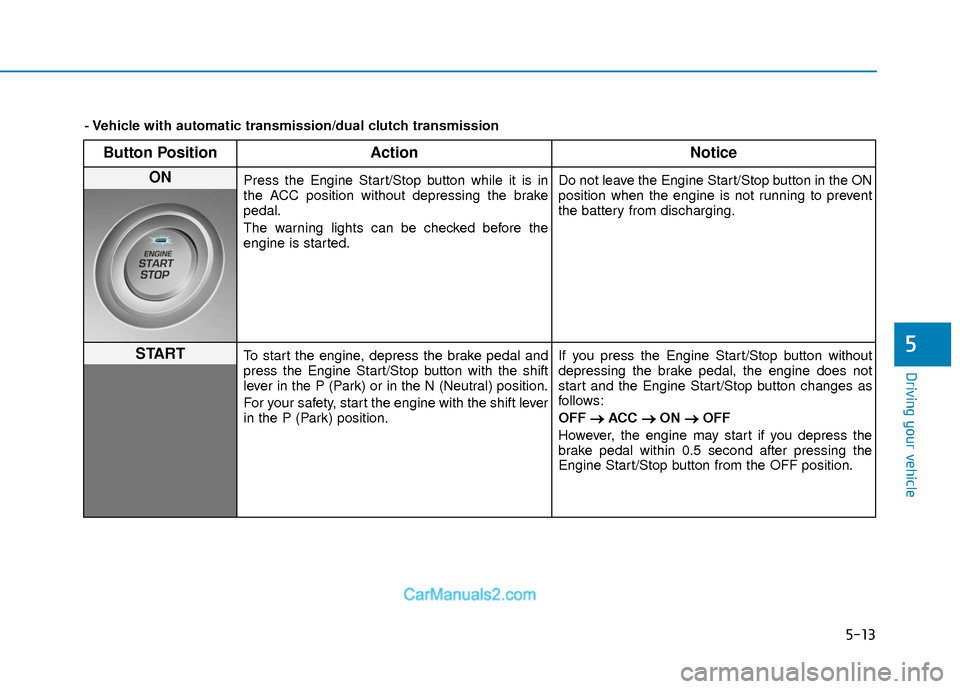
5-13
Driving your vehicle
5
Button PositionAction Notice
ON Press the Engine Start/Stop button while it is in
the ACC position without depressing the brake
pedal.
The warning lights can be checked before the
engine is started. Do not leave the Engine Start/Stop button in the ON
position when the engine is not running to prevent
the battery from discharging.
STARTTo start the engine, depress the brake pedal and
press the Engine Start/Stop button with the shift
lever in the P (Park) or in the N (Neutral) position.
For your safety, start the engine with the shift lever
in the P (Park) position.If you press the Engine Start/Stop button without
depressing the brake pedal, the engine does not
start and the Engine Start/Stop button changes as
follows:
OFF
→ →
ACC →
→
ON →
→
OFF
However, the engine may start if you depress the
brake pedal within 0.5 second after pressing the
Engine Start/Stop button from the OFF position.
- Vehicle with automatic transmission/dual clutch transmission
Page 297 of 526
5-14
Driving your vehicle
Starting the engine Information
• The engine will start by pressing theEngine Start/Stop button, only when the
smart key is in the vehicle.
• Even if the smart key is in the vehicle, if it is far away from the driver, the engine
may not start.
• When the Engine Start/Stop button is in the ACC or ON position, if any door is
open, the system checks for the smart
key. If the smart key is not in the vehicle,
the " " indicator will blink and the
warning "Key not in vehicle" will come
on and if all doors are closed, the chime
will also sound for about 5 seconds.
Keep the smart key in the vehicle when
using the ACC position or if the vehicle
engine is ON. Vehicle with manual transmission:
1. Always carry the smart key with you.
2. Make sure the parking brake is
applied.
3. Make sure the shift lever is in neutral.
4. Depress the clutch and brake pedals.
5. Press the Engine Start/Stop button.
Information
Depress the brake pedal and clutch pedal
until the engine starts.
Vehicle with automatic transmission/dual
clutch transmission:
1. Always carry the smart key with you.
2. Make sure the parking brake is applied.
3. Make sure the shift lever is in P (Park).
4. Depress the brake pedal.
5. Press the Engine Start/Stop button.
i
i
Always wear appropriate shoes
when operating your vehicle.
Unsuitable shoes, such as high
heels, ski boots, sandals, flip-
flops, etc., may interfere with your
ability to use the brake and accel-
erator pedals.
Do not start the vehicle with the
accelerator pedal depressed. The
vehicle can move and lead to an
accident.
Wait until the engine rpm is nor-
mal. The vehicle may suddenly
move if the brake pedal is
released when the rpm is high.
WARNING
Page 299 of 526
5-16
Manual Transmission
Operation
The manual transmission has 6 forward
gears. The transmission is fully synchro-
nized in all forward gears so shifting to
either a higher or a lower gear is easily
accomplished.
To shift to R (Reverse), make sure the
vehicle has completely stopped, and
then move the shift lever to neutral before
moving into R (Reverse).When you've come to a complete stop
and it's hard to shift into 1st gear or R
(Reverse):
1. Put the shift lever in neutral and
release the clutch pedal.
2. Depress the clutch pedal, and then shift into 1 (first) or R (Reverse) gear.
During cold weather, shifting may be
difficult until the transmission lubri-
cant has warmed up.
Using the clutch
The clutch pedal should be depressed all
the way before:
- Starting the engine The engine will not start without
depressing the clutch pedal.
- Shifting into gear, up shifting to the next higher gear, or down shifting to
the next lower gear.
When releasing the clutch pedal, release
it slowly. The clutch pedal should always
be fully released while driving.
NOTICE
M M A
AN
N U
U A
AL
L
T
T R
R A
A N
N S
SM
M I
IS
S S
SI
IO
O N
N
Driving your vehicle
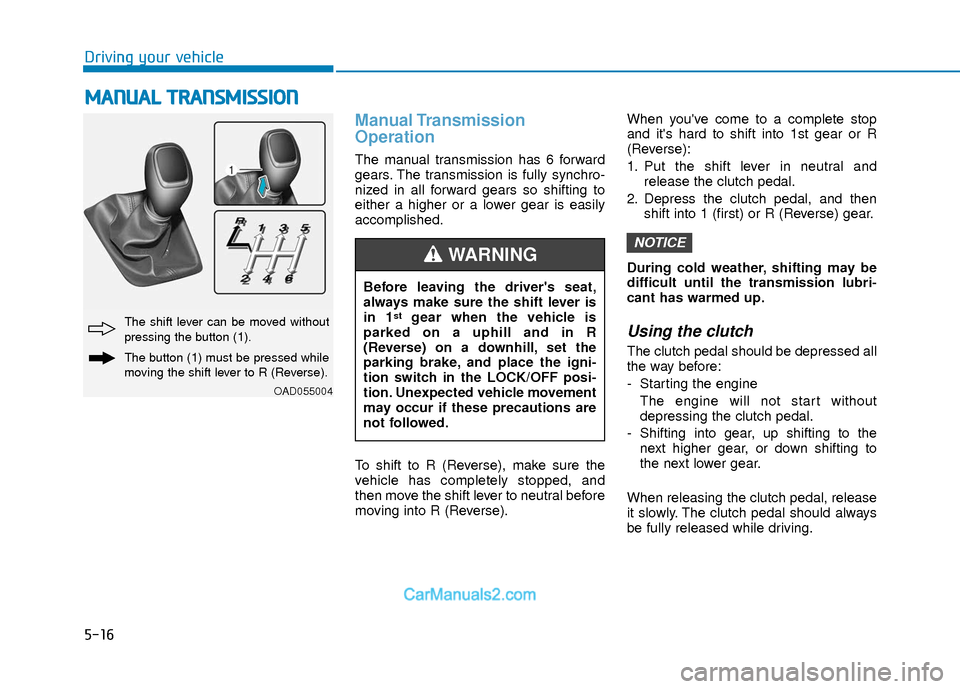
OAD055004
The shift lever can be moved without
pressing the button (1).
The button (1) must be pressed while
moving the shift lever to R (Reverse).
Before leaving the driver's seat,
always make sure the shift lever is
in 1
stgear when the vehicle is
parked on a uphill and in R
(Reverse) on a downhill, set the
parking brake, and place the igni-
tion switch in the LOCK/OFF posi-
tion. Unexpected vehicle movement
may occur if these precautions are
not followed.
WARNING
Page 301 of 526
5-18
Good Driving Practices
Never take the vehicle out of gear andcoast down a hill. This is extremely
dangerous.
Don't "ride" the brakes. This can cause the brakes and related parts to over-
heat and malfunction.
When you are driving down a long hill,
slow down and shift to a lower gear.
Engine braking will help slow down the
vehicle.
Slow down before shifting to a lower gear. This will help avoid over-revving
the engine, which can cause damage.
Slow down when you encounter cross winds. This gives you much better con-
trol of your vehicle.
Be sure the vehicle is completely stopped before you shift into R
(Reverse) to prevent damage to the
transmission.
Exercise extreme caution when driving on a slippery surface. Be especially
careful when braking, accelerating or
shifting gears. On a slippery surface,
an abrupt change in vehicle speed can
cause the drive wheels to lose traction
and may cause loss of vehicle control
resulting in an accident
Driving your vehicle
Do not use aggressive engine brak-
ing (shifting from a higher gear to a
lower gear) on slippery roads. This
could cause the tires to slip and
may result in an accident.
WARNING (Continued)
Loss of control often occurs if
two or more wheels drop off the
roadway and the driver over
steers to reenter the roadway.
In the event your vehicle leaves
the roadway, do not steer sharply.
Instead, slow down before pulling
back into the travel lanes.
HYUNDAI recommends you fol-
low all posted speed limits.
To reduce the risk of SERIOUS
INJURY or DEATH:
ALWAYS wear your seatbelt. In a
collision, an unbelted occupant is
significantly more likely to be
seriously injured or killed than a
properly belted occupant.
Avoid high speeds when corner-
ing or turning.
Do not make quick steering
wheel movements, such as sharp
lane changes or fast, sharp turns.
The risk of rollover is greatly
increased if you lose control of
your vehicle at highway speeds.
(Continued)
WARNING
Page 302 of 526
5-19
Driving your vehicle
5
A
AU
U T
TO
O M
M A
AT
TI
IC
C
T
T R
R A
A N
N S
SM
M I
IS
S S
SI
IO
O N
N
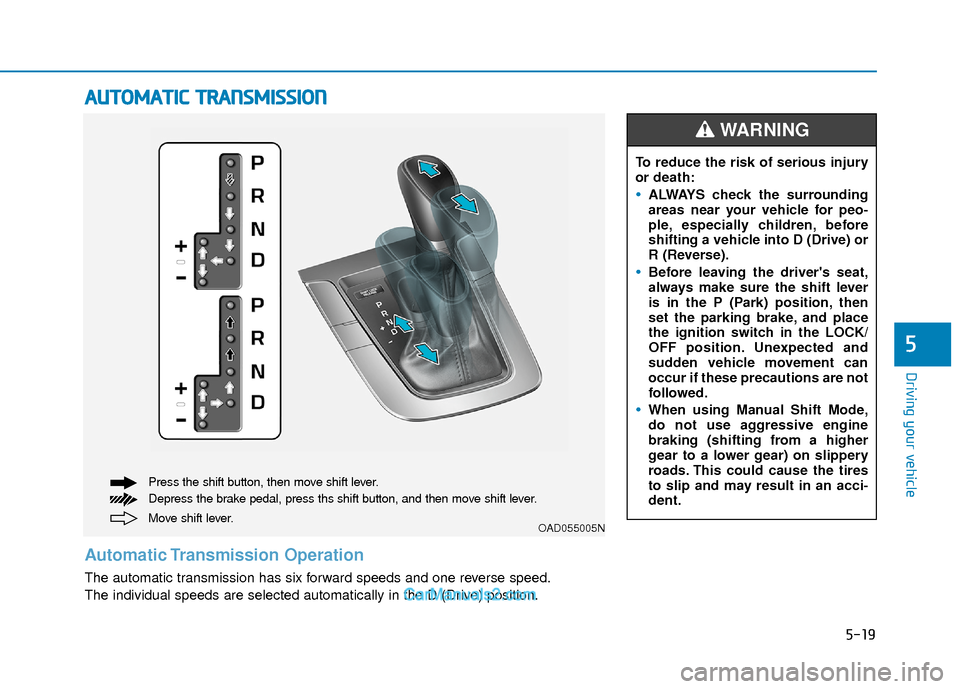
Move shift lever. Press the shift button, then move shift lever.
Depress the brake pedal, press ths shift button, and then move shift lever.OAD055005N
Automatic Transmission Operation
The automatic transmission has six forward speeds and one reverse speed.
The individual speeds are selected automatically in the D (Drive) position. To reduce the risk of serious injury
or death:
ALWAYS check the surrounding
areas near your vehicle for peo-
ple, especially children, before
shifting a vehicle into D (Drive) or
R (Reverse).
Before leaving the driver's seat,
always make sure the shift lever
is in the P (Park) position, then
set the parking brake, and place
the ignition switch in the LOCK/
OFF position. Unexpected and
sudden vehicle movement can
occur if these precautions are not
followed.
When using Manual Shift Mode,
do not use aggressive engine
braking (shifting from a higher
gear to a lower gear) on slippery
roads. This could cause the tires
to slip and may result in an acci-
dent.
WARNING
Page 303 of 526
5-20
Driving your vehicle
Transmission ranges
The indicator in the instrument cluster
displays the shift lever position when the
ignition switch is in the ON position.
P (Park)
Always come to a complete stop before
shifting into P (Park).
To shift from P (Park), you must depress
firmly on the brake pedal and make sure
your foot is off the accelerator pedal.
If you have done all of the above and still
cannot shift the lever out of P (Park), see
"Shift-Lock Release" in this section.
The shift lever must be in P (Park) before
turning the engine off.
R (Reverse)
Use this position to drive the vehicle
backward.
N (Neutral)
The wheels and transmission are not
engaged.
Use N (Neutral) if you need to restart a
stalled engine. Shift into P (Park) if you
need to leave your vehicle for any rea-
son.
Always depress the brake pedal when
you are shifting from N (Neutral) to
another gear.
Shifting into P (Park) while the
vehicle is in motion may cause
you to lose control of the vehicle.
After the vehicle has stopped,
always make sure the shift lever
is in P (Park), apply the parking
brake, and turn the engine off.
When parking on an incline, block
the wheels to prevent the vehicle
from rolling down.
Do not use the P (Park) position
in place of the parking brake.
WARNING
Always come to a complete stop
before shifting into or out of R
(Reverse); you may damage the
transmission if you shift into R
(Reverse) while the vehicle is in
motion.
CAUTION