drive mode Hyundai Elantra 2018 User Guide
[x] Cancel search | Manufacturer: HYUNDAI, Model Year: 2018, Model line: Elantra, Model: Hyundai Elantra 2018Pages: 526, PDF Size: 17.2 MB
Page 165 of 526
3-88
Convenient features of your vehicle
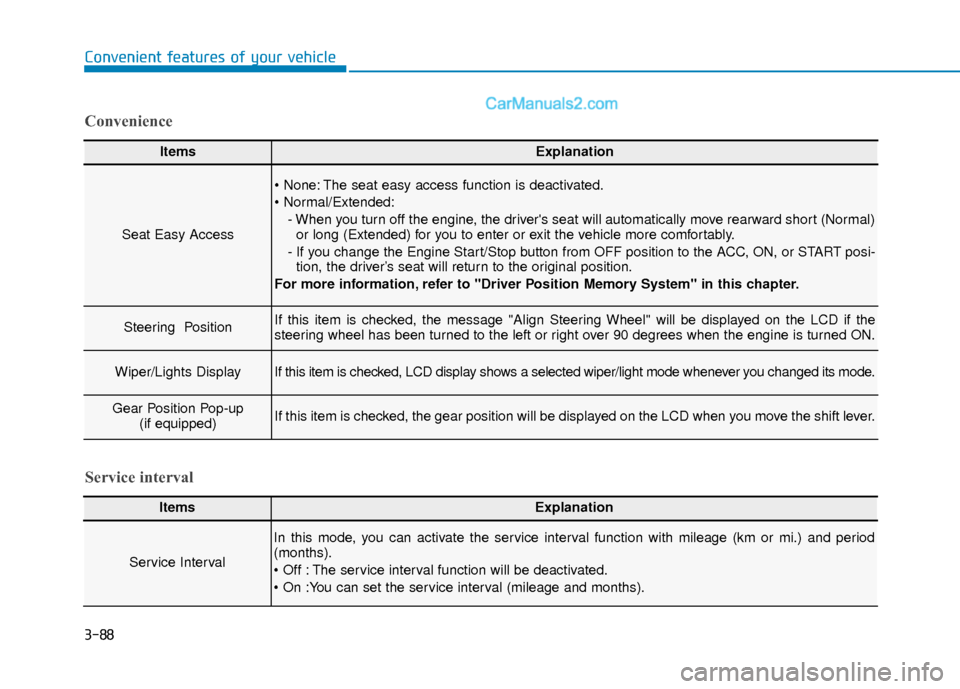
ItemsExplanation
Seat Easy Access
The seat easy access function is deactivated.
- When you turn off the engine, the driver's seat will automatically move rearward short (Normal)or long (Extended) for you to enter or exit the vehicle more comfortably.
- If you change the Engine Start/Stop button from OFF position to the ACC, ON, or START posi- tion, the driver’s seat will return to the original position.
For more information, refer to "Driver Position Memory System" in this chapter.
Steering Position If this item is checked, the message "Align Steering Wheel" will be displayed on the LCD if the
steering wheel has been turned to the left or right over 90 degrees when the engine is turned ON.
Wiper/Lights DisplayIf this item is checked, LCD display shows a selected wiper/light mode whenever you changed its mode.
Gear Position Pop-up (if equipped)If this item is checked, the gear position will be displayed on the LCD when you move the shift lever.
Convenience
ItemsExplanation
Service Interval
In this mode, you can activate the service interval function with mileage (km or mi.) and period
(months).
The service interval function will be deactivated.
Service interval
Page 167 of 526
3-90
Convenient features of your vehicle
Conventional Cluster
The trip computer is a microcomputer-
controlled driver information system that
displays information related to driving.
Information
Some driving information stored in the
trip computer (for example Average
Vehicle Speed) resets if the battery is dis-
connected.
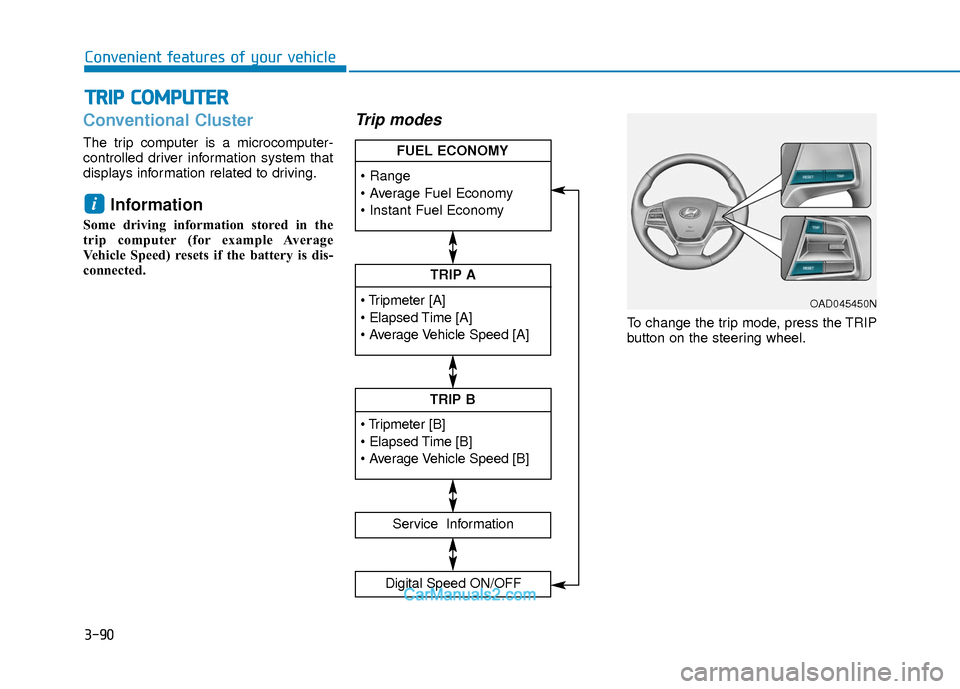
Trip modes
To change the trip mode, press the TRIP
button on the steering wheel.
i
T TR
R I
IP
P
C
C O
O M
M P
PU
U T
TE
ER
R
TRIP A
Service Information
Digital Speed ON/OFF
TRIP B
FUEL ECONOMY
OAD045450N
Page 168 of 526
3-91
Convenient features of your vehicle
3
Range
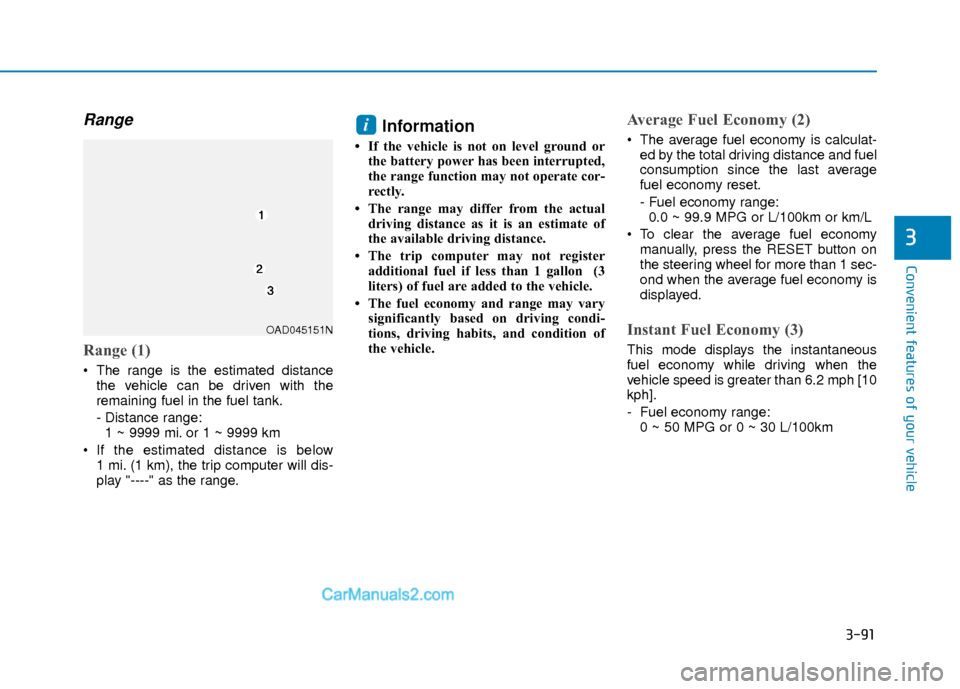
Range (1)
The range is the estimated distancethe vehicle can be driven with the
remaining fuel in the fuel tank.
- Distance range:1 ~ 9999 mi. or 1 ~ 9999 km
If the estimated distance is below 1 mi. (1 km), the trip computer will dis-
play "----" as the range.
Information
• If the vehicle is not on level ground orthe battery power has been interrupted,
the range function may not operate cor-
rectly.
• The range may differ from the actual driving distance as it is an estimate of
the available driving distance.
• The trip computer may not register additional fuel if less than 1 gallon (3
liters) of fuel are added to the vehicle.
• The fuel economy and range may vary significantly based on driving condi-
tions, driving habits, and condition of
the vehicle.
Average Fuel Economy (2)
The average fuel economy is calculat-ed by the total driving distance and fuel
consumption since the last average
fuel economy reset.
- Fuel economy range:0.0 ~ 99.9 MPG or L/100km or km/L
To clear the average fuel economy manually, press the RESET button on
the steering wheel for more than 1 sec-
ond when the average fuel economy is
displayed.
Instant Fuel Economy (3)
This mode displays the instantaneous
fuel economy while driving when the
vehicle speed is greater than 6.2 mph [10
kph].
- Fuel economy range:0 ~ 50 MPG or 0 ~ 30 L/100km
i
OAD045151N
Page 171 of 526
3-94
Convenient features of your vehicle
Supervision Cluster
The trip computer is a microcomputer-
controlled driver information system that
displays information related to driving.
Information
Some driving information stored in the
trip computer (for example Average
Vehicle Speed) resets if the battery is dis-
connected.
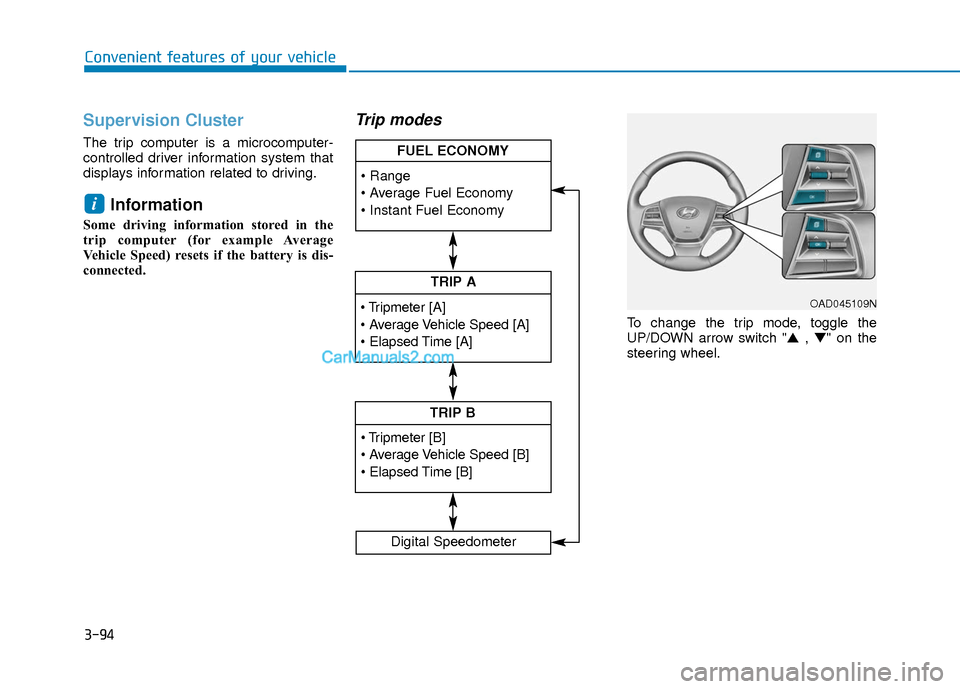
Trip modes
To change the trip mode, toggle the
UP/DOWN arrow switch "▲ , ▼" on the
steering wheel.
i
TRIP A
TRIP B
FUEL ECONOMY
Digital Speedometer
OAD045109N
Page 172 of 526
3-95
Convenient features of your vehicle
3
Range
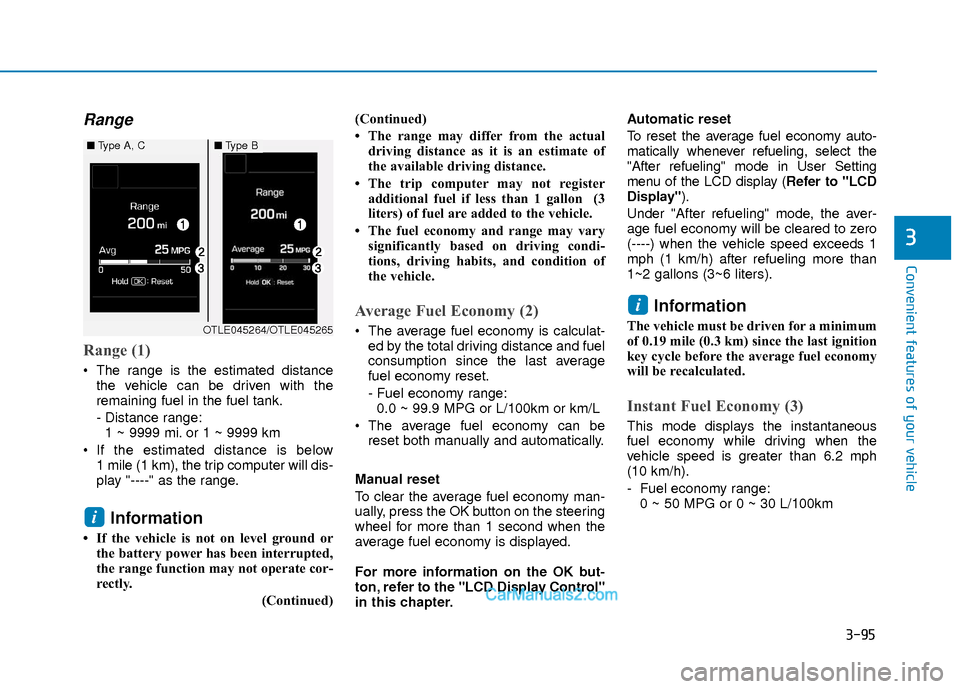
Range (1)
The range is the estimated distancethe vehicle can be driven with the
remaining fuel in the fuel tank.
- Distance range:1 ~ 9999 mi. or 1 ~ 9999 km
If the estimated distance is below 1 mile (1 km), the trip computer will dis-
play "----" as the range.
Information
• If the vehicle is not on level ground orthe battery power has been interrupted,
the range function may not operate cor-
rectly.
(Continued)(Continued)
• The range may differ from the actual
driving distance as it is an estimate of
the available driving distance.
• The trip computer may not register additional fuel if less than 1 gallon (3
liters) of fuel are added to the vehicle.
• The fuel economy and range may vary significantly based on driving condi-
tions, driving habits, and condition of
the vehicle.
Average Fuel Economy (2)
The average fuel economy is calculat-ed by the total driving distance and fuel
consumption since the last average
fuel economy reset.
- Fuel economy range:0.0 ~ 99.9 MPG or L/100km or km/L
The average fuel economy can be reset both manually and automatically.
Manual reset
To clear the average fuel economy man-
ually, press the OK button on the steering
wheel for more than 1 second when the
average fuel economy is displayed.
For more information on the OK but-
ton, refer to the "LCD Display Control"
in this chapter. Automatic reset
To reset the average fuel economy auto-
matically whenever refueling, select the
"After refueling" mode in User Setting
menu of the LCD display (
Refer to "LCD
Display").
Under "After refueling" mode, the aver-
age fuel economy will be cleared to zero
(----) when the vehicle speed exceeds 1
mph (1 km/h) after refueling more than
1~2 gallons (3~6 liters).
Information
The vehicle must be driven for a minimum
of 0.19 mile (0.3 km) since the last ignition
key cycle before the average fuel economy
will be recalculated.
Instant Fuel Economy (3)
This mode displays the instantaneous
fuel economy while driving when the
vehicle speed is greater than 6.2 mph
(10 km/h).
- Fuel economy range: 0 ~ 50 MPG or 0 ~ 30 L/100km
i
i
■ Type A, C■Type B
OTLE045264/OTLE045265
Page 180 of 526
3-103
Convenient features of your vehicle
3
You can activate or deactivate the One
Touch Turn Signal function or choose the
number of blinking (3, 5, or 7) from the
User Settings Mode (Light) on the LCD
display.
For more information, refer to the
"LCD Display" section in this chapter.
Battery saver function
The purpose of this feature is to prevent
the battery from being discharged. The
system automatically turns off the park-
ing lamp when the key is removed
(remote key) or when the driver turns the
engine off (smart key) and opens the
driver-side door.
With this feature, the parking lamps will
turn off automatically if the driver parks
on the side of road at night.
If necessary, to keep the lamps on when
the engine is turned off, perform the fol-
lowing:
1) Open the driver-side door.
2) Turn the parking lamps OFF and ONagain using the light switch on the
steering column.
Headlamp delay function (if equipped)
If the key is removed from the ignition
switch or placed in the ACC position or
the LOCK/OFF position with the head-
lamps ON, the headlamps (and/or park-
ing lamps) remain on for about 5 min-
utes. However, if the driver’s door is
opened and closed, the headlights are
turned off after 15 seconds. Also, with the
engine off if the driver's door is opened
and closed, the headlamps (and/or park-
ing lamps) are turned off after 15 sec-
onds.
The headlamps (and/or parking lamps)
can be turned off by pressing the lock
button on the remote key or smart key
twice or turning the light switch to the
OFF or AUTO position.
You can activate or deactivate the
Headlamp Delay function from the User
Settings Mode (Light) on the LCD dis-
play.
For more information, refer to the
"LCD Display" section in this chapter. If the driver gets out of the vehicle
through other doors (except driver’s
door), the battery saver function does
not operate and the headlamp delay
function does not turn off automati-
cally. Therefore, It causes the battery
to be discharged. In this case, make
sure to turn off the lamp before get-
ting out of the vehicle.
NOTICE
Page 194 of 526
3-117
Convenient features of your vehicle
3
Operation Tips
To keep dust or unpleasant fumes fromentering the car through the ventilation
system, temporarily set the air intake
control to the recirculated air position.
Return the control to the fresh air posi-
tion when the irritation has passed.
This will help keep the driver alert and
comfortable.
To prevent the inside of the windshield from fogging, set the air intake control
to the fresh air position and fan speed
to the desired position, turn on the air
conditioning system, and adjust the
temperature control to desired temper-
ature.
Air conditioning
All HYUNDAI Air Conditioning Systems
are filled with environmentally friendly R-
134a refrigerant.
1. Start the engine.
2. Push the air conditioning button.
3. Set the mode to the Face Level mode.
4. Set the air intake control to the recir- culated air position. However, pro-
longed operation of the recirculated air
position will excessively dry the air. In
this case, change the air position.
5. Adjust the fan speed control and tem- perature control to maintain maximum
comfort.
When maximum cooling is desired, set
the temperature control to the extreme
left position then set the fan speed con-
trol to the highest speed.
When using the air conditioning sys-
tem, monitor the engine temperature
gauge closely while driving up hills or
in heavy traffic when outside temper-
atures are high. Air conditioning sys-
tem operation can cause engine over-
heating. Continue to use the blower
fan, but turn the air conditioning sys-
tem off if the engine temperature
gauge indicates engine overheating.
Air conditioning system operation
tips
If the vehicle has been parked in direct sunlight during hot weather, open the
windows for a short time to let the hot
air inside the vehicle escape.
After sufficient cooling has been achieved, switch back from the recircu-
lated air to the fresh outside air posi-
tion.
To help reduce moisture inside of the windows on rainy or humid days,
decrease the humidity inside the vehi-
cle by operating the air conditioning
system with the windows and sunroof
closed.
Use the air conditioning system every month only for a few minutes to ensure
maximum system performance.
If you operate air conditioner exces- sively, the difference between the tem-
perature of the outside air and that of
the windshield could cause the outer
surface of the windshield to fog up,
causing loss of visibility. In this case,
set the mode selection knob or button
to the position and fan speed con-
trol to the lower speed.
NOTICE
Page 197 of 526
3-120
Convenient features of your vehicle
A
AU
U T
TO
O M
M A
AT
TI
IC
C
C
C L
LI
IM
M A
AT
TE
E
C
C O
O N
NT
TR
R O
O L
L
S
S Y
Y S
ST
T E
EM
M
OAD045310
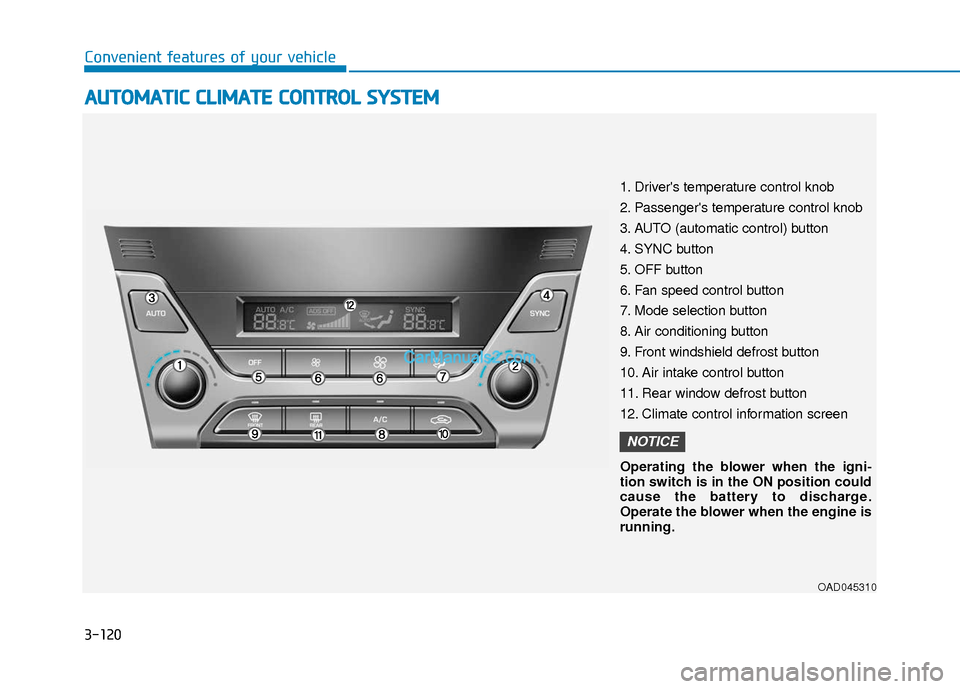
1. Driver's temperature control knob
2. Passenger's temperature control knob
3. AUTO (automatic control) button
4. SYNC button
5. OFF button
6. Fan speed control button
7. Mode selection button
8. Air conditioning button
9. Front windshield defrost button
10. Air intake control button
11. Rear window defrost button
12. Climate control information screen
Operating the blower when the igni-
tion switch is in the ON position could
cause the battery to discharge.
Operate the blower when the engine is
running.
NOTICE
Page 205 of 526
3-128
Convenient features of your vehicle
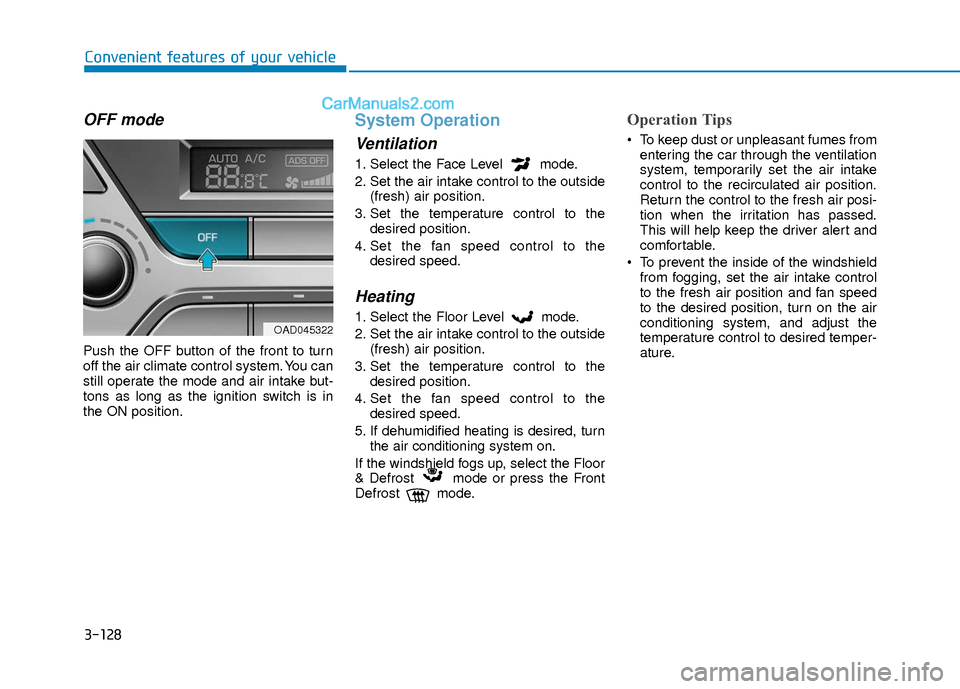
OFF mode
Push the OFF button of the front to turn
off the air climate control system. You can
still operate the mode and air intake but-
tons as long as the ignition switch is in
the ON position.
System Operation
Ventilation
1. Select the Face Level mode.
2. Set the air intake control to the outside(fresh) air position.
3. Set the temperature control to the desired position.
4. Set the fan speed control to the desired speed.
Heating
1. Select the Floor Level mode.
2. Set the air intake control to the outside(fresh) air position.
3. Set the temperature control to the desired position.
4. Set the fan speed control to the desired speed.
5. If dehumidified heating is desired, turn the air conditioning system on.
If the windshield fogs up, select the Floor
& Defrost mode or press the Front
Defrost mode.
Operation Tips
To keep dust or unpleasant fumes from entering the car through the ventilation
system, temporarily set the air intake
control to the recirculated air position.
Return the control to the fresh air posi-
tion when the irritation has passed.
This will help keep the driver alert and
comfortable.
To prevent the inside of the windshield from fogging, set the air intake control
to the fresh air position and fan speed
to the desired position, turn on the air
conditioning system, and adjust the
temperature control to desired temper-
ature.
OAD045322
Page 211 of 526
3-134
Convenient features of your vehicle
Auto Defogging System (Only
for Automatic Climate Control
System, if equipped)
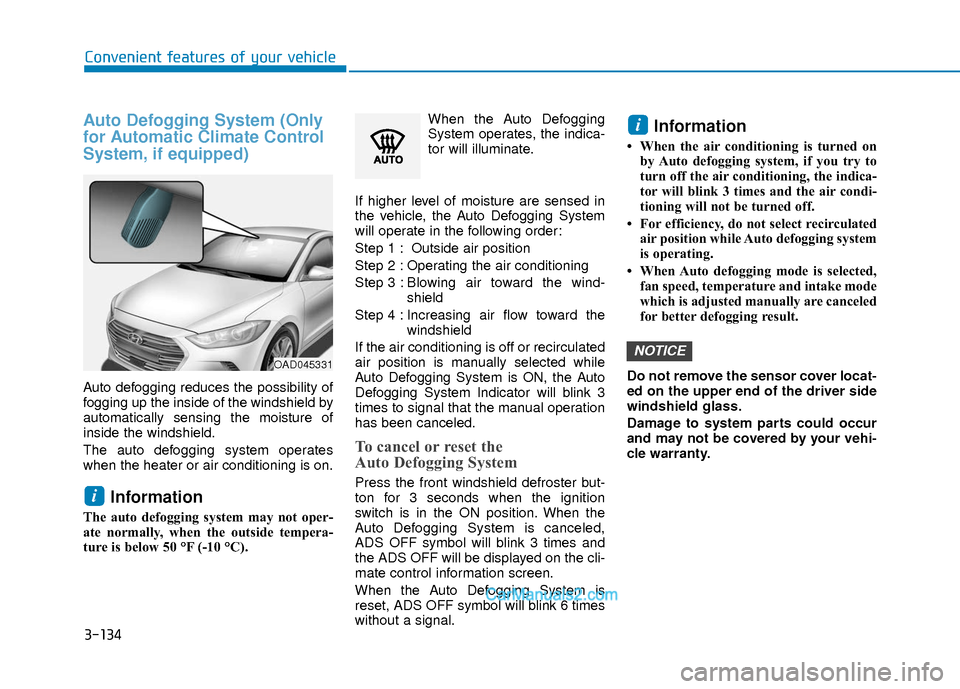
Auto defogging reduces the possibility of
fogging up the inside of the windshield by
automatically sensing the moisture of
inside the windshield.
The auto defogging system operates
when the heater or air conditioning is on.
Information
The auto defogging system may not oper-
ate normally, when the outside tempera-
ture is below 50 °F (-10 °C).When the Auto Defogging
System operates, the indica-
tor will illuminate.
If higher level of moisture are sensed in
the vehicle, the Auto Defogging System
will operate in the following order:
Step 1 : Outside air position
Step 2 : Operating the air conditioning
Step 3 : Blo wing air toward the wind-
shield
Step 4 : Increasing air flow toward the windshield
If the air conditioning is off or recirculated
air position is manually selected while
Auto Defogging System is ON, the Auto
Defogging System Indicator will blink 3
times to signal that the manual operation
has been canceled.
To cancel or reset the
Auto Defogging System
Press the front windshield defroster but-
ton for 3 seconds when the ignition
switch is in the ON position. When the
Auto Defogging System is canceled,
ADS OFF symbol will blink 3 times and
the ADS OFF will be displayed on the cli-
mate control information screen.
When the Auto Defogging System is
reset, ADS OFF symbol will blink 6 times
without a signal.
Information
• When the air conditioning is turned on by Auto defogging system, if you try to
turn off the air conditioning, the indica-
tor will blink 3 times and the air condi-
tioning will not be turned off.
• For efficiency, do not select recirculated air position while Auto defogging system
is operating.
• When Auto defogging mode is selected, fan speed, temperature and intake mode
which is adjusted manually are canceled
for better defogging result.
Do not remove the sensor cover locat-
ed on the upper end of the driver side
windshield glass.
Damage to system parts could occur
and may not be covered by your vehi-
cle warranty.
NOTICE
i
i
OAD045331