drive mode Hyundai Elantra 2018 Owner's Guide
[x] Cancel search | Manufacturer: HYUNDAI, Model Year: 2018, Model line: Elantra, Model: Hyundai Elantra 2018Pages: 526, PDF Size: 17.2 MB
Page 212 of 526
3-135
Convenient features of your vehicle
3
C
CL
LI
IM
M A
AT
TE
E
C
C O
O N
NT
TR
R O
O L
L
A
A D
DD
DI
IT
T I
IO
O N
NA
AL
L
F
F E
E A
A T
TU
U R
RE
ES
S
(
( I
IF
F
E
E Q
Q U
UI
IP
P P
PE
ED
D )
)
Automatic Ventilation
(if equipped)
When the ignition switch is in the ON
position or when the engine is running
and temperature is below 59°F (15°C)
with the recirculated air position selected
more than five minutes, the air intake
position will automatically change to the
outside (fresh) air position.
To cancel or reset the Automatic
Ventilation
When the air conditioning system is on,
select Face Level mode and while
pressing the A/C button, press the recir-
culated air position button five times with-
in three seconds.
Sunroof Inside Air
Recirculation (if equipped)
When the heater or air conditioning sys-
tem is on with the sunroof opened, the
outside (fresh) air position will be auto-
matically selected. At this time, if you
press the recirculated air position button,
the recirculated air position will be select-
ed but will change back to the outside
(fresh) air position after 3 minutes.
When the sunroof is closed, the air intake
position will return to the original position
that was selected.
To avoid possible theft, do not leave
valuables in the storage compart-
ments.
NOTICE
S
ST
T O
O R
RA
A G
G E
E
C
C O
O M
M P
PA
A R
RT
TM
M E
EN
N T
T
Never store cigarette lighters,
propane cylinders, or other flamma-
ble/explosive materials in the vehi-
cle. These items may catch fire
and/or explode if the vehicle is
exposed to hot temperatures for
extended periods.
WARNING
ALWAYS keep the storage compart-
ment covers closed securely while
driving. Items inside your vehicle
are moving as fast as the vehicle. If
you have to stop or turn quickly, or
if there is a crash, the items may fly
out of the compartment and may
cause an injury if they strike the
driver or a passenger.
WARNING
Page 233 of 526
Information - Precautions for
safe driving
• Bluetooth
®Handsfree is a feature that
enables drivers to practice safe driving.
Connecting the head unit with a
Bluetooth
®phone allows the user to
conveniently make and receive calls and
use contacts. Before using Bluetooth
®,
carefully read the contents of this user’s
manual.
• Excessive use or operations while driv- ing may lead to negligent driving prac-
tices and result in accidents. Refrain
from excessive operations while driving.
• Viewing the screen for prolonged peri- ods of time is dangerous and may lead to
accidents. When driving, view the
screen only for short periods of time.
Information - When connecting
a Bluetooth®phone
• Before connecting the head unit with the mobile phone, check to see that the
mobile phone supports Bluetooth
®fea-
tures.
• Even if the phone supports Bluetooth
®,
the phone will not be found during
device searches if the phone has been set
to hidden state or the Bluetooth
®power
is turned off. Disable the hidden state or
turn on the Bluetooth
®power prior to
searching/connecting with the Head
unit.
• Bluetooth
®phone is automatically con-
nected when the ignition on.
• If you do not want automatic connection with your Bluetooth
®device, turn off
the Bluetooth®feature within your
mobile phone.
• The Handsfree call volume and quality may differ depending on the mobile
phone.
(Continued)(Continued)
• Park the vehicle when connecting the
head unit with the mobile phone.
• Bluetooth
®connection may become
intermittently disconnected in some
mobile phones. Follow these steps to try
again.
1. Within the mobile phone, turn the Bluetooth
®function off/on and try
again.
2. Turn the mobile phone power Off/On and try again.
3. Completely remove the mobile phone battery, reboot, and then again.
4. Reboot the Audio System and try again.
5. Delete all paired devices, pair and try again.
• Handsfree call quality and volume may differ depending on the model of your
mobile phone.
ii
4-14
Multimedia System
Page 234 of 526
Information - Using the voicerecognition
• When using the voice recognition fea- ture, only commands listed within the
user's manual are supported.
• Be aware that during the operation of the voice recognition system, pressing
any key other than the key termi-
nate the voice recognition mode.
• For superior voice recognition perform- ance, position the microphone used for
voice recognition above the head of the
driver’s seat and maintain a proper
position when saying commands.
• Within the following situations, voice recognition may not function properly
due to external sound.
- When the windows and sunroof areopen
- When the wind of the cooling / heating device is strong
- When entering and passing through tunnels
(Continued)(Continued)
- When driving on rugged and unevenroads
- During severe rain (heavy rains, windstorms)
• Phone related voice commands can be used only when a Bluetooth
®Wireless
Technology device is connected.
• When making calls by stating a name, the corresponding contact must be
downloaded and stored within the audio
system.
• After downloading the Bluetooth
®
Wireless Technology phone book, it
takes some times to convert the phone
book data into voice information.
During this time, voice recognition may
not properly operate.
• Pronounce the voice commands natural- ly and clearly as if in a normal conver-
sation.
i
4-15
Multimedia System
4
Page 245 of 526
4-26
Multimedia System
Information
- Using the USB Devices
• To use an external USB device, make sure the device is not connected when
starting up the vehicle. Connect the
device after starting up.
• If you start the engine when the USB device is connected, it may damage the
USB device. (USB flashdrives are very
sensitive to electric shock.)
• If the engine is started up or turned off while the external USB device is con-
nected, the external USB device may not
work.
• The System may not play unauthenti- cated MP3 or WMA files.
1) It can only play MP3 files with the com- pression rate between 8Kbps ~
320Kbps.
2) It can only play WMA music files with the compression rate between 8Kbps ~
320Kbps.
• Take precautions for static electricity when connecting or disconnecting the
external USB device.
(Continued)(Continued)
• An encrypted MP3 PLAYER is not rec-
ognizable.
• Depending on the condition of the exter- nal USB device, the connected external
USB device can be unrecognizable.
• When the formatted byte/sector setting of External USB device is not either
512BYTE or 2048BYTE, then the device
will not be recognized.
• Use only a USB device formatted to FAT 12/16/32.
• USB devices without USB I/F authenti- cation may not be recognizable.
• Make sure the USB connection terminal does not come in contact with the
human body or other objects.
• If you repeatedly connect or disconnect the USB device in a short period of time,
it may break the device.
• You may hear a strange noise when con- necting or disconnecting a USB device.
• If you disconnect the external USB device during playback in USB mode,
the external USB device can be damaged
or may malfunction. Therefore, discon-
nect the external USB device when the
audio is turned off or in another mode.
(e.g, Radio)
(Continued)(Continued)
• Depending on the type and capacity of
the external USB device or the type of
files stored in the device, there is a dif-
ference in the time for recognition the
device.
• Do not use the USB device for purposes other than playing music files.
• Playing videos through the USB is not supported.
• Use of USB accessories such as recharg- ers or heaters using USB I/F may lower
performance or cause trouble.
• If you use devices such as a USB hub purchased separately, the vehicle’s
audio system may not recognize the USB
device. In this case, connect the USB
device directly to the multimedia termi-
nal of the vehicle.
• If the USB device is divided by logical drives, only the music files on the high-
est-priority drive are recognized by car
audio.
• Devices such as MP3 Player/ Cellular phone/Digital camera can be unrecog-
nizable by standard USB I/F.
• Charging through the USB may not be supported in some mobile devices.
• USB HDD or USB types liable to connec- tion failures due to vehicle vibrations are
not supported. (i-stick type)
(Continued)
i
Page 250 of 526
4-31
Multimedia System
4
Information
- Using Voice Recognition(if equipped)
• When using the voice recognition fea- ture, only commands listed within the
user's manual are supported.
• Be aware that when the voice recogni- tion system is active, pressing any but-
ton other than the button terminates
voice recognition mode.
• For optimal voice recognition perform- ance, position your head below the
microphone located above the driver’s
seat and maintain proper position when
speaking voice commands.
• Within the following situations, voice recognition may not function properly
due to external sound.
- When the windows and sunroof areopen
- When the blower AC/heater is set to high
- When entering and passing through tunnels
- When driving on rugged and uneven roads
(Continued)(Continued)
- During severe rain (heavy rains,windstorms)
• Phone related voice commands can be used only when a Bluetooth
®Wireless
Technology device is connected.
• When making calls by name, the corre- sponding contact must be downloaded
and stored within the audio system.
• After downloading the phone book, it takes some time to convert the phone
book data into voice information.
During this time, voice recognition may
not operate properly.
• Pressing and holding the button : While holding the button, frequency changes
without stopping. When the button is
released, the system automatically
searches for the next frequency from
that point.
i
Page 284 of 526
Driving your vehicle
5
Before Driving ........................................................5-4
Before Entering the Vehicle ...........................................5-4
Before Starting ..................................................................5-4
Ignition Switch ........................................................5-6
Key Ignition Switch ...........................................................5-6
Engine Start/Stop Button................................................5-9
Manual Transmission ...........................................5-16
Manual Transmission Operation ..................................5-16
Good Driving Practices ..................................................5-18
Automatic Transmission ......................................5-19
Automatic Transmission Operation .............................5-19
Good Driving Practices ..................................................5-23
Dual Clutch Transmission ....................................5-24
Dual Clutch Transmission Operation ..........................5-24
Good Driving Practices ..................................................5-32
Braking System ....................................................5-33
Power Brakes ...................................................................5-33
Disc Brakes Wear Indicator ..........................................5-34
Rear Drum Brakes...........................................................5-34
Parking Brake...................................................................5-34
Anti-lock Brake System (ABS) ....................................5-36
Electronic Stability Control (ESC)................................5-38
Vehicle Stability Management (VSM).........................5-41
Hill-Start Assist Control (HAC) ....................................5-42
Good Braking Practices .................................................5-42
Drive Mode Integrated Control System ............5-43
Blind Spot Detection System (BSD) ..................5-45
BSD (Blind Spot Detection) /
LCA (Lane Change Assist) .............................................5-46
RCTA (Rear Cross Traffic Alert) ..................................5-49
Limitations of the System .............................................5-51
Automatic Emergency Braking (AEB) ...............5-52
System Setting and Activation.....................................5-52
AEB Warning Message and System Control ............5-54
AEB Front Radar Sensor ...............................................5-56
System Malfunction .......................................................5-57
Limitations of the System .............................................5-58
Lane Keeping Assist System (LKAS) .................5-62
LKAS Operation ...............................................................5-63
Limitations of the System .............................................5-66
LKAS Malfunction ...........................................................5-67
LKAS Function Change ..................................................5-68
Cruise Control .......................................................5-69
Cruise Control operation ...............................................5-69
Page 302 of 526
5-19
Driving your vehicle
5
A
AU
U T
TO
O M
M A
AT
TI
IC
C
T
T R
R A
A N
N S
SM
M I
IS
S S
SI
IO
O N
N
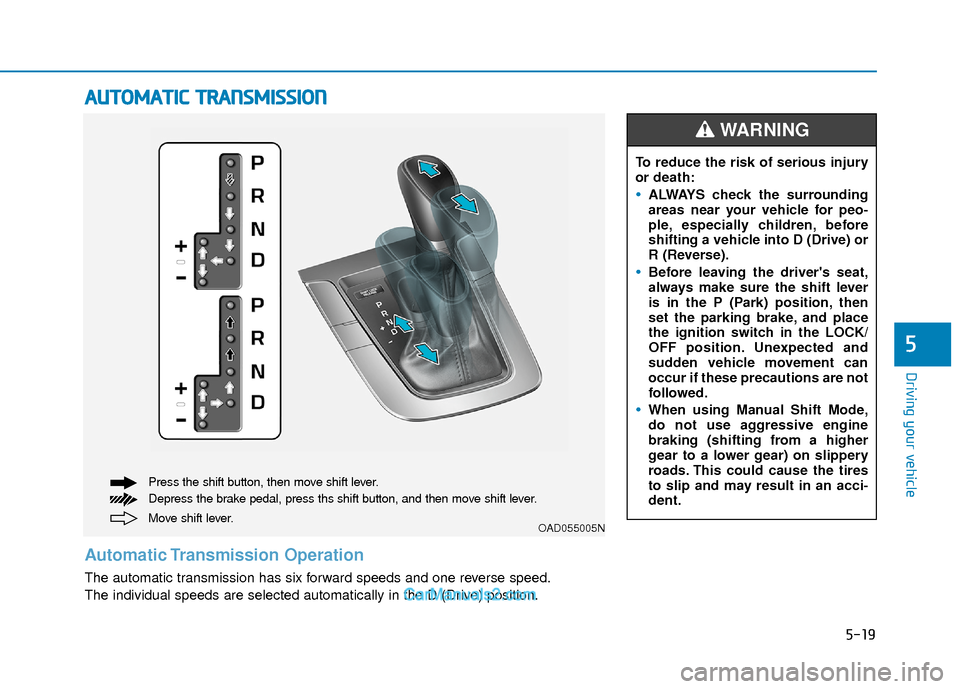
Move shift lever. Press the shift button, then move shift lever.
Depress the brake pedal, press ths shift button, and then move shift lever.OAD055005N
Automatic Transmission Operation
The automatic transmission has six forward speeds and one reverse speed.
The individual speeds are selected automatically in the D (Drive) position. To reduce the risk of serious injury
or death:
ALWAYS check the surrounding
areas near your vehicle for peo-
ple, especially children, before
shifting a vehicle into D (Drive) or
R (Reverse).
Before leaving the driver's seat,
always make sure the shift lever
is in the P (Park) position, then
set the parking brake, and place
the ignition switch in the LOCK/
OFF position. Unexpected and
sudden vehicle movement can
occur if these precautions are not
followed.
When using Manual Shift Mode,
do not use aggressive engine
braking (shifting from a higher
gear to a lower gear) on slippery
roads. This could cause the tires
to slip and may result in an acci-
dent.
WARNING
Page 304 of 526
5-21
Driving your vehicle
5
D (Drive)
This is the normal driving position. The
transmission will automatically shift
through a six-gear sequence, providing
the best fuel economy and power.
For extra power when passing another
vehicle or driving uphill depress the
accelerator pedal further until you feel
the transmission downshift to a lower
gear.
The DRIVE MODE switch, located on the
shift lever console, allows the driver to
switch from NORMAL mode to ECO or
SPORT mode.
For more information, refer to "Drive
Mode Integrated Control System"
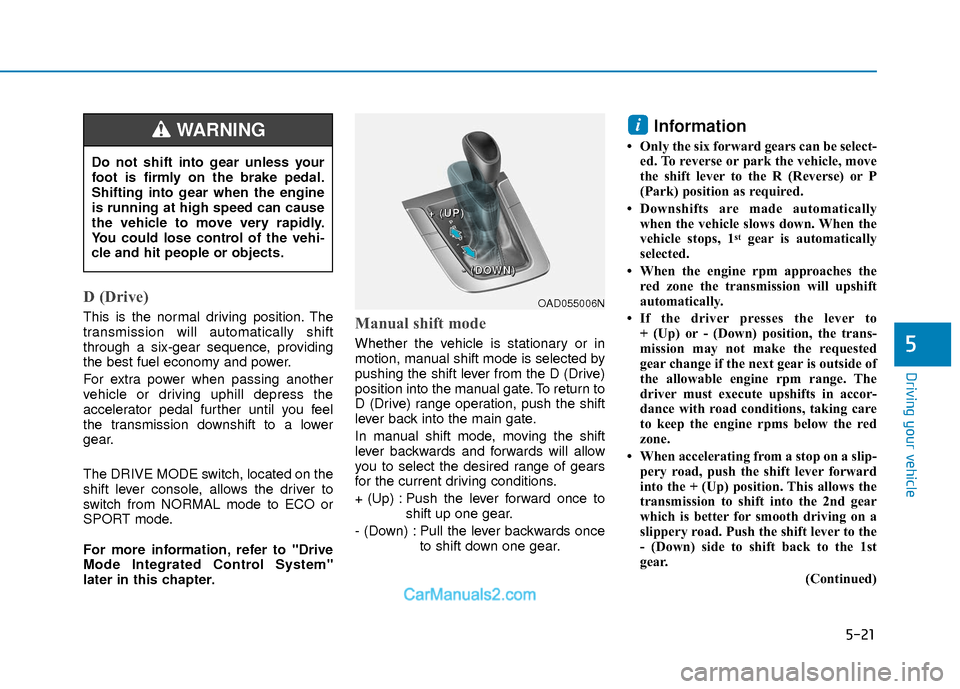
later in this chapter.Manual shift mode
Whether the vehicle is stationary or in
motion, manual shift mode is selected by
pushing the shift lever from the D (Drive)
position into the manual gate. To return to
D (Drive) range operation, push the shift
lever back into the main gate.
In manual shift mode, moving the shift
lever backwards and forwards will allow
you to select the desired range of gears
for the current driving conditions.
+ (Up) : Push the lever forward once toshift up one gear.
- (Down) : Pull the lever backwards once to shift down one gear.
Information
• Only the six forward gears can be select-ed. To reverse or park the vehicle, move
the shift lever to the R (Reverse) or P
(Park) position as required.
• Downshifts are made automatically when the vehicle slows down. When the
vehicle stops, 1
stgear is automatically
selected.
• When the engine rpm approaches the red zone the transmission will upshift
automatically.
• If the driver presses the lever to + (Up) or - (Down) position, the trans-
mission may not make the requested
gear change if the next gear is outside of
the allowable engine rpm range. The
driver must execute upshifts in accor-
dance with road conditions, taking care
to keep the engine rpms below the red
zone.
• When accelerating from a stop on a slip- pery road, push the shift lever forward
into the + (Up) position. This allows the
transmission to shift into the 2nd gear
which is better for smooth driving on a
slippery road. Push the shift lever to the
- (Down) side to shift back to the 1st
gear.
(Continued)
i
Do not shift into gear unless your
foot is firmly on the brake pedal.
Shifting into gear when the engine
is running at high speed can cause
the vehicle to move very rapidly.
You could lose control of the vehi-
cle and hit people or objects.
WARNING
OAD055006N
+
+
+
+
(
(
(
(
U
U
U
U
P
P
P
P
)
)
)
)
-
-
-
-
(
(
(
(
D
D
D
D
O
O
O
O
W
W
W
W
N
N
N
N
)
)
)
)
Page 305 of 526
5-22
Driving your vehicle
(Continued)
• When driving in Manual Shift Mode,slow down before shifting to a lower
gear. Otherwise, the lower gear may not
be engaged if the engine rpms are out-
side of the allowable range.
Shift-lock system
For your safety, the automatic transmis-
sion has a shift-lock system which pre-
vents shifting the transmission from P
(Park) into R (Reverse) unless the brake
pedal is depressed.
To shift the transmission from P (Park)
into R (Reverse):
1. Depress and hold the brake pedal.
2. Start the engine or place the ignition switch in the ON position.
3. Move the shift lever.
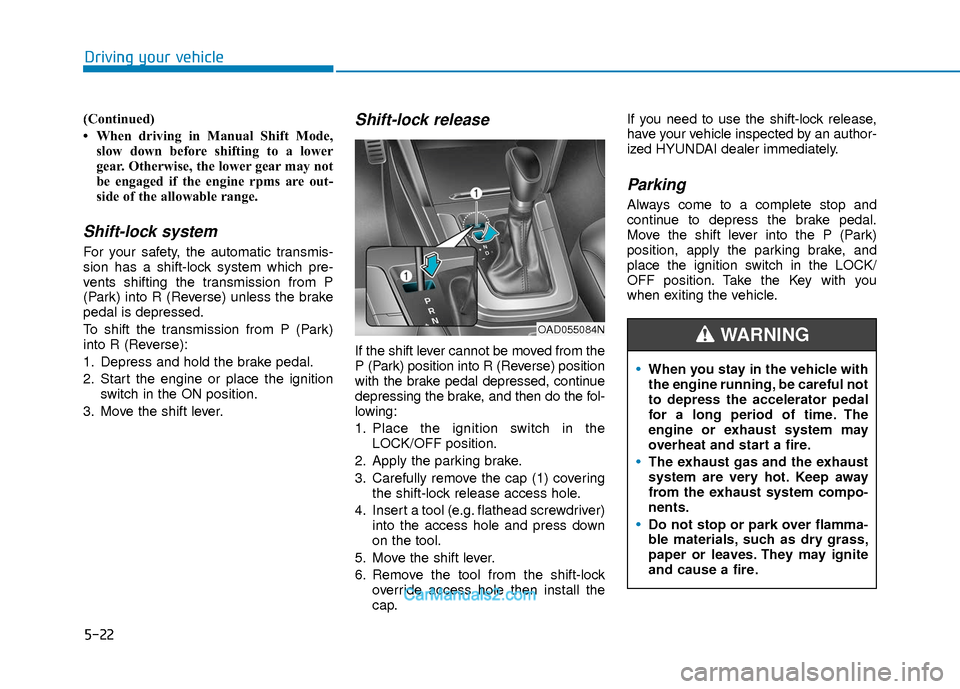
Shift-lock release
If the shift lever cannot be moved from the
P (Park) position into R (Reverse) position
with the brake pedal depressed, continue
depressing the brake, and then do the fol-
lowing:
1. Place the ignition switch in the LOCK/OFF position.
2. Apply the parking brake.
3. Carefully remove the cap (1) covering the shift-lock release access hole.
4. Insert a tool (e.g. flathead screwdriver) into the access hole and press down
on the tool.
5. Move the shift lever.
6. Remove the tool from the shift-lock override access hole then install the
cap. If you need to use the shift-lock release,
have your vehicle inspected by an author-
ized HYUNDAI dealer immediately.
Parking
Always come to a complete stop and
continue to depress the brake pedal.
Move the shift lever into the P (Park)
position, apply the parking brake, and
place the ignition switch in the LOCK/
OFF position. Take the Key with you
when exiting the vehicle.
When you stay in the vehicle with
the engine running, be careful not
to depress the accelerator pedal
for a long period of time. The
engine or exhaust system may
overheat and start a fire.
The exhaust gas and the exhaust
system are very hot. Keep away
from the exhaust system compo-
nents.
Do not stop or park over flamma-
ble materials, such as dry grass,
paper or leaves. They may ignite
and cause a fire.
WARNING OAD055084N
Page 308 of 526
5-25
Driving your vehicle
5
The dry-type clutch transfers torquemore directly and provides a direct-
drive feeling which may feel different
from a conventional automatic trans-
mission. This may be more noticeable
when launching the vehicle from a stop
or when traveling at low, stop-and-go
vehicle speeds.
When rapidly accelerating from a lower vehicle speed, the engine rpm may
increase dramatically as a result of
clutch slip as the dual clutch transmis-
sion selects the correct gear. This is a
normal condition.
When accelerating from a stop on an incline, press the accelerator smoothly
and gradually to avoid any shudder
feeling or jerkiness.
When traveling at a lower vehicle speed, if you release the accelerator
pedal quickly, you may feel engine
braking before the transmission
changes gears. This engine braking
feeling is similar to operating a manual
transmission at low speed.
When driving downhill, you may wish to move the gear shift lever to Manual
Shift mode and downshift to a lower
gear in order to control your speed
without using the brake pedal exces-
sively. When you turn the engine on and off,
you may hear clicking sounds as the
system goes through a self-test. This is
a normal sound for the dual clutch
transmission.
During the first 1000 miles, you may feel that the vehicle may not be smooth
when accelerating at low speed.
During this break-in period, the shift
quality and performance of your new
vehicle is continuously optimized. Always come to a complete stop
before shifting into D (Drive) or R
(Reverse).
Do not put the shift lever in N (Neutral) while driving.
NOTICE
To reduce the risk of serious injury
or death:
ALWAYS check the surrounding
areas near your vehicle for peo-
ple, especially children, before
shifting a vehicle into D (Drive) or
R (Reverse).
Before leaving the driver's seat,
always make sure the shift lever
is in the P (Park) position, then
set the parking brake, and place
the ignition switch in the
LOCK/OFF position. Unexpected
and sudden vehicle movement
can occur if these precautions
are not followed.
(Continued)
WARNING
(Continued)
Do not use aggressive engine
braking (shifting from a higher
gear to a lower gear) on slippery
roads. This could cause the tires
to slip and may result in an acci-
dent.
Due to transmission failure, you
may not continue to drive and the
position indicator (D, R) on the
cluster will blink. Contact an
authorized hyundai dealer and have
the system checked.
WARNING