drive mode Hyundai Elantra 2018 Owner's Guide
[x] Cancel search | Manufacturer: HYUNDAI, Model Year: 2018, Model line: Elantra, Model: Hyundai Elantra 2018Pages: 526, PDF Size: 17.2 MB
Page 312 of 526
5-29
Driving your vehicle
5
D (Drive)
This is the normal driving position. The
transmission will automatically shift
through a seven-gear sequence, provid-
ing the best fuel economy and power.
For extra power when passing another
vehicle or driving uphill depress the
accelerator pedal further until you feel
the transmission downshift to a lower
gear.
The DRIVE MODE switch, located on the
shift lever console, allows the driver to
switch from NORMAL mode to SPORT
mode.
For more information, refer to "Drive
Mode Integrated Control System"
later in this chapter.Manual shift mode
Whether the vehicle is stationary or in
motion, manual shift mode is selected by
pushing the shift lever from the D (Drive)
position into the manual gate. To return to
D (Drive) range operation, push the shift
lever back into the main gate.
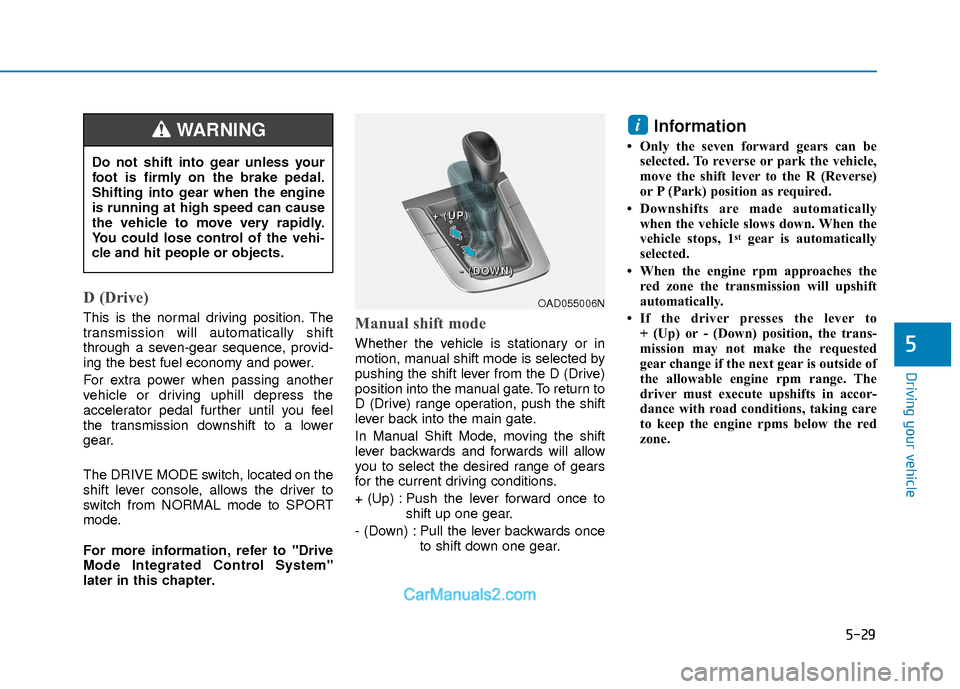
In Manual Shift Mode, moving the shift
lever backwards and forwards will allow
you to select the desired range of gears
for the current driving conditions.
+ (Up) : Push the lever forward once toshift up one gear.
- (Down) : Pull the lever backwards once to shift down one gear.
Information
• Only the seven forward gears can beselected. To reverse or park the vehicle,
move the shift lever to the R (Reverse)
or P (Park) position as required.
• Downshifts are made automatically when the vehicle slows down. When the
vehicle stops, 1
stgear is automatically
selected.
• When the engine rpm approaches the red zone the transmission will upshift
automatically.
• If the driver presses the lever to + (Up) or - (Down) position, the trans-
mission may not make the requested
gear change if the next gear is outside of
the allowable engine rpm range. The
driver must execute upshifts in accor-
dance with road conditions, taking care
to keep the engine rpms below the red
zone.
i
Do not shift into gear unless your
foot is firmly on the brake pedal.
Shifting into gear when the engine
is running at high speed can cause
the vehicle to move very rapidly.
You could lose control of the vehi-
cle and hit people or objects.
WARNING
OAD055006N
+
+
+
+
(
(
(
(
U
U
U
U
P
P
P
P
)
)
)
)
-
-
-
-
(
(
(
(
D
D
D
D
O
O
O
O
W
W
W
W
N
N
N
N
)
)
)
)
Page 313 of 526
5-30
Driving your vehicle
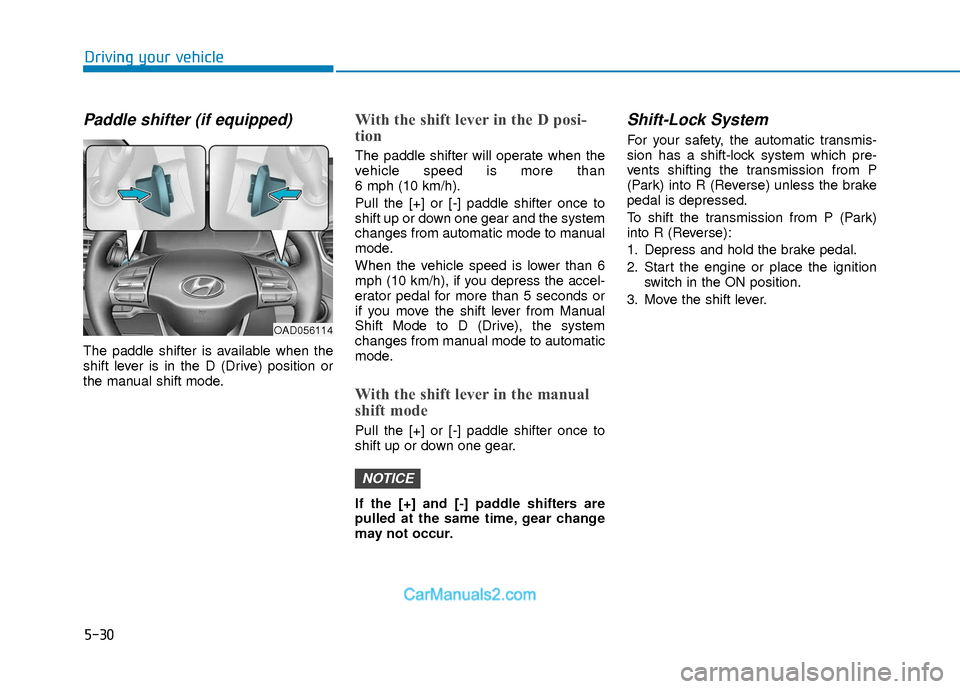
Paddle shifter (if equipped)
The paddle shifter is available when the
shift lever is in the D (Drive) position or
the manual shift mode.
With the shift lever in the D posi-
tion
The paddle shifter will operate when the
vehicle speed is more than
6 mph (10 km/h).
Pull the [+] or [-] paddle shifter once to
shift up or down one gear and the system
changes from automatic mode to manual
mode.
When the vehicle speed is lower than 6
mph (10 km/h), if you depress the accel-
erator pedal for more than 5 seconds or
if you move the shift lever from Manual
Shift Mode to D (Drive), the system
changes from manual mode to automatic
mode.
With the shift lever in the manual
shift mode
Pull the [+] or [-] paddle shifter once to
shift up or down one gear.
If the [+] and [-] paddle shifters are
pulled at the same time, gear change
may not occur.
Shift-Lock System
For your safety, the automatic transmis-
sion has a shift-lock system which pre-
vents shifting the transmission from P
(Park) into R (Reverse) unless the brake
pedal is depressed.
To shift the transmission from P (Park)
into R (Reverse):
1. Depress and hold the brake pedal.
2. Start the engine or place the ignitionswitch in the ON position.
3. Move the shift lever.
NOTICE
OAD056114
Page 315 of 526
5-32
Driving your vehicle
Good Driving Practices
Never move the shift lever from P(Park) or N (Neutral) to any other posi-
tion with the accelerator pedal
depressed.
Never move the shift lever into P (Park) when the vehicle is in motion.
Be sure the vehicle is completely
stopped before you attempt to shift into
R (Reverse) or D (Drive).
Do not move the shift lever to N (Neutral) when driving. Doing so may
result in an accident because of a loss
of engine braking and the transmission
could be damaged.
Do not drive with your foot resting on the brake pedal. Even light, but consis-
tent pedal pressure can result in the
brakes overheating, brake wear and
possibly even brake failure.
Depressing both accelerator and brake pedals at the same time can trigger
logic for engine power reduction to
assure vehicle deceleration. Vehicle
acceleration will resume after the
brake pedal is released.
When driving in Manual Shift Mode, slow down before shifting to a lower
gear. Otherwise, the lower gear may
not be engaged if the engine rpms are
outside of the allowable range. Always apply the parking brake when
leaving the vehicle. Do not depend on
placing the transmission in P (Park) to
keep the vehicle from moving.
Exercise extreme caution when driving on a slippery surface. Be especially
careful when braking, accelerating or
shifting gears. On a slippery surface,
an abrupt change in vehicle speed can
cause the drive wheels to lose traction
and may cause loss of vehicle control
resulting in an accident.
Optimum vehicle performance and economy is obtained by smoothly
depressing and releasing the accelera-
tor. (Continued)The risk of rollover is greatly
increased if you lose control of
your vehicle at highway speeds.
Loss of control often occurs if
two or more wheels drop off the
roadway and the driver over
steers to reenter the roadway.
In the event your vehicle leaves
the roadway, do not steer sharply.
Instead, slow down before pulling
back into the travel lanes.
HYUNDAI recommends you fol-
low all posted speed limits.
To reduce the risk of SERIOUS
INJURY or DEATH:
ALWAYS wear your seatbelt. In a
collision, an unbelted occupant is
significantly more likely to be
seriously injured or killed than a
properly belted occupant.
Avoid high speeds when corner-
ing or turning.
Do not make quick steering
wheel movements, such as sharp
lane changes or fast, sharp turns.
(Continued)
WARNING
Page 316 of 526
5-33
Driving your vehicle
5
Power Brakes
Your vehicle has power-assisted brakes
that adjust automatically through normal
usage.
If the engine is not running or is turned
off while driving, the power assist for the
brakes will not work. You can still stop
your vehicle by applying greater force to
the brake pedal than typical. The stop-
ping distance, however, will be longer
than with power brakes.
When the engine is not running, the
reserve brake power is partially depleted
each time the brake pedal is applied. Do
not pump the brake pedal when the
power assist has been interrupted.
Pump the brake pedal only when neces-
sary to maintain steering control on slip-
pery surfaces.
B BR
RA
A K
KI
IN
N G
G
S
S Y
Y S
ST
T E
EM
M
Take the following precautions:
Do not drive with your foot rest-
ing on the brake pedal. This will
create abnormal high brake tem-
peratures, excessive brake lining
and pad wear, and increased
stopping distances.
When descending down a long or
steep hill, move the gear shift
lever to Manual Shift Mode and
manually downshift to a lower
gear in order to control your
speed without using the brake
pedal excessively. Applying the
brakes continuously will cause
the brakes to overheat and could
result in a temporary loss of brak-
ing performance.
(Continued)
(Continued)
Wet brakes may impair the vehi-
cle's ability to safely slow down;
the vehicle may also pull to one
side when the brakes are applied.
Applying the brakes lightly will
indicate whether they have been
affected in this way. Always test
your brakes in this fashion after
driving through deep water. To
dry the brakes, lightly tap the
brake pedal to heat up the brakes
while maintaining a safe forward
speed until brake performance
returns to normal. Avoid driving
at high speeds until the brakes
function correctly.WARNING
Page 320 of 526
5-37
Driving your vehicle
5
Using ABS
To obtain the maximum benefit from your
ABS in an emergency situation, do not
attempt to modulate your brake pressure
and do not try to pump your brakes.
Depress your brake pedal as hard as
possible.
When you apply your brakes under con-
ditions which may lock the wheels, you
may hear sounds from the brakes, or feel
a corresponding sensation in the brake
pedal. This is normal and it means your
ABS is active.
ABS does not reduce the time or dis-
tance it takes to stop the vehicle.
Always maintain a safe distance from the
vehicle in front of you.
ABS will not prevent a skid that results
from sudden changes in direction, such
as trying to take a corner too fast or mak-
ing a sudden lane change. Always drive
at a safe speed for the road and weather
conditions.
ABS cannot prevent a loss of stability.
Always steer moderately when braking
hard. Severe or sharp steering wheel
movement can still cause your vehicle to
veer into oncoming traffic or off the road.On loose or uneven road surfaces, oper-
ation of the anti-lock brake system may
result in a longer stopping distance than
for vehicles equipped with a conventional
brake system.
The ABS warning light ( ) will stay on
for several seconds after the ignition
switch is in the ON position. During that
time, the ABS will go through self-diag-
nosis and the light will go off if everything
is normal. If the light stays on, you may
have a problem with your ABS. Contact
an authorized HYUNDAI dealer as soon
as possible
Information
When you jump start your vehicle because
of a drained battery, the ABS warning
light ( ) may turn on at the same time.
This happens because of the low battery
voltage. It does not mean your ABS is mal-
functioning. Have the battery recharged
before driving the vehicle.
i
If the ABS warning light ( ) is on
and stays on, you may have a prob-
lem with the ABS. Your power
brakes will work normally. To
reduce the risk of serious injury or
death, contact your HYUNDAI deal-
er as soon as possible.
WARNING
When you drive on a road having
poor traction, such as an icy road,
and apply your brakes continuous-
ly, the ABS will be active continu-
ously and the ABS warning light
( ) may illuminate. Pull your car
over to a safe place and turn the
engine off.
Restart the engine. If the ABS warn-
ing light is off, then your ABS sys-
tem is normal.
Otherwise, you may have a problem
with your ABS system.
Contact an
authorized HYUNDAI dealer as soon
as possible.
CAUTION
Page 323 of 526
5-40
Driving your vehicle
Driving with wheels and tires with dif-
ferent sizes may cause the ESC sys-
tem to malfunction. Before replacing
tires, make sure all four tires and
wheels are the same size. Never drive
the vehicle with different sized wheels
and tires installed.
ESC OFF usage
When Driving
The ESC OFF mode should only be used
briefly to help free the vehicle if stuck in
snow or mud by temporarily stopping
operation of the ESC to maintain wheel
torque.
To turn ESC off while driving, press the
ESC OFF button while driving on a flat
road surface. To prevent damage to the transmis-
sion:
Do not allow wheel(s) of one axle to
spin excessively while the ESC,
ABS, and parking brake warning
lights are displayed. The repairs
would not be covered by the vehicle
warranty. Reduce engine power and
do not spin the wheel(s) excessive-
ly while these lights are displayed.
When operating the vehicle on a dynamometer, make sure the ESC is
turned off (ESC OFF light illuminat-
ed).
Information
Turning the ESC off does not affect ABS
or standard brake system operation.
i
NOTICE
NOTICE
When the ESC is blinking, this indi-
cates the ESC is active:
Drive slowly and NEVER attempt to
accelerate. NEVER turn the ESC off
while the ESC indicator light is
blinking or you may lose control of
the vehicle resulting in an accident.
WARNING
Page 326 of 526
5-43
Driving your vehicle
5
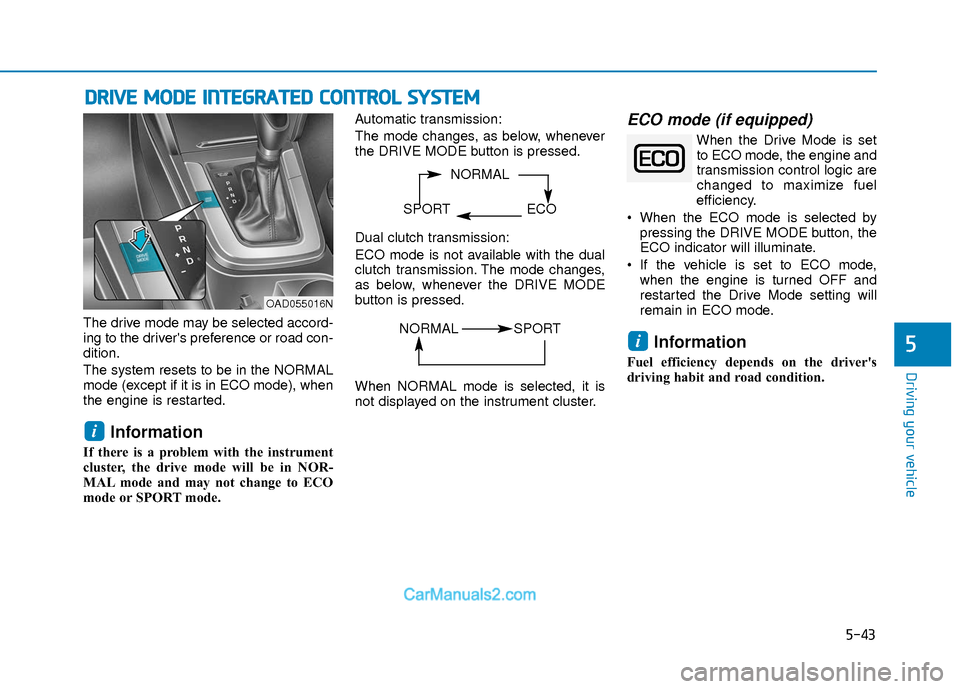
The drive mode may be selected accord-
ing to the driver's preference or road con-
dition.
The system resets to be in the NORMAL
mode (except if it is in ECO mode), when
the engine is restarted.
Information
If there is a problem with the instrument
cluster, the drive mode will be in NOR-
MAL mode and may not change to ECO
mode or SPORT mode. Automatic transmission:
The mode changes, as below, whenever
the DRIVE MODE button is pressed.
Dual clutch transmission:
ECO mode is not available with the dual
clutch transmission. The mode changes,
as below, whenever the DRIVE MODE
button is pressed.
When NORMAL mode is selected, it is
not displayed on the instrument cluster.
ECO mode (if equipped)
When the Drive Mode is set
to ECO mode, the engine and
transmission control logic are
changed to maximize fuel
efficiency.
When the ECO mode is selected by pressing the DRIVE MODE button, the
ECO indicator will illuminate.
If the vehicle is set to ECO mode, when the engine is turned OFF and
restarted the Drive Mode setting will
remain in ECO mode.
Information
Fuel efficiency depends on the driver's
driving habit and road condition.
i
i
D DR
RI
IV
V E
E
M
M O
OD
DE
E
I
IN
N T
TE
EG
G R
RA
A T
TE
ED
D
C
C O
O N
NT
TR
R O
O L
L
S
S Y
Y S
ST
T E
EM
M
NORMAL
SPORT ECO
OAD055016N
NORMAL SPORT
Page 327 of 526
5-44
Driving your vehicle
When the ECO mode is activated:
The acceleration response may beslightly reduced if the accelerator
pedal is depressed moderately.
The air conditioner performance may be limited.
The shift pattern of the automatic transmission/dual clutch transmission
may change.
The engine speed may be lower than when driving in NORMAL mode.
The above situations are normal condi-
tions when the ECO mode is activated to
improve fuel efficiency. Limitation of the ECO mode opera-
tion:
Even though ECO mode is selected and
there is no change in the ECO indicator :
When the coolant temperature is low,
ECO mode will be limited until engine
temperature is at normal operating
temperature.
When driving up a hill, ECO mode will be limited to provide better power
when driving uphill.
When driving the vehicle with the auto- matic transmission/ dual clutch trans-
mission gear shift lever in manual shift
mode, ECO mode will be limited
according to the shift position.SPORT mode
SPORT mode manages the
driving dynamics by automat-
ically adjusting the steering
effort, and the engine and
transmission control logic for enhanced
driver performance.
When SPORT mode is selected by pressing the DRIVE MODE button, the
SPORT indicator will illuminate.
Whenever the engine is restarted, the Drive Mode will revert back to NOR-
MAL mode. If SPORT mode is desired,
re-select SPORT mode from the
DRIVE MODE button.
When SPORT mode is activated: - The engine rpm will tend to remainraised over a certain length of time
even after releasing the accelerator
- Upshifts are delayed when accelerat- ing
Information
In SPORT mode, the fuel efficiency may
decrease.
i
Page 351 of 526
5-68
Driving your vehicle
Lane Departure Warning System(LDWS)
LDWS alerts the driver with a visual
warning and a warning alarm when the
system detects the vehicle departing the
lane. The steering wheel will not be con-
trolled.
Standard LKA
The Standard LKA mode guides the driv-
er to keep the vehicle within the lanes. It
rarely controls the steering wheel, when
the vehicle drives well inside the lanes.
However, it starts to control the steering
wheel, when the vehicle is about to devi-
ate out of the lanes.
Active LKA
The Active LKA mode provides more fre-
quent steering wheel control in compari-
son with the Standard LKA mode. The
driver may not feel the onset of the steer-
ing wheel control, because the Active
LKA may be constantly controlling the
steering with lighter corrections.
Information
This device complies with Part 15 of the
FCC rules.
Operation is subject to the following two
conditions:
1. This device may not cause harmful
interference, and
2. This device must accept any interfer- ence received, including interference
that may cause undesired operation.
i
OTLE055031/OTLE055032/OTLE055033
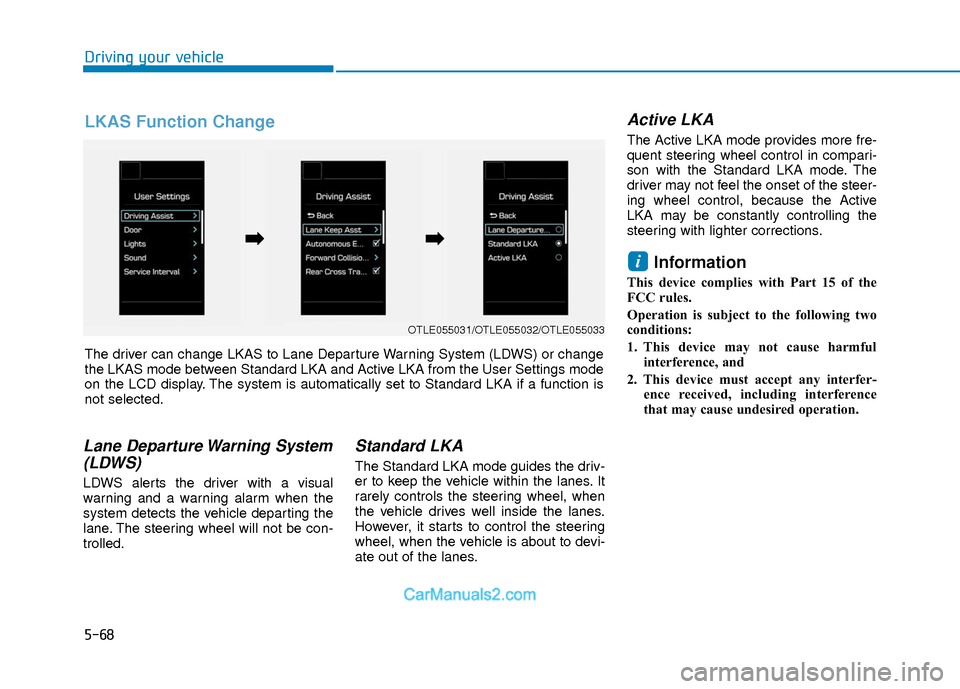
The driver can change LKAS to Lane Departure Warning System (LDWS) or change
the LKAS mode between Standard LKA and Active LKA from the User Settings mode
on the LCD display. The system is automatically set to Standard LKA if a function is
not selected.
➡ ➡ ➡
➡
LKAS Function Change
Page 358 of 526
5-75
Driving your vehicle
5
To Convert to Cruise Control
Mode
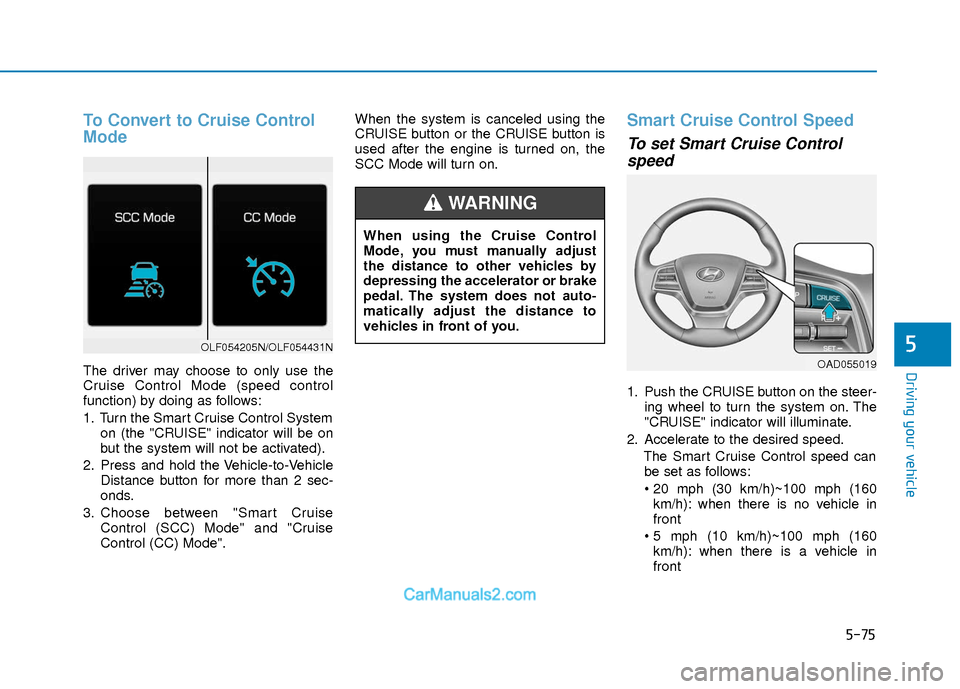
The driver may choose to only use the
Cruise Control Mode (speed control
function) by doing as follows:
1. Turn the Smart Cruise Control Systemon (the "CRUISE" indicator will be on
but the system will not be activated).
2. Press and hold the Vehicle-to-Vehicle Distance button for more than 2 sec-
onds.
3. Choose between "Smart Cruise Control (SCC) Mode" and "Cruise
Control (CC) Mode". When the system is canceled using the
CRUISE button or the CRUISE button is
used after the engine is turned on, the
SCC Mode will turn on.
Smart Cruise Control Speed
To set Smart Cruise Control
speed
1. Push the CRUISE button on the steer-
ing wheel to turn the system on. The
"CRUISE" indicator will illuminate.
2. Accelerate to the desired speed. The Smart Cruise Control speed canbe set as follows:
km/h): when there is no vehicle in
front
km/h): when there is a vehicle in
front
OLF054205N/OLF054431N
When using the Cruise Control
Mode, you must manually adjust
the distance to other vehicles by
depressing the accelerator or brake
pedal. The system does not auto-
matically adjust the distance to
vehicles in front of you.
WARNING
OAD055019