speed on Hyundai Elantra 2018 Owner's Guide
[x] Cancel search | Manufacturer: HYUNDAI, Model Year: 2018, Model line: Elantra, Model: Hyundai Elantra 2018Pages: 526, PDF Size: 17.2 MB
Page 167 of 526
3-90
Convenient features of your vehicle
Conventional Cluster
The trip computer is a microcomputer-
controlled driver information system that
displays information related to driving.
Information
Some driving information stored in the
trip computer (for example Average
Vehicle Speed) resets if the battery is dis-
connected.
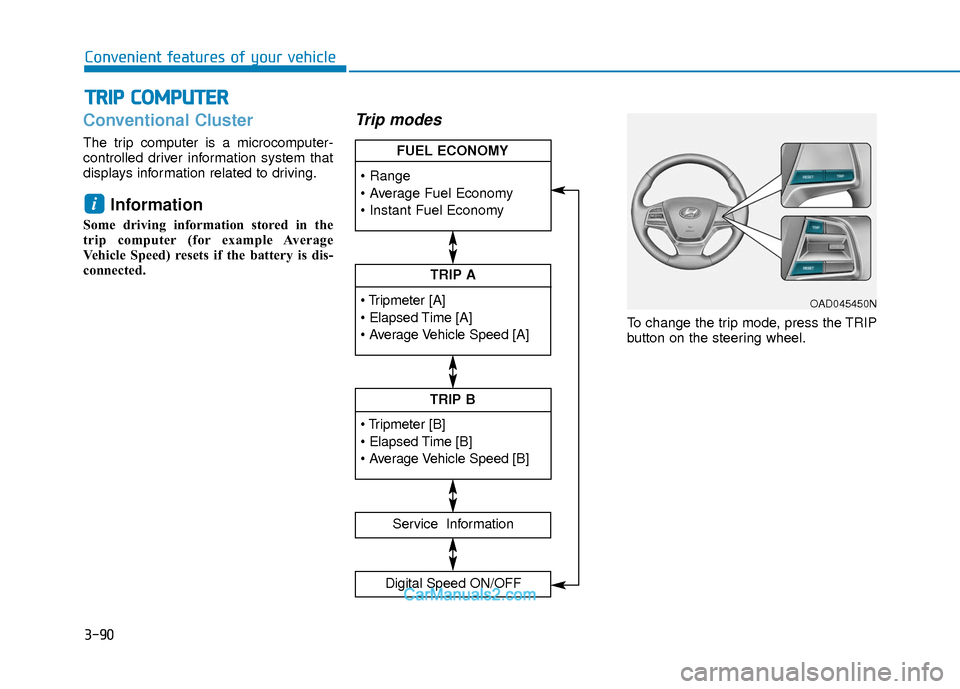
Trip modes
To change the trip mode, press the TRIP
button on the steering wheel.
i
T TR
R I
IP
P
C
C O
O M
M P
PU
U T
TE
ER
R
TRIP A
Service Information
Digital Speed ON/OFF
TRIP B
FUEL ECONOMY
OAD045450N
Page 168 of 526
3-91
Convenient features of your vehicle
3
Range
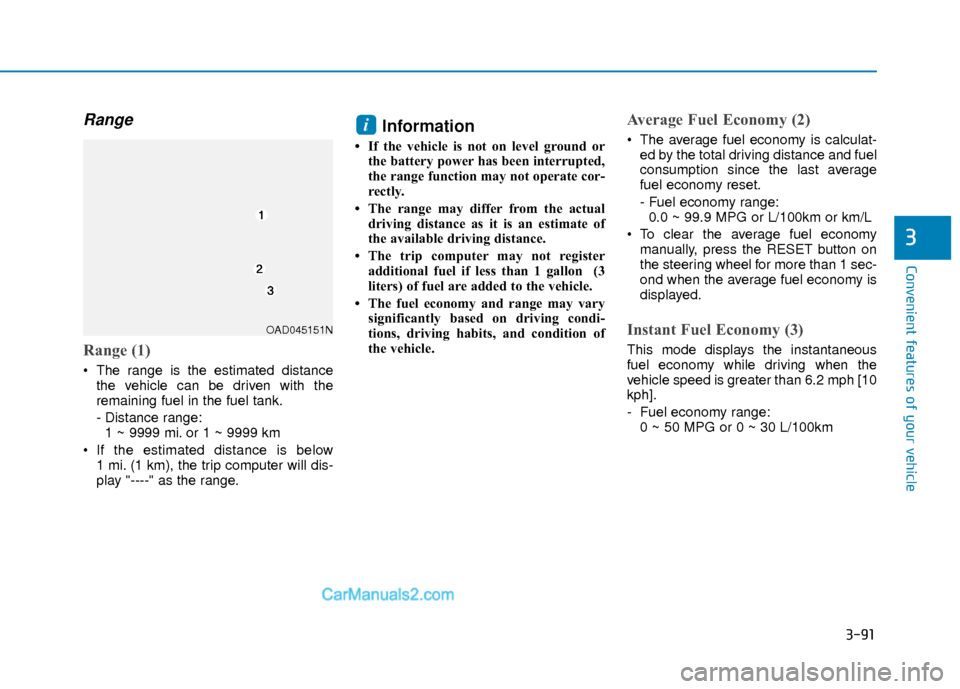
Range (1)
The range is the estimated distancethe vehicle can be driven with the
remaining fuel in the fuel tank.
- Distance range:1 ~ 9999 mi. or 1 ~ 9999 km
If the estimated distance is below 1 mi. (1 km), the trip computer will dis-
play "----" as the range.
Information
• If the vehicle is not on level ground orthe battery power has been interrupted,
the range function may not operate cor-
rectly.
• The range may differ from the actual driving distance as it is an estimate of
the available driving distance.
• The trip computer may not register additional fuel if less than 1 gallon (3
liters) of fuel are added to the vehicle.
• The fuel economy and range may vary significantly based on driving condi-
tions, driving habits, and condition of
the vehicle.
Average Fuel Economy (2)
The average fuel economy is calculat-ed by the total driving distance and fuel
consumption since the last average
fuel economy reset.
- Fuel economy range:0.0 ~ 99.9 MPG or L/100km or km/L
To clear the average fuel economy manually, press the RESET button on
the steering wheel for more than 1 sec-
ond when the average fuel economy is
displayed.
Instant Fuel Economy (3)
This mode displays the instantaneous
fuel economy while driving when the
vehicle speed is greater than 6.2 mph [10
kph].
- Fuel economy range:0 ~ 50 MPG or 0 ~ 30 L/100km
i
OAD045151N
Page 169 of 526
3-92
Convenient features of your vehicle
Trip A/B
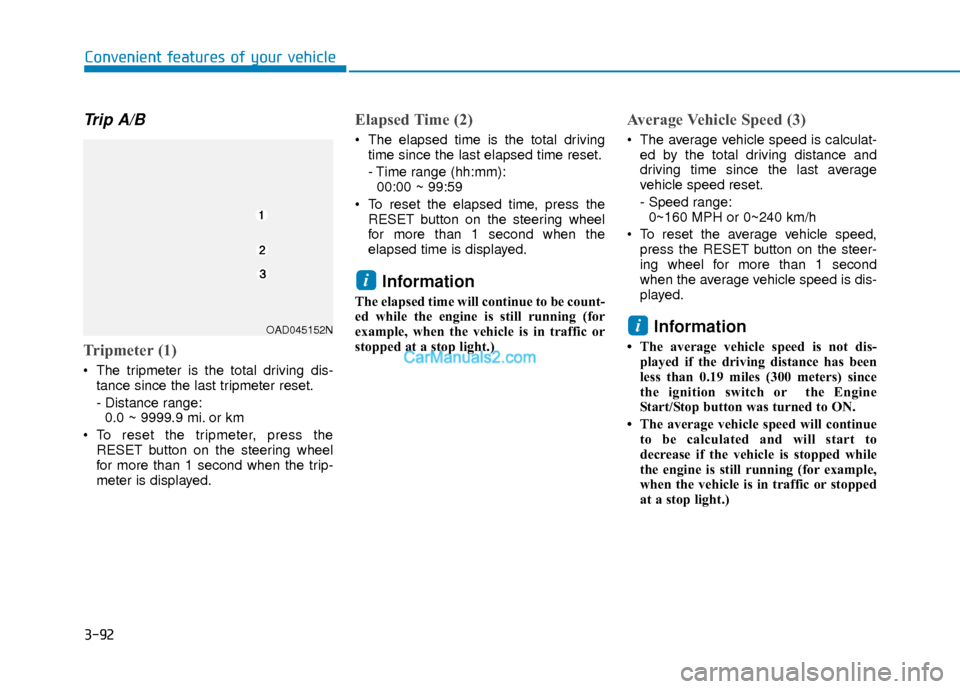
Tripmeter (1)
The tripmeter is the total driving dis-tance since the last tripmeter reset.
- Distance range:0.0 ~ 9999.9 mi. or km
To reset the tripmeter, press the RESET button on the steering wheel
for more than 1 second when the trip-
meter is displayed.
Elapsed Time (2)
The elapsed time is the total drivingtime since the last elapsed time reset.
- Time range (hh:mm):00:00 ~ 99:59
To reset the elapsed time, press the RESET button on the steering wheel
for more than 1 second when the
elapsed time is displayed.
Information
The elapsed time will continue to be count-
ed while the engine is still running (for
example, when the vehicle is in traffic or
stopped at a stop light.)
Average Vehicle Speed (3)
The average vehicle speed is calculat-ed by the total driving distance and
driving time since the last average
vehicle speed reset.
- Speed range:0~160 MPH or 0~240 km/h
To reset the average vehicle speed, press the RESET button on the steer-
ing wheel for more than 1 second
when the average vehicle speed is dis-
played.
Information
• The average vehicle speed is not dis-played if the driving distance has been
less than 0.19 miles (300 meters) since
the ignition switch or the Engine
Start/Stop button was turned to ON.
• The average vehicle speed will continue to be calculated and will start to
decrease if the vehicle is stopped while
the engine is still running (for example,
when the vehicle is in traffic or stopped
at a stop light.)
i
i
OAD045152N
Page 170 of 526
3-93
Convenient features of your vehicle
3
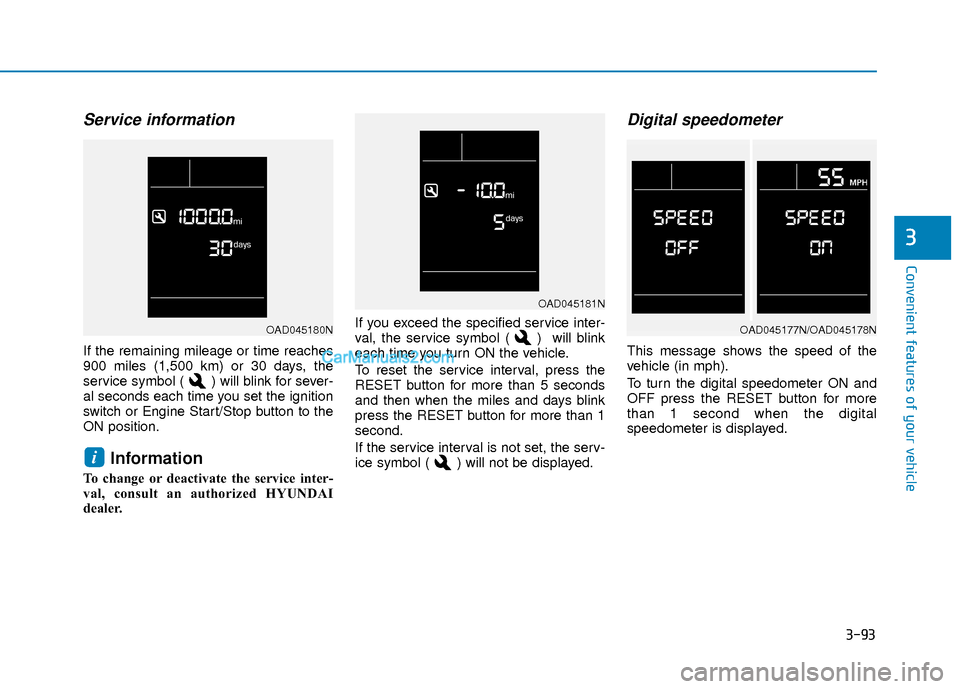
Service information
If the remaining mileage or time reaches
900 miles (1,500 km) or 30 days, the
service symbol ( ) will blink for sever-
al seconds each time you set the ignition
switch or Engine Start/Stop button to the
ON position.
Information
To change or deactivate the service inter-
val, consult an authorized HYUNDAI
dealer.If you exceed the specified service inter-
val, the service symbol ( ) will blink
each time you turn ON the vehicle.
To reset the service interval, press the
RESET button for more than 5 seconds
and then when the miles and days blink
press the RESET button for more than 1
second.
If the service interval is not set, the serv-
ice symbol ( ) will not be displayed.
Digital speedometer
This message shows the speed of the
vehicle (in mph).
To turn the digital speedometer ON and
OFF press the RESET button for more
than 1 second when the digital
speedometer is displayed.
i
OAD045181N
OAD045177N/OAD045178NOAD045180N
Page 171 of 526
3-94
Convenient features of your vehicle
Supervision Cluster
The trip computer is a microcomputer-
controlled driver information system that
displays information related to driving.
Information
Some driving information stored in the
trip computer (for example Average
Vehicle Speed) resets if the battery is dis-
connected.
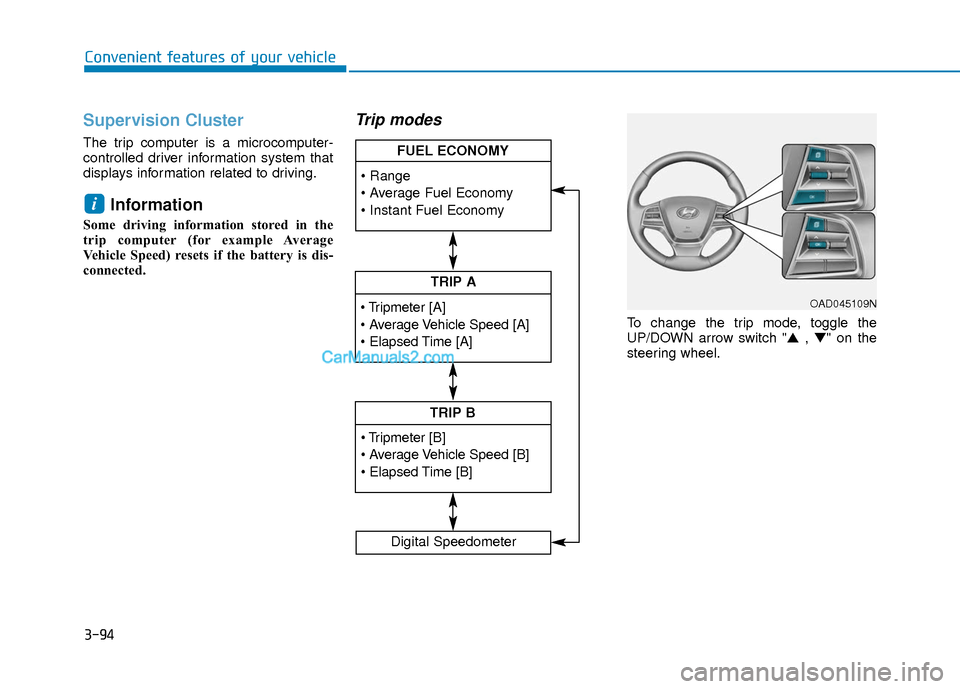
Trip modes
To change the trip mode, toggle the
UP/DOWN arrow switch "▲ , ▼" on the
steering wheel.
i
TRIP A
TRIP B
FUEL ECONOMY
Digital Speedometer
OAD045109N
Page 172 of 526
3-95
Convenient features of your vehicle
3
Range
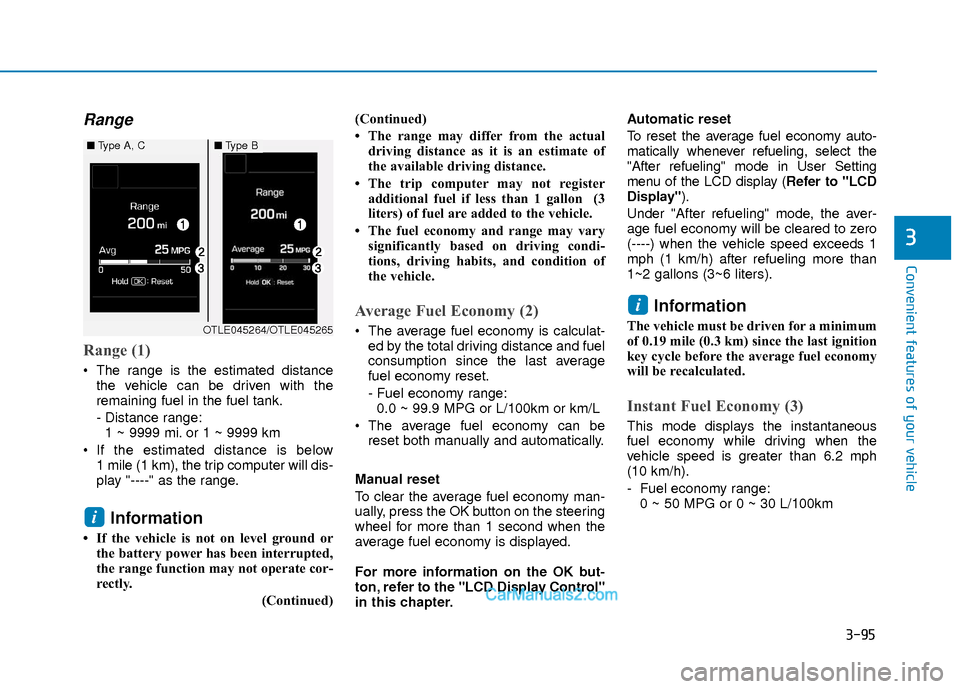
Range (1)
The range is the estimated distancethe vehicle can be driven with the
remaining fuel in the fuel tank.
- Distance range:1 ~ 9999 mi. or 1 ~ 9999 km
If the estimated distance is below 1 mile (1 km), the trip computer will dis-
play "----" as the range.
Information
• If the vehicle is not on level ground orthe battery power has been interrupted,
the range function may not operate cor-
rectly.
(Continued)(Continued)
• The range may differ from the actual
driving distance as it is an estimate of
the available driving distance.
• The trip computer may not register additional fuel if less than 1 gallon (3
liters) of fuel are added to the vehicle.
• The fuel economy and range may vary significantly based on driving condi-
tions, driving habits, and condition of
the vehicle.
Average Fuel Economy (2)
The average fuel economy is calculat-ed by the total driving distance and fuel
consumption since the last average
fuel economy reset.
- Fuel economy range:0.0 ~ 99.9 MPG or L/100km or km/L
The average fuel economy can be reset both manually and automatically.
Manual reset
To clear the average fuel economy man-
ually, press the OK button on the steering
wheel for more than 1 second when the
average fuel economy is displayed.
For more information on the OK but-
ton, refer to the "LCD Display Control"
in this chapter. Automatic reset
To reset the average fuel economy auto-
matically whenever refueling, select the
"After refueling" mode in User Setting
menu of the LCD display (
Refer to "LCD
Display").
Under "After refueling" mode, the aver-
age fuel economy will be cleared to zero
(----) when the vehicle speed exceeds 1
mph (1 km/h) after refueling more than
1~2 gallons (3~6 liters).
Information
The vehicle must be driven for a minimum
of 0.19 mile (0.3 km) since the last ignition
key cycle before the average fuel economy
will be recalculated.
Instant Fuel Economy (3)
This mode displays the instantaneous
fuel economy while driving when the
vehicle speed is greater than 6.2 mph
(10 km/h).
- Fuel economy range: 0 ~ 50 MPG or 0 ~ 30 L/100km
i
i
■ Type A, C■Type B
OTLE045264/OTLE045265
Page 173 of 526
3-96
Convenient features of your vehicle
Trip A/B
Information
If you press and hold the OK button when
viewing the tripmeter, the mileage, the
average vehicle speed, and the timer will
be reset simultaneously.
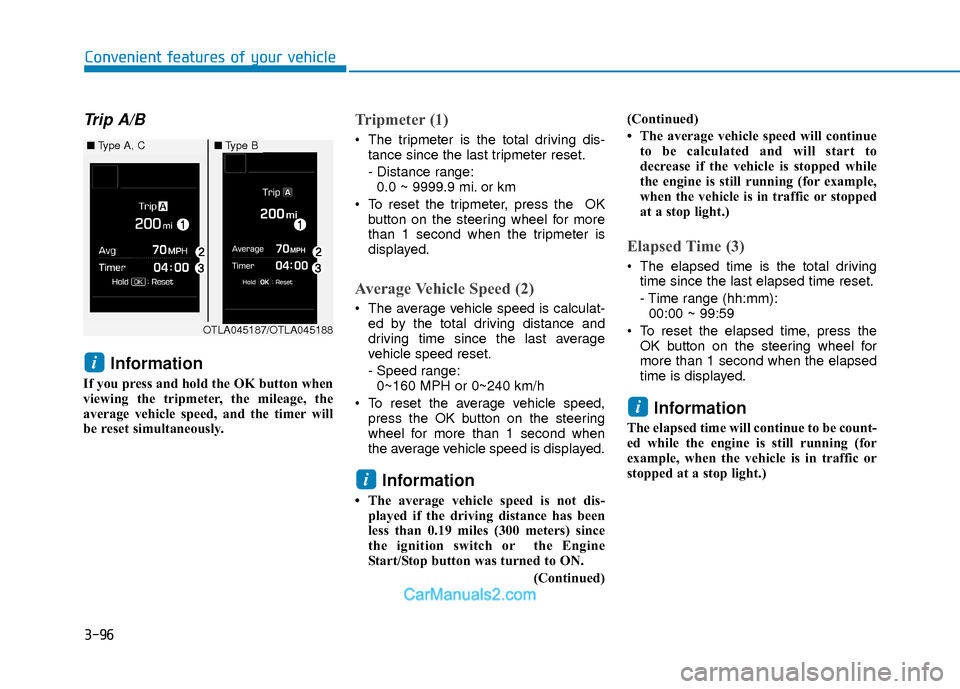
Tripmeter (1)
The tripmeter is the total driving dis-tance since the last tripmeter reset.
- Distance range:0.0 ~ 9999.9 mi. or km
To reset the tripmeter, press the OK button on the steering wheel for more
than 1 second when the tripmeter is
displayed.
Average Vehicle Speed (2)
The average vehicle speed is calculat-ed by the total driving distance and
driving time since the last average
vehicle speed reset.
- Speed range:0~160 MPH or 0~240 km/h
To reset the average vehicle speed, press the OK button on the steering
wheel for more than 1 second when
the average vehicle speed is displayed.
Information
• The average vehicle speed is not dis-played if the driving distance has been
less than 0.19 miles (300 meters) since
the ignition switch or the Engine
Start/Stop button was turned to ON.
(Continued)(Continued)
• The average vehicle speed will continue
to be calculated and will start to
decrease if the vehicle is stopped while
the engine is still running (for example,
when the vehicle is in traffic or stopped
at a stop light.)
Elapsed Time (3)
The elapsed time is the total drivingtime since the last elapsed time reset.
- Time range (hh:mm):00:00 ~ 99:59
To reset the elapsed time, press the OK button on the steering wheel for
more than 1 second when the elapsed
time is displayed.
Information
The elapsed time will continue to be count-
ed while the engine is still running (for
example, when the vehicle is in traffic or
stopped at a stop light.)
i
i
i
OTLA045187/OTLA045188
■ Type A, C■Type B
Page 174 of 526
3-97
Convenient features of your vehicle
3
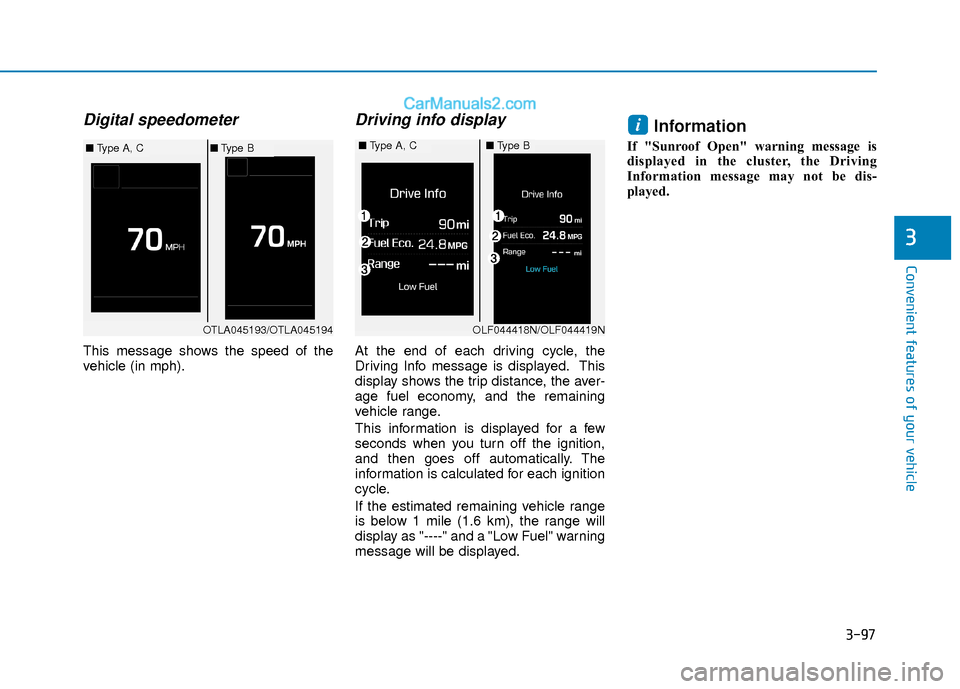
Digital speedometer
This message shows the speed of the
vehicle (in mph).
Driving info display
At the end of each driving cycle, the
Driving Info message is displayed. This
display shows the trip distance, the aver-
age fuel economy, and the remaining
vehicle range.
This information is displayed for a few
seconds when you turn off the ignition,
and then goes off automatically. The
information is calculated for each ignition
cycle.
If the estimated remaining vehicle range
is below 1 mile (1.6 km), the range will
display as "----" and a "Low Fuel" warning
message will be displayed.
Information
If "Sunroof Open" warning message is
displayed in the cluster, the Driving
Information message may not be dis-
played.
i
OTLA045193/OTLA045194
■Type A, C■Type B■Type A, C■Type B
OLF044418N/OLF044419N
Page 178 of 526
3-101
Convenient features of your vehicle
3
3. The Smart High Beam will turn onwhen vehicle speed is above
25 mph (40km/h).
Smart High Beam is operating, the
Smart High Beam will turn off and the
high beam will be on continuously. The
smart high beam ( ) indicator will
turn off.
when the Smart High Beam is oper-
ating, the Smart High Beam will turn
off.
4. If the light switch is placed to the head- lamp position, the Smart High Beam
will turn off and the low beam will be
on continuously.
The high beam switches to low beam in
the below conditions.
- When the Smart High Beam is off.
- When the light switch is not in the AUTO position.
- When the headlamp is detected from the on-coming vehicle.
- When the tail lamp is detected from the front vehicle.
- When the surrounding is bright enough high beams are not needed.
- When streetlights or other lights are detected.
- When vehicle speed is below 15 mph (24 km/h).
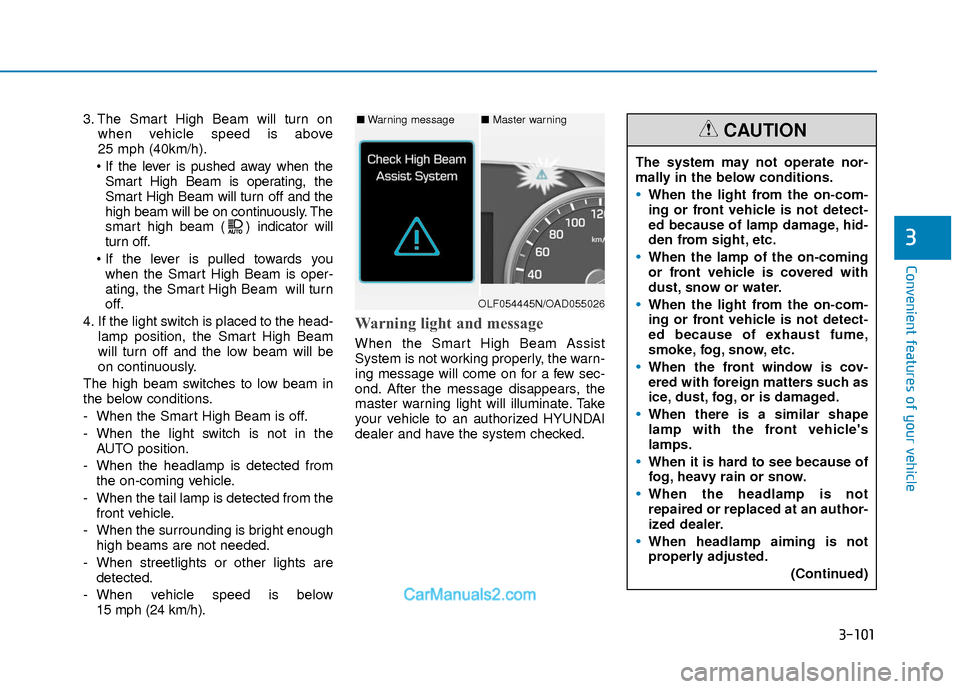
Warning light and message
When the Smart High Beam Assist
System is not working properly, the warn-
ing message will come on for a few sec-
ond. After the message disappears, the
master warning light will illuminate. Take
your vehicle to an authorized HYUNDAI
dealer and have the system checked.
The system may not operate nor-
mally in the below conditions.
When the light from the on-com-
ing or front vehicle is not detect-
ed because of lamp damage, hid-
den from sight, etc.
When the lamp of the on-coming
or front vehicle is covered with
dust, snow or water.
When the light from the on-com-
ing or front vehicle is not detect-
ed because of exhaust fume,
smoke, fog, snow, etc.
When the front window is cov-
ered with foreign matters such as
ice, dust, fog, or is damaged.
When there is a similar shape
lamp with the front vehicle's
lamps.
When it is hard to see because of
fog, heavy rain or snow.
When the headlamp is not
repaired or replaced at an author-
ized dealer.
When headlamp aiming is not
properly adjusted.
(Continued)
CAUTION■Warning message■ Master warning
OLF054445N/OAD055026
Page 181 of 526
3-104
Convenient features of your vehicle
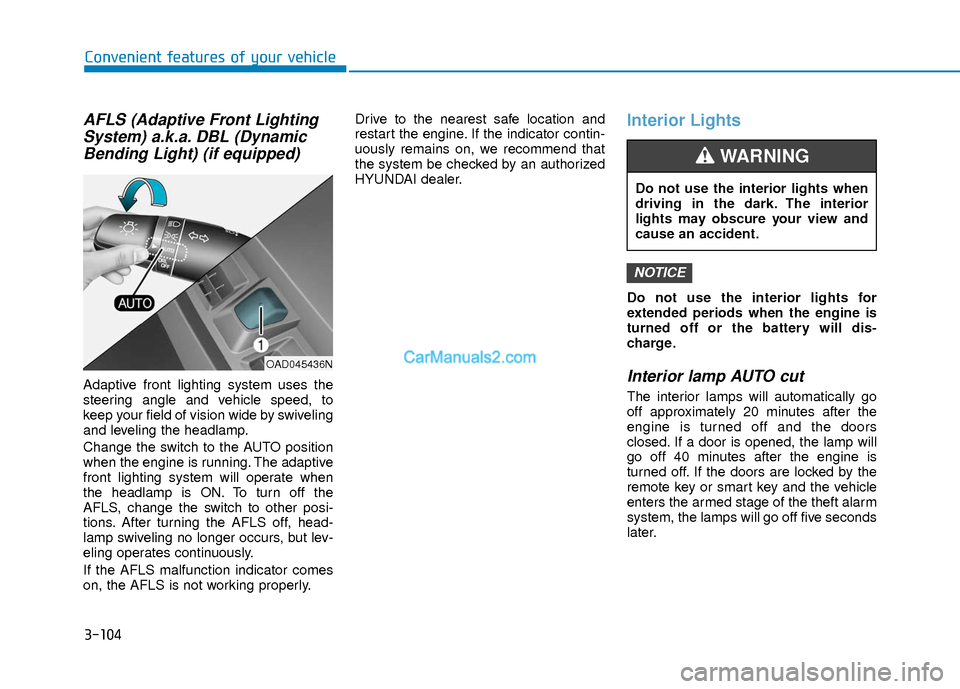
AFLS (Adaptive Front LightingSystem) a.k.a. DBL (DynamicBending Light) (if equipped)
Adaptive front lighting system uses the
steering angle and vehicle speed, to
keep your field of vision wide by swiveling
and leveling the headlamp.
Change the switch to the AUTO position
when the engine is running. The adaptive
front lighting system will operate when
the headlamp is ON. To turn off the
AFLS, change the switch to other posi-
tions. After turning the AFLS off, head-
lamp swiveling no longer occurs, but lev-
eling operates continuously.
If the AFLS malfunction indicator comes
on, the AFLS is not working properly. Drive to the nearest safe location and
restart the engine. If the indicator contin-
uously remains on, we recommend that
the system be checked by an authorized
HYUNDAI dealer.
Interior Lights
Do not use the interior lights for
extended periods when the engine is
turned off or the battery will dis-
charge.
Interior lamp AUTO cut
The interior lamps will automatically go
off approximately 20 minutes after the
engine is turned off and the doors
closed. If a door is opened, the lamp will
go off 40 minutes after the engine is
turned off. If the doors are locked by the
remote key or smart key and the vehicle
enters the armed stage of the theft alarm
system, the lamps will go off five seconds
later.
NOTICE
OAD045436N
Do not use the interior lights when
driving in the dark. The interior
lights may obscure your view and
cause an accident.
WARNING