speed on Hyundai Elantra 2018 Workshop Manual
[x] Cancel search | Manufacturer: HYUNDAI, Model Year: 2018, Model line: Elantra, Model: Hyundai Elantra 2018Pages: 526, PDF Size: 17.2 MB
Page 291 of 526
5-8
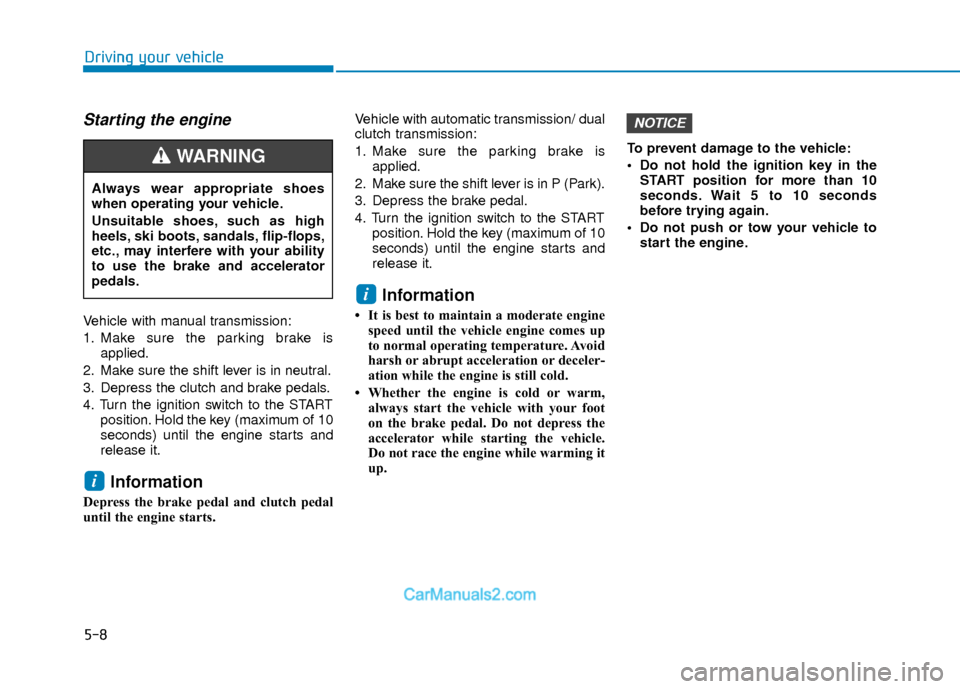
Starting the engine
Vehicle with manual transmission:
1. Make sure the parking brake isapplied.
2. Make sure the shift lever is in neutral.
3. Depress the clutch and brake pedals.
4. Turn the ignition switch to the START position. Hold the key (maximum of 10
seconds) until the engine starts and
release it.
Information
Depress the brake pedal and clutch pedal
until the engine starts. Vehicle with automatic transmission/ dual
clutch transmission:
1. Make sure the parking brake is
applied.
2. Make sure the shift lever is in P (Park).
3. Depress the brake pedal.
4. Turn the ignition switch to the START position. Hold the key (maximum of 10
seconds) until the engine starts and
release it.
Information
• It is best to maintain a moderate enginespeed until the vehicle engine comes up
to normal operating temperature. Avoid
harsh or abrupt acceleration or deceler-
ation while the engine is still cold.
• Whether the engine is cold or warm, always start the vehicle with your foot
on the brake pedal. Do not depress the
accelerator while starting the vehicle.
Do not race the engine while warming it
up. To prevent damage to the vehicle:
Do not hold the ignition key in the
START position for more than 10
seconds. Wait 5 to 10 seconds
before trying again.
Do not push or tow your vehicle to start the engine.
NOTICE
i
i
Driving your vehicle
Always wear appropriate shoes
when operating your vehicle.
Unsuitable shoes, such as high
heels, ski boots, sandals, flip-flops,
etc., may interfere with your ability
to use the brake and accelerator
pedals.
WARNING
Page 298 of 526
5-15
Driving your vehicle
5
Information
• Do not wait for the engine to warm upwhile the vehicle remains stationary.
Start driving at moderate engine speeds.
(Aggressive accelerating and decelerat-
ing should be avoided.)
• Always start the vehicle with your foot on the brake pedal. Do not depress the
accelerator while starting the vehicle.
Do not race the engine while warming it
up.
To prevent damage to the vehicle:
If the engine stalls while you are in motion, do not attempt to move the
shift lever to the P (Park) position.
If traffic and road conditions permit,
you may put the shift lever in the N
(Neutral) position while the vehicle
is still moving and press the Engine
Start/Stop button in an attempt to
restart the engine.
Do not push or tow your vehicle to start the engine. To prevent damage to the vehicle:
When the stop lamp switch fuse is
blown, you can't start the engine nor-
mally. Replace the fuse with a new
one. If you are not able to replace the
fuse, you can start the engine by
pressing and holding the Engine
Start/Stop button for 10 seconds with
the Engine Start/Stop button in the
ACC position.
Do not press the Engine Start/Stop
button for more than 10 seconds
except when the stop lamp switch
fuse is blown.
For your safety always depress the
brake pedal before starting the
engine.
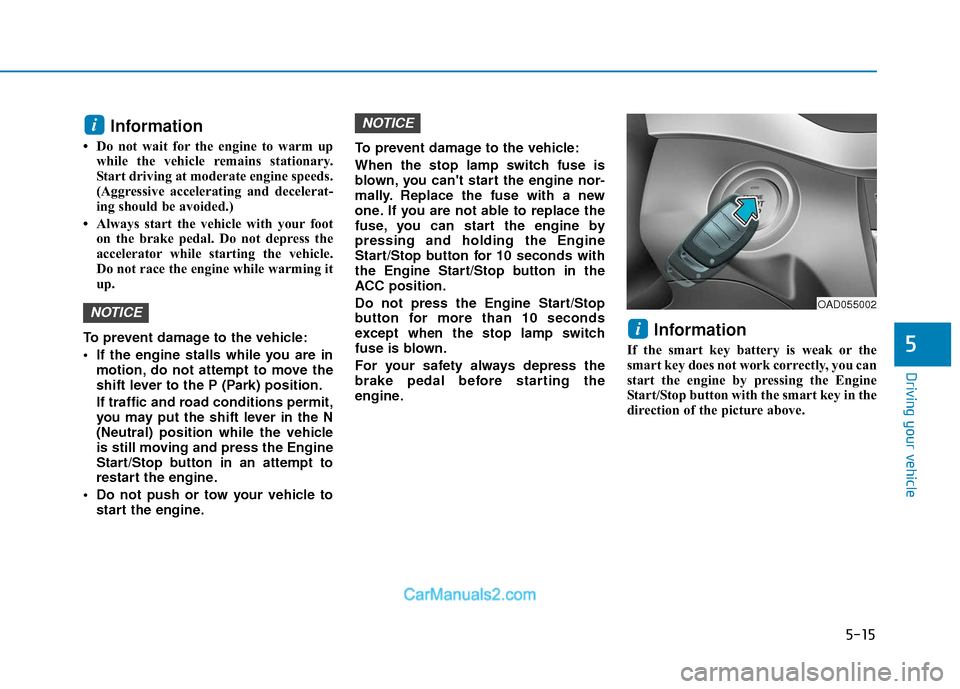
Information
If the smart key battery is weak or the
smart key does not work correctly, you can
start the engine by pressing the Engine
Start/Stop button with the smart key in the
direction of the picture above.
i
NOTICE
NOTICE
i
OAD055002
Page 300 of 526
5-17
Driving your vehicle
Downshifting
Down shift to a lower gear when slowing
down in heavy traffic or driving up a
steep hill to prevent high engine loads.
Also, downshifting reduces the chance of
stalling and helps reaccelerate the vehi-
cle when you need to increase your
speed.
When the vehicle is going downhill,
downshifting helps maintain safe speed
by providing engine braking (brake power
from the engine) and results in less wear
on the brakes.To prevent damage to the engine,
clutch and transmission:
When downshifting from 5
thgear to
4thgear, be careful not to inadver-
tently push the shift lever sideways
engaging the 2
ndgear. A drastic
downshift may cause the engine
speed to increase to the point the
tachometer will enter the red-zone
and may cause engine damage.
Do not downshift more than two gear at a time or downshift the gear
when the engine is running at high
speed (5,000 RPM or higher).
Such down shifting may damage the
engine, clutch and the transmission.
NOTICE
5
To prevent unnecessary wear or
damage to the clutch:
Do not rest your foot on the
clutch pedal while driving.
Do not hold the vehicle with the
clutch on an incline, while waiting
for the traffic light, etc.
Always depress the clutch pedal
down fully to prevent noise or
damage.
Do not depress the clutch pedal
again until it is fully released.
Do not start with the 2nd(second)
gear engaged except when you
start on a slippery road.
Do not drive with cargo loaded
more than required loading
capacity.
CAUTION
Page 301 of 526
5-18
Good Driving Practices
Never take the vehicle out of gear andcoast down a hill. This is extremely
dangerous.
Don't "ride" the brakes. This can cause the brakes and related parts to over-
heat and malfunction.
When you are driving down a long hill,
slow down and shift to a lower gear.
Engine braking will help slow down the
vehicle.
Slow down before shifting to a lower gear. This will help avoid over-revving
the engine, which can cause damage.
Slow down when you encounter cross winds. This gives you much better con-
trol of your vehicle.
Be sure the vehicle is completely stopped before you shift into R
(Reverse) to prevent damage to the
transmission.
Exercise extreme caution when driving on a slippery surface. Be especially
careful when braking, accelerating or
shifting gears. On a slippery surface,
an abrupt change in vehicle speed can
cause the drive wheels to lose traction
and may cause loss of vehicle control
resulting in an accident
Driving your vehicle
Do not use aggressive engine brak-
ing (shifting from a higher gear to a
lower gear) on slippery roads. This
could cause the tires to slip and
may result in an accident.
WARNING (Continued)
Loss of control often occurs if
two or more wheels drop off the
roadway and the driver over
steers to reenter the roadway.
In the event your vehicle leaves
the roadway, do not steer sharply.
Instead, slow down before pulling
back into the travel lanes.
HYUNDAI recommends you fol-
low all posted speed limits.
To reduce the risk of SERIOUS
INJURY or DEATH:
ALWAYS wear your seatbelt. In a
collision, an unbelted occupant is
significantly more likely to be
seriously injured or killed than a
properly belted occupant.
Avoid high speeds when corner-
ing or turning.
Do not make quick steering
wheel movements, such as sharp
lane changes or fast, sharp turns.
The risk of rollover is greatly
increased if you lose control of
your vehicle at highway speeds.
(Continued)
WARNING
Page 302 of 526
5-19
Driving your vehicle
5
A
AU
U T
TO
O M
M A
AT
TI
IC
C
T
T R
R A
A N
N S
SM
M I
IS
S S
SI
IO
O N
N
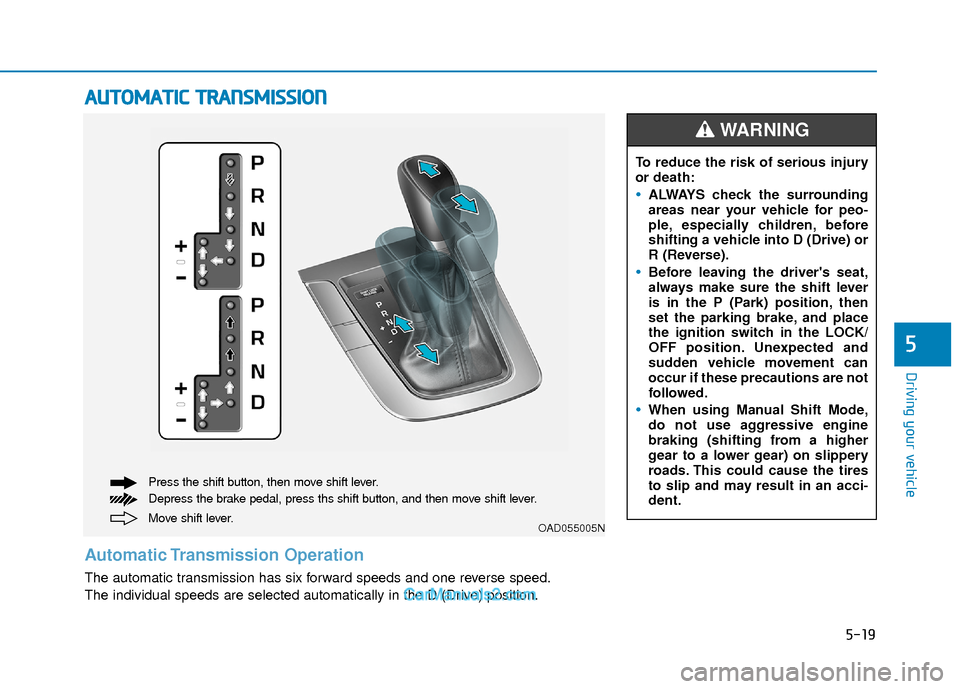
Move shift lever. Press the shift button, then move shift lever.
Depress the brake pedal, press ths shift button, and then move shift lever.OAD055005N
Automatic Transmission Operation
The automatic transmission has six forward speeds and one reverse speed.
The individual speeds are selected automatically in the D (Drive) position. To reduce the risk of serious injury
or death:
ALWAYS check the surrounding
areas near your vehicle for peo-
ple, especially children, before
shifting a vehicle into D (Drive) or
R (Reverse).
Before leaving the driver's seat,
always make sure the shift lever
is in the P (Park) position, then
set the parking brake, and place
the ignition switch in the LOCK/
OFF position. Unexpected and
sudden vehicle movement can
occur if these precautions are not
followed.
When using Manual Shift Mode,
do not use aggressive engine
braking (shifting from a higher
gear to a lower gear) on slippery
roads. This could cause the tires
to slip and may result in an acci-
dent.
WARNING
Page 304 of 526
5-21
Driving your vehicle
5
D (Drive)
This is the normal driving position. The
transmission will automatically shift
through a six-gear sequence, providing
the best fuel economy and power.
For extra power when passing another
vehicle or driving uphill depress the
accelerator pedal further until you feel
the transmission downshift to a lower
gear.
The DRIVE MODE switch, located on the
shift lever console, allows the driver to
switch from NORMAL mode to ECO or
SPORT mode.
For more information, refer to "Drive
Mode Integrated Control System"
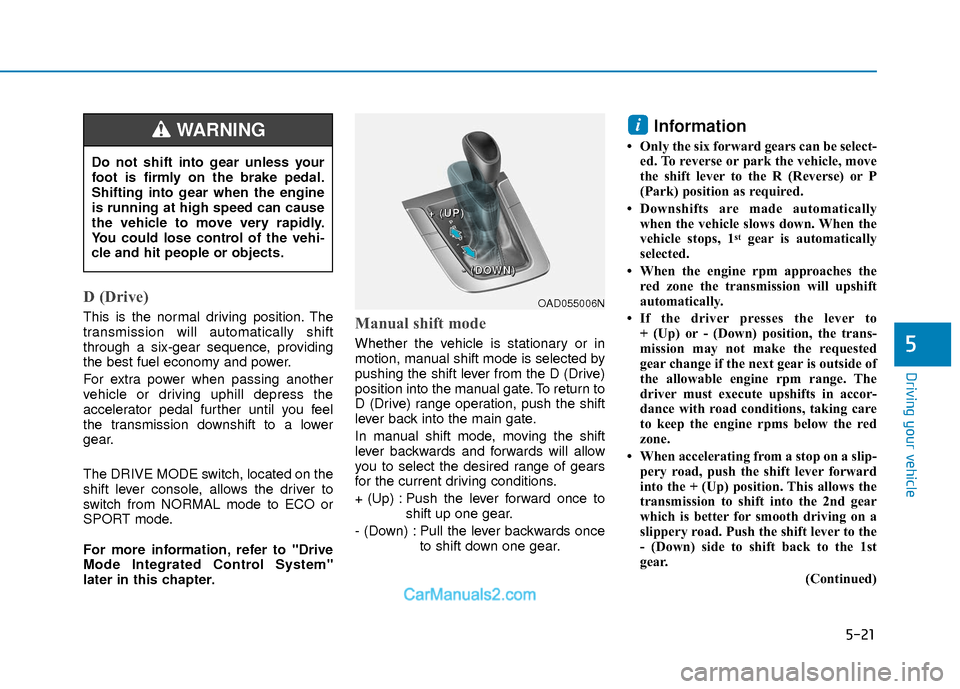
later in this chapter.Manual shift mode
Whether the vehicle is stationary or in
motion, manual shift mode is selected by
pushing the shift lever from the D (Drive)
position into the manual gate. To return to
D (Drive) range operation, push the shift
lever back into the main gate.
In manual shift mode, moving the shift
lever backwards and forwards will allow
you to select the desired range of gears
for the current driving conditions.
+ (Up) : Push the lever forward once toshift up one gear.
- (Down) : Pull the lever backwards once to shift down one gear.
Information
• Only the six forward gears can be select-ed. To reverse or park the vehicle, move
the shift lever to the R (Reverse) or P
(Park) position as required.
• Downshifts are made automatically when the vehicle slows down. When the
vehicle stops, 1
stgear is automatically
selected.
• When the engine rpm approaches the red zone the transmission will upshift
automatically.
• If the driver presses the lever to + (Up) or - (Down) position, the trans-
mission may not make the requested
gear change if the next gear is outside of
the allowable engine rpm range. The
driver must execute upshifts in accor-
dance with road conditions, taking care
to keep the engine rpms below the red
zone.
• When accelerating from a stop on a slip- pery road, push the shift lever forward
into the + (Up) position. This allows the
transmission to shift into the 2nd gear
which is better for smooth driving on a
slippery road. Push the shift lever to the
- (Down) side to shift back to the 1st
gear.
(Continued)
i
Do not shift into gear unless your
foot is firmly on the brake pedal.
Shifting into gear when the engine
is running at high speed can cause
the vehicle to move very rapidly.
You could lose control of the vehi-
cle and hit people or objects.
WARNING
OAD055006N
+
+
+
+
(
(
(
(
U
U
U
U
P
P
P
P
)
)
)
)
-
-
-
-
(
(
(
(
D
D
D
D
O
O
O
O
W
W
W
W
N
N
N
N
)
)
)
)
Page 306 of 526
5-23
Driving your vehicle
5
Good Driving Practices
Never move the shift lever from P(Park) or N (Neutral) to any other posi-
tion with the accelerator pedal
depressed.
Never move the shift lever into P (Park) when the vehicle is in motion.
Be sure the vehicle is completely
stopped before you attempt to shift into
R (Reverse) or D (Drive).
Do not move the shift lever to N (Neutral) when driving. Doing so may
result in an accident because of a loss
of engine braking and the transmission
could be damaged.
Do not drive with your foot resting on the brake pedal. Even light, but consis-
tent pedal pressure can result in the
brakes overheating, brake wear and
possibly even brake failure.
Depressing both accelerator and brake pedals at the same time can trigger
logic for engine power reduction to
assure vehicle deceleration. Vehicle
acceleration will resume after the
brake pedal is released.
Always apply the parking brake when leaving the vehicle. Do not depend on
placing the transmission in P (Park) to
keep the vehicle from moving. Exercise extreme caution when driving
on a slippery surface. Be especially
careful when braking, accelerating or
shifting gears. On a slippery surface,
an abrupt change in vehicle speed can
cause the drive wheels to lose traction
and may cause loss of vehicle control
resulting in an accident.
Optimum vehicle performance and economy is obtained by smoothly
depressing and releasing the accelera-
tor. To reduce the risk of SERIOUS
INJURY or DEATH:
ALWAYS wear your seatbelt. In a
collision, an unbelted occupant is
significantly more likely to be
seriously injured or killed than a
properly belted occupant.
Avoid high speeds when corner-
ing or turning.
Do not make quick steering
wheel movements, such as sharp
lane changes or fast, sharp turns.
The risk of rollover is greatly
increased if you lose control of
your vehicle at highway speeds.
Loss of control often occurs if
two or more wheels drop off the
roadway and the driver over
steers to reenter the roadway.
In the event your vehicle leaves
the roadway, do not steer sharply.
Instead, slow down before pulling
back into the travel lanes.
HYUNDAI recommends you fol-
low all posted speed limits.
WARNING
Page 307 of 526
5-24
Driving your vehicle
The dual clutch transmission can bethought of as an automatically shifting
manual transmission. It gives the driv-
ing feel of a manual transmission, yet
provides the ease of a fully automatic
transmission.
When D (Drive) is selected, the trans- mission will automatically shift through
the gears similar to a conventional
automatic transmission. Unlike a tradi-
tional automatic transmission, the gear
shifting can sometimes be felt and
heard as the actuators engage the
clutches and the gears are selected.
The dual clutch transmission incorpo- rates a dry-type dual clutch mecha-
nism, which allows for better accelera-
tion performance and increased fuel
efficiency while driving. But it differs
from a conventional automatic trans-
mission because it does not incorpo-
rate a torque converter. Instead, the
transition from one gear to the next is
managed by clutch slip, especially at
lower speeds. As a result, shifts are
sometimes more noticeable, and a
light vibration can be felt as the trans-
mission shaft speed is matched with
the engine shaft speed. This is a nor-
mal condition of the dual clutch trans-
mission.
D DU
U A
AL
L
C
C L
LU
U T
TC
CH
H
T
T R
R A
A N
N S
SM
M I
IS
S S
SI
IO
O N
N
(
( I
IF
F
E
E Q
Q U
UI
IP
P P
PE
ED
D )
)
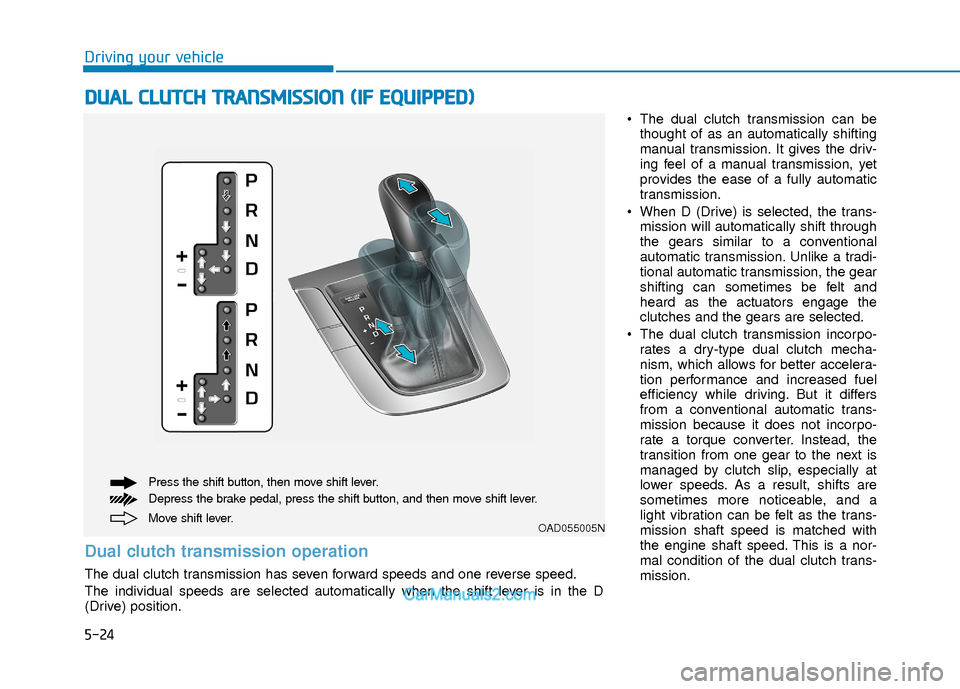
Move shift lever. Press the shift button, then move shift lever.
Depress the brake pedal, press the shift button, and then move shift lever.OAD055005N
Dual clutch transmission operation
The dual clutch transmission has seven forward speeds and one reverse speed.
The individual speeds are selected automatically when the shift lever is in the D
(Drive) position.
Page 308 of 526
5-25
Driving your vehicle
5
The dry-type clutch transfers torquemore directly and provides a direct-
drive feeling which may feel different
from a conventional automatic trans-
mission. This may be more noticeable
when launching the vehicle from a stop
or when traveling at low, stop-and-go
vehicle speeds.
When rapidly accelerating from a lower vehicle speed, the engine rpm may
increase dramatically as a result of
clutch slip as the dual clutch transmis-
sion selects the correct gear. This is a
normal condition.
When accelerating from a stop on an incline, press the accelerator smoothly
and gradually to avoid any shudder
feeling or jerkiness.
When traveling at a lower vehicle speed, if you release the accelerator
pedal quickly, you may feel engine
braking before the transmission
changes gears. This engine braking
feeling is similar to operating a manual
transmission at low speed.
When driving downhill, you may wish to move the gear shift lever to Manual
Shift mode and downshift to a lower
gear in order to control your speed
without using the brake pedal exces-
sively. When you turn the engine on and off,
you may hear clicking sounds as the
system goes through a self-test. This is
a normal sound for the dual clutch
transmission.
During the first 1000 miles, you may feel that the vehicle may not be smooth
when accelerating at low speed.
During this break-in period, the shift
quality and performance of your new
vehicle is continuously optimized. Always come to a complete stop
before shifting into D (Drive) or R
(Reverse).
Do not put the shift lever in N (Neutral) while driving.
NOTICE
To reduce the risk of serious injury
or death:
ALWAYS check the surrounding
areas near your vehicle for peo-
ple, especially children, before
shifting a vehicle into D (Drive) or
R (Reverse).
Before leaving the driver's seat,
always make sure the shift lever
is in the P (Park) position, then
set the parking brake, and place
the ignition switch in the
LOCK/OFF position. Unexpected
and sudden vehicle movement
can occur if these precautions
are not followed.
(Continued)
WARNING
(Continued)
Do not use aggressive engine
braking (shifting from a higher
gear to a lower gear) on slippery
roads. This could cause the tires
to slip and may result in an acci-
dent.
Due to transmission failure, you
may not continue to drive and the
position indicator (D, R) on the
cluster will blink. Contact an
authorized hyundai dealer and have
the system checked.
WARNING
Page 312 of 526
5-29
Driving your vehicle
5
D (Drive)
This is the normal driving position. The
transmission will automatically shift
through a seven-gear sequence, provid-
ing the best fuel economy and power.
For extra power when passing another
vehicle or driving uphill depress the
accelerator pedal further until you feel
the transmission downshift to a lower
gear.
The DRIVE MODE switch, located on the
shift lever console, allows the driver to
switch from NORMAL mode to SPORT
mode.
For more information, refer to "Drive
Mode Integrated Control System"
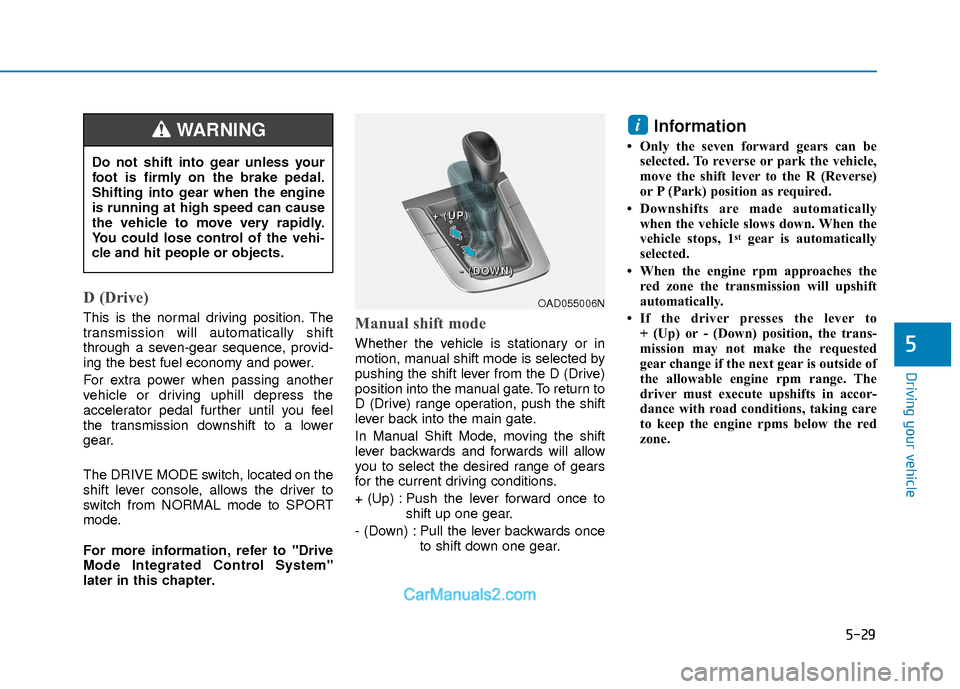
later in this chapter.Manual shift mode
Whether the vehicle is stationary or in
motion, manual shift mode is selected by
pushing the shift lever from the D (Drive)
position into the manual gate. To return to
D (Drive) range operation, push the shift
lever back into the main gate.
In Manual Shift Mode, moving the shift
lever backwards and forwards will allow
you to select the desired range of gears
for the current driving conditions.
+ (Up) : Push the lever forward once toshift up one gear.
- (Down) : Pull the lever backwards once to shift down one gear.
Information
• Only the seven forward gears can beselected. To reverse or park the vehicle,
move the shift lever to the R (Reverse)
or P (Park) position as required.
• Downshifts are made automatically when the vehicle slows down. When the
vehicle stops, 1
stgear is automatically
selected.
• When the engine rpm approaches the red zone the transmission will upshift
automatically.
• If the driver presses the lever to + (Up) or - (Down) position, the trans-
mission may not make the requested
gear change if the next gear is outside of
the allowable engine rpm range. The
driver must execute upshifts in accor-
dance with road conditions, taking care
to keep the engine rpms below the red
zone.
i
Do not shift into gear unless your
foot is firmly on the brake pedal.
Shifting into gear when the engine
is running at high speed can cause
the vehicle to move very rapidly.
You could lose control of the vehi-
cle and hit people or objects.
WARNING
OAD055006N
+
+
+
+
(
(
(
(
U
U
U
U
P
P
P
P
)
)
)
)
-
-
-
-
(
(
(
(
D
D
D
D
O
O
O
O
W
W
W
W
N
N
N
N
)
)
)
)