speed on Hyundai Elantra 2018 Owner's Guide
[x] Cancel search | Manufacturer: HYUNDAI, Model Year: 2018, Model line: Elantra, Model: Hyundai Elantra 2018Pages: 526, PDF Size: 17.2 MB
Page 185 of 526
3-108
Convenient features of your vehicle
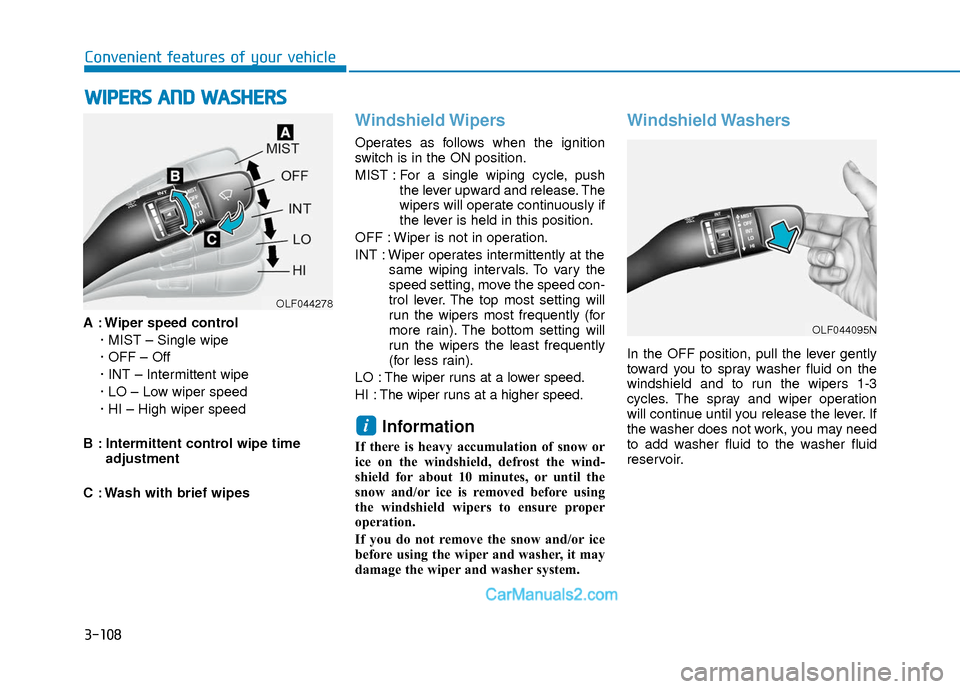
A : Wiper speed control· MIST – Single wipe
· OFF – Off
· INT – Intermittent wipe
· LO – Low wiper speed
· HI – High wiper speed
B : Intermittent control wipe time adjustment
C : Wash with brief wipes
Windshield Wipers
Operates as follows when the ignition
switch is in the ON position.
MIST : For a single wiping cycle, push the lever upward and release. The
wipers will operate continuously if
the lever is held in this position.
OFF : Wiper is not in operation.
INT : Wiper operates intermittently at the same wiping intervals. To vary the
speed setting, move the speed con-
trol lever. The top most setting will
run the wipers most frequently (for
more rain). The bottom setting will
run the wipers the least frequently
(for less rain).
LO : The wiper runs at a lower speed.
HI : The wiper runs at a higher speed.
Information
If there is heavy accumulation of snow or
ice on the windshield, defrost the wind-
shield for about 10 minutes, or until the
snow and/or ice is removed before using
the windshield wipers to ensure proper
operation.
If you do not remove the snow and/or ice
before using the wiper and washer, it may
damage the wiper and washer system.
Windshield Washers
In the OFF position, pull the lever gently
toward you to spray washer fluid on the
windshield and to run the wipers 1-3
cycles. The spray and wiper operation
will continue until you release the lever. If
the washer does not work, you may need
to add washer fluid to the washer fluid
reservoir.
i
W W I
IP
P E
ER
R S
S
A
A N
N D
D
W
W A
AS
SH
H E
ER
R S
S
OLF044278
OLF044095N
Page 188 of 526
3-111
Convenient features of your vehicle
3
M
MA
AN
N U
U A
AL
L
C
C L
LI
IM
M A
AT
TE
E
C
C O
O N
NT
TR
R O
O L
L
S
S Y
Y S
ST
T E
EM
M
(
( I
IF
F
E
E Q
Q U
UI
IP
P P
PE
ED
D )
)
OAD045300/OAD045300N
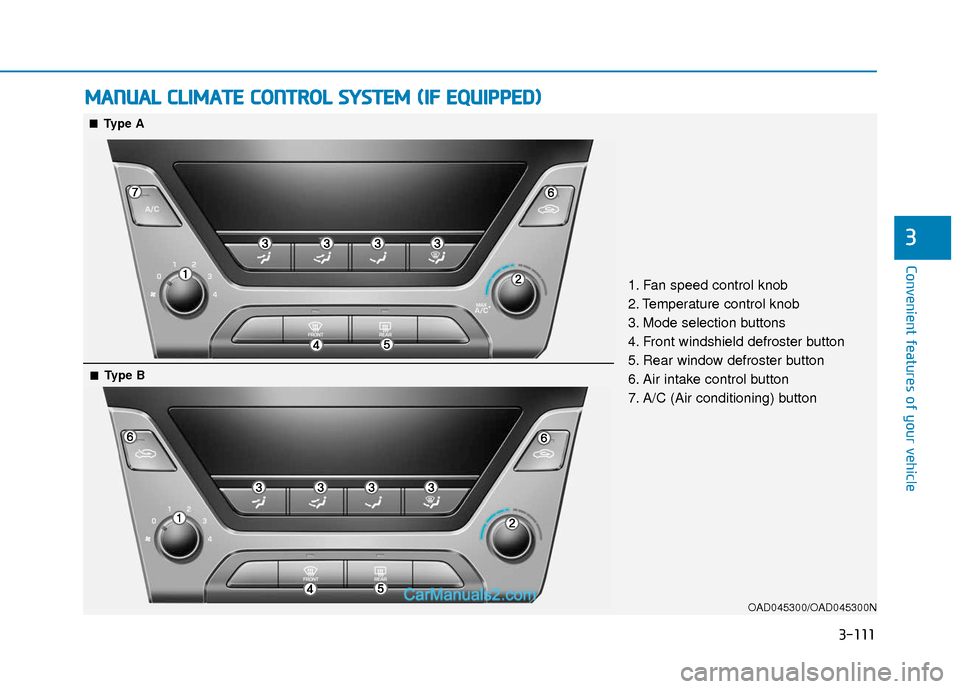
1. Fan speed control knob
2. Temperature control knob
3. Mode selection buttons
4. Front windshield defroster button
5. Rear window defroster button
6. Air intake control button
7. A/C (Air conditioning) button
■ ■Type A
■
■Type B
Page 189 of 526
3-112
Convenient features of your vehicle
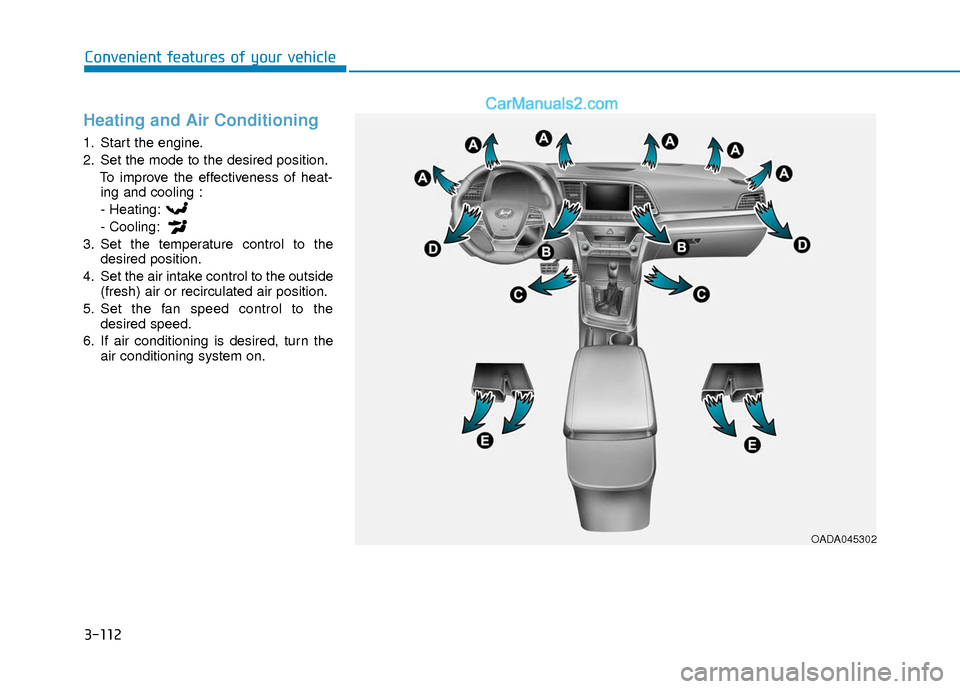
Heating and Air Conditioning
1. Start the engine.
2. Set the mode to the desired position.To improve the effectiveness of heat-ing and cooling :
- Heating:
- Cooling:
3. Set the temperature control to the desired position.
4. Set the air intake control to the outside (fresh) air or recirculated air position.
5. Set the fan speed control to the desired speed.
6. If air conditioning is desired, turn the air conditioning system on.
OADA045302
Page 191 of 526
3-114
Convenient features of your vehicle
MAX A/C-Level (B, D) (if equipped)
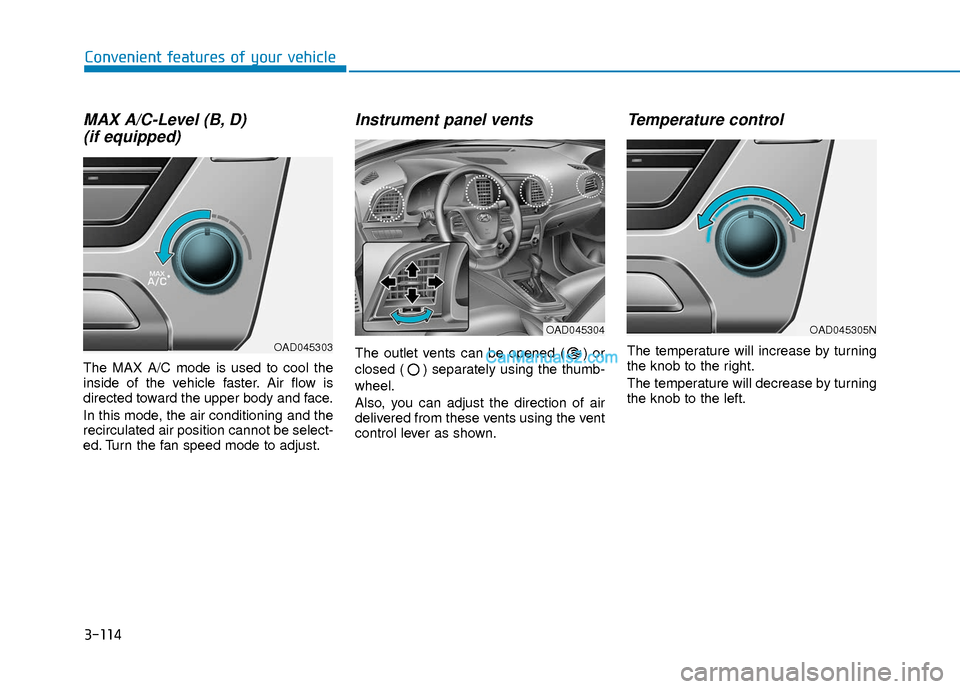
The MAX A/C mode is used to cool the
inside of the vehicle faster. Air flow is
directed toward the upper body and face.
In this mode, the air conditioning and the
recirculated air position cannot be select-
ed. Turn the fan speed mode to adjust.
Instrument panel vents
The outlet vents can be opened ( ) or
closed ( ) separately using the thumb-
wheel.
Also, you can adjust the direction of air
delivered from these vents using the vent
control lever as shown.
Temperature control
The temperature will increase by turning
the knob to the right.
The temperature will decrease by turning
the knob to the left.
OAD045305N
OAD045303
OAD045304
Page 193 of 526
3-116
Convenient features of your vehicle
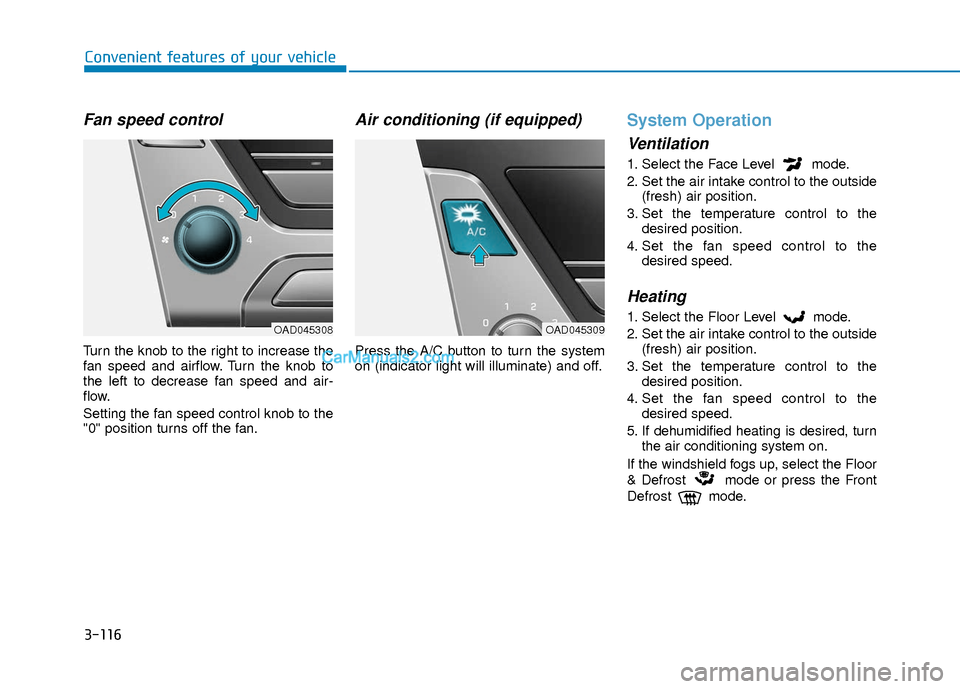
Fan speed control
Turn the knob to the right to increase the
fan speed and airflow. Turn the knob to
the left to decrease fan speed and air-
flow.
Setting the fan speed control knob to the
"0" position turns off the fan.
Air conditioning (if equipped)
Press the A/C button to turn the system
on (indicator light will illuminate) and off.
System Operation
Ventilation
1. Select the Face Level mode.
2. Set the air intake control to the outside(fresh) air position.
3. Set the temperature control to the desired position.
4. Set the fan speed control to the desired speed.
Heating
1. Select the Floor Level mode.
2. Set the air intake control to the outside(fresh) air position.
3. Set the temperature control to the desired position.
4. Set the fan speed control to the desired speed.
5. If dehumidified heating is desired, turn the air conditioning system on.
If the windshield fogs up, select the Floor
& Defrost mode or press the Front
Defrost mode.OAD045308OAD045309
Page 194 of 526
3-117
Convenient features of your vehicle
3
Operation Tips
To keep dust or unpleasant fumes fromentering the car through the ventilation
system, temporarily set the air intake
control to the recirculated air position.
Return the control to the fresh air posi-
tion when the irritation has passed.
This will help keep the driver alert and
comfortable.
To prevent the inside of the windshield from fogging, set the air intake control
to the fresh air position and fan speed
to the desired position, turn on the air
conditioning system, and adjust the
temperature control to desired temper-
ature.
Air conditioning
All HYUNDAI Air Conditioning Systems
are filled with environmentally friendly R-
134a refrigerant.
1. Start the engine.
2. Push the air conditioning button.
3. Set the mode to the Face Level mode.
4. Set the air intake control to the recir- culated air position. However, pro-
longed operation of the recirculated air
position will excessively dry the air. In
this case, change the air position.
5. Adjust the fan speed control and tem- perature control to maintain maximum
comfort.
When maximum cooling is desired, set
the temperature control to the extreme
left position then set the fan speed con-
trol to the highest speed.
When using the air conditioning sys-
tem, monitor the engine temperature
gauge closely while driving up hills or
in heavy traffic when outside temper-
atures are high. Air conditioning sys-
tem operation can cause engine over-
heating. Continue to use the blower
fan, but turn the air conditioning sys-
tem off if the engine temperature
gauge indicates engine overheating.
Air conditioning system operation
tips
If the vehicle has been parked in direct sunlight during hot weather, open the
windows for a short time to let the hot
air inside the vehicle escape.
After sufficient cooling has been achieved, switch back from the recircu-
lated air to the fresh outside air posi-
tion.
To help reduce moisture inside of the windows on rainy or humid days,
decrease the humidity inside the vehi-
cle by operating the air conditioning
system with the windows and sunroof
closed.
Use the air conditioning system every month only for a few minutes to ensure
maximum system performance.
If you operate air conditioner exces- sively, the difference between the tem-
perature of the outside air and that of
the windshield could cause the outer
surface of the windshield to fog up,
causing loss of visibility. In this case,
set the mode selection knob or button
to the position and fan speed con-
trol to the lower speed.
NOTICE
Page 197 of 526
3-120
Convenient features of your vehicle
A
AU
U T
TO
O M
M A
AT
TI
IC
C
C
C L
LI
IM
M A
AT
TE
E
C
C O
O N
NT
TR
R O
O L
L
S
S Y
Y S
ST
T E
EM
M
OAD045310
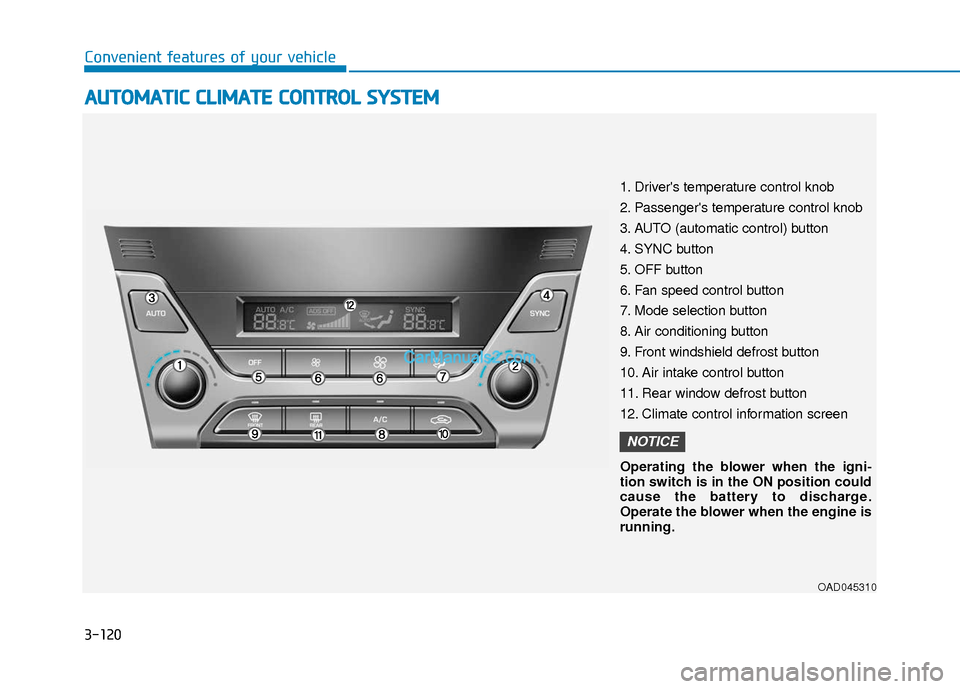
1. Driver's temperature control knob
2. Passenger's temperature control knob
3. AUTO (automatic control) button
4. SYNC button
5. OFF button
6. Fan speed control button
7. Mode selection button
8. Air conditioning button
9. Front windshield defrost button
10. Air intake control button
11. Rear window defrost button
12. Climate control information screen
Operating the blower when the igni-
tion switch is in the ON position could
cause the battery to discharge.
Operate the blower when the engine is
running.
NOTICE
Page 198 of 526
3-121
Convenient features of your vehicle
3
Automatic Heating and Air
Conditioning
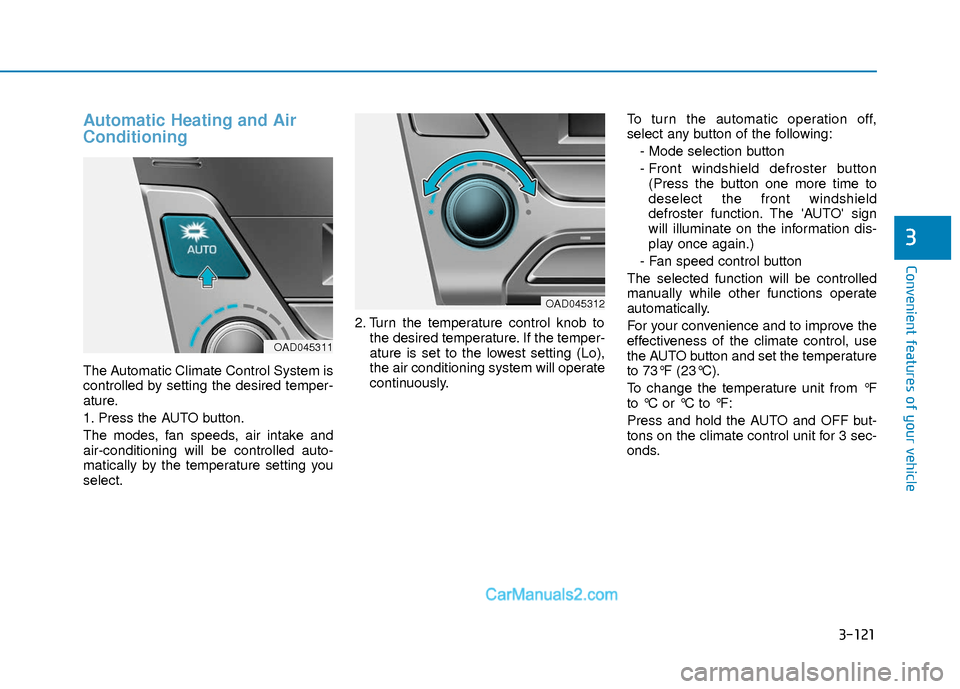
The Automatic Climate Control System is
controlled by setting the desired temper-
ature.
1. Press the AUTO button.
The modes, fan speeds, air intake and
air-conditioning will be controlled auto-
matically by the temperature setting you
select.2. Turn the temperature control knob to
the desired temperature. If the temper-
ature is set to the lowest setting (Lo),
the air conditioning system will operate
continuously. To turn the automatic operation off,
select any button of the following:
- Mode selection button
- Front windshield defroster button(Press the button one more time to
deselect the front windshield
defroster function. The 'AUTO' sign
will illuminate on the information dis-
play once again.)
- Fan speed control button
The selected function will be controlled
manually while other functions operate
automatically.
For your convenience and to improve the
effectiveness of the climate control, use
the AUTO button and set the temperature
to 73°F (23°C).
To change the temperature unit from °F
to °C or °C to °F:
Press and hold the AUTO and OFF but-
tons on the climate control unit for 3 sec-
onds.
OAD045311
OAD045312
Page 199 of 526
3-122
Convenient features of your vehicle
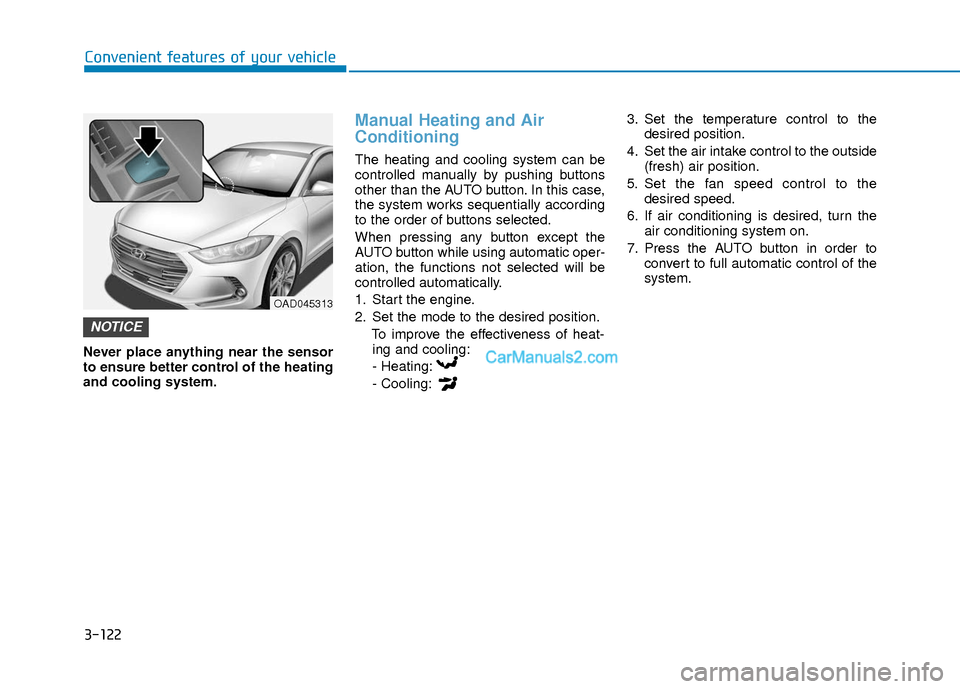
Never place anything near the sensor
to ensure better control of the heating
and cooling system.
Manual Heating and Air
Conditioning
The heating and cooling system can be
controlled manually by pushing buttons
other than the AUTO button. In this case,
the system works sequentially according
to the order of buttons selected.
When pressing any button except the
AUTO button while using automatic oper-
ation, the functions not selected will be
controlled automatically.
1. Start the engine.
2. Set the mode to the desired position.To improve the effectiveness of heat-ing and cooling:
- Heating:
- Cooling: 3. Set the temperature control to the
desired position.
4. Set the air intake control to the outside (fresh) air position.
5. Set the fan speed control to the desired speed.
6. If air conditioning is desired, turn the air conditioning system on.
7. Press the AUTO button in order to convert to full automatic control of the
system.
NOTICE
OAD045313
Page 202 of 526
3-125
Convenient features of your vehicle
3
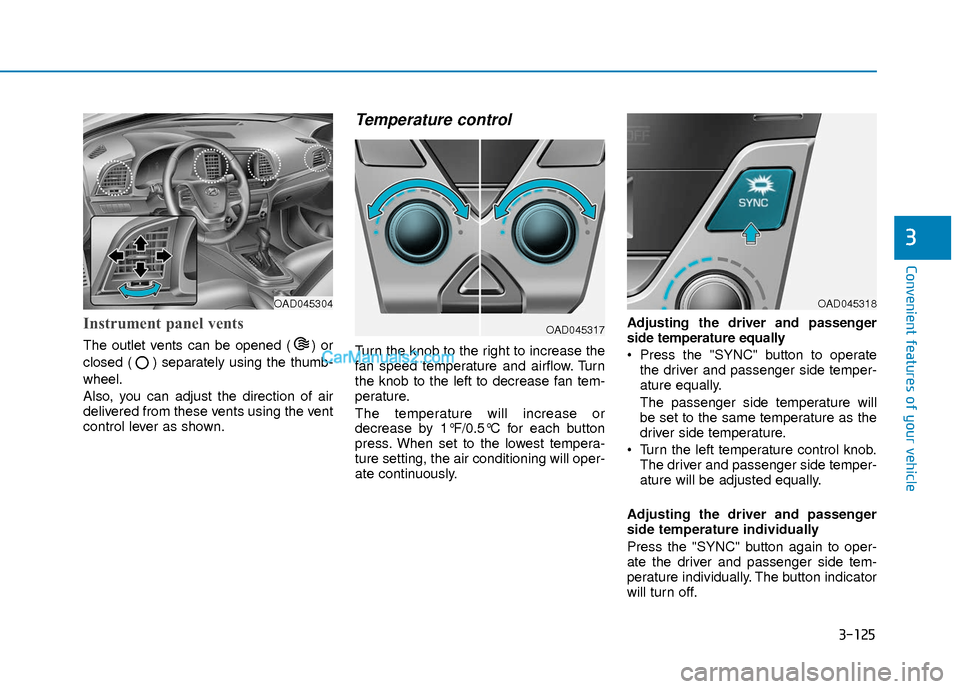
Instrument panel vents
The outlet vents can be opened ( ) or
closed ( ) separately using the thumb-
wheel.
Also, you can adjust the direction of air
delivered from these vents using the vent
control lever as shown.
Temperature control
Turn the knob to the right to increase the
fan speed temperature and airflow. Turn
the knob to the left to decrease fan tem-
perature.
The temperature will increase or
decrease by 1°F/0.5°C for each button
press. When set to the lowest tempera-
ture setting, the air conditioning will oper-
ate continuously.Adjusting the driver and passenger
side temperature equally
Press the "SYNC" button to operate
the driver and passenger side temper-
ature equally.
The passenger side temperature will
be set to the same temperature as the
driver side temperature.
Turn the left temperature control knob. The driver and passenger side temper-
ature will be adjusted equally.
Adjusting the driver and passenger
side temperature individually
Press the "SYNC" button again to oper-
ate the driver and passenger side tem-
perature individually. The button indicator
will turn off.
OAD045317
OAD045304OAD045318