air condition HYUNDAI ENTOURAGE 2007 Owner's Guide
[x] Cancel search | Manufacturer: HYUNDAI, Model Year: 2007, Model line: ENTOURAGE, Model: HYUNDAI ENTOURAGE 2007Pages: 398, PDF Size: 8.03 MB
Page 212 of 398
Features of your vehicle196 3✽
✽
NOTICE• To assure proper operation of the unit,
keep the vehicle interior temperature
within a normal range by using the
vehicle's air conditioning or heating
system.
• When replacing the audio unit fuse,
replace it with a fuse having the cor-
rect capacity.
• The preset station frequencies are all
erased when the car battery is discon-
nected. Therefore, all data will have to
be set again if this should occur.
• Do not add any oil to the rotating
parts. Keep magnets, screwdrivers
and other metallic objects away from
the tape mechanism and head.
• This equipment is designed to be used
only in a 12 volt DC battery system
with negative ground.
• This unit is made of precision parts.
Do not attempt to disassemble or
adjust any parts.
(Continued)(Continued)
• When driving your vehicle, be sure to
keep the volume of the unit set low
enough to allow you to hear sounds
coming from the outside.
• Do not expose this equipment (includ-
ing the speakers and tape) to water or
excessive moisture.
CAUTION
Do not insert anything like coins
into the player slot as damage to
the unit may occur.
Do not place beverages close to
the audio system. The playback
mechanism may be damaged if
you spill them.
Do not strike or allow anything to
impact the audio system, damage
to the system mechanisms could
occur.
Page 216 of 398
Features of your vehicle200 3✽
✽
NOTICE• To assure proper operation of the unit,
keep the vehicle interior temperature
within a normal range by using the
vehicle's air conditioning or heating
system.
• When replacing the audio unit fuse,
replace it with a fuse having the cor-
rect capacity.
• All stored CD bookmarks are all
erased when the car battery is discon-
nected or power to the vehicle is lost.
If this occurs, the bookmarks will
have to be reset.
• This equipment is designed to be used
only in a 12 volt DC battery system
with negative ground.
• This unit is made of precision parts.
Do not attempt to disassemble or
adjust any parts.
• When driving your vehicle, be sure to
keep the volume of the unit set low
enough to allow you to hear sounds
coming from the outside.
• Do not expose this equipment (includ-
ing the speakers and tape) to water or
excessive moisture.
CAUTION
Do not insert warped or poor
quality discs into the CD player
as damage to the unit may occur.
Do not insert anything like coins
into the player slot as damage to
the unit may occur.
Do not place beverages close to
the audio system. The playback
mechanism may be damaged if
you spill them.
Do not strike or allow anything to
impact the audio system, damage
to the system mechanisms could
occur.
Off-road or rough surface driving
may cause the compact disc to
skip. Do not use the compact disc
when driving in such conditions
as damage to the compact disc
face could occur.
(Continued)
(Continued)
Do not attempt to grab or pull the
compact disc out while the disc is
being pulled into the audio unit
by the self-loading mechanism.
Damage to the audio unit and
compact disc could occur.
Avoid using recorded compact
discs in your audio unit. Original
compact discs are recommended
for best results.
Page 222 of 398
Features of your vehicle206 3✽
✽
NOTICE• To assure proper operation of the unit,
keep the vehicle interior temperature
within a normal range by using the
vehicle's air conditioning or heating
system.
• When replacing the audio unit fuse,
replace it with a fuse having the cor-
rect capacity.
• The preset station frequencies are all
erased when the car battery is discon-
nected. Therefore, all data will have to
be set again if this should occur.
• Do not add any oil to the rotating
parts. Keep magnets, screwdrivers
and other metallic objects away from
the tape mechanism and head.
• This equipment is designed to be used
only in a 12 volt DC battery system
with negative ground.
• This unit is made of precision parts.
Do not attempt to disassemble or
adjust any parts.
(Continued)(Continued)
• When driving your vehicle, be sure to
keep the volume of the unit set low
enough to allow you to hear sounds
coming from the outside.
• Do not expose this equipment (includ-
ing the speakers and tape) to water or
excessive moisture.
CAUTION
Do not insert anything like coins
into the player slot as damage to
the unit may occur.
Do not place beverages close to
the audio system. The playback
mechanism may be damaged if
you spill them.
Do not strike or allow anything to
impact the audio system, damage
to the system mechanisms could
occur.
Page 227 of 398
3211
Features of your vehicle
13. FILE SEARCH Knob
(TUNE Select Knob) You can skip the track (file) by turning
the FILE SEARCH knob clockwise or
counterclockwise.
After selecting the desired track (file),
press the FILE SEARCH knob to play-
back the track (file).
If you do not press the FILE SEARCH
knob within five seconds, the search
will stop.14. DIRECTORY SEARCH (DIR)
Button You can move through the folder by
pushing the DIR button to up ( ) and
down( ).
After moving the desired folder, press
the FILE SEARCH knob to play back in
the selected folder. If you do not press
the FILE SEARCH knob within 5 sec-
onds, the folder searching function will
be released. It can not be operated in a
single folder.
✽ ✽
NOTICE• To assure proper operation of the unit,
keep the vehicle interior temperature
within a normal range by using the
vehicle's air conditioning or heating
system.
• When replacing the audio unit fuse,
replace it with a fuse having the cor-
rect capacity.
• Stored CD bookmarks are all erased
when the car battery is disconnected
or power to the vehicle is lost. If this
occurs, the bookmarks will have to be
reset.
• This equipment is designed to be used
only in a 12 volt DC battery system
with negative ground.
• This unit is made of precision parts.
Do not attempt to disassemble or
adjust any parts.
• When driving your vehicle, be sure to
keep the volume of the unit set low
enough to allow you to hear sounds
coming from the outside.
• Do not expose this equipment (includ-
ing the speakers and tape) to water or
excessive moisture.
CAUTION
Do not insert warped or poor
quality discs into the CD player
as damage to the unit may occur.
Do not insert anything like coins
into the player slot as damage to
the unit may occur.
Do not place beverages close to
the audio system. The playback
mechanism may be damaged if
you spill them.
Do not strike or allow anything to
impact the audio system, damage
to the system mechanisms could
occur.
Off-road or rough surface driving
may cause the compact disc to
skip. Do not use the compact
disc when driving in such condi-
tions as damage to the compact
disc face could occur.
Do not attempt to grab or pull the
compact disc out while the disc is
being pulled into the audio unit
by the self-loading mechanism.
Damage to the audio unit and
compact disc could occur.
Avoid using home-recorded com-
pact discs in your audio unit.
Original compact discs are rec-
ommended for best results.
Page 266 of 398
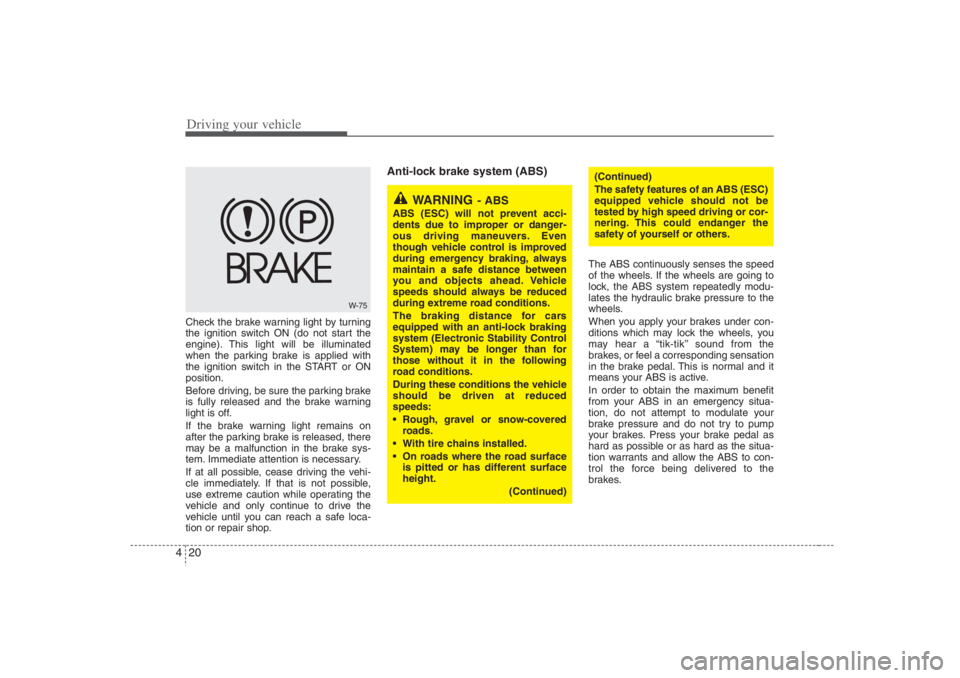
Driving your vehicle20 4Check the brake warning light by turning
the ignition switch ON (do not start the
engine). This light will be illuminated
when the parking brake is applied with
the ignition switch in the START or ON
position.
Before driving, be sure the parking brake
is fully released and the brake warning
light is off.
If the brake warning light remains on
after the parking brake is released, there
may be a malfunction in the brake sys-
tem. Immediate attention is necessary.
If at all possible, cease driving the vehi-
cle immediately. If that is not possible,
use extreme caution while operating the
vehicle and only continue to drive the
vehicle until you can reach a safe loca-
tion or repair shop.
Anti-lock brake system (ABS)
The ABS continuously senses the speed
of the wheels. If the wheels are going to
lock, the ABS system repeatedly modu-
lates the hydraulic brake pressure to the
wheels.
When you apply your brakes under con-
ditions which may lock the wheels, you
may hear a “tik-tik’’ sound from the
brakes, or feel a corresponding sensation
in the brake pedal. This is normal and it
means your ABS is active.
In order to obtain the maximum benefit
from your ABS in an emergency situa-
tion, do not attempt to modulate your
brake pressure and do not try to pump
your brakes. Press your brake pedal as
hard as possible or as hard as the situa-
tion warrants and allow the ABS to con-
trol the force being delivered to the
brakes.
W-75
WARNING
- ABS
ABS (ESC) will not prevent acci-
dents due to improper or danger-
ous driving maneuvers. Even
though vehicle control is improved
during emergency braking, always
maintain a safe distance between
you and objects ahead. Vehicle
speeds should always be reduced
during extreme road conditions.
The braking distance for cars
equipped with an anti-lock braking
system (Electronic Stability Control
System) may be longer than for
those without it in the following
road conditions.
During these conditions the vehicle
should be driven at reduced
speeds:
Rough, gravel or snow-covered
roads.
With tire chains installed.
On roads where the road surface
is pitted or has different surface
height.
(Continued)
(Continued)
The safety features of an ABS (ESC)
equipped vehicle should not be
tested by high speed driving or cor-
nering. This could endanger the
safety of yourself or others.
Page 272 of 398
Driving your vehicle26 4Non-operational conditions of
back warning systemThe back warning system may not
operate properly when:1. Moisture is frozen to the sensor. (It will
operate normally when the moisture
has been cleared.)
2. The sensor is covered with foreign
matter, such as snow or water, or the
sensor cover is blocked. (It will operate
normally when the material is removed
or the sensor is no longer blocked.)
3. Driving on uneven road surfaces
(unpaved roads, gravel, bumps, gradi-
ent).
4. Objects generating excessive noise
(vehicle horns, loud motorcycle
engines, or truck air brakes) are within
range of the sensor.
5. Heavy rain or water spray exists.
6. Wireless transmitters or mobile phones
are within range of the sensor.
7. The sensor is covered with snow.
8. Trailer towing
The detecting range may decrease
when:1. The sensor is stained with foreign mat-
ter such as snow or water. (The sens-
ing range will return to normal when
removed.)
2. Outside air temperature is extremely
hot or cold.The following objects may not be rec-
ognized by the sensor:1. Sharp or slim objects such as ropes,
chains or small poles.
2. Objects which tend to absorb the sen-
sor frequency such as clothes, spongy
material or snow.
3. Undetectable objects smaller than 40 in.
(1 m) and narrower than 6 in. (14 cm) in
diameter.
CAUTION
1. The back warning may not sound
sequentially depending on the
speed and shapes of the objects
detected.
2. The back warning system may
malfunction if the vehicle bumper
height or sensor installation has
been modified or damaged. Any
non-factory installed equipment
or accessories may also interfere
with the sensor performance.
3. The sensor may not recognize
objects less than 15 in. (40 cm)
from the sensor, or it may sense
an incorrect distance. Use cau-
tion.
4. When the sensor is frozen or
stained with snow, dirt, or water,
the sensor may be inoperative
until the stains are removed
using a soft cloth.
5. Do not push, scratch or strike the
sensor. Sensor damage could
occur.
Page 275 of 398
429
Driving your vehicle
Your vehicle's fuel economy depends
mainly on your style of driving, where you
drive and when you drive.
Each of these factors affects how many
miles (kilometers) you can get from a gal-
lon (liter) of fuel. To operate your vehicle
as economically as possible, use the fol-
lowing driving suggestions to help save
money in both fuel and repairs:
Avoid lengthy warm-up idling. Once the
engine is running smoothly, begin driv-
ing. Remember, engine warm-up may
take a little longer on cold days.
Save fuel by accelerating slowly after
stopping.
Keep the engine in tune and follow the
recommended periodic maintenance
schedule. This will increase the life of
all parts and lower your operating
costs. Do not use the air conditioner unnec-
essarily.
Slow down when driving on rough
roads.
For longer tire life and better fuel econ-
omy, always keep the tires inflated to
the recommended pressures.
Maintain a safe distance from other
vehicles to avoid sudden stops. This
will reduce wear on brake linings and
pads. Driving in such a way will also
save fuel because extra fuel is required
to accelerate back to driving speed.
Do not carry unnecessary weight in the
vehicle.
Do not rest your foot on the brake
pedal while driving. This can cause
needless wear, possible damage to the
brakes, and poor fuel economy.
Improper wheel alignment results in
faster tire wear and lower fuel econo-
my. Open windows at high speeds can
reduce fuel economy.
Fuel economy is less in crosswinds
and headwinds. To help offset some of
this loss, slow down when driving in
these conditions.
Keeping a vehicle in good operating con-
dition is important both for economy and
safety. Therefore, have an authorized
Hyundai dealer perform scheduled
inspections and maintenance.ECONOMICAL OPERATION
WARNING
- Engine off dur-
ing motion
Never turn the engine off to coast
down hills or anytime the vehicle is
in motion. The power steering and
power brakes will not function
properly without the engine run-
ning. Instead, keep the engine on
and downshift to an appropriate
gear for engine braking effect. In
addition, turning off the ignition
while driving could engage the
steering wheel lock resulting in
loss of vehicle steering which could
cause serious injury or death.
Page 284 of 398
Driving your vehicle38 4When you are ready to leave after
parking on a hill 1. With the automatic transaxle in P
(Park), apply your brakes and hold the
brake pedal down while you:
Start your engine;
Shift into gear; and
Release the parking brake.
2. Slowly remove your foot from the
brake pedal.
3. Drive slowly until the trailer is clear of
the chocks.
4. Stop and have someone pick up and
store the chocks.
Maintenance when trailer towing Your vehicle will need service more often
when you regularly pull a trailer.
Important items to pay particular atten-
tion to include engine oil, automatic
transaxle fluid, axle lubricant and cooling
system fluid. Brake condition is another
important item to frequently check. Each
item is covered in this manual, and the
Index will help you find them quickly. If
you’re trailering, it’s a good idea to review
these sections before you start your trip.
Don’t forget to also maintain your trailer
and hitch. Follow the maintenance
schedule that accompanied your trailer
and check it periodically. Preferably, con-
duct the check at the start of each day’s
driving. Most importantly, all hitch nuts
and bolts should be tight.
WARNING
- Parking brake
It can be dangerous to get out of
your vehicle if the parking brake is
not firmly set.
If you have left the engine running,
the vehicle can move suddenly. You
or others could be seriously or
fatally injured.
CAUTION
Due to higher load during trailer
usage, overheating might occur
in hot days or during uphill driv-
ing. If the coolant gauge indicates
over-heating, switch off the A/C
and stop the vehicle in a safe area
to cool down the engine.
When towing check transaxle
fluid more frequently.
If your vehicle is not equipped
with the air conditioner, you
should install a condenser fan to
improve engine performance
when towing a trailer.
Page 297 of 398
55
What to do in an emergency
5. Start the engine of the vehicle with the
booster battery and let it run at 2,000
rpm, then start the engine of the vehi-
cle with the discharged battery.If the cause of your battery discharging is
not apparent, you should have your vehi-
cle checked by an Authorized Hyundai
Dealer.Push-starting Vehicles equipped with automatic
transaxle cannot be push-started.
Follow the directions in this section for
jump-starting.If your temperature gauge indicates over-
heating, if you experience a loss of
power, or if you hear a loud knocking or
pinging noise, the engine has probably
overheated. Should any of these symp-
toms occur, use the following procedure:
1. Turn on the hazard warning flasher,
then drive to the nearest safe location
and stop your vehicle; set the auto-
matic transaxle in P (Park) and apply
the parking brake.
2. Make sure the air conditioner is off.
3. If coolant or steam is boiling out of the
radiator, stop the engine and call an
Authorized Hyundai Dealer for assis-
tance.
If coolant is not boiling out, allow the
engine to idle and open the hood to
permit the engine to cool gradually.
If the temperature does not go down
with the engine idling, stop the engine
and allow sufficient time for it to cool.4. The coolant level should then be
checked. If the level in the reservoir is
low, look for leaks at the radiator
hoses and connections, heater hoses
and connections, radiator, and water
pump. If you find a major leak or
another problem that may have
caused the engine to overheat, do not
operate the engine until it has been
corrected. Call an Authorized Hyundai
Dealer for assistance. If you do not
find a leak or other problem, carefully
add coolant to the reservoir.
If the engine frequently overheats, have
the cooling system checked and repaired
by an Authorized Hyundai Dealer.
CAUTION
Never tow a vehicle to start it
because the sudden surge forward
when the engine starts could cause
a collision with the tow vehicle.
CAUTION
- Battery cables
Do not connect the jumper cable
from the negative terminal of the
booster battery to the negative ter-
minal of the discharged battery.
This can cause the discharged bat-
tery to overheat and crack, releas-
ing battery acid.
IF THE ENGINE OVERHEATS
WARNING
- Removing
radiator cap
Do not remove the radiator cap
when the engine and radiator are
hot. Scalding hot coolant and steam
may blow out under pressure. This
could cause serious injury.
Page 316 of 398
Maintenance2 6MAINTENANCE SERVICESYou should exercise the utmost care to
prevent damage to your vehicle and
injury to yourself whenever performing
any maintenance or inspection proce-
dures.
Should you have any doubts concerning
the inspection or servicing of your vehi-
cle, we strongly recommend that you
have an Authorized Hyundai Dealer per-
form this work.
An Authorized Hyundai Dealer has facto-
ry-trained technicians and genuine
Hyundai parts to service your vehicle
properly. For expert advice and quality
service, see an Authorized Hyundai
Dealer.
Inadequate, incomplete or insufficient
servicing may result in operational prob-
lems with your vehicle that could lead to
vehicle damage, an accident, or person-
al injury.
Owner’s responsibility Maintenance Service and Record
Retention are the owner's responsibil-
ity.
You should retain documents that show
proper maintenance has been performed
on your vehicle in accordance with the
scheduled maintenance service charts
shown on the following pages. You need
this information to establish your compli-
ance with the servicing and maintenance
requirements of your Hyundai warranties.
Detailed warranty information is provided
in your Owner’s Handbook & Warranty
Information booklet.
Repairs and adjustments required as a
result of improper maintenance or a lack
of required maintenance are not covered.
We recommend you have your vehicle
maintained and repaired by an author-
ized Hyundai dealer.
An authorized Hyundai dealer meets
Hyundai's high service quality standards
and receives technical support from
Hyundai in order to provide you with a
high level of service satisfaction.If none of the following conditions are
applicable, then use Schedule 1 –
Normal Maintenance.
Repeated short distance driving.
Driving in dusty conditions or sandy
areas.
Extensive use of brakes.
Driving in areas where salt or other
corrosive materials are being used.
Driving on rough or muddy roads.
Driving in mountainous areas.
Extended periods of idling or low
speed operation.
Driving for a prolonged period in cold
temperatures and/or extremely humid
climates.
More than 50% driving in heavy city
traffic during hot weather above 90°F
(32°C).
However, if any of the preceding condi-
tions apply, follow Schedule 2 – Severe
Maintenance.
After 120 months or 150,000 miles
(240,000 km) continue to follow the pre-
scribed maintenance intervals.SCHEDULED MAINTENANCE
SERVICE