rear Hyundai Equus 2015 Owner's Manual
[x] Cancel search | Manufacturer: HYUNDAI, Model Year: 2015, Model line: Equus, Model: Hyundai Equus 2015Pages: 483, PDF Size: 13.26 MB
Page 327 of 483
Driving your vehicle
66 5
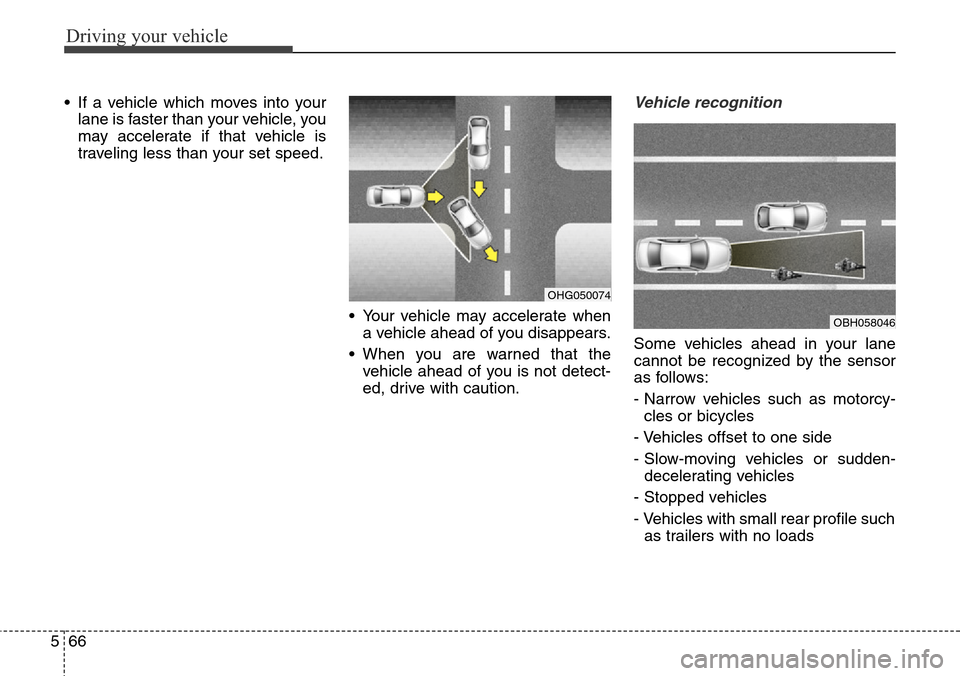
• If a vehicle which moves into your
lane is faster than your vehicle, you
may accelerate if that vehicle is
traveling less than your set speed.
• Your vehicle may accelerate when
a vehicle ahead of you disappears.
• When you are warned that the
vehicle ahead of you is not detect-
ed, drive with caution.Vehicle recognition
Some vehicles ahead in your lane
cannot be recognized by the sensor
as follows:
- Narrow vehicles such as motorcy-
cles or bicycles
- Vehicles offset to one side
- Slow-moving vehicles or sudden-
decelerating vehicles
- Stopped vehicles
- Vehicles with small rear profile such
as trailers with no loads
OHG050074
OBH058046
Page 334 of 483
573
Driving your vehicle
DRIVER'S ATTENTION
The driver must be cautious in the
below situations for the system may
not assist the driver and may not
work properly.
• The lane is not visible due to snow,
rain, stain, a puddle or many other
things.
• The brightness of the outside
changes suddenly such as passing
through a tunnel.
• Not turning on the headlight or
the light is weak even at night or in
a tunnel.
• Difficult to distinguish the color of
the lane marker from the road.
• Driving on a steep grade or a
curve.
• Light reflects from the water on
the road such as sunlight, street-
light or the light of oncoming vehi-
cles.
• The lens or windshield is stained
with foreign matters.
• The sensor cannot detect the lane
because of fog, heavy rain or
heavy snow.
• The surrounding of the inside rear
view mirror temperature is high
due to direct light.• The lane is very wide or narrow.
• The lane marker is damaged or
indistinct.
• The shadow is on the lane marker
by a median strip.
• There is a mark similar to a lane
marker.
• There is a boundary structure.
• The distance from vehicle ahead is
very short or the vehicle ahead
drives hiding the lane marker.
• The vehicle shakes heavily.
• The lane number increases or
decreases or the lane marker are
crossing complicatedly.
• Placing something on the dash-
board.
• Driving with the sun in front of
you.
• Driving in areas under construc-
tion.
• The lane marker is more than two.
• The lane marker in a tunnel is
hard to distinguish due to dust or
grease.
• The lane marker is hard to distin-
guish after raining at night.
• The lane marker is hard to distin-
guish due to dust.
Page 339 of 483
Driving your vehicle
78 5
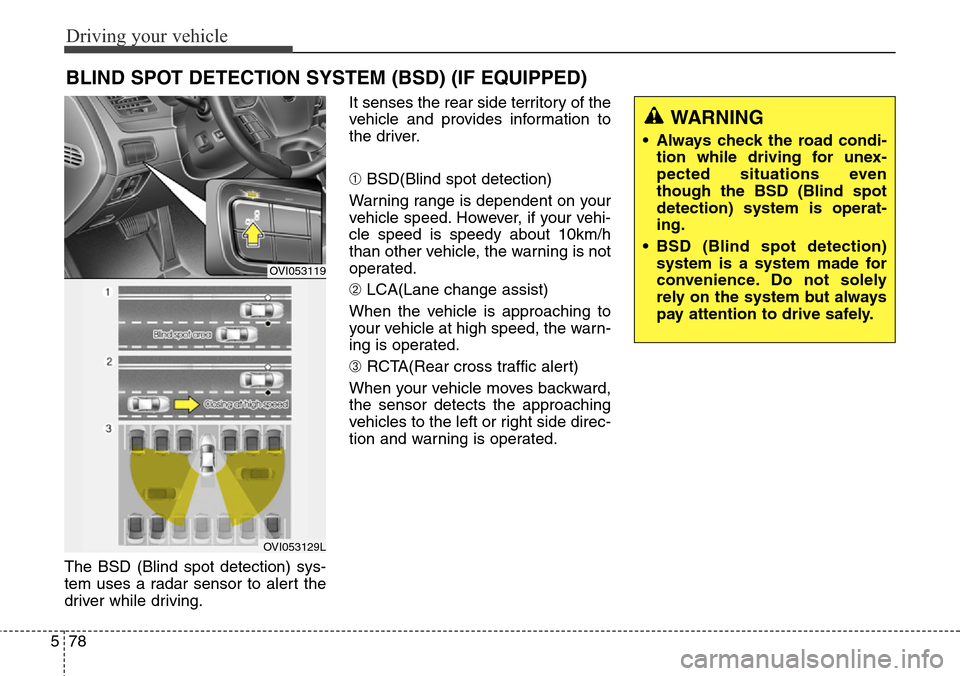
The BSD (Blind spot detection) sys-
tem uses a radar sensor to alert the
driver while driving.It senses the rear side territory of the
vehicle and provides information to
the driver.
➀BSD(Blind spot detection)
Warning range is dependent on your
vehicle speed. However, if your vehi-
cle speed is speedy about 10km/h
than other vehicle, the warning is not
operated.
➁LCA(Lane change assist)
When the vehicle is approaching to
your vehicle at high speed, the warn-
ing is operated.
➂RCTA(Rear cross traffic alert)
When your vehicle moves backward,
the sensor detects the approaching
vehicles to the left or right side direc-
tion and warning is operated.
BLIND SPOT DETECTION SYSTEM (BSD) (IF EQUIPPED)
OVI053119
OVI053129L
WARNING
• Always check the road condi-
tion while driving for unex-
pected situations even
though the BSD (Blind spot
detection) system is operat-
ing.
• BSD (Blind spot detection)
system is a system made for
convenience. Do not solely
rely on the system but always
pay attention to drive safely.
Page 340 of 483
579
Driving your vehicle
Operating conditions
The indicator on the switch will illumi-
nate when the BSD (Blind spot
detection) system switch is pressed
with the ignition switch ON. If vehicle
speed exceeds 15 km/h (9.3 mph),
the system will activate.
If you press the switch again, the
switch indicator and system will be
turned off.
If the ignition switch is turned OFF
and ON the system returns to the
previous state.
When the system is not used turn the
system off by turning off the switch.
When the system is turned on the
warning light will illuminate for 3 sec-
onds on the outside rearview mirror.
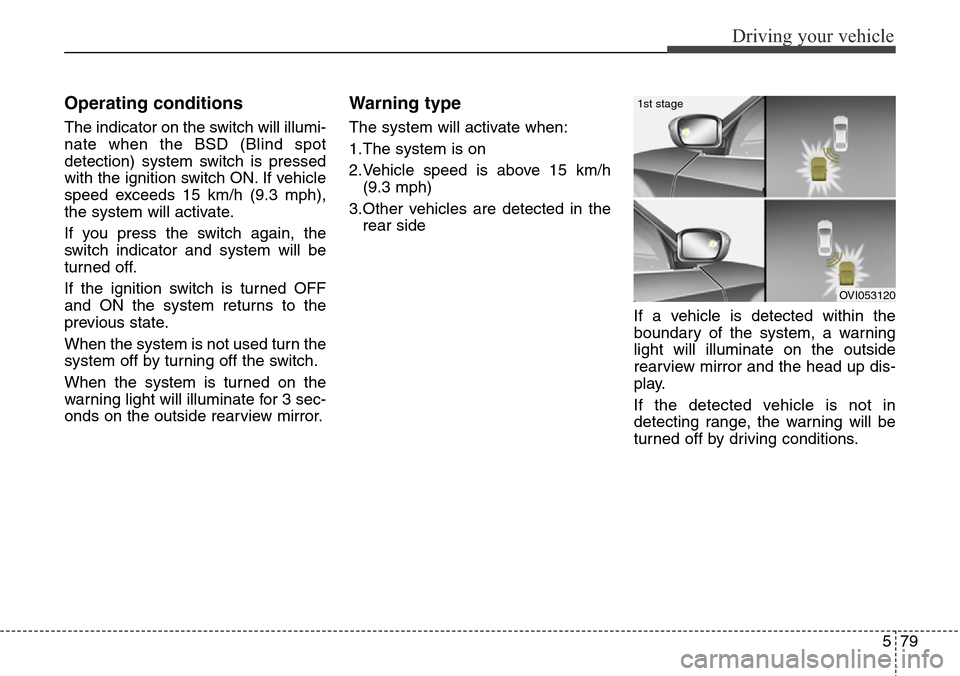
Warning type
The system will activate when:
1.The system is on
2.Vehicle speed is above 15 km/h
(9.3 mph)
3.Other vehicles are detected in the
rear side
If a vehicle is detected within the
boundary of the system, a warning
light will illuminate on the outside
rearview mirror and the head up dis-
play.
If the detected vehicle is not in
detecting range, the warning will be
turned off by driving conditions.
OVI053120
1st stage
Page 341 of 483
Driving your vehicle
80 5
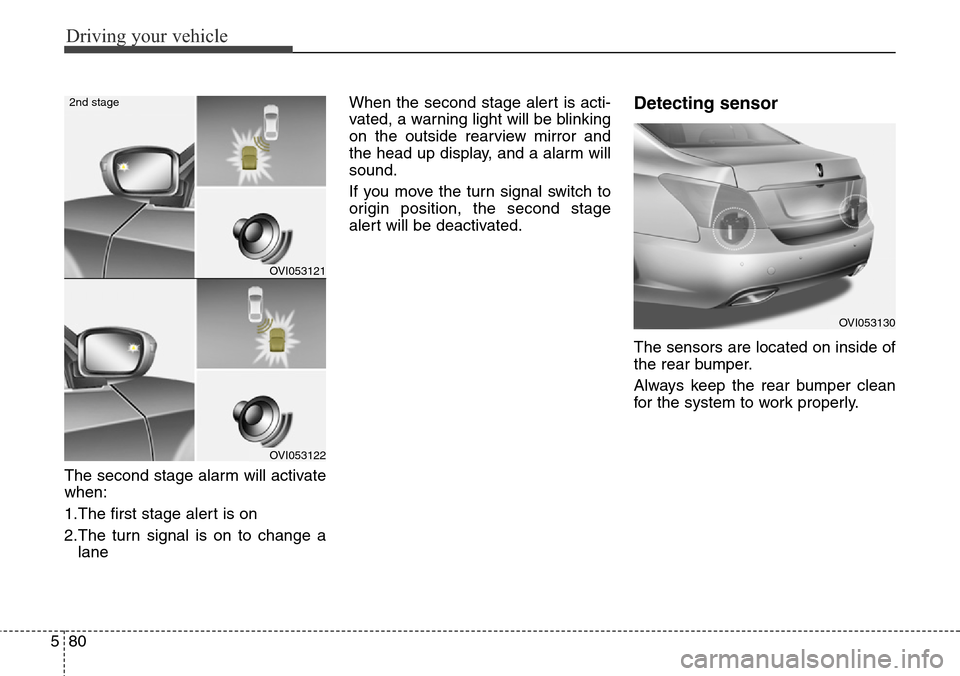
The second stage alarm will activate
when:
1.The first stage alert is on
2.The turn signal is on to change a
laneWhen the second stage alert is acti-
vated, a warning light will be blinking
on the outside rearview mirror and
the head up display, and a alarm will
sound.
If you move the turn signal switch to
origin position, the second stage
alert will be deactivated.
Detecting sensor
The sensors are located on inside of
the rear bumper.
Always keep the rear bumper clean
for the system to work properly.
OVI053121
OVI053122
2nd stage
OVI053130
Page 342 of 483
581
Driving your vehicle
Warning message
The message will appear to notify
the driver if there are foreign sub-
stances on the rear bumper. The light
on the switch and the system will
turn off automatically.
Remove the foreign substance on the
rear bumper.
After the foreign substance is removed,
if you drive for approximately 10 min-
utes, the system will work normally.
If the system does not work normally
even though the foreign substance is
removed, we recommend that you
take your vehicle to an authorized
HYUNDAI dealer and have the system
checked.
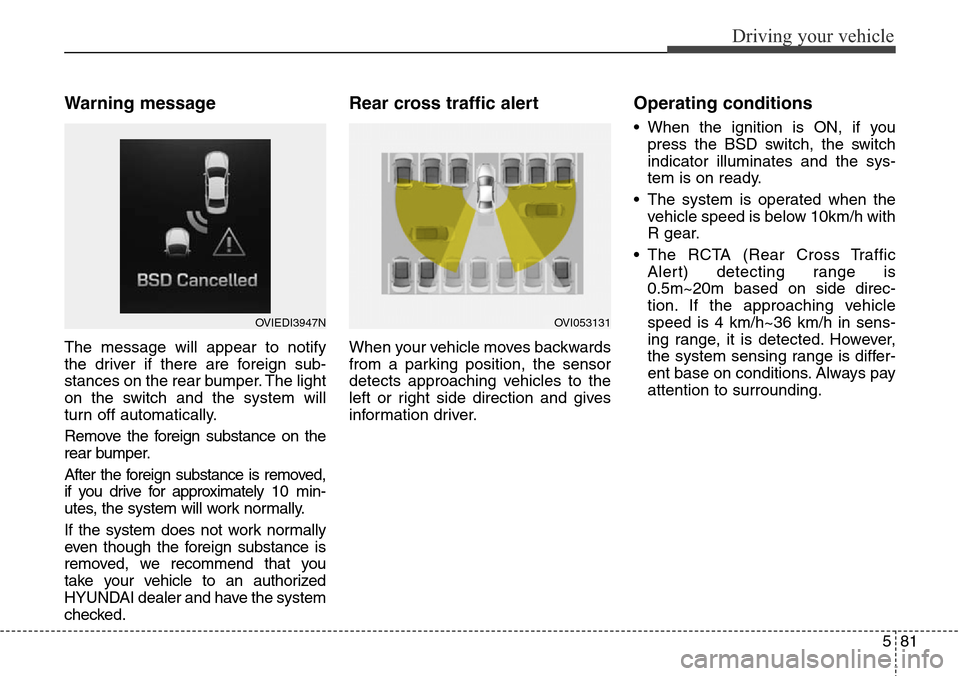
Rear cross traffic alert
When your vehicle moves backwards
from a parking position, the sensor
detects approaching vehicles to the
left or right side direction and gives
information driver.
Operating conditions
• When the ignition is ON, if you
press the BSD switch, the switch
indicator illuminates and the sys-
tem is on ready.
• The system is operated when the
vehicle speed is below 10km/h with
R gear.
• The RCTA (Rear Cross Traffic
Alert) detecting range is
0.5m~20m based on side direc-
tion. If the approaching vehicle
speed is 4 km/h~36 km/h in sens-
ing range, it is detected. However,
the system sensing range is differ-
ent base on conditions. Always pay
attention to surrounding.
OVIEDI3947NOVI053131
Page 343 of 483
Driving your vehicle
82 5
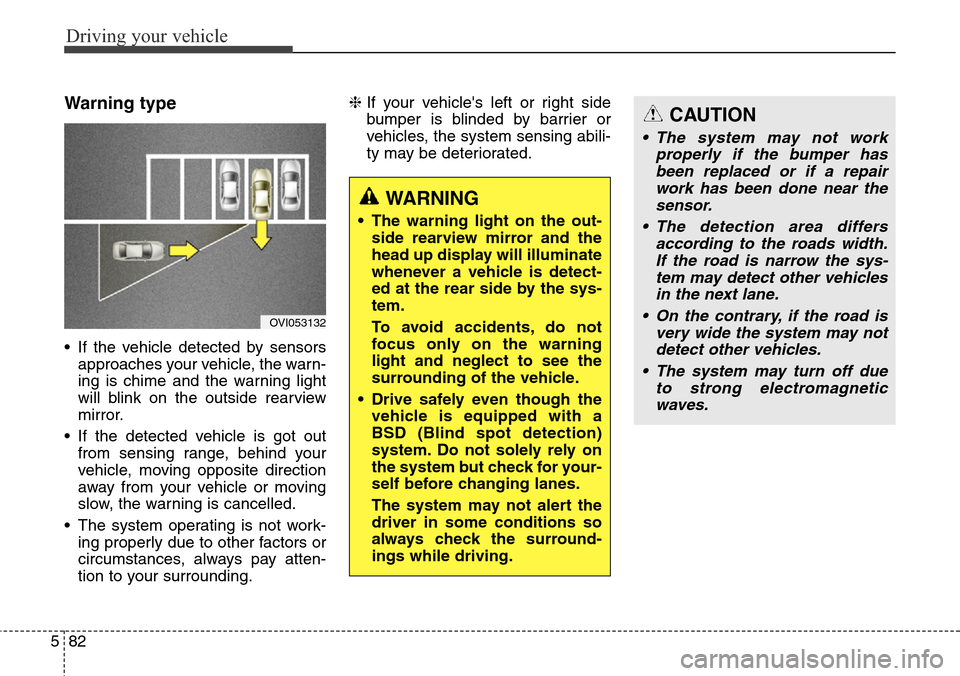
Warning type
• If the vehicle detected by sensors
approaches your vehicle, the warn-
ing is chime and the warning light
will blink on the outside rearview
mirror.
• If the detected vehicle is got out
from sensing range, behind your
vehicle, moving opposite direction
away from your vehicle or moving
slow, the warning is cancelled.
• The system operating is not work-
ing properly due to other factors or
circumstances, always pay atten-
tion to your surrounding.❈If your vehicle's left or right side
bumper is blinded by barrier or
vehicles, the system sensing abili-
ty may be deteriorated.
OVI053132
WARNING
• The warning light on the out-
side rearview mirror and the
head up display will illuminate
whenever a vehicle is detect-
ed at the rear side by the sys-
tem.
To avoid accidents, do not
focus only on the warning
light and neglect to see the
surrounding of the vehicle.
• Drive safely even though the
vehicle is equipped with a
BSD (Blind spot detection)
system. Do not solely rely on
the system but check for your-
self before changing lanes.
The system may not alert the
driver in some conditions so
always check the surround-
ings while driving.
CAUTION
• The system may not work
properly if the bumper has
been replaced or if a repair
work has been done near the
sensor.
• The detection area differs
according to the roads width.
If the road is narrow the sys-
tem may detect other vehicles
in the next lane.
• On the contrary, if the road is
very wide the system may not
detect other vehicles.
• The system may turn off due
to strong electromagnetic
waves.
Page 344 of 483
583
Driving your vehicle
Non-operating condition
Driver's Attention
The driver must be cautious in the
below situations for the system may
not assist the driver and may not
work properly.
- Curved roads, tollgates, etc.
- The surrounding of the sensor is
polluted with rain, snow, mud, etc
- The rear bumper near the sensor is
covered or hidden with a foreign
matter such as a sticker, bumper
guard, bicycle stand etc.
- The rear bumper is damaged or the
sensor is out of place.
- The height of the vehicle shows
much change such as when the
trunk is loaded with heavy objects,
abnormal tire pressure etc.
- Due to bad weather such as heavy
rain or snow.
- A fixed object is near such as a
guardrail, etc.
- A lot of amount of metal sub-
stances are near the vehicles such
as a construction area.- A big vehicle is near such as a bus
or truck.
- A motorcycle or bicycle is near.
- A flat trailer like vehicle is near.
- If the vehicle has started at the
same time as the vehicle next to it
and has accelerated.
- When the other vehicle passes by
very fast.
- When changing lanes.
- When going down or up a steep
road where the height of the lane is
different.
- When the other vehicle drives at
the rear very nearby or drives very
close.
- When a trailer or carrier is installed.
- When the temperature of rear
bumper is high
- When the sensors are covered by
the vehicle, wall and pillar of park-
ing lot
- When your vehicle moves back, if
the detected vehicle also moves
back
- If there is small things like shopping
cart and baby carriage- If there is low height vehicle like
sport vehicle
- When the vehicle is closing to your
vehicle
- When driving through a narrow
road with many trees or bushes.
Outside rearview mirror may not
alert the driver when:
- The outside rearview mirror hous-
ing is severely polluted
- The window is severely polluted
- The windows are severely tinted.
Page 353 of 483
Driving your vehicle
92 5
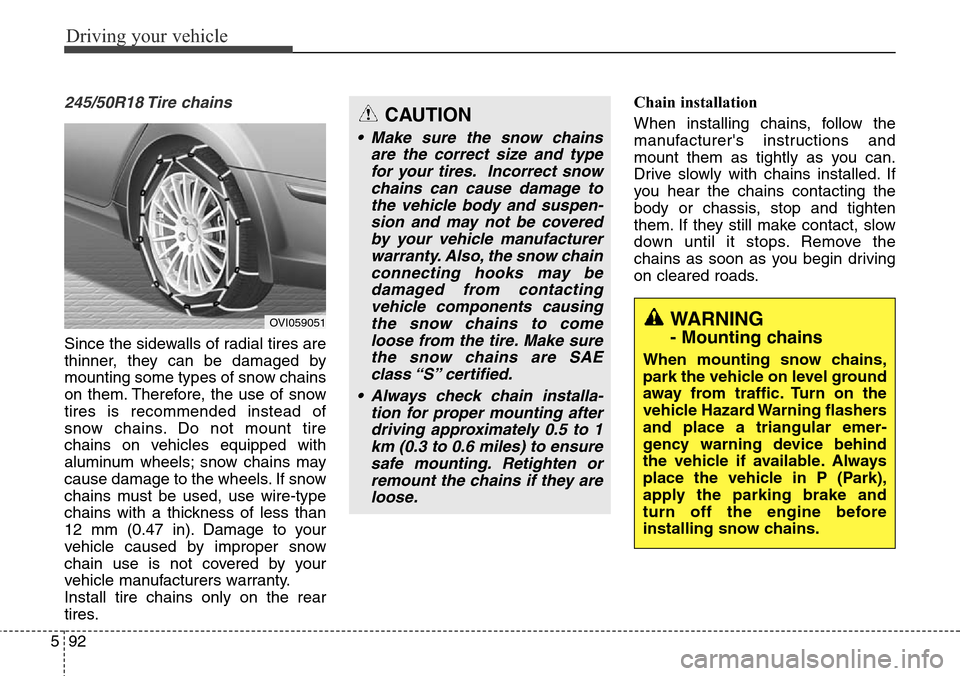
245/50R18 Tire chains
Since the sidewalls of radial tires are
thinner, they can be damaged by
mounting some types of snow chains
on them. Therefore, the use of snow
tires is recommended instead of
snow chains. Do not mount tire
chains on vehicles equipped with
aluminum wheels; snow chains may
cause damage to the wheels. If snow
chains must be used, use wire-type
chains with a thickness of less than
12 mm (0.47 in). Damage to your
vehicle caused by improper snow
chain use is not covered by your
vehicle manufacturers warranty.
Install tire chains only on the rear
tires.Chain installation
When installing chains, follow the
manufacturer's instructions and
mount them as tightly as you can.
Drive slowly with chains installed. If
you hear the chains contacting the
body or chassis, stop and tighten
them. If they still make contact, slow
down until it stops. Remove the
chains as soon as you begin driving
on cleared roads.
CAUTION
• Make sure the snow chains
are the correct size and type
for your tires. Incorrect snow
chains can cause damage to
the vehicle body and suspen-
sion and may not be covered
by your vehicle manufacturer
warranty. Also, the snow chain
connecting hooks may be
damaged from contacting
vehicle components causing
the snow chains to come
loose from the tire. Make sure
the snow chains are SAE
class “S” certified.
• Always check chain installa-
tion for proper mounting after
driving approximately 0.5 to 1
km (0.3 to 0.6 miles) to ensure
safe mounting. Retighten or
remount the chains if they are
loose.
WARNING
- Mounting chains
When mounting snow chains,
park the vehicle on level ground
away from traffic. Turn on the
vehicle Hazard Warning flashers
and place a triangular emer-
gency warning device behind
the vehicle if available. Always
place the vehicle in P (Park),
apply the parking brake and
turn off the engine before
installing snow chains.
OVI059051
Page 354 of 483
593
Driving your vehicle
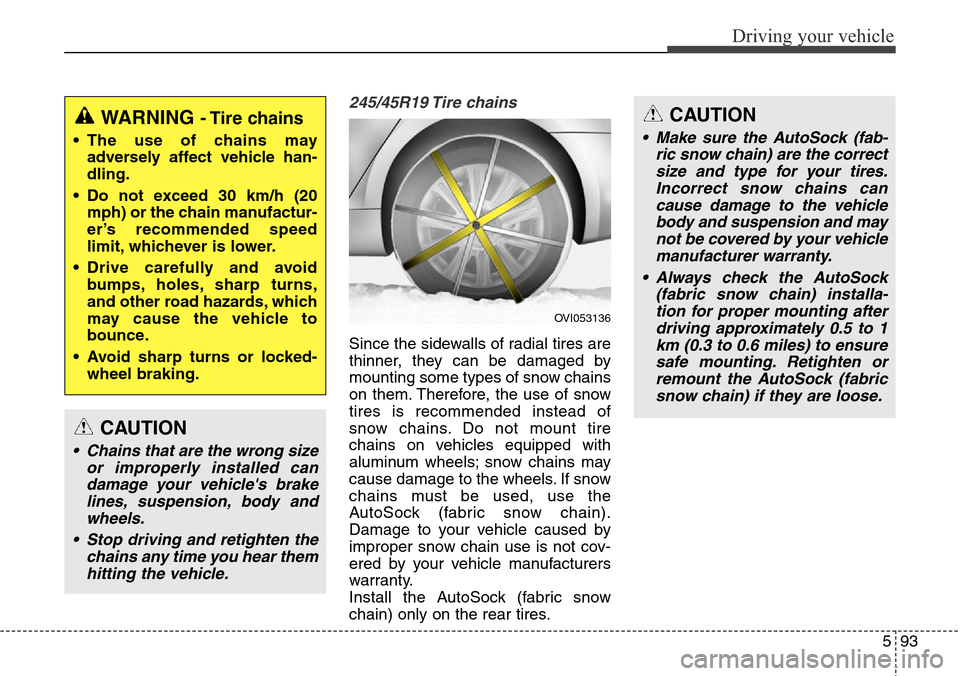
245/45R19 Tire chains
Since the sidewalls of radial tires are
thinner, they can be damaged by
mounting some types of snow chains
on them. Therefore, the use of snow
tires is recommended instead of
snow chains. Do not mount tire
chains on vehicles equipped with
aluminum wheels; snow chains may
cause damage to the wheels. If snow
chains must be used, use the
AutoSock (fabric snow chain).
Damage to your vehicle caused by
improper snow chain use is not cov-
ered by your vehicle manufacturers
warranty.
Install the AutoSock (fabric snow
chain) only on the rear tires.
WARNING - Tire chains
• The use of chains may
adversely affect vehicle han-
dling.
• Do not exceed 30 km/h (20
mph) or the chain manufactur-
er’s recommended speed
limit, whichever is lower.
• Drive carefully and avoid
bumps, holes, sharp turns,
and other road hazards, which
may cause the vehicle to
bounce.
• Avoid sharp turns or locked-
wheel braking.
CAUTION
• Chains that are the wrong size
or improperly installed can
damage your vehicle's brake
lines, suspension, body and
wheels.
• Stop driving and retighten the
chains any time you hear them
hitting the vehicle.
CAUTION
• Make sure the AutoSock (fab-
ric snow chain) are the correct
size and type for your tires.
Incorrect snow chains can
cause damage to the vehicle
body and suspension and may
not be covered by your vehicle
manufacturer warranty.
• Always check the AutoSock
(fabric snow chain) installa-
tion for proper mounting after
driving approximately 0.5 to 1
km (0.3 to 0.6 miles) to ensure
safe mounting. Retighten or
remount the AutoSock (fabric
snow chain) if they are loose.
OVI053136