rear Hyundai Equus 2015 Manual PDF
[x] Cancel search | Manufacturer: HYUNDAI, Model Year: 2015, Model line: Equus, Model: Hyundai Equus 2015Pages: 483, PDF Size: 13.26 MB
Page 146 of 483
457
Features of your vehicle
Reverse parking aid function
(if equipped)
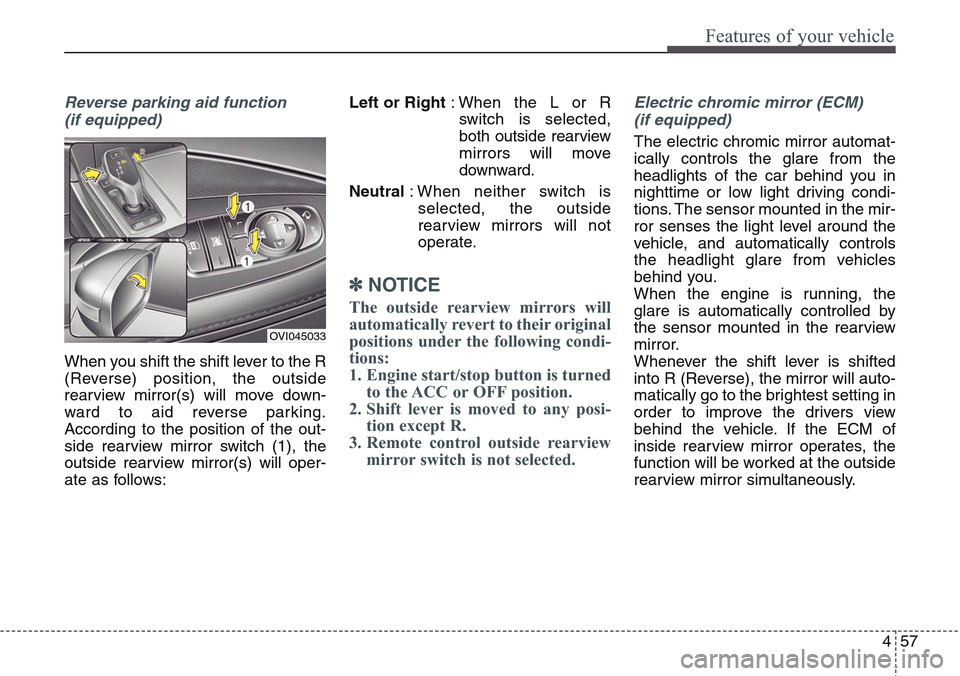
When you shift the shift lever to the R
(Reverse) position, the outside
rearview mirror(s) will move down-
ward to aid reverse parking.
According to the position of the out-
side rearview mirror switch (1), the
outside rearview mirror(s) will oper-
ate as follows:Left or Right: When the L or R
switch is selected,
both outside rearview
mirrors will move
downward.
Neutral: When neither switch is
selected, the outside
rearview mirrors will not
operate.
✽NOTICE
The outside rearview mirrors will
automatically revert to their original
positions under the following condi-
tions:
1. Engine start/stop button is turned
to the ACC or OFF position.
2. Shift lever is moved to any posi-
tion except R.
3. Remote control outside rearview
mirror switch is not selected.
Electric chromic mirror (ECM)
(if equipped)
The electric chromic mirror automat-
ically controls the glare from the
headlights of the car behind you in
nighttime or low light driving condi-
tions. The sensor mounted in the mir-
ror senses the light level around the
vehicle, and automatically controls
the headlight glare from vehicles
behind you.
When the engine is running, the
glare is automatically controlled by
the sensor mounted in the rearview
mirror.
Whenever the shift lever is shifted
into R (Reverse), the mirror will auto-
matically go to the brightest setting in
order to improve the drivers view
behind the vehicle. If the ECM of
inside rearview mirror operates, the
function will be worked at the outside
rearview mirror simultaneously.
OVI045033
Page 147 of 483
Features of your vehicle
58 4
Folding the outside rearview mirror
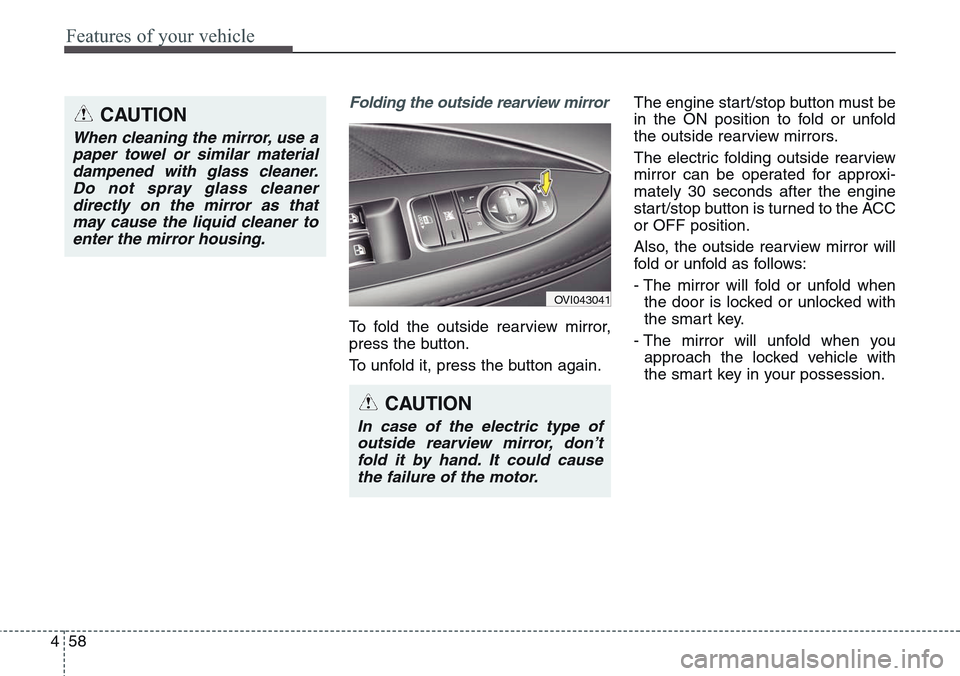
To fold the outside rearview mirror,
press the button.
To unfold it, press the button again.The engine start/stop button must be
in the ON position to fold or unfold
the outside rearview mirrors.
The electric folding outside rearview
mirror can be operated for approxi-
mately 30 seconds after the engine
start/stop button is turned to the ACC
or OFF position.
Also, the outside rearview mirror will
fold or unfold as follows:
- The mirror will fold or unfold when
the door is locked or unlocked with
the smart key.
- The mirror will unfold when you
approach the locked vehicle with
the smart key in your possession.
OVI043041
CAUTION
In case of the electric type of
outside rearview mirror, don’t
fold it by hand. It could cause
the failure of the motor.
CAUTION
When cleaning the mirror, use a
paper towel or similar material
dampened with glass cleaner.
Do not spray glass cleaner
directly on the mirror as that
may cause the liquid cleaner to
enter the mirror housing.
Page 166 of 483
477
Features of your vehicle
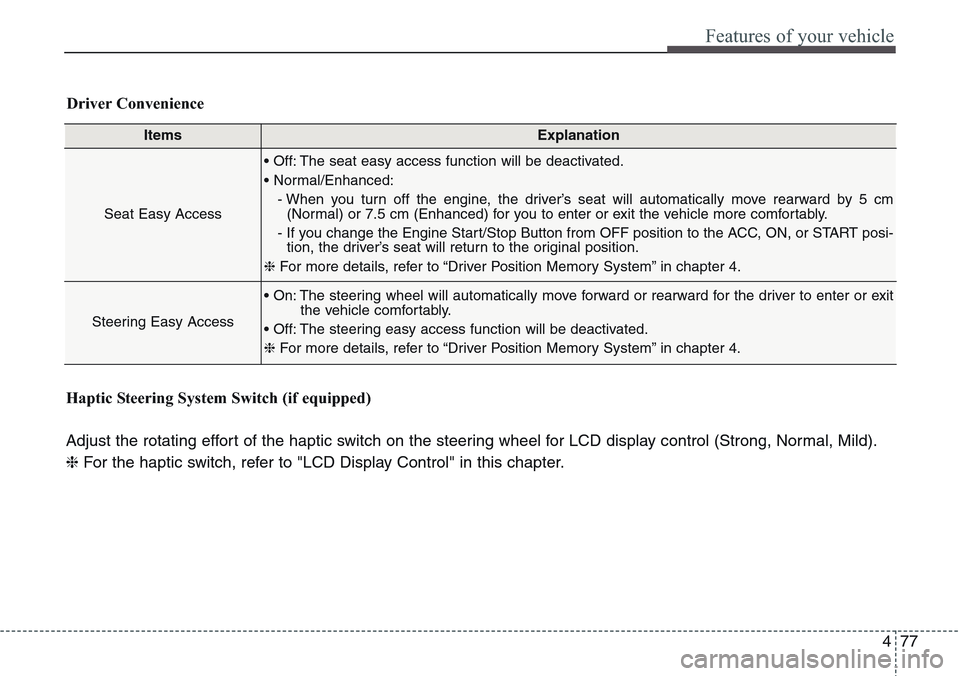
ItemsExplanation
Seat Easy Access
• Off: The seat easy access function will be deactivated.
• Normal/Enhanced:
- When you turn off the engine, the driver’s seat will automatically move rearward by 5 cm
(Normal) or 7.5 cm (Enhanced) for you to enter or exit the vehicle more comfortably.
- If you change the Engine Start/Stop Button from OFF position to the ACC, ON, or START posi-
tion, the driver’s seat will return to the original position.
❈For more details, refer to “Driver Position Memory System” in chapter 4.
Steering Easy Access
• On: The steering wheel will automatically move forward or rearward for the driver to enter or exit
the vehicle comfortably.
• Off: The steering easy access function will be deactivated.
❈For more details, refer to “Driver Position Memory System” in chapter 4.
Driver Convenience
Haptic Steering System Switch (if equipped)
Adjust the rotating effort of the haptic switch on the steering wheel for LCD display control (Strong, Normal, Mild).
❈For the haptic switch, refer to "LCD Display Control" in this chapter.
Page 194 of 483
4 105
Features of your vehicle
Front Fog Indicator
Light (if equipped)
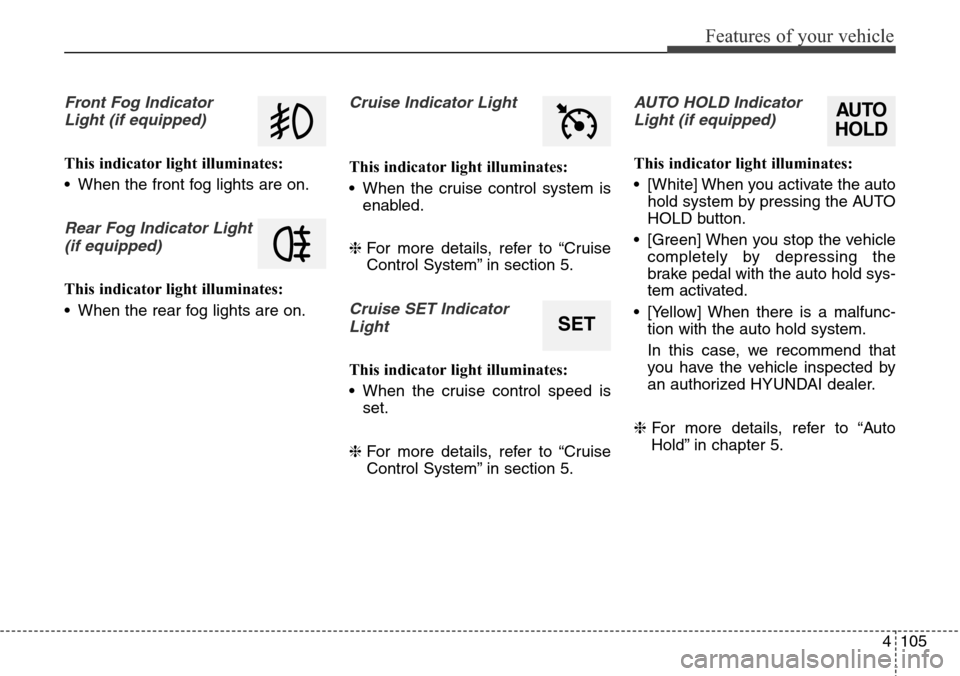
This indicator light illuminates:
• When the front fog lights are on.
Rear Fog Indicator Light
(if equipped)
This indicator light illuminates:
• When the rear fog lights are on.
Cruise Indicator Light
This indicator light illuminates:
• When the cruise control system is
enabled.
❈For more details, refer to “Cruise
Control System” in section 5.
Cruise SET Indicator
Light
This indicator light illuminates:
• When the cruise control speed is
set.
❈For more details, refer to “Cruise
Control System” in section 5.
AUTO HOLD Indicator
Light (if equipped)
This indicator light illuminates:
• [White] When you activate the auto
hold system by pressing the AUTO
HOLD button.
• [Green] When you stop the vehicle
completely by depressing the
brake pedal with the auto hold sys-
tem activated.
• [Yellow] When there is a malfunc-
tion with the auto hold system.
In this case, we recommend that
you have the vehicle inspected by
an authorized HYUNDAI dealer.
❈For more details, refer to “Auto
Hold” in chapter 5.
SET
AUTO
HOLD
Page 200 of 483
4111
Features of your vehicle
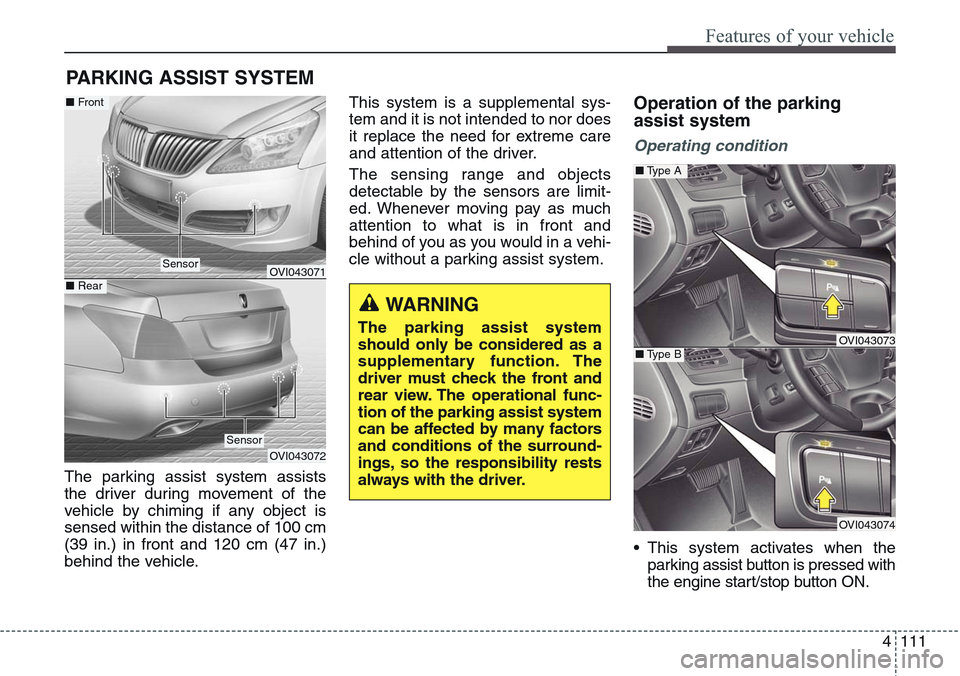
The parking assist system assists
the driver during movement of the
vehicle by chiming if any object is
sensed within the distance of 100 cm
(39 in.) in front and 120 cm (47 in.)
behind the vehicle.This system is a supplemental sys-
tem and it is not intended to nor does
it replace the need for extreme care
and attention of the driver.
The sensing range and objects
detectable by the sensors are limit-
ed. Whenever moving pay as much
attention to what is in front and
behind of you as you would in a vehi-
cle without a parking assist system.
Operation of the parking
assist system
Operating condition
• This system activates when the
parking assist button is pressed with
the engine start/stop button ON.
PARKING ASSIST SYSTEM
WARNING
The parking assist system
should only be considered as a
supplementary function. The
driver must check the front and
rear view. The operational func-
tion of the parking assist system
can be affected by many factors
and conditions of the surround-
ings, so the responsibility rests
always with the driver.
OVI043071
OVI043072
Sensor
■Front
■ Rear
Sensor
OVI043073
OVI043074
■Type A
■Type B
Page 201 of 483
Features of your vehicle
112 4
• The parking assist button turns on
automatically and activates the
parking assist system when you
shift the gear to the R (Reverse)
position. It will turn off automatical-
ly when you shift out of R (Reverse)
and drive above 20 km/h.
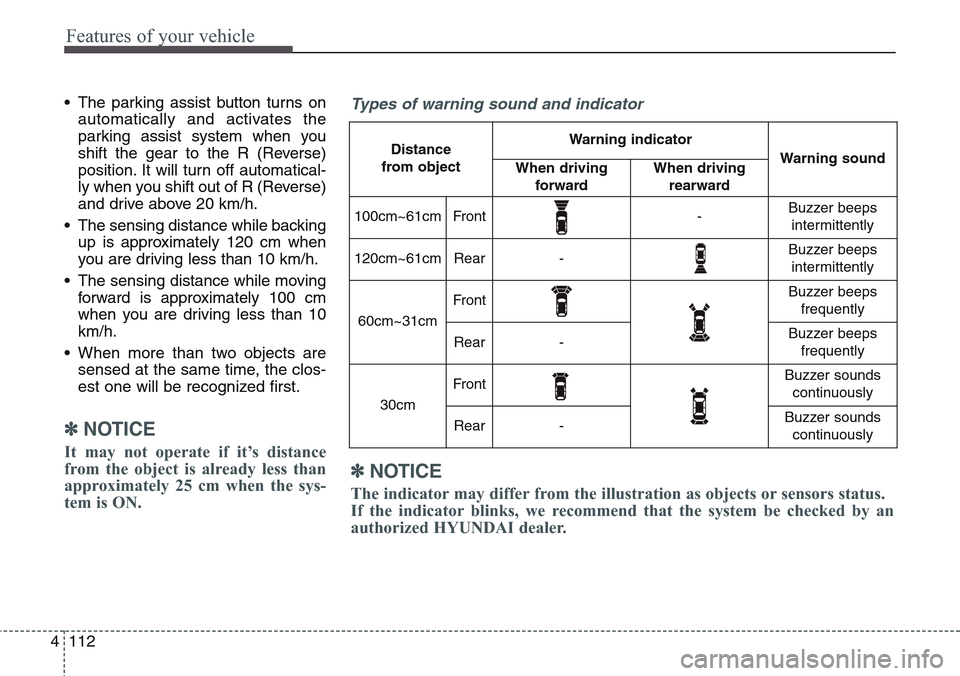
• The sensing distance while backing
up is approximately 120 cm when
you are driving less than 10 km/h.
• The sensing distance while moving
forward is approximately 100 cm
when you are driving less than 10
km/h.
• When more than two objects are
sensed at the same time, the clos-
est one will be recognized first.
✽NOTICE
It may not operate if it’s distance
from the object is already less than
approximately 25 cm when the sys-
tem is ON.
✽NOTICE
The indicator may differ from the illustration as objects or sensors status.
If the indicator blinks, we recommend that the system be checked by an
authorized HYUNDAI dealer.
Types of warning sound and indicator
Distance
from object Warning indicator
Warning soundWhen driving
forwardWhen driving
rearward
100cm~61cmFront-Buzzer beeps
intermittently
120cm~61cmRear-Buzzer beeps
intermittently
60cm~31cm
FrontBuzzer beeps
frequently
Rear-Buzzer beeps
frequently
30cm
FrontBuzzer sounds
continuously
Rear-Buzzer sounds
continuously
Page 205 of 483
Features of your vehicle
116 4
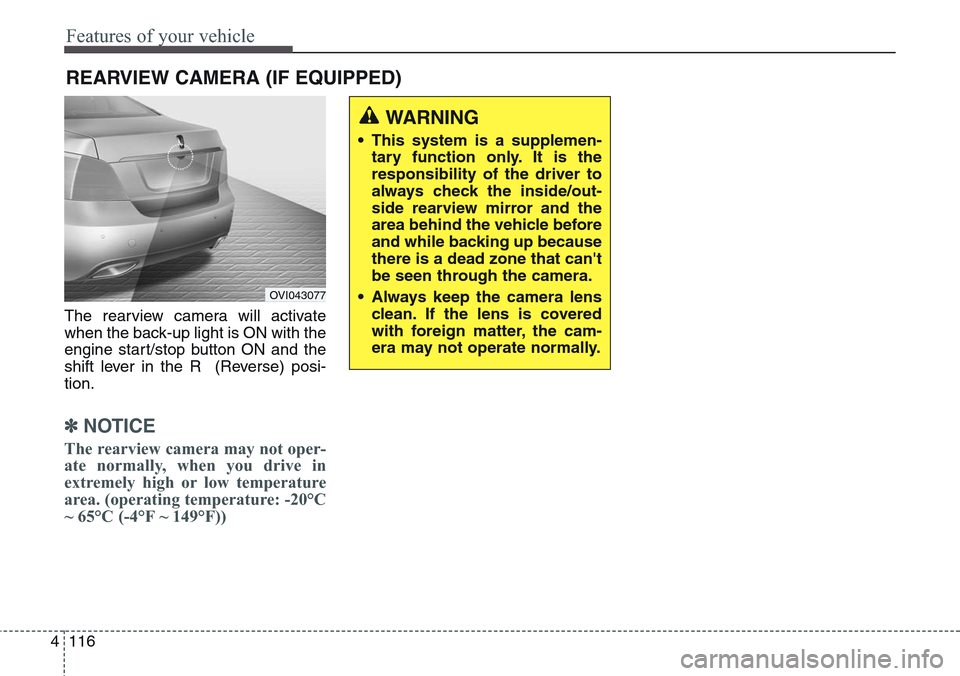
The rearview camera will activate
when the back-up light is ON with the
engine start/stop button ON and the
shift lever in the R (Reverse) posi-
tion.
✽NOTICE
The rearview camera may not oper-
ate normally, when you drive in
extremely high or low temperature
area. (operating temperature: -20°C
~ 65°C (-4°F ~ 149°F))
REARVIEW CAMERA (IF EQUIPPED)
OVI043077
WARNING
• This system is a supplemen-
tary function only. It is the
responsibility of the driver to
always check the inside/out-
side rearview mirror and the
area behind the vehicle before
and while backing up because
there is a dead zone that can't
be seen through the camera.
• Always keep the camera lens
clean. If the lens is covered
with foreign matter, the cam-
era may not operate normally.
Page 207 of 483
Features of your vehicle
118 4
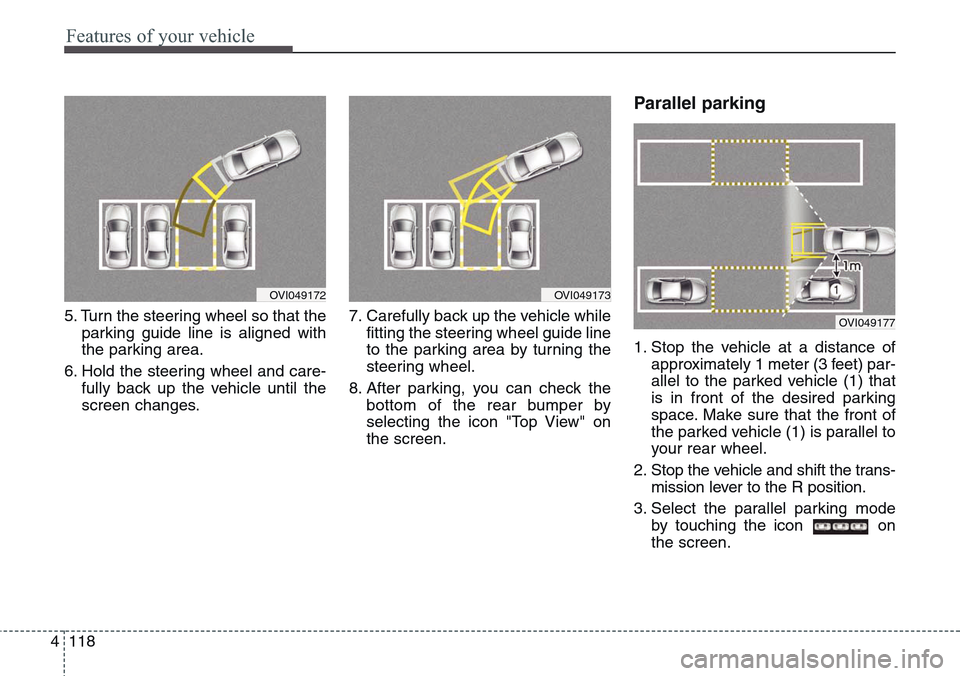
5. Turn the steering wheel so that the
parking guide line is aligned with
the parking area.
6. Hold the steering wheel and care-
fully back up the vehicle until the
screen changes.7. Carefully back up the vehicle while
fitting the steering wheel guide line
to the parking area by turning the
steering wheel.
8. After parking, you can check the
bottom of the rear bumper by
selecting the icon "Top View" on
the screen.
Parallel parking
1. Stop the vehicle at a distance of
approximately 1 meter (3 feet) par-
allel to the parked vehicle (1) that
is in front of the desired parking
space. Make sure that the front of
the parked vehicle (1) is parallel to
your rear wheel.
2. Stop the vehicle and shift the trans-
mission lever to the R position.
3. Select the parallel parking mode
by touching the icon on
the screen.
OVI049173OVI049172
OVI049177
Page 208 of 483
4119
Features of your vehicle
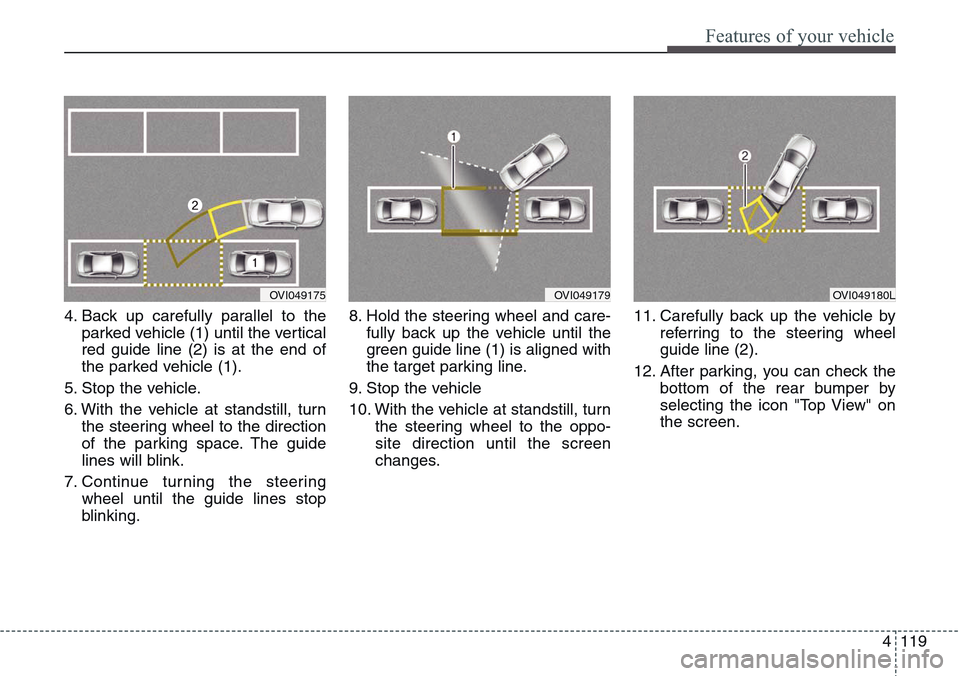
4. Back up carefully parallel to the
parked vehicle (1) until the vertical
red guide line (2) is at the end of
the parked vehicle (1).
5. Stop the vehicle.
6. With the vehicle at standstill, turn
the steering wheel to the direction
of the parking space. The guide
lines will blink.
7. Continue turning the steering
wheel until the guide lines stop
blinking.8. Hold the steering wheel and care-
fully back up the vehicle until the
green guide line (1) is aligned with
the target parking line.
9. Stop the vehicle
10. With the vehicle at standstill, turn
the steering wheel to the oppo-
site direction until the screen
changes.11. Carefully back up the vehicle by
referring to the steering wheel
guide line (2).
12. After parking, you can check the
bottom of the rear bumper by
selecting the icon "Top View" on
the screen.
OVI049175OVI049179OVI049180L
Page 209 of 483
![Hyundai Equus 2015 Manual PDF Features of your vehicle
120 4
This is the parking support system to
show around circumstance when you
park the vehicle in monitor. When
you push the button in [ON] position,
it is operated. To cancel](/img/35/14638/w960_14638-208.png "Hyundai Equus 2015 Manual PDF Features of your vehicle
120 4
This is the parking support system to
show around circumstance when you
park the vehicle in monitor. When
you push the button in [ON] position,
it is operated. To cancel")
Features of your vehicle
120 4
This is the parking support system to
show around circumstance when you
park the vehicle in monitor. When
you push the button in [ON] position,
it is operated. To cancel the system,
push again.
Operating conditions
- When ignition is ON
- When the transaxle is on D, N or R
- When the vehicle speed is not over
20km/h• When the vehicle speed is over
20km/h, the AVM system is turned
off. If the vehicle speed is not over
20km/h after turning off the AVM
by over speed, the AVM is not
turned on. To operate again, push
the button.
• When the vehicle moves back-
wards, regardless of On/Off of but-
ton and vehicle speed, the AVM is
operated. And then, if you shift to
the D position and the driving
speed is over 10km/h the AVM is
deactivated.
• When the trunk and driver/passen-
ger door are opened and the out-
side mirror is folded, the warning is
illuminated in AVM system.
• If the AVM system is not normally
operated, we recommend that you
contact an authorized HYUNDAI
dealer.
* AVM : Around View Monitoring
AROUND VIEW MONITORING SYSTEM (IF EQUIPPED)
OVI043400
CAUTION
(1) Front camera
(2) Left/Right
camera
(3) Rear camera
• Around View Monitoring
(AVM) System only serves to
assist the driver in parking.
ALWAYS look around your
vehicle to make sure there are
no objects or obstacles before
moving the vehicle.
• Always keep the camera lens
clean. The camera may not
work normally if the lens is
covered with foreign material.
OHYK045007