battery Hyundai Equus 2016 User Guide
[x] Cancel search | Manufacturer: HYUNDAI, Model Year: 2016, Model line: Equus, Model: Hyundai Equus 2016Pages: 477, PDF Size: 16.25 MB
Page 99 of 477
Rearview camera................................................3-107
Multi-view camera system ...............................3-108
Lighting................................................................3-109
Battery saver function ................................................3-109
Headlamp escort function ..........................................3-109
Lighting control .............................................................3-110
High beam operation....................................................3-111
Turn signals and lane change signals......................3-112
Front fog light ...............................................................3-113
Daytime running light .................................................3-113
Headlight leveling device ...........................................3-113
AFLS (Adaptive Front Lighting System) ..................3-114
Wipers and washer ............................................3-115
Windshield wipers ........................................................3-115
Windshield washer........................................................3-117
Interior light........................................................3-118
Front........................................................................\
.........3-118
Rear ........................................................................\
..........3-119
Trunk room lamp ...........................................................3-119
Door courtesy lamp ......................................................3-119
Glove box lamp ..............................................................3-120
Vanity mirror lamp ........................................................3-120
Welcome system ................................................3-121
Puddle lamp ....................................................................3-12\
1
Headlamp................................................................\
.........3-121
Interior light ..................................................................3-121
Defroster .............................................................3-122
Rear window defroster ...............................................3-122
Front wiper deicer ........................................................3-122
Convenient features ofyour vehicle
Page 103 of 477
(Continued)
• You can control the door unlockmode in the User Settings menu on
the LCD display, such as unlocking
all the doors by pressing the unlock
button one time.
Trunk Unlocking
To unlock:
1. Carry the Smart Key.
2. Press either the trunk handle but- ton or the Trunk Unlock button on
the Smart Key for one second or
over.
3. The hazard warning lights will flash two times.
After opening and closing the trunk,
the trunk will automatically lock.
Information
The power trunk (if equipped) can be
operated even when the engine is not
running. However, the power trunk
consumes large amounts of vehicle
electric power. To prevent the battery
from being discharged, do not operate
it consecutively (more than approxi-
mately 10 times).
Panic Button
Press the Panic button (4) for more
than one second. The horn sounds
and hazard warning lights flash for
about 30 seconds.
To cancel the panic mode, press any
button on the Smart Key.
Start-Up
You can start the engine without
inserting the key. For detailed infor-
mation, refer to the Engine
Start/Stop Button in the chapter 5.
To prevent the Smart Key from
being damaged:
• Keep the Smart Key away from water or any liquid and fire. If the
inside of the Smart Key gets
damp (due to drinks or mois-
ture), or is heated, internal cir-
cuit may malfunction, excluding
the vehicle from the warranty.
Avoid dropping or throwing the Smart Key.
Do not keep the Smart Key at an extreme temperature.
NOTICE
i
3-8
Convenient features of your vehicle
Page 107 of 477
To release:
1. Open the glove box with themechanical key.
2. Set the Trunk Lid Control button to the ON position (depressed).
In this position, the trunk lid will open
with the Trunk Lid button of the Smart
Key.
Battery Replacement
When the Smart Key does not prop-
erly operate, replace the battery with
a new one.
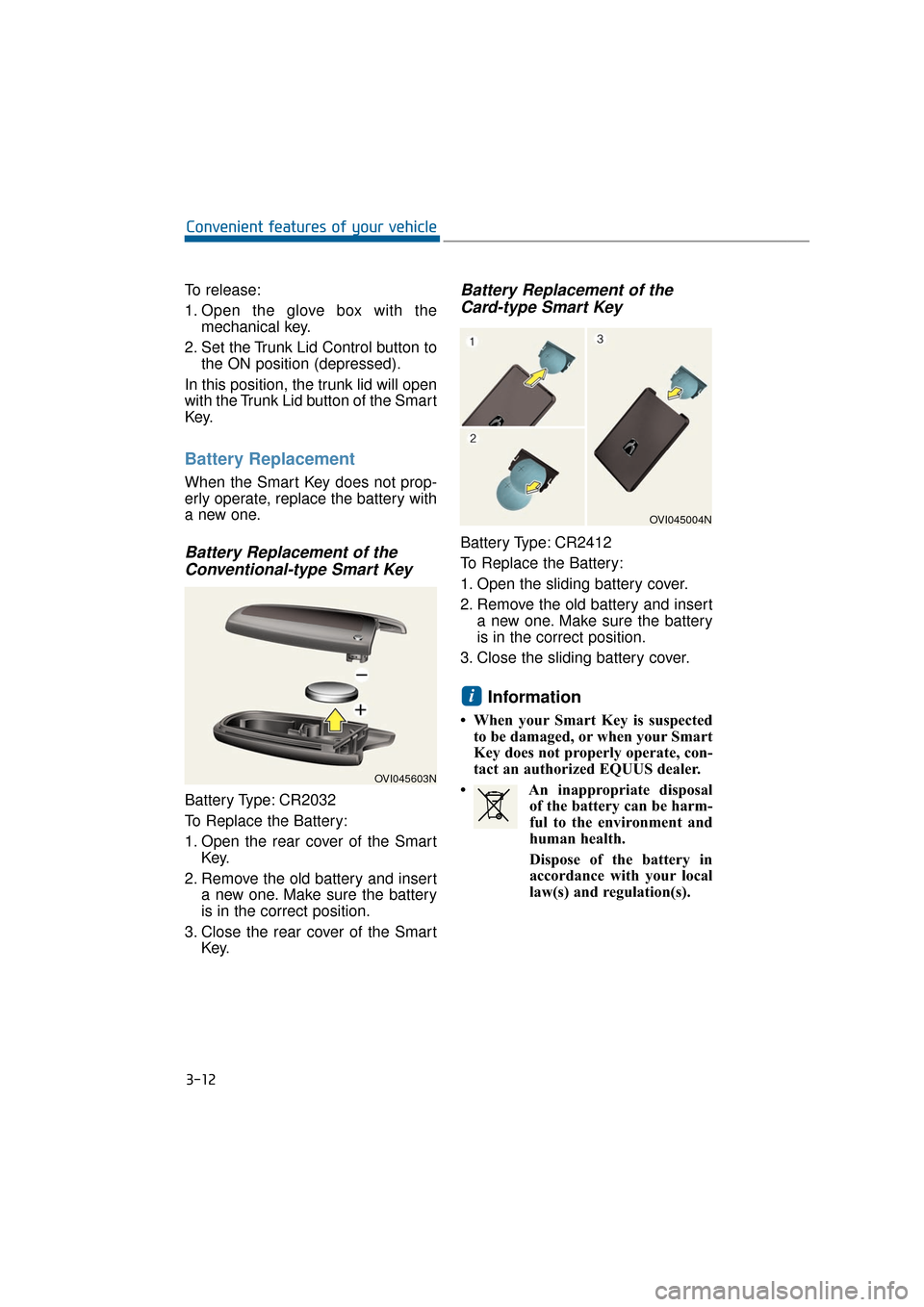
Battery Replacement of the Conventional-type Smart Key
Battery Type: CR2032
To Replace the Battery:
1. Open the rear cover of the Smart
Key.
2. Remove the old battery and insert a new one. Make sure the battery
is in the correct position.
3. Close the rear cover of the Smart Key.
Battery Replacement of theCard-type Smart Key
Battery Type: CR2412
To Replace the Battery:
1. Open the sliding battery cover.
2. Remove the old battery and insert
a new one. Make sure the battery
is in the correct position.
3. Close the sliding battery cover.
Information
• When your Smart Key is suspected to be damaged, or when your Smart
Key does not properly operate, con-
tact an authorized EQUUS dealer.
• An inappropriate disposal of the battery can be harm-
ful to the environment and
human health.
Dispose of the battery in
accordance with your local
law(s) and regulation(s).
i
3-12
Convenient features of your vehicle
OVI045603N
OVI045004N
Page 115 of 477
Information
The Power Trunk Lock button will
not operate in one of the following sit-
uations:
- Any door is open.
- The Engine Start/Stop Button is notOFF.
- The Smart Key is in the vehicle. Do not manually close or open
the Power Trunk. This may dam-
age the Power Trunk. If neces-
sary, when the battery is drained
or disconnected, do not apply
excessive force.
Do not leave the Power Trunk open for a long period of time.
This may drain the battery.
To prevent the trunk lift cylin- ders and other attached compo-
nents from being damaged,
always close the trunk before
driving.
Information
In a cold and wet temperature, trunk
lock and trunk mechanisms may not
properly operate due to freezing con-
ditions.
i
NOTICEi
3-20
Convenient features of your vehicle
Always securely close the trunk
lid while the vehicle is in
motion. When it is still open or
ajar, poisonous exhaust gases
containing carbon monoxide
(CO) may enter the vehicle,
resulting serious illness or
death.
WARNING
Make sure there are no people
or objects around the trunk
before opening or closing the
Power Trunk. Wait until the trunk
is fully open, before loading or
unloading.
WARNING
Never leave children or animals
unattended in your vehicle.
Children or animals may oper-
ate the power trunk, injuring
themselves, others, or vehicle
damage.
WARNING
Page 116 of 477
Power Trunk Non-Opening orClosing Conditions:
The Power Trunk will not operate,
when driving faster than 1.8 mph
(3 km/h).
The Power Trunk is operable when the engine is not running.
However, the Power Trunk opera-
tion consumes large amounts of
vehicle electric power. To prevent
the battery from being drained, do
not operate it excessively (i.e.
more than approximately 10 times
in a consecutive manner.)
Do not modify or repair any part of the Power Trunk by yourself. This
must be done by an authorized
EQUUS dealer.
Before jacking up the vehicle to change a tire or repair the vehicle,
open the Power Trunk. Do not
operate the Power Trunk, when
the vehicle is raised up.
Otherwise, this may cause the
Power Trunk to improperly oper-
ate.
When there are substances, such as snow, on the Power Trunk, it
may not automatically open. After
removing the substances, try to
open it again.
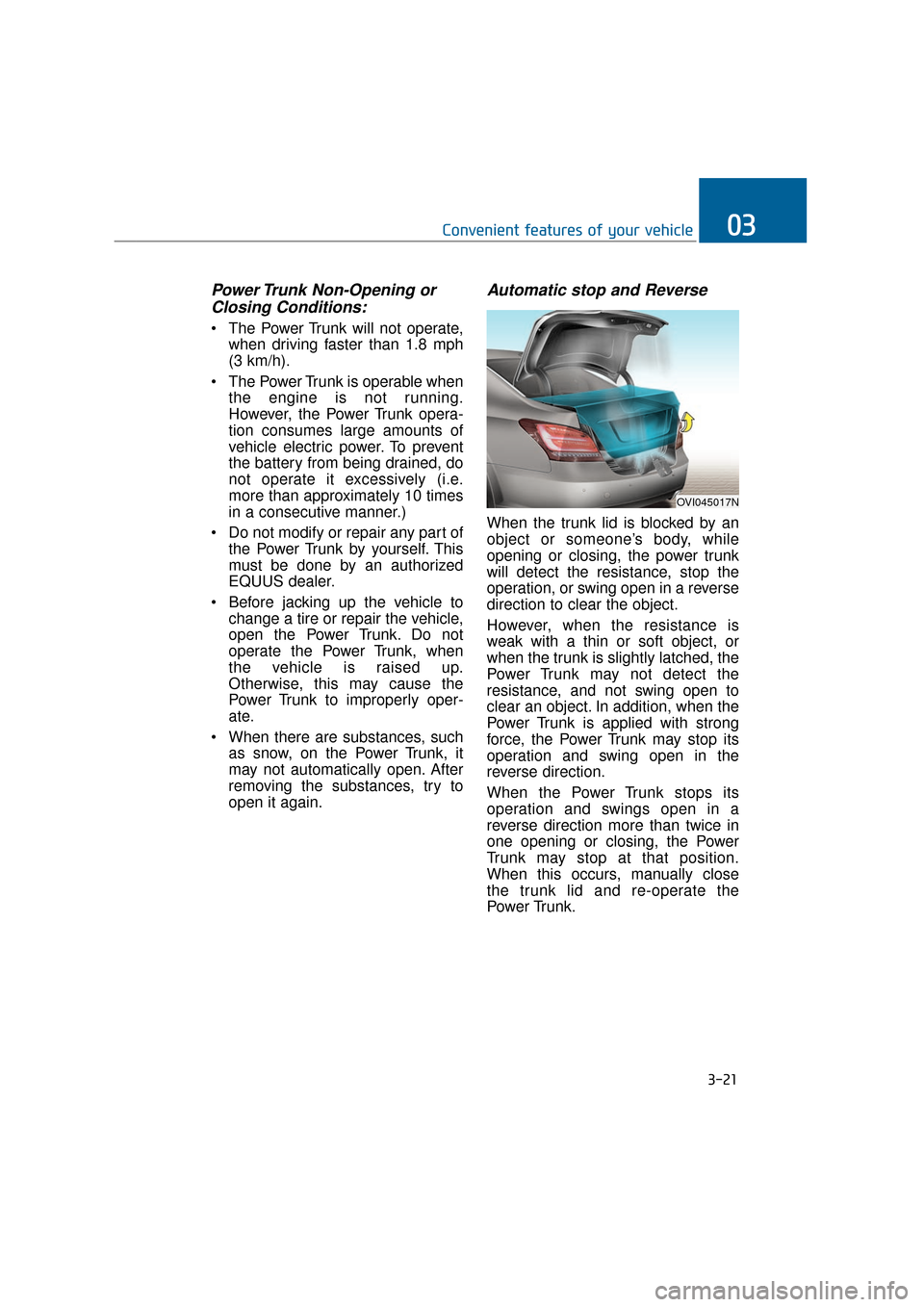
Automatic stop and Reverse
When the trunk lid is blocked by an
object or someone’s body, while
opening or closing, the power trunk
will detect the resistance, stop the
operation, or swing open in a reverse
direction to clear the object.
However, when the resistance is
weak with a thin or soft object, or
when the trunk is slightly latched, the
Power Trunk may not detect the
resistance, and not swing open to
clear an object. In addition, when the
Power Trunk is applied with strong
force, the Power Trunk may stop its
operation and swing open in the
reverse direction.
When the Power Trunk stops its
operation and swings open in a
reverse direction more than twice in
one opening or closing, the Power
Trunk may stop at that position.
When this occurs, manually close
the trunk lid and re-operate the
Power Trunk.
3-21
Convenient features of your vehicle03
OVI045017N
Page 117 of 477
To Reset the Power Trunk
When the battery is discharged or
disconnected, or when the related
fuse is replaced or disconnected,
reset the Power Trunk as follows:
1. Set the shift lever in P(Park).
2. Manually close the trunk.
When the Power Trunk does not
properly operate after following the
above procedures, have the system
checked by an authorized EQUUS
dealer.
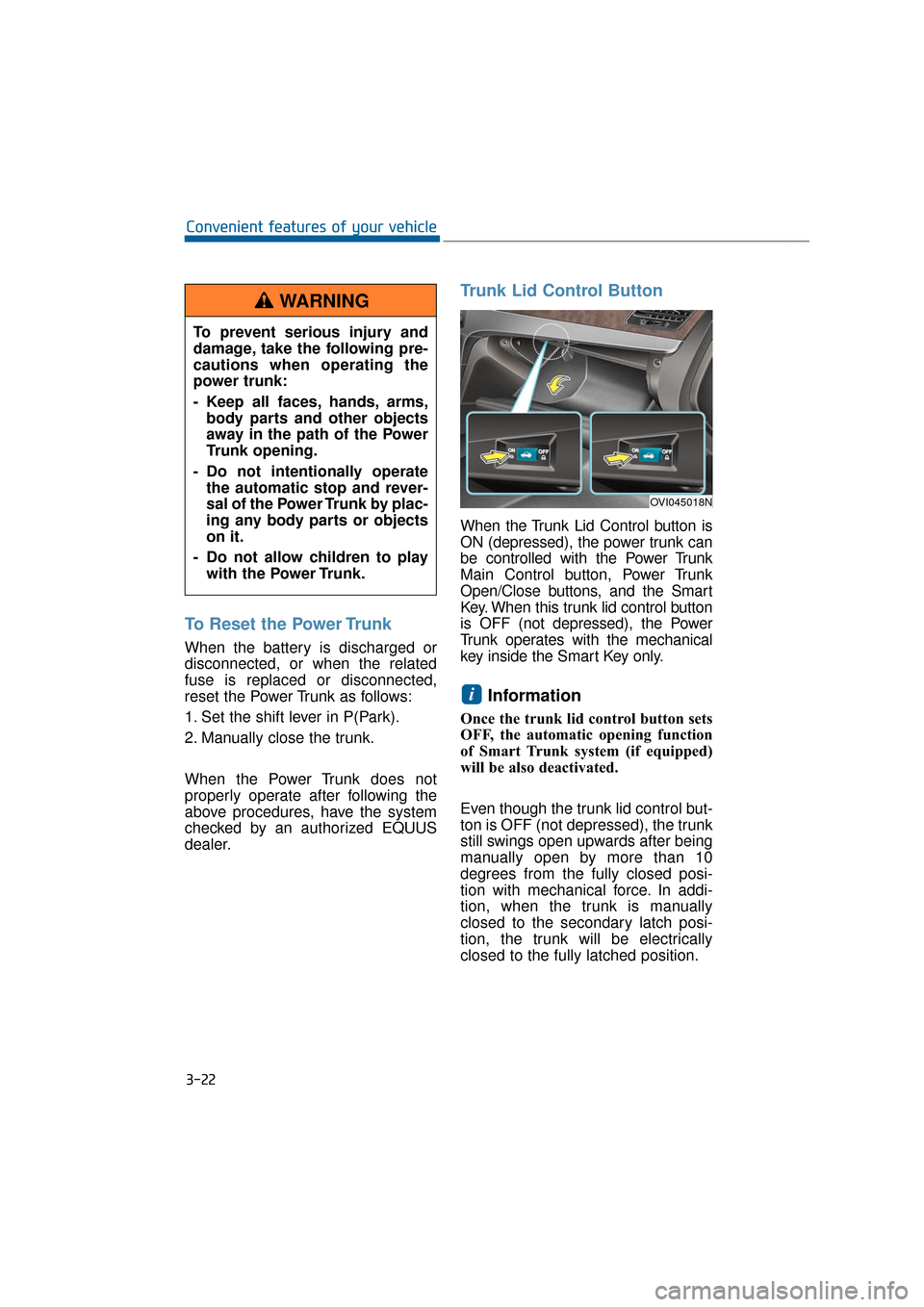
Trunk Lid Control Button
When the Trunk Lid Control button is
ON (depressed), the power trunk can
be controlled with the Power Trunk
Main Control button, Power Trunk
Open/Close buttons, and the Smart
Key. When this trunk lid control button
is OFF (not depressed), the Power
Trunk operates with the mechanical
key inside the Smart Key only.
Information
Once the trunk lid control button sets
OFF, the automatic opening function
of Smart Trunk system (if equipped)
will be also deactivated.
Even though the trunk lid control but-
ton is OFF (not depressed), the trunk
still swings open upwards after being
manually open by more than 10
degrees from the fully closed posi-
tion with mechanical force. In addi-
tion, when the trunk is manually
closed to the secondary latch posi-
tion, the trunk will be electrically
closed to the fully latched position.
i
3-22
Convenient features of your vehicleTo prevent serious injury and
damage, take the following pre-
cautions when operating the
power trunk:
- Keep all faces, hands, arms, body parts and other objects
away in the path of the Power
Trunk opening.
- Do not intentionally operate the automatic stop and rever-
sal of the Power Trunk by plac-
ing any body parts or objects
on it.
- Do not allow children to play with the Power Trunk.
WARNING
OVI045018N
Page 134 of 477
Resetting the Sunroof
Sunroof needs to be reset if (in the
followings)
- Battery is discharged or discon-nected or the related fuse has been
replaced or disconnected.
- The one-touch sliding function of the sunroof does not normally oper-
ate.
1. The Engine Start/Stop Button must be ON.
2. Completely close the sunroof. Then, release the control lever.
3. Pull down the control lever and hold it, until the sunroof slightly
moves up and down. Then,
release the control lever.
4. Pull down the control lever and hold it, until the sunroof operates
as follows:
TILT DOWN → SLIDE OPEN →
SLIDE CLOSE
Then, release the control lever.
If the problem persists, have the sys-
tem checked by an EQUUS dealer.
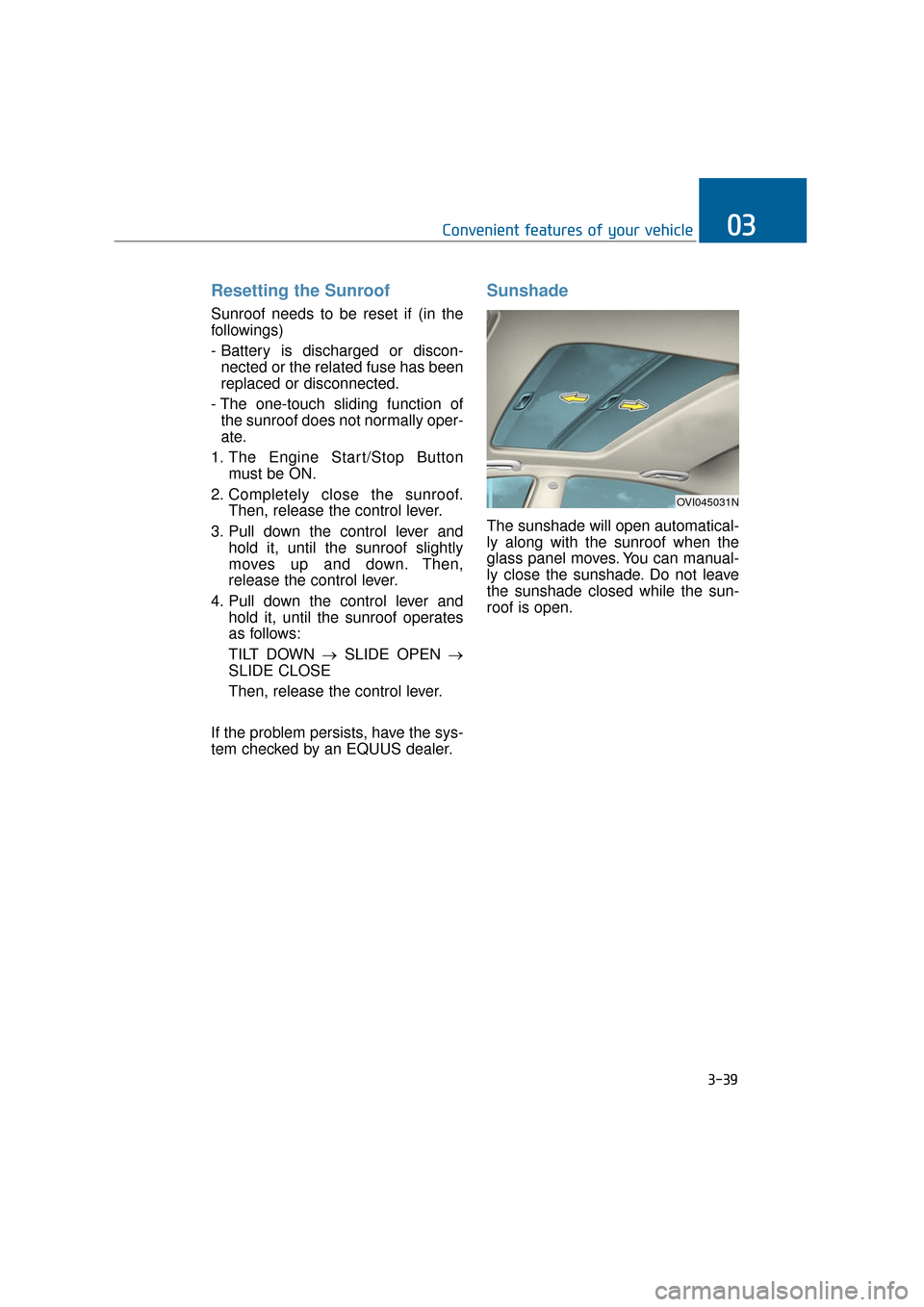
Sunshade
The sunshade will open automatical-
ly along with the sunroof when the
glass panel moves. You can manual-
ly close the sunshade. Do not leave
the sunshade closed while the sun-
roof is open.
3-39
Convenient features of your vehicle03
OVI045031N
Page 135 of 477
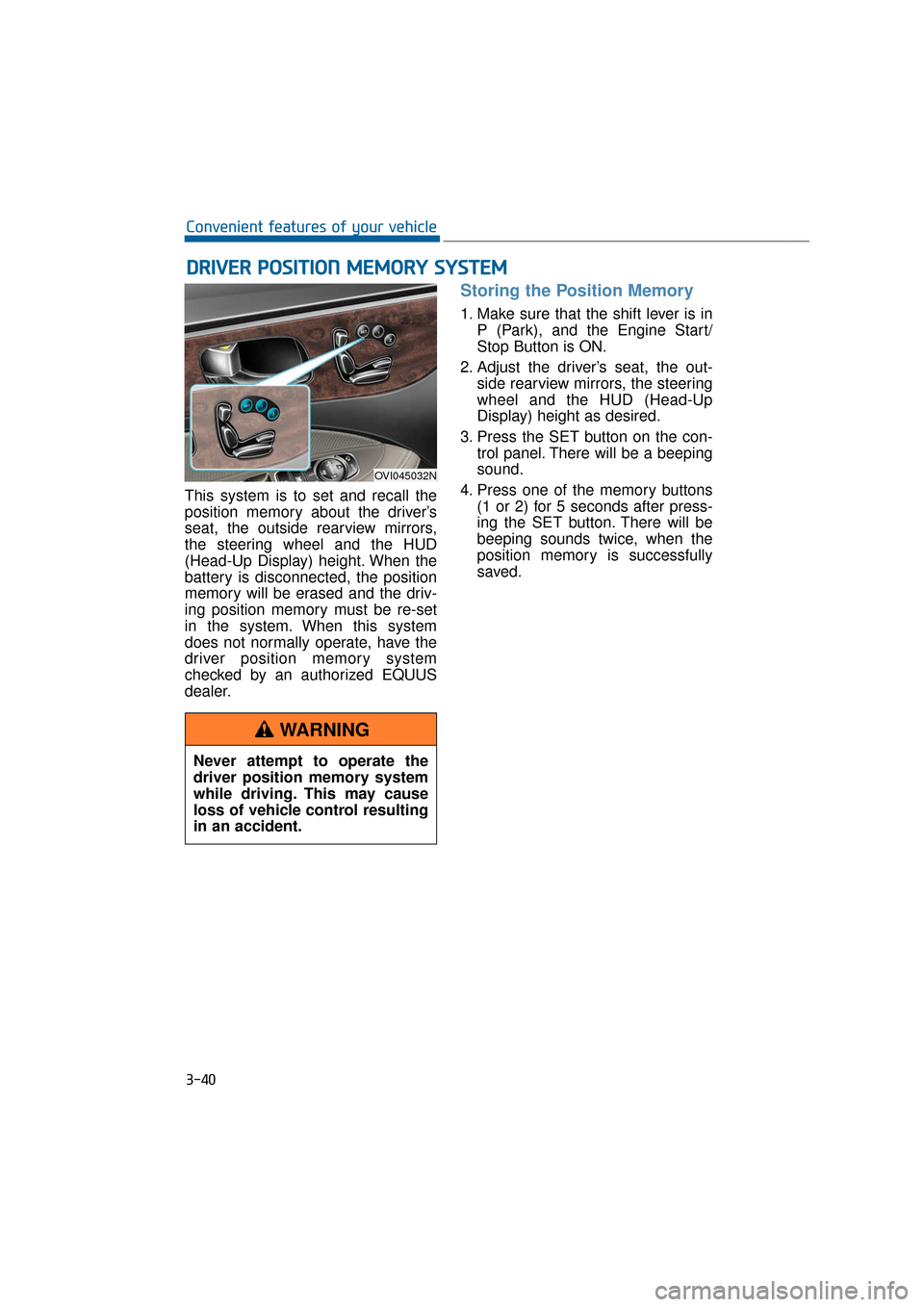
This system is to set and recall the
position memory about the driver’s
seat, the outside rearview mirrors,
the steering wheel and the HUD
(Head-Up Display) height. When the
battery is disconnected, the position
memory will be erased and the driv-
ing position memory must be re-set
in the system. When this system
does not normally operate, have the
driver position memory system
checked by an authorized EQUUS
dealer.
Storing the Position Memory
1. Make sure that the shift lever is inP (Park), and the Engine Start/
Stop Button is ON.
2. Adjust the driver’s seat, the out- side rearview mirrors, the steering
wheel and the HUD (Head-Up
Display) height as desired.
3. Press the SET button on the con- trol panel. There will be a beeping
sound.
4. Press one of the memory buttons (1 or 2) for 5 seconds after press-
ing the SET button. There will be
beeping sounds twice, when the
position memory is successfully
saved.
D DR
RI
IV
V E
ER
R
P
P O
O S
SI
IT
T I
IO
O N
N
M
M E
EM
M O
OR
RY
Y
S
S Y
Y S
ST
T E
EM
M
3-40
Convenient features of your vehicle
OVI045032N
Never attempt to operate the
driver position memory system
while driving. This may cause
loss of vehicle control resulting
in an accident.
WARNING
Page 143 of 477
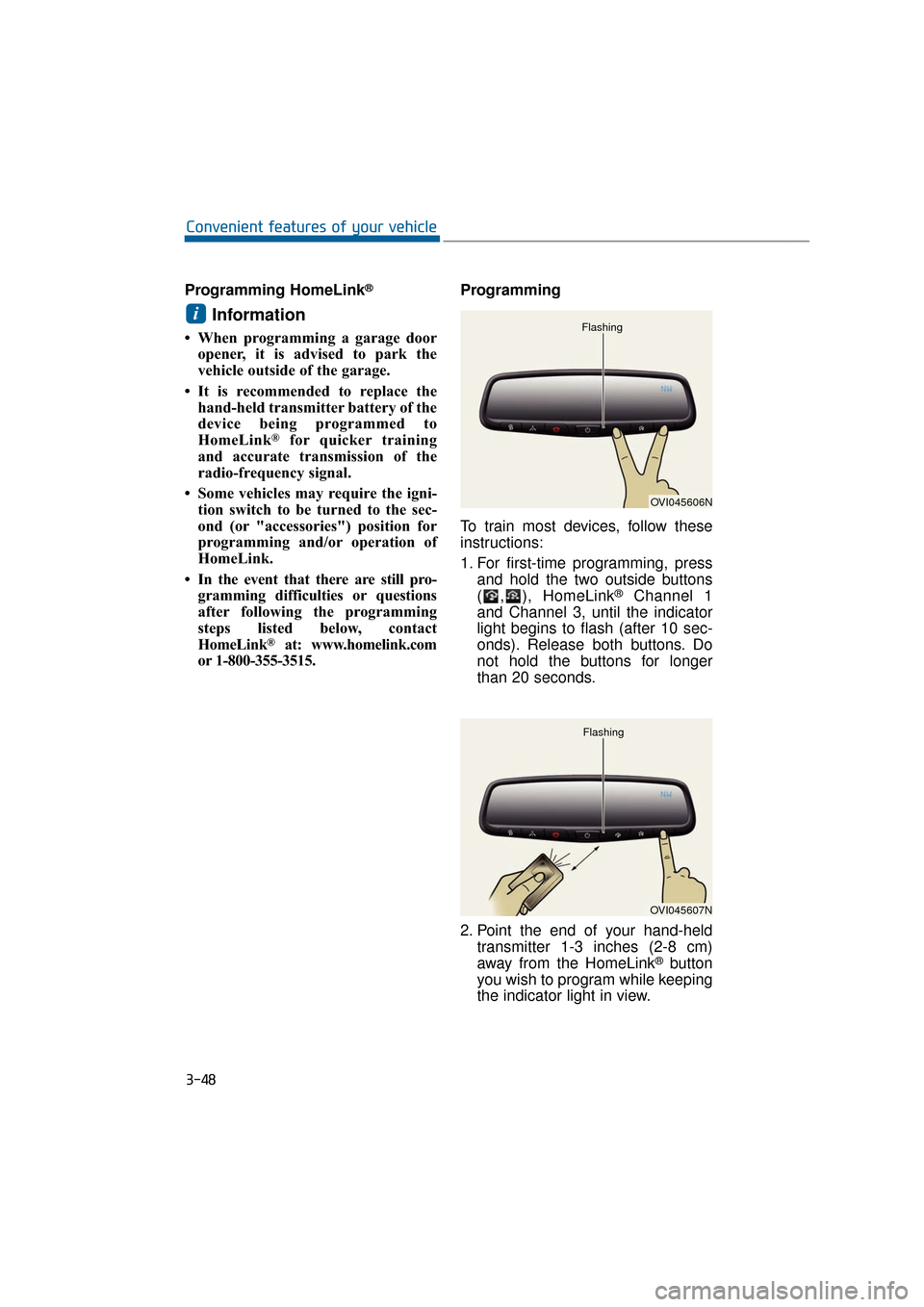
Programming HomeLink®
Information
• When programming a garage dooropener, it is advised to park the
vehicle outside of the garage.
• It is recommended to replace the hand-held transmitter battery of the
device being programmed to
HomeLink
®for quicker training
and accurate transmission of the
radio-frequency signal.
• Some vehicles may require the igni- tion switch to be turned to the sec-
ond (or "accessories") position for
programming and/or operation of
HomeLink.
• In the event that there are still pro- gramming difficulties or questions
after following the programming
steps listed below, contact
HomeLink
®at: www.homelink.com
or 1-800-355-3515. Programming
To train most devices, follow these
instructions:
1. For first-time programming, press
and hold the two outside buttons
( , ), HomeLink
®Channel 1
and Channel 3, until the indicator
light begins to flash (after 10 sec-
onds). Release both buttons. Do
not hold the buttons for longer
than 20 seconds.
2. Point the end of your hand-held transmitter 1-3 inches (2-8 cm)
away from the HomeLink
®button
you wish to program while keeping
the indicator light in view.
i
3-48
Convenient features of your vehicle
OVI045606N
Flashing
OVI045607N
Flashing
Page 150 of 477
Programming HomeLink®
Information
• When programming a garage dooropener, it is advised to park the
vehicle outside of the garage.
• It is recommended to replace the hand-held transmitter battery of the
device being programmed to
HomeLink
®for quicker training
and accurate transmission of the
radio-frequency signal.
• Some vehicles may require the igni- tion switch to be turned to the sec-
ond (or "accessories") position for
programming and/or operation of
HomeLink
®.
• In the event that there are still pro- gramming difficulties or questions
after following the programming
steps listed below, contact
HomeLink
®at: www.homelink.com
or 1-800-355-3515. Standard programming
To train most devices, follow these
instructions:
1. For first-time programming, press
and hold the two outside buttons,
HomeLink
®Channel 1 and
Channel 3 Buttons, until the indi-
cator light begins to flash (after 20
seconds). Release both buttons.
Do not hold the buttons for longer
than 30 seconds.
2. Point the end of your hand-held transmitter 1-3 inches (2-8 cm)
away from the HomeLink
®button
you wish to program while keeping
the indicator light in view.
3. Simultaneously press and hold both the HomeLink
®and handheld
transmitter buttons. DO NOT
release the buttons until step 4 is
completed.
4. When continuously pressing the buttons, the red Indicator Status
LED will flash slowly and then rap-
idly after HomeLink
®successfully
trains to the frequency signal from
the hand-held transmitter. Then,
release both buttons.
5. Press and hold the just-trained HomeLink
®button and observe
the red Status Indicator LED. If the
indicator light stays on constantly,
programming is complete and
your device will activate when the
HomeLink
®button is pressed and
released.
6. To program the remaining two HomeLink
®buttons, follow the
steps 2 to 5.
i
3-55
Convenient features of your vehicle03