ECU Hyundai Equus 2016 Owner's Guide
[x] Cancel search | Manufacturer: HYUNDAI, Model Year: 2016, Model line: Equus, Model: Hyundai Equus 2016Pages: 477, PDF Size: 16.25 MB
Page 112 of 477
Auto Door Lock/Unlock Features
You can adjust the auto door lock/
unlock modes in the User Setting.
Refer to the User Setting Mode in the
chapter 3.
Child-Protector Rear Door
Locks
The child safety lock is equipped to
prevent a child seated in a rear from
accidentally opening a rear door. The
rear door safety lock should be used
whenever a child seats in a vehicle.
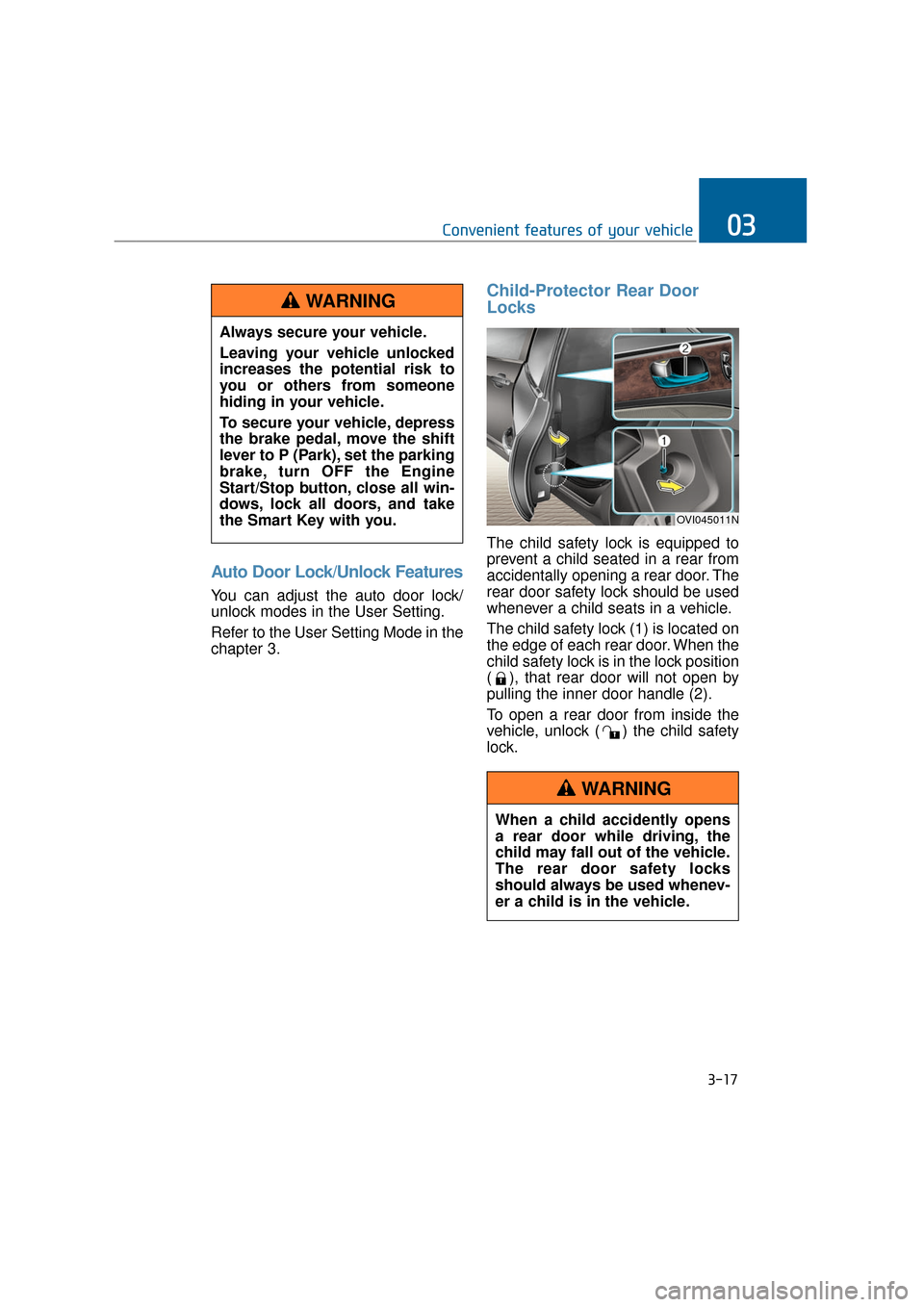
The child safety lock (1) is located on
the edge of each rear door. When the
child safety lock is in the lock position
( ), that rear door will not open by
pulling the inner door handle (2).
To open a rear door from inside the
vehicle, unlock ( ) the child safety
lock.
3-17
Convenient features of your vehicle03
When a child accidently opens
a rear door while driving, the
child may fall out of the vehicle.
The rear door safety locks
should always be used whenev-
er a child is in the vehicle.
WARNING
Always secure your vehicle.
Leaving your vehicle unlocked
increases the potential risk to
you or others from someone
hiding in your vehicle.
To secure your vehicle, depress
the brake pedal, move the shift
lever to P (Park), set the parking
brake, turn OFF the Engine
Start/Stop button, close all win-
dows, lock all doors, and take
the Smart Key with you.
WARNING
OVI045011N
Page 113 of 477
Non-Powered Trunk
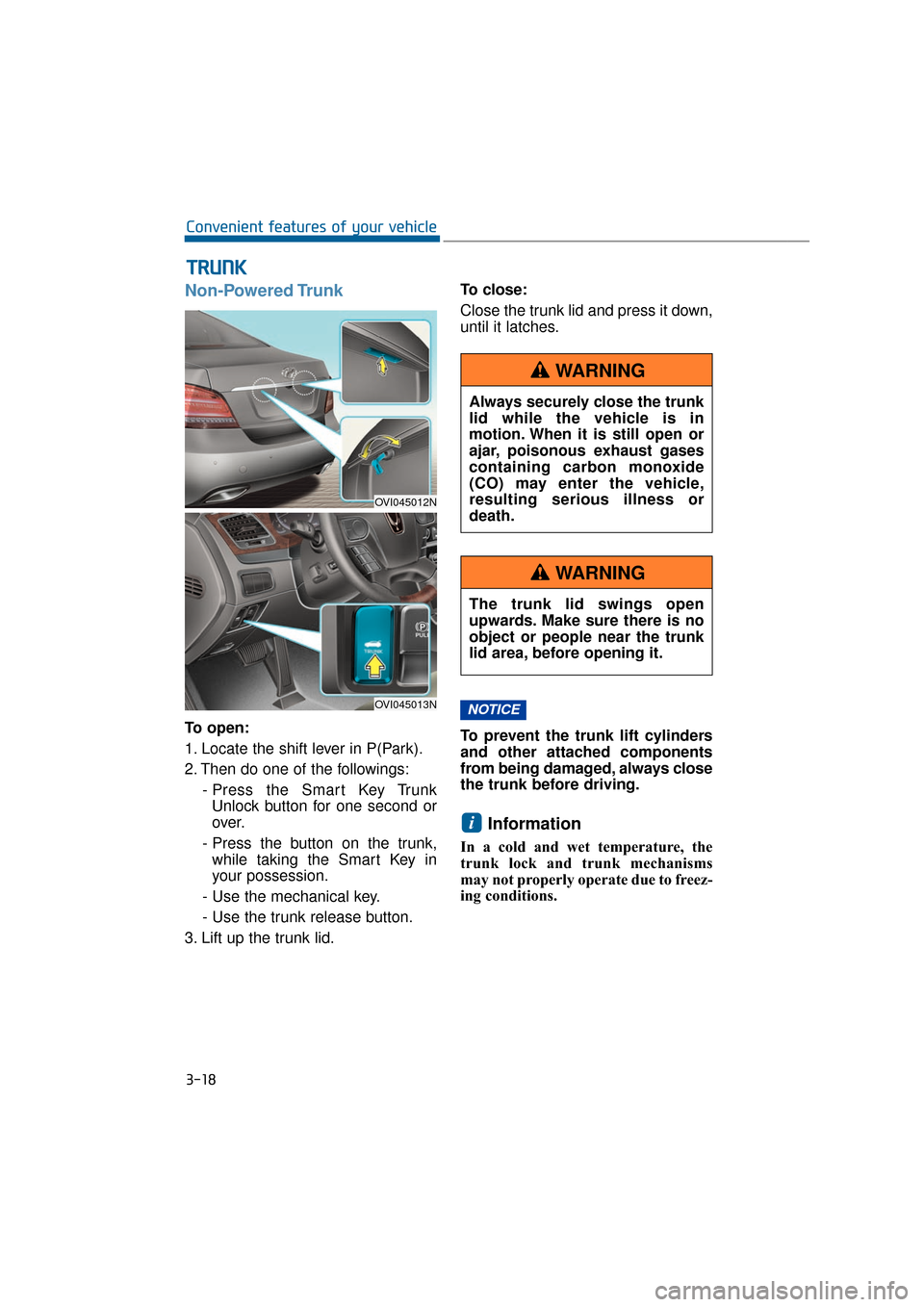
To open:
1. Locate the shift lever in P(Park).
2. Then do one of the followings:- Press the Smart Key TrunkUnlock button for one second or
over.
- Press the button on the trunk, while taking the Smart Key in
your possession.
- Use the mechanical key.
- Use the trunk release button.
3. Lift up the trunk lid. To close:
Close the trunk lid and press it down,
until it latches.
To prevent the trunk lift cylinders
and other attached components
from being damaged, always close
the trunk before driving.
Information
In a cold and wet temperature, the
trunk lock and trunk mechanisms
may not properly operate due to freez-
ing conditions.
i
NOTICE
T T
R
R U
U N
NK
K
3-18
Convenient features of your vehicle
OVI045012N
OVI045013N
Always securely close the trunk
lid while the vehicle is in
motion. When it is still open or
ajar, poisonous exhaust gases
containing carbon monoxide
(CO) may enter the vehicle,
resulting serious illness or
death.
WARNING
The trunk lid swings open
upwards. Make sure there is no
object or people near the trunk
lid area, before opening it.
WARNING
Page 114 of 477
Power Trunk (if equipped)
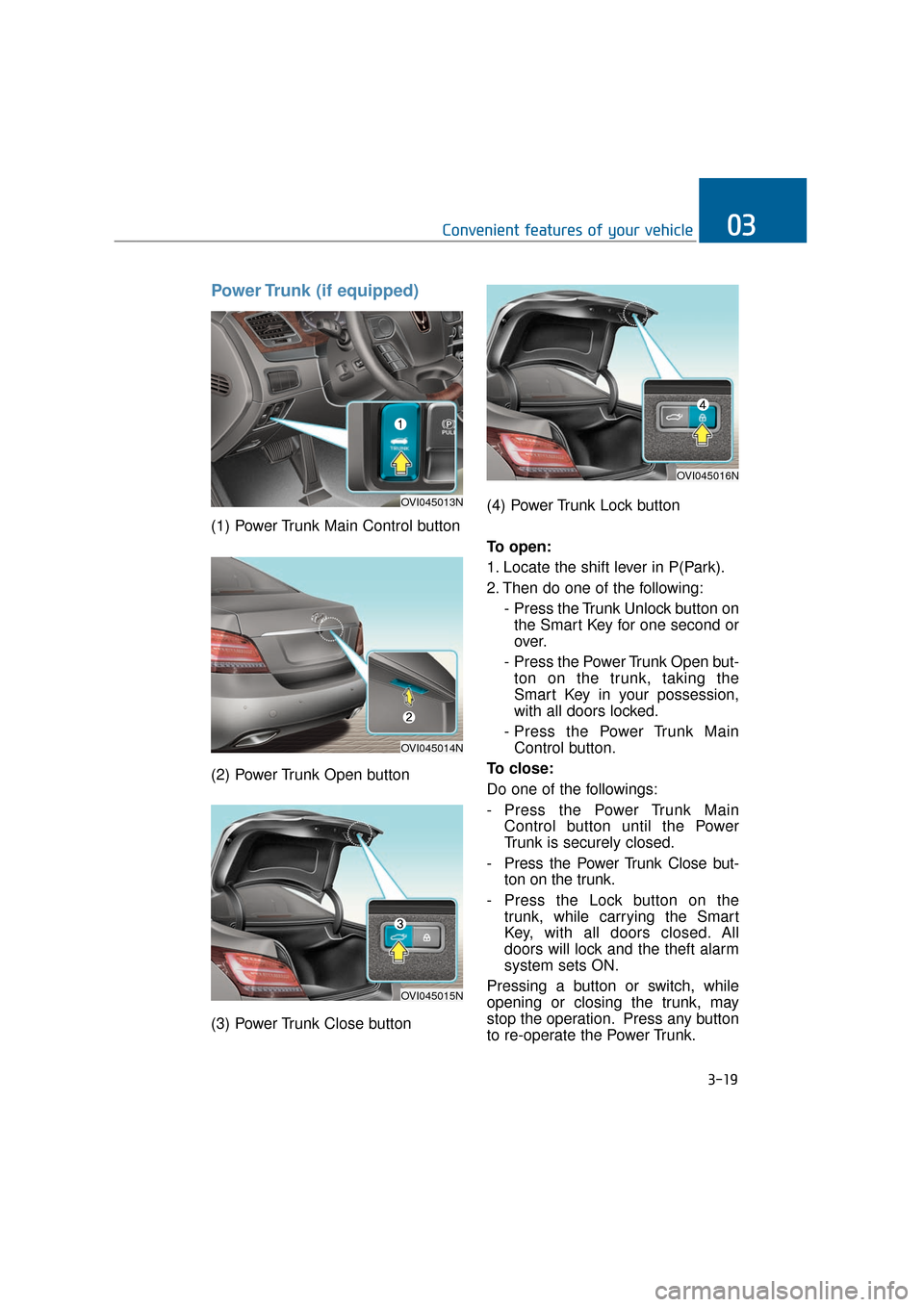
(1) Power Trunk Main Control button
(2) Power Trunk Open button
(3) Power Trunk Close button(4) Power Trunk Lock button
To open:
1. Locate the shift lever in P(Park).
2. Then do one of the following:
- Press the Trunk Unlock button onthe Smart Key for one second or
over.
- Press the Power Trunk Open but- ton on the trunk, taking the
Smart Key in your possession,
with all doors locked.
- Press the Power Trunk Main Control button.
To close:
Do one of the followings:
- Press the Power Trunk Main Control button until the Power
Trunk is securely closed.
- Press the Power Trunk Close but- ton on the trunk.
- Press the Lock button on the trunk, while carrying the Smart
Key, with all doors closed. All
doors will lock and the theft alarm
system sets ON.
Pressing a button or switch, while
opening or closing the trunk, may
stop the operation. Press any button
to re-operate the Power Trunk.
3-19
Convenient features of your vehicle03
OVI045013N
OVI045014N
OVI045015N
OVI045016N
Page 115 of 477
Information
The Power Trunk Lock button will
not operate in one of the following sit-
uations:
- Any door is open.
- The Engine Start/Stop Button is notOFF.
- The Smart Key is in the vehicle. Do not manually close or open
the Power Trunk. This may dam-
age the Power Trunk. If neces-
sary, when the battery is drained
or disconnected, do not apply
excessive force.
Do not leave the Power Trunk open for a long period of time.
This may drain the battery.
To prevent the trunk lift cylin- ders and other attached compo-
nents from being damaged,
always close the trunk before
driving.
Information
In a cold and wet temperature, trunk
lock and trunk mechanisms may not
properly operate due to freezing con-
ditions.
i
NOTICEi
3-20
Convenient features of your vehicle
Always securely close the trunk
lid while the vehicle is in
motion. When it is still open or
ajar, poisonous exhaust gases
containing carbon monoxide
(CO) may enter the vehicle,
resulting serious illness or
death.
WARNING
Make sure there are no people
or objects around the trunk
before opening or closing the
Power Trunk. Wait until the trunk
is fully open, before loading or
unloading.
WARNING
Never leave children or animals
unattended in your vehicle.
Children or animals may oper-
ate the power trunk, injuring
themselves, others, or vehicle
damage.
WARNING
Page 116 of 477
Power Trunk Non-Opening orClosing Conditions:
The Power Trunk will not operate,
when driving faster than 1.8 mph
(3 km/h).
The Power Trunk is operable when the engine is not running.
However, the Power Trunk opera-
tion consumes large amounts of
vehicle electric power. To prevent
the battery from being drained, do
not operate it excessively (i.e.
more than approximately 10 times
in a consecutive manner.)
Do not modify or repair any part of the Power Trunk by yourself. This
must be done by an authorized
EQUUS dealer.
Before jacking up the vehicle to change a tire or repair the vehicle,
open the Power Trunk. Do not
operate the Power Trunk, when
the vehicle is raised up.
Otherwise, this may cause the
Power Trunk to improperly oper-
ate.
When there are substances, such as snow, on the Power Trunk, it
may not automatically open. After
removing the substances, try to
open it again.
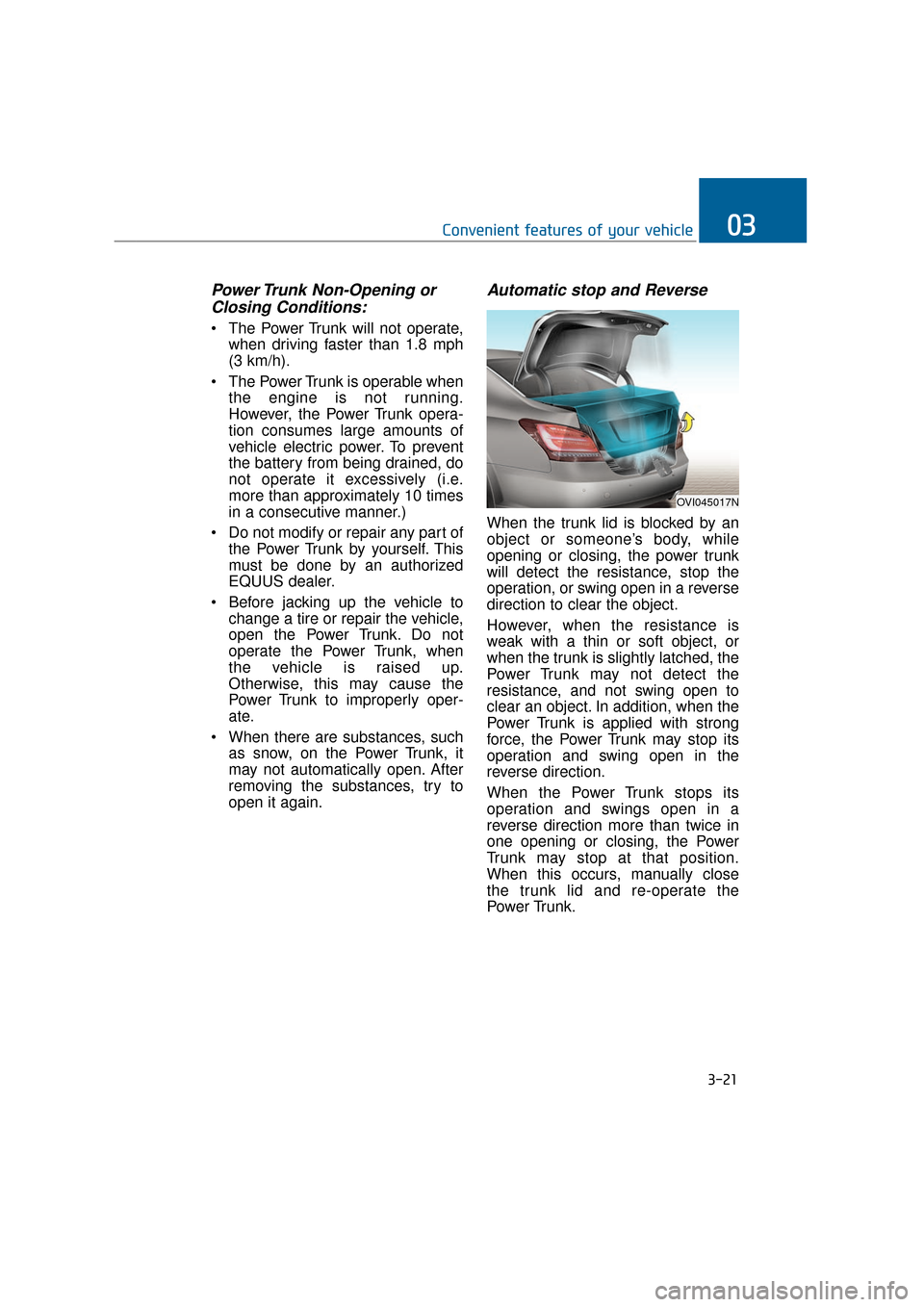
Automatic stop and Reverse
When the trunk lid is blocked by an
object or someone’s body, while
opening or closing, the power trunk
will detect the resistance, stop the
operation, or swing open in a reverse
direction to clear the object.
However, when the resistance is
weak with a thin or soft object, or
when the trunk is slightly latched, the
Power Trunk may not detect the
resistance, and not swing open to
clear an object. In addition, when the
Power Trunk is applied with strong
force, the Power Trunk may stop its
operation and swing open in the
reverse direction.
When the Power Trunk stops its
operation and swings open in a
reverse direction more than twice in
one opening or closing, the Power
Trunk may stop at that position.
When this occurs, manually close
the trunk lid and re-operate the
Power Trunk.
3-21
Convenient features of your vehicle03
OVI045017N
Page 128 of 477
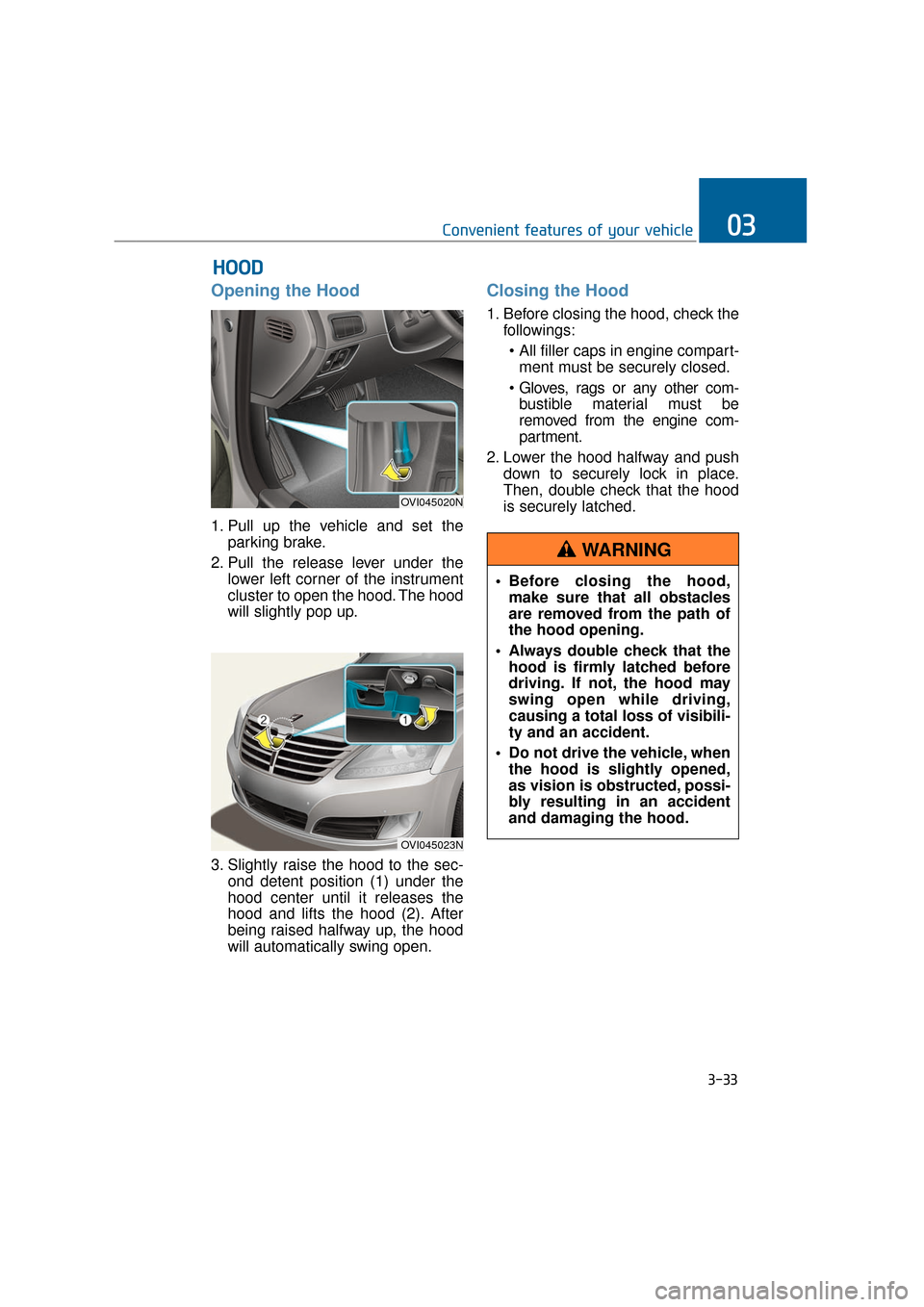
Opening the Hood
1. Pull up the vehicle and set theparking brake.
2. Pull the release lever under the lower left corner of the instrument
cluster to open the hood. The hood
will slightly pop up.
3. Slightly raise the hood to the sec- ond detent position (1) under the
hood center until it releases the
hood and lifts the hood (2). After
being raised halfway up, the hood
will automatically swing open.
Closing the Hood
1. Before closing the hood, check thefollowings:
ment must be securely closed.
bustible material must be
removed from the engine com-
partment.
2. Lower the hood halfway and push down to securely lock in place.
Then, double check that the hood
is securely latched.
H HO
O O
OD
D
3-33
Convenient features of your vehicle03
OVI045020N
OVI045023N
Before closing the hood,
make sure that all obstacles
are removed from the path of
the hood opening.
Always double check that the hood is firmly latched before
driving. If not, the hood may
swing open while driving,
causing a total loss of visibili-
ty and an accident.
Do not drive the vehicle, when the hood is slightly opened,
as vision is obstructed, possi-
bly resulting in an accident
and damaging the hood.
WARNING
Page 129 of 477
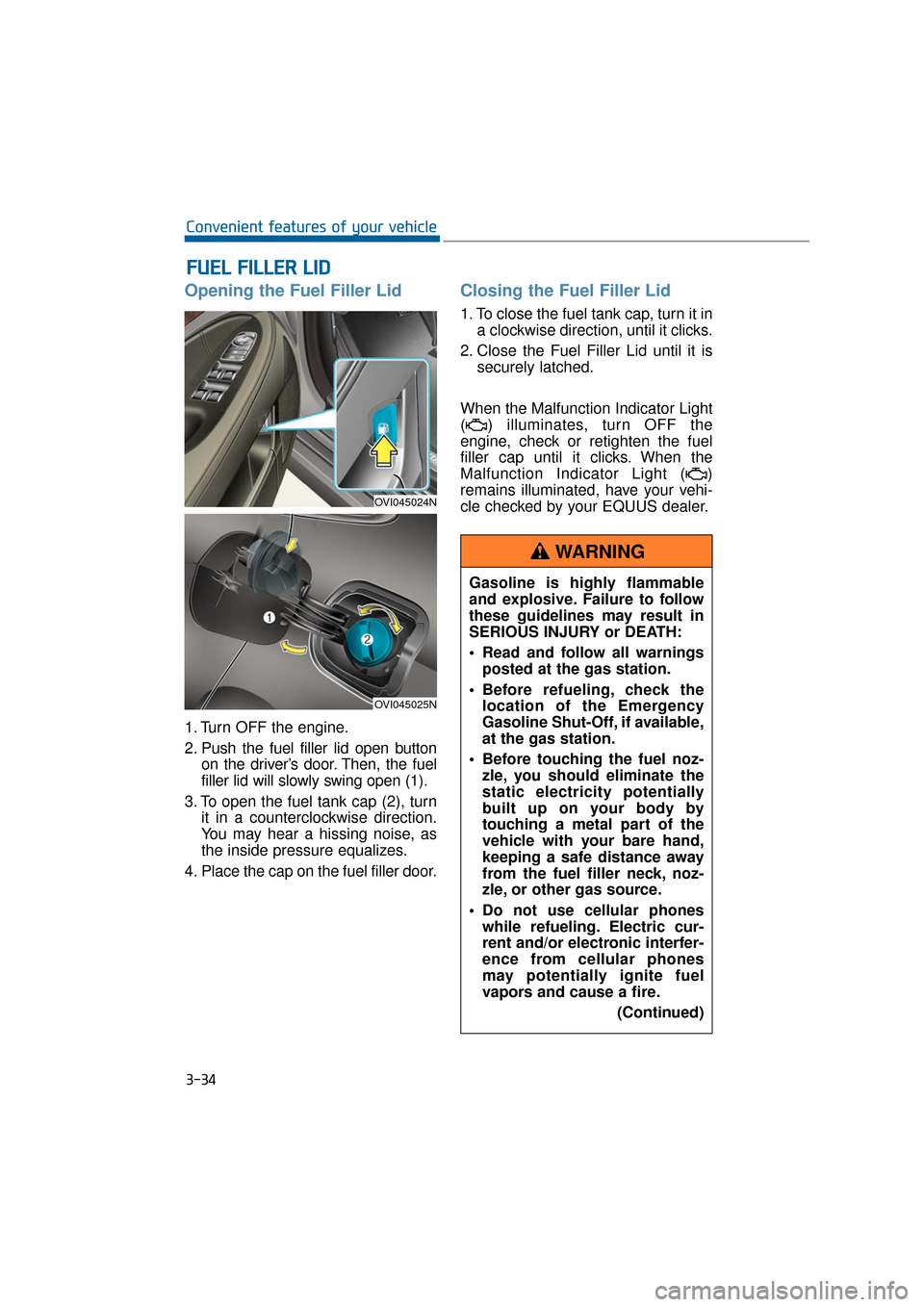
Opening the Fuel Filler Lid
1. Turn OFF the engine.
2. Push the fuel filler lid open buttonon the driver’s door. Then, the fuel
filler lid will slowly swing open (1).
3. To open the fuel tank cap (2), turn it in a counterclockwise direction.
You may hear a hissing noise, as
the inside pressure equalizes.
4. Place the cap on the fuel filler door.
Closing the Fuel Filler Lid
1. To close the fuel tank cap, turn it in a clockwise direction, until it clicks.
2. Close the Fuel Filler Lid until it is securely latched.
When the Malfunction Indicator Light
( ) illuminates, turn OFF the
engine, check or retighten the fuel
filler cap until it clicks. When the
Malfunction Indicator Light ( )
remains illuminated, have your vehi-
cle checked by your EQUUS dealer.
F
F U
U E
EL
L
F
F I
IL
L L
LE
E R
R
L
L I
ID
D
3-34
Convenient features of your vehicle
OVI045024N
OVI045025N
Gasoline is highly flammable
and explosive. Failure to follow
these guidelines may result in
SERIOUS INJURY or DEATH:
Read and follow all warnings
posted at the gas station.
Before refueling, check the location of the Emergency
Gasoline Shut-Off, if available,
at the gas station.
Before touching the fuel noz- zle, you should eliminate the
static electricity potentially
built up on your body by
touching a metal part of the
vehicle with your bare hand,
keeping a safe distance away
from the fuel filler neck, noz-
zle, or other gas source.
Do not use cellular phones while refueling. Electric cur-
rent and/or electronic interfer-
ence from cellular phones
may potentially ignite fuel
vapors and cause a fire.
(Continued)
WARNING
Page 130 of 477
3-35
Convenient features of your vehicle03
(Continued)
Do not get back into a vehiclewhile refueling. You may build
up static electricity by touch-
ing, rubbing or sliding against
any item or fabric capable of
producing static electricity.
Static electricity discharge
may ignite fuel vapors, caus-
ing a fire. When you must re-
enter the vehicle, you should
eliminate potentially danger-
ous static electricity once
again by touching a metal part
of the vehicle with your bare
hand, keeping a safe distance
away from the fuel filler neck,
nozzle, or other gas source.
When using an approved portable fuel container, make
sure to place the container on
the ground, before refueling.
Static electricity discharged
from the container may ignite
fuel vapors, causing a fire.
Once refueling has begun,
contact between your bare
hand and the vehicle should
be maintained until the filling
is complete.
Use only approved portable plastic fuel containers
designed to carry and store
gasoline.
When refueling, always set the shift lever in P (Park), set the
parking brake, and turn OFF
the Engine Start/Stop button.
Sparks produced by electrical
components related to the
engine may ignite fuel vapors,
causing a fire.
(Continued)(Continued)
Do not use matches or alighter and do not smoke or
leave a lit cigarette in your
vehicle while at a gas station,
especially during refueling.
Do not overfill or "top-off" your vehicle tank, which may
cause gasoline spillage.
When a fire breaks out during refueling, stay away from the
vehicle, and immediately noti-
fy it to the gas station manag-
er, and call the local fire
department. Follow any safety
instructions they provide.
When pressurized fuel sprays out, it may cover your clothes
or skin. This puts you at risk
of fire and burns. Always care-
fully and slowly open the fuel
cap. When the fuel vents out
from the tank, or when you
hear a hissing sound, wait
until those stop before com-
pletely opening the cap.
Always check that the fuel cap is securely closed to prevent
fuel spillage in the event of an
accident.
Page 142 of 477
There are some conditions that can
cause changes to the vehicle mag-
nets, such as installing a ski rack or
a CB antenna. Body repair work on
the vehicle can also cause changes
to the vehicle's magnetic field. In
these situations, the compass will
need to be re-calibrated to quickly
correct these changes. To re-cali-
brate the compass:
1. Press and hold the button formore than 9 seconds. When the
compass memory is deleted, a let-
ter "C" will appear on the display.
2. To calibrate the compass, drive the vehicle in a circle twice at less
than 5 mph (8 km/h).
Integrated HomeLink®Wireless
Control System
The HomeLink®Wireless Control
System provides a convenient way to
replace up to three hand-held
radiofrequency (RF) transmitters
with a single built-in device. This
innovative feature will learn the radio
frequency codes of most current
transmitters to operate devices such
as gate operators, garage door
openers, entry door locks, security
systems, and even home lighting.
Both standard and rolling code-
equipped transmitters can be pro-
grammed by following the outlined
procedures. Additional HomeLink
®
information can be found at:
www.homelink.com or by calling 1-
800-355-3515. Retain the original transmitter of the
RF device you programmed for use
in other vehicles as well as for future
HomeLink
®programming. It is also
suggested that upon the sale of the
vehicle, the programmed HomeLink
®
buttons be erased for security pur-
poses.
3-47
Convenient features of your vehicle03
Before programming
HomeLink®to a garage door
opener or gate operator, make
sure that people and objects are
out of the way from the device
to prevent potential harm or
damage. Do not use HomeLink
®
with any garage door opener
that lacks the safety stop and
reverse features required by
U.S. federal safety standards
(this includes any garage door
opener model manufactured
before April 1, 1982). A garage
door that cannot detect an
object - signaling the door to
stop and reverse - does not
meet current U.S. federal safety
standards. Using a garage door
opener without these features
increases the risk of serious
injury or death.
WARNING
Page 145 of 477
Gate operator & Canadian
programming
During programming, your handheld
transmitter may automatically stop
transmitting. Continue to press the
Integrated HomeLink
®Wireless
Control System button (refer to the
steps 2 to 3 in the Programming part)
while you press and re-press
("cycle") your handheld transmitter
every two seconds until the frequen-
cy signal is learned. The indicator
light will flash slowly and then rapidly
after a few seconds when success-
fully trained.
Operating HomeLink
®
To operate, simply press and release
the programmed HomeLink®button.
Activation will now occur for the
trained devices (i.e. garage door
opener, gate operator, security sys-
tem entry door lock, home/office
lighting, etc.). For convenience, the
hand-held transmitter of the device
may also be used at any time. Reprogramming a single
HomeLink
®button
To program a device to HomeLink
®
using a HomeLink®button previous-
ly trained, follow these steps:
1. Press and hold the desired HomeLink
®button. DO NOT
release the button.
2. The indicator light will begin to flash after 20 seconds. Without
releasing the HomeLink
®button,
proceed to the "Programming"
step 2.
For more questions or comments,
contact HomeLink
®at www.home-
link.comor 1-800-355-3515.
Erasing HomeLink
®buttons
An individual programming cannot
be erased respectively. However, all
three programming can be erased at
the same time by following below
steps;
1. Press and hold the two outer HomeLink
®buttons until the indi-
cator light begins to flash after 10
seconds.
2. Release both buttons. Do not hold for longer than 20 seconds.
The Integrated HomeLink
®Wireless
Control System is now in the training
(learning) mode and can be pro-
grammed at any time by following the
appropriate steps as in the
"Programming".
FCC ID: NZLTLMHL4
IC: 4112A-TLMHL4
3-50
Convenient features of your vehicle