ECU Hyundai Equus 2016 Owner's Guide
[x] Cancel search | Manufacturer: HYUNDAI, Model Year: 2016, Model line: Equus, Model: Hyundai Equus 2016Pages: 477, PDF Size: 16.25 MB
Page 149 of 477
There are some conditions that can
cause changes to the vehicle mag-
nets, such as installing a ski rack or
a CB antenna. Body repair work on
the vehicle can also cause changes
to the vehicle's magnetic field. In
these situations, the compass will
need to be re-calibrated to quickly
correct these changes. To re-cali-
brate the compass:
1. Press and hold the button formore than 6 seconds. When the
compass memory is deleted, a let-
ter "C" will appear on the display.
2. To calibrate the compass, drive the vehicle in 2 complete circles at
less than 5 mph (8 km/h).
Integrated HomeLink®Wireless
Control System
The HomeLink®Wireless Control
System provides a convenient way to
replace up to three hand-held
radiofrequency (RF) transmitters
with a single built-in device. This
innovative feature will learn the radio
frequency codes of most current
transmitters to operate devices such
as gate operators, garage door
openers, entry door locks, security
systems, and even home lighting.
Both standard and rolling code-
equipped transmitters can be pro-
grammed by following the outlined
procedures. Additional HomeLink
®
information can be found at:
www.homelink.com or by calling 1-
800-355-3515. Before programming HomeLink
®to
a garage door opener or gate oper-
ator, make sure that people and
objects are out of the way from the
device to prevent potential harm or
damage. Do not use HomeLink
®
with any garage door opener that
lacks the safety stop and reverse
features required by U.S. federal
safety standards (this includes any
garage door opener model manu-
factured before April 1, 1982). A
garage door that cannot detect an
object - signaling the door to stop
and reverse - does not meet cur-
rent U.S. federal safety standards.
Using a garage door opener with-
out these features increases the
risk of serious injury or death.
Retain the original transmitter of the
RF device you programmed for use
in other vehicles as well as for future
HomeLink
®programming. It is also
suggested that upon the sale of the
vehicle, the programmed HomeLink
®
buttons be erased for security pur-
poses.
NOTICE
3-54
Convenient features of your vehicle
Page 152 of 477
Operating HomeLink®
To operate, simply press and release
the programmed HomeLink®button.
Activation will occur for the trained
device (i.e. garage door opener, gate
operator, security system, entry door
lock, home/office lighting, etc.). For
convenience, the hand-held transmit-
ter of the device may also be used at
any time.
Reprogramming a single
HomeLink
®button
To program a new device to a previ-
ously trained HomeLink
®button, fol-
low these steps:
1. Press and hold the desired HomeLink
®button. Do NOT release
until the step 4 is completed.
2. When the indicator light begins to flash slowly (after 20 seconds),
point the handheld transmitter 1 to
3 inches away from the
HomeLink
®surface.
3. Press and hold the handheld transmitter button. The HomeLink
®
indicator light will flash, first slowly
and then rapidly.
4. When the indicator light begins to flash rapidly, release both buttons.
5. Press and hold the just-trained HomeLink
®button and observe
the red Status Indicator LED. If the
indicator light stays on constantly,
programming is complete and
your new device should activate. Erasing HomeLink
®buttons
An individual programming cannot
be erased. However, to erase all
three programmings;
1. Press and hold the two outer HomeLink
®buttons until the indi-
cator light begins to flash after 20
seconds; and
2. Release both buttons. Do not hold for longer than 30 seconds.
The Integrated HomeLink
®Wireless
Control System is now in the training
(learning) mode and can be pro-
grammed at any time by following the
appropriate steps as in the
"Programming".
FCC ID: NZLZTVHL3
IC: 4112A-ZTVHL3
3-57
Convenient features of your vehicle03
Page 177 of 477
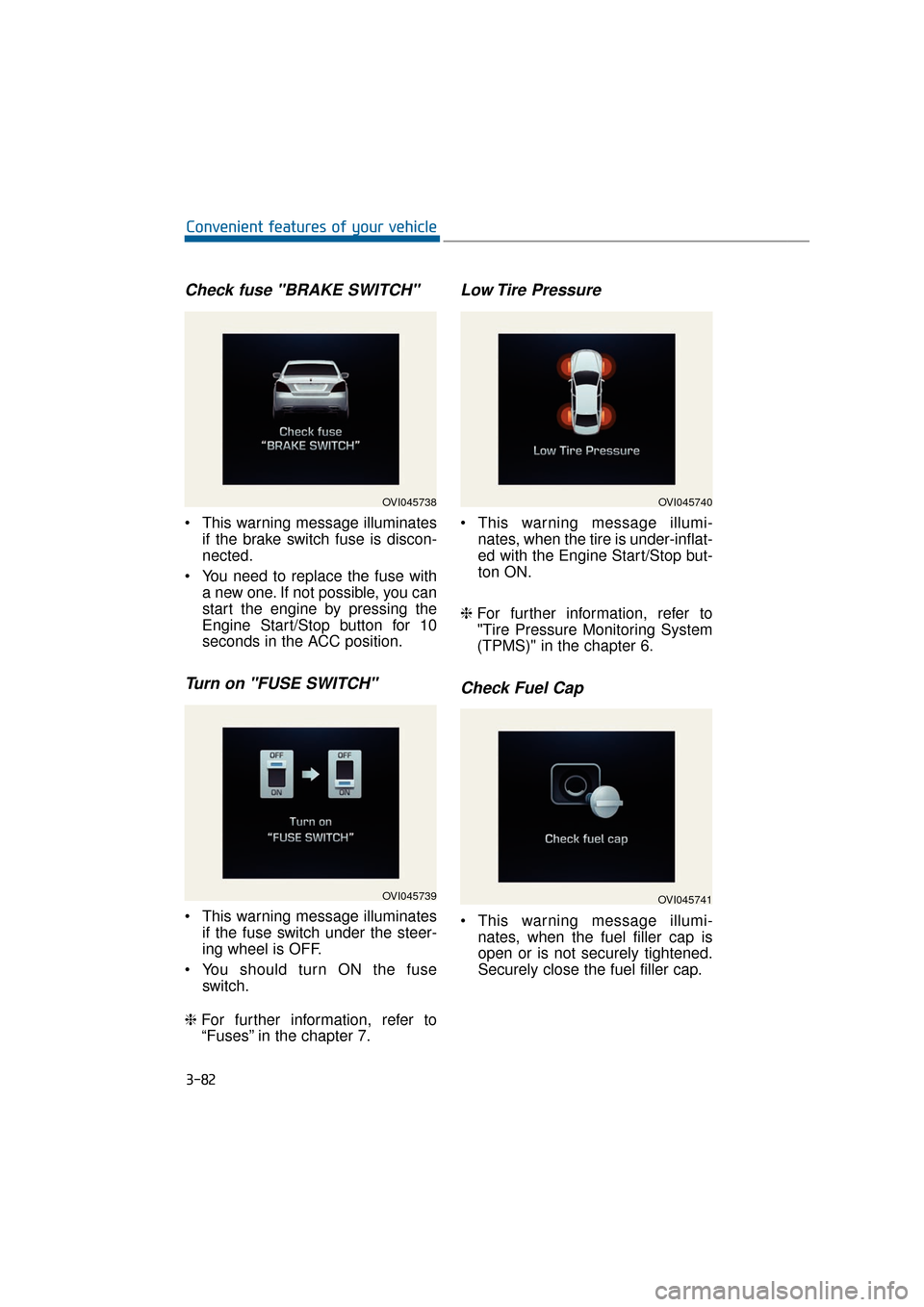
Check fuse "BRAKE SWITCH"
This warning message illuminatesif the brake switch fuse is discon-
nected.
You need to replace the fuse with a new one. If not possible, you can
start the engine by pressing the
Engine Start/Stop button for 10
seconds in the ACC position.
Turn on "FUSE SWITCH"
This warning message illuminatesif the fuse switch under the steer-
ing wheel is OFF.
You should turn ON the fuse switch.
❈ For further information, refer to
“Fuses” in the chapter 7.
Low Tire Pressure
This warning message illumi-
nates, when the tire is under-inflat-
ed with the Engine Start/Stop but-
ton ON.
❈ For further information, refer to
"Tire Pressure Monitoring System
(TPMS)" in the chapter 6.
Check Fuel Cap
This warning message illumi-
nates, when the fuel filler cap is
open or is not securely tightened.
Securely close the fuel filler cap.
3-82
Convenient features of your vehicle
OVI045738
OVI045739
OVI045740
OVI045741
Page 189 of 477
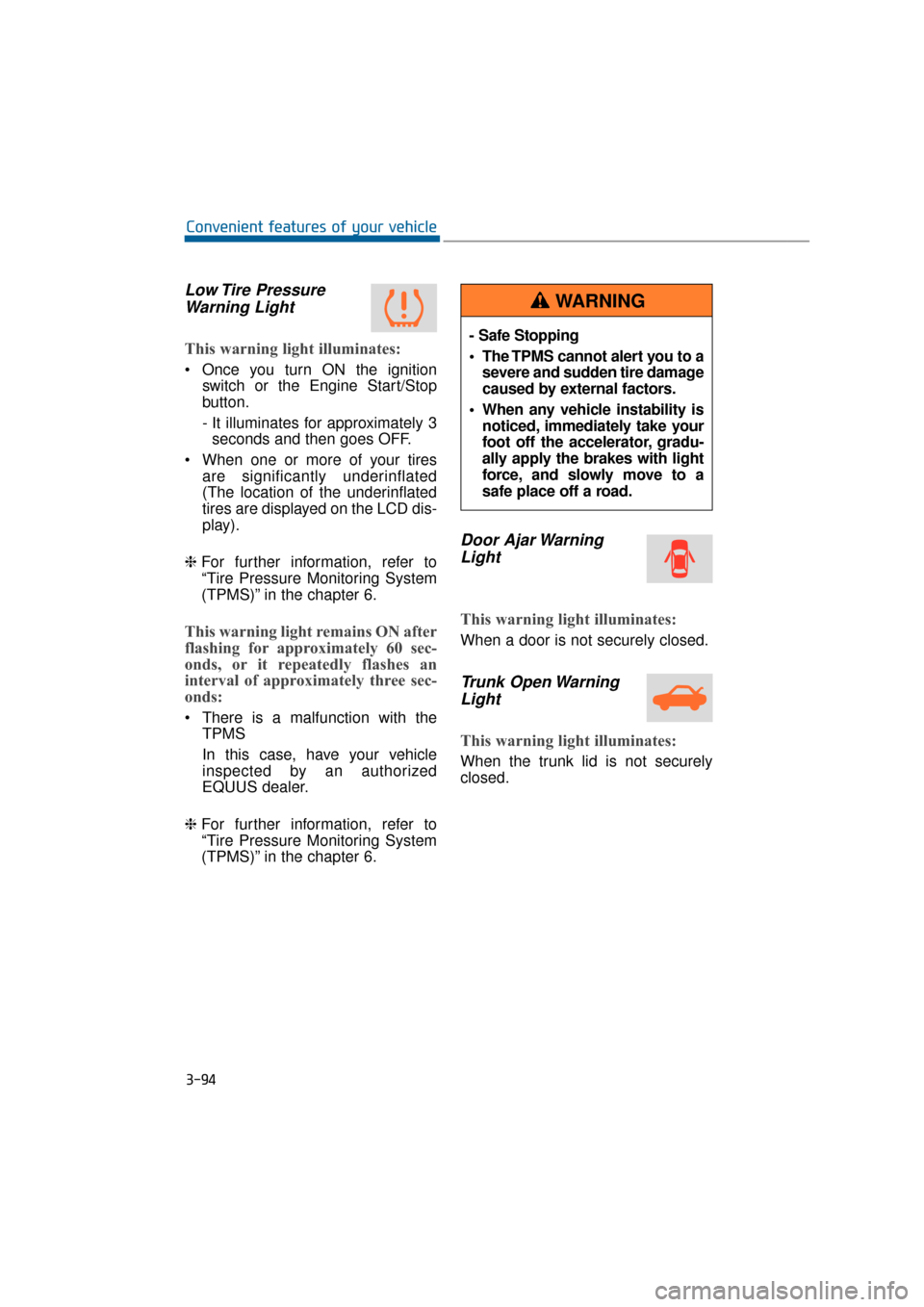
Low Tire PressureWarning Light
This warning light illuminates:
Once you turn ON the ignition
switch or the Engine Start/Stop
button.
- It illuminates for approximately 3seconds and then goes OFF.
When one or more of your tires are significantly underinflated
(The location of the underinflated
tires are displayed on the LCD dis-
play).
❈ For further information, refer to
“Tire Pressure Monitoring System
(TPMS)” in the chapter 6.
This warning light remains ON after
flashing for approximately 60 sec-
onds, or it repeatedly flashes an
interval of approximately three sec-
onds:
There is a malfunction with the
TPMS
In this case, have your vehicle
inspected by an authorized
EQUUS dealer.
❈ For further information, refer to
“Tire Pressure Monitoring System
(TPMS)” in the chapter 6.
Door Ajar Warning
Light
This warning light illuminates:
When a door is not securely closed.
Trunk Open WarningLight
This warning light illuminates:
When the trunk lid is not securely
closed.
3-94
Convenient features of your vehicle
- Safe Stopping
The TPMS cannot alert you to a
severe and sudden tire damage
caused by external factors.
When any vehicle instability is noticed, immediately take your
foot off the accelerator, gradu-
ally apply the brakes with light
force, and slowly move to a
safe place off a road.
WARNING
Page 214 of 477
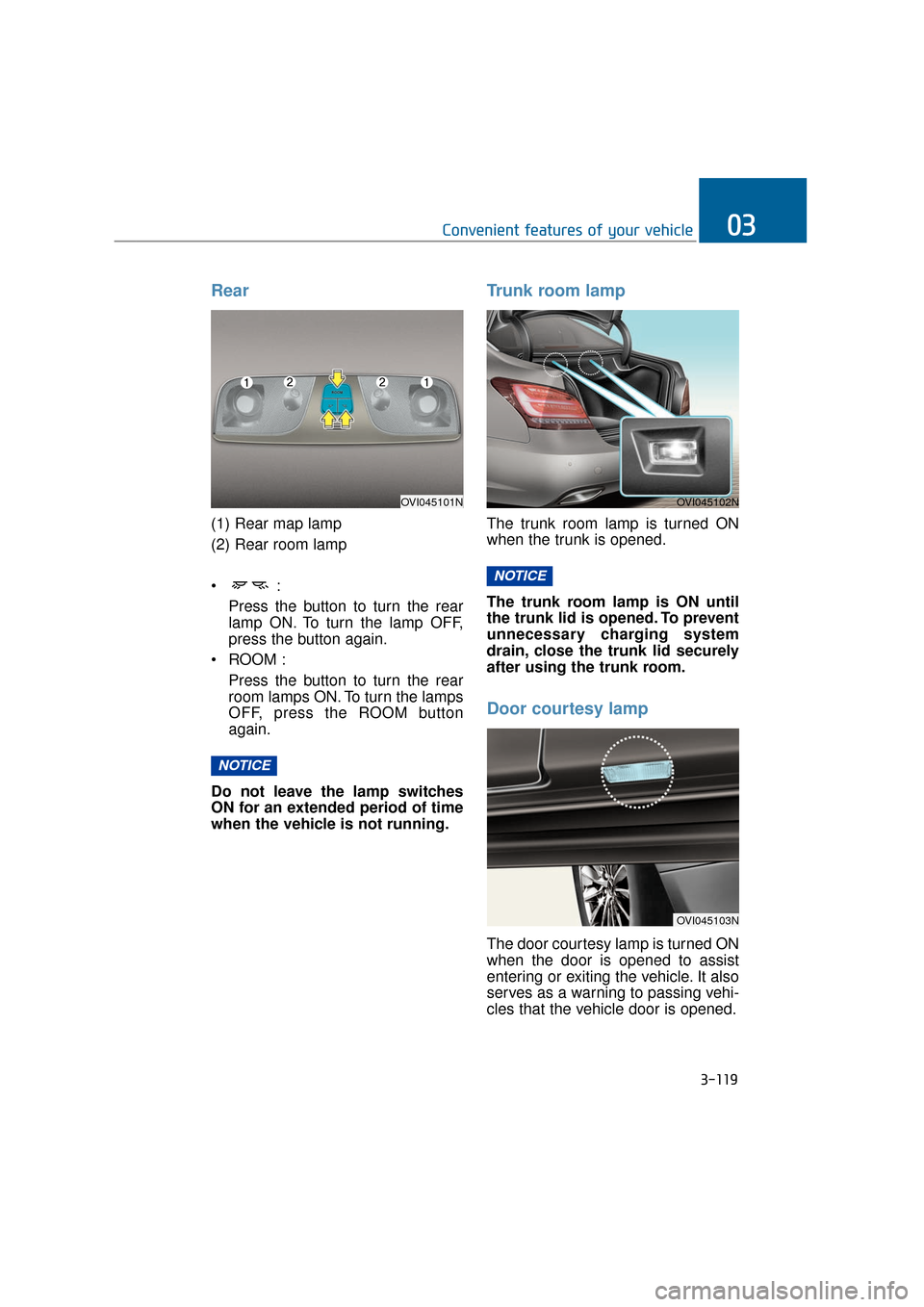
Rear
(1) Rear map lamp
(2) Rear room lamp
Press the button to turn the rearlamp ON. To turn the lamp OFF,
press the button again.
ROOM : Press the button to turn the rearroom lamps ON. To turn the lamps
OFF, press the ROOM button
again.
Do not leave the lamp switches
ON for an extended period of time
when the vehicle is not running.
Trunk room lamp
The trunk room lamp is turned ON
when the trunk is opened.
The trunk room lamp is ON until
the trunk lid is opened. To prevent
unnecessary charging system
drain, close the trunk lid securely
after using the trunk room.
Door courtesy lamp
The door courtesy lamp is turned ON
when the door is opened to assist
entering or exiting the vehicle. It also
serves as a warning to passing vehi-
cles that the vehicle door is opened.
NOTICE
NOTICE
3-119
Convenient features of your vehicle03
OVI045101NOVI045102N
OVI045103N
Page 215 of 477
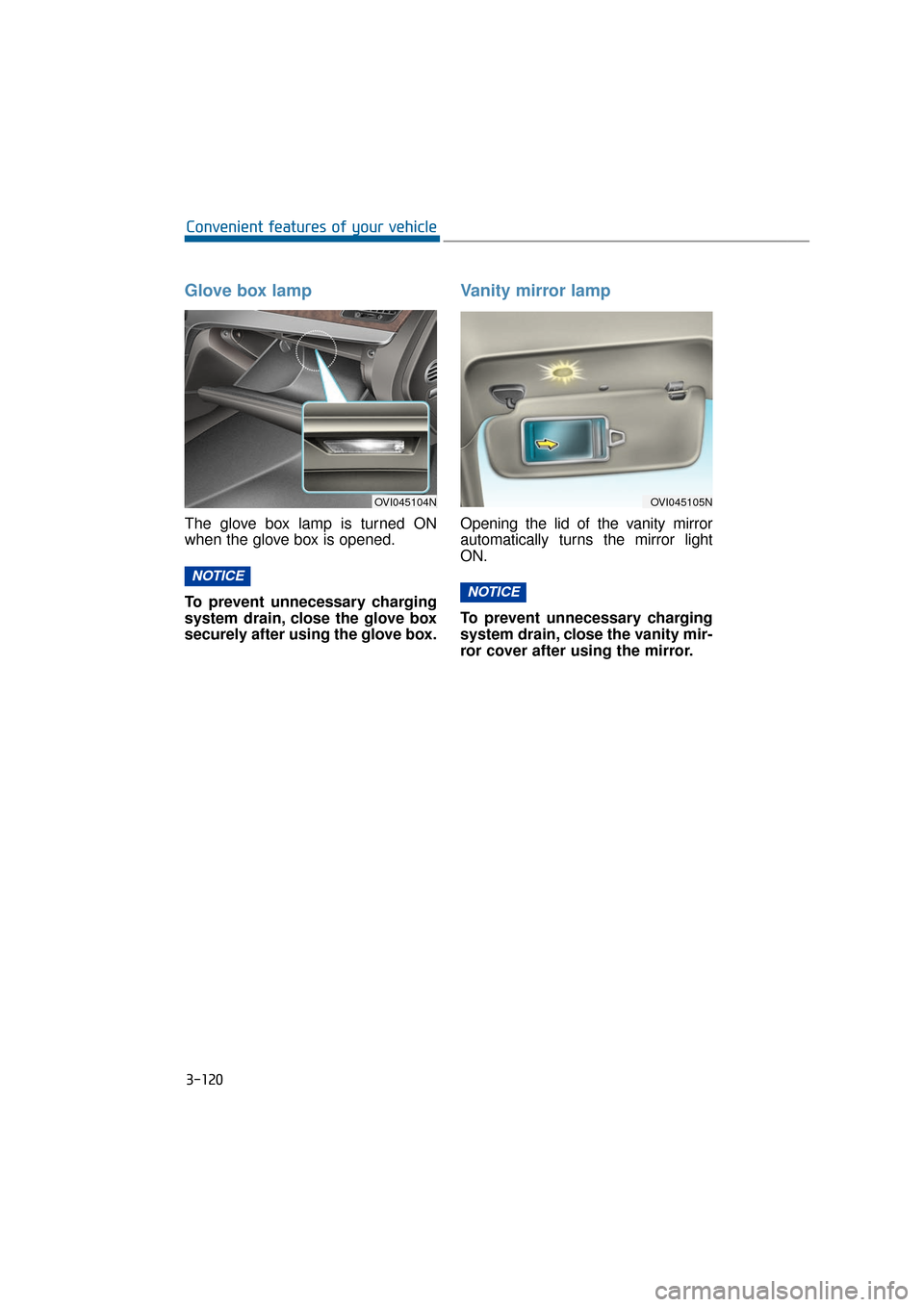
Glove box lamp
The glove box lamp is turned ON
when the glove box is opened.
To prevent unnecessary charging
system drain, close the glove box
securely after using the glove box.
Vanity mirror lamp
Opening the lid of the vanity mirror
automatically turns the mirror light
ON.
To prevent unnecessary charging
system drain, close the vanity mir-
ror cover after using the mirror.
NOTICE
NOTICE
3-120
Convenient features of your vehicle
OVI045104NOVI045105N
Page 222 of 477
3-127
Convenient features of your vehicle03
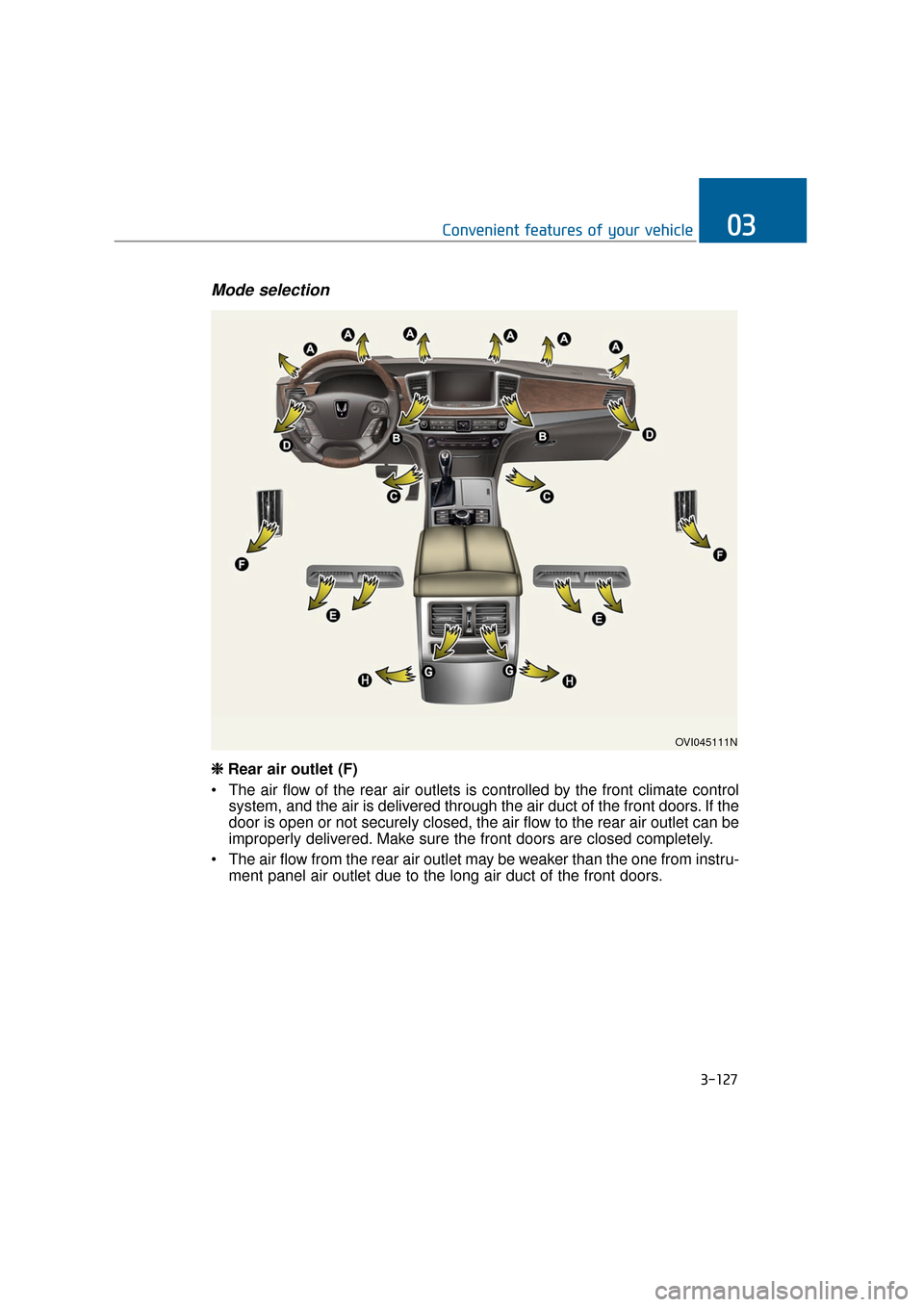
Mode selection
OVI045111N
❈
❈
Rear air outlet (F)
The air flow of the rear air outlets is controlled by the front climate control system, and the air is delivered through the air duct of the front doors. If the
door is open or not securely closed, the air flow to the rear air outlet can be
improperly delivered. Make sure the front doors are closed completely.
The air flow from the rear air outlet may be weaker than the one from instru- ment panel air outlet due to the long air duct of the front doors.
Page 236 of 477
3-141
Convenient features of your vehicle03
These compartments are to store
small items required by the driver or
passengers.
To avoid possible theft, do notleave valuables in the storage
compartments.
Always keep the storage com- partment covers closed while
driving. Do not attempt to place
so many items in the storage
compartment. Otherwise, the
storage compartment cover can-
not be securely closed.
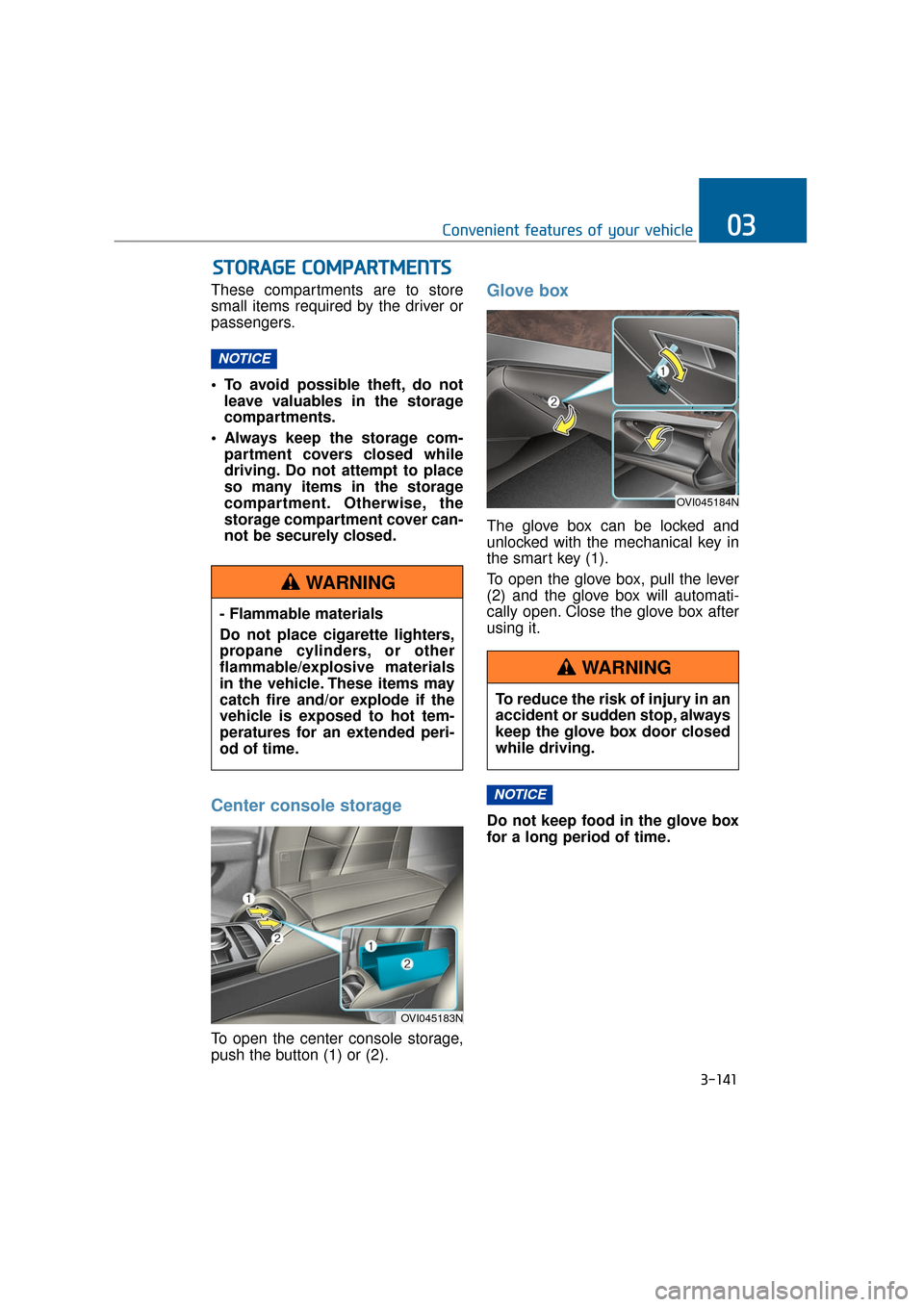
Center console storage
To open the center console storage,
push the button (1) or (2).
Glove box
The glove box can be locked and
unlocked with the mechanical key in
the smart key (1).
To open the glove box, pull the lever
(2) and the glove box will automati-
cally open. Close the glove box after
using it.
Do not keep food in the glove box
for a long period of time.
NOTICE
NOTICE
S ST
T O
O R
RA
A G
G E
E
C
C O
O M
M P
PA
A R
RT
TM
M E
EN
N T
TS
S
- Flammable materials
Do not place cigarette lighters,
propane cylinders, or other
flammable/explosive materials
in the vehicle. These items may
catch fire and/or explode if the
vehicle is exposed to hot tem-
peratures for an extended peri-
od of time.
WARNING
OVI045183N
OVI045184N
To reduce the risk of injury in an
accident or sudden stop, always
keep the glove box door closed
while driving.
WARNING
Page 238 of 477
3-143
Convenient features of your vehicle03
Cool and warm box
(if equipped)
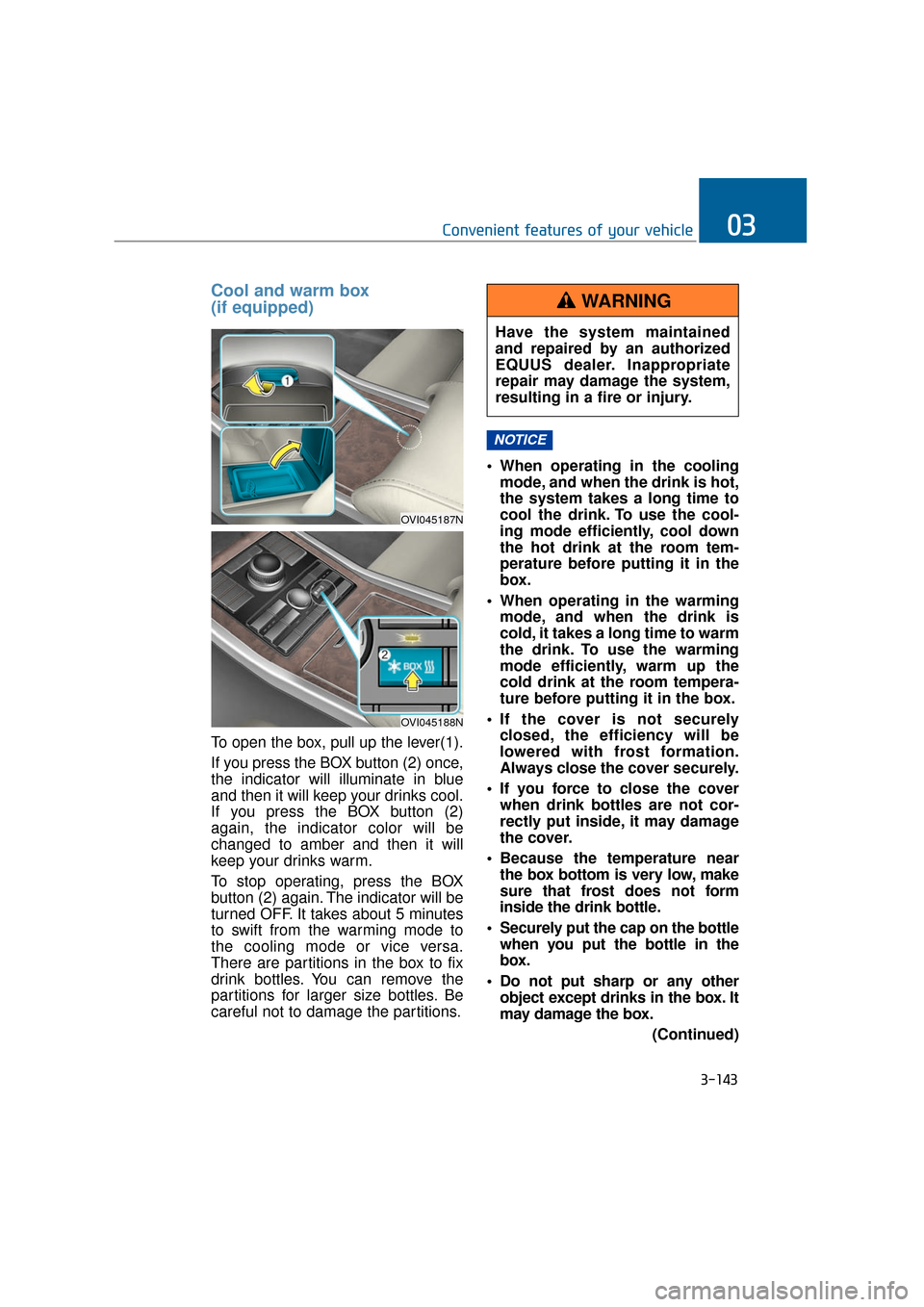
To open the box, pull up the lever(1).
If you press the BOX button (2) once,
the indicator will illuminate in blue
and then it will keep your drinks cool.
If you press the BOX button (2)
again, the indicator color will be
changed to amber and then it will
keep your drinks warm.
To stop operating, press the BOX
button (2) again. The indicator will be
turned OFF. It takes about 5 minutes
to swift from the warming mode to
the cooling mode or vice versa.
There are partitions in the box to fix
drink bottles. You can remove the
partitions for larger size bottles. Be
careful not to damage the partitions. When operating in the cooling
mode, and when the drink is hot,
the system takes a long time to
cool the drink. To use the cool-
ing mode efficiently, cool down
the hot drink at the room tem-
perature before putting it in the
box.
When operating in the warming mode, and when the drink is
cold, it takes a long time to warm
the drink. To use the warming
mode efficiently, warm up the
cold drink at the room tempera-
ture before putting it in the box.
If the cover is not securely closed, the efficiency will be
lowered with frost formation.
Always close the cover securely.
If you force to close the cover when drink bottles are not cor-
rectly put inside, it may damage
the cover.
Because the temperature near the box bottom is very low, make
sure that frost does not form
inside the drink bottle.
Securely put the cap on the bottle when you put the bottle in the
box.
Do not put sharp or any other object except drinks in the box. It
may damage the box.
(Continued)
NOTICE
OVI045187N
OVI045188N
Have the system maintained
and repaired by an authorized
EQUUS dealer. Inappropriate
repair may damage the system,
resulting in a fire or injury.
WARNING
Page 241 of 477
3-146
Convenient features of your vehicle
Cup holder
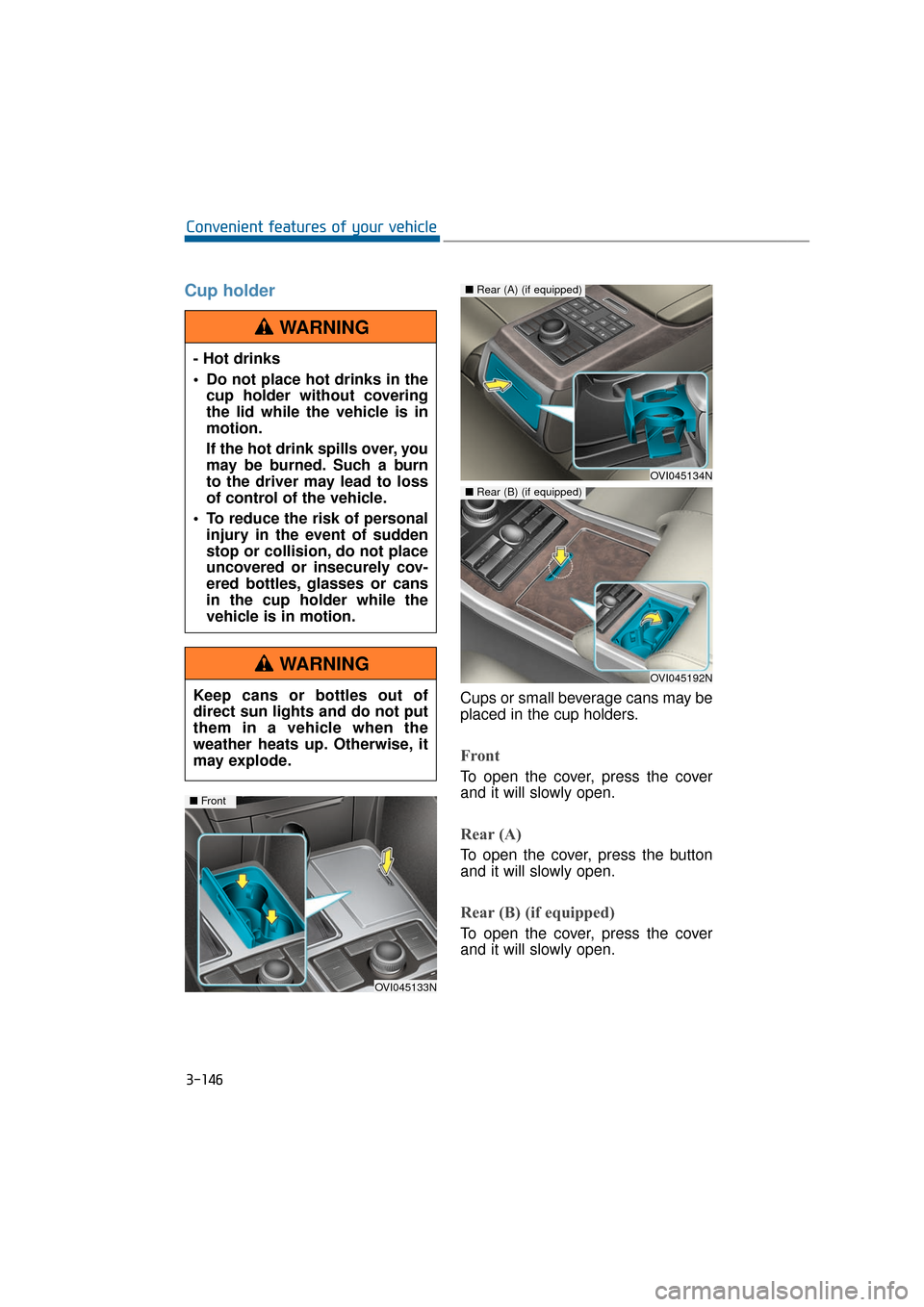
Cups or small beverage cans may be
placed in the cup holders.
Front
To open the cover, press the cover
and it will slowly open.
Rear (A)
To open the cover, press the button
and it will slowly open.
Rear (B) (if equipped)
To open the cover, press the cover
and it will slowly open.
- Hot drinks
Do not place hot drinks in the
cup holder without covering
the lid while the vehicle is in
motion.
If the hot drink spills over, you
may be burned. Such a burn
to the driver may lead to loss
of control of the vehicle.
To reduce the risk of personal injury in the event of sudden
stop or collision, do not place
uncovered or insecurely cov-
ered bottles, glasses or cans
in the cup holder while the
vehicle is in motion.
WARNING
Keep cans or bottles out of
direct sun lights and do not put
them in a vehicle when the
weather heats up. Otherwise, it
may explode.
WARNING
OVI045133N
■ Front
OVI045134N
■Rear (A) (if equipped)
OVI045192N
■Rear (B) (if equipped)