display Hyundai Genesis 2014 Repair Manual
[x] Cancel search | Manufacturer: HYUNDAI, Model Year: 2014, Model line: Genesis, Model: Hyundai Genesis 2014Pages: 546, PDF Size: 13.59 MB
Page 352 of 546
5-76
Driving your vehicle
LKAS activation
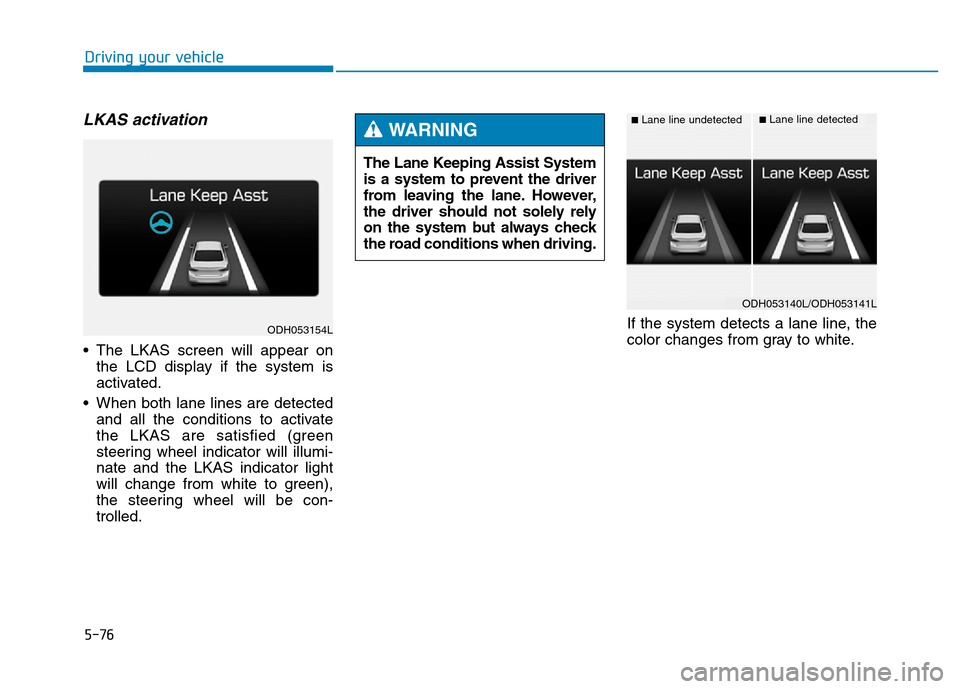
• The LKAS screen will appear on
the LCD display if the system is
activated.
• When both lane lines are detected
and all the conditions to activate
the LKAS are satisfied (green
steering wheel indicator will illumi-
nate and the LKAS indicator light
will change from white to green),
the steering wheel will be con-
trolled.If the system detects a lane line, the
color changes from gray to white. The Lane Keeping Assist System
is a system to prevent the driver
from leaving the lane. However,
the driver should not solely rely
on the system but always check
the road conditions when driving.
WARNING ■Lane line undetected■Lane line detected
ODH053154L
ODH053140L/ODH053141L
Page 353 of 546
5-77
Driving your vehicle
5
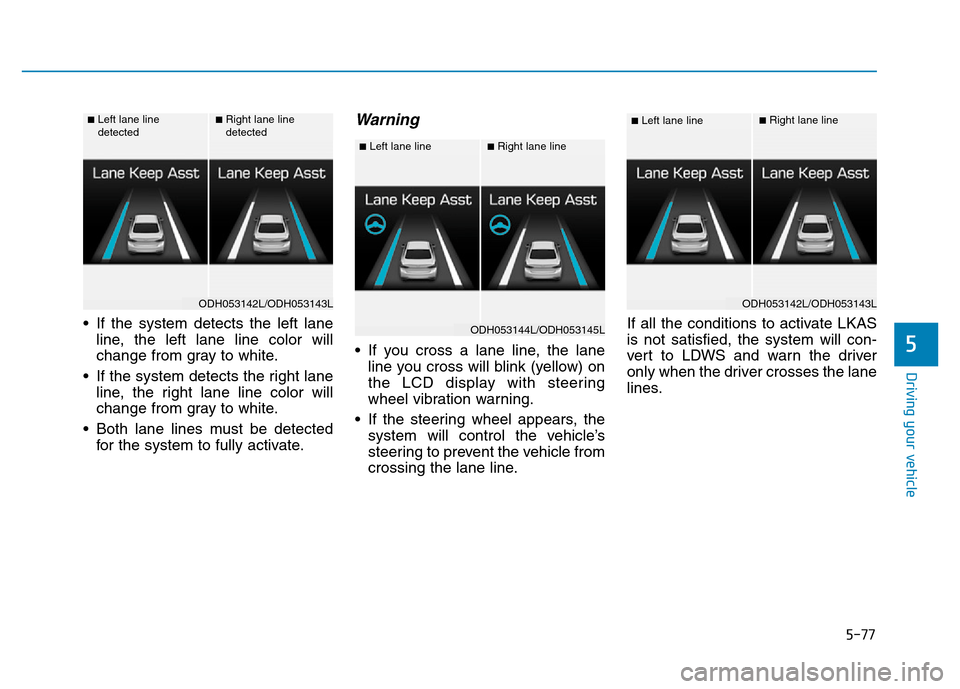
• If the system detects the left lane
line, the left lane line color will
change from gray to white.
• If the system detects the right lane
line, the right lane line color will
change from gray to white.
• Both lane lines must be detected
for the system to fully activate.
Warning
• If you cross a lane line, the lane
line you cross will blink (yellow) on
the LCD display with steering
wheel vibration warning.
• If the steering wheel appears, the
system will control the vehicle’s
steering to prevent the vehicle from
crossing the lane line.If all the conditions to activate LKAS
is not satisfied, the system will con-
vert to LDWS and warn the driver
only when the driver crosses the lane
lines.
■Left lane line
detected■Right lane line
detected
ODH053142L/ODH053143L
■Left lane line■Right lane line
ODH053144L/ODH053145L
■Left lane line■Right lane line
ODH053142L/ODH053143L
Page 355 of 546
5-79
Driving your vehicle
5
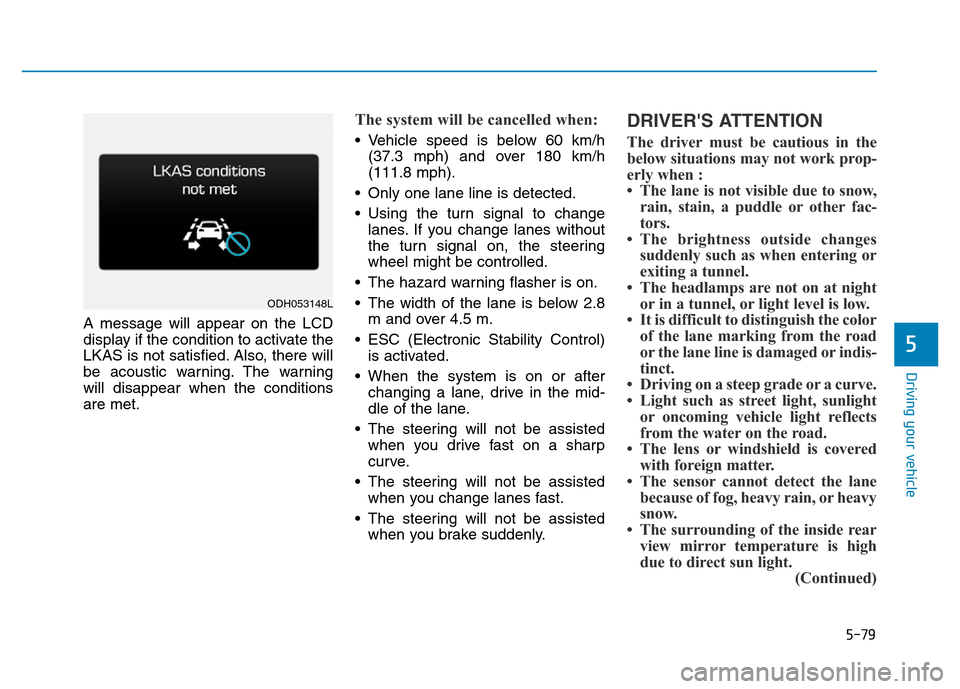
A message will appear on the LCD
display if the condition to activate the
LKAS is not satisfied. Also, there will
be acoustic warning. The warning
will disappear when the conditions
are met.
The system will be cancelled when:
• Vehicle speed is below 60 km/h
(37.3 mph) and over 180 km/h
(111.8 mph).
• Only one lane line is detected.
• Using the turn signal to change
lanes. If you change lanes without
the turn signal on, the steering
wheel might be controlled.
• The hazard warning flasher is on.
• The width of the lane is below 2.8
m and over 4.5 m.
• ESC (Electronic Stability Control)
is activated.
• When the system is on or after
changing a lane, drive in the mid-
dle of the lane.
• The steering will not be assisted
when you drive fast on a sharp
curve.
• The steering will not be assisted
when you change lanes fast.
• The steering will not be assisted
when you brake suddenly.
DRIVER'S ATTENTION
The driver must be cautious in the
below situations may not work prop-
erly when :
• The lane is not visible due to snow,
rain, stain, a puddle or other fac-
tors.
• The brightness outside changes
suddenly such as when entering or
exiting a tunnel.
• The headlamps are not on at night
or in a tunnel, or light level is low.
• It is difficult to distinguish the color
of the lane marking from the road
or the lane line is damaged or indis-
tinct.
• Driving on a steep grade or a curve.
• Light such as street light, sunlight
or oncoming vehicle light reflects
from the water on the road.
• The lens or windshield is covered
with foreign matter.
• The sensor cannot detect the lane
because of fog, heavy rain, or heavy
snow.
• The surrounding of the inside rear
view mirror temperature is high
due to direct sun light.
(Continued)
ODH053148L
Page 357 of 546
5-81
Driving your vehicle
5
When there is a problem with the
system do one of the following:
• Turn the system on after turning
the engine off and on again.
• Check if the Engine Start/Stop but-
ton is in the ON position.
• Check if the system is affected by
the weather. (ex: fog, heavy rain,
etc.)
• Check if there is foreign matter on
the camera lens.
If the problem is not solved, we rec-
ommend that the system be checked
by an authorized HYUNDAI dealer.
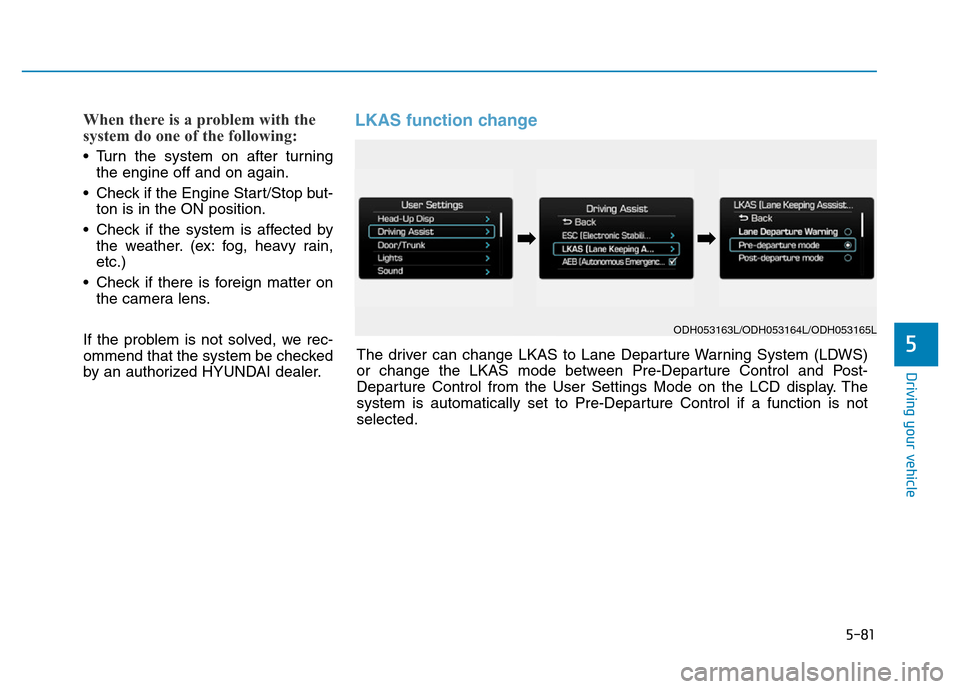
LKAS function change
ODH053163L/ODH053164L/ODH053165L
The driver can change LKAS to Lane Departure Warning System (LDWS)
or change the LKAS mode between Pre-Departure Control and Post-
Departure Control from the User Settings Mode on the LCD display. The
system is automatically set to Pre-Departure Control if a function is not
selected.
➡➡
Page 360 of 546
5-84
Driving your vehicle
BSD (Blind Spot Detection) /
LCA (Lane Change Assist)
Operating conditions
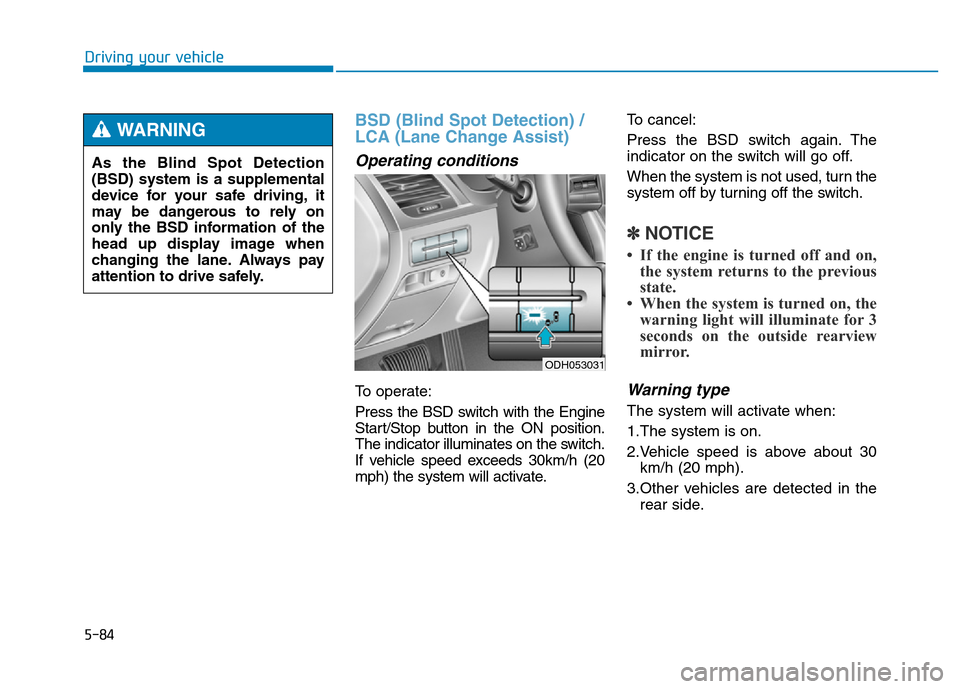
To operate:
Press the BSD switch with the Engine
Start/Stop button in the ON position.
The indicator illuminates on the switch.
If vehicle speed exceeds 30km/h (20
mph) the system will activate.To cancel:
Press the BSD switch again. The
indicator on the switch will go off.
When the system is not used, turn the
system off by turning off the switch.
✽NOTICE
• If the engine is turned off and on,
the system returns to the previous
state.
• When the system is turned on, the
warning light will illuminate for 3
seconds on the outside rearview
mirror.
Warning type
The system will activate when:
1.The system is on.
2.Vehicle speed is above about 30
km/h (20 mph).
3.Other vehicles are detected in the
rear side.
ODH053031
As the Blind Spot Detection
(BSD) system is a supplemental
device for your safe driving, it
may be dangerous to rely on
only the BSD information of the
head up display image when
changing the lane. Always pay
attention to drive safely.
WARNING
Page 361 of 546
5-85
Driving your vehicle
5
First stage alert
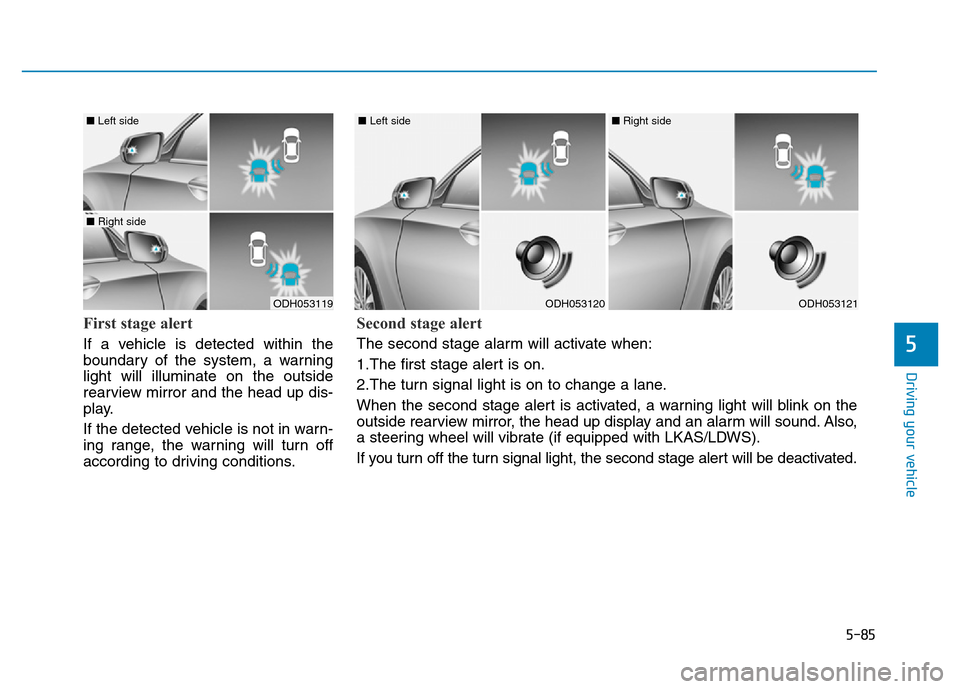
If a vehicle is detected within the
boundary of the system, a warning
light will illuminate on the outside
rearview mirror and the head up dis-
play.
If the detected vehicle is not in warn-
ing range, the warning will turn off
according to driving conditions.
ODH053119
■ Left side
■ Right side
ODH053120
■ Left side
ODH053121
■ Right side
Second stage alert
The second stage alarm will activate when:
1.The first stage alert is on.
2.The turn signal light is on to change a lane.
When the second stage alert is activated, a warning light will blink on the
outside rearview mirror, the head up display and an alarm will sound. Also,
a steering wheel will vibrate (if equipped with LKAS/LDWS).
If you turn off the turn signal light, the second stage alert will be deactivated.
Page 363 of 546
5-87
Driving your vehicle
5
RCTA (Rear Cross Traffic Alert)
Operating conditions
To operate:
Go to the User Settings Mode
(Driving Assist) and select RCTA
(Rear Cross Traffic Alert) on the LCD
display (For more details, refer to
"LCD Display" in chapter 3.). The
system will turn on and standby to
activate. The system will activate
when vehicle speed is below 10km/h
(6.2mph) with the shift lever in R
(Reverse).
✽NOTICE
The RCTA (Rear Cross Traffic
Alert) detecting range is about 0.5m
~ 20m. A vehicle will be detected if
the vehicle speed is 4km/h ~ 36km/h
within the detecting range. However,
the detecting range may change
under different conditions. Always
pay attention to the surroundings.
Warning type
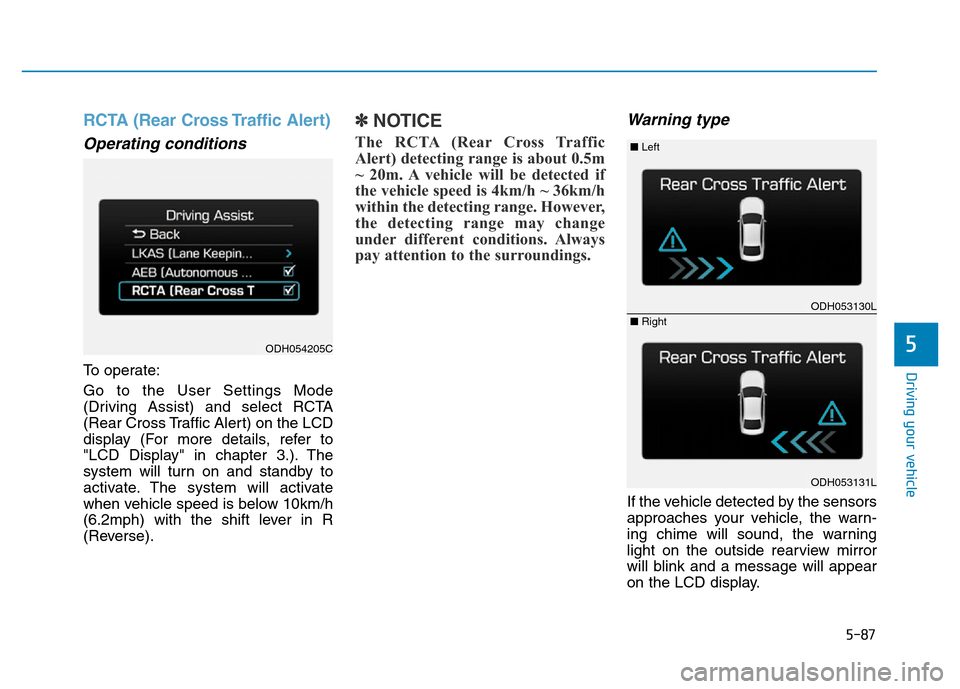
If the vehicle detected by the sensors
approaches your vehicle, the warn-
ing chime will sound, the warning
light on the outside rearview mirror
will blink and a message will appear
on the LCD display.
ODH054205C
ODH053130L
ODH053131L
■ Left
■ Right
Page 414 of 546
6-11
What to do in an emergency
6
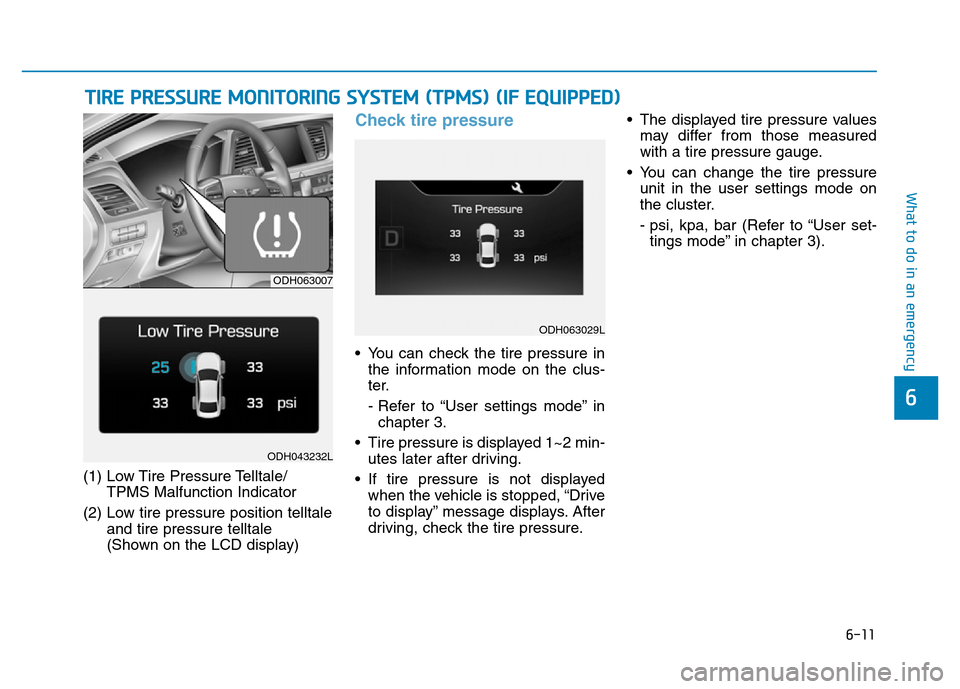
(1) Low Tire Pressure Telltale/
TPMS Malfunction Indicator
(2) Low tire pressure position telltale
and tire pressure telltale
(Shown on the LCD display)
Check tire pressure
• You can check the tire pressure in
the information mode on the clus-
ter.
- Refer to “User settings mode” in
chapter 3.
• Tire pressure is displayed 1~2 min-
utes later after driving.
• If tire pressure is not displayed
when the vehicle is stopped, “Drive
to display” message displays. After
driving, check the tire pressure.• The displayed tire pressure values
may differ from those measured
with a tire pressure gauge.
• You can change the tire pressure
unit in the user settings mode on
the cluster.
- psi, kpa, bar (Refer to “User set-
tings mode” in chapter 3).
TIRE PRESSURE MONITORING SYSTEM (TPMS) (IF EQUIPPED)
ODH063007
ODH043232L
ODH063029L
Page 416 of 546
6-13
What to do in an emergency
6
✽
✽NOTICE
If any of the below happens, we rec-
ommend that the system be checked
by an authorized HYUNDAI dealer.
1.The low tire pressure telltale/
TPMS malfunction indicator does
not illuminate for 3 seconds when
Engine Start/Stop button is turned
to the ON or engine is running.
2. The TPMS malfunction indicator remains illuminated after blinking
for approximately 1 minute.
3. The Low tire pressure position telltale remains illuminated.
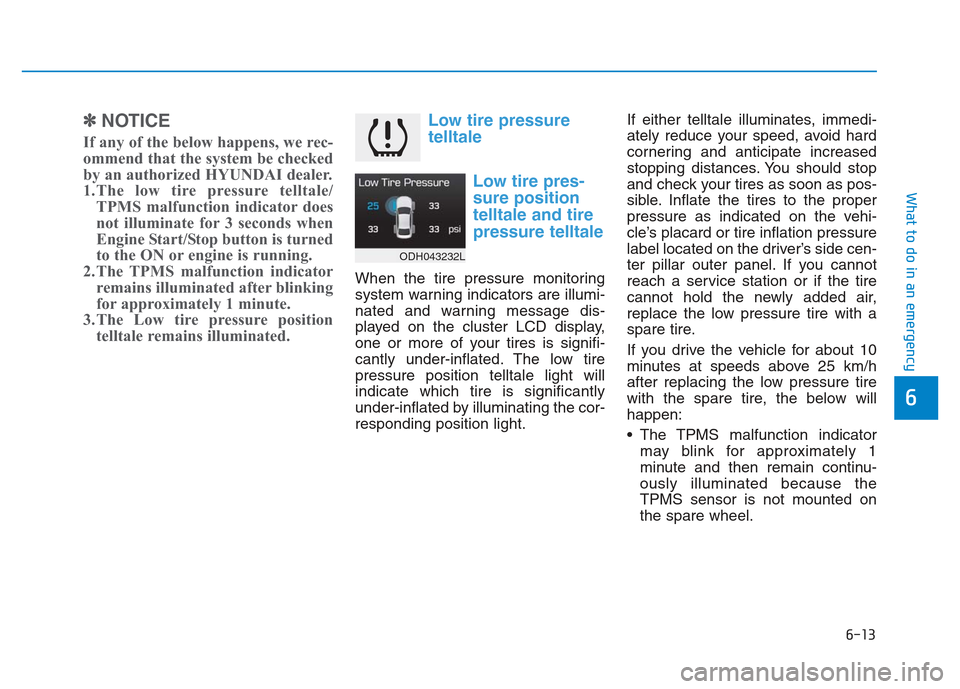
Low tire pressure
telltale
Low tire pres-
sure position
telltale and tire
pressure telltale
When the tire pressure monitoring
system warning indicators are illumi-
nated and warning message dis-
played on the cluster LCD display,
one or more of your tires is signifi-
cantly under-inflated. The low tire
pressure position telltale light will
indicate which tire is significantly
under-inflated by illuminating the cor-
responding position light. If either telltale illuminates, immedi-
ately reduce your speed, avoid hard
cornering and anticipate increased
stopping distances. You should stop
and check your tires as soon as pos-
sible. Inflate the tires to the proper
pressure as indicated on the vehi-
cle’s placard or tire inflation pressure
label located on the driver’s side cen-
ter pillar outer panel. If you cannot
reach a service station or if the tire
cannot hold the newly added air,
replace the low pressure tire with a
spare tire.
If you drive the vehicle for about 10
minutes at speeds above 25 km/h
after replacing the low pressure tire
with the spare tire, the below will
happen:
The TPMS malfunction indicator
may blink for approximately 1
minute and then remain continu-
ously illuminated because the
TPMS sensor is not mounted on
the spare wheel.
ODH043232L
Page 417 of 546
6-14
What to do in an emergency
✽NOTICE
The spare tire is not equipped with a
tire pressure sensor.
TPMS (Tire Pressure
Monitoring System)
malfunction indicator
The TPMS malfunction indicator will
illuminate after it blinks for approxi-
mately one minute when there is a
problem with the Tire Pressure
Monitoring System.
We recommend that the system be
checked by an authorized HYUNDAI
dealer.
✽NOTICE
If there is a malfunction with the
TPMS, the low tire pressure position
telltale will not be displayed even
though the vehicle has an under-
inflated tire.
In winter or cold weather, the
low tire pressure telltale may
illuminate if the tire pressure
was adjusted to the recom-
mended tire inflation pressure
in warm weather. It does not
mean your TPMS is malfunc-
tioning because the decreased
temperature leads to a lowering
of tire pressure.
When you drive your vehicle
from a warm area to a cold area
or from a cold area to a warm
area, or the outside temperature
is higher or lower, you should
check the tire inflation pressure
and adjust the tires to the rec-
ommended tire inflation pres-
sure.
CAUTION
Low pressure damage
Significantly low tire pressure
makes the vehicle unstable and
can contribute to loss of vehicle
control and increased braking
distances.
Continued driving on low pres-
sure tires can cause the tires to
overheat and fail.
WARNING