chapter Hyundai Genesis 2016 Workshop Manual
[x] Cancel search | Manufacturer: HYUNDAI, Model Year: 2016, Model line: Genesis, Model: Hyundai Genesis 2016Pages: 503, PDF Size: 12.94 MB
Page 283 of 503
5-22
Driving your vehicle
Towing
AWD vehicles must be towed with a
wheel lift and dollies or flatbed equip-
ment with all the wheels off the
ground.
For more information, refer to
"Towing" in chapter 6.
Vehicle inspection
When the vehicle is on a car lift, donot operate the front and rear
wheels separately. All four wheels
should be operated.
Never engage the parking brake while running the engine on a car
lift. This may damage the AWD
system.
Dynamometer testing
An AWD vehicle must be tested on a
special four wheel chassis
dynamometer. An AWD vehicle should not be tested
on a 2WD roll tester. If a 2WD roll
tester must be used, perform the fol-
lowing procedure:
1.Check the tire pressures recom-
mended for your vehicle.
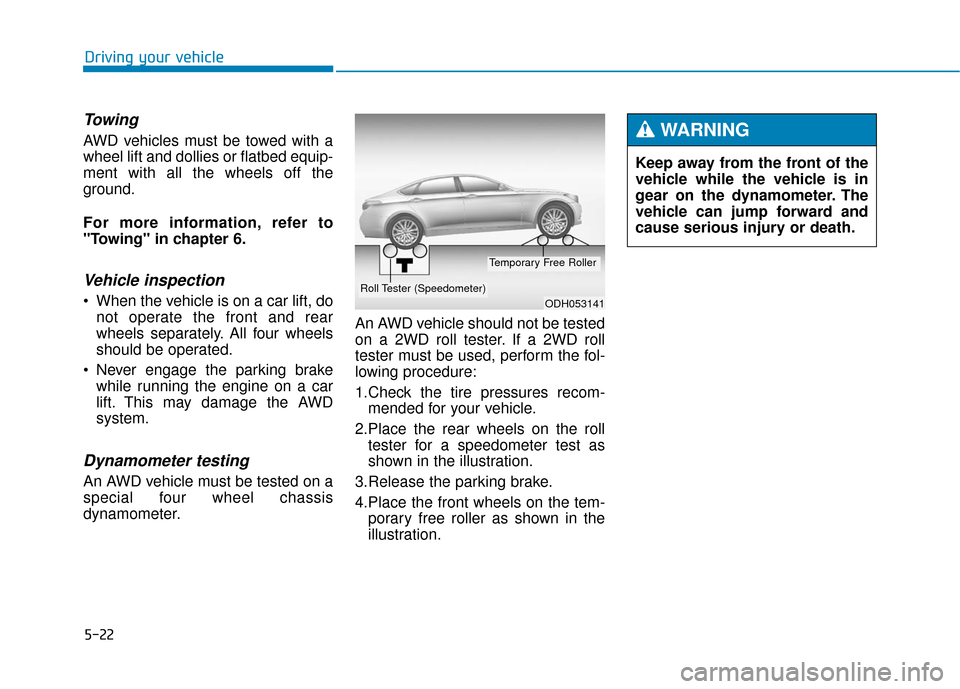
2.Place the rear wheels on the roll tester for a speedometer test as
shown in the illustration.
3.Release the parking brake.
4.Place the front wheels on the tem- porary free roller as shown in the
illustration.
ODH053141
Roll Tester (Speedometer)
Temporary Free Roller
Keep away from the front of the
vehicle while the vehicle is in
gear on the dynamometer. The
vehicle can jump forward and
cause serious injury or death.
WARNING
Page 299 of 503
5-38
Driving your vehicle
Electronic Stability Control
(ESC)
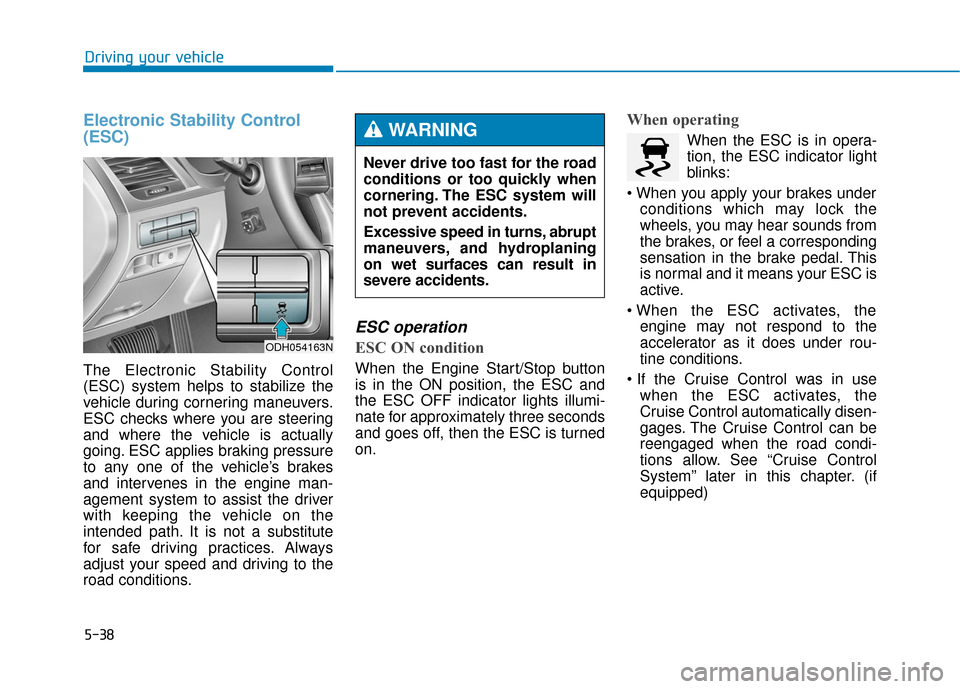
The Electronic Stability Control
(ESC) system helps to stabilize the
vehicle during cornering maneuvers.
ESC checks where you are steering
and where the vehicle is actually
going. ESC applies braking pressure
to any one of the vehicle’s brakes
and intervenes in the engine man-
agement system to assist the driver
with keeping the vehicle on the
intended path. It is not a substitute
for safe driving practices. Always
adjust your speed and driving to the
road conditions.
ESC operation
ESC ON condition
When the Engine Start/Stop button
is in the ON position, the ESC and
the ESC OFF indicator lights illumi-
nate for approximately three seconds
and goes off, then the ESC is turned
on.
When operating
When the ESC is in opera-
tion, the ESC indicator light
blinks:
conditions which may lock the
wheels, you may hear sounds from
the brakes, or feel a corresponding
sensation in the brake pedal. This
is normal and it means your ESC is
active.
engine may not respond to the
accelerator as it does under rou-
tine conditions.
when the ESC activates, the
Cruise Control automatically disen-
gages. The Cruise Control can be
reengaged when the road condi-
tions allow. See “Cruise Control
System” later in this chapter. (if
equipped)
Never drive too fast for the road
conditions or too quickly when
cornering. The ESC system will
not prevent accidents.
Excessive speed in turns, abrupt
maneuvers, and hydroplaning
on wet surfaces can result in
severe accidents.WARNING
ODH054163N
Page 308 of 503
5-47
Driving your vehicle
5
Automatic emergency modechange
In a critical situation, to help avoid
collisions, the Automatic Emergency
Mode automatically controls the
Electronic Control Suspension
(ECS) and Electronic Stability
Control (ESC). When the critical situ-
ation is over, the Electronic Control
Suspension (ECS) and Electronic
Stability Control (ESC) returns to its
previous status.
✽ ✽ NOTICE
• If the AEB is canceled from the
User Settings Mode or there is a
problem with the AEB system, the
Automatic Emergency Mode will
not work.
• If the ESC is off or there is a prob- lem with the ESC system, the
Automatic Emergency Mode will
not work.
• The ESC must be on for the Automatic Emergency Mode to
control ESC in collision situations.
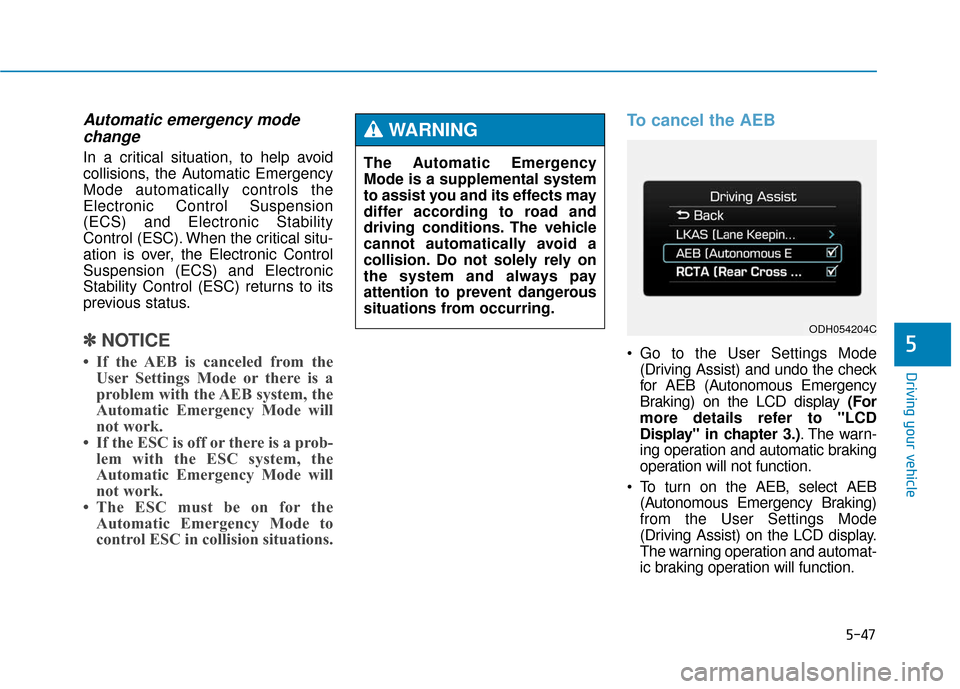
To cancel the AEB
Go to the User Settings Mode
(Driving Assist) and undo the check
for AEB (Autonomous Emergency
Braking) on the LCD display (For
more details refer to "LCD
Display" in chapter 3.) . The warn-
ing operation and automatic braking
operation will not function.
To turn on the AEB, select AEB (Autonomous Emergency Braking)
from the User Settings Mode
(Driving Assist) on the LCD display.
The warning operation and automat-
ic braking operation will function.
The Automatic Emergency
Mode is a supplemental system
to assist you and its effects may
differ according to road and
driving conditions. The vehicle
cannot automatically avoid a
collision. Do not solely rely on
the system and always pay
attention to prevent dangerous
situations from occurring.
WARNING
ODH054204C
Page 343 of 503
5-82
Driving your vehicle
RCTA (Rear Cross Traffic Alert)
Operating conditions
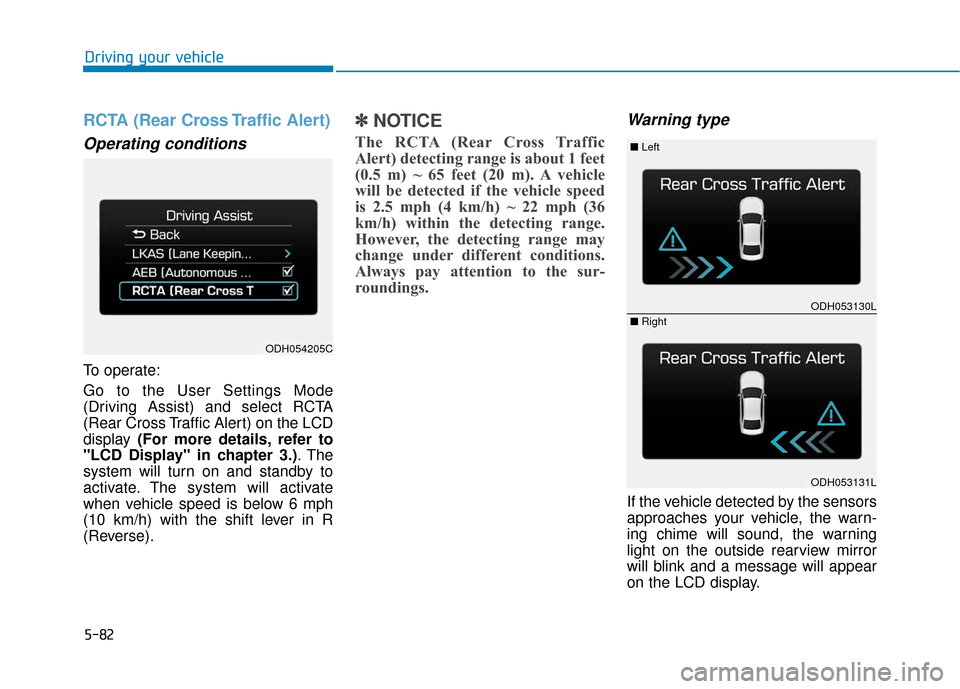
To operate:
Go to the User Settings Mode
(Driving Assist) and select RCTA
(Rear Cross Traffic Alert) on the LCD
display (For more details, refer to
"LCD Display" in chapter 3.) . The
system will turn on and standby to
activate. The system will activate
when vehicle speed is below 6 mph
(10 km/h) with the shift lever in R
(Reverse).
✽ ✽ NOTICE
The RCTA (Rear Cross Traffic
Alert) detecting range is about 1 feet
(0.5 m) ~ 65 feet (20 m). A vehicle
will be detected if the vehicle speed
is 2.5 mph (4 km/h) ~ 22 mph (36
km/h) within the detecting range.
However, the detecting range may
change under different conditions.
Always pay attention to the sur-
roundings.
Warning type
If the vehicle detected by the sensors
approaches your vehicle, the warn-
ing chime will sound, the warning
light on the outside rearview mirror
will blink and a message will appear
on the LCD display.
ODH054205C
ODH053130L
ODH053131L
■ Left
■ Right
Page 348 of 503
5-87
Driving your vehicle
5
Smooth cornering
Avoid braking or gear changing in
corners, especially when roads are
wet. Ideally, corners should always
be taken under gentle acceleration.
Driving at night
Night driving presents more hazards
than driving in the daylight. Here are
some important tips to remember:
Slow down and keep more dis-tance between you and other vehi-
cles, as it may be more difficult to
see at night, especially in areas
where there may not be any street
lights.
Adjust your mirrors to reduce the glare from other driver's head-
lamps.
Keep your headlamps clean and properly aimed. Dirty or improperly
aimed headlamps will make it
much more difficult to see at night.
Avoid staring directly at the head- lamps of oncoming vehicles. You
could be temporarily blinded, and it
will take several seconds for your
eyes to readjust to the darkness.
If you are still stuck after rock-
ing the vehicle a few times, have
the vehicle pulled out by a tow
vehicle to avoid engine over-
heating, possible damage to the
transmission, and tire damage.
See “Towing” in chapter 6.
To prevent damage to the trans-
mission, turn OFF the ESC prior
to rocking the vehicle.CAUTION
Page 349 of 503
5-88
Driving your vehicle
Driving in the rain
Rain and wet roads can make driving
dangerous. Here are a few things to
consider when driving in the rain or
on slick pavement:
Slow down and allow extra follow-ing distance. A heavy rainfall
makes it harder to see and increas-
es the distance needed to stop
your vehicle.
Turn OFF your Cruise Control. (if equipped)
Replace your windshield wiper blades when they show signs of
streaking or missing areas on the
windshield.
Be sure your tires have enough tread. If your tires do not have
enough tread, making a quick stop
on wet pavement can cause a skid
and possibly lead to an accident.
Refer to "Tire Tread" in chapter 7.
Turn on your headlamps to make it easier for others to see you.
Driving too fast through large pud- dles can affect your brakes. If you
must go through puddles, try to
drive through them slowly. If you believe your brakes may be
wet, apply them lightly while driv-
ing until normal braking operation
returns.
Hydroplaning
If the road is wet enough and you are
going fast enough, your vehicle may
have little or no contact with the road
surface and actually ride on the
water. The best advice is SLOW
DOWN when the road is wet. The
risk of hydroplaning increases as the
depth of tire tread decreases. (Refer
to "Tire Tread" in chapter 7.)
Driving in flooded areas
Avoid driving through flooded areas
unless you are sure the water is no
higher than the bottom of the wheel
hub. Drive through any water slowly.
Allow adequate stopping distance
because brake performance may be
reduced.
After driving through water, dry the
brakes by gently applying them sev-
eral times while the vehicle is moving
slowly.
Page 362 of 503
6-3
What to do in an emergency
If you have a flat tire while
driving
If a tire goes flat while you are driving:
Take your foot off the acceleratorpedal and let the vehicle slow down
while driving straight ahead. Do not
apply the brakes immediately or
attempt to pull off the road as this
may cause loss of vehicle control
resulting in an accident. When the
vehicle has slowed to such a speed
that it is safe to do so, brake care-
fully and pull off the road. Drive off
the road as far as possible and park
on firm, level ground. If you are on
a divided highway, do not park in
the median area between the two
traffic lanes.
When the vehicle is stopped, press the hazard warning flasher button,
move the shift lever into P(Park),
and apply the parking brake, and
place the Engine Start/Stop button
in the OFF position.
Have all passengers get out of the vehicle. Be sure they all get out on
the side of the vehicle that is away
from traffic.
When changing a flat tire, follow the instructions provided later in
this chapter.
If the engine doesn't turn over
or turns over slowly
Be sure the shift lever is in N
(Neutral) or P (Park). The engine
starts only when the shift lever is in
N (Neutral) or P (Park).
Check the battery connections to be sure they are clean and tight.
Turn on the interior light. If the light dims or goes out when you operate
the starter, the battery is drained.
Do not push or pull the vehicle to
start it. This could cause damage to
your vehicle. See instructions for
"Jump Starting" provided in this
chapter.
If the engine turns over nor-
mally but doesn't start
Check the fuel level and add fuel if necessary.
If the engine still does not start, have
your vehicle checked by an author-
ized HYUNDAI dealer.
6
I I F
F
T
T H
H E
E
E
E N
N G
GI
IN
N E
E
W
W I
IL
L L
L
N
N O
O T
T
S
S T
T A
A R
RT
T
Push or pull starting the vehicle
may cause the catalytic con-
verter to overload which can
lead to damage to the emission
control system.
WARNING
Page 365 of 503
6-6
What to do in an emergency
7.Connect the jumper cables in the exact sequence shown in the illus-
tration. First connect one jumper
cable to the red, positive (+)
jumper terminal of your vehicle (1).
8.Connect the other end of the jumper cable to the red, positive
(+) battery/jumper terminal of the
assisting vehicle (2).
9.Connect the second jumper cable to the black, negative (-)
battery/chassis ground of the
assisting vehicle (3).
10. Connect the other end of the sec- ond jumper cable to the black,
negative (-) chassis ground of
your vehicle (4).
Do not allow the jumper cables to
contact anything except the cor-
rect battery or jumper terminals
or the correct ground. Do not lean
over the battery when making
connections.
11. Start the engine of the assisting vehicle and let it run at approxi-
mately 2,000 rpm for a few min-
utes. Then start your vehicle. If your vehicle will not start after a
few attempts, it probably requires
servicing. In this event please seek
qualified assistance. If the cause of
your battery discharging is not
apparent, have your vehicle checked
by an authorized HYUNDAI dealer.
Disconnect the jumper cables in the
exact reverse order you connected
them:
1.Disconnect the jumper cable from
the black, negative (-) chassis
ground of your vehicle (4).
2.Disconnect the other end of the jumper cable from the black, nega-
tive (-) battery/chassis ground of
the assisting vehicle (3).
3.Disconnect the second jumper cable from the red, positive (+) bat-
tery/jumper terminal of the assist-
ing vehicle (2).
4.Disconnect the other end of the jumper cable from the red, positive
(+) jumper terminal of your vehicle
(1).
Push-starting
Vehicles equipped with automatic
transmission cannot be push-start-
ed.
Follow the directions in this chapter
for jump-starting.
Page 368 of 503
6-9
What to do in an emergency
6
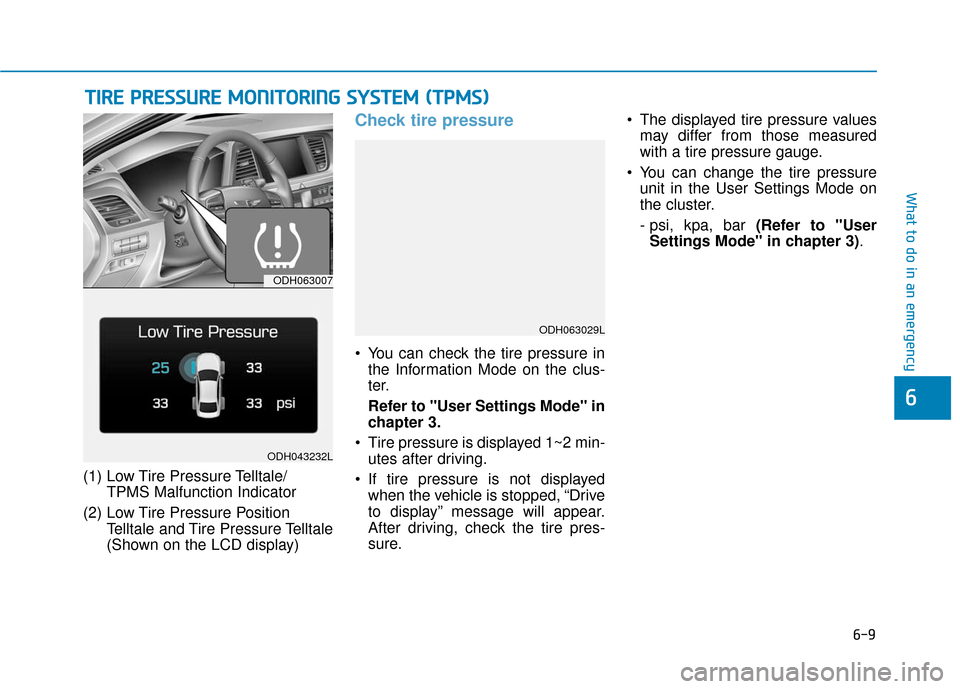
(1) Low Tire Pressure Telltale/TPMS Malfunction Indicator
(2) Low Tire Pressure Position Telltale and Tire Pressure Telltale
(Shown on the LCD display)
Check tire pressure
• You can check the tire pressure inthe Information Mode on the clus-
ter.
Refer to "User Settings Mode" in
chapter 3.
Tire pressure is displayed 1~2 min- utes after driving.
If tire pressure is not displayed when the vehicle is stopped, “Drive
to display” message will appear.
After driving, check the tire pres-
sure. The displayed tire pressure values
may differ from those measured
with a tire pressure gauge.
You can change the tire pressure unit in the User Settings Mode on
the cluster.
- psi, kpa, bar (Refer to "UserSettings Mode" in chapter 3) .
T TI
IR
R E
E
P
P R
R E
ES
SS
SU
U R
RE
E
M
M O
ON
NI
IT
T O
O R
RI
IN
N G
G
S
S Y
Y S
ST
T E
EM
M
(
( T
T P
P M
M S
S)
)
ODH063007
ODH043232L
ODH063029L
Page 378 of 503
6-19
What to do in an emergency
6
If you have a tire gauge, check the
tire pressure (see “Tires and Wheels”
in chapter 8 for tire pressure instruc-
tions.). If the pressure is lower or
higher than recommended, drive
slowly to the nearest service station
and adjust it to the recommended
pressure. Always reinstall the valve
cap after checking or adjusting tire
pressure. If the cap is not replaced,
air may leak from the tire. If you lose
a valve cap, buy another and install it
as soon as possible. After changing
tires, secure the flat tire and return
the jack and tools to their proper stor-
age locations.
✽ ✽NOTICE
Check the tire pressure as soon as
possible after installing a spare tire.
Adjust it to the recommended pres-
sure.
If any of the equipment such as the
jack, lug nuts, studs, or other equip-
ment is damaged or in poor condi-
tion, do not attempt to change the
tire and call for assistance.
Use of compact spare tires
(if equipped)
Compact spare tires are designed for
emergency use only. Drive carefully
on the compact spare tire and
always follow the safety precautions.
Your vehicle has metric threads
on the studs and lug nuts. Make
certain during tire changing
that the same nuts that were
removed are reinstalled. If you
have to replace your lug nuts
make sure they have metric
threads to avoid damaging the
studs and ensure the wheel is
properly secured to the hub.
Consult an authorized
HYUNDAI dealer for assistance.
CAUTION
To prevent compact spare tire
failure and loss of control pos-
sibly resulting in an accident:
Use the compact spare tire
only in an emergency.
NEVER operate your vehicle
over 50 mph (80 km/h).
Do not exceed the vehicle’s
maximum load rating or the
load carrying capacity shown
on the sidewall of the com-
pact spare tire.
Do not use the compact spare
tire continuously. Repair or
replace the original tire as
soon as possible to avoid fail-
ure of the compact spare tire.
WARNING