clock Hyundai Genesis Coupe 2013 User Guide
[x] Cancel search | Manufacturer: HYUNDAI, Model Year: 2013, Model line: Genesis Coupe, Model: Hyundai Genesis Coupe 2013Pages: 414, PDF Size: 38.89 MB
Page 215 of 414
4149
Features of your vehicle
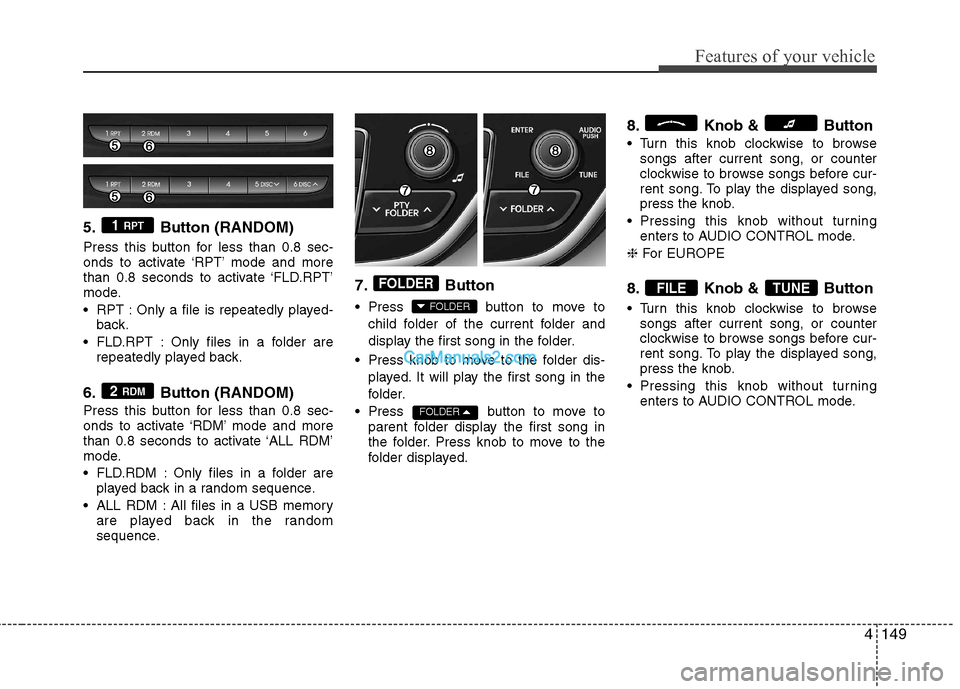
5. Button (RANDOM)
Press this button for less than 0.8 sec-
onds to activate ‘RPT’ mode and more
than 0.8 seconds to activate ‘FLD.RPT’
mode.
RPT : Only a file is repeatedly played-back.
FLD.RPT : Only files in a folder are repeatedly played back.
6. Button (RANDOM)
Press this button for less than 0.8 sec-
onds to activate ‘RDM’ mode and more
than 0.8 seconds to activate ‘ALL RDM’
mode.
FLD.RDM : Only files in a folder are played back in a random sequence.
ALL RDM : All files in a USB memory are played back in the random
sequence. 7. Button
Press button to move to
child folder of the current folder and
display the first song in the folder.
Press knob to move to the folder dis- played. It will play the first song in the
folder.
Press button to move to parent folder display the first song in
the folder. Press knob to move to the
folder displayed. 8. Knob & Button
Turn this knob clockwise to browse
songs after current song, or counter
clockwise to browse songs before cur-
rent song. To play the displayed song,
press the knob.
Pressing this knob without turning enters to AUDIO CONTROL mode.
❈ For EUROPE
8. Knob & Button
Turn this knob clockwise to browse songs after current song, or counter
clockwise to browse songs before cur-
rent song. To play the displayed song,
press the knob.
Pressing this knob without turning enters to AUDIO CONTROL mode.
TUNEFILE
FOLDER
FOLDER
FOLDER
2 RDM
1 RPT
Page 219 of 414
4153
Features of your vehicle
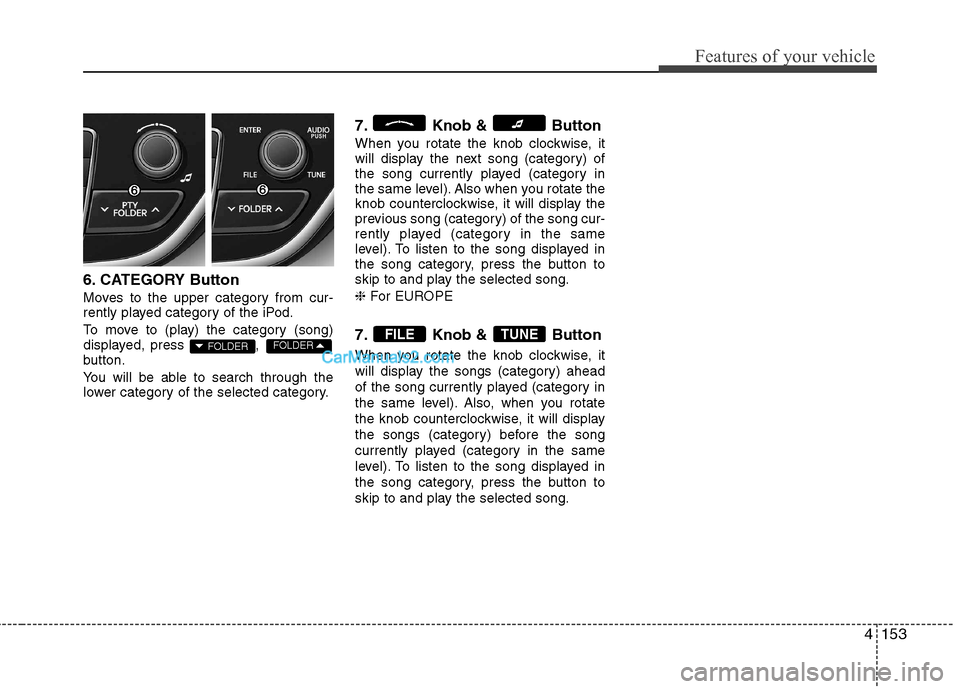
6. CATEGORY Button
Moves to the upper category from cur-
rently played category of the iPod.
To move to (play) the category (song)
displayed, press ,
button.
You will be able to search through the
lower category of the selected category.7. Knob & Button
When you rotate the knob clockwise, it
will display the next song (category) of
the song currently played (category in
the same level). Also when you rotate the
knob counterclockwise, it will display the
previous song (category) of the song cur-
rently played (category in the same
level). To listen to the song displayed in
the song category, press the button to
skip to and play the selected song. ❈
For EUROPE
7. Knob & Button
When you rotate the knob clockwise, it
will display the songs (category) ahead
of the song currently played (category in
the same level). Also, when you rotate
the knob counterclockwise, it will display
the songs (category) before the song
currently played (category in the same
level). To listen to the song displayed in
the song category, press the button to
skip to and play the selected song.
TUNEFILEFOLDERFOLDER
Page 222 of 414
Features of your vehicle
156
4
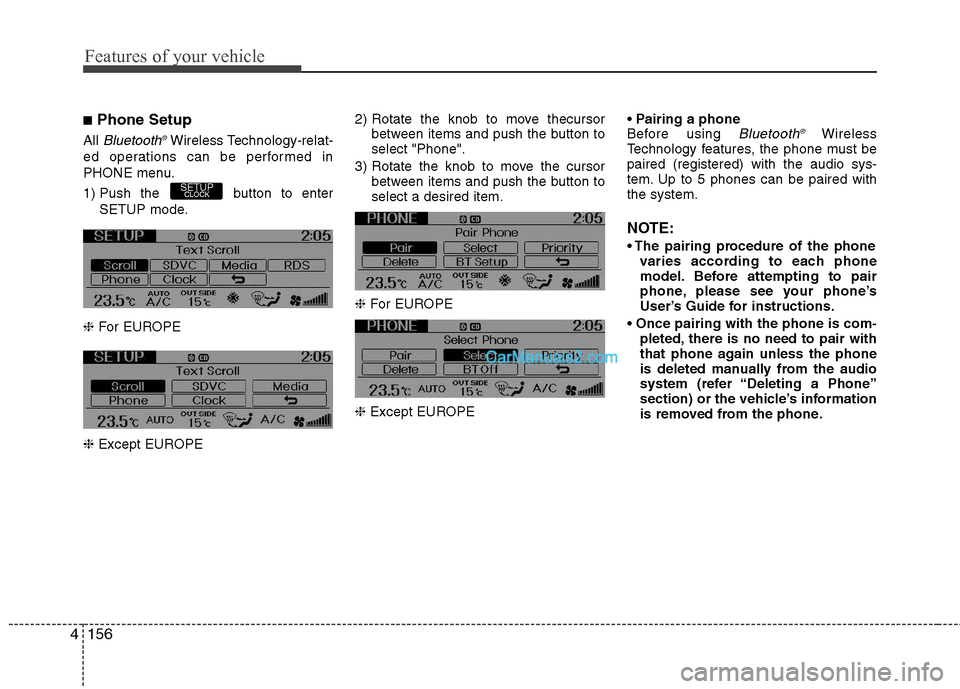
■ Phone Setup
All
Bluetooth ®Wireless Technology-relat-
ed operations can be performed in
PHONE menu.
1) Push the button to enter SETUP mode.
❈ For EUROPE
❈ Except EUROPE 2) Rotate the knob to move thecursor
between items and push the button to select "Phone".
3) Rotate the knob to move the cursor between items and push the button toselect a desired item.
❈ For EUROPE
❈ Except EUROPE
Before using Bluetooth
®Wireless
Technology features, the phone must bepaired (registered) with the audio sys-
tem. Up to 5 phones can be paired withthe system.
NOTE:
varies according to each phone
model. Before attempting to pair
phone, please see your phone’s
User’s Guide for instructions.
pleted, there is no need to pair with
that phone again unless the phone
is deleted manually from the audio
system (refer “Deleting a Phone”
section) or the vehicle’s information
is removed from the phone.
SETUPCLOCK
Page 223 of 414
4157
Features of your vehicle
1. Press button to enter SETUPmode.
2. Select “Phone”, then “Pair” in PHONE menu.
3. The audio displays “searching ---- passkey: 0000”
4. Search the
Bluetooth ®Wireless
Technology system on your phone.
Your phone should display your [vehi-cle model name] on the
Bluetooth ®Wireless Technology device list. Then
attempt pairing on your phone.
NOTE:
If the phone is paired to two or more
vehicles of the same model, i.e. both
vehicles are HYUNDAI GENESIS
COUPE, some phones may not handle
Bluetooth ®Wireless Technology
devices of that name correctly. In this
case, you may need to change the
name displayed on your phone fromGENESIS COUPE to GENESISCOUPE1 and GENESIS COUPE2.
Refer to your phone’s User’s Guide, or
contact your cellular carrier or phone
manufacturer for instructions. When the
Bluetooth
®Wireless
Technology system is enabled, the
phone previously used is automatically
selected and re-connected. If you want to
select different phone previously paired,the phone can be selected through
“Select Phone” menu.Only a selected phone can be used with
the hands-free system at a time.
1. Press button to enter SETUP
mode.
2. Select “Phone”, then “Select” in PHONE menu.
3. Select desired phone name from the
list shown.
The paired phone can be deleted.
- When the phone is deleted, all the infor- mation associated with that phone isalso deleted (including phonebook).
- If you want to use the deleted phone with the audio system again, pairing
procedure must be completed once
more.
1. Press button to enter SETUP mode.
2. Select “Phone”, then “Delete” in PHONE menu.
3. Select desired phone name from the list shown.
If several phones are paired with theaudio system, the system attempts to
connect following order when the
Bluetooth
®Wireless Technology system
is enabled:
1) “Priority” checked phone.
2) Previously connected phone
3) Gives up auto connection.
1. Press button to enter SETUP
mode.
2. Select “Phone”, then “Priority” in PHONE menu.
3. Select desired phone name from the
list shown.
Bluetooth ®Wireless
Technology ON/OFF
Bluetooth ®Wireless Technology system
can be enabled (ON) or disabled (OFF)
by this menu. - If
Bluetooth ®Wireless Technology is
disabled, all the commands related to
Bluetooth ®Wireless Technology system
prompts whether you wish to turn
Bluetooth ®Wireless Technology ON or
not.
1. Press button to enter SETUP mode.
2. Select “Phone”, then “BT Off ” in
PHONE menu.
SETUPCLOCK
SETUPCLOCK
SETUPCLOCK
SETUPCLOCK
SETUP
CLOCK
Page 234 of 414
Features of your vehicle
168
4
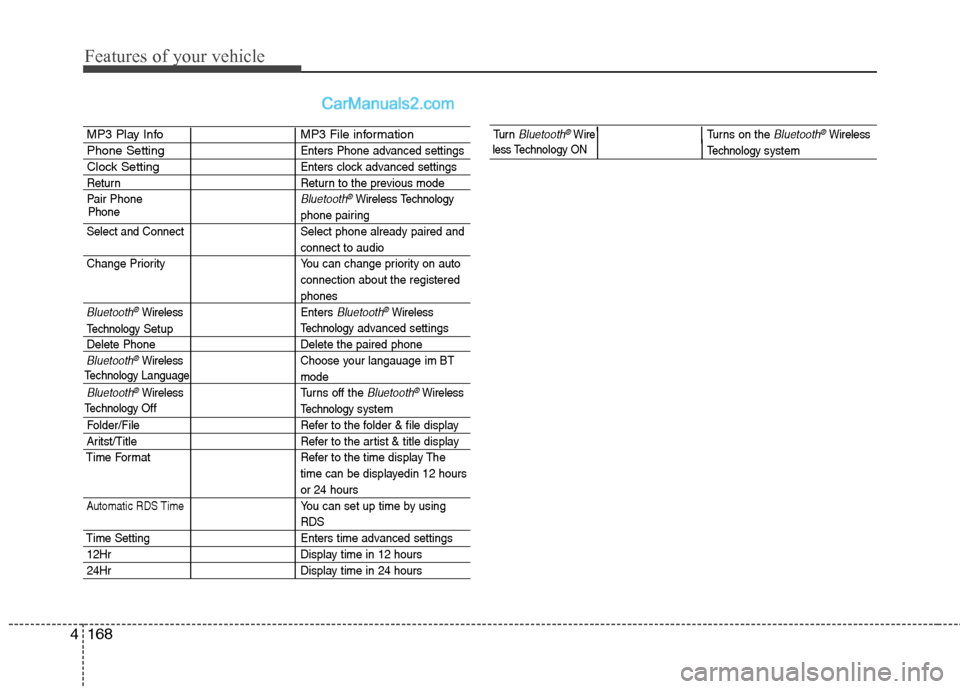
MP3 Play Info MP3 File information
Phone SettingEnters Phone advanced settings
Clock SettingEnters clock advanced settings
Return Return to the previous mode
Pair Phone
Bluetooth®WirelessTechnology
phone pairing
Select and Connect Select phone already paired and
connect to audio
Change Priority You can change priority on auto connection about the registered
phones
Bluetooth®WirelessEnters Bluetooth®Wireless
Technologyadvanced settings
Delete Phone Delete the paired phone
Bluetooth®Wireless Choose your langauage im BT
mode
Bluetooth®WirelessTurns off the Bluetooth®Wireless
Technology system
Folder/File Refer to the folder & file display
Aritst/Title Refer to the artist & title display
Time Format Refer to the time display The time can be displayedin 12 hours
or 24 hours
Automatic RDS TimeYou can set up time by using
RDS
Time Setting Enters time advanced settings
12HrDisplay time in 12 hours
24HrDisplay time in 24 hours
Phone
TechnologyLanguage
Technology
Setup
TechnologyOff
Tu r n Bluetooth®WireTurns on the Bluetooth®Wireless
Technologysystem less Technology ON
Page 295 of 414
69
What to do in an emergency
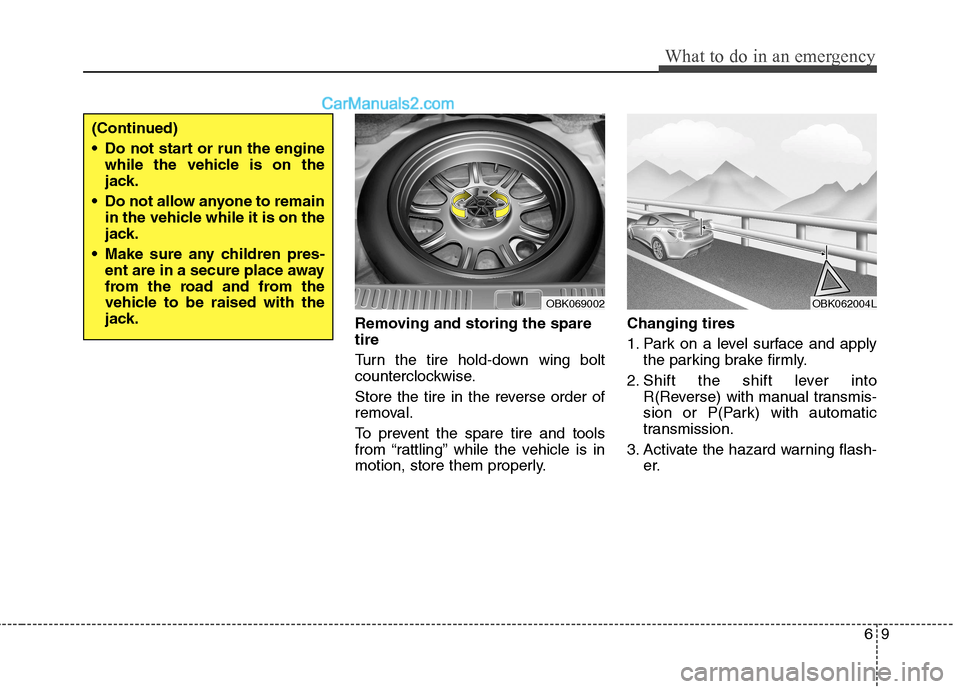
Removing and storing the spare tire
Turn the tire hold-down wing bolt
counterclockwise.
Store the tire in the reverse order of
removal.
To prevent the spare tire and tools
from “rattling” while the vehicle is in
motion, store them properly.Changing tires
1. Park on a level surface and apply
the parking brake firmly.
2. Shift the shift lever into R(Reverse) with manual transmis-
sion or P(Park) with automatic
transmission.
3. Activate the hazard warning flash- er.
OBK069002
(Continued)
Do not start or run the enginewhile the vehicle is on the
jack.
Do not allow anyone to remain in the vehicle while it is on the
jack.
Make sure any children pres- ent are in a secure place away
from the road and from the
vehicle to be raised with the
jack.
OBK062004L
Page 296 of 414
What to do in an emergency
10
6
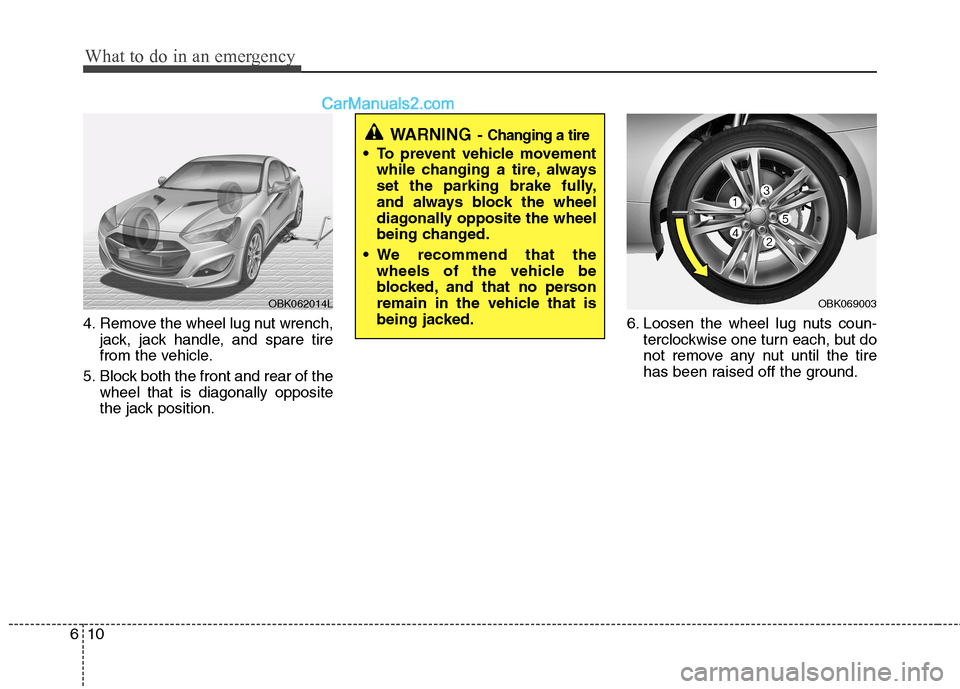
4. Remove the wheel lug nut wrench,
jack, jack handle, and spare tire
from the vehicle.
5. Block both the front and rear of the wheel that is diagonally opposite
the jack position. 6. Loosen the wheel lug nuts coun-
terclockwise one turn each, but do
not remove any nut until the tire
has been raised off the ground.
OBK062014LOBK069003
WARNING - Changing a tire
To prevent vehicle movement
while changing a tire, always
set the parking brake fully,
and always block the wheel
diagonally opposite the wheel
being changed.
We recommend that the wheels of the vehicle be
blocked, and that no person
remain in the vehicle that is
being jacked.
Page 297 of 414
611
What to do in an emergency
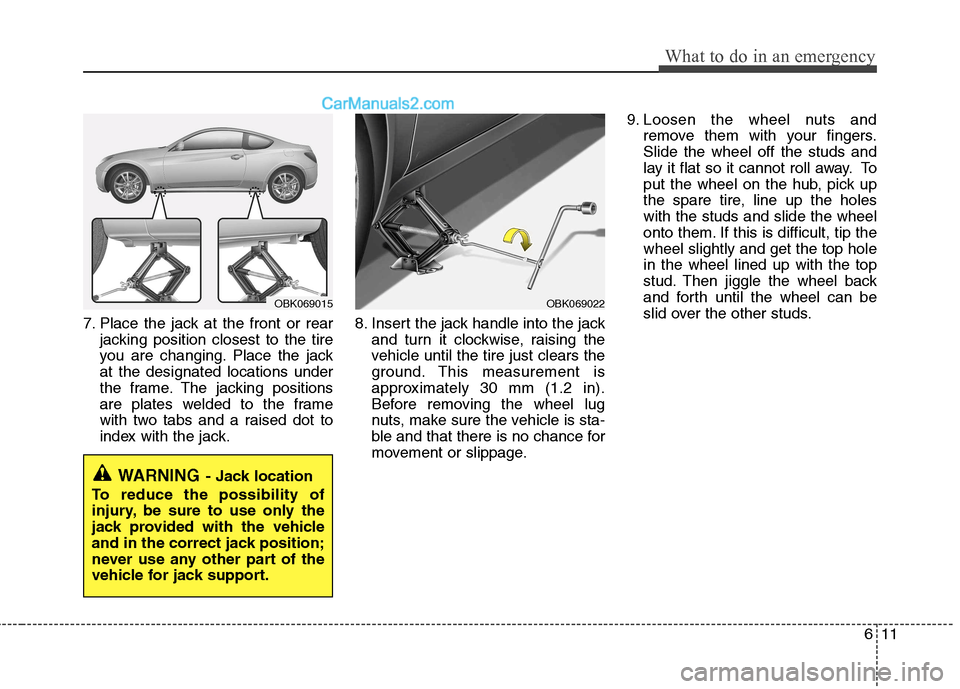
7. Place the jack at the front or rearjacking position closest to the tire
you are changing. Place the jackat the designated locations under
the frame. The jacking positions
are plates welded to the frame
with two tabs and a raised dot to
index with the jack. 8. Insert the jack handle into the jack
and turn it clockwise, raising the
vehicle until the tire just clears the
ground. This measurement is
approximately 30 mm (1.2 in).
Before removing the wheel lug
nuts, make sure the vehicle is sta-
ble and that there is no chance for
movement or slippage. 9. Loosen the wheel nuts and
remove them with your fingers.Slide the wheel off the studs and
lay it flat so it cannot roll away. To
put the wheel on the hub, pick up
the spare tire, line up the holeswith the studs and slide the wheel
onto them. If this is difficult, tip thewheel slightly and get the top holein the wheel lined up with the top
stud. Then jiggle the wheel back
and forth until the wheel can be
slid over the other studs.
WARNING - Jack location
To reduce the possibility of
injury, be sure to use only the
jack provided with the vehicle
and in the correct jack position;
never use any other part of the
vehicle for jack support.
OBK069022OBK069015
Page 298 of 414
What to do in an emergency
12
6
10. To reinstall the wheel, hold it on
the studs, put the wheel nuts on the studs and tighten them finger
tight. The nuts should be installedwith their tapered small diameter
ends directed inward. Jiggle thetire to be sure it is completely
seated, then tighten the nuts as
much as possible with your fin-gers again.
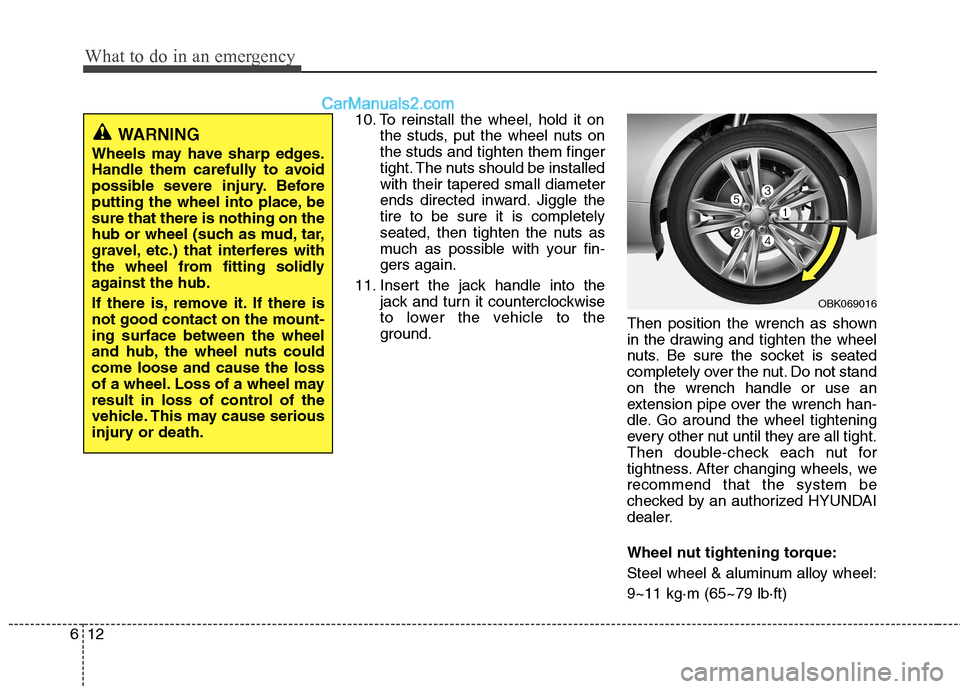
11. Insert the jack handle into the jack and turn it counterclockwise
to lower the vehicle to the
ground. Then position the wrench as shown
in the drawing and tighten the wheel
nuts. Be sure the socket is seated
completely over the nut. Do not standon the wrench handle or use an
extension pipe over the wrench han-
dle. Go around the wheel tightening
every other nut until they are all tight.
Then double-check each nut for
tightness. After changing wheels, werecommend that the system be
checked by an authorized HYUNDAI
dealer.
Wheel nut tightening torque:
Steel wheel & aluminum alloy wheel:9~11 kg·m (65~79 lb·ft)
WARNING
Wheels may have sharp edges.
Handle them carefully to avoid
possible severe injury. Before
putting the wheel into place, besure that there is nothing on the
hub or wheel (such as mud, tar,
gravel, etc.) that interferes with
the wheel from fitting solidly
against the hub.
If there is, remove it. If there is not good contact on the mount-ing surface between the wheel
and hub, the wheel nuts couldcome loose and cause the loss
of a wheel. Loss of a wheel may
result in loss of control of the
vehicle. This may cause serious
injury or death.
OBK069016
Page 303 of 414
617
What to do in an emergency
When towing your vehicle in an emer- gency without wheel dollies :
1. Set the ignition switch in the ACC posi-tion.
2. Place the shift lever in N (Neutral).
3. Release the parking brake.
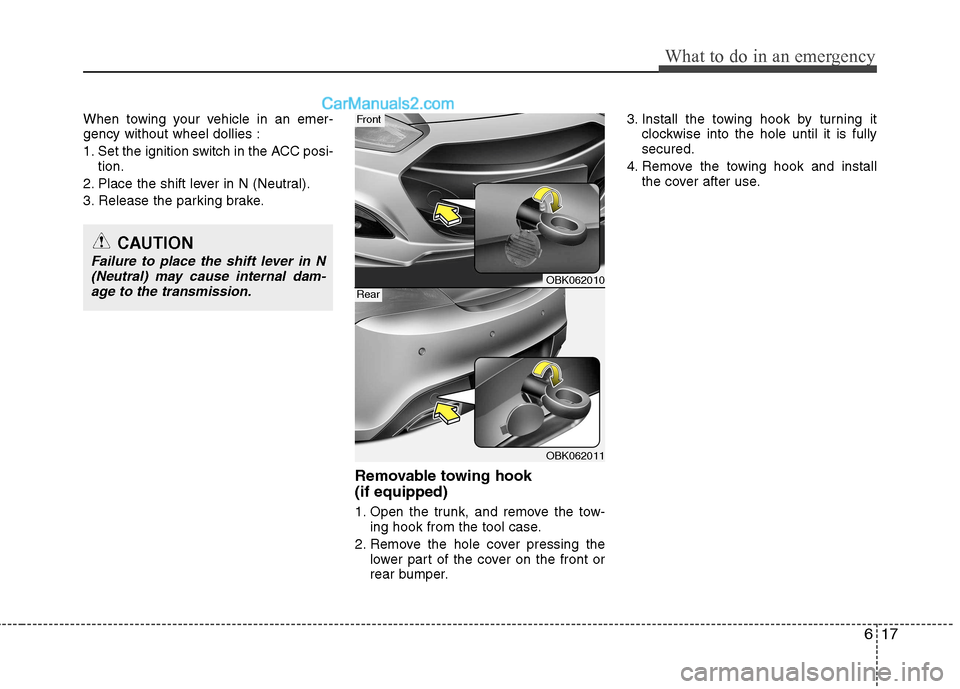
Removable towing hook (if equipped)
1. Open the trunk, and remove the tow-ing hook from the tool case.
2. Remove the hole cover pressing the lower part of the cover on the front or
rear bumper. 3. Install the towing hook by turning it
clockwise into the hole until it is fullysecured.
4. Remove the towing hook and install the cover after use.
CAUTION
Failure to place the shift lever in N
(Neutral) may cause internal dam-age to the transmission.
OBK062010
OBK062011
Front
Rear