lock Hyundai Getz 2007 Owners Manual
[x] Cancel search | Manufacturer: HYUNDAI, Model Year: 2007, Model line: Getz, Model: Hyundai Getz 2007Pages: 463, PDF Size: 11.14 MB
Page 313 of 463
FEATURES OF YOUR HYUNDAI 1- 47
!
B260P02Y-EAT
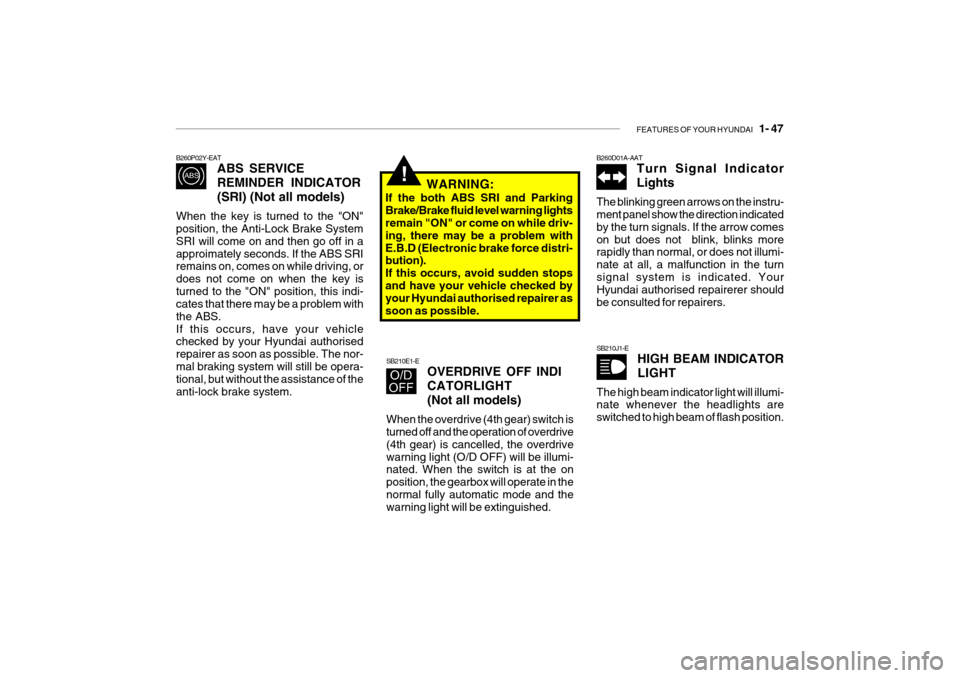
ABS SERVICE REMINDER INDICATOR(SRI) (Not all models)
When the key is turned to the "ON" position, the Anti-Lock Brake System SRI will come on and then go off in aapproimately seconds. If the ABS SRI remains on, comes on while driving, or does not come on when the key isturned to the "ON" position, this indi- cates that there may be a problem with the ABS.If this occurs, have your vehicle checked by your Hyundai authorised repairer as soon as possible. The nor-mal braking system will still be opera- tional, but without the assistance of the anti-lock brake system. SB210E1-E
OVERDRIVE OFF INDI CATORLIGHT(Not all models)
When the overdrive (4th gear) switch is turned off and the operation of overdrive (4th gear) is cancelled, the overdrivewarning light (O/D OFF) will be illumi- nated. When the switch is at the on position, the gearbox will operate in thenormal fully automatic mode and the warning light will be extinguished. B260D01A-AAT
Turn Signal Indicator Lights
The blinking green arrows on the instru- ment panel show the direction indicated by the turn signals. If the arrow comeson but does not blink, blinks more rapidly than normal, or does not illumi- nate at all, a malfunction in the turnsignal system is indicated. Your Hyundai authorised repairerer should be consulted for repairers.
WARNING:
If the both ABS SRI and ParkingBrake/Brake fluid level warning lights remain "ON" or come on while driv- ing, there may be a problem withE.B.D (Electronic brake force distri- bution). If this occurs, avoid sudden stopsand have your vehicle checked by your Hyundai authorised repairer as soon as possible.
SB210J1-E HIGH BEAM INDICATOR LIGHT
The high beam indicator light will illumi- nate whenever the headlights are switched to high beam of flash position.
Page 317 of 463

FEATURES OF YOUR HYUNDAI 1- 51
B260U01TB-EAT
IMMOBILISER
INDICATOR LIGHT(Not all models)
This indicator light comes on for some seconds after the ignition key is turned to the "ON" position. At this time, youcan start the engine. The light goes out after the engine is running. In case this light goes out before you start the en-gine, you must turn to the "LOCK" position and restart the engine. In case this light blinks for five seconds whenthe ignition key is turned to "ON" posi- tion, this indicates that the immobiliser system is out of order. At this time,consult to the Hyundai authorised re- pairer.B260S01B-GAT DIESEL PRE-HEAT INDICATORLIGHT-AMBER(Diesel Engine)
The indicator light illuminates amber when the ignition switch is placed at the "ON" position. The engine can be started after the pre-heat indicator lightgoes off. The illuminating time varies with the water temperature, air tem- perature and battery condition. NOTE: If the engine were not started 10 seconds after the preheating is com-pleted, turn the ignition key once more to the "LOCK" position, and then to the "ON" position, in orderto preheat again.B265C01LZ-EAT ELECTRONIC STABIL-
ITY PROGRAM INDICA-TOR LIGHTS(NOT ALL MODELS)
The electronic stability program indica- tors change operation according to the ignition switch position and whether the system is in operation or not.They will illuminate when the ignition key is turned to the "ON" position, but should go out after three seconds. If theESP or ESP-OFF indicator stays on, take your car to your Hyundai authorised repairer and have the system checked.See section 2 for more information about the ESP.
Page 328 of 463
1- 62 FEATURES OF YOUR HYUNDAI
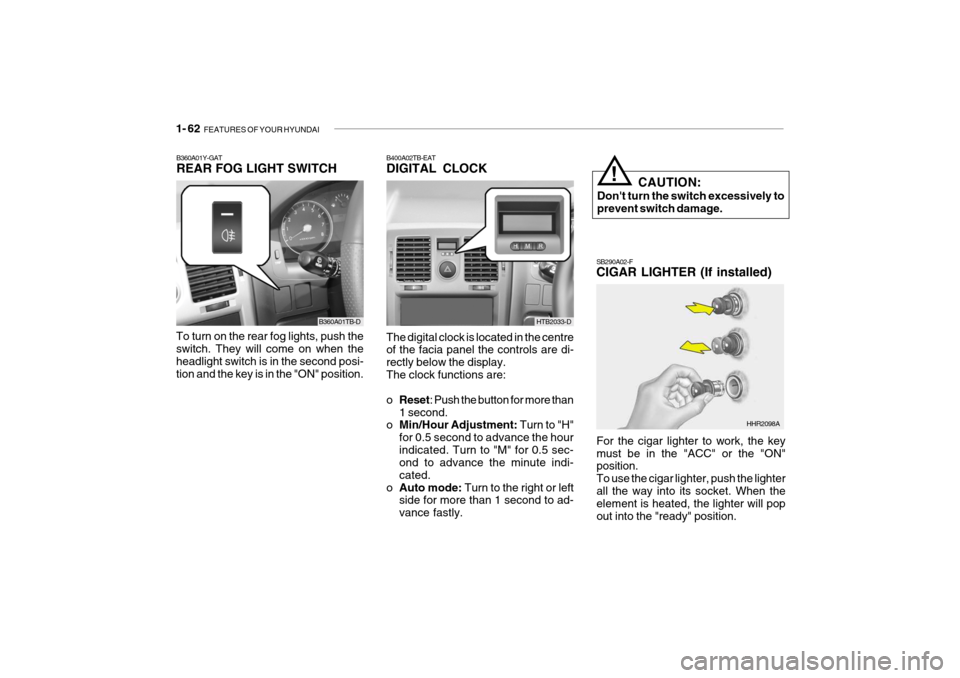
SB290A02-F CIGAR LIGHTER (If installed)
For the cigar lighter to work, the key must be in the "ACC" or the "ON" position. To use the cigar lighter, push the lighterall the way into its socket. When the element is heated, the lighter will pop out into the "ready" position.
HHR2098A
B400A02TB-EAT DIGITAL CLOCK The digital clock is located in the centre of the facia panel the controls are di- rectly below the display.The clock functions are: o Reset : Push the button for more than
1 second.
o Min/Hour Adjustment: Turn to "H"
for 0.5 second to advance the hour indicated. Turn to "M" for 0.5 sec- ond to advance the minute indi- cated.
o Auto mode: Turn to the right or left
side for more than 1 second to ad-vance fastly. CAUTION:
Don't turn the switch excessively toprevent switch damage.
!
B360A01Y-GAT REAR FOG LIGHT SWITCH
To turn on the rear fog lights, push the switch. They will come on when the headlight switch is in the second posi-tion and the key is in the "ON" position.
B360A01TB-DHTB2033-D
Page 331 of 463
FEATURES OF YOUR HYUNDAI 1- 65
!
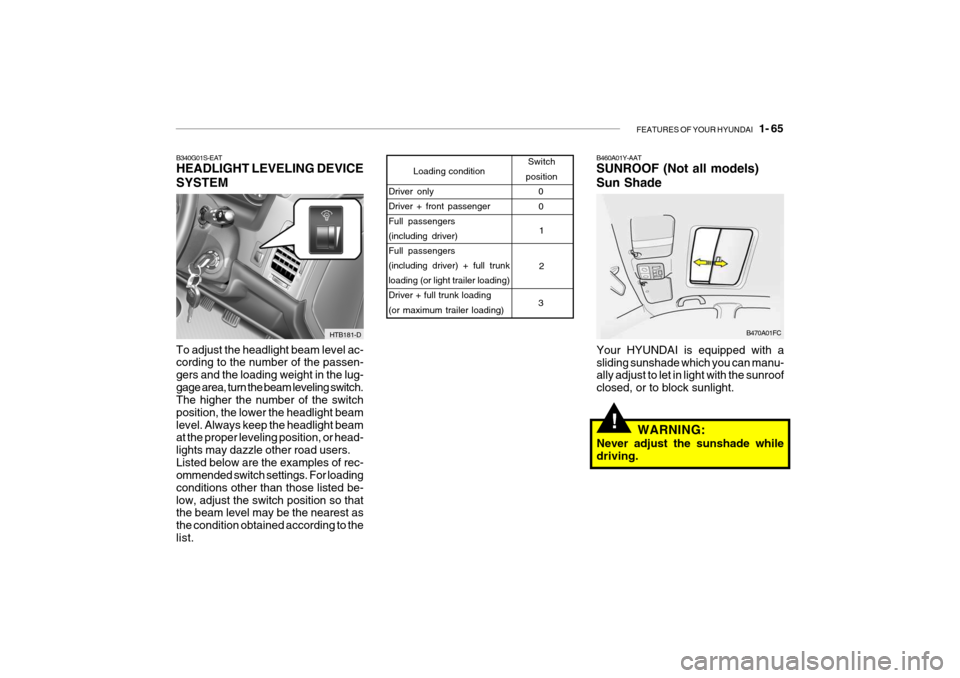
B460A01Y-AAT SUNROOF (Not all models) Sun Shade
Your HYUNDAI is equipped with a sliding sunshade which you can manu- ally adjust to let in light with the sunroof closed, or to block sunlight.
Loading condition Switch
position
Driver only Driver + front passenger Full passengers (including driver)Full passengers (including driver) + full trunk loading (or light trailer loading)Driver + full trunk loading (or maximum trailer loading) 0
1 2
3 0
B470A01FC
WARNING:
Never adjust the sunshade while driving.
B340G01S-EAT HEADLIGHT LEVELING DEVICE SYSTEM To adjust the headlight beam level ac- cording to the number of the passen- gers and the loading weight in the lug-gage area, turn the beam leveling switch. The higher the number of the switch position, the lower the headlight beamlevel. Always keep the headlight beam at the proper leveling position, or head- lights may dazzle other road users.Listed below are the examples of rec- ommended switch settings. For loading conditions other than those listed be-low, adjust the switch position so that the beam level may be the nearest as the condition obtained according to thelist.
HTB181-D
Page 333 of 463
FEATURES OF YOUR HYUNDAI 1- 67
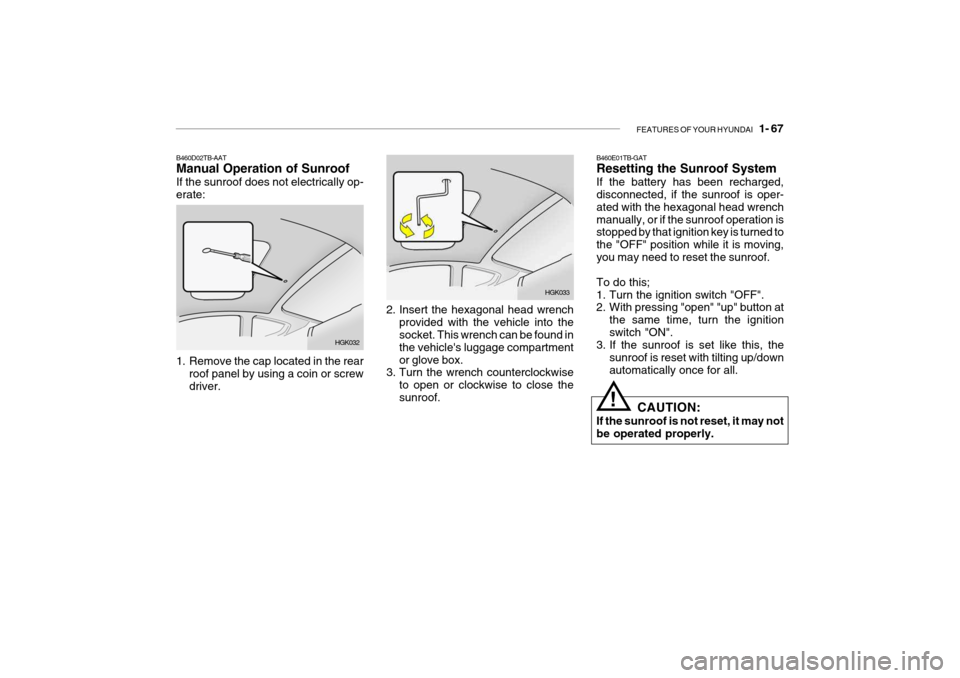
2. Insert the hexagonal head wrench
provided with the vehicle into the socket. This wrench can be found in the vehicle's luggage compartmentor glove box.
3. Turn the wrench counterclockwise
to open or clockwise to close thesunroof. HGK033B460E01TB-GAT Resetting the Sunroof System If the battery has been recharged, disconnected, if the sunroof is oper- ated with the hexagonal head wrenchmanually, or if the sunroof operation is stopped by that ignition key is turned to the "OFF" position while it is moving,you may need to reset the sunroof. To do this;
1. Turn the ignition switch "OFF".
2. With pressing "open" "up" button at
the same time, turn the ignition switch "ON".
3. If the sunroof is set like this, the
sunroof is reset with tilting up/downautomatically once for all.
! CAUTION:
If the sunroof is not reset, it may not be operated properly.
B460D02TB-AAT Manual Operation of Sunroof If the sunroof does not electrically op- erate:
HGK032
1. Remove the cap located in the rear roof panel by using a coin or screw driver.
Page 340 of 463
1- 74 FEATURES OF YOUR HYUNDAI
!
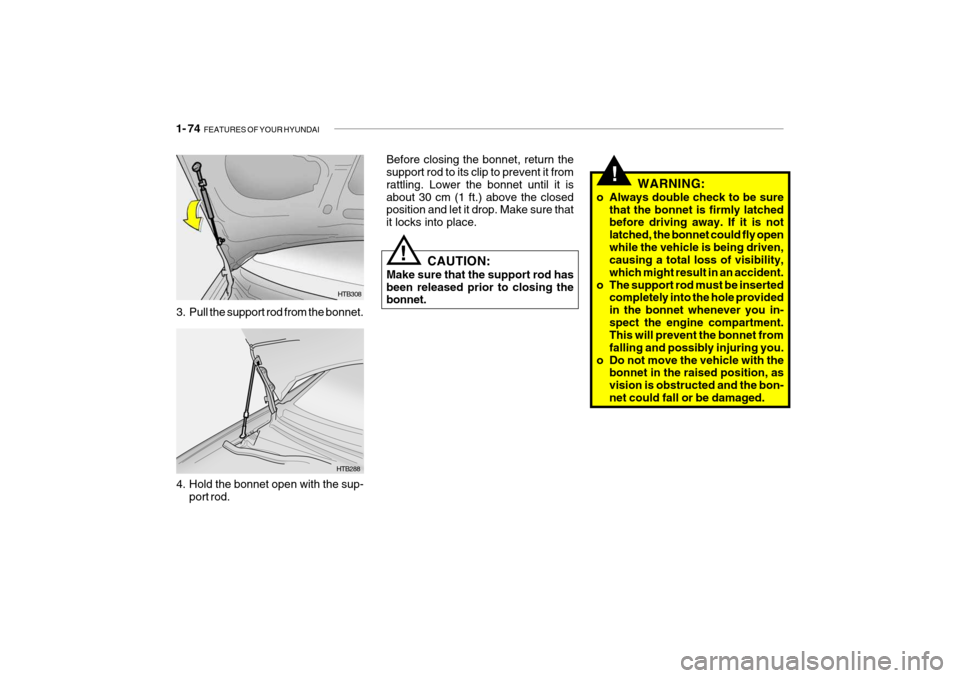
Before closing the bonnet, return the support rod to its clip to prevent it from rattling. Lower the bonnet until it isabout 30 cm (1 ft.) above the closed position and let it drop. Make sure that it locks into place.
HTB288
3. Pull the support rod from the bonnet.
HTB308
CAUTION:
Make sure that the support rod has been released prior to closing the bonnet.
4. Hold the bonnet open with the sup- port rod. WARNING:
o Always double check to be sure that the bonnet is firmly latchedbefore driving away. If it is not latched, the bonnet could fly openwhile the vehicle is being driven, causing a total loss of visibility, which might result in an accident.
o The support rod must be inserted completely into the hole providedin the bonnet whenever you in-spect the engine compartment. This will prevent the bonnet from falling and possibly injuring you.
o Do not move the vehicle with the bonnet in the raised position, asvision is obstructed and the bon-net could fall or be damaged.
!
Page 342 of 463
1- 76 FEATURES OF YOUR HYUNDAI
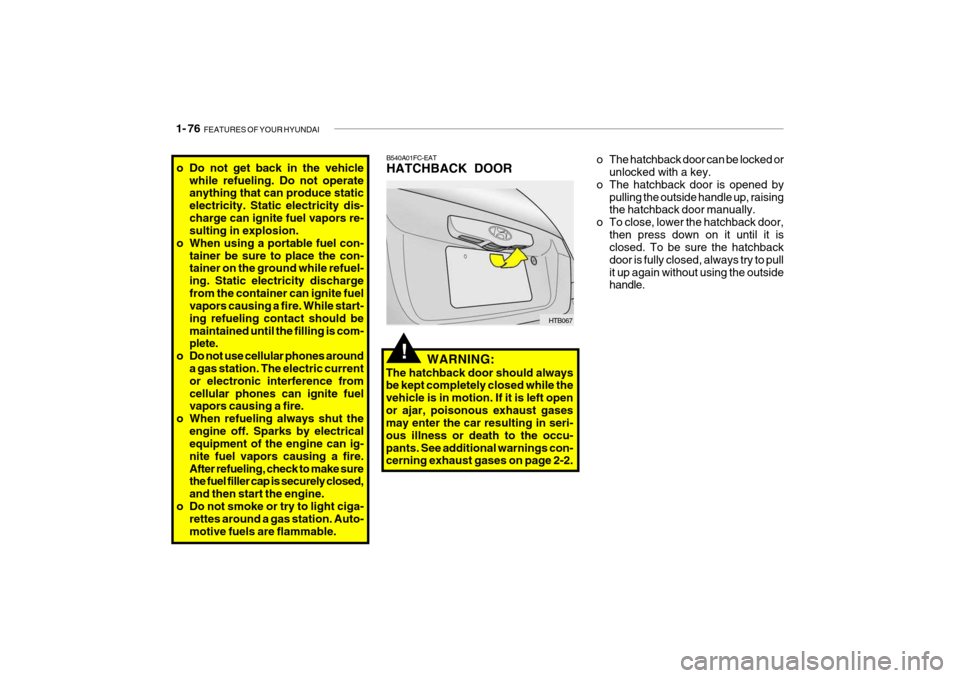
B540A01FC-EAT HATCHBACK DOOR
HTB067
WARNING:
The hatchback door should always be kept completely closed while the vehicle is in motion. If it is left openor ajar, poisonous exhaust gases may enter the car resulting in seri- ous illness or death to the occu-pants. See additional warnings con- cerning exhaust gases on page 2-2.
!
o The hatchback door can be locked or unlocked with a key.
o The hatchback door is opened by pulling the outside handle up, raising the hatchback door manually.
o To close, lower the hatchback door, then press down on it until it isclosed. To be sure the hatchback door is fully closed, always try to pullit up again without using the outside handle.o Do not get back in the vehicle
while refueling. Do not operate anything that can produce static electricity. Static electricity dis-charge can ignite fuel vapors re- sulting in explosion.
o When using a portable fuel con-
tainer be sure to place the con-tainer on the ground while refuel- ing. Static electricity dischargefrom the container can ignite fuel vapors causing a fire. While start- ing refueling contact should bemaintained until the filling is com- plete.
o Do not use cellular phones around a gas station. The electric current or electronic interference fromcellular phones can ignite fuel vapors causing a fire.
o When refueling always shut the
engine off. Sparks by electricalequipment of the engine can ig- nite fuel vapors causing a fire.After refueling, check to make sure the fuel filler cap is securely closed, and then start the engine.
o Do not smoke or try to light ciga- rettes around a gas station. Auto-motive fuels are flammable.
Page 347 of 463

FEATURES OF YOUR HYUNDAI 1- 81
!
!
SB520A1-F STEERING WHEEL TILT LEVER To adjust the steering wheel:
1. Push the lever downward to unlock.
2. Raise or lower the steering wheel to
the desired position.
3. After adjustment, securely tighten the lever by pulling it upward
WARNING:
Do not attempt to adjust the steering wheel while driving as this may re- sult in loss of control of the vehicle and result in death or serious injury.
Your Hyundai is equipped with sun visors to give the driver and front pas- senger either frontal or side ward shade.The sun visors are fitted on both sides on all models. To reduce glare or to shut out direct rays of the sun, turn thesun visor down to block the annoy- ance. A ticket holder is provided on the back of the sun visor for the driver.Vanity mirrors are provided on the back of the sunvisor for the driver and the front passenger (If installed). NOTE: The Supplemental Restraint Sys- tem (SRS) label containing useful information can be found on the front of each sun visor.
WARNING:
Do not place the sun visor in such a manner that it obscures visibility of the roadway, traffic or other ob-jects.
B600A01TB-D
B610B01A-DAT HORN
Press the centre hub of the steering wheel to sound the horn. B240B01TB
Page 355 of 463
FEATURES OF YOUR HYUNDAI 1- 89
B740A01A-AAT AIR CONDITIONING SWITCH (Not all models)
B730A01FC-EAT Operation Tips
o To keep dust or unpleasant fumes
from entering the car through the ventilation system, temporarily set the air intake control at "Recircula- tion". Be sure to return the control to"Fresh" when the irritation has passed to keep fresh air in the ve- hicle. This will help keep the driveralert and comfortable.
o Air for the heating/cooling system is
drawn in through the grilles justahead of the windscreen. Care should be taken that these are not blocked by leaves, snow, ice or other ob-structions.
o To prevent interior fog on the
windscreen, set the air intake controlto the fresh air ( ) position and fan speed to the desired position.
To remove the frost or exterior fog on the windscreen:
o Set the air intake control to the fresh
( ) position.
o Set the air flow control to the defrost ( ) position
o Set the temperature control to warm.
o Set the fan speed control to position
"3" or "4".
NOTE: When the A/C is operated continu- ously on the floor-defrost level ( ) or defrost level ( ), it may cause fog to form on the exteriorwindscreen. If this occurs, set the air flow control to the face level posi- tion ( ) and fan speed control tothe low position. The air conditioning is turned on by pushing the A/C button on the heating/ air conditioning control panel.
HTB037-D
Page 359 of 463
FEATURES OF YOUR HYUNDAI 1- 93
!
B750A04L B750A05L
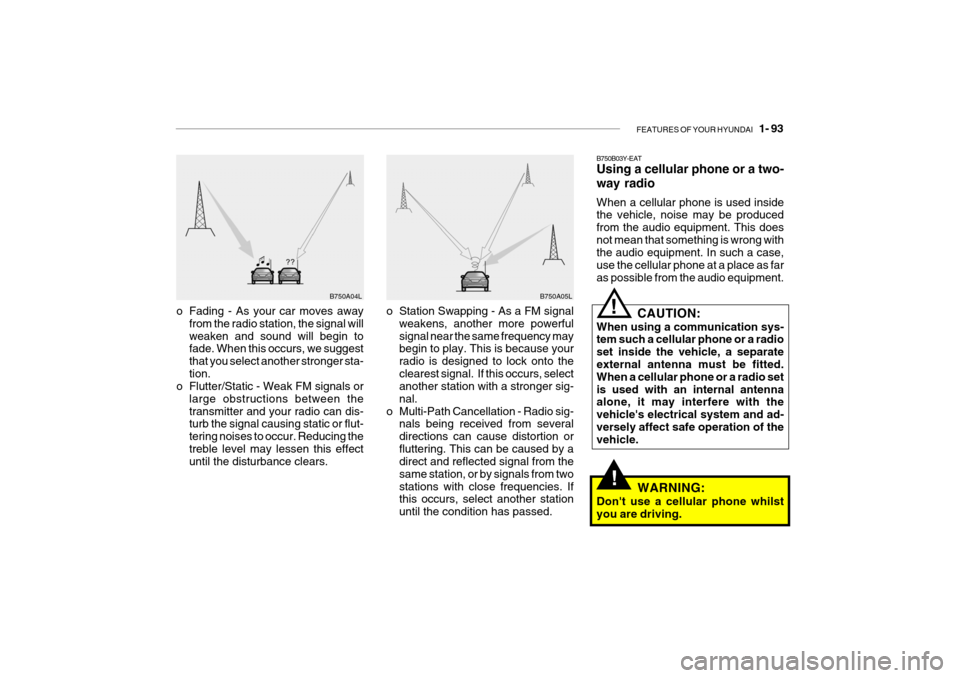
o Station Swapping - As a FM signal weakens, another more powerful signal near the same frequency may begin to play. This is because your radio is designed to lock onto theclearest signal. If this occurs, select another station with a stronger sig- nal.
o Multi-Path Cancellation - Radio sig- nals being received from severaldirections can cause distortion orfluttering. This can be caused by a direct and reflected signal from the same station, or by signals from twostations with close frequencies. If this occurs, select another station until the condition has passed.
o Fading - As your car moves away
from the radio station, the signal willweaken and sound will begin to fade. When this occurs, we suggest that you select another stronger sta-tion.
o Flutter/Static - Weak FM signals or
large obstructions between thetransmitter and your radio can dis- turb the signal causing static or flut- tering noises to occur. Reducing thetreble level may lessen this effect until the disturbance clears. B750B03Y-EAT Using a cellular phone or a two- way radio When a cellular phone is used inside the vehicle, noise may be produced from the audio equipment. This doesnot mean that something is wrong with the audio equipment. In such a case, use the cellular phone at a place as faras possible from the audio equipment.
!
CAUTION:
When using a communication sys- tem such a cellular phone or a radio set inside the vehicle, a separate external antenna must be fitted. When a cellular phone or a radio setis used with an internal antenna alone, it may interfere with the vehicle's electrical system and ad-versely affect safe operation of the vehicle.
WARNING:
Don't use a cellular phone whilst you are driving.