check Hyundai H350 2016 User Guide
[x] Cancel search | Manufacturer: HYUNDAI, Model Year: 2016, Model line: H350, Model: Hyundai H350 2016Pages: 473, PDF Size: 26.4 MB
Page 93 of 473
3-31
Convenient features of your vehicle
3
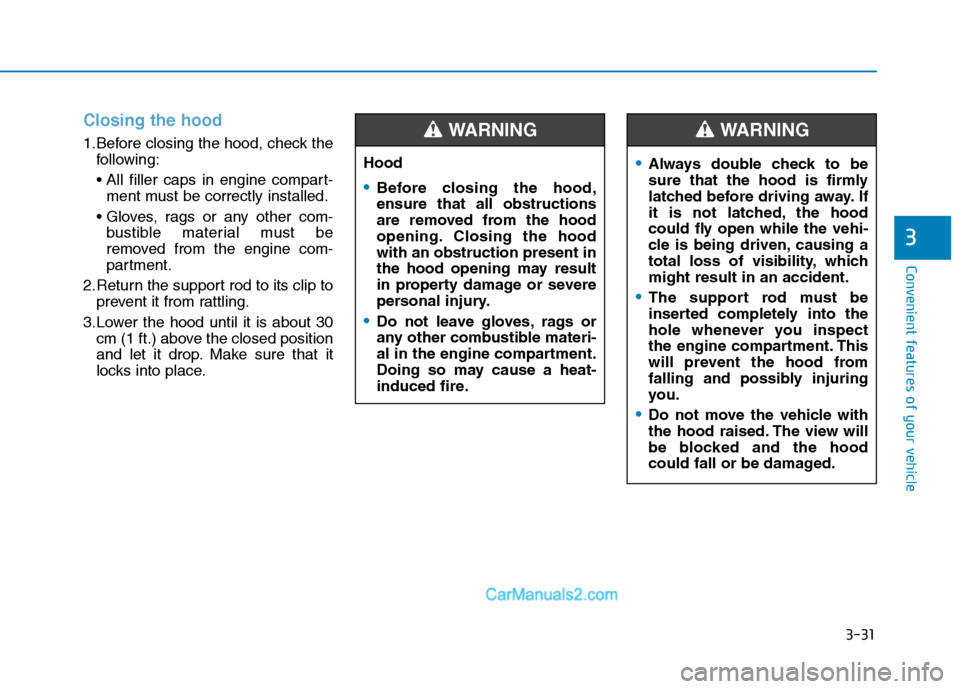
Closing the hood
1.Before closing the hood, check thefollowing:
ment must be correctly installed.
bustible material must be
removed from the engine com-
partment.
2.Return the support rod to its clip to prevent it from rattling.
3.Lower the hood until it is about 30 cm (1 ft.) above the closed position
and let it drop. Make sure that it
locks into place. Hood
Before closing the hood, ensure that all obstructions
are removed from the hood
opening. Closing the hoodwith an obstruction present in
the hood opening may result
in property damage or severe
personal injury.
Do not leave gloves, rags or
any other combustible materi-
al in the engine compartment.
Doing so may cause a heat-
induced fire.
WARNING
Always double check to be
sure that the hood is firmly
latched before driving away. If
it is not latched, the hood
could fly open while the vehi-
cle is being driven, causing a
total loss of visibility, whichmight result in an accident.
The support rod must be
inserted completely into the
hole whenever you inspect
the engine compartment. This
will prevent the hood from
falling and possibly injuring
you.
Do not move the vehicle with
the hood raised. The view will
be blocked and the hood
could fall or be damaged.
WARNING
Page 94 of 473
3-32
Convenient features of your vehicle
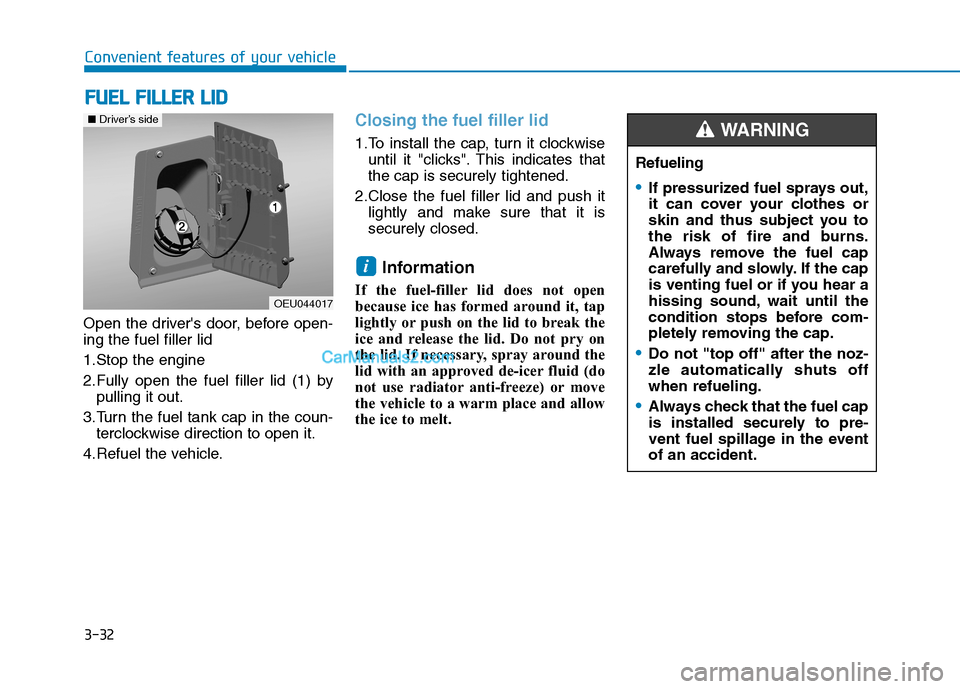
Open the driver's door, before open- ing the fuel filler lid
1.Stop the engine
2.Fully open the fuel filler lid (1) bypulling it out.
3.Turn the fuel tank cap in the coun- terclockwise direction to open it.
4.Refuel the vehicle.
Closing the fuel filler lid
1.To install the cap, turn it clockwise until it "clicks". This indicates that the cap is securely tightened.
2.Close the fuel filler lid and push it lightly and make sure that it issecurely closed.
Information
If the fuel-filler lid does not open
because ice has formed around it, tap
lightly or push on the lid to break the
ice and release the lid. Do not pry on
the lid. If necessary, spray around the
lid with an approved de-icer fluid (do
not use radiator anti-freeze) or move
the vehicle to a warm place and allow
the ice to melt.
i
FF UU EELL FF IILL LLEE RR LL IIDD
OEU044017
■Driver’s side
Refueling
If pressurized fuel sprays out,
it can cover your clothes or
skin and thus subject you to
the risk of fire and burns.
Always remove the fuel cap
carefully and slowly. If the cap
is venting fuel or if you hear a
hissing sound, wait until the
condition stops before com-
pletely removing the cap.
Do not "top off" after the noz-
zle automatically shuts offwhen refueling.
Always check that the fuel cap
is installed securely to pre-
vent fuel spillage in the eventof an accident.
WARNING
Page 95 of 473
3-33
Convenient features of your vehicle
3
Refueling dangers
Automotive fuels are flammable
materials. When refueling,
please note the following guide-
lines carefully. Failure to follow
these guidelines may result in
severe personal injury, severe
burns or death by fire or explo-sion.
Read and follow all warning posted at the gas station facil-
ity.
Before touching the fuel noz-
zle, you should eliminate
potentially dangerous static
electricity discharge by touch-
ing another metal part of the
vehicle, a safe distance away
from the fuel filler neck, noz-
zle, or other gas source.(Continued)
WARNING (Continued)
Do not get back into a vehicle
once you have begun refuel-
ing since you can generate
static electricity by touching,
rubbing or sliding against any
item or fabric (polyester, satin,
nylon, etc.) capable of produc-
ing static electricity. Static
electricity discharge can
ignite fuel vapors resulting in
rapid burning. If you must re-
enter the vehicle, you should
once again eliminate poten-
tially dangerous static elec-
tricity discharge by touching a
metal part of the vehicle, away
from the fuel filler neck, noz-
zle or other diesel source.
When using an approved
portable fuel container, besure to place the container on
the ground prior to refueling.(Continued)
(Continued)
Static electricity discharge
from the container can ignite
fuel vapors causing a fire.Once refueling has begun,
contact with the vehicleshould be maintained until the
filling is complete.
Use only portable plastic fuel
containers designed to carryand store diesel.
Do not use cellular phones
while refueling. Electric cur-
rent and/or electronic interfer-
ence from cellular phones can
potentially ignite fuel vapors
causing a fire.
When refueling, always shut
the engine off. Sparks pro-
duced by electrical compo-nents related to the engine
can ignite fuel vapors causing
a fire. Once refueling is com-
plete, check to make sure thefiller cap and filler door are
securely closed, before start-
ing the engine. (Continued)
Page 99 of 473
3-37
Convenient features of your vehicle
3
Power steering
Power steering uses energy from the
engine to assist you in steering the
vehicle. If the engine is off or if the
power steering system becomes
inoperative, the vehicle may still be
steered, but it will require increased
steering effort.
Should you notice any change in the
effort required to steer during normal
vehicle operation, have the power
steering checked by an authorized
HYUNDAI dealer.If the power steering drive belt
breaks or if the power steering
pump malfunctions, the steering
effort will greatly increase.
If the vehicle is parked for extend- ed periods outside in cold weath-
er (below -10°C/14°F), the power
steering may require increased
effort when the engine is first
started. This is caused byincreased fluid viscosity due tothe cold weather and does notindicate a malfunction.
When this happens, increase the
engine RPM by depressing accel-
erator until the RPM reaches 1,500rpm then release or let the engine
idle for two or three minutes towarm up the fluid.
Tilt & telescopic steering
A tilt steering column allows you to
adjust the steering wheel before you
drive. You can also raise it to give
your legs more room when you exit
and enter the vehicle (if equipped).
The steering wheel should be posi-
tioned so that it is comfortable for
you to drive, while permitting you to
see the instrument panel warning
lights and gauges.
NOTICE
NOTICE
SS
TT EEEERR IINN GG WW HHEEEELL
Never hold the steering wheel
against a stop (extreme right or
left turn) for more than 5 sec-onds with the engine running.
Holding the steering wheel formore than 5 seconds in either
position may cause damage to
the power steering pump.
CAUTION
Never adjust the angle and height of steering wheel while
driving. You may lose your
steering control and cause
severe personal injury or acci-dents.
After adjusting, push the steering wheel both up and
down to be certain it is lockedin position.
WARNING
Page 100 of 473
3-38
Convenient features of your vehicle
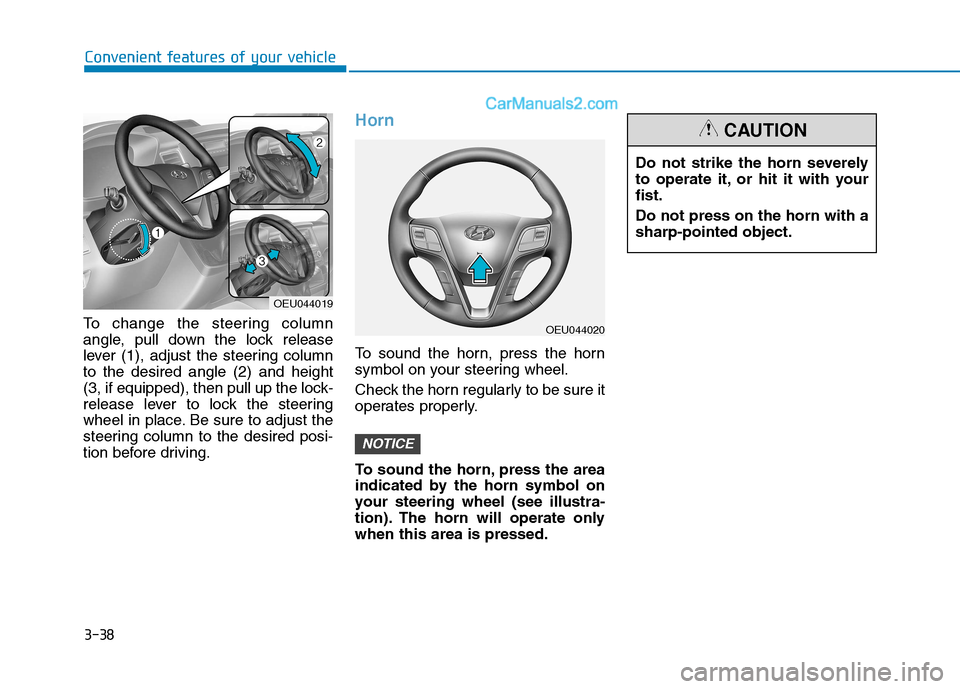
To change the steering column
angle, pull down the lock release
lever (1), adjust the steering columnto the desired angle (2) and height
(3, if equipped), then pull up the lock-
release lever to lock the steering
wheel in place. Be sure to adjust the
steering column to the desired posi-
tion before driving.
Horn
To sound the horn, press the horn
symbol on your steering wheel.
Check the horn regularly to be sure it
operates properly.
To sound the horn, press the area
indicated by the horn symbol on
your steering wheel (see illustra-
tion). The horn will operate onlywhen this area is pressed.
NOTICE
Do not strike the horn severely
to operate it, or hit it with yourfist. Do not press on the horn with a sharp-pointed object.
CAUTION
OEU044020
OEU044019
Page 114 of 473
3-52
Convenient features of your vehicle
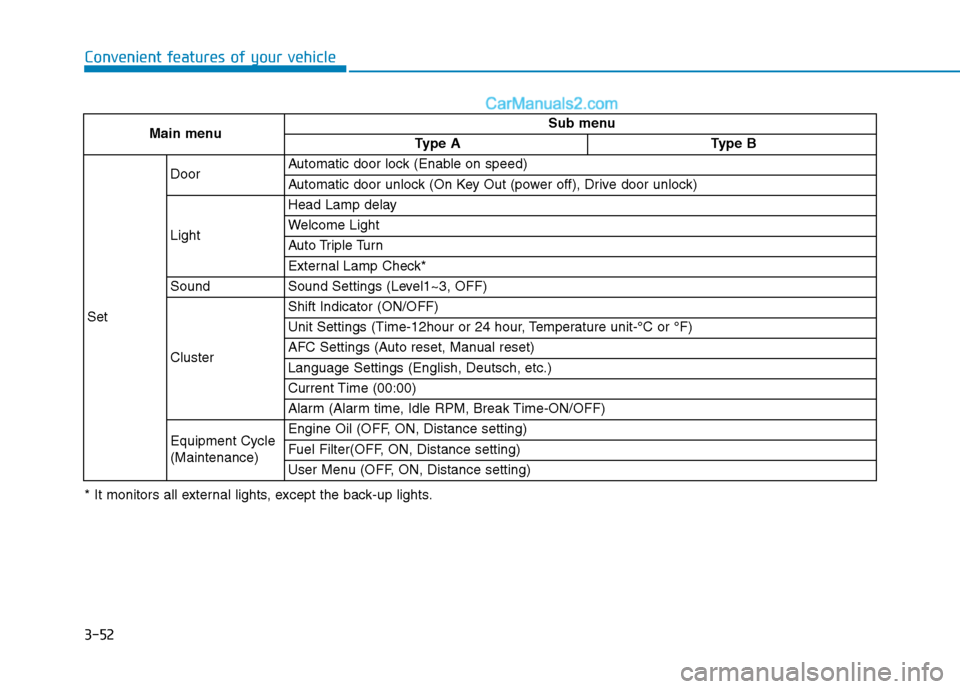
Main menuSub menu
Type AType B
Set
DoorAutomatic door lock (Enable on speed)
Automatic door unlock (On Key Out (power off), Drive door unlock)
Light
Head Lamp delay
Welcome Light
Auto Triple Turn
External Lamp Check*
SoundSound Settings (Level1~3, OFF)
Cluster
Shift Indicator (ON/OFF)
Unit Settings (Time-12hour or 24 hour, Temperature unit-°C or °F)
AFC Settings (Auto reset, Manual reset)
Language Settings (English, Deutsch, etc.)
Current Time (00:00)
Alarm (Alarm time, Idle RPM, Break Time-ON/OFF)
Equipment Cycle (Maintenance)Engine Oil (OFF, ON, Distance setting)
Fuel Filter(OFF, ON, Distance setting)
User Menu (OFF, ON, Distance setting)
* It monitors all external lights, except the back-up lights.
Page 118 of 473
3-56
Convenient features of your vehicle
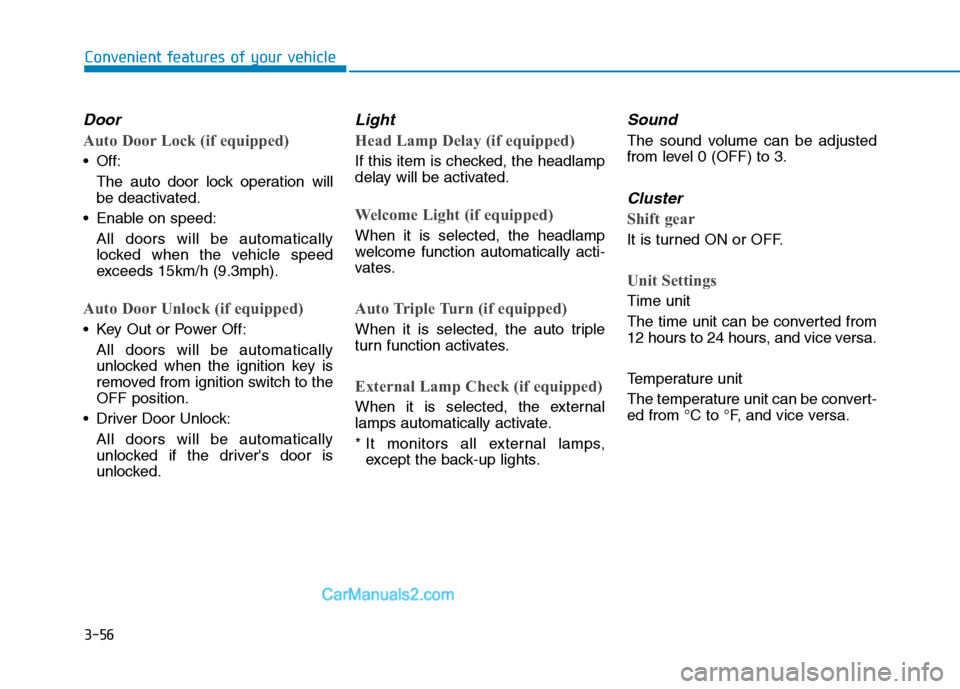
Door
Auto Door Lock (if equipped)
Off:The auto door lock operation willbe deactivated.
Enable on speed: All doors will be automaticallylocked when the vehicle speed
exceeds 15km/h (9.3mph).
Auto Door Unlock (if equipped)
Key Out or Power Off:
All doors will be automaticallyunlocked when the ignition key is
removed from ignition switch to theOFF position.
Driver Door Unlock:
All doors will be automatically
unlocked if the driver's door is
unlocked.
Light
Head Lamp Delay (if equipped)
If this item is checked, the headlamp
delay will be activated.
Welcome Light (if equipped)
When it is selected, the headlamp
welcome function automatically acti-
vates.
Auto Triple Turn (if equipped)
When it is selected, the auto triple
turn function activates.
External Lamp Check (if equipped)
When it is selected, the external
lamps automatically activate.
* It monitors all external lamps,except the back-up lights.
Sound
The sound volume can be adjusted
from level 0 (OFF) to 3.
Cluster
Shift gear
It is turned ON or OFF.
Unit Settings
Time unit
The time unit can be converted from
12 hours to 24 hours, and vice versa.
Temperature unit
The temperature unit can be convert-
ed from °C to °F, and vice versa.
Page 120 of 473
3-58
Convenient features of your vehicle
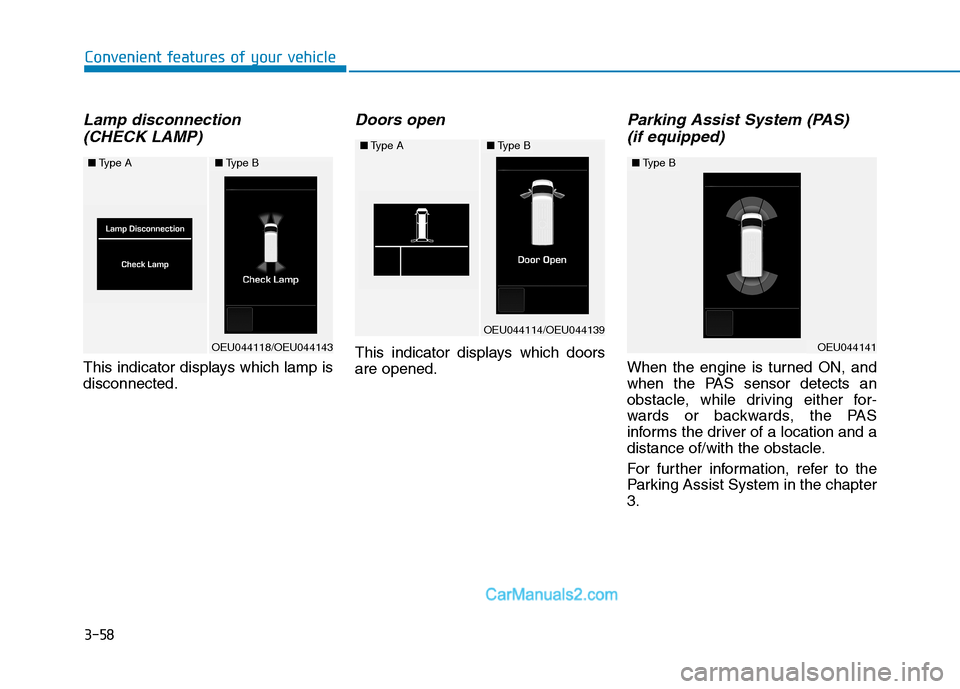
Lamp disconnection (CHECK LAMP)
This indicator displays which lamp is disconnected.
Doors open
This indicator displays which doorsare opened.
Parking Assist System (PAS) (if equipped)
When the engine is turned ON, and
when the PAS sensor detects an
obstacle, while driving either for-
wards or backwards, the PAS
informs the driver of a location and a
distance of/with the obstacle.
For further information, refer to the
Parking Assist System in the chapter3.
■ Type A
OEU044118/OEU044143
■Type B
■Type A
OEU044114/OEU044139
■Type B
OEU044141
■Type B
Page 121 of 473
3-59
Convenient features of your vehicle
3
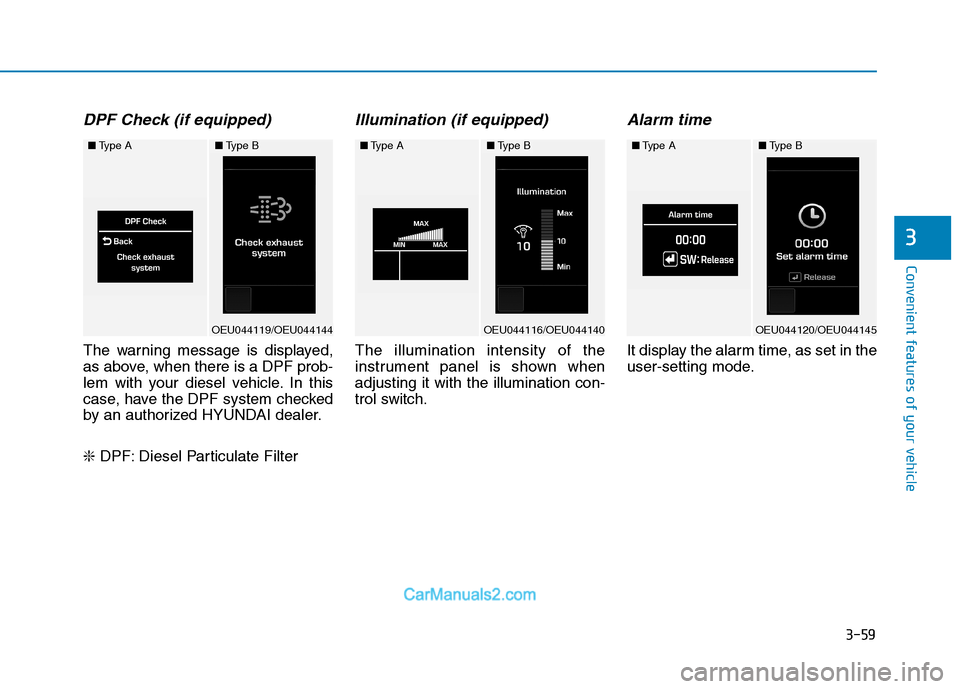
DPF Check (if equipped)
The warning message is displayed,
as above, when there is a DPF prob-
lem with your diesel vehicle. In this
case, have the DPF system checked
by an authorized HYUNDAI dealer. ❇DPF: Diesel Particulate Filter
Illumination (if equipped)
The illumination intensity of the
instrument panel is shown whenadjusting it with the illumination con-
trol switch.
Alarm time
It display the alarm time, as set in the
user-setting mode.
■Type A
OEU044119/OEU044144
■Type B■Type A
OEU044116/OEU044140
■Type B■Type A
OEU044120/OEU044145
■Type B
Page 123 of 473
3-61
Convenient features of your vehicle
3
Some driving information stored
in the trip computer (for example
Average Vehicle Speed) resets if
the battery is disconnected.
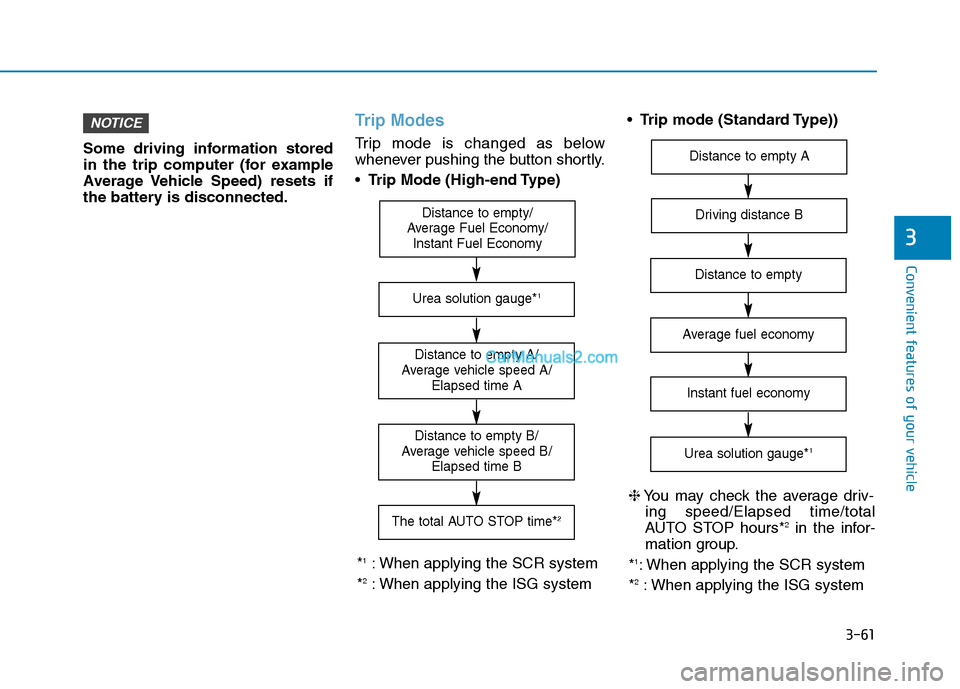
Trip Modes
Trip mode is changed as below
whenever pushing the button shortly. Trip Mode (High-end Type)
Trip mode (Standard Type))
NOTICE
Distance to empty/
Average Fuel Economy/ Instant Fuel Economy
Distance to empty A/
Average vehicle speed A/ Elapsed time A
The total AUTO STOP time* 2
Distance to empty B/
Average vehicle speed B/ Elapsed time B
Urea solution gauge* 1
*1
: When applying the SCR system
* 2
: When applying the ISG system
Driving distance B
Distance to empty A
Average fuel economy
Instant fuel economy
Urea solution gauge* 1
Distance to empty
❈
You may check the average driv-
ing speed/Elapsed time/total
AUTO STOP hours* 2
in the infor-
mation group.
* 1
: When applying the SCR system
* 2
: When applying the ISG system