lock Hyundai H350 2016 Service Manual
[x] Cancel search | Manufacturer: HYUNDAI, Model Year: 2016, Model line: H350, Model: Hyundai H350 2016Pages: 473, PDF Size: 26.4 MB
Page 111 of 473
3-49
Convenient features of your vehicle
3
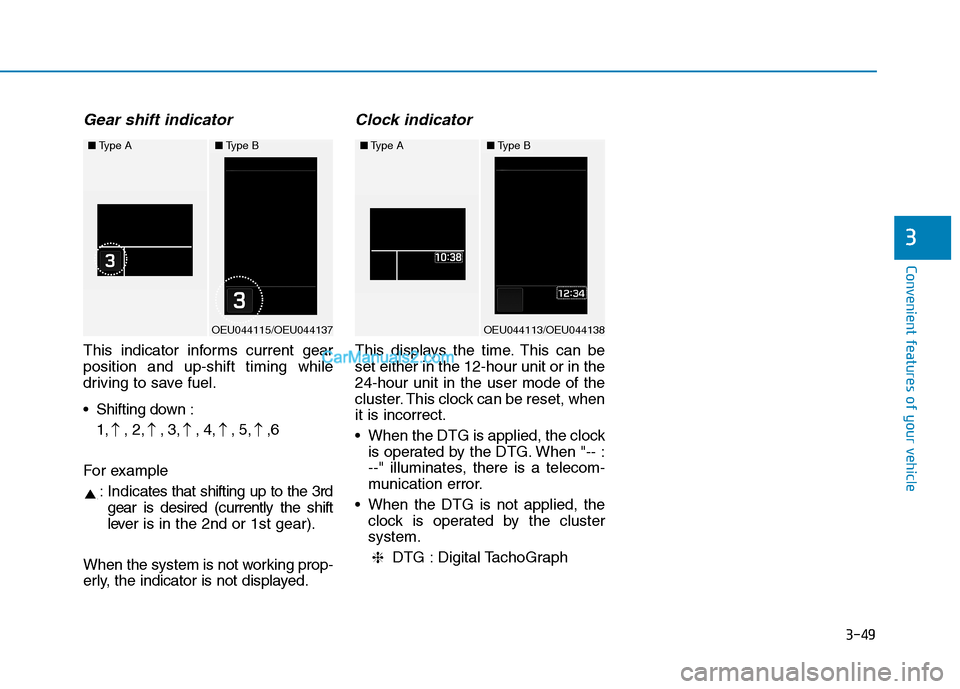
Gear shift indicator
This indicator informs current gear position and up-shift timing while
driving to save fuel.
Shifting down :1, , 2, , 3, , 4, , 5, ,6
For example : Indic ates that shifting up to the 3rd
gear is desired (currently the shift
lever is in the 2nd or 1st gear).
When the system is not working prop-
erly, the indicator is not displayed.
Clock indicator
This displays the time. This can beset either in the 12-hour unit or in the24-hour unit in the user mode of the
cluster. This clock can be reset, whenit is incorrect.
When the DTG is applied, the clock is operated by the DTG. When "-- :
--" illuminates, there is a telecom-
munication error.
When the DTG is not applied, the clock is operated by the clustersystem.
DTG : Digital TachoGraph
❈
■ Type A
OEU044115/OEU044137
■Type B■Type A
OEU044113/OEU044138
■Type B
Page 114 of 473
3-52
Convenient features of your vehicle
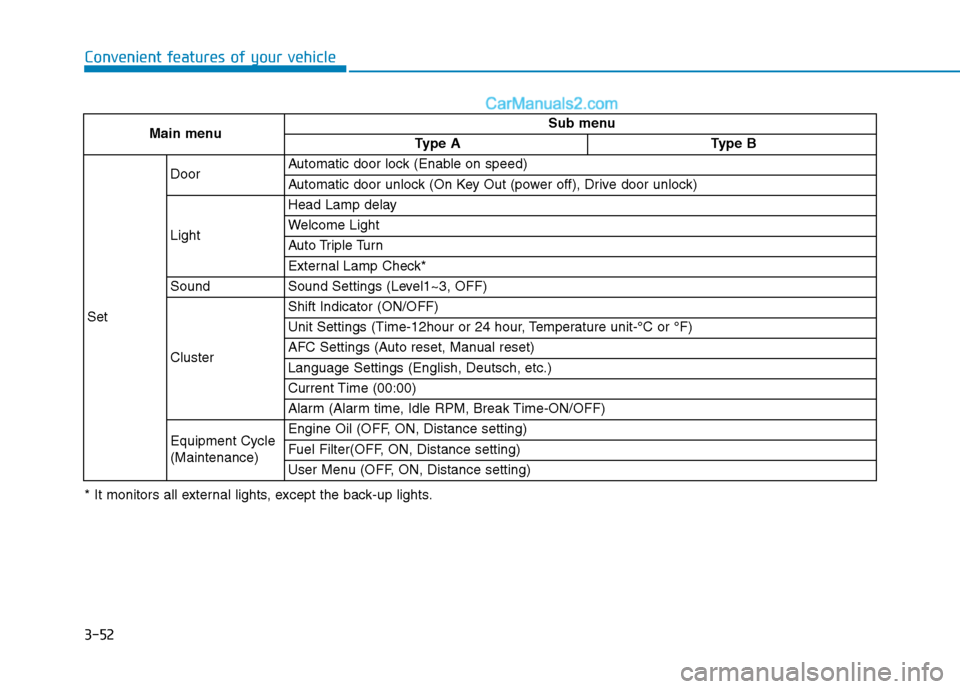
Main menuSub menu
Type AType B
Set
DoorAutomatic door lock (Enable on speed)
Automatic door unlock (On Key Out (power off), Drive door unlock)
Light
Head Lamp delay
Welcome Light
Auto Triple Turn
External Lamp Check*
SoundSound Settings (Level1~3, OFF)
Cluster
Shift Indicator (ON/OFF)
Unit Settings (Time-12hour or 24 hour, Temperature unit-°C or °F)
AFC Settings (Auto reset, Manual reset)
Language Settings (English, Deutsch, etc.)
Current Time (00:00)
Alarm (Alarm time, Idle RPM, Break Time-ON/OFF)
Equipment Cycle (Maintenance)Engine Oil (OFF, ON, Distance setting)
Fuel Filter(OFF, ON, Distance setting)
User Menu (OFF, ON, Distance setting)
* It monitors all external lights, except the back-up lights.
Page 118 of 473
3-56
Convenient features of your vehicle
Door
Auto Door Lock (if equipped)
Off:The auto door lock operation willbe deactivated.
Enable on speed: All doors will be automaticallylocked when the vehicle speed
exceeds 15km/h (9.3mph).
Auto Door Unlock (if equipped)
Key Out or Power Off:
All doors will be automaticallyunlocked when the ignition key is
removed from ignition switch to theOFF position.
Driver Door Unlock:
All doors will be automatically
unlocked if the driver's door is
unlocked.
Light
Head Lamp Delay (if equipped)
If this item is checked, the headlamp
delay will be activated.
Welcome Light (if equipped)
When it is selected, the headlamp
welcome function automatically acti-
vates.
Auto Triple Turn (if equipped)
When it is selected, the auto triple
turn function activates.
External Lamp Check (if equipped)
When it is selected, the external
lamps automatically activate.
* It monitors all external lamps,except the back-up lights.
Sound
The sound volume can be adjusted
from level 0 (OFF) to 3.
Cluster
Shift gear
It is turned ON or OFF.
Unit Settings
Time unit
The time unit can be converted from
12 hours to 24 hours, and vice versa.
Temperature unit
The temperature unit can be convert-
ed from °C to °F, and vice versa.
Page 132 of 473
3-70
Convenient features of your vehicle
Warning light operation
The brake fluid level warning light
indicates that the brake fluid level in
the brake master cylinder is low and
hydraulic brake fluid conforming toSAE J1703 specifications should be
added. After adding fluid, if no other
trouble is found, we recommend that
the system be inspected by an
authorized HYUNDAI dealer. If fur-
ther trouble is experience, we recom-
mend that you contact an authorized
HYUNDAI dealer.
Anti-lock Brake System(ABS) Warning Light
This warning light illuminates:
Once you set the ignition switch to the ON position.
- It illuminates for approximately 3seconds and then goes off.
When there is a malfunction with the ABS (The normal braking sys-
tem will still be operational without
the assistance of the anti-lock
brake system).
In this case, we recommend that
you have the vehicle inspected by
an authorized HYUNDAI dealer.
Electronic Brake force
Distribution (EBD)
System Warning Light
These two warning lights illuminate
at the same time while driving:
When the ABS and regular brake system may not work normally.
In this case, we recommend that
you have the vehicle inspected by
an authorized HYUNDAI dealer.
Page 138 of 473
3-76
Convenient features of your vehicle
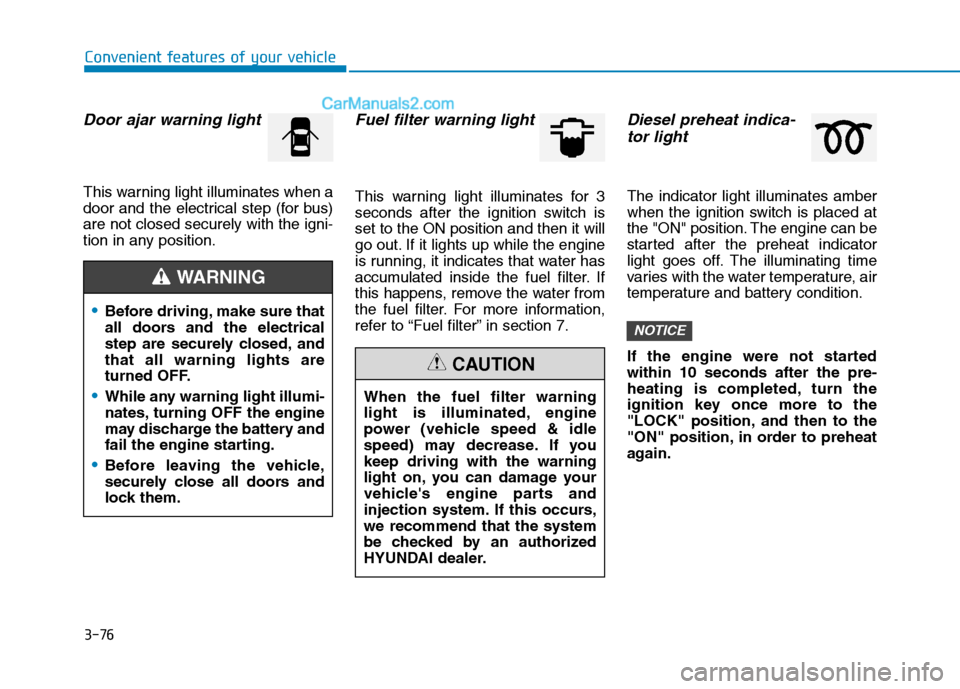
Door ajar warning light
This warning light illuminates when a
door and the electrical step (for bus)are not closed securely with the igni-
tion in any position.
Fuel filter warning light
This warning light illuminates for 3
seconds after the ignition switch isset to the ON position and then it will
go out. If it lights up while the engine
is running, it indicates that water has
accumulated inside the fuel filter. If
this happens, remove the water from
the fuel filter. For more information,
refer to “Fuel filter” in section 7.
Diesel preheat indica-tor light
The indicator light illuminates amber
when the ignition switch is placed at
the "ON" position. The engine can be
started after the preheat indicator
light goes off. The illuminating time
varies with the water temperature, air
temperature and battery condition.
If the engine were not started within 10 seconds after the pre-
heating is completed, turn the
ignition key once more to the
"LOCK" position, and then to the
"ON" position, in order to preheat
again.
NOTICE
When the fuel filter warning
light is illuminated, engine
power (vehicle speed & idle
speed) may decrease. If youkeep driving with the warning
light on, you can damage your
vehicle's engine parts and
injection system. If this occurs,we recommend that the system
be checked by an authorized
HYUNDAI dealer.
CAUTION
Before driving, make sure that
all doors and the electrical
step are securely closed, andthat all warning lights are
turned OFF.
While any warning light illumi-
nates, turning OFF the engine
may discharge the battery and
fail the engine starting.
Before leaving the vehicle,
securely close all doors and
lock them.
WARNING
Page 142 of 473
3-80
Convenient features of your vehicle
Warning sound
Overspeed warning (if equipped)
Overspeed warning light
If you drive with the speed of
120km/h or more, the overspeed
warning light will blink. This is to pre-
vent from driving your vehicle with
overspeed.
Overspeed warning chime
If you drive with the speed of
120km/h or more, the overspeed
warning chime will sound for about 5
seconds. This is to prevent you from
driving your vehicle with overspeed.
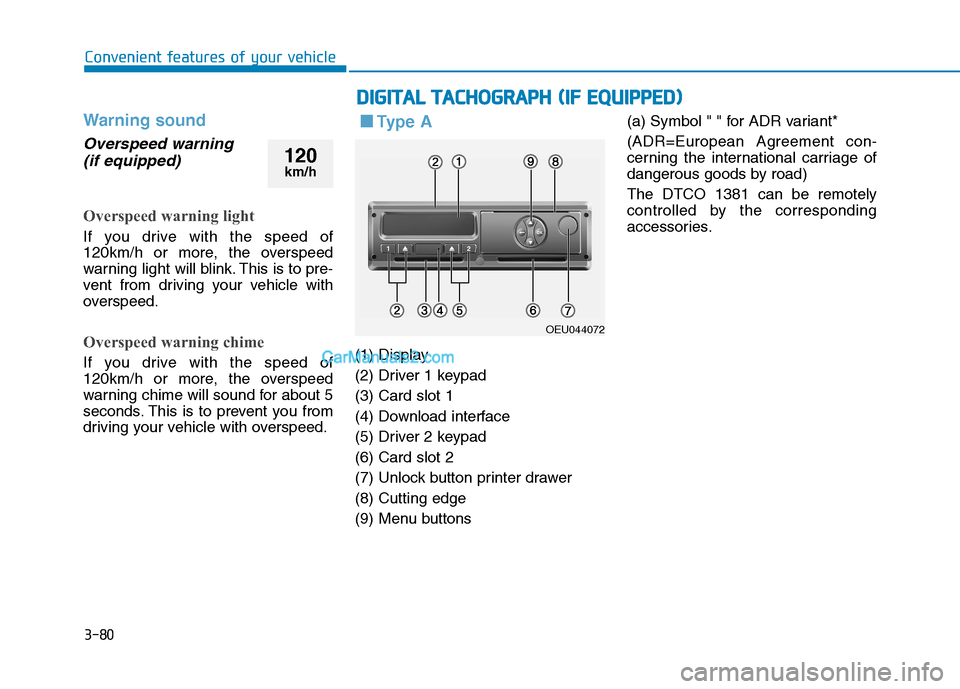
■■ Ty p e A
(1) Display
(2) Driver 1 keypad(3) Card slot 1
(4) Download interface
(5) Driver 2 keypad(6) Card slot 2
(7) Unlock button printer drawer(8) Cutting edge
(9) Menu buttons (a) Symbol " " for ADR variant*
(ADR=European Agreement con-
cerning the international carriage of
dangerous goods by road) The DTCO 1381 can be remotely
controlled by the corresponding
accessories.
DD
IIGG IITT AA LL TT AA CCHH OO GGRRAA PPHH (( IIFF EE QQ UUIIPP PP EEDD ))
OEU044072
120
km/h
Page 143 of 473
3-81
Convenient features of your vehicle
3
Description
Display (1)
Depending on the vehicle's opera-
tional condition, different displays will
appear or data can be displayed.
Driver 1 keypad (2)
( ) activity button for driver 1
( ) ejection button for card slot 1
Card slot 1 (3)
Driver 1, who will drive the vehicle at
this moment in time, inserts his driv-er card into slot 1.
Download interface (4)
The download interface is located
under the cover. The access rights of
this interface are regulated according
to the inserted tachograp card.
Driver 2 keypad (5)
( ) activity button for driver 2
( ) ejection button for card slot 2
Card slot 2 (6)
Driver 2, who is not driving the vehi-
cle at this moment in time, inserts his
driver card into slot 2 (crew opera-tion).
Unlock button (7)
Use this button to unlock the printer
drawer, for example when inserting a
roll of paper.
Cutting edge (8)
You can use the cutting edge to tear
off a printout generated by integrated
printer.
Menu buttons (9)
Use the following buttons to enter,
display, or print out data. (/) Use the paging function to
select the desired function or
selection.(This is possible by
pressing and holding down
the auto-repeat function key.)
( ) Confirm or acknowledge desired function/selection.
( ) Press and hold, repeatedly until the last entry field.
( ) Back to the last entry field, abort the entry of a country, or leave
the menu one step at a time.
OK
OK
22
2
1
Page 152 of 473
3-90
Convenient features of your vehicle
Types of warning sound
When an object is 120 cm to 61 cm(47.2 in. to 24 in.) from the rear
bumper:
Buzzer beeps intermittently.
When an object is 60 cm to 31 cm (23.6 in. to 12.2 in.) from the rear
bumper:
Buzzer beeps more frequently.
When an object is within 30 cm (11.8 in.) of the rear bumper:
Buzzer sounds continuously.
Non-operational conditions
The rear parking assist system may
not operate properly when:
1. Moisture is frozen to the sensor. (It will operate normally when the moisture has been cleared.)
2. The sensor is covered with foreign matter, such as snow or water, or
the sensor cover is blocked. (It will
operate normally when the materi-
al is removed or the sensor is no
longer blocked.)
3. Driving on uneven road surfaces. (unpaved roads, gravel, bumps,
gradient)
4. Objects generating excessive noise (vehicle horns, loud motor-
cycle engines, or truck air brakes)
are within range of the sensor.
5. Heavy rain or water spray exists.
6. Wireless transmitters or mobile phones are within range of the
sensor.
7. The sensor is covered with snow.
8. Trailer towing.
9. The place light the fluorescent lamp. The detecting range may decrease when:
1. The sensor is stained with foreign
matter such as snow or water.
(The sensing range will return to
normal when removed.)
2. Outside air temperature is extremely hot or cold.
The following objects may not be rec-
ognized by the sensor:
1. Sharp or slim objects such as ropes, chains or small poles.
2. Objects which tend to absorb the sensor frequency such as clothes,
spongy material or snow.
3. Undetectable objects smaller than 1 m (40 in.) in height and narrower
than 14 cm (6 in.) in diameter.
Page 158 of 473
3-96
Convenient features of your vehicle
Headlight escort function (if equipped)
The headlights (and/or taillights)
remain on for approximately 5 min-
utes after the ignition key is removed
or turned to the ACC or LOCK posi-
tion. However, if the driver’s door isopened and closed, the headlights
are turned off after 30 seconds.
The headlights can be turned off by
pressing the lock button on the trans-
mitter twice or turning off the light
switch from the headlight or Autolight position.
Headlight welcome function (if equipped)
When the headlight switch is in the
ON or AUTO position and all doors
(and tailgate) are closed and locked,
if you press the door unlock button
on the transmitter the headlights will
come on for about 15 seconds.
If the headlight switch is in the AUTO position, the function can only oper-ate at night.
At this time, if you press the door
unlock button again or door lock but-
ton on the transmitter, the headlights
will turn off immediately.
Lighting control
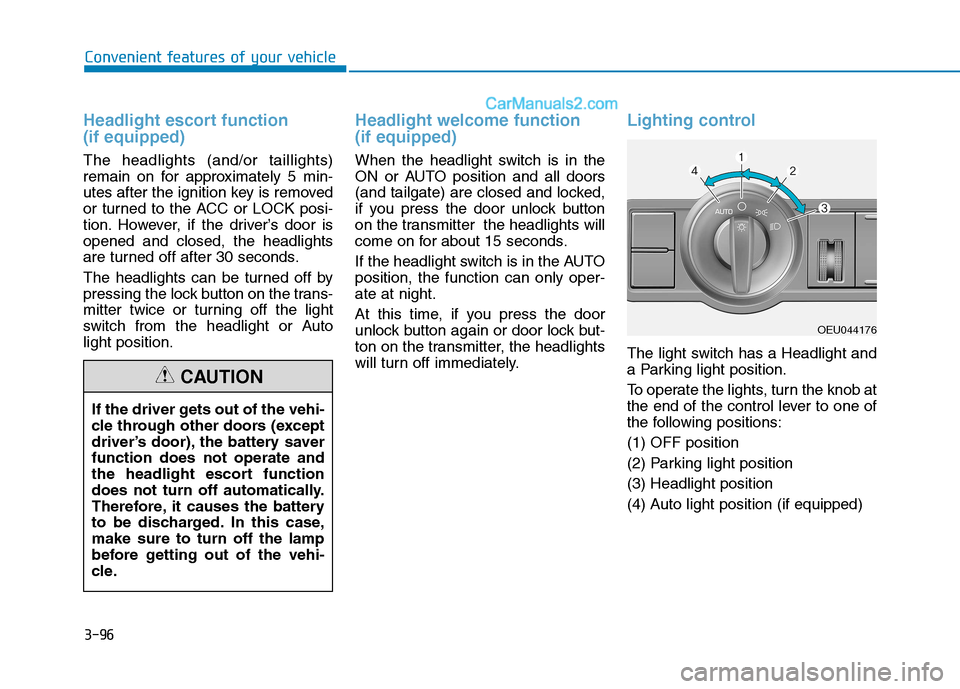
The light switch has a Headlight and
a Parking light position.
To operate the lights, turn the knob at
the end of the control lever to one of
the following positions: (1) OFF position
(2) Parking light position(3) Headlight position
(4) Auto light position (if equipped)
If the driver gets out of the vehi-
cle through other doors (except
driver’s door), the battery saverfunction does not operate and
the headlight escort function
does not turn off automatically.
Therefore, it causes the battery
to be discharged. In this case,make sure to turn off the lamp
before getting out of the vehi-
cle.
CAUTION
OEU044176
Page 168 of 473
3-106
Convenient features of your vehicle
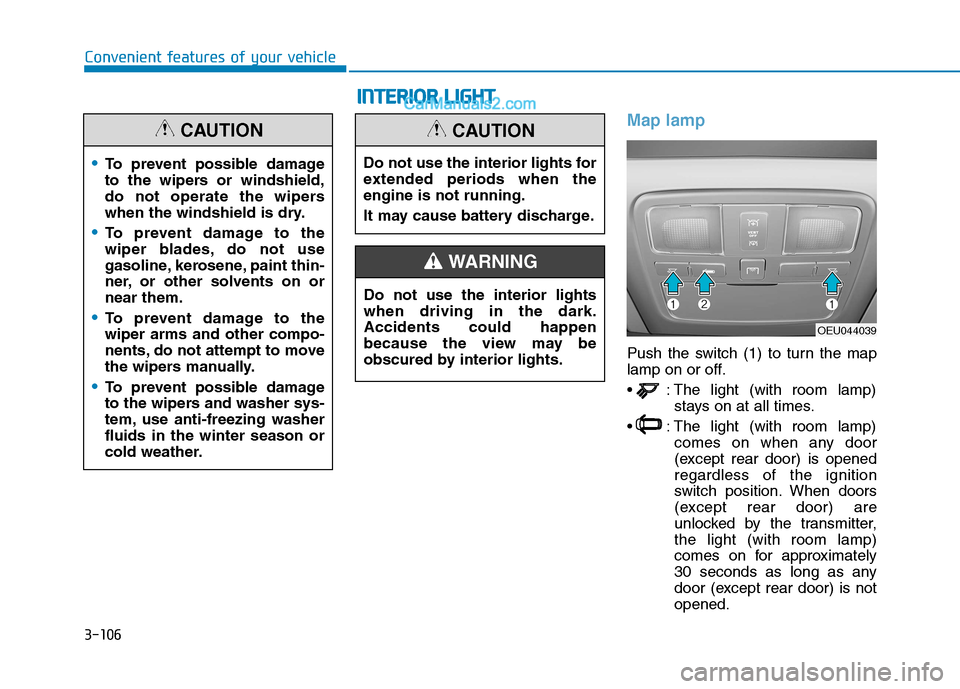
Map lamp
Push the switch (1) to turn the map
lamp on or off.
: The light (with room lamp)stays on at all times.
: The light (with room lamp) comes on when any door
(except rear door) is openedregardless of the ignition
switch position. When doors
(except rear door) are
unlocked by the transmitter,the light (with room lamp)
comes on for approximately
30 seconds as long as any
door (except rear door) is notopened.
To prevent possible damage
to the wipers or windshield,
do not operate the wipers
when the windshield is dry.
To prevent damage to the
wiper blades, do not use
gasoline, kerosene, paint thin-
ner, or other solvents on ornear them.
To prevent damage to the wiper arms and other compo-
nents, do not attempt to move
the wipers manually.
To prevent possible damage
to the wipers and washer sys-
tem, use anti-freezing washerfluids in the winter season or
cold weather.
CAUTION
OEU044039
Do not use the interior lights for
extended periods when theengine is not running.
It may cause battery discharge.
CAUTION
Do not use the interior lights when driving in the dark.Accidents could happen
because the view may be
obscured by interior lights.
WARNING
II
NN TTEERR IIOO RR LL IIGG HH TT