Call HYUNDAI I10 2014 User Guide
[x] Cancel search | Manufacturer: HYUNDAI, Model Year: 2014, Model line: I10, Model: HYUNDAI I10 2014Pages: 343, PDF Size: 9.14 MB
Page 68 of 343
47
Features of your vehicle
Remote keyless entry system
operations
Remote key
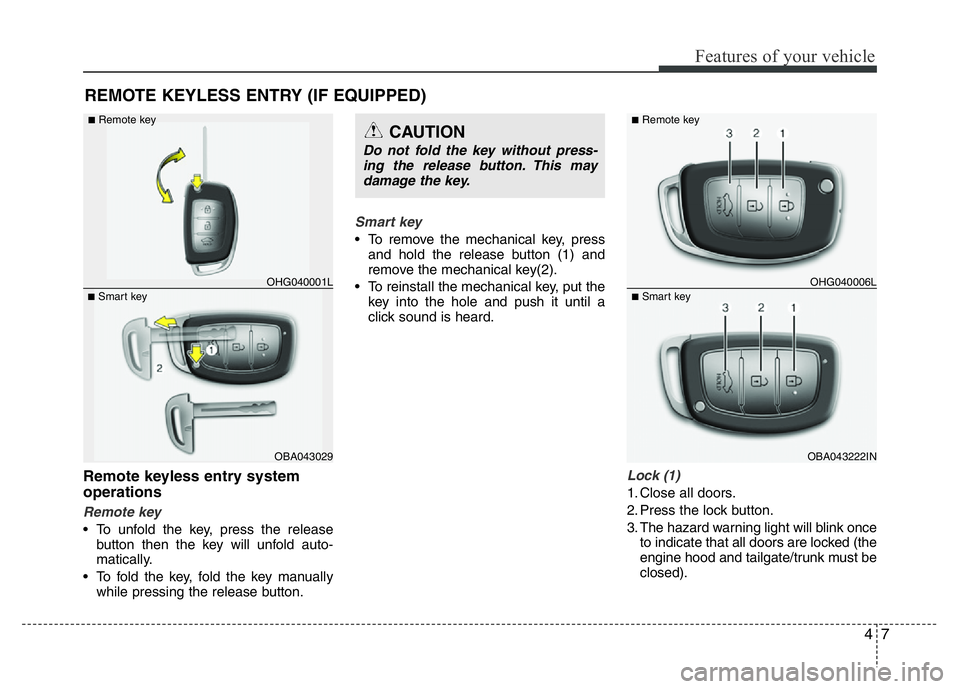
• To unfold the key, press the release
button then the key will unfold auto-
matically.
• To fold the key, fold the key manually
while pressing the release button.
Smart key
• To remove the mechanical key, press
and hold the release button (1) and
remove the mechanical key(2).
• To reinstall the mechanical key, put the
key into the hole and push it until a
click sound is heard.
Lock (1)
1. Close all doors.
2. Press the lock button.
3. The hazard warning light will blink once
to indicate that all doors are locked (the
engine hood and tailgate/trunk must be
closed).
REMOTE KEYLESS ENTRY (IF EQUIPPED)
OBA043029
■Smart keyOHG040001L
■Remote keyCAUTION
Do not fold the key without press-
ing the release button. This may
damage the key.
OBA043222IN
■Smart keyOHG040006L
■Remote key
Page 69 of 343
Features of your vehicle
8 4
✽NOTICE
The doors will not lock if a door is
opened.
Unlock (2)
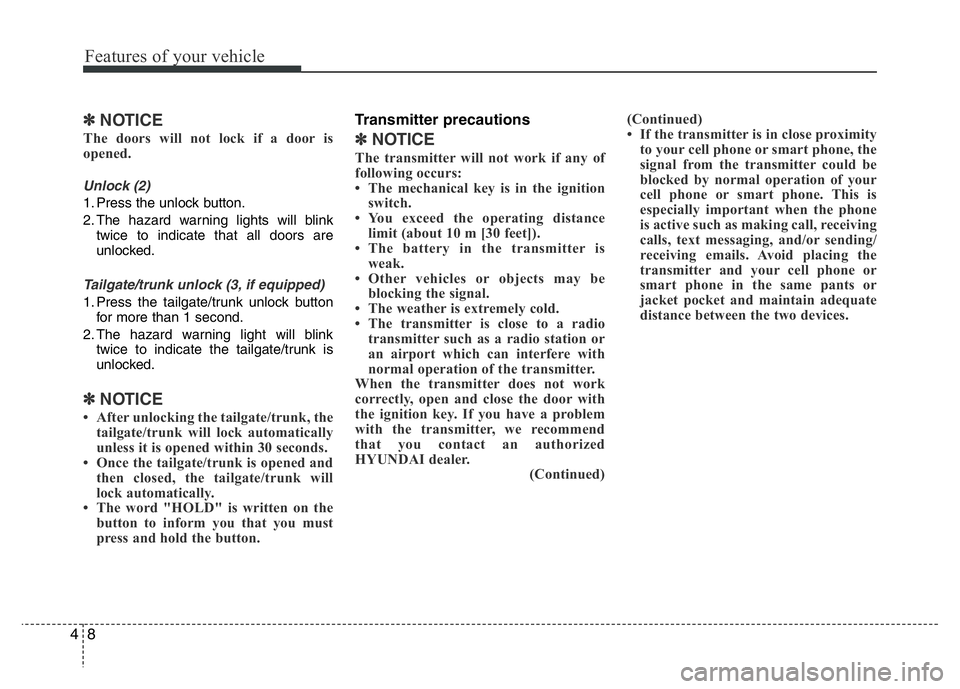
1. Press the unlock button.
2. The hazard warning lights will blink
twice to indicate that all doors are
unlocked.
Tailgate/trunk unlock (3, if equipped)
1. Press the tailgate/trunk unlock button
for more than 1 second.
2. The hazard warning light will blink
twice to indicate the tailgate/trunk is
unlocked.
✽NOTICE
• After unlocking the tailgate/trunk, the
tailgate/trunk will lock automatically
unless it is opened within 30 seconds.
• Once the tailgate/trunk is opened and
then closed, the tailgate/trunk will
lock automatically.
• The word "HOLD" is written on the
button to inform you that you must
press and hold the button.
Transmitter precautions
✽NOTICE
The transmitter will not work if any of
following occurs:
• The mechanical key is in the ignition
switch.
• You exceed the operating distance
limit (about 10 m [30 feet]).
• The battery in the transmitter is
weak.
• Other vehicles or objects may be
blocking the signal.
• The weather is extremely cold.
• The transmitter is close to a radio
transmitter such as a radio station or
an airport which can interfere with
normal operation of the transmitter.
When the transmitter does not work
correctly, open and close the door with
the ignition key. If you have a problem
with the transmitter, we recommend
that you contact an authorized
HYUNDAI dealer.
(Continued)(Continued)
• If the transmitter is in close proximity
to your cell phone or smart phone, the
signal from the transmitter could be
blocked by normal operation of your
cell phone or smart phone. This is
especially important when the phone
is active such as making call, receiving
calls, text messaging, and/or sending/
receiving emails. Avoid placing the
transmitter and your cell phone or
smart phone in the same pants or
jacket pocket and maintain adequate
distance between the two devices.
Page 73 of 343
Features of your vehicle
12 4
Unlocking
1. Carry the smart key.
2. Press the button of the front outside
door handle.
3. All doors will unlock and the hazard
warning lights will blink twice.
✽NOTICE
• The button will only operate when the
smart key is within 0.7 m (28 in.) from
the outside door handle.
• When the smart key is recognized in
the area of 0.7 m (28 in.) from the
front outside door handle, other peo-
ple can also open the doors.
Tailgate/trunk unlocking
1. Carry the smart key.
2. Press the tailgate/trunk handle switch.
3. The tailgate/trunk will unlock.
✽NOTICE
• Once the tailgate/trunk is opened and
then closed, the tailgate/trunk will
lock automatically.
• The button will only operate when the
smart key is within 0.7 m (28 in.) from
the tailgate/trunk handle.
Smart key precautions
✽NOTICE
• If, for some reason, you happen to lose
your smart key, you will not be able to
start the engine. Tow the vehicle, if nec-
essary, we recommend that you contact
an authorized HYUNDAI dealer.
• A maximum of 2 smart keys can be
registered to a single vehicle. If you
lose a smart key, we recommend that
you contact an authorized HYUNDAI
dealer.
• The smart key will not work if any of
the following occurs:
- The smart key is close to a radio
transmitter such as a radio station
or an airport which can interfere
with normal operation of the smart
key.
- The smart key is near a mobile two-
way radio system or a cellular phone.
- Another vehicle’s smart key is being
operated close to your vehicle.
When the smart key does not work
properly, open and close the door with
the mechanical key. If you have a
problem with the smart key, we rec-
ommend that you contact an author-
ized HYUNDAI dealer.
(Continued)
Page 74 of 343
413
Features of your vehicle
(Continued)
• If the smart key is in close proximity
to your cell phone or smart phone, the
signal from the smart key could be
blocked by normal operation of your
cell phone or smart phone. This is
especially important when the phone
is active such as making call, receiving
calls, text messaging, and/or send-
ing/receiving emails. Avoid placing the
smart key and your cell phone or
smart phone in the same pants or
jacket pocket and maintain adequate
distance between the two devices.
Door lock/unlock in an emer-
gency situation
If the smart key does not operate nor-
mally, you can lock or unlock the doors by
using the mechanical key.
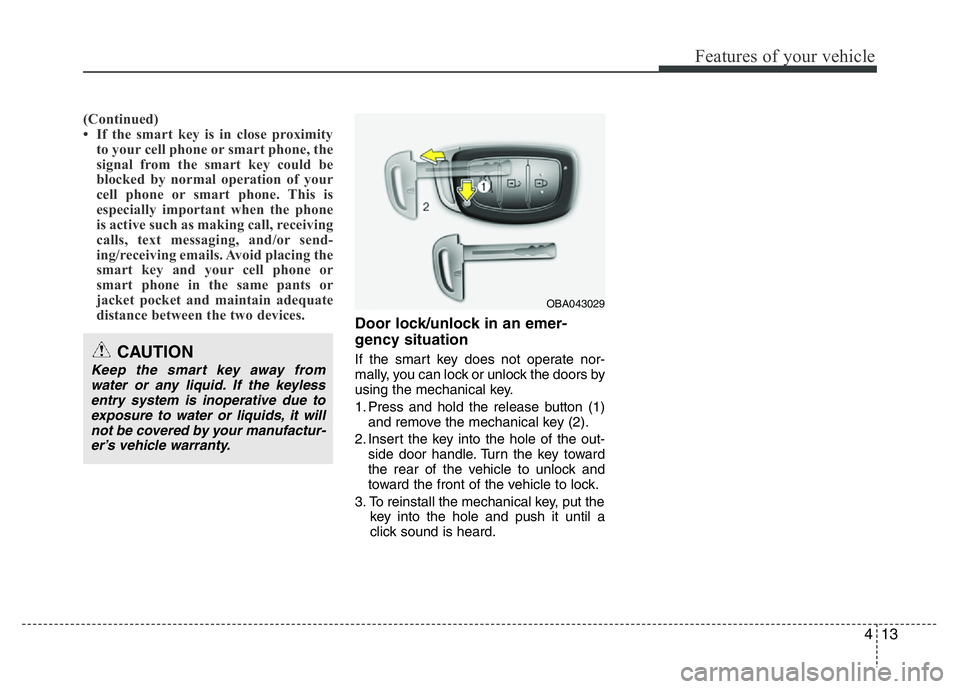
1. Press and hold the release button (1)
and remove the mechanical key (2).
2. Insert the key into the hole of the out-
side door handle. Turn the key toward
the rear of the vehicle to unlock and
toward the front of the vehicle to lock.
3. To reinstall the mechanical key, put the
key into the hole and push it until a
click sound is heard.CAUTION
Keep the smart key away from
water or any liquid. If the keyless
entry system is inoperative due to
exposure to water or liquids, it will
not be covered by your manufactur-
er’s vehicle warranty.
OBA043029
Page 75 of 343
Features of your vehicle
14 4
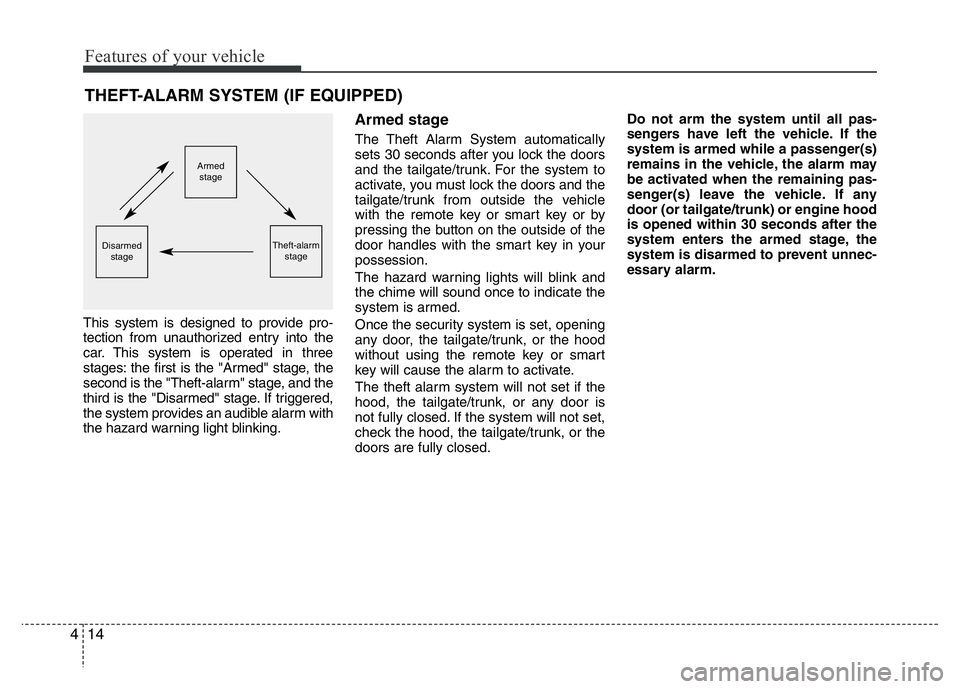
This system is designed to provide pro-
tection from unauthorized entry into the
car. This system is operated in three
stages: the first is the "Armed" stage, the
second is the "Theft-alarm" stage, and the
third is the "Disarmed" stage. If triggered,
the system provides an audible alarm with
the hazard warning light blinking.
Armed stage
The Theft Alarm System automatically
sets 30 seconds after you lock the doors
and the tailgate/trunk. For the system to
activate, you must lock the doors and the
tailgate/trunk from outside the vehicle
with the remote key or smart key or by
pressing the button on the outside of the
door handles with the smart key in your
possession.
The hazard warning lights will blink and
the chime will sound once to indicate the
system is armed.
Once the security system is set, opening
any door, the tailgate/trunk, or the hood
without using the remote key or smart
key will cause the alarm to activate.
The theft alarm system will not set if the
hood, the tailgate/trunk, or any door is
not fully closed. If the system will not set,
check the hood, the tailgate/trunk, or the
doors are fully closed.Do not arm the system until all pas-
sengers have left the vehicle. If the
system is armed while a passenger(s)
remains in the vehicle, the alarm may
be activated when the remaining pas-
senger(s) leave the vehicle. If any
door (or tailgate/trunk) or engine hood
is opened within 30 seconds after the
system enters the armed stage, the
system is disarmed to prevent unnec-
essary alarm.
THEFT-ALARM SYSTEM (IF EQUIPPED)
Armed
stage
Theft-alarm
stageDisarmed
stage
Page 77 of 343
Features of your vehicle
16 4
Operating door locks from out-
side the vehicle
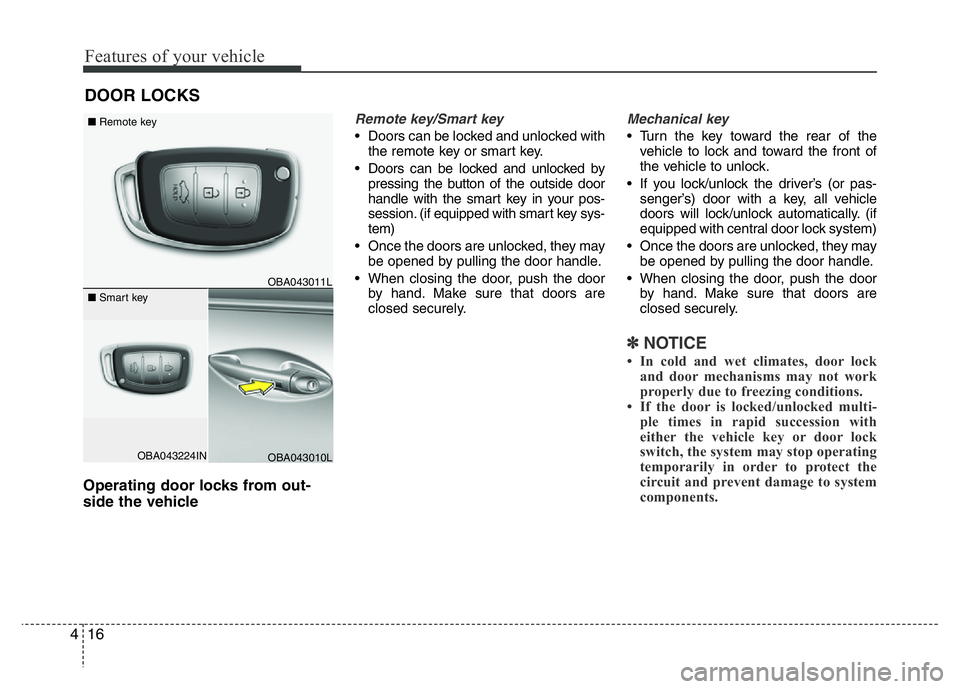
Remote key/Smart key
• Doors can be locked and unlocked with
the remote key or smart key.
• Doors can be locked and unlocked by
pressing the button of the outside door
handle with the smart key in your pos-
session. (if equipped with smart key sys-
tem)
• Once the doors are unlocked, they may
be opened by pulling the door handle.
• When closing the door, push the door
by hand. Make sure that doors are
closed securely.
Mechanical key
• Turn the key toward the rear of the
vehicle to lock and toward the front of
the vehicle to unlock.
• If you lock/unlock the driver’s (or pas-
senger’s) door with a key, all vehicle
doors will lock/unlock automatically. (if
equipped with central door lock system)
• Once the doors are unlocked, they may
be opened by pulling the door handle.
• When closing the door, push the door
by hand. Make sure that doors are
closed securely.
✽NOTICE
• In cold and wet climates, door lock
and door mechanisms may not work
properly due to freezing conditions.
• If the door is locked/unlocked multi-
ple times in rapid succession with
either the vehicle key or door lock
switch, the system may stop operating
temporarily in order to protect the
circuit and prevent damage to system
components.
DOOR LOCKS
OBA043224IN
■Remote key
■Smart key
OBA043011L
OBA043010L
Page 81 of 343
Features of your vehicle
20 4
Impact sensing door unlock sys-
tem (if equipped)
All doors will automatically unlock when
an impact causes the air bags to deploy.
Speed sensing door lock system
(if equipped)
All doors will be automatically locked
after the vehicle speed exceeds 15 km/h.
And all doors will be automatically
unlocked when you turn the engine off or
when you remove the ignition key. (if
equipped)
Child-protector rear door lock
The child safety lock is provided to help
prevent children from accidentally open-
ing the rear doors from inside the vehicle.
The rear door safety locks should be used
whenever children are in the vehicle.
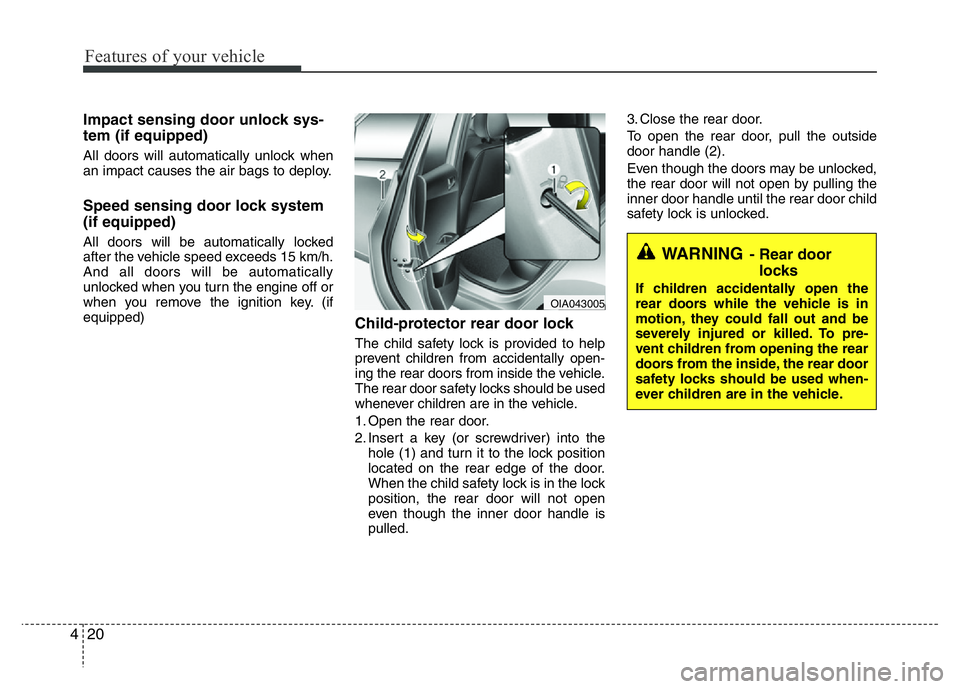
1. Open the rear door.
2. Insert a key (or screwdriver) into the
hole (1) and turn it to the lock position
located on the rear edge of the door.
When the child safety lock is in the lock
position, the rear door will not open
even though the inner door handle is
pulled.3. Close the rear door.
To open the rear door, pull the outside
door handle (2).
Even though the doors may be unlocked,
the rear door will not open by pulling the
inner door handle until the rear door child
safety lock is unlocked.
WARNING- Rear door
locks
If children accidentally open the
rear doors while the vehicle is in
motion, they could fall out and be
severely injured or killed. To pre-
vent children from opening the rear
doors from the inside, the rear door
safety locks should be used when-
ever children are in the vehicle.OIA043005
Page 82 of 343
421
Features of your vehicle
TRUNK
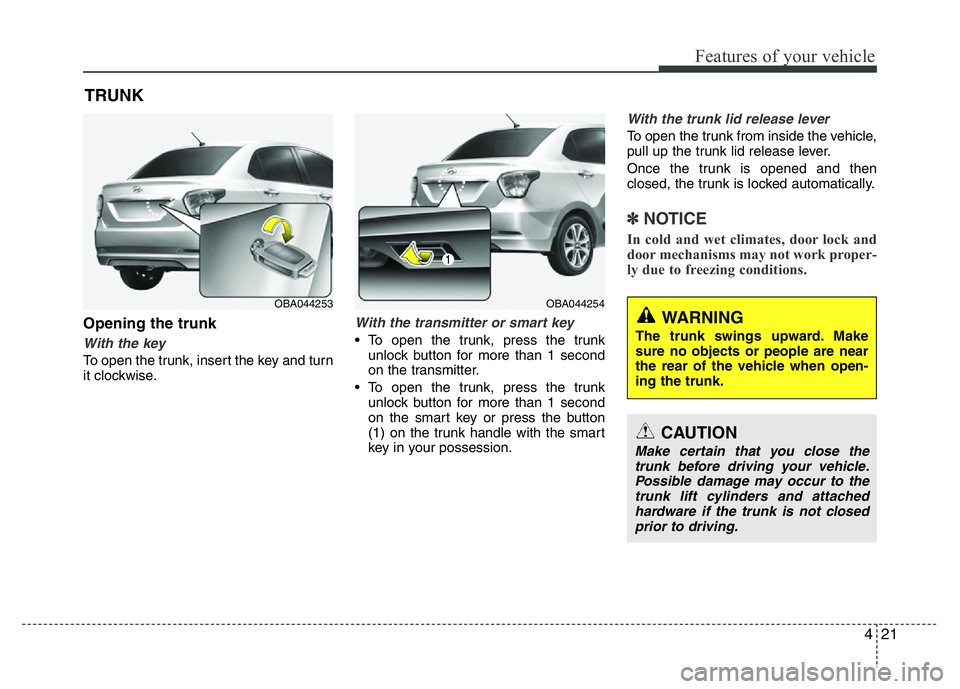
Opening the trunk
With the key
To open the trunk, insert the key and turn
it clockwise.
With the transmitter or smart key
• To open the trunk, press the trunk
unlock button for more than 1 second
on the transmitter.
• To open the trunk, press the trunk
unlock button for more than 1 second
on the smart key or press the button
(1) on the trunk handle with the smart
key in your possession.
With the trunk lid release lever
To open the trunk from inside the vehicle,
pull up the trunk lid release lever.
Once the trunk is opened and then
closed, the trunk is locked automatically.
✽NOTICE
In cold and wet climates, door lock and
door mechanisms may not work proper-
ly due to freezing conditions.
CAUTION
Make certain that you close the
trunk before driving your vehicle.
Possible damage may occur to the
trunk lift cylinders and attached
hardware if the trunk is not closed
prior to driving.
WARNING
The trunk swings upward. Make
sure no objects or people are near
the rear of the vehicle when open-
ing the trunk.
OBA044254OBA044253
Page 94 of 343
433
Features of your vehicle
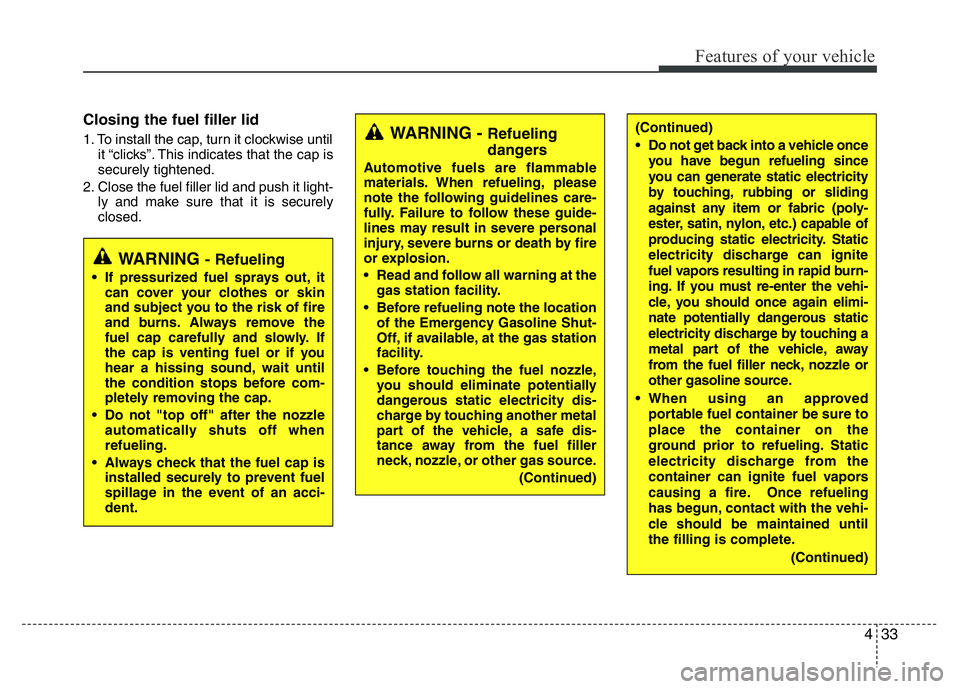
Closing the fuel filler lid
1. To install the cap, turn it clockwise until
it “clicks”. This indicates that the cap is
securely tightened.
2. Close the fuel filler lid and push it light-
ly and make sure that it is securely
closed.WARNING - Refueling
dangers
Automotive fuels are flammable
materials. When refueling, please
note the following guidelines care-
fully. Failure to follow these guide-
lines may result in severe personal
injury, severe burns or death by fire
or explosion.
• Read and follow all warning at the
gas station facility.
• Before refueling note the location
of the Emergency Gasoline Shut-
Off, if available, at the gas station
facility.
• Before touching the fuel nozzle,
you should eliminate potentially
dangerous static electricity dis-
charge by touching another metal
part of the vehicle, a safe dis-
tance away from the fuel filler
neck, nozzle, or other gas source.
(Continued)
WARNING - Refueling
• If pressurized fuel sprays out, it
can cover your clothes or skin
and subject you to the risk of fire
and burns. Always remove the
fuel cap carefully and slowly. If
the cap is venting fuel or if you
hear a hissing sound, wait until
the condition stops before com-
pletely removing the cap.
• Do not "top off" after the nozzle
automatically shuts off when
refueling.
• Always check that the fuel cap is
installed securely to prevent fuel
spillage in the event of an acci-
dent.
(Continued)
• Do not get back into a vehicle once
you have begun refueling since
you can generate static electricity
by touching, rubbing or sliding
against any item or fabric (poly-
ester, satin, nylon, etc.) capable of
producing static electricity. Static
electricity discharge can ignite
fuel vapors resulting in rapid burn-
ing. If you must re-enter the vehi-
cle, you should once again elimi-
nate potentially dangerous static
electricity discharge by touching a
metal part of the vehicle, away
from the fuel filler neck, nozzle or
other gasoline source.
• When using an approved
portable fuel container be sure to
place the container on the
ground prior to refueling. Static
electricity discharge from the
container can ignite fuel vapors
causing a fire. Once refueling
has begun, contact with the vehi-
cle should be maintained until
the filling is complete.
(Continued)
Page 112 of 343
451
Features of your vehicle
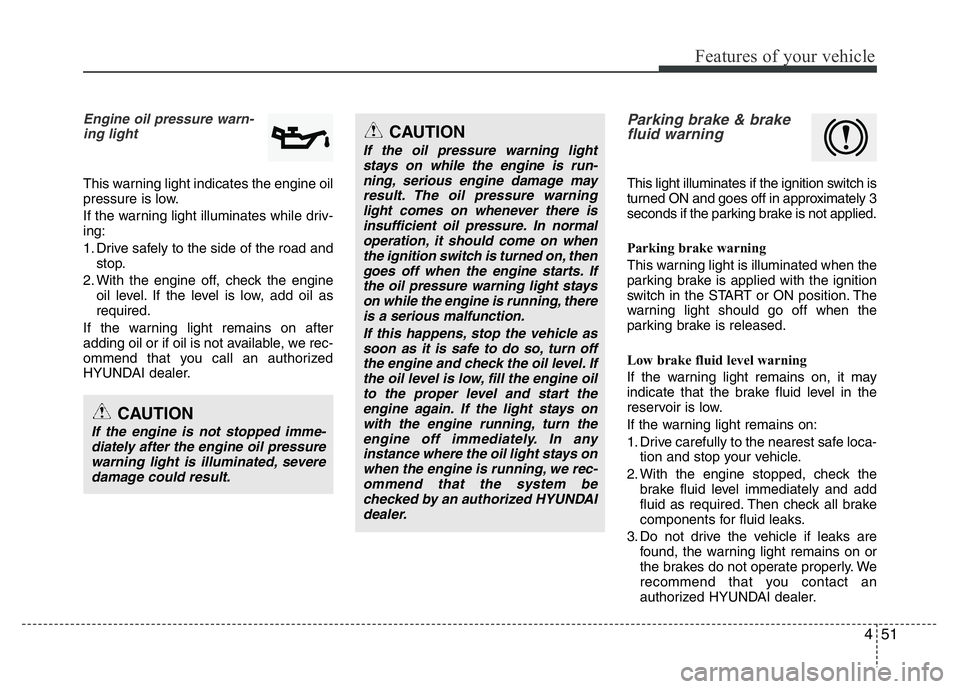
Engine oil pressure warn-
ing light
This warning light indicates the engine oil
pressure is low.
If the warning light illuminates while driv-
ing:
1. Drive safely to the side of the road and
stop.
2. With the engine off, check the engine
oil level. If the level is low, add oil as
required.
If the warning light remains on after
adding oil or if oil is not available, we rec-
ommend that you call an authorized
HYUNDAI dealer.
Parking brake & brake
fluid warning
This light illuminates if the ignition switch is
turned ON and goes off in approximately 3
seconds if the parking brake is not applied.
Parking brake warning
This warning light is illuminated when the
parking brake is applied with the ignition
switch in the START or ON position. The
warning light should go off when the
parking brake is released.
Low brake fluid level warning
If the warning light remains on, it may
indicate that the brake fluid level in the
reservoir is low.
If the warning light remains on:
1. Drive carefully to the nearest safe loca-
tion and stop your vehicle.
2. With the engine stopped, check the
brake fluid level immediately and add
fluid as required. Then check all brake
components for fluid leaks.
3. Do not drive the vehicle if leaks are
found, the warning light remains on or
the brakes do not operate properly. We
recommend that you contact an
authorized HYUNDAI dealer.
CAUTION
If the engine is not stopped imme-
diately after the engine oil pressure
warning light is illuminated, severe
damage could result.
CAUTION
If the oil pressure warning light
stays on while the engine is run-
ning, serious engine damage may
result. The oil pressure warning
light comes on whenever there is
insufficient oil pressure. In normal
operation, it should come on when
the ignition switch is turned on, then
goes off when the engine starts. If
the oil pressure warning light stays
on while the engine is running, there
is a serious malfunction.
If this happens, stop the vehicle as
soon as it is safe to do so, turn off
the engine and check the oil level. If
the oil level is low, fill the engine oil
to the proper level and start the
engine again. If the light stays on
with the engine running, turn the
engine off immediately. In any
instance where the oil light stays on
when the engine is running, we rec-
ommend that the system be
checked by an authorized HYUNDAI
dealer.