N mode HYUNDAI I30 2023 Owner's Manual
[x] Cancel search | Manufacturer: HYUNDAI, Model Year: 2023, Model line: I30, Model: HYUNDAI I30 2023Pages: 533, PDF Size: 59.13 MB
Page 167 of 533
3-84
One-touch turn signal function
To activate a one-touch turn signal
function, move the turn signal lever
slightly and then release it. The lane
change signals will blink 3, 5 or 7
times.
You can activate/deactivate the One
Touch Turn Signal function or choose
the number of blinks (3, 5, or 7) from
the User Settings mode on the LCD
display.For more details, refer to
"LCD Display" in this chapter.
Rear fog lamp
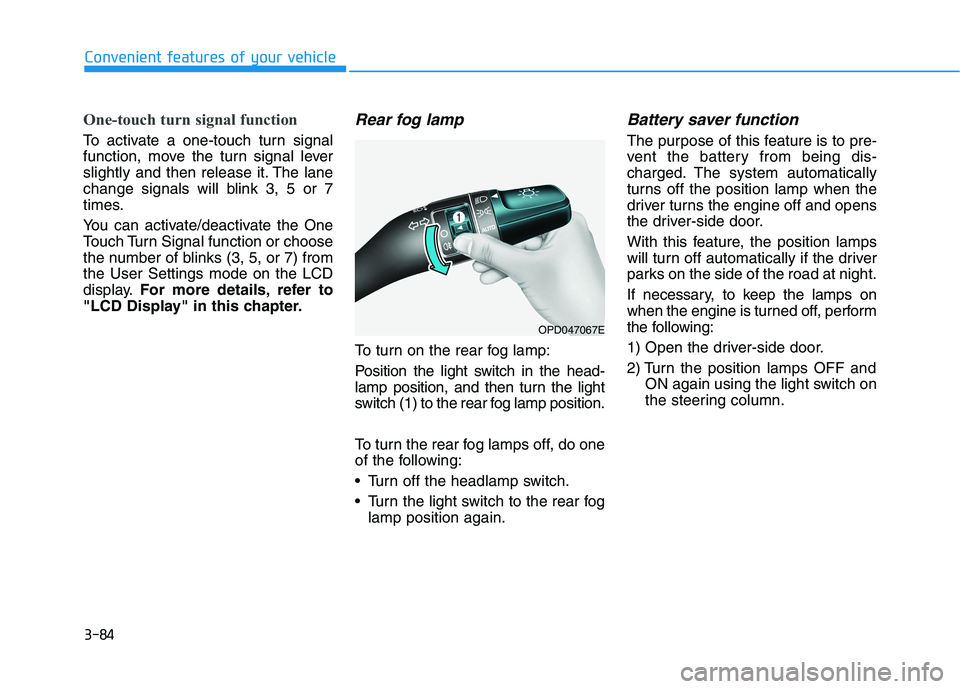
To turn on the rear fog lamp:
Position the light switch in the head-
lamp position, and then turn the light
switch (1) to the rear fog lamp position.
To turn the rear fog lamps off, do one
of the following:
• Turn off the headlamp switch.
Turn the light switch to the rear fog
lamp position again.
Battery saver function
The purpose of this feature is to pre-
vent the battery from being dis-
charged. The system automatically
turns off the position lamp when the
driver turns the engine off and opens
the driver-side door.
With this feature, the position lamps
will turn off automatically if the driver
parks on the side of the road at night.
If necessary, to keep the lamps on
when the engine is turned off, perform
the following:
1) Open the driver-side door.
2) Turn the position lamps OFF and
ON again using the light switch on
the steering column.
Convenient features of your vehicle
OPD047067E
Page 168 of 533
3-85
Convenient features of your vehicle
3
Headlamp delay function
(if equipped)
If you place the ignition switch to the
ACC or OFF position with the head-
lamps ON, the headlamps (and/or
position lamps) remain on for about 5
minutes. However, with the engine off
if the driver’s door is opened and
closed, the headlamps (and/or posi-
tion lamps) are turned off after 15
seconds.
The headlamps (and/or position
lamps) can be turned off by pressing
the lock button on the remote key or
smart key twice or turning the light
switch to the OFF or AUTO position.
However, if you turn the light switch
to the AUTO position when it is dark
outside, the headlamps will not be
turned off.
You can activate or deactivate the
Headlamp Delay function from the
User Settings mode on the LCD dis-
play.For more details, refer to
"LCD Display" in this chapter.If the driver gets out of the vehicle
through other doors (except dri-
ver's door), the battery saver func-
tion does not operate and the
headlamp delay function does not
turn off automatically. Therefore, It
causes the battery to be dis-
charged. In this case, make sure to
turn off the lamp before getting out
of the vehicle.
Daytime running light (DRL)
(if equipped)
The Daytime Running Lights (DRL)
can make it easier for others to see
the front of your vehicle during the
day, especially after dawn and before
sunset.
The DRL system will turn the dedi-
cated lamp OFF when:
1. The headlamps are in the ON
position.
2. The position lamp switch is in the
ON position.
3. The engine is turned off.
NOTICE
Page 170 of 533
3-87
Convenient features of your vehicle
3
Welcome system (if equipped)
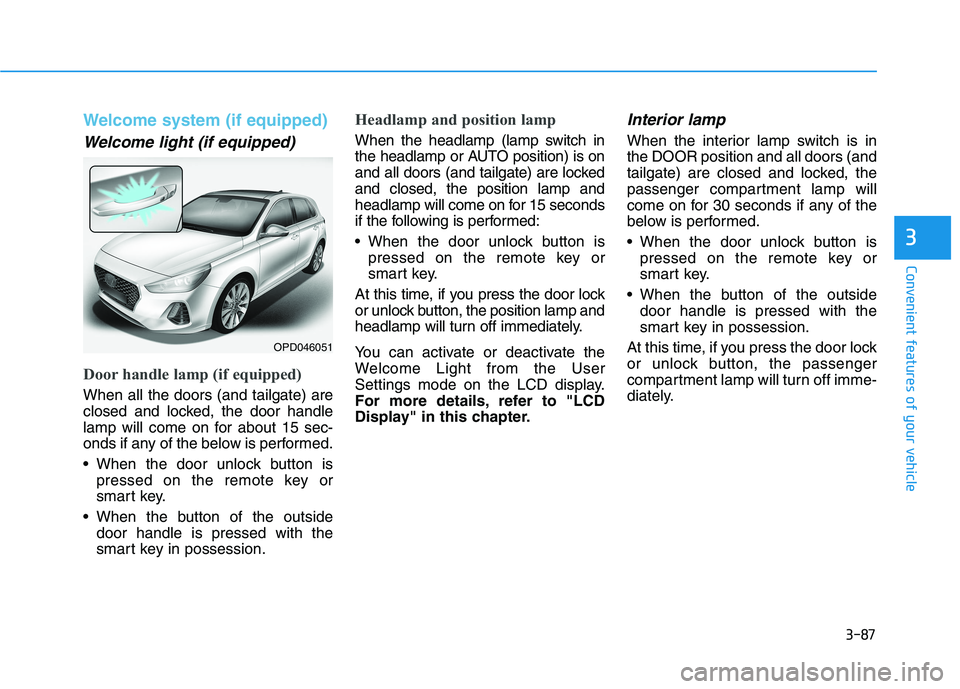
Welcome light (if equipped)
Door handle lamp (if equipped)
When all the doors (and tailgate) are
closed and locked, the door handle
lamp will come on for about 15 sec-
onds if any of the below is performed.
When the door unlock button is
pressed on the remote key or
smart key.
When the button of the outside
door handle is pressed with the
smart key in possession.
Headlamp and position lamp
When the headlamp (lamp switch in
the headlamp or AUTO position) is on
and all doors (and tailgate) are locked
and closed, the position lamp and
headlamp will come on for 15 seconds
if the following is performed:
When the door unlock button is
pressed on the remote key or
smart key.
At this time, if you press the door lock
or unlock button, the position lamp and
headlamp will turn off immediately.
You can activate or deactivate the
Welcome Light from the User
Settings mode on the LCD display.
For more details, refer to "LCD
Display" in this chapter.
Interior lamp
When the interior lamp switch is in
the DOOR position and all doors (and
tailgate) are closed and locked, the
passenger compartment lamp will
come on for 30 seconds if any of the
below is performed.
When the door unlock button is
pressed on the remote key or
smart key.
When the button of the outside
door handle is pressed with the
smart key in possession.
At this time, if you press the door lock
or unlock button, the passenger
compartment lamp will turn off imme-
diately.
OPD046051
Page 175 of 533

3-92
Convenient features of your vehicle
Windscreen wipers
Operates as follows when the igni-
tion switch is turned ON.
MIST : For a single wiping cycle,
move the lever upward and
release it. The wipers will
operate continuously if the
lever is held in this position.
OFF : Wiper is not in operation
INT : Wiper operates intermittently at
the same wiping intervals. Use
this mode in light rain or mist. To
vary the speed setting, turn the
speed control knob.
LO : The wiper runs at a lower speed.
HI : The wiper runs at a higher speed.
Information
If there is heavy accumulation of snow
or ice on the windscreen, defrost the
windscreen for about 10 minutes, or
until the snow and/or ice is removed
before using the windscreen wipers, to
ensure proper operation.
If you do not remove the snow and/or ice
before using the wiper and washer, it may
damage the wiper and washer system.
i
W WI
IP
PE
ER
RS
S
A
AN
ND
D
W
WA
AS
SH
HE
ER
RS
S
■Front windscreen wiper/washer■Rear windscreen wiper/washer
OPD047455L/OTLE045511R
A : Wiper speed control (front)
· MIST – Single wipe
· OFF – Off
· INT – Intermittent wipe
AUTO* – Auto control wipe
· LO – Low wiper speed
· HI – High wiper speed
B : Intermittent control wipe time
adjustment/Auto control wipe
time adjustment*C : Wash with brief wipes (front)
D : Rear wiper control*
· HI – High wiper speed
· LO – Low wiper speed
· OFF – Off
E : Wash with brief wipes (rear)
* : if equipped
Page 176 of 533
3-93
Convenient features of your vehicle
3
AUTO (Automatic) control
(if equipped)
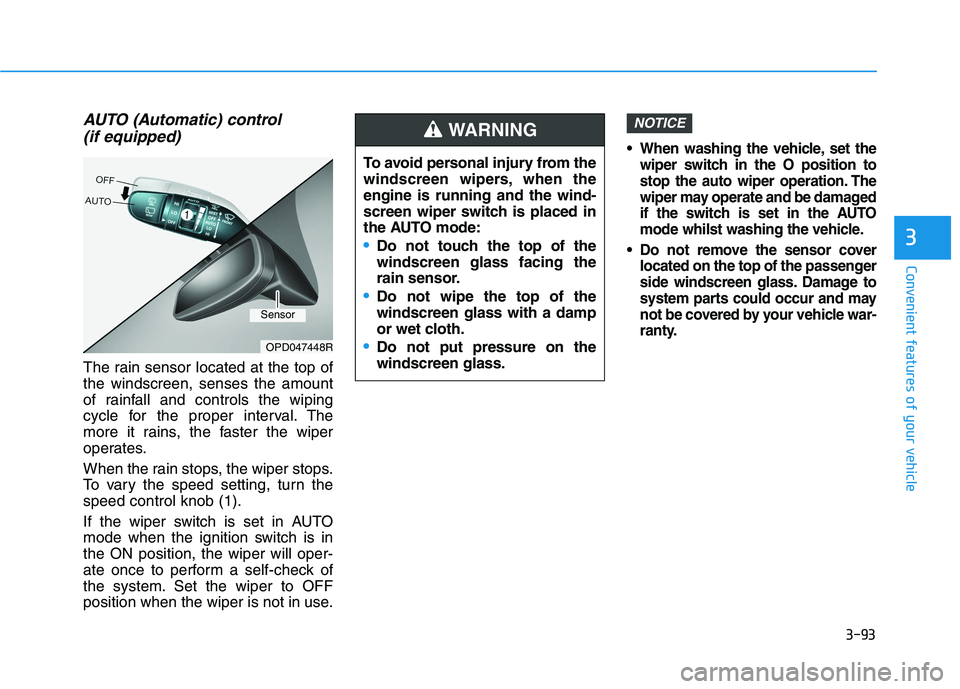
The rain sensor located at the top of
the windscreen, senses the amount
of rainfall and controls the wiping
cycle for the proper interval. The
more it rains, the faster the wiper
operates.
When the rain stops, the wiper stops.
To vary the speed setting, turn the
speed control knob (1).
If the wiper switch is set in AUTO
mode when the ignition switch is in
the ON position, the wiper will oper-
ate once to perform a self-check of
the system. Set the wiper to OFF
position when the wiper is not in use.
When washing the vehicle, set the
wiper switch in the O position to
stop the auto wiper operation. The
wiper may operate and be damaged
if the switch is set in the AUTO
mode whilst washing the vehicle.
Do not remove the sensor cover
located on the top of the passenger
side windscreen glass. Damage to
system parts could occur and may
not be covered by your vehicle war-
ranty.
NOTICE
OPD047448R
To avoid personal injury from the
windscreen wipers, when the
engine is running and the wind-
screen wiper switch is placed in
the AUTO mode:
Do not touch the top of the
windscreen glass facing the
rain sensor.
Do not wipe the top of the
windscreen glass with a damp
or wet cloth.
Do not put pressure on the
windscreen glass.
WARNING
Sensor
Page 188 of 533

3-105
Convenient features of your vehicle
3
M MA
AN
NU
UA
AL
L
C
CL
LI
IM
MA
AT
TE
E
C
CO
ON
NT
TR
RO
OL
L
S
SY
YS
ST
TE
EM
M
(
(I
IF
F
E
EQ
QU
UI
IP
PP
PE
ED
D)
)
3-105
OPD046301/OPD046300
1. Blower speed control knob
2. Temperature control knob
3. Mode selection buttons
4. Front windscreen defroster button
5. Rear window defroster button
6. A/C (Air conditioning) button*
7. Air intake control button
* : if equipped
■ ■Type A
■ ■Type B
Page 189 of 533

3-106
Convenient features of your vehicle
Heating and air conditioning
1. Start the engine.
2. Set the mode to the desired posi-
tion.
To improve the effectiveness of
heating and cooling, select:
- Heating:
- Cooling:
3. Set the temperature control to the
desired position.
4. Set the air intake control to the
outside (fresh) air position.
5. Set the blower speed control to the
desired speed.
6. If air conditioning is desired, turn
the air conditioning system on.
Mode selection
(if equipped) (if equipped)
OPDE046307R/OPD046306
The mode selection button controls the direction of the air flow through the
ventilation system. Five symbols are used to represent Face, Bi-Level, Floor,
Floor-Defrost and Defrost air position.
Air can be directed to the floor, instrument panel outlets, or windscreen.
Page 190 of 533

3-107
Convenient features of your vehicle
3
Face-Level (B, D, F)
Air flow is directed toward the upper
body and face. Additionally, each
outlet can be controlled to direct the
air discharged from the outlet.
Bi-Level (B, D, C, E, F)
Air flow is directed towards the face
and the floor.
Floor-Level (A, C, D, E, F)
Most of the air flow is directed to the
floor, with a small amount of the air
being directed to the windscreen and
side window defrosters.
Floor/Defrost-Level
(A, C, D, E, F)
Most of the air flow is directed to the
floor and the windscreen with a small
amount directed to the side window
defrosters.
Defrost-Level (A, D)
Most of the air flow is directed to the
windscreenwith a small amount of air
directed to the side window defrosters.MAX A/C-Level (B, D, F)
(if equipped)
To operate the MAX A/C, turn the
temperature control knob to the
extreme left. Air flow is directed
toward the upper body and face.
In this mode, the air conditioning and
the recirculated air position will be
selected automatically.
OPD046308
Page 193 of 533

3-110
Convenient features of your vehicle
Blower speed control
Turn the knob to the right to increase
the blower speed and airflow. Turn
the knob to the left to decrease blow-
er speed and airflow.
Setting the blower speed control
knob to the “0” position turns off the
blower.
Operating the blower when the
ignition switch is in the ON posi-
tion could cause the battery to
discharge. Operate the blower
when the engine is running.
Air conditioning (A/C)
(if equipped)
Press the A/C button to turn the air
conditioning system on (indicator
light will illuminate). Press the button
again to turn the air conditioning sys-
tem off.
System operation
Ventilation
1. Set the mode to the position.
2. Set the air intake control to the
outside (fresh) air position.
3. Set the temperature control to the
desired position.
4. Set the blower speed control to the
desired speed.
Heating
1. Set the mode to the position.
2. Set the air intake control to the
outside (fresh) air position.
3. Set the temperature control to the
desired position.
4. Set the blower speed control to the
desired speed.
5. If dehumidified heating is desired,
turn the air conditioning system (if
equipped) on.
If the windscreen fogs up, set the
mode to the or position.
NOTICE
OPD046314
OPD046311
Page 194 of 533

3-111
Convenient features of your vehicle
3
Operation Tips
To keep dust or unpleasant fumes
from entering the vehicle through
the ventilation system, temporarily
set the air intake control to the
recirculated air position. Be sure to
return the control to the fresh air
position when the irritation has
passed to keep fresh air in the
vehicle. This will help keep the driv-
er alert and comfortable.
To prevent interior fog on the wind-
screen, set the air intake control to
the fresh air position and blower
speed to the desired position. Turn
on the air conditioning system, and
adjust the temperature control to
the desired temperature.
Air conditioning
HYUNDAI Air Conditioning Systems
are filled with R-134a refrigerant.
1. Start the engine. Push the air con-
ditioning button.
2. Set the mode to the position.
3. Set the air intake control to the out-
side air or recirculated air position.
4. Adjust the blower speed control
and temperature control to main-
tain maximum comfort.
The refrigerant system should
only be serviced by trained and
certified technicians to insure
proper and safe operation.
The refrigerant system should
be serviced in a well-ventilated
place.
The air conditioning evaporator
(cooling coil) shall never be
repaired or replaced with one
removed from a used or sal-
vaged vehicle and new replace-
ment MAC evaporators shall be
certified (and labelled) as meet-
ing SAE Standard J2842. When using the air conditioning
system, monitor the temperature
gauge closely whilst driving up
hills or in heavy traffic when out-
side temperatures are high. Air
conditioning system operation
may cause engine overheating.
Continue to use the blower but
turn the air conditioning system
off if the temperature gauge
indicates engine overheating.
When opening the windows in
humid weather, air conditioning
may create water droplets inside
the vehicle. As excessive water
droplets may cause damage to
electrical equipment, air condi-
tioning should only be used with
the windows closed.
NOTICE
NOTICE