mirror HYUNDAI I30 2023 Owner's Manual
[x] Cancel search | Manufacturer: HYUNDAI, Model Year: 2023, Model line: I30, Model: HYUNDAI I30 2023Pages: 533, PDF Size: 59.13 MB
Page 330 of 533
5-65
Driving your vehicle
BCW (if equipped)
Operating conditions
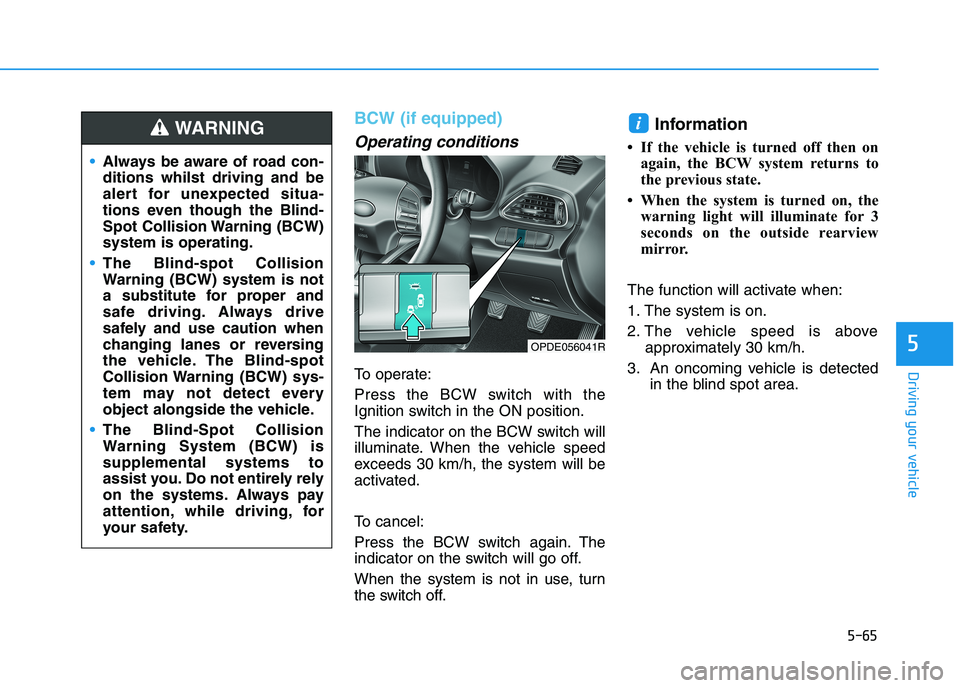
To operate:
Press the BCW switch with the
Ignition switch in the ON position.
The indicator on the BCW switch will
illuminate. When the vehicle speed
exceeds 30 km/h, the system will be
activated.
To cancel:
Press the BCW switch again. The
indicator on the switch will go off.
When the system is not in use, turn
the switch off.
Information
• If the vehicle is turned off then on
again, the BCW system returns to
the previous state.
• When the system is turned on, the
warning light will illuminate for 3
seconds on the outside rearview
mirror.
The function will activate when:
1. The system is on.
2. The vehicle speed is above
approximately 30 km/h.
3. An oncoming vehicle is detected
in the blind spot area.
i
5
Always be aware of road con-
ditions whilst driving and be
alert for unexpected situa-
tions even though the Blind-
Spot Collision Warning (BCW)
system is operating.
The Blind-spot Collision
Warning (BCW) system is not
a substitute for proper and
safe driving. Always drive
safely and use caution when
changing lanes or reversing
the vehicle. The Blind-spot
Collision Warning (BCW) sys-
tem may not detect every
object alongside the vehicle.
The Blind-Spot Collision
Warning System (BCW) is
supplemental systems to
assist you. Do not entirely rely
on the systems. Always pay
attention, while driving, for
your safety.
WARNING
OPDE056041R
Page 331 of 533
5-66
Driving your vehicle
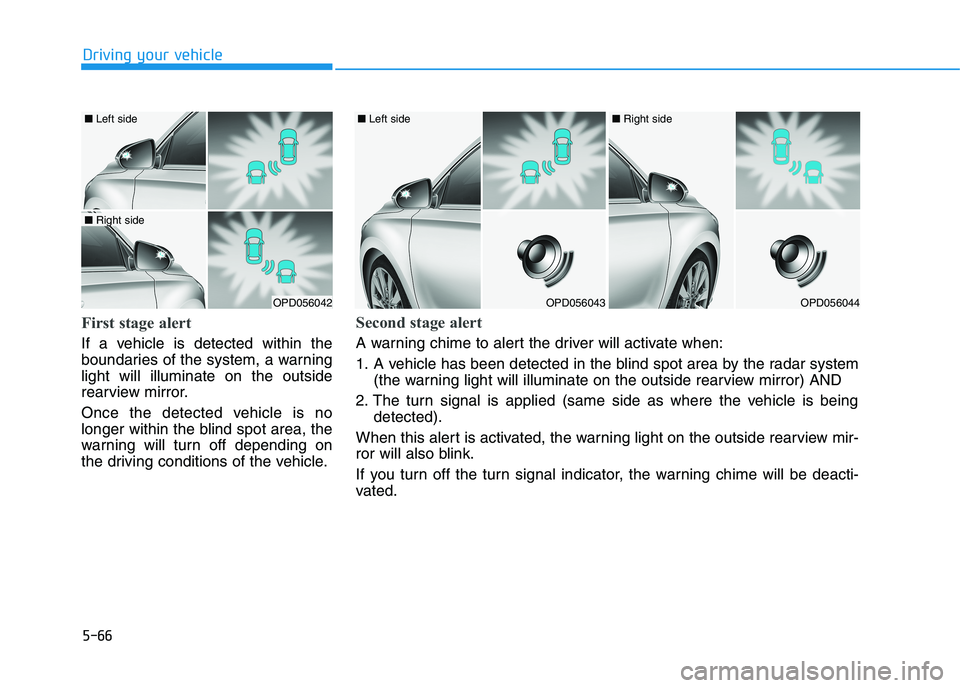
First stage alert
If a vehicle is detected within the
boundaries of the system, a warning
light will illuminate on the outside
rearview mirror.
Once the detected vehicle is no
longer within the blind spot area, the
warning will turn off depending on
the driving conditions of the vehicle.
OPD056042
■ Left side
■ Right side
OPD056043
■ Left side
OPD056044
■ Right side
Second stage alert
A warning chime to alert the driver will activate when:
1. A vehicle has been detected in the blind spot area by the radar system
(the warning light will illuminate on the outside rearview mirror) AND
2. The turn signal is applied (same side as where the vehicle is being
detected).
When this alert is activated, the warning light on the outside rearview mir-
ror will also blink.
If you turn off the turn signal indicator, the warning chime will be deacti-
vated.
Page 333 of 533
5-68
Driving your vehicle
Warning type
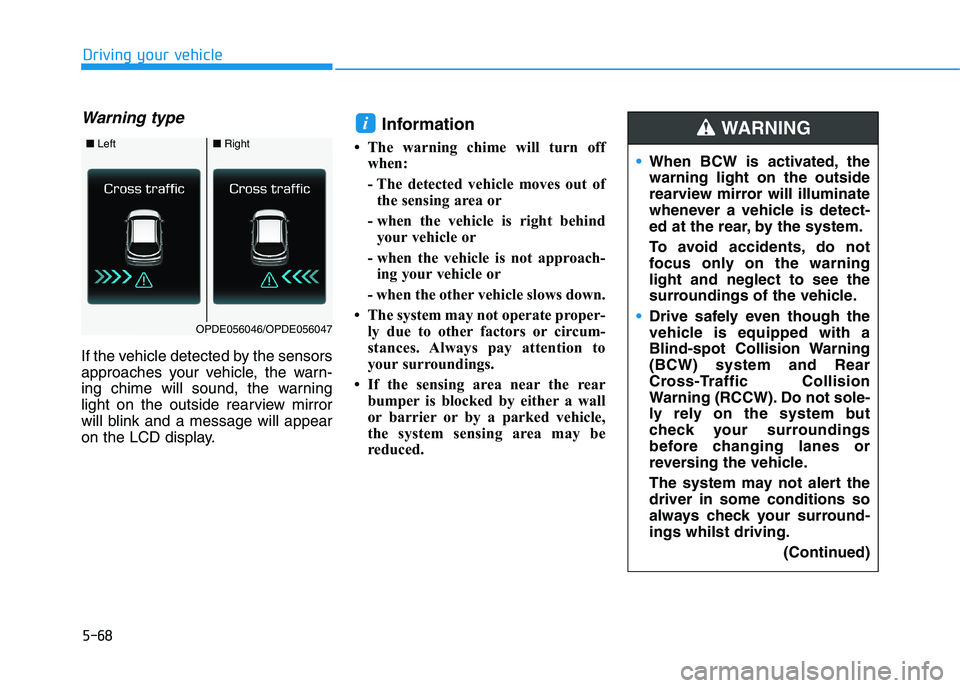
If the vehicle detected by the sensors
approaches your vehicle, the warn-
ing chime will sound, the warning
light on the outside rearview mirror
will blink and a message will appear
on the LCD display.
Information
• The warning chime will turn off
when:
- The detected vehicle moves out of
the sensing area or
- when the vehicle is right behind
your vehicle or
- when the vehicle is not approach-
ing your vehicle or
- when the other vehicle slows down.
• The system may not operate proper-
ly due to other factors or circum-
stances. Always pay attention to
your surroundings.
• If the sensing area near the rear
bumper is blocked by either a wall
or barrier or by a parked vehicle,
the system sensing area may be
reduced.
i
■ Left■Right
OPDE056046/OPDE056047
When BCW is activated, the
warning light on the outside
rearview mirror will illuminate
whenever a vehicle is detect-
ed at the rear, by the system.
To avoid accidents, do not
focus only on the warning
light and neglect to see the
surroundings of the vehicle.
Drive safely even though the
vehicle is equipped with a
Blind-spot Collision Warning
(BCW) system and Rear
Cross-Traffic Collision
Warning (RCCW). Do not sole-
ly rely on the system but
check your surroundings
before changing lanes or
reversing the vehicle.
The system may not alert the
driver in some conditions so
always check your surround-
ings whilst driving.
(Continued)
WARNING
Page 335 of 533
5-70
Driving your vehicle
If any of these conditions occur, the
light on the BCW switch and the sys-
tem will turn off automatically.
When the BCW cancelled warning
message is displayed in the cluster,
check to make sure that the rear
bumper is free from any dirt or snow
in the areas where the sensor is
located. Remove any dirt, snow, or
foreign material that could interfere
with the radar sensors.
After any dirt or debris is removed,
the BCW system should operate nor-
mally after about 10 minutes of driv-
ing the vehicle.
If the system still does not operate
normally have your vehicle inspected
by an authorised HYUNDAI dealer.
Information
Turn off the system by pressing the
BCW switch and deselecting Rear
Cross Traffic Collision Warning
(RCCW) from the User Settings mode
on the cluster, when using a trailer or
carrier behind your vehicle.
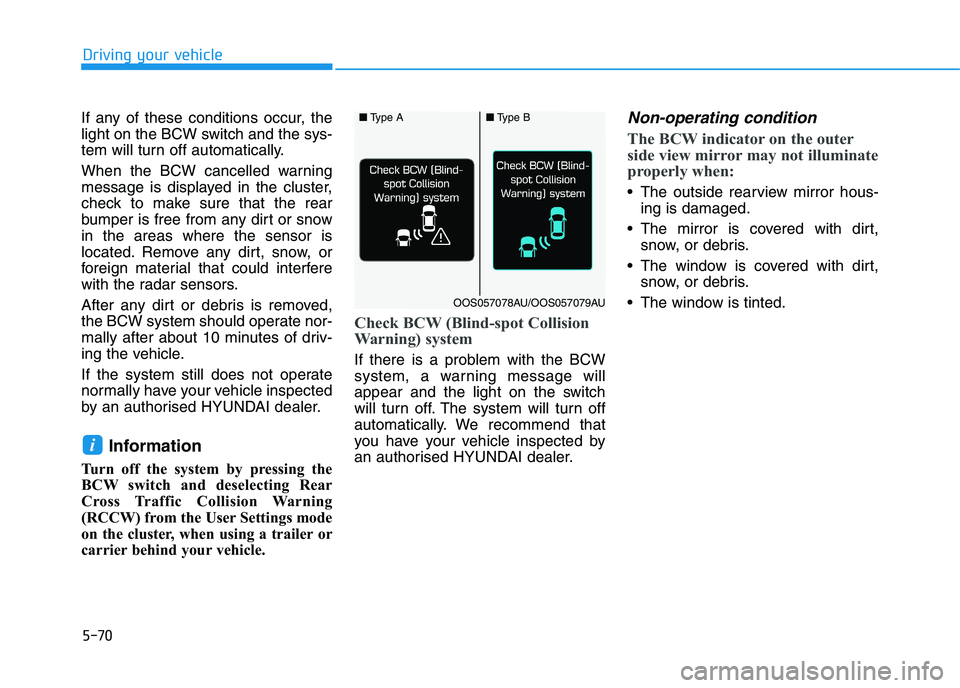
Check BCW (Blind-spot Collision
Warning) system
If there is a problem with the BCW
system, a warning message will
appear and the light on the switch
will turn off. The system will turn off
automatically. We recommend that
you have your vehicle inspected by
an authorised HYUNDAI dealer.
Non-operating condition
The BCW indicator on the outer
side view mirror may not illuminate
properly when:
The outside rearview mirror hous-
ing is damaged.
The mirror is covered with dirt,
snow, or debris.
The window is covered with dirt,
snow, or debris.
The window is tinted.
i
■Type A■Type B
OOS057078AU/OOS057079AU
Page 346 of 533
5-81
Driving your vehicle
5
Do not apply licence plate
frames or foreign objects such
as a bumper sticker or a bumper
guard near the radar sensor.
Doing so may adversely affect
the sensing performance of the
radar.
Always keep the radar sensor
and cover clean and free of dirt
and debris.
Use only a soft cloth to wash the
vehicle. Do not spray pres-
surised water directly on the
sensor or sensor cover.
Be careful not to apply unneces-
sary force on the radar sensor or
sensor cover. If the sensor is
forcibly moved out of proper
alignment, the FCA system may
not operate correctly. In this
case, a warning message may
not be displayed. We recom-
mend you have the vehicle
inspected by an authorised
HYUNDAI dealer.
(Continued)(Continued)
If the front bumper becomes
damaged in the area around the
radar sensor, the FCA system
may not operate properly. Have
the vehicle inspected by an
authorised HYUNDAI dealer.
Use only genuine HYUNDAI
parts to repair or replace a dam-
aged sensor or sensor cover. Do
not apply paint to the sensor
cover. NEVER install any accessories
or stickers on the front wind-
screen, nor tint the front wind-
screen.
NEVER locate any reflective
objects (i.e. white paper, mirror)
over the instrument panel. Any
light reflection may cause a mal-
function of the system.
Pay extreme caution to keep the
camera out of water.
NEVER disassemble the camera
assembly, nor apply any impact
on the camera assembly.
Playing the vehicle audio sys-
tem at high volume may offset
the system warning sounds.
Information
We recommend you have the system
checked by an authorised HYUNDAI
dealer when:
• The windscreen glass is replaced.
• The camera or related parts are
repaired or removed.
i
NOTICENOTICE
Page 354 of 533
5-89
Driving your vehicle
5
(Continued)
The operation of the LKA sys-
tem can be cancelled or not
work properly according to
road condition and surround-
ings. Always be cautious
when driving.
Do not disassemble the LKA
system camera temporarily to
tint the window or attach any
types of coatings and acces-
sories. If you disassemble the
camera and assemble it again,
we recommend that you take
your vehicle to an authorised
HYUNDAI dealer and have the
system checked for calibra-
tion.
When you replace the wind-
screen glass, LKA system
camera or related parts of the
steering wheel, take your
vehicle to an authorised
HYUNDAI dealer and have the
system checked for calibra-
tion.
(Continued)
(Continued)
Always have your hands on
the steering wheel whilst the
LKA system is activated. If
you continue to drive with
your hands off the steering
wheel after the "Keep hands
on steering wheel" warning
message appears, the system
will turn off automatically.
The steering wheel is not con-
tinuously controlled so if the
vehicle speed is at a higher
speed when leaving a lane the
vehicle may not be able to be
controlled by the system. The
driver must always follow the
speed limit when using the
system.
If you attach objects to the
steering wheel, the system
may not assist steering or the
hands off alarm may not work
properly.
(Continued)
The system detects lane lines
and controls the steering
wheel by a camera, therefore,
if the lane lines are hard to
detect, the system may not
work properly.
Please refer to "Limitations of
the system".
Do not remove or damage the
related parts of LKA system.
You may not hear a warning
sound of the LKA system
because of excessive audio
sound.
Do not place objects on the
instrument panel that reflects
light such as mirrors, white
paper, etc. The system may
malfunction if the sunlight is
reflected.
(Continued)
Page 360 of 533
5-95
Driving your vehicle
5
The lane suddenly disappears
such as at the intersection.
There is not enough distance
between you and the vehicle in
front to be able to detect the lane
line or the vehicle ahead is driving
on the lane line.
Driving on a steep grade, over a
hill, or when driving on a bend.
The adverse road conditions cause
excessive vehicle vibrations whilst
driving.
The surrounding of the inside rear
view mirror temperature is high
due to direct sunlight.
When front visibility is poor
The windscreen or the LKA system
camera lens is blocked with dirt or
debris.
The windscreen glass is fogged
up; a clear view of the road is
obstructed.
Placing objects on the instrument
panel, etc.LKA system Function Change
The driver can change LKA to the
Lane Departure Warning (LDW) sys-
tem or change the LKA system mode
between Standard LKA and Active
LKA from the LCD display. Go to the
"User Settings →Driver Assistance
→Lane Safety →Lane Departure
Warning / Standard LKA / Active
LKA".
Lane Departure Warning
LDW alerts the driver with a visual
warning and a warning alarm when
the system detects the vehicle
departing the lane. The steering
wheel will not be controlled.
Standard LKA
The Standard LKA mode guides the
driver to help keep the vehicle within
the lanes. It rarely controls the steer-
ing wheel, when the vehicle drives
well inside the lanes. However, it
starts to control the steering wheel,
when the vehicle is about to deviate
out of the lanes.
Active LKA
The Active LKA mode provides more
frequent steering wheel control in
comparison with the Standard LKA
mode. Active LKA can reduce the dri-
ver’s fatigue to assist the steering for
maintaining the vehicle in the middle
of the lane.
Page 364 of 533
5-99
Driving your vehicle
5
The Driver Attention Warning
(DAW) system utilises the camera
sensor on the front windscreen for
its operation. To keep the camera
sensor in the best condition, you
should observe the following:
NEVER install any accessories or
stickers on the front windscreen,
nor tint the front windscreen.
NEVER locate any reflective
objects (i.e. white paper, mirror)
over the instrument panel. Any
light reflection may cause a mal-
function of the Driver Attention
Warning (DAW) system.
Pay extreme caution to keep the
camera sensor out of water.
NEVER disassemble the camera
assembly, nor apply any impact
on the camera assembly.
Do not disassemble the camera
temporarily for tinted window or
attaching any types of coatings
and accessories.
(Continued)(Continued)
If you disassemble a camera and
assemble it again, we recom-
mend that you take your vehicle
to an authorised HYUNDAI deal-
er and have the system checked
for calibration.
NOTICE
The Driver Attention Warning
(DAW) system may not operate
properly or operate with limited
alerts in the following situations:
The lane detection perform-
ance is limited. For more
information, refer to "Lane
Keeping Assist (LKA) system"
in this chapter.
The vehicle is violently driven
or is abruptly turned for
obstacle avoidance (e.g. con-
struction area, other vehicles,
fallen objects, bumpy road).
Forward drivability of the
vehicle is severely under-
mined (possibly due to wide
variation in tyre pressures,
uneven tyre wear-out, toe-
in/toe-out alignment).
(Continued)
(Continued)
The vehicle drives on a wind-
ing road.
The vehicle drives on a
bumpy road.
The vehicle drives through a
windy area.
The vehicle is controlled by
the following driving assist
systems:
- Lane Keeping Assist (LKA)
system
- Forward Collision-
Avoidance Assist (FCA) sys-
tem
- Smart Cruise Control (SCC)
system
CAUTION
Playing the vehicle audio sys-
tem at high volume may offset
the Driver Attention Warning
(DAW) system warning sounds.
CAUTION
Page 389 of 533
5-124
Driving your vehicle
Information
The ESC system (if equipped) must be
turned OFF before rocking the vehi-
cle.
If you are still stuck after rocking
the vehicle a few times, have the
vehicle pulled out by a tow vehicle
to avoid engine overheating, pos-
sible damage to the transmission,
and tyre damage. See "Towing" in
chapter 6.
Smooth cornering
Avoid braking or gear changing in
corners, especially when roads are
wet. Ideally, corners should always
be taken under gentle acceleration.
Driving at night
Night driving presents more hazards
than driving in the daylight. Here are
some important tips to remember:
Slow down and keep more dis-
tance between you and other vehi-
cles, as it may be more difficult to
see at night, especially in areas
where there may not be any street
lights.
Adjust your mirrors to reduce the
glare from other drivers' head-
lamps.
Keep your headlamps clean and
properly aimed. Dirty or improperly
aimed headlamps will make it
much more difficult to see at night.
Avoid staring directly at the head-
lamps of oncoming vehicles. You
could be temporarily blinded, and it
will take several seconds for your
eyes to readjust to the darkness.
Driving in the rain
Rain and wet roads can make driving
dangerous. Here are a few things to
consider when driving in the rain or
on slick pavement:
Slow down and allow extra following
distance. A heavy rainfall makes it
harder to see and increases the dis-
tance needed to stop your vehicle.
Turn OFF your Cruise Control (if
equipped).
Replace your windscreen wiper
blades when they show signs of
streaking or missing areas on the
windscreen.
Be sure your tyres have enough
tread. If your tyres do not have
enough tread, making a quick stop
on wet pavement can cause a skid
and possibly lead to an accident.
See "Tyre Tread" in chapter 7.
Turn on your headlamps to make it
easier for others to see you.
Driving too fast through large pud-
dles can affect your brakes. If you
must go through puddles, try to
drive through them slowly.
If you believe your brakes may be
wet, apply them lightly whilst driv-
ing until normal braking operation
returns.
NOTICE
i
Page 507 of 533
7-76
Maintenance
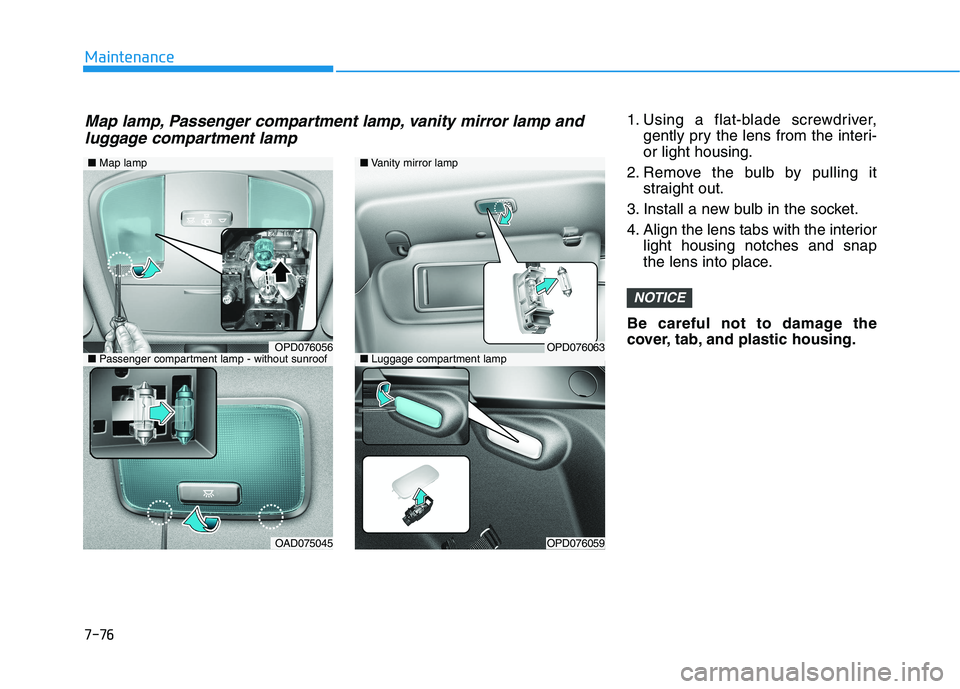
1. Using a flat-blade screwdriver,
gently pry the lens from the interi-
or light housing.
2. Remove the bulb by pulling it
straight out.
3. Install a new bulb in the socket.
4. Align the lens tabs with the interior
light housing notches and snap
the lens into place.
Be careful not to damage the
cover, tab, and plastic housing.
NOTICE
■Map lamp
OPD076056
OAD075045
■Vanity mirror lamp
■Luggage compartment lampOPD076063
OPD076059
■Passenger compartment lamp - without sunroof
Map lamp, Passenger compartment lamp, vanity mirror lamp and
luggage compartment lamp