warning HYUNDAI IONIQ 2020 Owners Manual
[x] Cancel search | Manufacturer: HYUNDAI, Model Year: 2020, Model line: IONIQ, Model: HYUNDAI IONIQ 2020Pages: 561, PDF Size: 24.5 MB
Page 217 of 561
3-132
Convenient features of your vehicle
W WI
IN
ND
DS
SH
HI
IE
EL
LD
D
D
DE
EF
FR
RO
OS
ST
TI
IN
NG
G
A
AN
ND
D
D
DE
EF
FO
OG
GG
GI
IN
NG
G
For maximum defrosting, set the
temperature control to the extreme
right/hot position and the fan speed
control to the highest speed.
If warm air to the floor is desired
while defrosting or defogging, set the
mode to the floor-defrost position.
Before driving, clear all snow and
ice from the windshield, rear win-
dow, side view mirrors, and all side
windows.
Clear all snow and ice from the
hood and air inlet in the cowl grill to
improve heater and defroster effi-
ciency and to reduce the probability
of fogging up the inside of the wind-
shield.To Defog Inside Windshield
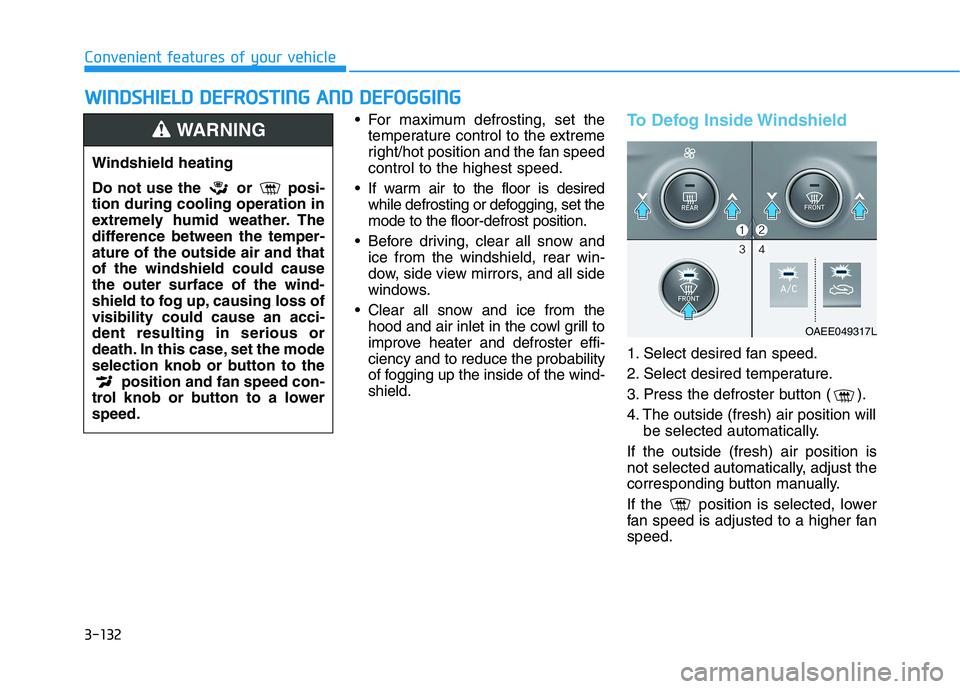
1. Select desired fan speed.
2. Select desired temperature.
3. Press the defroster button ( ).
4. The outside (fresh) air position will
be selected automatically.
If the outside (fresh) air position is
not selected automatically, adjust the
corresponding button manually.
If the position is selected, lower
fan speed is adjusted to a higher fan
speed.
OAEE049317L
Windshield heating
Do not use the or posi-
tion during cooling operation in
extremely humid weather. The
difference between the temper-
ature of the outside air and that
of the windshield could cause
the outer surface of the wind-
shield to fog up, causing loss of
visibility could cause an acci-
dent resulting in serious or
death. In this case, set the mode
selection knob or button to the
position and fan speed con-
trol knob or button to a lower
speed.
WARNING
Page 221 of 561
3-136
Convenient features of your vehicle
To avoid possible theft, do not
leave valuables in the storage
compartments.
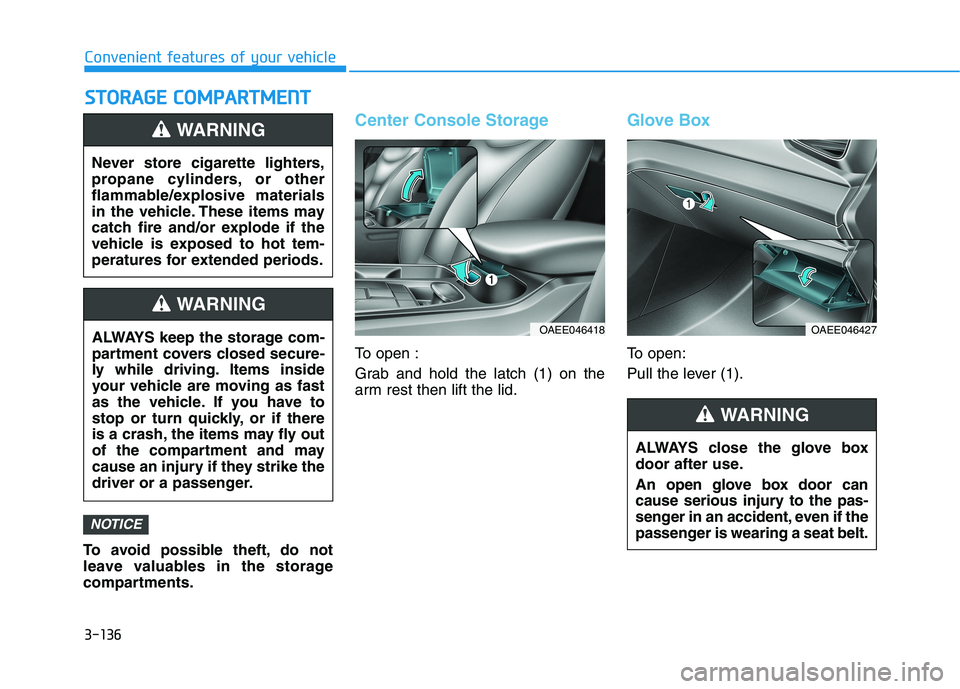
Center Console Storage
To open :
Grab and hold the latch (1) on the
arm rest then lift the lid.
Glove Box
To open:
Pull the lever (1).
NOTICE
S ST
TO
OR
RA
AG
GE
E
C
CO
OM
MP
PA
AR
RT
TM
ME
EN
NT
T
Never store cigarette lighters,
propane cylinders, or other
flammable/explosive materials
in the vehicle. These items may
catch fire and/or explode if the
vehicle is exposed to hot tem-
peratures for extended periods.
WARNING
ALWAYS keep the storage com-
partment covers closed secure-
ly while driving. Items inside
your vehicle are moving as fast
as the vehicle. If you have to
stop or turn quickly, or if there
is a crash, the items may fly out
of the compartment and may
cause an injury if they strike the
driver or a passenger.
WARNING
OAEE046418
ALWAYS close the glove box
door after use.
An open glove box door can
cause serious injury to the pas-
senger in an accident, even if the
passenger is wearing a seat belt.
WARNING
OAEE046427
Page 222 of 561
3-137
Convenient features of your vehicle
3
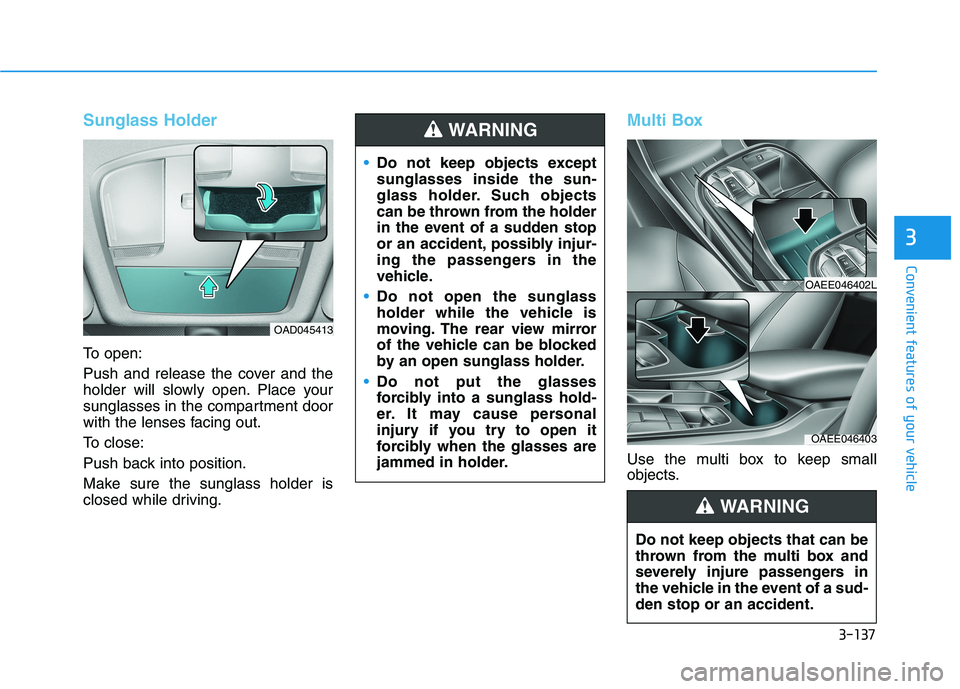
Sunglass Holder
To open:
Push and release the cover and the
holder will slowly open. Place your
sunglasses in the compartment door
with the lenses facing out.
To close:
Push back into position.
Make sure the sunglass holder is
closed while driving.
Multi Box
Use the multi box to keep small
objects.
OAD045413
Do not keep objects except
sunglasses inside the sun-
glass holder. Such objects
can be thrown from the holder
in the event of a sudden stop
or an accident, possibly injur-
ing the passengers in the
vehicle.
Do not open the sunglass
holder while the vehicle is
moving. The rear view mirror
of the vehicle can be blocked
by an open sunglass holder.
Do not put the glasses
forcibly into a sunglass hold-
er. It may cause personal
injury if you try to open it
forcibly when the glasses are
jammed in holder.
WARNING
OAEE046402L
OAEE046403
Do not keep objects that can be
thrown from the multi box and
severely injure passengers in
the vehicle in the event of a sud-
den stop or an accident.
WARNING
Page 223 of 561
3-138
Convenient features of your vehicle
I IN
NT
TE
ER
RI
IO
OR
R
F
FE
EA
AT
TU
UR
RE
ES
S
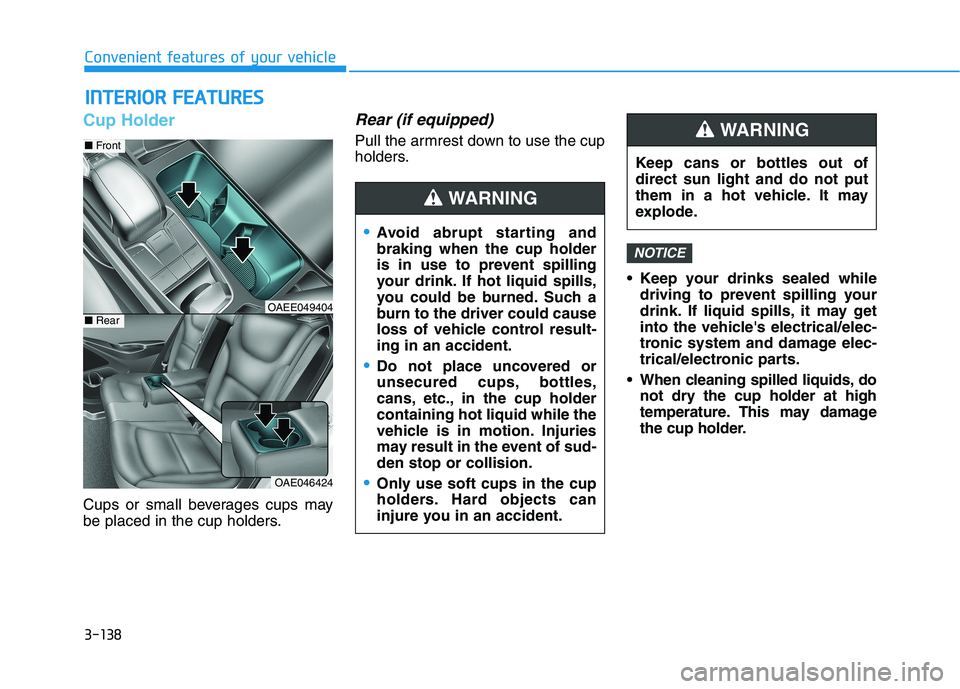
Cup Holder
Cups or small beverages cups may
be placed in the cup holders.
Rear (if equipped)
Pull the armrest down to use the cup
holders.
Keep your drinks sealed while
driving to prevent spilling your
drink. If liquid spills, it may get
into the vehicle's electrical/elec-
tronic system and damage elec-
trical/electronic parts.
When cleaning spilled liquids, do
not dry the cup holder at high
temperature. This may damage
the cup holder.
NOTICE
OAE046424
■Front
■RearOAEE049404
Avoid abrupt starting and
braking when the cup holder
is in use to prevent spilling
your drink. If hot liquid spills,
you could be burned. Such a
burn to the driver could cause
loss of vehicle control result-
ing in an accident.
Do not place uncovered or
unsecured cups, bottles,
cans, etc., in the cup holder
containing hot liquid while the
vehicle is in motion. Injuries
may result in the event of sud-
den stop or collision.
Only use soft cups in the cup
holders. Hard objects can
injure you in an accident.
WARNING
Keep cans or bottles out of
direct sun light and do not put
them in a hot vehicle. It may
explode.
WARNING
Page 224 of 561
3-139
Convenient features of your vehicle
3
Sunvisor
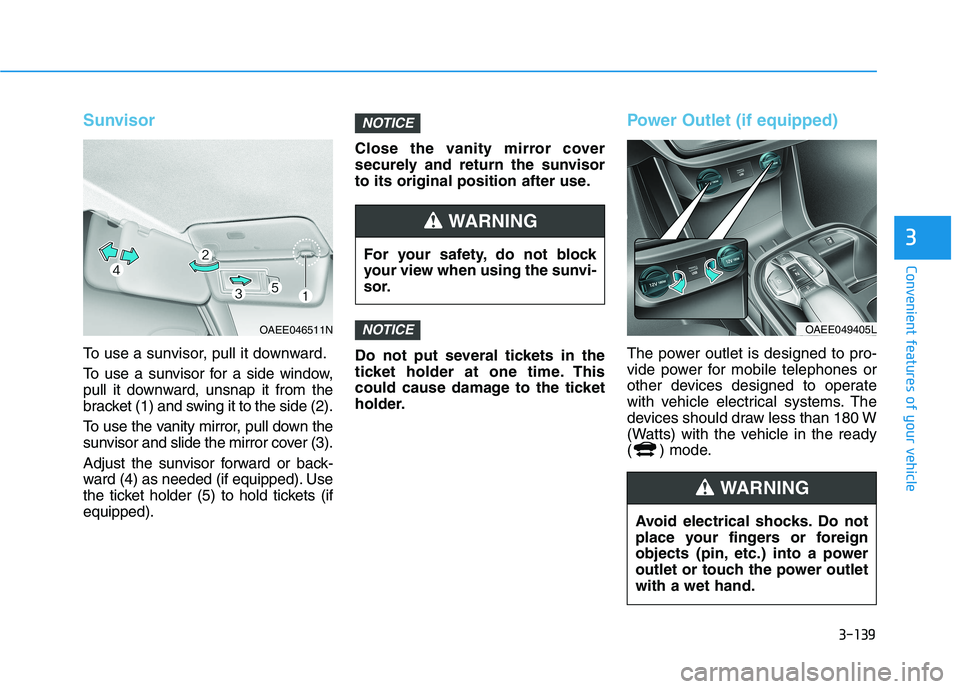
To use a sunvisor, pull it downward.
To use a sunvisor for a side window,
pull it downward, unsnap it from the
bracket (1) and swing it to the side (2).
To use the vanity mirror, pull down the
sunvisor and slide the mirror cover (3).
Adjust the sunvisor forward or back-
ward (4) as needed (if equipped). Use
the ticket holder (5) to hold tickets (if
equipped).Close the vanity mirror cover
securely and return the sunvisor
to its original position after use.
Do not put several tickets in the
ticket holder at one time. This
could cause damage to the ticket
holder.
Power Outlet (if equipped)
The power outlet is designed to pro-
vide power for mobile telephones or
other devices designed to operate
with vehicle electrical systems. The
devices should draw less than 180 W
(Watts) with the vehicle in the ready
( ) mode.
NOTICE
NOTICE
OAEE046511N
For your safety, do not block
your view when using the sunvi-
sor.
WARNING
OAEE049405L
Avoid electrical shocks. Do not
place your fingers or foreign
objects (pin, etc.) into a power
outlet or touch the power outlet
with a wet hand.
WARNING
Page 227 of 561
3-142
Convenient features of your vehicle
(Continued)
The wireless charging process
may temporarily stop, when tem-
perature abnormally increases
inside the wireless cellular
phone charging system. The
wireless charging process
restarts, when temperature falls
to a proper level.
The wireless charging process
may temporarily stop when
there is any metallic item, such
as a coin, between the wireless
cellular phone charging system
and a cellular phone.
For certain cellular phone with
their own protection, the wire-
less charging speed may
decrease and the wireless
charging may stop.
If the cellular phone has a thick
cover, the wireless charging may
not be possible.
If the cell phone is not complete-
ly contacting the charging pad,
wireless charging may not oper-
ate properly.
(Continued)(Continued)
Some magnetic items like credit
cards, phone cards or rail tickets
may be damaged if left with the
cellular phone during the charg-
ing process.
If the cellular phone without the
wireless charging function or
the metallic items are placed on
the charging pad, it may cause
slight noise. This noise does not
affect the cellular phone and the
vehicle, because this noise is an
operating sound during deter-
mining the item on the charging
pad.
If the POWER button is in the
OFF position, the charging also
stops.
Clock
Vehicles with Audio system
Select the [SETUP]button on the
audio system ➟Select [Date/Time].
Set time : Set the time displayed on
the audio screen.
Time format : Choose between 12-
hour and 24-hour time formats. Do not adjust the clock while
driving, you may lose your
steering control and cause an
accident that results in severe
personal injury or death.
WARNING
Page 228 of 561
![HYUNDAI IONIQ 2020 Owners Manual 3-143
Convenient features of your vehicle
3
Vehicles with Navigation system
Select the Settings menu on the
Navigation system➟Select
[Date/Time].
GPS time : Displays time according
to the received](/img/35/58884/w960_58884-227.png "HYUNDAI IONIQ 2020 Owners Manual 3-143
Convenient features of your vehicle
3
Vehicles with Navigation system
Select the Settings menu on the
Navigation system➟Select
[Date/Time].
GPS time : Displays time according
to the received")
3-143
Convenient features of your vehicle
3
Vehicles with Navigation system
Select the Settings menu on the
Navigation system➟Select
[Date/Time].
GPS time : Displays time according
to the received GNSS time.
24-hour : Switches to 12 hour or 24
hour.
❈Detailed information for the
Infotainment system is described
in a separately supplied manual.
Clothes Hanger (if equipped)
These hangers are not designed to
hold large or heavy items.
OAEE046434
Do not hang other objects such
as hangers or hard objects
except clothes. Also, do not put
heavy, sharp or breakable
objects in the clothes pockets.
In an accident or when the cur-
tain air bag is inflated, it may
cause vehicle damage or per-
sonal injury.
WARNING
OGSB047265L
Page 229 of 561
3-144
Convenient features of your vehicle
Floor Mat Anchor(s)
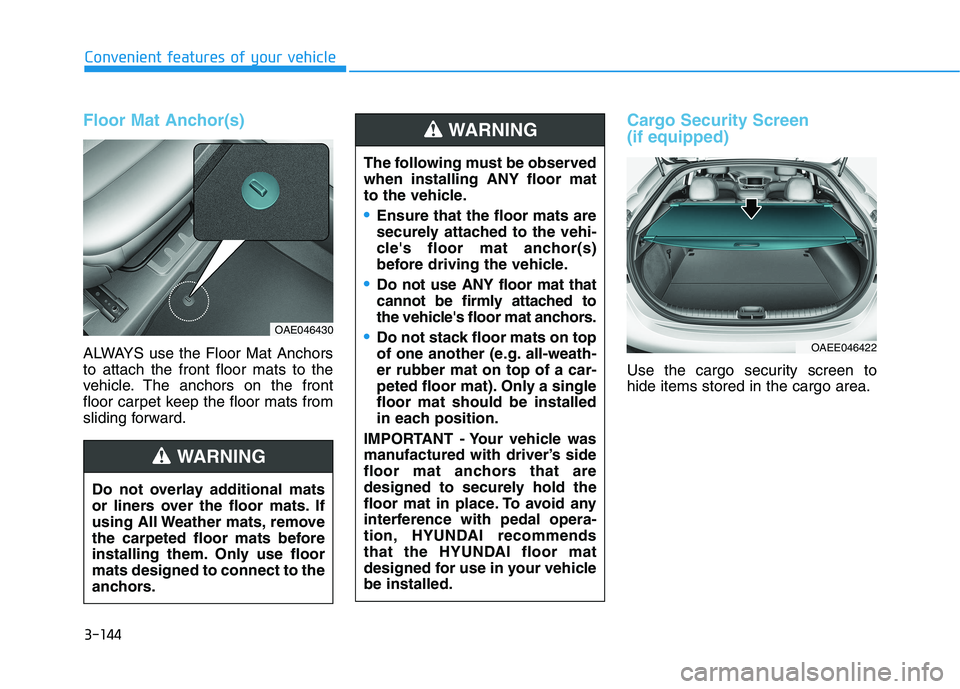
ALWAYS use the Floor Mat Anchors
to attach the front floor mats to the
vehicle. The anchors on the front
floor carpet keep the floor mats from
sliding forward.
Cargo Security Screen
(if equipped)
Use the cargo security screen to
hide items stored in the cargo area.
Do not overlay additional mats
or liners over the floor mats. If
using All Weather mats, remove
the carpeted floor mats before
installing them. Only use floor
mats designed to connect to the
anchors.
WARNING
OAE046430
The following must be observed
when installing ANY floor mat
to the vehicle.
Ensure that the floor mats are
securely attached to the vehi-
cle's floor mat anchor(s)
before driving the vehicle.
Do not use ANY floor mat that
cannot be firmly attached to
the vehicle's floor mat anchors.
Do not stack floor mats on top
of one another (e.g. all-weath-
er rubber mat on top of a car-
peted floor mat). Only a single
floor mat should be installed
in each position.
IMPORTANT - Your vehicle was
manufactured with driver’s side
floor mat anchors that are
designed to securely hold the
floor mat in place. To avoid any
interference with pedal opera-
tion, HYUNDAI recommends
that the HYUNDAI floor mat
designed for use in your vehicle
be installed.
WARNING
OAEE046422
Page 237 of 561
Driving your vehicle
Before driving.........................................................5-3
Before Entering the Vehicle ...........................................5-3
Before Starting ..................................................................5-3
Power button ..........................................................5-5
POWER Button Positions.................................................5-6
Starting the Vehicle ..........................................................5-8
Turning Off the Vehicle ...................................................5-9
Reduction gear .....................................................5-10
Reduction Gear Operation ............................................5-10
Parking ...............................................................................5-12
LCD Display Messages ...................................................5-12
Good Driving Practices ..................................................5-15
Paddle shifter (regenerative braking control) ..5-16
One Pedal Driving ...........................................................5-17
Smart regeneration system with
smart cruise control system...............................5-18
System Setting .................................................................5-18
Activating the Smart Regeneration System .............5-18
Cancelling the Smart Regeneration System .............5-20
Resuming the Smart Regeneration System ..............5-20
Disabling the Smart Regeneration System ...............5-20
Vehicle-to-Vehicle Front Recognition
- Front Radar Sensor ....................................................5-20
Warning Message............................................................5-21
Limitations of the System .............................................5-21
Braking system ...................................................5-26
Power Brakes ...................................................................5-26
Disc Brake Wear Indicator ............................................5-27
Electronic Parking Brake (EPB)...................................5-27
Auto Hold ..........................................................................5-32
Anti-lock Brake System (ABS) ....................................5-36
Electronic Stability Control (ESC)................................5-38
Vehicle Stability Management (VSM).........................5-42
Hill-Start Assist Control (HAC) ....................................5-43
Good Braking Practices .................................................5-44
Drive Mode Integrated Control System ...........5-45
Drive mode ........................................................................5-45
Initial setting for each Drive Mode ............................5-45
Forward Collision-Avoidance assist (FCA) .....5-46
System setting and activation......................................5-46
FCA warning message and brake control .................5-48
FCA sensor (Front view camera+ Front radar) .......5-51
System malfunction ........................................................5-53
Limitations of the system .............................................5-55
Lane Keeping Assist (LKA) .................................5-62
LKA operation ..................................................................5-64
Warning light and message ..........................................5-67
Limitations of the System .............................................5-68
LKA system function change .......................................5-70
5
Page 238 of 561
5
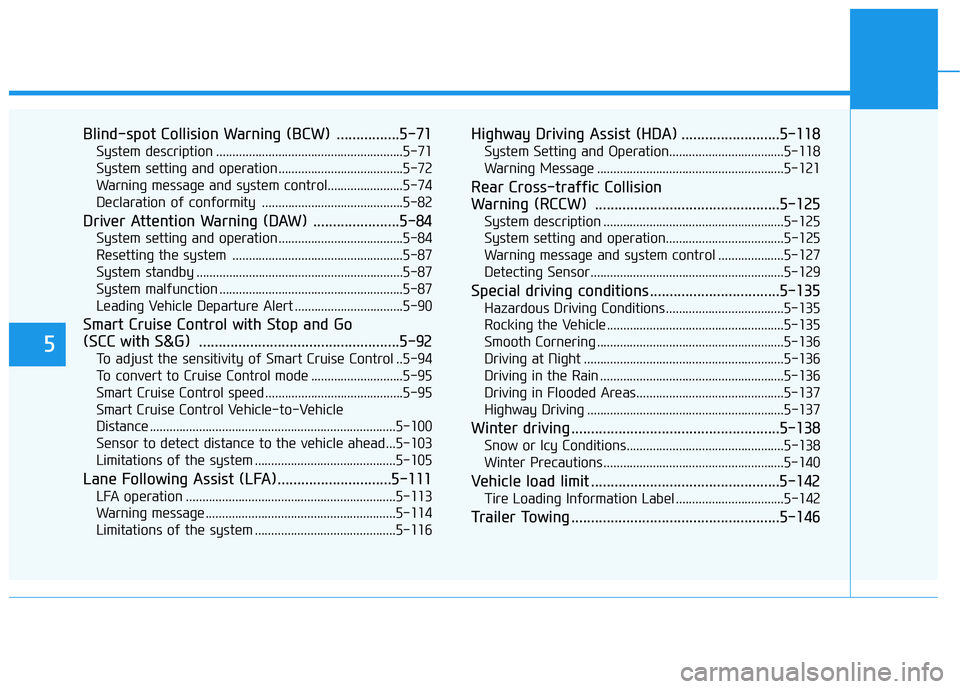
Blind-spot Collision Warning (BCW) ................5-71
System description .........................................................5-71
System setting and operation ......................................5-72
Warning message and system control.......................5-74
Declaration of conformity ...........................................5-82
Driver Attention Warning (DAW) ......................5-84
System setting and operation ......................................5-84
Resetting the system ....................................................5-87
System standby ...............................................................5-87
System malfunction ........................................................5-87
Leading Vehicle Departure Alert .................................5-90
Smart Cruise Control with Stop and Go
(SCC with S&G) ...................................................5-92
To adjust the sensitivity of Smart Cruise Control ..5-94
To convert to Cruise Control mode ............................5-95
Smart Cruise Control speed ..........................................5-95
Smart Cruise Control Vehicle-to-Vehicle
Distance ...........................................................................5-100
Sensor to detect distance to the vehicle ahead ...5-103
Limitations of the system ...........................................5-105
Lane Following Assist (LFA).............................5-111
LFA operation ................................................................5-113
Warning message ..........................................................5-114
Limitations of the system ...........................................5-116
Highway Driving Assist (HDA) .........................5-118
System Setting and Operation...................................5-118
Warning Message .........................................................5-121
Rear Cross-traffic Collision
Warning (RCCW) ...............................................5-125
System description .......................................................5-125
System setting and operation....................................5-125
Warning message and system control ....................5-127
Detecting Sensor...........................................................5-129
Special driving conditions .................................5-135
Hazardous Driving Conditions....................................5-135
Rocking the Vehicle ......................................................5-135
Smooth Cornering .........................................................5-136
Driving at Night .............................................................5-136
Driving in the Rain ........................................................5-136
Driving in Flooded Areas.............................................5-137
Highway Driving ............................................................5-137
Winter driving .....................................................5-138
Snow or Icy Conditions................................................5-138
Winter Precautions .......................................................5-140
Vehicle load limit ................................................5-142
Tire Loading Information Label .................................5-142
Trailer Towing .....................................................5-146