sensor HYUNDAI IONIQ 5 2023 Manual Online
[x] Cancel search | Manufacturer: HYUNDAI, Model Year: 2023, Model line: IONIQ 5, Model: HYUNDAI IONIQ 5 2023Pages: 680, PDF Size: 48.22 MB
Page 550 of 680
Driver Assistance System
7-148
WARNING
Take the following precautions when
using Reverse Parking Collision-
Avoidance Assist: • Always pay extreme caution while
driving. The driver is responsible for
controlling the brake for safe driving.
• Always pay attention to road and
traffic conditions while driving,
whether or not there is a warning.
• Always look around your vehicle to
make sure there are no pedestrians
or objects before moving the vehicle.
• The performance of Reverse Parking
Collision-Avoidance Assist may
vary under certain conditions. If
vehicle speed is above 2 mph (4
km/h), Reverse Parking Collision-
Avoidance Assist will provide
collision avoidance assist only when
pedestrians are detected. Always
look around and pay attention when
backing up your vehicle.
• Some objects may not be detected
by the rear ultrasonic sensors due
to the objects distance, size or
material, all of which can limit the
effectiveness of the sensor.
• Reverse Parking Collision-Avoidance
Assist may not operate properly
or may operate unnecessarily
depending on the road conditions
and the surroundings.
• Do not solely rely on Reverse Parking
Collision-Avoidance Assist. Doing
so may lead to vehicle damage or injuries. CAUTION
• Noise may be heard when sudden
braking occurs to avoid a collision.
• If any other warning sound such
as the seat belt warning chime is
already generated, Reverse Parking
Collision-Avoidance Assist warning
may not sound.
• Reverse Parking Collision-Avoidance
Assist may not work properly if the
bumper has been damaged, replaced
or repaired.
• Reverse Parking Collision-Avoidance
Assist may not operate properly if
interfered by strong electromagnetic
waves.
• Playing the vehicle audio system at
high volume may prevent passengers
from hearing Reverse Parking
Collision-Avoidance Assist warning sounds.
• Turn off Reverse Parking Collision-
Avoidance Assist when towing a
trailer. If towing and moving in
reverse, Reverse Parking Collision-
Avoidance Assist will activate as it
detects the trailer.
• The brake control may not operate
properly depending on the status of
ESC (Electronic Stability Control).
There will only be a warning when:
- The ESC (Electronic Stability
Control) warning light is on
- ESC (Electronic Stability Control) is
engaged in a different function
Page 551 of 680
07
7-149
CAUTION
Take the following precautions to
maintain optimal performance of the
detecting sensors: • Always keep the rear view camera
and rear ultrasonic sensors clean.
• Do not use any cleanser containing
acid or alkaline detergents when
cleaning the rear view camera lens.
Use only a mild soap or neutral
detergent, and rinse thoroughly with
water.
• Do not spray the rear view camera or
the rear ultrasonic sensors or their
surrounding area directly with a
high pressure washer. It may cause
the rear view camera or the rear
ultrasonic sensors to malfunction.
• Do not apply objects, such as a
bumper sticker or a bumper guard,
near the rear view camera or rear
ultrasonic sensors or apply paint to
the bumper. Doing so may adversely
affect the performance of Reverse
Parking Collision-Avoidance Assist.
• Never disassemble or apply impact
on the rear view camera or the rear
ultrasonic sensors components.
• Do not apply unnecessary force on
the rear view camera or the rear
ultrasonic sensors. Reverse Parking
Collision-Avoidance Assist may
not operate properly if the rear
view camera or the rear ultrasonic
sensor(s) is forcibly moved out of
proper alignment. Have the vehicle
be inspected by an authorized
HYUNDAI dealer. Information
Reverse Parking Collision-Avoidance
Assist can detect a pedestrian or an object when: • A pedestrian is standing behind the vehicle
• A large obstacle, such as a vehicle,
is parked in the rear center of your vehicle
Page 552 of 680
Driver Assistance System
7-150
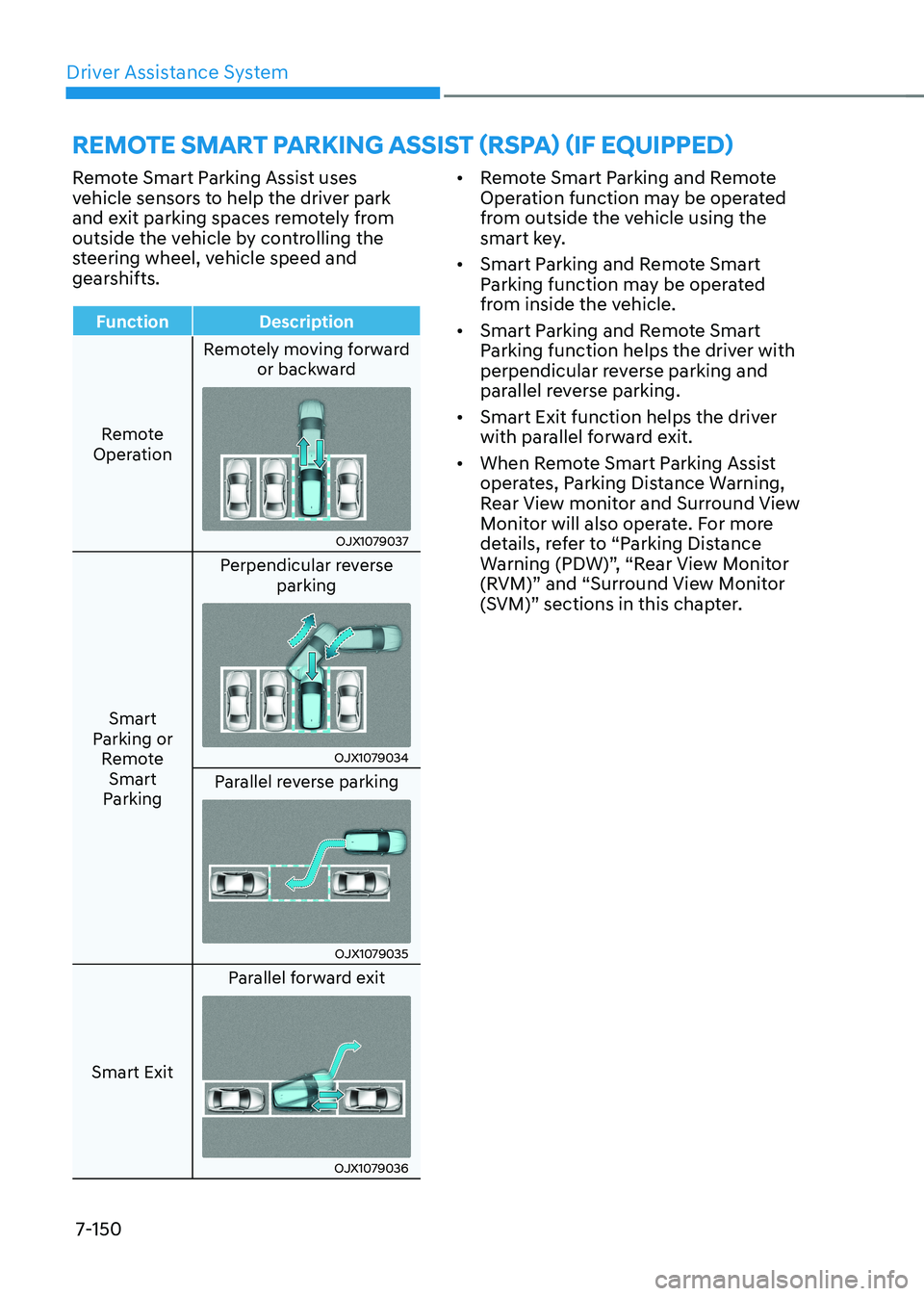
Remote Smart Parking Assist uses
vehicle sensors to help the driver park
and exit parking spaces remotely from
outside the vehicle by controlling the
steering wheel, vehicle speed and
gearshifts.
Function Description
Remote
Operation Remotely moving forward
or backward
OJX1079037
Smart
Parking or Remote Smart
Parking Perpendicular reverse
parking
OJX1079034
Parallel reverse parking
OJX1079035
Smart Exit Parallel forward exit
OJX1079036•
Remote Smart Parking and Remote
Operation function may be operated
from outside the vehicle using the
smart key.
• Smart Parking and Remote Smart
Parking function may be operated
from inside the vehicle.
• Smart Parking and Remote Smart
Parking function helps the driver with
perpendicular reverse parking and
parallel reverse parking.
• Smart Exit function helps the driver
with parallel forward exit.
• When Remote Smart Parking Assist
operates, Parking Distance Warning,
Rear View monitor and Surround View
Monitor will also operate. For more
details, refer to “Parking Distance
Warning (PDW)”, “Rear View Monitor
(RVM)” and “Surround View Monitor
(SVM)” sections in this chapter.
REMOTE SMART PARKING ASSIST (RSPA) (IF EQUIPPED)
Page 553 of 680
![HYUNDAI IONIQ 5 2023 Manual Online 07
7-151
Detecting sensors
ONE1071057
ONE1071058N
[1] : Front ultrasonic sensors,
[2] : Front corner ultrasonic sensors,
[3] : Rear corner ultrasonic sensors,
[4] : Rear ultrasonic sensors
Refer to](/img/35/56168/w960_56168-552.png "HYUNDAI IONIQ 5 2023 Manual Online 07
7-151
Detecting sensors
ONE1071057
ONE1071058N
[1] : Front ultrasonic sensors,
[2] : Front corner ultrasonic sensors,
[3] : Rear corner ultrasonic sensors,
[4] : Rear ultrasonic sensors
Refer to")
07
7-151
Detecting sensors
ONE1071057
ONE1071058N
[1] : Front ultrasonic sensors,
[2] : Front corner ultrasonic sensors,
[3] : Rear corner ultrasonic sensors,
[4] : Rear ultrasonic sensors
Refer to the picture above for the
detailed location of the detecting
sensors.
CAUTION
Take the following precautions to
maintain optimal performance of the
detecting sensors: • Never disassemble the detecting
sensor or sensor assembly, or cause
any damage to it.
• If the detecting sensors need repair,
have the vehicle be inspected by an
authorized HYUNDAI dealer. •
Remote Smart Parking Assist
may malfunction if the vehicle
bumper height or ultrasonic sensor
installation has been modified
or damaged. Any non-factory
installed equipment or accessories
may also interfere with the sensor
performance.
• When the ultrasonic sensor is frozen
or stained with snow, dirt, or water,
the sensor may not operate until the
stains are removed using a soft cloth.
• Do not push, scratch or strike the
ultrasonic sensor. Sensor damage
could occur.
• Do not spray the ultrasonic sensors
or its surrounding area directly with
a high pressure washer.
Remote Smart Parking Assist
Settings
Settings features
ONE1071202N
Warning Volume
With the vehicle on, select ‘Driver
Assistance → Warning Volume’ from the
Settings menu to change the Warning
Volume to ‘High’, ‘Medium’ or ‘Low’ for
Remote Smart Parking Assist.
If you change the warning volume,
the Warning Volume of other Driver
Assistance systems may change.
Page 561 of 680
07
7-159
•
Remote Smart Parking Assist
searches for parking spaces that are
next to parked vehicles, or parking
spaces with parked vehicles in front
or rear.
• While searching for a parking space,
when vehicle speed is above 12 mph
(20 km/h), a message will appear
on the infotainment system screen
informing you to slow down. When
vehicle speed is above 18 mph (30
km/h), Parking function will turn off.
• Searching for a parking space will
be completed when there is enough
space to move the vehicle in
addition to the parking space.
• Even if an audible sound is heard
to notify that searching for a
parking space is complete, search
completion can be canceled
immediately depending on
surroundings.
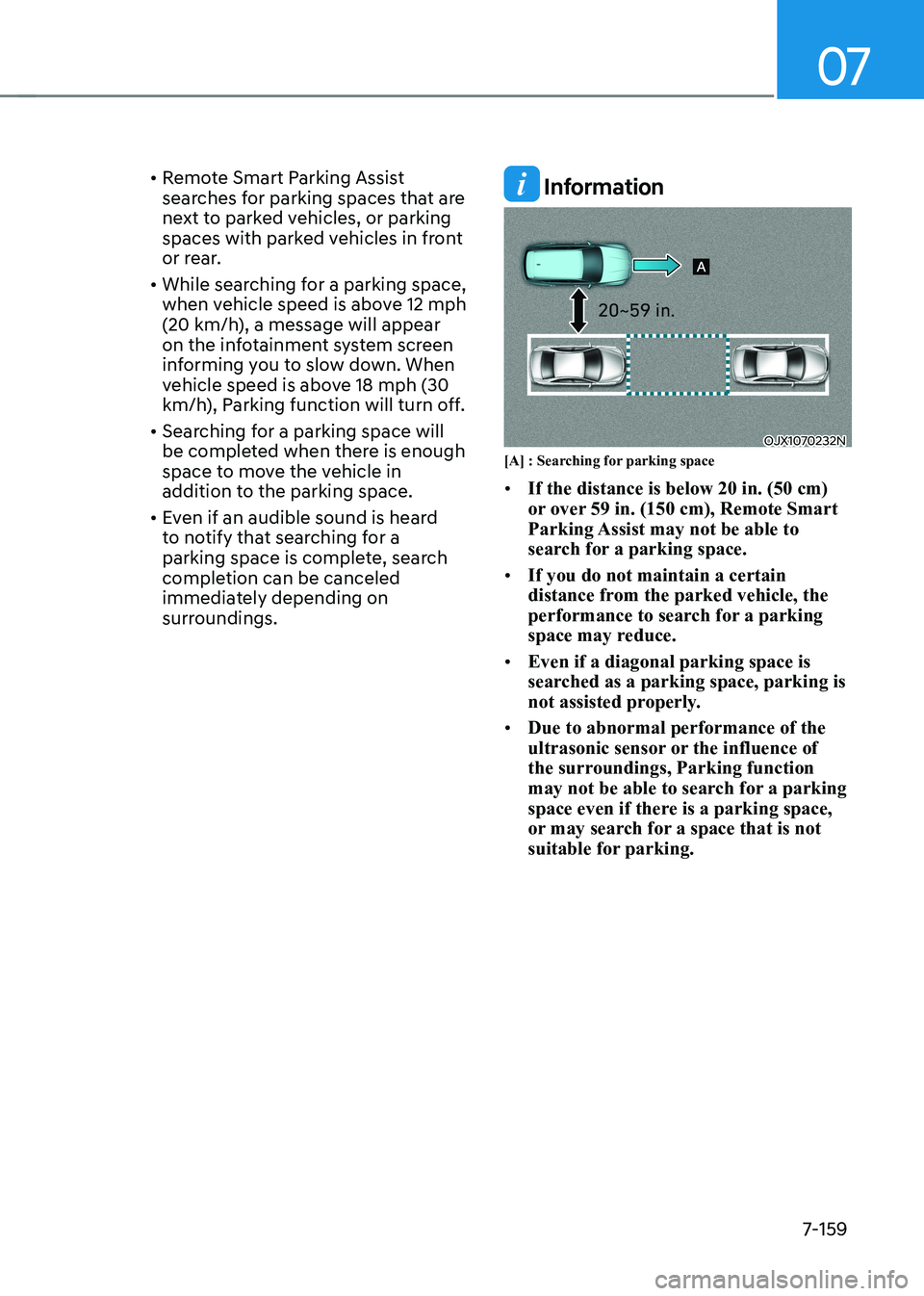
Information
OJX1070232N
[A] : Searching for parking space • If the distance is below 20 in. (50 cm)
or over 59 in. (150 cm), Remote Smart
Parking Assist may not be able to
search for a parking space.
• If you do not maintain a certain
distance from the parked vehicle, the
performance to search for a parking
space may reduce.
• Even if a diagonal parking space is
searched as a parking space, parking is
not assisted properly.
• Due to abnormal performance of the
ultrasonic sensor or the influence of
the surroundings, Parking function
may not be able to search for a parking
space even if there is a parking space,
or may search for a space that is not
suitable for parking.
Page 569 of 680
07
7-167
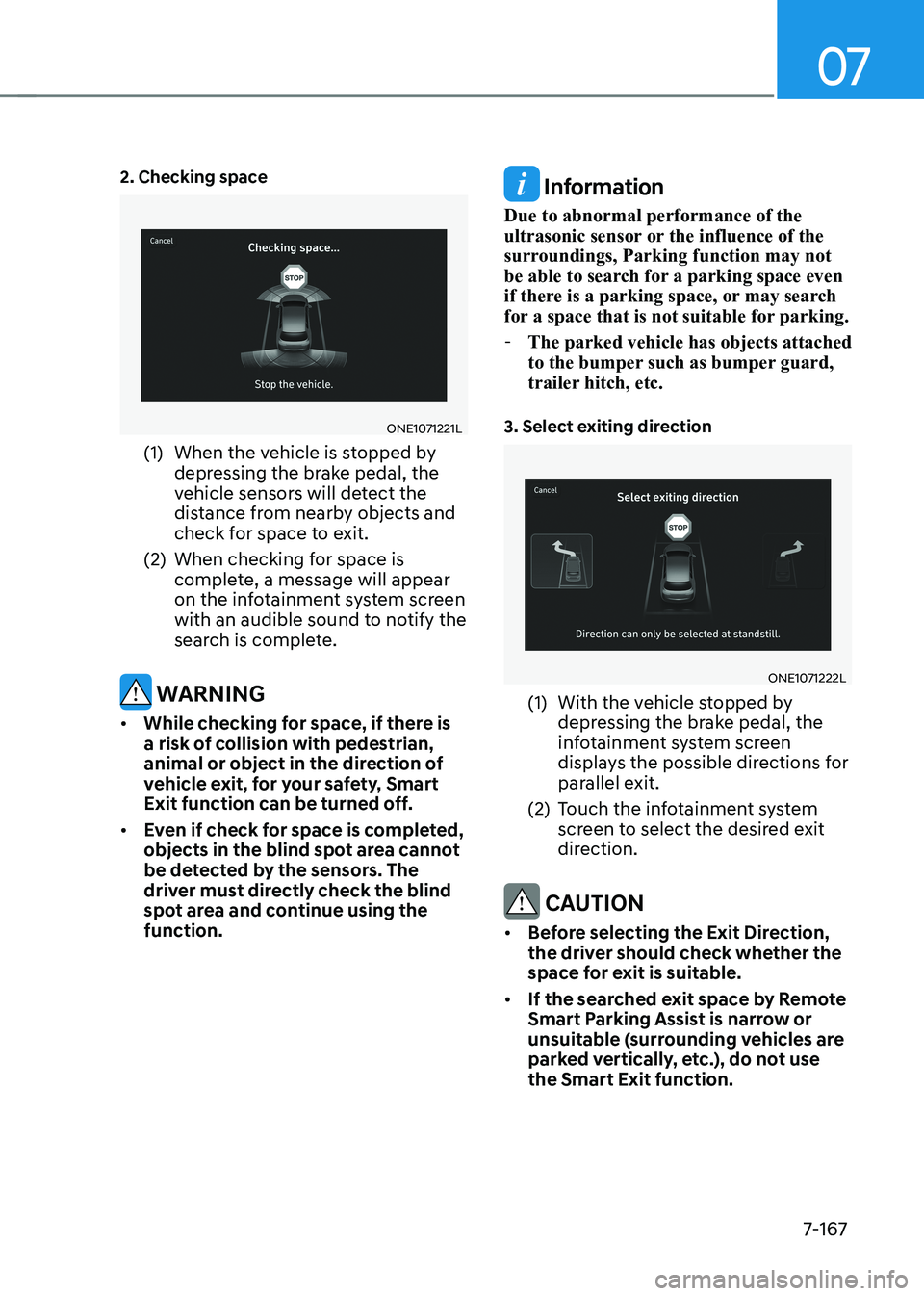
2. Checking space
ONE1071221L
(1) When the vehicle is stopped by depressing the brake pedal, the
vehicle sensors will detect the
distance from nearby objects and
check for space to exit.
(2) When checking for space is complete, a message will appear
on the infotainment system screen
with an audible sound to notify the
search is complete.
WARNING
• While checking for space, if there is
a risk of collision with pedestrian,
animal or object in the direction of
vehicle exit, for your safety, Smart
Exit function can be turned off.
• Even if check for space is completed,
objects in the blind spot area cannot
be detected by the sensors. The
driver must directly check the blind
spot area and continue using the function.
Information
Due to abnormal performance of the
ultrasonic sensor or the influence of the
surroundings, Parking function may not
be able to search for a parking space even
if there is a parking space, or may search
for a space that is not suitable for parking. - The parked vehicle has objects attached
to the bumper such as bumper guard,
trailer hitch, etc.
3. Select exiting direction
ONE1071222L
(1) With the vehicle stopped by depressing the brake pedal, the
infotainment system screen
displays the possible directions for
parallel exit.
(2) Touch the infotainment system screen to select the desired exit
direction.
CAUTION
• Before selecting the Exit Direction,
the driver should check whether the
space for exit is suitable.
• If the searched exit space by Remote
Smart Parking Assist is narrow or
unsuitable (surrounding vehicles are
parked vertically, etc.), do not use the Smart Exit function.
Page 573 of 680
07
7-171
Limitations of Remote Smart Parking
Assist
In the following circumstances, Remote
Smart Parking Assist performance to
park or exit the vehicle may be limited,
there may be a risk of collision, or
Remote Smart Parking Assist may turn
off. Park or exit the vehicle manually if
necessary. •
An object is attached to the steering wheel
• The vehicle is installed with a snow
chain, spare tire or different size wheel
• Tire pressure is lower or higher than
the standard tire pressure
• Your vehicle is loaded with cargo
longer or wider than your vehicle or a
trailer is connected to your vehicle
• There is a problem with the wheel
alignment
• Your vehicle is leaned severely to one side
• Your vehicle is equipped with a trailer
hitch
• The license plate is installed
differently from the original location
• There is a person, animal or object
above or below the ultrasonic sensor
when Remote Smart Parking Assist is
activated
• The parking space is curved or diagonal
• There is an obstacle such as a person,
animal or object (trash can, bicycle,
motorcycle, shopping cart, narrow
pillar, etc.) near the parking space •
There is a circular pillar or narrow
pillar, or a pillar surrounded by objects
such as fire extinguisher, etc., near the parking space
• The road surface is bumpy (curbstone,
speed bump, etc.)
• The road is slippery
• The parking space is near a vehicle
with higher ground clearance or big,
such as a truck, etc.
• The parking space is Inclined
• There is heavy wind
• Operating Remote Smart Parking
Assist on uneven roads, gravel roads,
bushes, etc.
• The performance of the ultrasonic
sensor is affected by extremely hot or
cold weather
• The ultrasonic sensor is covered with
snow or water
• An object that generates ultrasonic
waves is nearby
• A wireless device with a transmission
function operates near the ultrasonic
sensors
• Your vehicle is affected by another
vehicle’s Parking Distance Warning
• The sensor is mounted or positioned
incorrectly by an impact to the bumper
• When the ultrasonic sensor cannot
detect the following objects:
- Sharp or slim objects, such as ropes, chains or small poles
- Objects smaller than 40 in. (100 cm) in length and narrower than 6 in. (14
cm) in diameter
- Objects which tend to absorb sensor frequency, such as clothes,
spongy material or snow
- A narrow object such as a corner of a square pillar
- Person, animal or object near the ultrasonic sensor
Page 574 of 680
Driver Assistance System
7-172
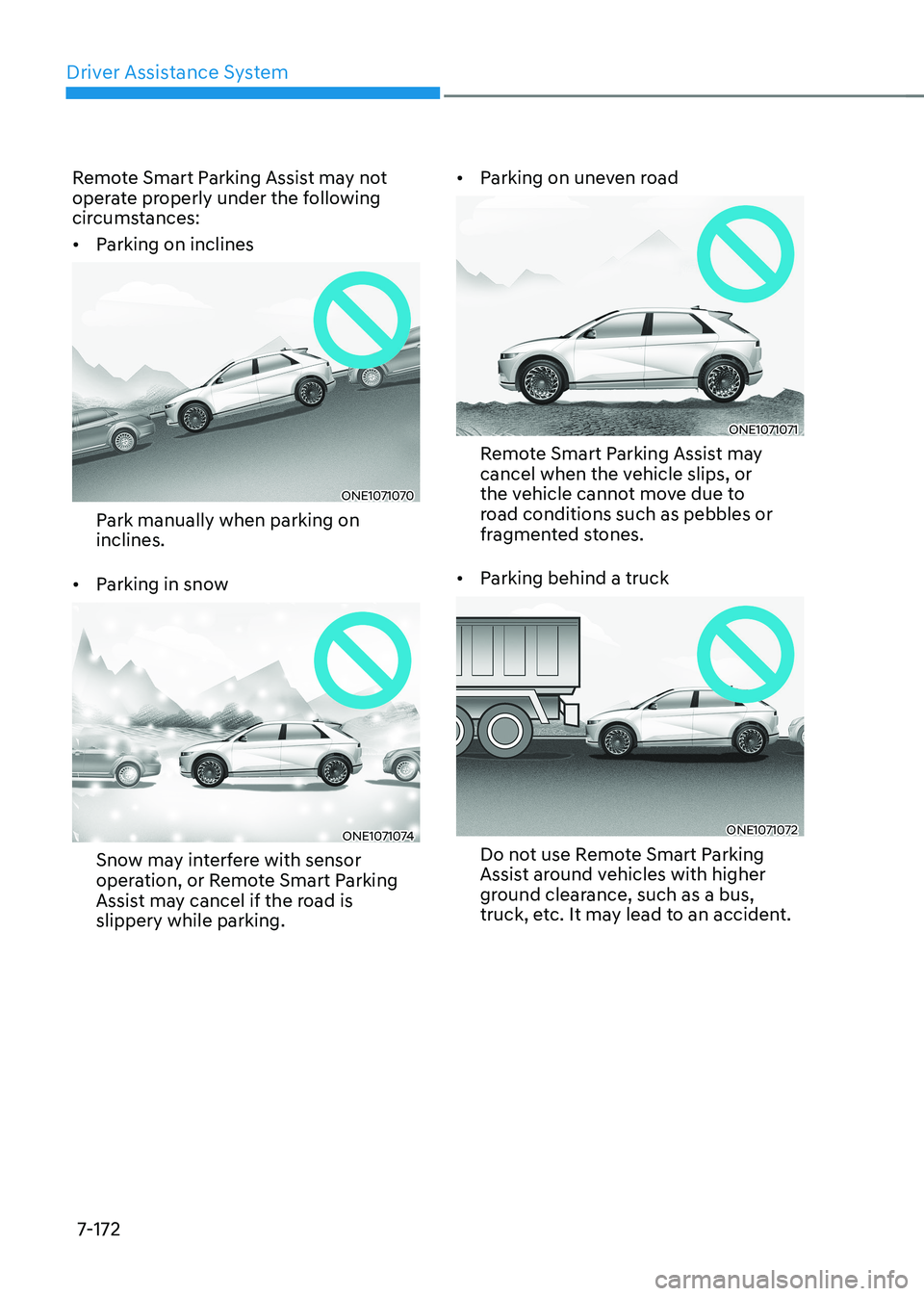
Remote Smart Parking Assist may not
operate properly under the following
circumstances: •
Parking on inclines
ONE1071070
Park manually when parking on inclines.
• Parking in snow
ONE1071074
Snow may interfere with sensor
operation, or Remote Smart Parking
Assist may cancel if the road is slippery while parking. •
Parking on uneven road
ONE1071071
Remote Smart Parking Assist may
cancel when the vehicle slips, or
the vehicle cannot move due to
road conditions such as pebbles or
fragmented stones.
• Parking behind a truck
ONE1071072
Do not use Remote Smart Parking
Assist around vehicles with higher
ground clearance, such as a bus,
truck, etc. It may lead to an accident.
Page 576 of 680
Driver Assistance System
7-174
WARNING
Take the following precautions when
using Remote Smart Parking Assist: • The driver is responsible for safe
parking and exit when using Remote
Smart Parking Assist.
• When using Remote Smart Parking
Assist, stay out of the way in the
direction the vehicle moves for your
safety.
• Always check surroundings when
using Remote Smart Parking Assist.
You may collide with pedestrians,
animals, or objects if they are near
the sensor or are in the sensor’s blind
spot area.
• A collision may occur if a pedestrian,
animal, or object suddenly appears
while Remote Smart Parking Assist is
operating.
• Do not use Remote Smart Parking
Assist when under the influence of
alcohol.
• Do not let children or other people to
use the smart key.
• If Remote Smart Parking Assist is
used continuously for a long period,
it may adversely affect Remote
Smart Parking Assist performance.• Remote Smart Parking Assist may not
operate properly if the vehicle needs
wheel alignment adjustment such
as when the vehicle tilts to one side.
Have the vehicle be inspected by an
authorized HYUNDAI dealer.
• Noise may be heard when braking
occurs by Remote Smart Parking
Assist or when the brake pedal is
depressed by the driver.
• Remote Smart Parking Assist may
suddenly apply the brake to avoid
collision.
• Use Remote Smart Parking Assist
only in a parking space that is large
enough for the vehicle to move
safely.
NOTICE
• If the 3rd stage warning (continuous
beep) of the Forward/Reverse
Parking Distance Warning sounds
while Remote Smart Parking
Assist is operating, it means the
obstacle detected is close to your
vehicle. At this time, Remote Smart
Parking Assist will temporarily stop
operating. Make sure there are no
pedestrians, animals, or objects
around your vehicle.
• Depending on brake operation, the
stop lights may come on while the
vehicle is moving.
• If the vehicle is remotely started that
has been parked in cold weather for
a long time, the operation of Remote
Smart Parking function may be
delayed or canceled depending on
vehicle condition.
Page 588 of 680
Emergency Situations
8-10
TPMS (Tire Pressure
Monitoring System)
Malfunction Indicator
The TPMS Malfunction Indicator
will illuminate after it blinks for
approximately one minute when there
is a problem with the Tire Pressure
Monitoring System.
Have the system checked by an
authorized HYUNDAI dealer as soon as possible.
NOTICE
If there is a malfunction with the TPMS,
the Low Tire Pressure Position Telltale
will not be displayed even though the
vehicle has an under-inflated tire.
NOTICE
The TPMS Malfunction Indicator may
illuminate after blinking for one minute
if the vehicle is near electric power
supply cables or radio transmitters
such as police stations, government
and public offices, broadcasting
stations, military installations, airports,
transmitting towers, etc.
Additionally, the TPMS Malfunction
Indicator may illuminate if snow chains
are used or electronic devices such as
computers, chargers, remote starters,
navigation, etc. This may interfere with
normal operation of the TPMS.
Changing a Tire with TPMS
If you have a flat tire, the Low Tire
Pressure and Position telltales will come
on. Have the flat tire repaired by an
authorized HYUNDAI dealer as soon as
possible or replace the flat tire with the
spare tire.
NOTICE
It is recommended that you do not use a
puncture-repairing agent not approved
by an authorized HYUNDAI dealer or the
equivalent specified for your vehicle
to repair and/or inflate a low pressure
tire. Tire sealant not approved by an
authorized HYUNDAI dealer or the
equivalent specified for your vehicle
may damage the tire pressure sensor.
The spare tire (if equipped) does not
come with a tire pressure monitoring
sensor. When the low pressure tire or
the flat tire is replaced with the spare
tire, the Low Tire Pressure Telltale will
remain on. Also, the TPMS Malfunction
Indicator will illuminate after blinking
for one minute if the vehicle is driven
at speed above 25 km/h (15.5 mph) for
approximately 10 minutes. Once the original wheel equipped with
a tire pressure monitoring sensor is
reinflated to the recommended pressure
and reinstalled on the vehicle, the
Low Tire Pressure Telltale and TPMS
Malfunction Indicator will go off within a
few minutes of driving.
If the indicators do not extinguish after
a few minutes, consult an authorized
HYUNDAI dealer.