start stop HYUNDAI IONIQ 5 2023 Manual Online
[x] Cancel search | Manufacturer: HYUNDAI, Model Year: 2023, Model line: IONIQ 5, Model: HYUNDAI IONIQ 5 2023Pages: 680, PDF Size: 48.22 MB
Page 317 of 680
05
5-125
Charging smart phone
The wireless smart phone charging
system charges only the Qi-enabled smart phones (
). Read the label on
the smart phone accessory cover or
visit your smart phone manufacturer’s
website to check whether your smart
phone supports the Qi technology.
The wireless charging process starts
when you put a Qi-enabled smart phone
on the wireless charging unit.
1. Remove other items, including the smart key, from the wireless charging
unit. If not, the wireless charging
process may be interrupted. Place
the smart phone on the center of the
charging pad.
2. The indicator light is orange when the smart phone is charging. The indicator
light will turn blue when phone
charging is complete.
3. You can turn ON or OFF the wireless charging function from the Settings
menu in the infotainment system
screen. Select:
- Setup → Vehicle → Convenience →
Wireless Charging
For detailed information, refer to the
separately supplied infotainment
system manual.
If your smart phone is not charging: - Slightly change the position of the smart phone on the charging pad.
- Make sure the indicator light is orange.
The indicator light will blink orange for 10
seconds if there is a malfunction in the
wireless charging system.
In this case, temporarily stop the
charging process, and re-attempt to
charge your smart phone again.
The system warns you with a message on
the LCD display if the smart phone is still
on the wireless charging unit after the
vehicle is turned OFF and the front door is opened.
For some manufacturer’s smart phones,
the system may not warn you even
though the smart phone is left on the
wireless charging unit. This is due to the
particular characteristic of the smart
phone and not a malfunction of the
wireless charging.
NOTICE
• The wireless smart phone charging
system may not support certain
smart phones, which are not verified
for the Qi specification (
).
• When placing your smart phone on
the charging pad, position the phone
in the middle of the mat for optimal
charging performance. If your smart
phone is off to the side, the charging
rate may be less and in some cases
the smart phone may experience
higher heat conduction.
• In some cases, the wireless charging
may stop temporarily when the
smart key is used, either when
starting the vehicle or locking/
unlocking the doors, etc.
Page 318 of 680
Convenience Features
5-126
•
When charging certain smart
phones, the charging indicator may
not change to blue when the smart
phone is fully charged.
• The wireless charging process may
temporarily stop, when temperature
abnormally increases inside the
wireless smart phone charging
system. The wireless charging
process restarts, when temperature
falls to a certain level.
• The wireless charging process may
temporarily stop when there is
any metallic item, such as a coin,
between the wireless smart phone
charging system and smart phone.
• When charging some smart phones
with a self-protection feature,
the wireless charging speed may
decrease and the wireless charging
may stop.
• If the smart phone has a thick cover,
the wireless charging may not be possible.
• If the smart phone is not completely
contacting the charging pad,
wireless charging may not operate
properly.
• Some magnetic items like credit
cards, phone cards or rail tickets may
be damaged if left with the smart
phone during the charging process.
• When any smart phone without
a wireless charging function or a
metallic object is placed on the
charging pad, a small noise may
sound. This small sound is due to the
vehicle discerning compatibility of
the object placed on the charging
pad. It does not affect your vehicle or
the smart phone in any way.
Information
If the Start/Stop button is in the OFF position, the charging also stops.
Information
This device complies with Part 15 of the FCC rules.
Operation is subject to the following three conditions: 1. This device may not cause harmful
interference.
2. This device must accept any
interference received, including
interference that may cause undesired operation.
3. Changes or modifications not expressly
approved by the party responsible
for compliance could void the user’s authority to operate the device
Page 327 of 680
6
6. Driving Your Vehicle
Before Driving ................................................................................................... 6-3
Before Entering the Vehicle ......................................................................................... 6-3
Before Starting ............................................................................................................. 6-3
Start/Stop Button .............................................................................................. 6-4
Start/Stop Button Positions ......................................................................................... 6-5
Starting the Vehicle ..................................................................................................... 6-6
Turning Off the Vehicle ................................................................................................ 6 -7
Remote Start ................................................................................................................ 6-8
Reduction Gear ................................................................................................. 6-9
Reduction Gear Operation .......................................................................................... 6-9
LCD Display Messages (Cluster) ................................................................................ 6-13
Good Driving Practices .............................................................................................. 6-15
Regenerative Braking System ......................................................................... 6-16
One Pedal Driving........................................................................................................6-17 i-Pedal ......................................................................................................................... 6-18
Smart Recuperation System ........................................................................... 6-19
Smart Recuperation System Setting ......................................................................... 6-19
To Activate Smart Recuperation System .................................................................. 6-19
Ready to Operate ...................................................................................................... 6-20
How to Operate .......................................................................................................... 6-21
Smart Recuperation System Will Be Temporarily Cancelled When: .......................6-21
To Resume Smart Recuperation System .................................................................. 6-21
Vehicle-to-Vehicle Distance Recognition Sensor (Front Radar) .............................6-22
System Malfunction ................................................................................................... 6-23
Limitations of the System .......................................................................................... 6-23
Braking System ............................................................................................... 6-26
Power-Assist Brakes ................................................................................................... 6-26
Disc Brakes Wear Indicator........................................................................................ 6-27
Electronic Parking Brake (EPB) .................................................................................. 6-27
Auto Hold .................................................................................................................... 6-32
Anti-Lock Brake System (ABS) ................................................................................... 6-35
Electronic Stability Control (ESC) ............................................................................. 6-37
Vehicle Stability Management (VSM) ...................................................................... 6-40
Hill-Start Assist Control (HAC) ................................................................................... 6-41
Good Braking Practices ............................................................................................ 6-42
Page 330 of 680
Driving Your Vehicle
6-4
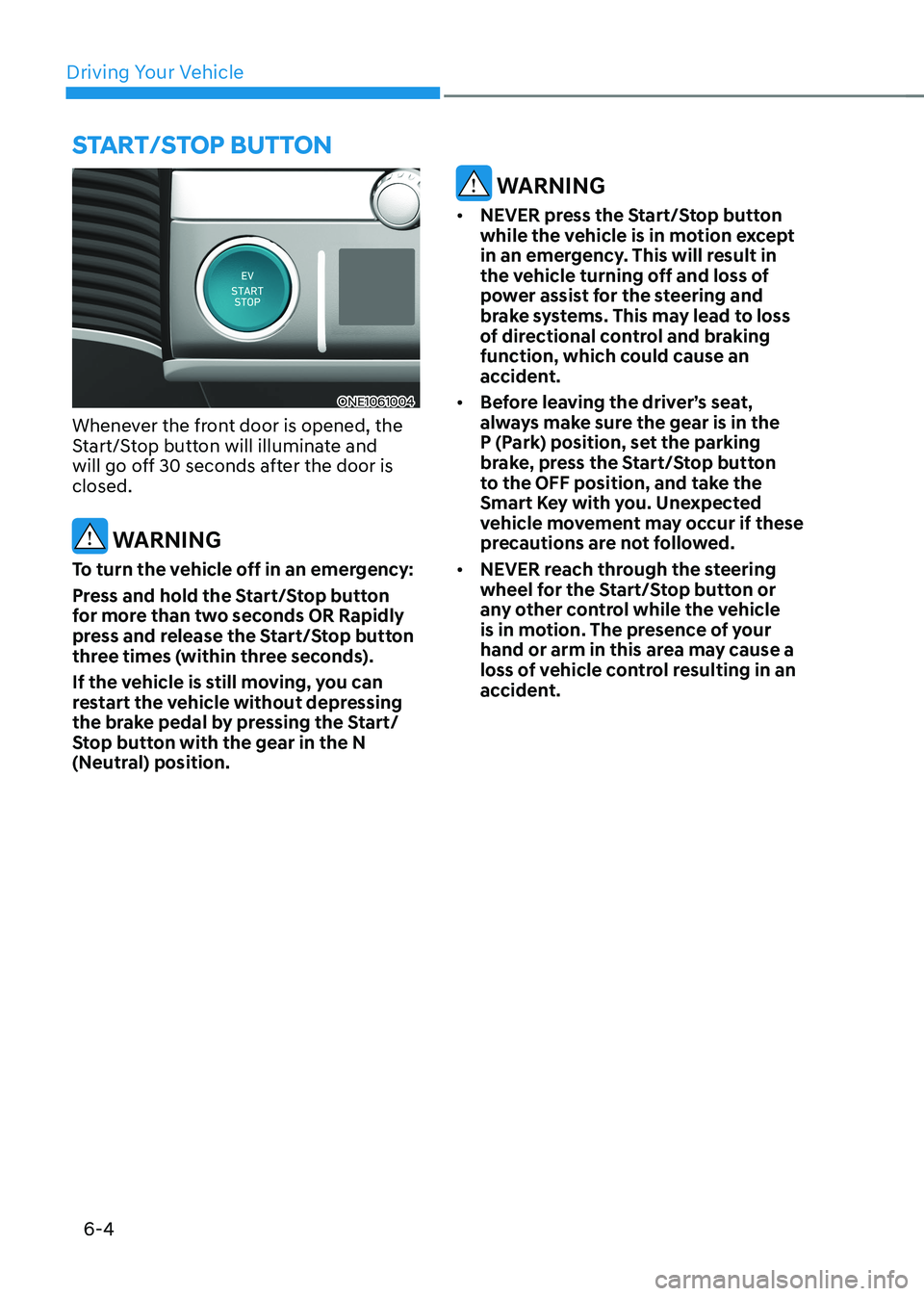
ONE1061004
Whenever the front door is opened, the
Start/Stop button will illuminate and
will go off 30 seconds after the door is closed.
WARNING
To turn the vehicle off in an emergency:
Press and hold the Start/Stop button
for more than two seconds OR Rapidly
press and release the Start/Stop button
three times (within three seconds).
If the vehicle is still moving, you can
restart the vehicle without depressing
the brake pedal by pressing the Start/
Stop button with the gear in the N
(Neutral) position.
WARNING
• NEVER press the Start/Stop button
while the vehicle is in motion except
in an emergency. This will result in
the vehicle turning off and loss of
power assist for the steering and
brake systems. This may lead to loss
of directional control and braking
function, which could cause an
accident.
• Before leaving the driver’s seat,
always make sure the gear is in the
P (Park) position, set the parking
brake, press the Start/Stop button
to the OFF position, and take the
Smart Key with you. Unexpected
vehicle movement may occur if these
precautions are not followed.
• NEVER reach through the steering
wheel for the Start/Stop button or
any other control while the vehicle
is in motion. The presence of your
hand or arm in this area may cause a
loss of vehicle control resulting in an
accident.
Start/Stop Button
Page 331 of 680
06
6-5
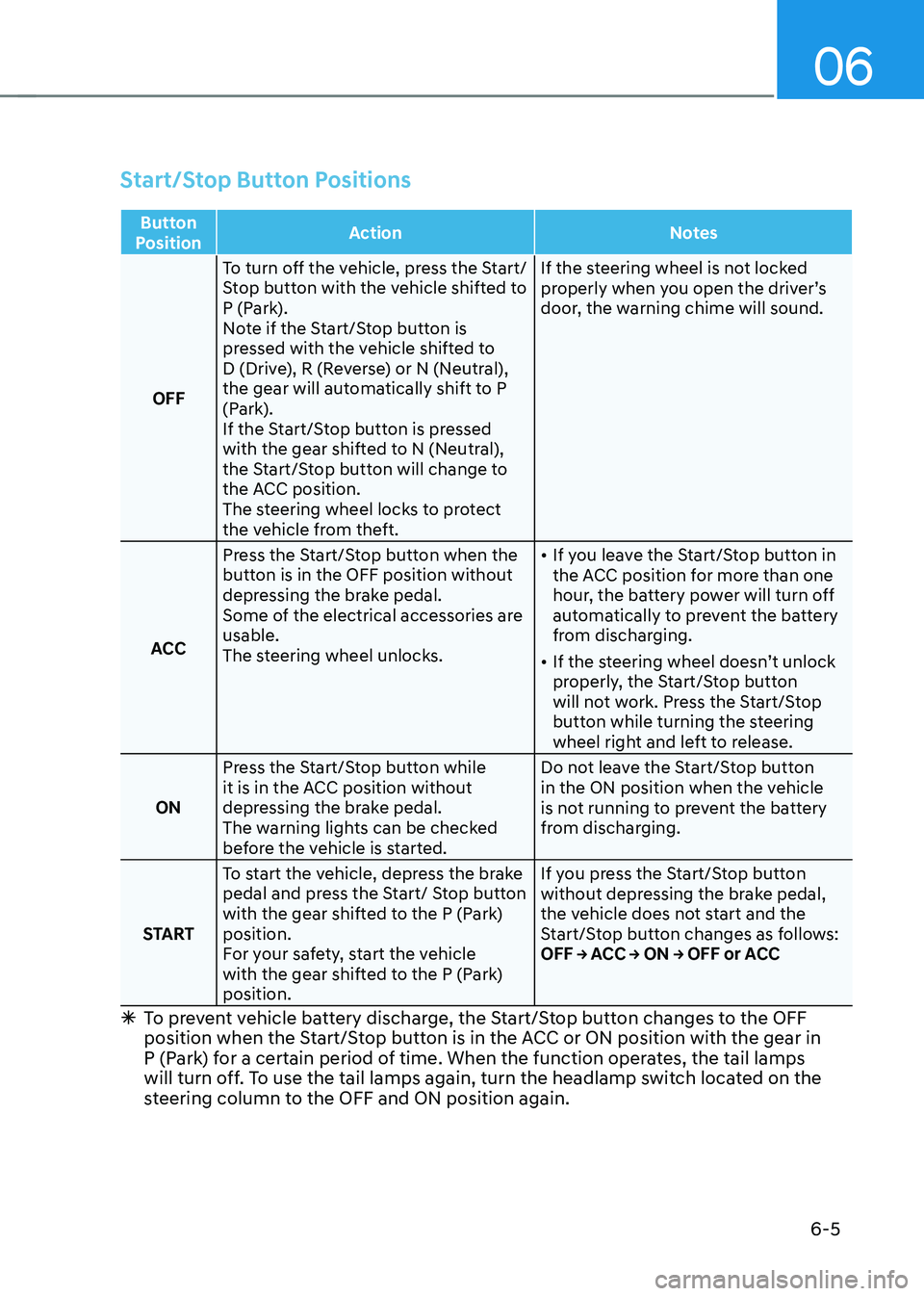
Start/Stop Button Positions
Button
Position Action
Notes
OFFTo turn off the vehicle, press the Start/
Stop button with the vehicle shifted to
P (Park).
Note if the Start/Stop button is
pressed with the vehicle shifted to
D (Drive), R (Reverse) or N (Neutral),
the gear will automatically shift to P
(Park).
If the Start/Stop button is pressed
with the gear shifted to N (Neutral),
the Start/Stop button will change to
the ACC position.
The steering wheel locks to protect
the vehicle from theft. If the steering wheel is not locked
properly when you open the driver’s
door, the warning chime will sound.
ACC Press the Start/Stop button when the
button is in the OFF position without
depressing the brake pedal.
Some of the electrical accessories are usable.
The steering wheel unlocks. •
If you leave the Start/Stop button in
the ACC position for more than one
hour, the battery power will turn off
automatically to prevent the battery
from discharging.
• If the steering wheel doesn’t unlock
properly, the Start/Stop button
will not work. Press the Start/Stop
button while turning the steering
wheel right and left to release.
ON Press the Start/Stop button while
it is in the ACC position without
depressing the brake pedal.
The warning lights can be checked
before the vehicle is started. Do not leave the Start/Stop button
in the ON position when the vehicle
is not running to prevent the battery
from discharging.
START To start the vehicle, depress the brake
pedal and press the Start/ Stop button
with the gear shifted to the P (Park) position.
For your safety, start the vehicle
with the gear shifted to the P (Park) position. If you press the Start/Stop button
without depressing the brake pedal,
the vehicle does not start and the
Start/Stop button changes as follows:
OFF → ACC → ON → OFF or ACC
à To prevent vehicle battery discharge, the Start/Stop button changes to the OFF
position when the Start/Stop button is in the ACC or ON position with the gear in
P (Park) for a certain period of time. When the function operates, the tail lamps
will turn off. To use the tail lamps again, turn the headlamp switch located on the
steering column to the OFF and ON position again.
Page 332 of 680
Driving Your Vehicle
6-6
Starting the Vehicle
WARNING
• Always wear appropriate shoes when
operating your vehicle. Unsuitable
shoes, such as high heels, ski boots,
sandals, flipflops, etc., may interfere
with your ability to use the brake and
accelerator pedals.
• Do not start the vehicle with the
accelerator pedal depressed.
The vehicle can move which can lead
to an accident.
Information
• The vehicle will start by pressing the Start/Stop button, only when the smart key is in the vehicle.
• Even if the smart key is in the vehicle,
and when it is far away from the driver, the vehicle may not start.
• When the Start/Stop button is in the
ACC or ON position, if any door is
open, the system checks for the smart
key. When the smart key is not in the
vehicle, the “
” indicator will
blink and the warning 'Key not in
vehicle' will come on. When all doors
are closed, the chime will also sound for about 5 seconds. Keep the smart key in
the vehicle when in the ACC position
or if the vehicle is in the ready (
)
mode.
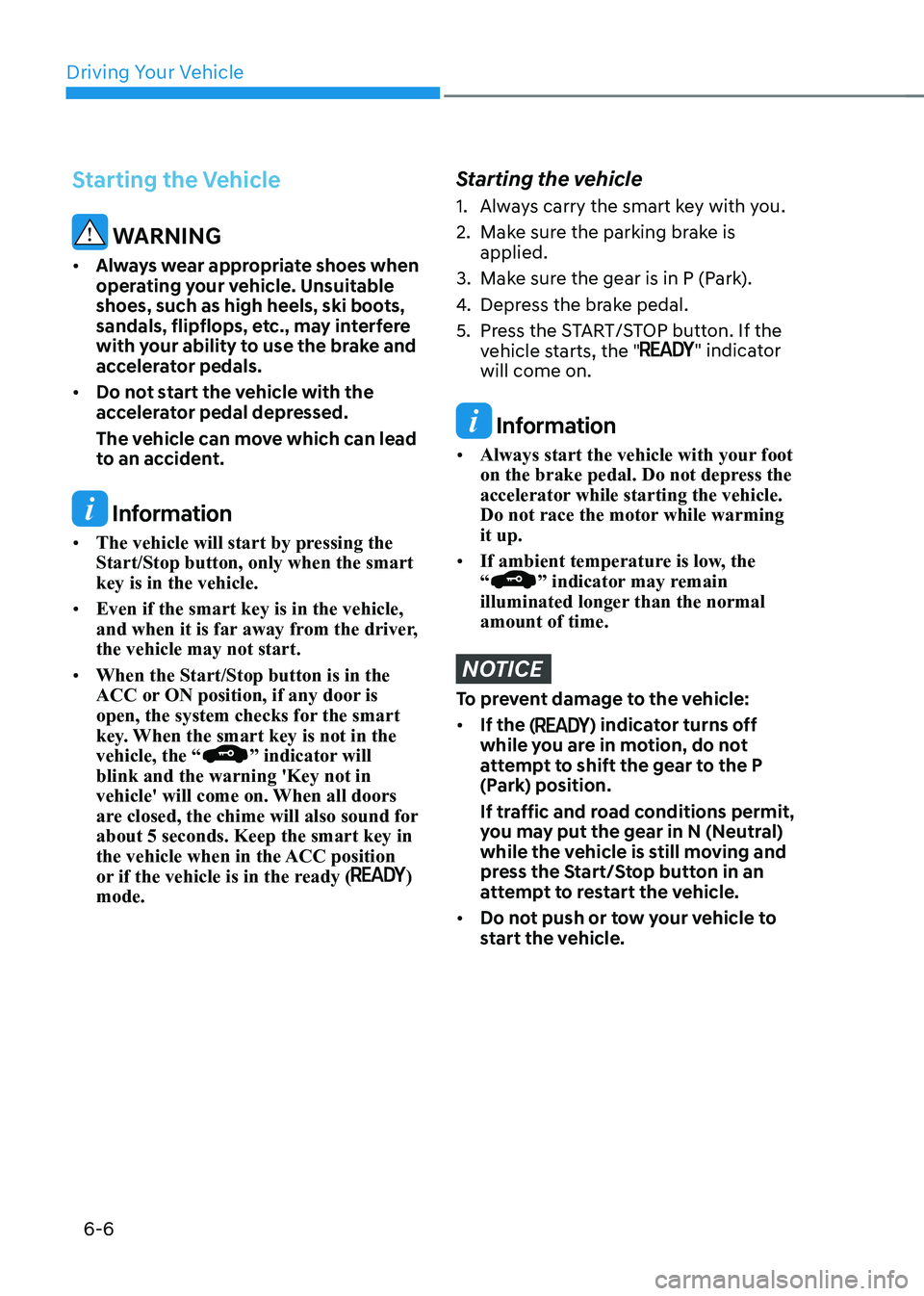
Starting the vehicle
1. Always carry the smart key with you.
2. Make sure the parking brake is applied.
3. Make sure the gear is in P (Park).
4. Depress the brake pedal.
5. Press the START/STOP button. If the vehicle starts, the "
" indicator
will come on.
Information
• Always start the vehicle with your foot
on the brake pedal. Do not depress the
accelerator while starting the vehicle.
Do not race the motor while warming it up.
• If ambient temperature is low, the “
” indicator may remain
illuminated longer than the normal amount of time.
NOTICE
To prevent damage to the vehicle: • If the (
) indicator turns off
while you are in motion, do not
attempt to shift the gear to the P
(Park) position.
If traffic and road conditions permit,
you may put the gear in N (Neutral)
while the vehicle is still moving and
press the Start/Stop button in an
attempt to restart the vehicle.
• Do not push or tow your vehicle to
start the vehicle.
Page 333 of 680
06
6 -7
NOTICE
To prevent damage to the vehicle:
Do not press the Start/Stop button for
more than 10 seconds except when the
stop lamp fuse is blown.
When the stop lamp fuse is blown,
you cannot normally start the vehicle.
Replace the fuse with a new one. If you
are not able to replace the fuse, you
can start the vehicle by pressing and
holding the Start/Stop button for 10
seconds with the Start/Stop button in
the ACC position.
Pressing the brake pedal many times while “
” indicator light is off will
increase the possibility of discharging
the 12V battery.
For your safety always depress the
brake pedal before starting the vehicle.
Information
Virtual Engine Sound System(VESS) VESS generates virtual engine sound to
make pedestrians to aware. VESS operates
when the vehicle can be driven. When the
vehicle in P(parking) gear status, VESS doesn't work.
CAUTION
• Because the vehicle doesn't make
the engine sound, pay attention to
the surrounding environment and
drive carefully.
• After parking or waiting for a traffic
light, please check around(children,
obstacle, etc.) before departure.
• When reversing, check directly
behind you before driving.
Pedestrians may not be able to
recognize vehicle sounds.
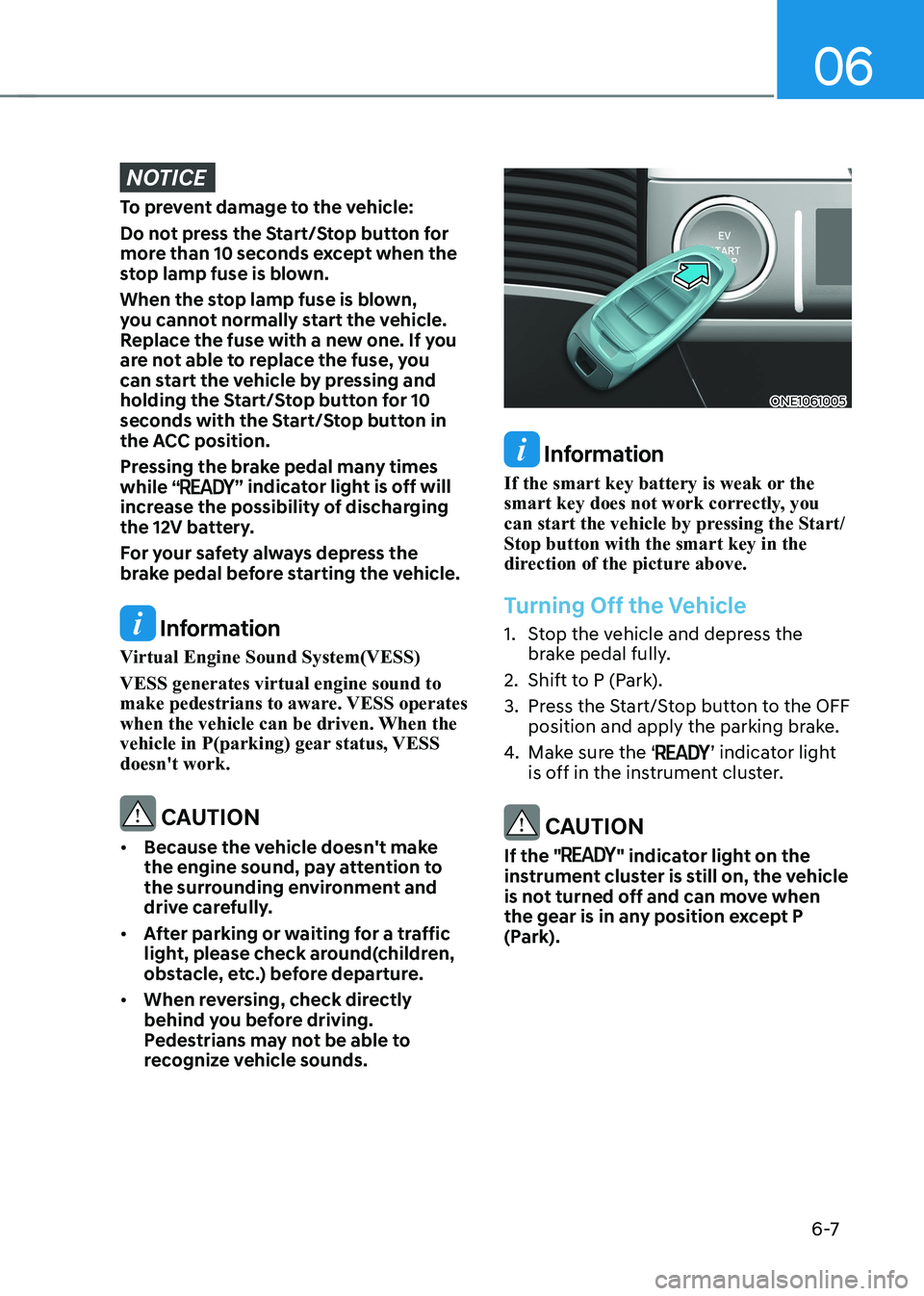
ONE1061005
Information
If the smart key battery is weak or the
smart key does not work correctly, you
can start the vehicle by pressing the Start/Stop button with the smart key in the
direction of the picture above.
Turning Off the Vehicle
1. Stop the vehicle and depress the brake pedal fully.
2. Shift to P (Park).
3. Press the Start/Stop button to the OFF position and apply the parking brake.
4. Make sure the ‘
’ indicator light
is off in the instrument cluster.
CAUTION
If the "
" indicator light on the
instrument cluster is still on, the vehicle
is not turned off and can move when
the gear is in any position except P
(Park).
Page 335 of 680
![HYUNDAI IONIQ 5 2023 Manual Online 06
6-9
reduction gear
ONE1061008
[A]: Rotary gear shift dial, [B]: P button
Reduction Gear Operation
To change the gear, depress the brake
pedal and rotate the rotary gear shift dial.
WARNING
To re](/img/35/56168/w960_56168-334.png "HYUNDAI IONIQ 5 2023 Manual Online 06
6-9
reduction gear
ONE1061008
[A]: Rotary gear shift dial, [B]: P button
Reduction Gear Operation
To change the gear, depress the brake
pedal and rotate the rotary gear shift dial.
WARNING
To re")
06
6-9
reduction gear
ONE1061008
[A]: Rotary gear shift dial, [B]: P button
Reduction Gear Operation
To change the gear, depress the brake
pedal and rotate the rotary gear shift dial.
WARNING
To reduce the risk of serious injury or
death: • ALWAYS check the surrounding
areas near your vehicle for people,
especially children, before shifting a
vehicle into D (Drive) or R (Reverse).
• Before leaving the driver's seat,
always make sure the vehicle is
shifted to the P (Park) position, then
apply the parking brake, then press
the Start/Stop button to the OFF
position. Unexpected and sudden
vehicle movement can occur if these
precautions are not followed. Rotary shifter/ Rotary gear shift dial
P (Park)
Always come to a complete stop before
shifting into P (Park).
ONE1061001
To shift the gear to P (Park), press the P
button while depressing the brake pedal.
If you turn the vehicle off in R (Reverse),
N (Neutral) or D (Drive), the gear will
automatically shift to P (Park).
WARNING
• Shifting into P (Park) while the
vehicle is in motion may cause you to
lose control of the vehicle.
• After the vehicle has stopped, always
make sure the vehicle is in P (Park),
apply the parking brake, and turn the
vehicle off.
• When parking on an incline, shift
the gear to P (Park) and apply the
parking brake to prevent the vehicle
from rolling downhill.
Page 338 of 680
Driving Your Vehicle
6-12
4. Press and hold the OK button on
the steering wheel for more than 1 second.
5. When the message ‘Vehicle will stay in (N). Change gear to cancel’ (or ‘N will
stay engaged when the vehicle is Off’)
will appear on the cluster LCD display,
press the Start/Stop button while
depressing the brake pedal.
However, if you open the driver’s door
within 3 minutes in the ACC state, the
gear will automatically shift to P (Park)
and the Start/Stop button will change
to the OFF position.
NOTICE
With the gear in N (Neutral) the Start/
Stop button will be in the ACC position.
Note that the doors cannot be locked
in the ACC position or the battery (12V)
may discharge if left in the ACC position
for a long period.
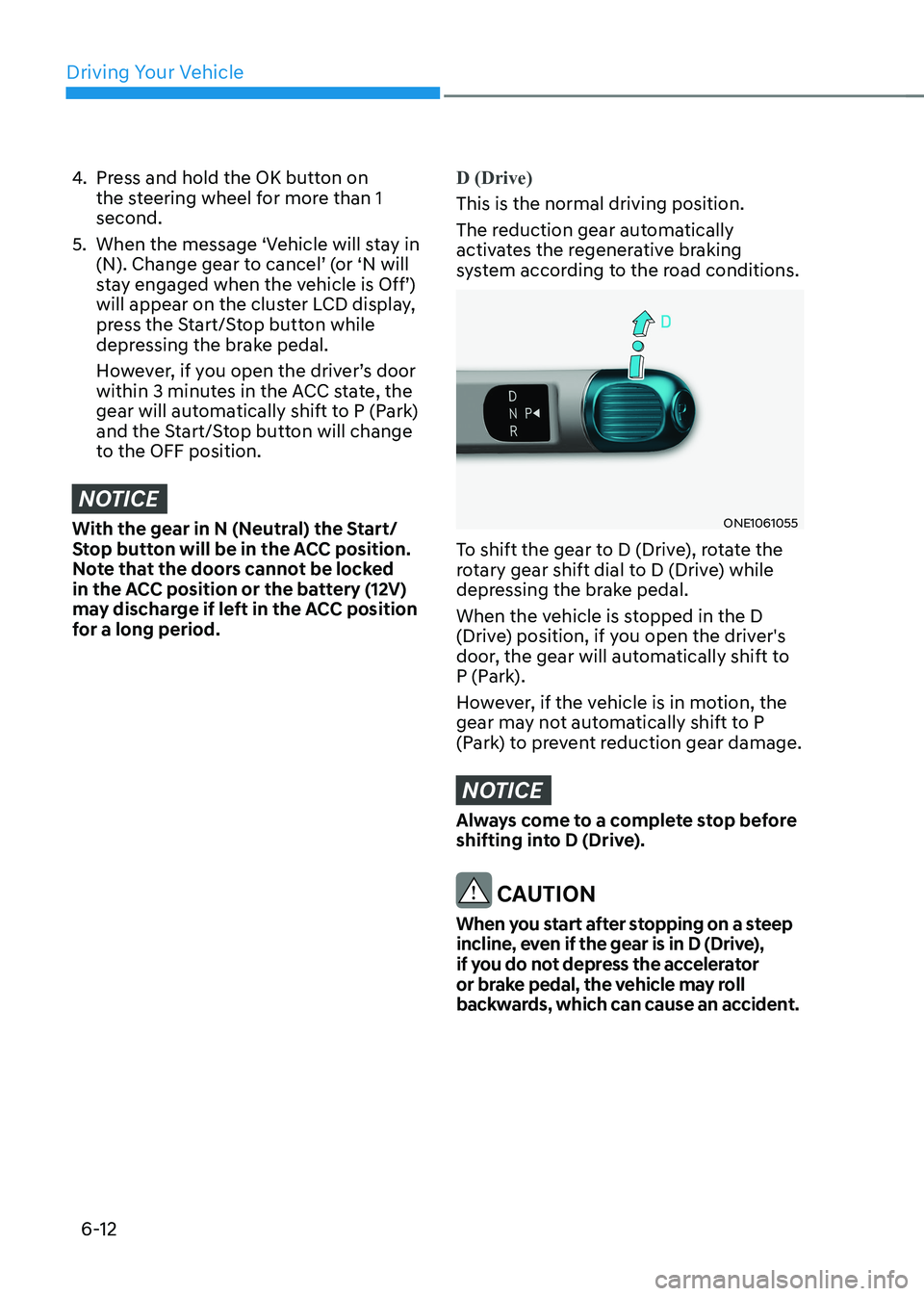
D (Drive)
This is the normal driving position.
The reduction gear automatically
activates the regenerative braking
system according to the road conditions.
ONE1061055
To shift the gear to D (Drive), rotate the
rotary gear shift dial to D (Drive) while
depressing the brake pedal.
When the vehicle is stopped in the D
(Drive) position, if you open the driver's
door, the gear will automatically shift to
P (Park).
However, if the vehicle is in motion, the
gear may not automatically shift to P
(Park) to prevent reduction gear damage.
NOTICE
Always come to a complete stop before
shifting into D (Drive).
CAUTION
When you start after stopping on a steep
incline, even if the gear is in D (Drive),
if you do not depress the accelerator
or brake pedal, the vehicle may roll
backwards, which can cause an accident.
Page 339 of 680
06
6-13
When the battery (12V) is discharged
You cannot shift gears, when the battery
is discharged.
Jump start your vehicle (refer to "Jump
Starting" in chapter 8) or contact an
authorized HYUNDAI dealer.
Parking
Always come to a complete stop and
continue to depress the brake pedal.
Shift the gear to P (Park), apply the
parking brake, and press the Start/Stop
button to the OFF position. Take the Key
with you when leaving the vehicle.
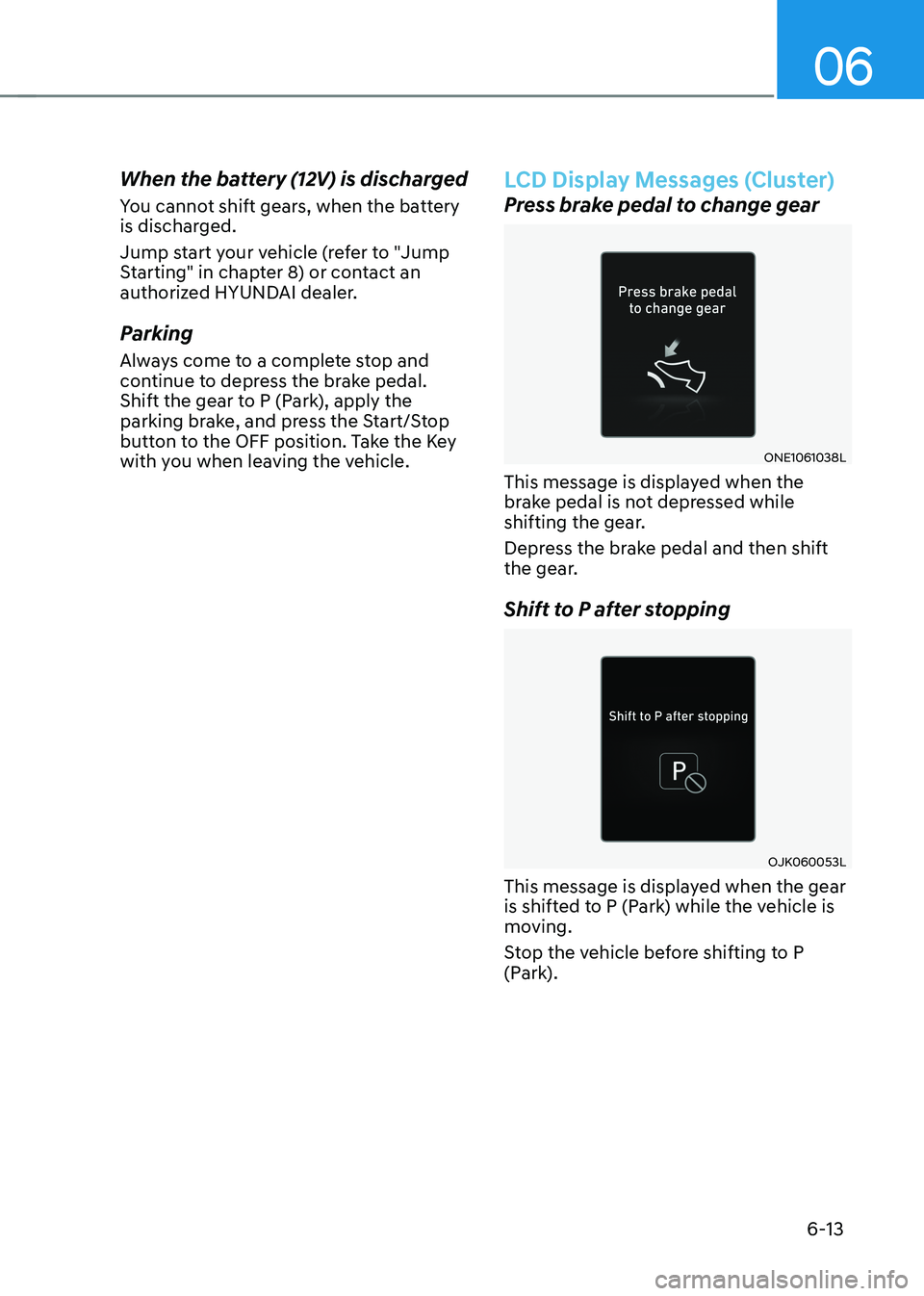
LCD Display Messages (Cluster)
Press brake pedal to change gear
ONE1061038L
This message is displayed when the
brake pedal is not depressed while
shifting the gear.
Depress the brake pedal and then shift
the gear.
Shift to P after stopping
OJK060053L
This message is displayed when the gear
is shifted to P (Park) while the vehicle is
moving.
Stop the vehicle before shifting to P
(Park).