navigation Hyundai Ioniq Electric 2017 Owner's Manual
[x] Cancel search | Manufacturer: HYUNDAI, Model Year: 2017, Model line: Ioniq Electric, Model: Hyundai Ioniq Electric 2017Pages: 582, PDF Size: 37.73 MB
Page 17 of 582
H10
EEVV MM OODDEE (( CC OO NNTT..))
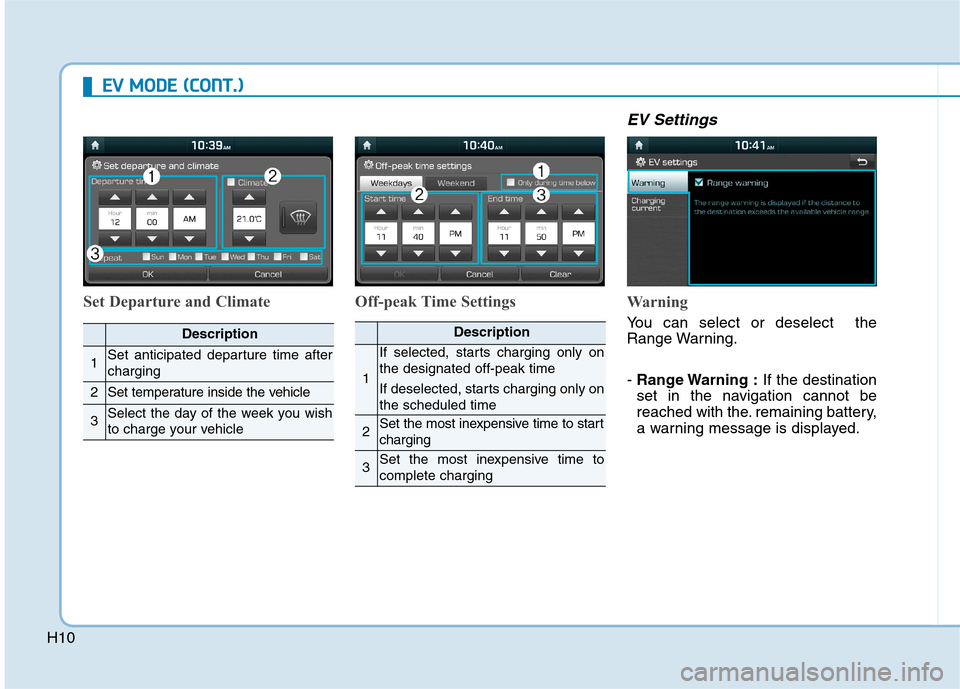
Set Departure and Climate Off-peak Time Settings
EV Settings
Warning
You can select or deselect the
Range Warning. - Range Warning : If the destination
set in the navigation cannot be
reached with the. remaining battery,
a warning message is displayed.Description
1Set anticipated departure time after charging
2Set temperature inside the vehicle
3Select the day of the week you wish
to charge your vehicle
Description
1
If selected, starts charging only on the designated off-peak time
If deselected, starts charging only on the scheduled time
2Set the most inexpensive time to start charging
3Set the most inexpensive time to complete charging
Page 96 of 582
1-8
INSTRUMENT PANEL OVERVIEW (I)
Your vehicle at a glance
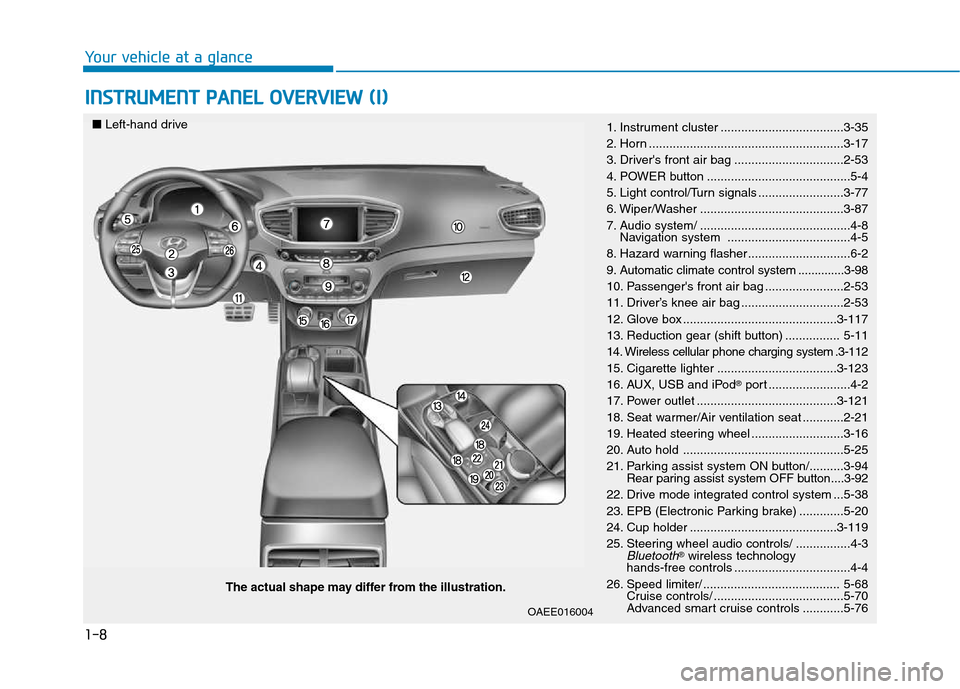
The actual shape may differ from the illustration.
■
Left-hand drive
1. Instrument cluster ....................................3-35
2. Horn .........................................................3-17
3. Driver's front air bag ................................2-53
4. POWER button ..........................................5-4
5. Light control/Turn signals .........................3-77
6. Wiper/Washer ..........................................3-87
7. Audio system/ ............................................4-8
Navigation system ....................................4-5
8. Hazard warning flasher ..............................6-2
9. Automatic climate control system ..............3-98
10. Passenger's front air bag .......................2-53
11. Driver’s knee air bag ..............................2-53
12. Glove box .............................................3-117
13. Reduction gear (shift button) ................ 5-11
14. Wireless cellular phone charging system .3-112
15. Cigarette lighter ...................................3-123
16. AUX, USB and iPod
Page 97 of 582
1-9
Your vehicle at a glance
1
INSTRUMENT PANEL OVERVIEW (II)
OAEE016004R
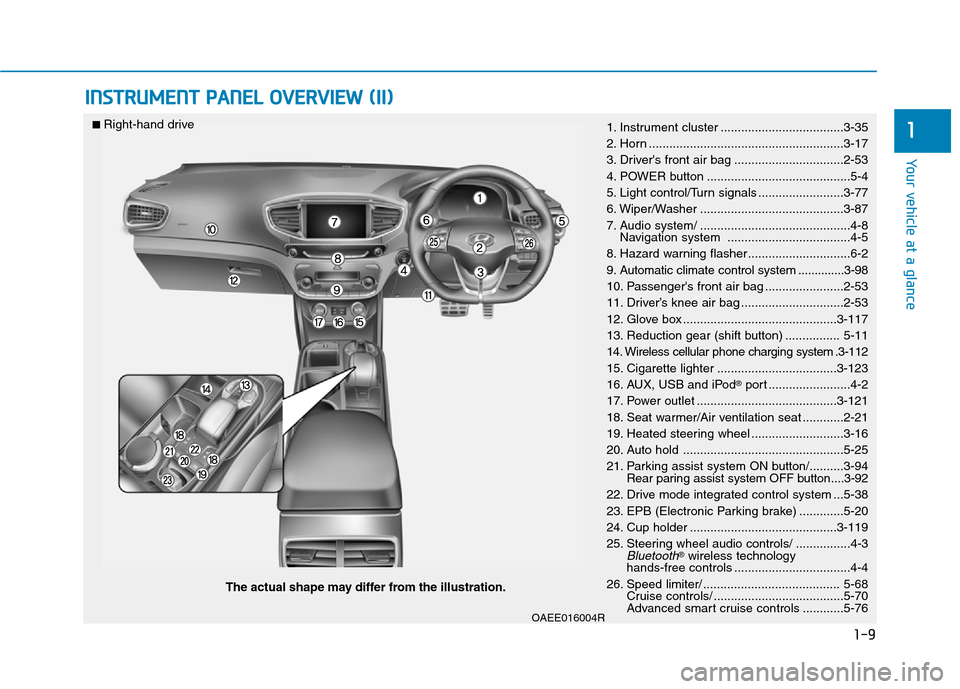
The actual shape may differ from the illustration.
■
Right-hand drive
1. Instrument cluster ....................................3-35
2. Horn .........................................................3-17
3. Driver's front air bag ................................2-53
4. POWER button ..........................................5-4
5. Light control/Turn signals .........................3-77
6. Wiper/Washer ..........................................3-87
7. Audio system/ ............................................4-8
Navigation system ....................................4-5
8. Hazard warning flasher ..............................6-2
9. Automatic climate control system ..............3-98
10. Passenger's front air bag .......................2-53
11. Driver’s knee air bag ..............................2-53
12. Glove box .............................................3-117
13. Reduction gear (shift button) ................ 5-11
14. Wireless cellular phone charging system .3-112
15. Cigarette lighter ...................................3-123
16. AUX, USB and iPod
Page 235 of 582
3-66
Convenient features of your vehicle
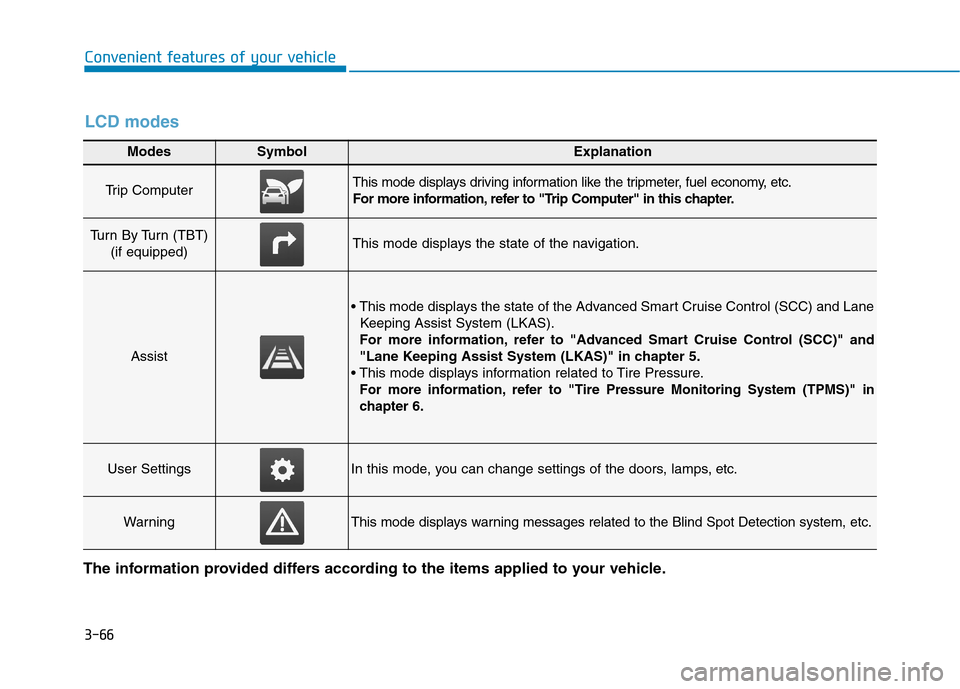
Modes SymbolExplanation
Trip Computer This mode displays driving information like the tripmeter, fuel economy, etc.
For more information, refer to "Trip Computer" in this chapter.
Turn By Turn (TBT) (if equipped)This mode displays the state of the navigation.
Assist
Keeping Assist System (LKAS).
For more information, refer to "Advanced Smart Cruise Control (SCC)" and
"Lane Keeping Assist System (LKAS)" in chapter 5.
For more information, refer to "Tire Pressure Monitoring System (TPMS)"in
chapter 6.
User SettingsIn this mode, you can change settings of the doors, lamps, etc.
WarningThis mode displays warning messages related to the Blind Spot Detection system, etc.
The information provided differs according to the items applied to your vehicle.
LCD modes
Page 237 of 582
3-68
Convenient features of your vehicle
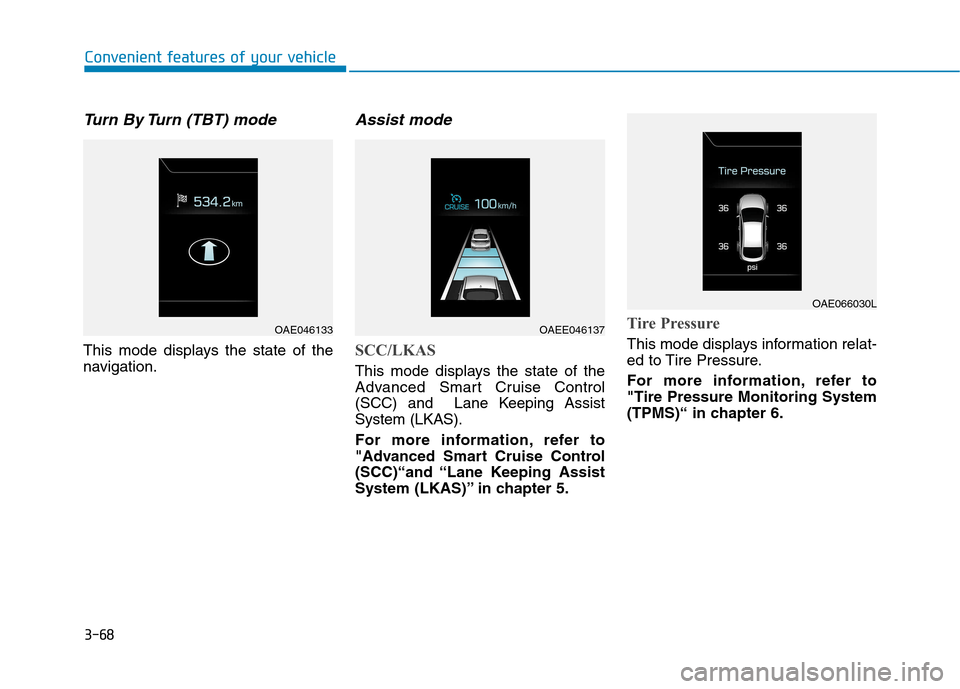
Turn By Turn (TBT) mode
This mode displays the state of the
navigation.
Assist mode
SCC/LKAS
This mode displays the state of the
Advanced Smart Cruise Control
(SCC) and Lane Keeping AssistSystem (LKAS).
For more information, refer to
"Advanced Smart Cruise Control
(SCC)“and “Lane Keeping Assist
System (LKAS)” in chapter 5.
Tire Pressure
This mode displays information relat-
ed to Tire Pressure.
For more information, refer to "Tire Pressure Monitoring System
(TPMS)“ in chapter 6.
OAE046133OAEE046137
OAE066030L
Page 293 of 582
![Hyundai Ioniq Electric 2017 Owners Manual 3-124
Convenient features of your vehicle
Clock
Vehicles with Audio system
Select the [SETUP]button on the
audio system ➟Select [Date/Time].
Set time: Set the time displayed on the audio screen.](/img/35/14909/w960_14909-292.png "Hyundai Ioniq Electric 2017 Owners Manual 3-124
Convenient features of your vehicle
Clock
Vehicles with Audio system
Select the [SETUP]button on the
audio system ➟Select [Date/Time].
Set time: Set the time displayed on the audio screen.")
3-124
Convenient features of your vehicle
Clock
Vehicles with Audio system
Select the [SETUP]button on the
audio system ➟Select [Date/Time].
Set time: Set the time displayed on the audio screen.
Time format: Choose between 12- hour and 24-hour time formats.
Vehicles with Navigation system
Select the Settings menu on the
Navigation system ➟Select
[Date/Time].
GPS time: Displays time according to the received GNSS time.
24-hour: Switches to 12 hour or 24 hour.
Clothes hanger (if equipped)
To hang items, pull the hanger down. These hangers are not designed to
hold large or heavy items.
Floor mat anchor(s) (if equipped)
ALWAYS use the Floor Mat Anchors to attach the front floor mats to the
vehicle. The anchors on the front
floor carpet keep the floor mats from
sliding forward.
Do not adjust the clock while
driving. You may lose your steer-
ing control and cause severe
personal injury or accidents.
WARNING
OAEE046434
Do not hang other objects such
as hangers or hard objects
except clothes. Also, do not put
heavy, sharp or breakable
objects in the clothe pockets. In
an accident or when the curtain
air bag is inflated, it may cause
vehicle damage or personal
injury.
WARNING
OAE046430
Page 297 of 582
Multimedia System
Multimedia system .................................................4-2Aux, USB and iPod ®®
port ................................................4-2
Antenna ...............................................................................4-2
Steering wheel audio control .........................................4-3
Bluetooth®®Wireless Technology hands-free ..........4-4
Audio / Video / Navigation system (AVN) ..................4-5
How vehicle radio works .................................................4-5
Audio (Without touch screen) .............................4-8 Feature of your audio......................................................4-9Radio .................................................................................4-16
Media..................................................................................4-18
Phone .................................................................................4-32
Setup ..................................................................................4-40
Declaration of conformity ..................................4-42 CE for EU ..........................................................................4-42
NCC for Taiwan ................................................................4-43
4
Page 301 of 582
(1) Call / Answer button
(2) Call end button
(3) Microphone
Audio : For detailed information,refer to “AUDIO” in this chapter.
AVN : Detailed information for the
Bluetooth® Wireless Technology
hands-free is described in the man-
ual supplied separately.
Audio / Video / Navigation sys-
tem (AVN) (if equipped)
Detailed information for the AVN sys-
tem is described in a separately sup-
plied manual.
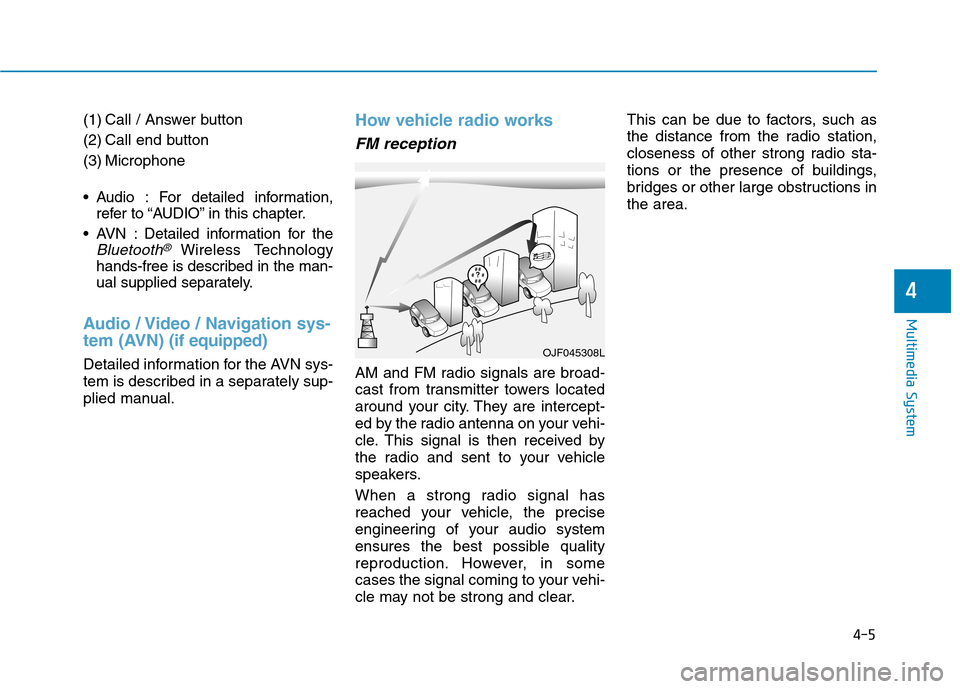
How vehicle radio works
FM reception
AM and FM radio signals are broad-
cast from transmitter towers located
around your city. They are intercept-
ed by the radio antenna on your vehi-
cle. This signal is then received by
the radio and sent to your vehicle
speakers.
When a strong radio signal has
reached your vehicle, the precise
engineering of your audio system
ensures the best possible quality
reproduction. However, in some
cases the signal coming to your vehi-
cle may not be strong and clear. This can be due to factors, such as
the distance from the radio station,
closeness of other strong radio sta-
tions or the presence of buildings,
bridges or other large obstructions inthe area.
OJF045308L
4-5
Multimedia System
4
Page 454 of 582
6-13
What to do in an emergency
6
The TPMS Malfunction Indicator
may illuminate after blinking for
one minute if the vehicle is near
electric power supply cables or
radio transmitters such as police
stations, government and public
offices, broadcasting stations,
military installations, airports,
transmitting towers, etc.
Additionally, the TPMS Malfunction
Indicator may illuminate if snow
chains are used or electronic
devices such as computers, charg-
ers, remote starters, navigation,
etc. This may interfere with normal
operation of the TPMS.
Changing a tire with TPMS
If you have a flat tire, the Low Tire
Pressure and Position telltales will
come on. Have the flat tire repaired
by an authorized HYUNDAI dealer
as soon as possible or replace the
flat tire with the spare tire.
Once the original tire equipped with
a tire pressure monitoring sensor isreinflated to the recommended pres-
sure and reinstalled on the vehicle,
the Low Tire Pressure Telltale andTPMS Malfunction Indicator will go
off within a few minutes of driving.
If the indicators do not extinguish
after a few minutes, please visit an
authorized HYUNDAI dealer.Each wheel is equipped with a tirepressure sensor mounted inside the
tire behind the valve stem. You must
use TPMS specific wheels. It is rec-
ommended that you always have
your tires serviced by an authorized
HYUNDAI dealer.
You may not be able to identify a tire
with low pressure by simply looking
at it. Always use a good quality tire
pressure gauge to measure. Pleasenote that a tire that is hot (from being
driven) will have a higher pressuremeasurement than a tire that is cold.
A cold tire means the vehicle has
been sitting for 3 hours and driven forless than 1.6 km (1 mile) in that 3
hour period.
Allow the tire to cool before measur-
ing the inflation pressure. Always be
sure the tire is cold before inflating to
the recommended pressure.
NOTICE
Never use a puncture-repairing
agent not approved by HYUNDAIdealer to repair and/or inflate a
low pressure tire. Tire sealant
not approved by HYUNDAI deal-
er may damage the tire pressure
sensor.
CAUTION
Page 513 of 582

7-47
7
Maintenance
Instrument panel fuse panel
Fuse NameSymbolFuse RatingCircuit Protected
Module 5MODULE510A
Electro Chromic Mirror, A/V & Navigation Head Unit, Audio, Driver IMS Module,
Rear Seat Warmer Module, Auto Head Lamp Leveling Device Module,
Head Lamp Leveling Device Actuator LH/RH, Vess Unit,
Front Air Ventilation Seat Control Module, Front Seat Warmer Control Module
Module 4MODULE410ALane Keeping Assist Unit, Crash Pad Switch, AEB Unit,
Blind Spot Detection Radar LH/RH, Electronic Parking Brake Switch
Interior Lamp10AFront Vanity Lamp LH/RH, Room Lamp, Overhead Console Lamp,
Luggage Lamp, Wireless Charger Unit, Rain Sensor
Air bag15ASRS Control Module
E- Shifter 1 10ASBW Switch, Front Console Switch
Ignition 1IG125APCB Block
ClusterCLUSTER10AInstrument Cluster
Ignition 3 2 10AIPS Control Module, Main Battery Charging Switch, Charge Lamp, PTC Heater,
A/V & Navigation Head Unit, Instrument Cluster, A/C Control Module
Memory 2MEMORY
27.5AActive Air Flap LH/RH
Module 8MODULE 810AActive Air Flap LH/RH, Electric Water Pump (Engine), VPD Sensor, BMS Control Module,
E/R Junction Block
Air bag IndicatorIND7.5AInstrument Cluster
Start7.5AEPCU, Smart Key Control Module