lights Hyundai Ioniq Hybrid 2017 User Guide
[x] Cancel search | Manufacturer: HYUNDAI, Model Year: 2017, Model line: Ioniq Hybrid, Model: Hyundai Ioniq Hybrid 2017Pages: 553, PDF Size: 59.51 MB
Page 125 of 553
3-23
Convenient features of your vehicle
3
When cleaning the mirror, use a
paper towel or similar material
dampened with glass cleaner. Do
not spray glass cleaner directly on
the mirror as that may cause the
liquid cleaner to enter the mirrorhousing.
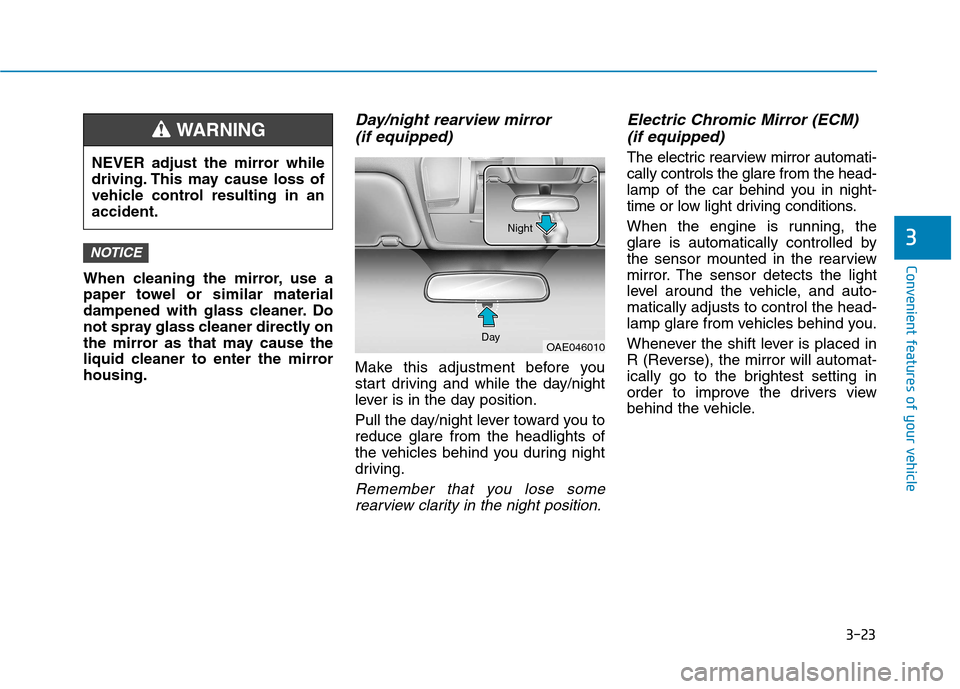
Day/night rearview mirror (if equipped)
Make this adjustment before you
start driving and while the day/night
lever is in the day position.
Pull the day/night lever toward you to reduce glare from the headlights of
the vehicles behind you during night
driving.
Remember that you lose somerearview clarity in the night position.
Electric Chromic Mirror (ECM)
(if equipped)
The electric rearview mirror automati-cally controls the glare from the head-
lamp of the car behind you in night-
time or low light driving conditions.
When the engine is running, the
glare is automatically controlled by
the sensor mounted in the rearview
mirror. The sensor detects the light
level around the vehicle, and auto-matically adjusts to control the head-
lamp glare from vehicles behind you.
Whenever the shift lever is placed in
R (Reverse), the mirror will automat-
ically go to the brightest setting in
order to improve the drivers view
behind the vehicle.
NOTICE
NEVER adjust the mirror while
driving. This may cause loss of
vehicle control resulting in anaccident.
WARNING
OAE046010
Day Night
Page 144 of 553
3-42
Convenient features of your vehicle
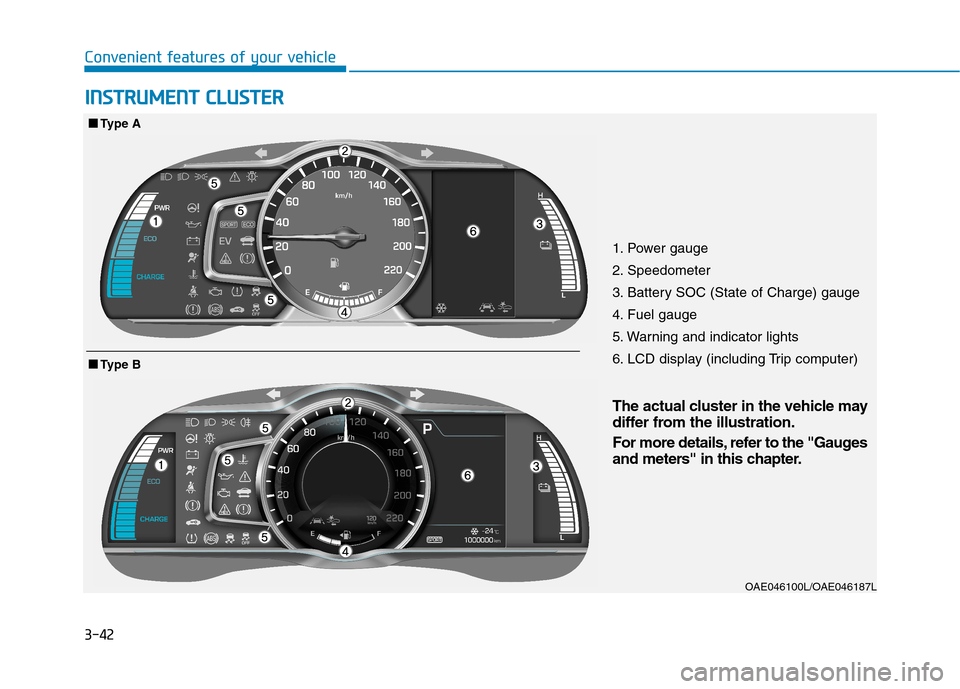
1. Power gauge
2. Speedometer
3. Battery SOC (State of Charge) gauge
4. Fuel gauge
5. Warning and indicator lights
6. LCD display (including Trip computer)OAE046100L/OAE046187L
■■Type B
■■Type A
IINN SSTT RR UU MM EENN TT CC LLUU SSTT EERR
The actual cluster in the vehicle may
differ from the illustration.
For more details, refer to the "Gauges
and meters" in this chapter.
Page 145 of 553
3-43
Convenient features of your vehicle
3
Instrument cluster control
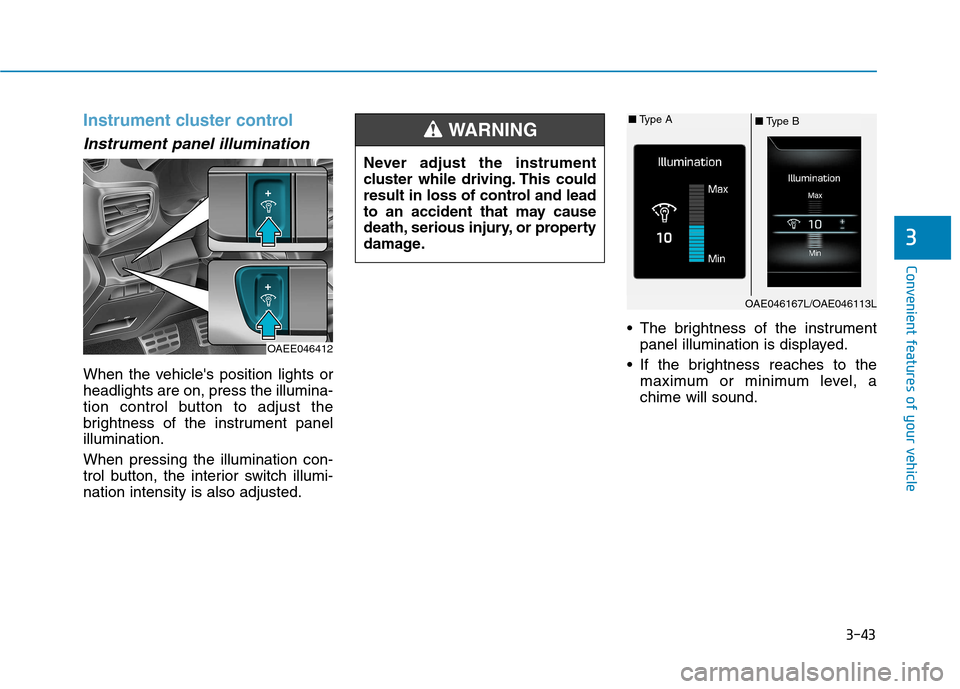
Instrument panel illumination
When the vehicle's position lights or headlights are on, press the illumina-
tion control button to adjust the
brightness of the instrument panelillumination. When pressing the illumination con-
trol button, the interior switch illumi-nation intensity is also adjusted. The brightness of the instrument
panel illumination is displayed.
If the brightness reaches to the maximum or minimum level, achime will sound.
Never adjust the instrument
cluster while driving. This could
result in loss of control and lead
to an accident that may cause
death, serious injury, or property
damage.
WARNING
OAE046167L/OAE046113L
■
Type B
■
Type A
OAEE046412
Page 152 of 553
3-50
Convenient features of your vehicle
Warning and indicator lights
Information
Make sure that all warning lights are
OFF after starting the engine. If any
light is still ON, this indicates a situa-
tion that needs attention.
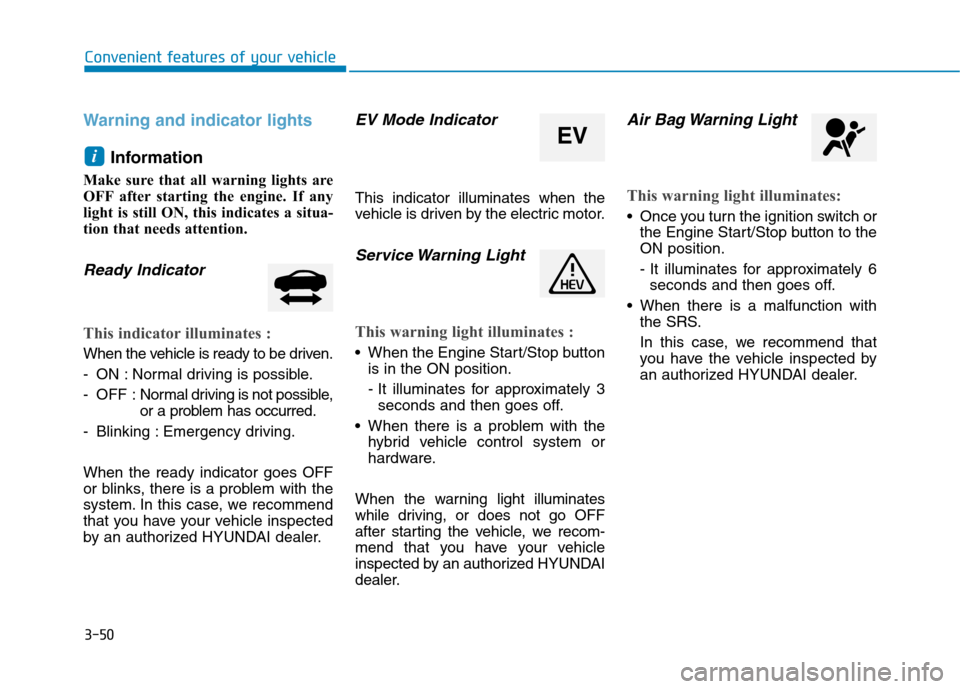
Ready Indicator
This indicator illuminates :
When the vehicle is ready to be driven.
- ON : Normal driving is possible.
- OFF : Nor mal driving is not possible,
or a problem has occurred.
- Blinking : Emergency driving. When the ready indicator goes OFF
or blinks, there is a problem with the
system. In this case, we recommend
that you have your vehicle inspected
by an authorized HYUNDAI dealer.
EV Mode Indicator
This indicator illuminates when the
vehicle is driven by the electric motor.
Service Warning Light
This warning light illuminates :
When the Engine Start/Stop button is in the ON position.
- It illuminates for approximately 3seconds and then goes off.
When there is a problem with the hybrid vehicle control system or
hardware.
When the warning light illuminates
while driving, or does not go OFF
after starting the vehicle, we recom-
mend that you have your vehicle
inspected by an authorized HYUNDAI
dealer.
Air Bag Warning Light
This warning light illuminates:
Once you turn the ignition switch or the Engine Start/Stop button to the ON position.
- It illuminates for approximately 6seconds and then goes off.
When there is a malfunction with the SRS.
In this case, we recommend that
you have the vehicle inspected by
an authorized HYUNDAI dealer.
i
EV
Page 155 of 553
3-53
Convenient features of your vehicle
3
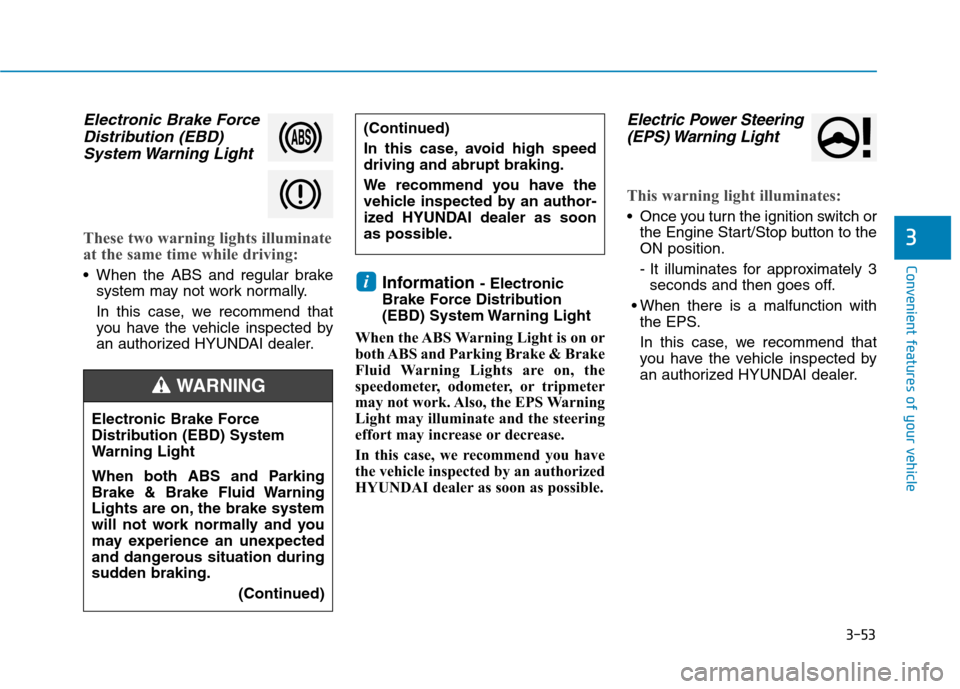
Electronic Brake ForceDistribution (EBD)
System Warning Light
These two warning lights illuminate
at the same time while driving:
When the ABS and regular brake system may not work normally.
In this case, we recommend that
you have the vehicle inspected by
an authorized HYUNDAI dealer. Information
- Electronic
Brake Force Distribution
(EBD) System Warning Light
When the ABS Warning Light is on or
both ABS and Parking Brake & Brake
Fluid Warning Lights are on, the
speedometer, odometer, or tripmeter
may not work. Also, the EPS Warning
Light may illuminate and the steering
effort may increase or decrease.
In this case, we recommend you have
the vehicle inspected by an authorized
HYUNDAI dealer as soon as possible.
Electric Power Steering (EPS) Warning Light
This warning light illuminates:
Once you turn the ignition switch or the Engine Start/Stop button to the ON position.
- It illuminates for approximately 3seconds and then goes off.
When there is a malfunction with the EPS.
In this case, we recommend that
you have the vehicle inspected by
an authorized HYUNDAI dealer.
i
Electronic Brake Force
Distribution (EBD) System
Warning Light
When both ABS and Parking
Brake & Brake Fluid Warning
Lights are on, the brake system
will not work normally and you
may experience an unexpected
and dangerous situation during
sudden braking.
(Continued)
WARNING
(Continued)
In this case, avoid high speed driving and abrupt braking.
We recommend you have the
vehicle inspected by an author-
ized HYUNDAI dealer as soon
as possible.
Page 161 of 553
3-59
Convenient features of your vehicle
3
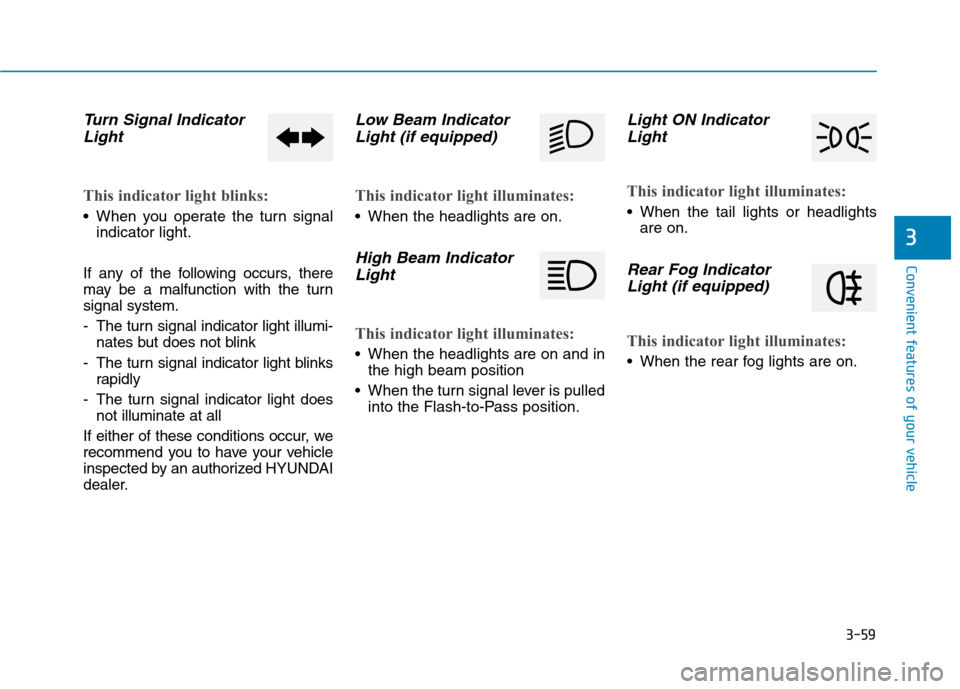
Turn Signal IndicatorLight
This indicator light blinks:
When you operate the turn signal indicator light.
If any of the following occurs, there
may be a malfunction with the turnsignal system.
- The turn signal indicator light illumi- nates but does not blink
- The turn signal indicator light blinks rapidly
- The turn signal indicator light does not illuminate at all
If either of these conditions occur, we
recommend you to have your vehicle
inspected by an authorized HYUNDAI
dealer.
Low Beam Indicator Light (if equipped)
This indicator light illuminates:
When the headlights are on.
High Beam Indicator
Light
This indicator light illuminates:
When the headlights are on and in the high beam position
When the turn signal lever is pulled into the Flash-to-Pass position.
Light ON Indicator
Light
This indicator light illuminates:
When the tail lights or headlights are on.
Rear Fog Indicator
Light (if equipped)
This indicator light illuminates:
When the rear fog lights are on.
Page 167 of 553
3-65
Convenient features of your vehicle
3
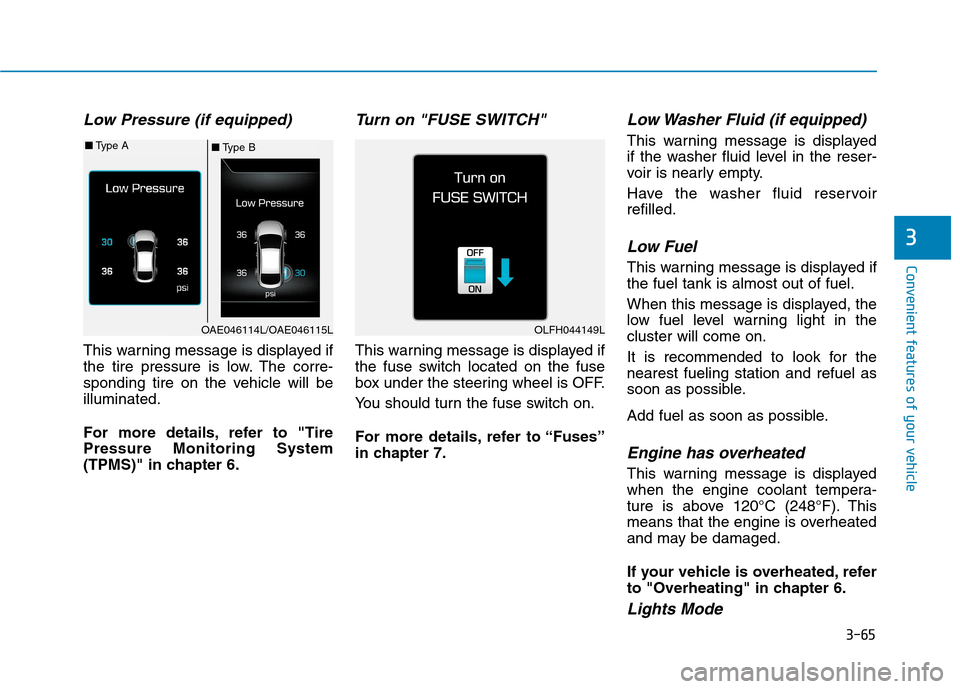
Low Pressure (if equipped)
This warning message is displayed if
the tire pressure is low. The corre-
sponding tire on the vehicle will beilluminated.
For more details, refer to "Tire Pressure Monitoring System
(TPMS)" in chapter 6.
Turn on "FUSE SWITCH"
This warning message is displayed if
the fuse switch located on the fuse
box under the steering wheel is OFF.
You should turn the fuse switch on.
For more details, refer to “Fuses”
in chapter 7.
Low Washer Fluid (if equipped)
This warning message is displayed
if the washer fluid level in the reser-
voir is nearly empty.
Have the washer fluid reservoir refilled.
Low Fuel
This warning message is displayed ifthe fuel tank is almost out of fuel.
When this message is displayed, the
low fuel level warning light in thecluster will come on.
It is recommended to look for the nearest fueling station and refuel as
soon as possible.
Add fuel as soon as possible.
Engine has overheated
This warning message is displayed
when the engine coolant tempera-
ture is above 120°C (248°F). This
means that the engine is overheated
and may be damaged.
If your vehicle is overheated, refer
to "Overheating" in chapter 6.
Lights Mode
■Type B
■
Type A
OAE046114L/OAE046115LOLFH044149L
Page 178 of 553
3-76
Convenient features of your vehicle
User settings mode
In this mode, you can change the
setting of the instrument cluster,
doors, lamps, etc.
1. Driving Assist
2. Door
3. Lights
4. Sound
5. Convenience
6. Service Interval
7. Other Features
8. Reset
The information provided differs
according to the items applied to your
vehicle.
1. Driving Assist
Lane Keeping Assist System
- Lane Departure/Standard LKA/Active LKA
To adjust the sensitivity of the Lane
Keeping Assist System.
For more information, refer to the
"Lane Keeping Assist System" in
chapter 5.
- Response (Slow/Normal/Fast)
To adjust the sensitivity of the
Smart Cruise Control system.
For more information, refer to the
"Smart Cruise Control" in chapter 5.
- Autonomous Emergency Braking To activate or deactivate the AEB system.
- Late/Normal/Early To adjust the initial warning alert
time for Autonomous Emergency
Braking system.
For more information, refer to
"Autonomous Emergency Braking
(AEB)" in chapter 5.
- Rear Cross Traffic Alert
To activate or deactivate the Rear
Cross Traffic Alert system.
- Blind Spot Detection Sound To activate or deactivate the BlindSpot Detection sound.
For more information, refer to “Blind
Spot Detection" in chapter 5. 2. Door
- Disable: The auto door lock opera-
tion will be canceled.
- Enable on Speed: All doors will be automatically locked when the vehi-
cle speed exceeds 15km/h (9.3mph).
- Enable on Shift: All doors will be automatically locked if the automat-
ic transmission shift lever is shifted
from the P (Park) position to the R
(Reverse), N (Neutral), or D (Drive)position.
- Disable: The auto door unlock oper- ation will be canceled.
- Vehicle Off: All doors will be auto- matically unlocked when the
Engine Start/Stop button is set to
the OFF position. (if equipped with
smart key)
- On Key Out: All doors will be auto- matically unlocked when the igni-
tion key is removed from the igni-
tion switch. (if equipped with remote
key)
Page 179 of 553
3-77
Convenient features of your vehicle
3
- On Shift to P: All doors will be auto-matically unlocked if the automatic
transmission shift lever is shifted to
the P (Park) position.
To activate or deactivate the horn
feedback.
If the horn feedback is activated,
after locking the door by pressing the
lock button on the remote key, and
pressing it again within 4 seconds,
the horn feedback sound will operateonce to indicate that all doors are
locked.
3. Lights
- Off: The one touch turn signal func- tion will be deactivated.
- 3, 5, 7 Flashes: The turn signal indi- cator will blink 3, 5, or 7 times when
the turn signal lever is moved slightly.
For more information, refer to
"Light" in this chapter.
To activate or deactivate the head-
lamp delay function.
For more information, refer to
"Light" in this chapter
4. Sound
- Level 1~3
To adjust the Park Assist System
volume.
5. Convenience
- Off: The seat easy access function is deactivated.
- Normal/Extended: When you turn off the engine, the driver's seat will
automatically move rearward short
(Normal) or long (Extended) for you
to enter or exit the vehicle more
comfortably.
For more information, refer to
"Driver Position Memory System"
in this chapter.
To activate or deactivate the wireless charging system in the front seat.
For more information, refer to
"Wireless Charging System" in
this chapter.
To activate or deactivate the Wiper/
Light mode.
When activated, the LCD display
shows the selected Wiper/Light
mode whenever you change the
mode.
To activate or deactivate the gear
position pop-up.
When activated, the gear position
will be displayed on the LCD display.
6. Service Interval
To activate or deactivate the service
interval function.
Page 184 of 553
3-82
Convenient features of your vehicle
Warning mode
If one of followings occurs, warning
messages will be displayed in the
information mode for several seconds.
- Lower washer fluid ((if equipped)
- Exterior lamp malfunction
- Blind Spot Detection (BSD) mal-function (if equipped)
- Autonomous Emergency Braking (AEB) malfunction
- Smart cruise control malfunction
- Tire Pressure Monitoring System (TPMS) malfunction (if equipped)
User settings mode
In this mode, you can change the
setting of the instrument cluster,
doors, lamps, etc.
1. Driving Assist
2. Door
3. Lights
4. Sound
5. Convenience
6. Service Interval
7. Other Features
8. Reset
The information provided differs
according to the items applied to your
vehicle. 1. Driving Assist
- Lane Departure/Standard LKA/Active
LKA
To adjust the sensitivity of the Lane
Keeping Assist System.
For more information, refer to the
"Lane Keeping Assist System" in
chapter 5.
- Slow/Normal/Fast To adjust the sensitivity of the
Smart Cruise Control system.
For more information, refer to the
"Smart Cruise Control" in chapter5.
To activate or deactivate the Autonomous
Emergency Braking (AEB).
For more information, refer to
"Autonomous Emergency Braking
(AEB)" in chapter 5.