check engine Hyundai Ioniq Hybrid 2017 Owner's Guide
[x] Cancel search | Manufacturer: HYUNDAI, Model Year: 2017, Model line: Ioniq Hybrid, Model: Hyundai Ioniq Hybrid 2017Pages: 553, PDF Size: 59.51 MB
Page 287 of 553
5-3
Driving your vehicle
5
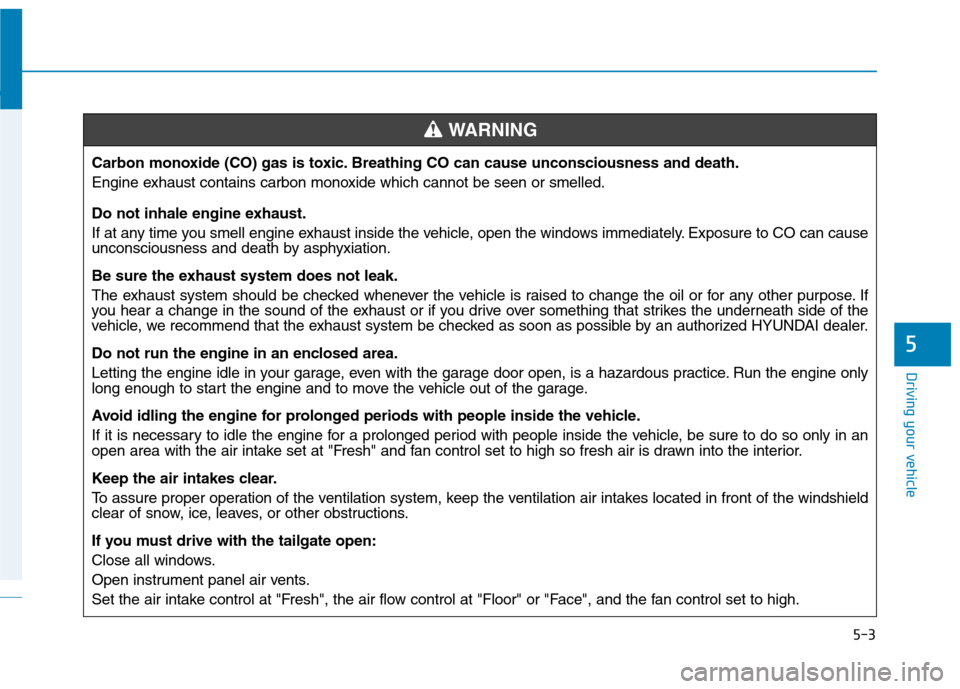
Carbon monoxide (CO) gas is toxic. Breathing CO can cause unconsciousness and death.
Engine exhaust contains carbon monoxide which cannot be seen or smelled.
Do not inhale engine exhaust.
If at any time you smell engine exhaust inside the vehicle, open the windows immediately. Exposure to CO can cause
unconsciousness and death by asphyxiation.
Be sure the exhaust system does not leak.
The exhaust system should be checked whenever the vehicle is raised to change the oil or for any other purpose. If
you hear a change in the sound of the exhaust or if you drive over something that strikes the underneath side of the
vehicle, we recommend that the exhaust system be checked as soon as possible by an authorized HYUNDAI dealer.
Do not run the engine in an enclosed area.
Letting the engine idle in your garage, even with the garage door open, is a hazardous practice. Run the engine only
long enough to start the engine and to move the vehicle out of the garage.
Avoid idling the engine for prolonged periods with people inside the vehicle.
If it is necessary to idle the engine for a prolonged period with people inside the vehicle, be sure to do so only in an
open area with the air intake set at "Fresh" and fan control set to high so fresh air is drawn into the interior.
Keep the air intakes clear.
To assure proper operation of the ventilation system, keep the ventilation air intakes located in front of the windshield
clear of snow, ice, leaves, or other obstructions.
If you must drive with the tailgate open:
Close all windows.
Open instrument panel air vents.
Set the air intake control at "Fresh", the air flow control at "Floor" or "Face", and the fan control set to high.
WARNING
Page 291 of 553
5-7
Driving your vehicle
5
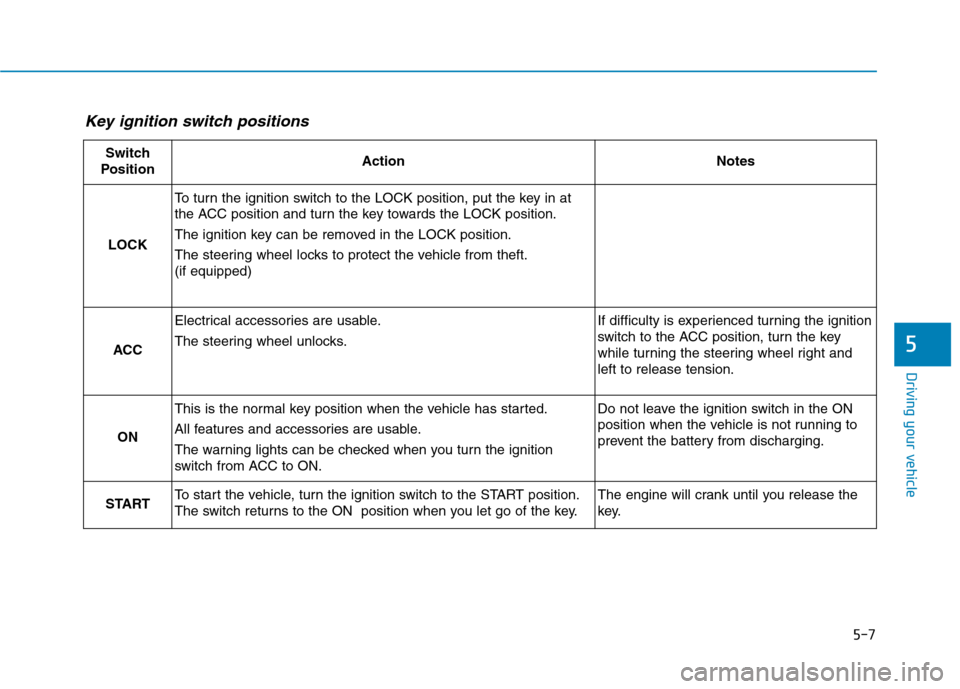
Key ignition switch positions
Switch
PositionActionNotes
LOCK
To turn the ignition switch to the LOCK position, put the key in at
the ACC position and turn the key towards the LOCK position.
The ignition key can be removed in the LOCK position.
The steering wheel locks to protect the vehicle from theft. (if equipped)
ACC
Electrical accessories are usable.
The steering wheel unlocks.If difficulty is experienced turning the ignition
switch to the ACC position, turn the key
while turning the steering wheel right andleft to release tension.
ON
This is the normal key position when the vehicle has started.
All features and accessories are usable.
The warning lights can be checked when you turn the ignition
switch from ACC to ON.Do not leave the ignition switch in the ON
position when the vehicle is not running to
prevent the battery from discharging.
STARTTo start the vehicle, turn the ignition switch to the START position.
The switch returns to the ON position when you let go of the key.The engine will crank until you release the
key.
Page 295 of 553
5-11
Driving your vehicle
5
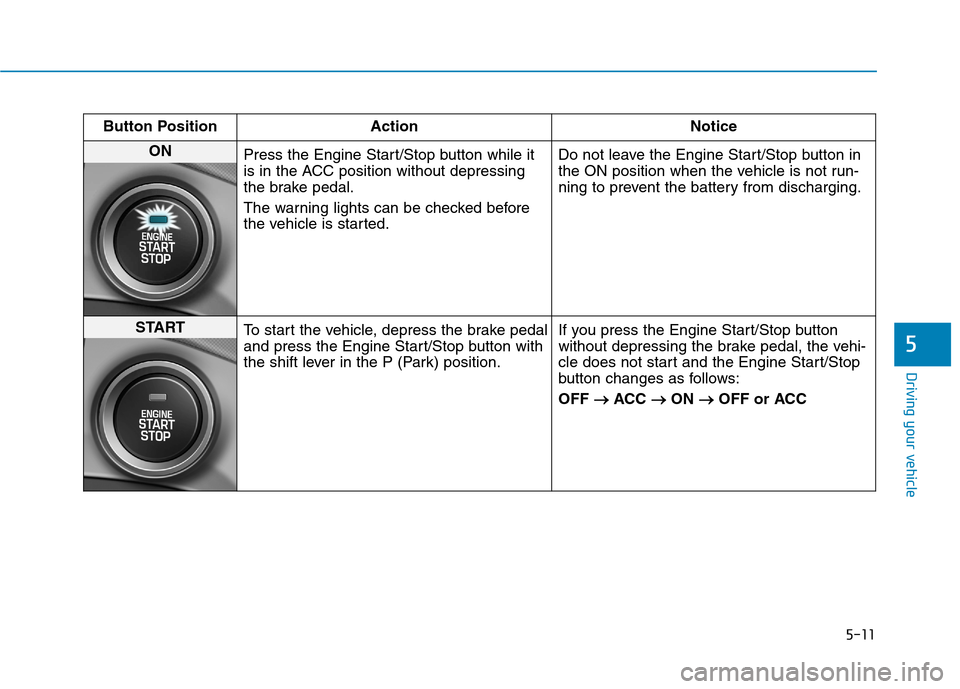
Button Position ActionNotice
ON
Press the Engine Start/Stop button while it
is in the ACC position without depressing
the brake pedal.
The warning lights can be checked before
the vehicle is started. Do not leave the Engine Start/Stop button in
the ON position when the vehicle is not run-
ning to prevent the battery from discharging.
START
To start the vehicle, depress the brake pedal
and press the Engine Start/Stop button with
the shift lever in the P (Park) position. If you press the Engine Start/Stop button
without depressing the brake pedal, the vehi-
cle does not start and the Engine Start/Stop
button changes as follows: OFF
ACC
ON
OFF or ACC
Page 296 of 553
5-12
Driving your vehicle
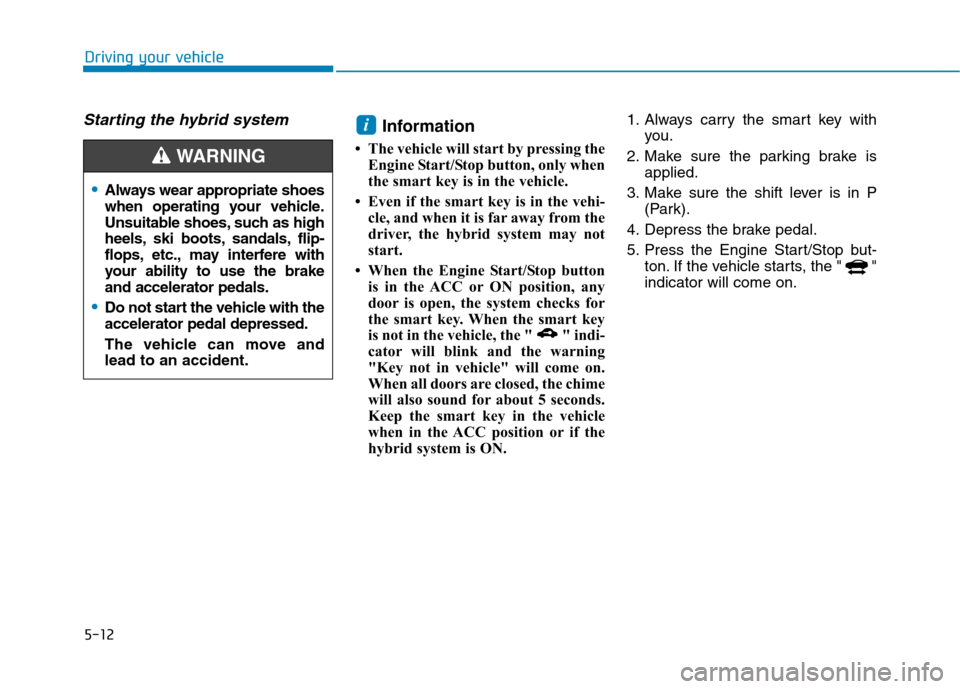
Starting the hybrid system Information
The vehicle will start by pressing the Engine Start/Stop button, only when
the smart key is in the vehicle.
Even if the smart key is in the vehi- cle, and when it is far away from the
driver, the hybrid system may not
start.
When the Engine Start/Stop button is in the ACC or ON position, any
door is open, the system checks for
the smart key. When the smart key
is not in the vehicle, the " " indi-
cator will blink and the warning
"Key not in vehicle" will come on.
When all doors are closed, the chime
will also sound for about 5 seconds.
Keep the smart key in the vehicle
when in the ACC position or if the
hybrid system is ON. 1. Always carry the smart key with
you.
2. Make sure the parking brake is applied.
3. Make sure the shift lever is in P (Park).
4. Depress the brake pedal.
5. Press the Engine Start/Stop but- ton. If the vehicle starts, the " " indicator will come on.i
Always wear appropriate shoes
when operating your vehicle.
Unsuitable shoes, such as high
heels, ski boots, sandals, flip-
flops, etc., may interfere with
your ability to use the brakeand accelerator pedals.
Do not start the vehicle with the accelerator pedal depressed.
The vehicle can move and lead to an accident.
WARNING
Page 300 of 553
5-16
Driving your vehicle
The dual clutch transmission givesthe driving feel of a manual trans-
mission, yet provides the ease of a
fully automatic transmission. Unlike
a traditional automatic transmis-sion, the gear shifting can some-
times be felt and heard on the dual
clutch transmission, as the actua-tors engage the clutch and thegear is selected.
The dual clutch transmission can be thought of as an automatically
shifting manual transmission.
When D (Drive) is selected, the
transmission will automatically shiftthrough the gears similar to a con-
ventional automatic transmission. The dual clutch transmission incor-
porates a dry-type dual clutch
mechanism, which allows for better
acceleration performance and
increased fuel efficiency while driv-
ing. But it differs from a conven-
tional automatic transmission in
that it does not incorporate a
torque converter. Instead, the tran-
sition from one gear to the next is
managed by clutch slip, especially
at lower speeds. As a result, shifts
are sometimes more noticeable,
and a light vibration can be felt as
the transmission shaft speed ismatched with the engine shaft
speed. This is a normal condition of
the dual clutch transmission.
The dry-type clutch transfers torque more directly and provides
a direct-drive feeling which may
feel different from a conventional
automatic transmission. This may
be more noticeable when launch-
ing the vehicle from a stop or when
traveling at low, stop-and-go vehi-
cle speeds.
To reduce the risk of serious
injury or death:
ALWAYS check the surround-
ing areas near your vehicle for
people, especially children,
before shifting a vehicle into
D (Drive) or R (Reverse).
Before leaving the driver's
seat, always make sure the
shift lever is in the P (Park)
position, then set the parking
brake, and place the ignition
switch in the LOCK/OFF posi-
tion. Unexpected and sudden
vehicle movement can occurif these precautions are not
followed.
(Continued)
(Continued)
Do not use the engine brake
(shifting from a high gear to
lower gear) rapidly on slip-
pery roads. The vehicle mayslip causing an accident.
WARNING
Page 315 of 553
5-31
Driving your vehicle
5
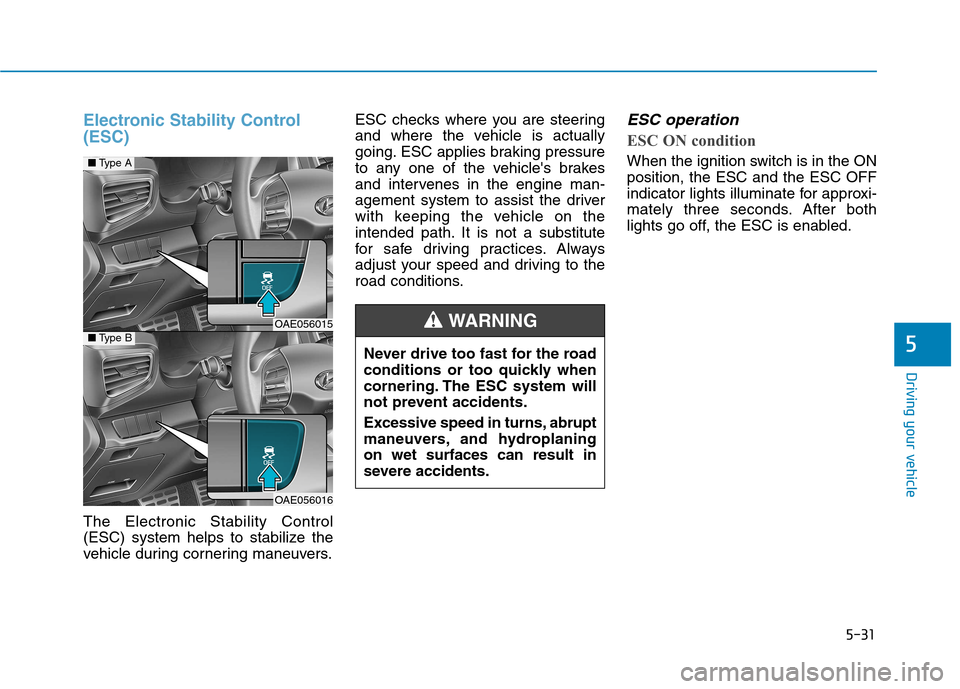
Electronic Stability Control (ESC)
The Electronic Stability Control
(ESC) system helps to stabilize the
vehicle during cornering maneuvers.ESC checks where you are steering
and where the vehicle is actually
going. ESC applies braking pressure
to any one of the vehicle's brakes
and intervenes in the engine man-
agement system to assist the driver
with keeping the vehicle on the
intended path. It is not a substitute
for safe driving practices. Always
adjust your speed and driving to the
road conditions.
ESC operation
ESC ON condition
When the ignition switch is in the ON position, the ESC and the ESC OFF
indicator lights illuminate for approxi-
mately three seconds. After both
lights go off, the ESC is enabled.
OAE056015
OAE056016
■
Type A
■Type B
Never drive too fast for the road
conditions or too quickly when
cornering. The ESC system will
not prevent accidents.
Excessive speed in turns, abrupt
maneuvers, and hydroplaningon wet surfaces can result in
severe accidents.
WARNING
Page 318 of 553
5-34
Driving your vehicle
To prevent damage to the trans- mission:
Do not allow wheel(s) of one axleto spin excessively while the
ESC, ABS, and parking brake
warning lights are displayed. The
repairs would not be covered by
the vehicle warranty. Reduce
engine power and do not spin
the wheel(s) excessively while
these lights are displayed.
When operating the vehicle on a dynamometer, make sure theESC is turned off (ESC OFF lightilluminated).
Information
Turning the ESC off does not affect
ABS or standard brake system opera-
tion.
Vehicle Stability Management (VSM)
The Vehicle Stability Management (VSM) is a function of the Electronic
Stability Control (ESC) system. It
helps ensure the vehicle stays stable
when accelerating or braking sud-
denly on wet, slippery and rough
roads where traction over the four
tires can suddenly become uneven.
VSM operation
VSM ON condition
The VSM operates when:
The Electronic Stability Control (ESC) is on.
Vehicle speed is approximately above 15 km/h (9 mph) on curve
roads.
Vehicle speed is approximately above 20 km/h (12 mph) when the
vehicle is braking on rough roads.
When operating
When you apply your brakes under
conditions which may activate the
ESC, you may hear sounds from the
brakes, or feel a corresponding sen-
sation in the brake pedal. This is nor-
mal and it means your VSM is active.
i
NOTICE
Take the following precautions
when using the Vehicle Stability
Management (VSM):
ALWAYS check the speed and
the distance to the vehicle
ahead. The VSM is not a substi-
tute for safe driving practices.
Never drive too fast for the
road conditions. The VSM sys-
tem will not prevent acci-
dents. Excessive speed in bad
weather, slippery and uneven
roads can result in severeaccidents.
WARNING
Page 365 of 553
5-81
Driving your vehicle
5
Cancelled automatically
The driver's door is opened.
The shift lever is shifted to N(Neutral), R (Reverse) or P (Park).
The parking brake is applied.
The vehicle speed is under 10 km/h (5 mph).
The vehicle speed is over 190 km/h (120 mph).
The ESC (Electronic Stability Control), TCS (Traction Control
System) or ABS is operating.
The ESC is turned off.
The sensor or the cover is dirty or blocked with foreign matter.
The accelerator pedal is continu- ously depressed for more than one
minute.
The SCC system has malfunc- tioned.
The engine performance is abnor- mal.
The AEB is activated. Each of these actions will cancel
the Smart Cruise Control opera-
tion. The Set Speed and Vehicle-to-
Vehicle Distance on the LCD dis-
play will go off.
In a condition the Smart Cruise Control is cancelled automatically,
the Smart Cruise Control will not
resume even though the RES+ or
SET- toggle switch is pushed.
Information
If the Smart Cruise Control is can-
celled by other than the reasons men-
tioned, we recommend that the system
be checked by an authorized
HYUNDAI dealer.
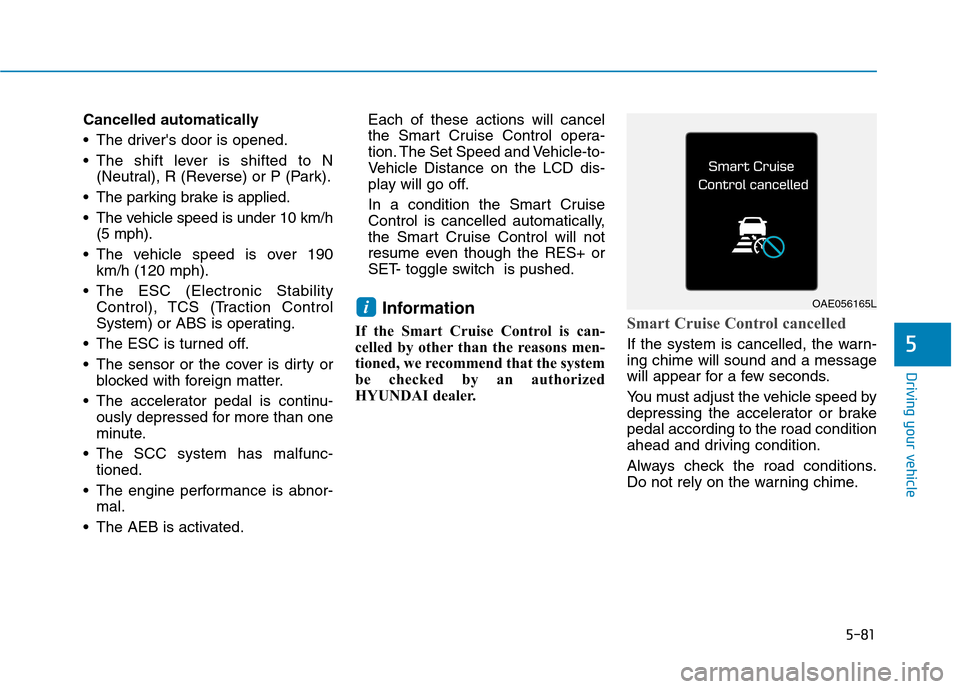
Smart Cruise Control cancelled
If the system is cancelled, the warn- ing chime will sound and a message
will appear for a few seconds.
You must adjust the vehicle speed by
depressing the accelerator or brakepedal according to the road condition
ahead and driving condition.
Always check the road conditions.
Do not rely on the warning chime.
iOAE056165L
Page 378 of 553
5-94
Driving your vehicle
If you believe your brakes may bewet, apply them lightly while driv-
ing until normal braking operation
returns.
Hydroplaning
If the road is wet enough and you are
going fast enough, your vehicle may
have little or no contact with the road
surface and actually ride on the
water. The best advice is SLOW
DOWN when the road is wet.
The risk of hydroplaning increas- es as the depth of tire tread
decreases, refer to "Tire Tread" in
chapter 7.
Driving in flooded areas
Avoid driving through flooded areas
unless you are sure the water is nohigher than the bottom of the wheel
hub. Drive through any water slowly.
Allow adequate stopping distance
because brake performance may bereduced.
After driving through water, dry the
brakes by gently applying them sev-
eral times while the vehicle is moving
slowly.
Highway driving
Tires
Adjust the tire inflation, as specified.
Under-inflation may overheat or
damage the tires.
Do not install worn-out or damaged
tires, which may reduce traction or
fail the braking operation.
Information
Never over-inflate your tires above the
maximum inflation pressure, as speci-
fied on your tires.
Fuel, engine coolant and engine oil
Driving at higher speeds on the high-
way consumes more fuel and is less
efficient than driving at a slower,
more moderate speed. Maintain a
moderate speed in order to conserve
fuel when driving on the highway.
Be sure to check both the engine
coolant level and the engine oil
before driving.
Drive belt
A loose or damaged drive belt may
overheat the engine.
i
Page 379 of 553
5-95
Driving your vehicle
5
The severe weather conditions of
winter quickly wear out tires and
cause other problems. To minimize
winter driving problems, you should
take the following suggestions:Information
Information for Snow Tires and Tire
Chains in the national language
(Bulgarian, Hungarian, Icelandic,
Polish) is provided in the Appendix.
Snow or icy conditions
You need to keep sufficient distance
between your vehicle and the vehicle
in front of you.
Apply the brakes gently. Speeding,
rapid acceleration, sudden brake
applications, and sharp turns are
potentially very hazardous practices.
During deceleration, use engine
braking to the fullest extent. Sudden
brake applications on snowy or icy
roads may cause the vehicle to skid.
To drive your vehicle in deep snow, it
may be necessary to use snow tires
or to install tire chains on your tires. Always carry emergency equipment.
Some of the items you may want to
carry include tire chains, tow straps
or chains, a flashlight, emergency
flares, sand, a shovel, jumper cables,
a window scraper, gloves, ground
cloth, coveralls, a blanket, etc.
Snow tires
If you mount snow tires on your vehi-
cle, make sure to use radial tires of
the same size and load range as the
original tires. Mount snow tires on all
four wheels to balance your vehicle’s
handling in all weather conditions.
The traction provided by snow tires
on dry roads may not be as high as
your vehicle's original equipment
tires. Check with the tire dealer for
maximum speed recommendations.
Information
Do not install studded tires without first
checking local and municipal regula-
tions for possible restrictions against
their use.
i
i
WW IINN TTEERR DD RRIIVV IINN GG
Snow tires should be equivalent
in size and type to the vehicle's
standard tires. Otherwise, the
safety and handling of your
vehicle may be adversely affect-ed.
WARNING