Battery reset Hyundai Ioniq Hybrid 2017 Owner's Manual
[x] Cancel search | Manufacturer: HYUNDAI, Model Year: 2017, Model line: Ioniq Hybrid, Model: Hyundai Ioniq Hybrid 2017Pages: 553, PDF Size: 59.51 MB
Page 137 of 553
3-35
Convenient features of your vehicle
3
Periodically remove any dirt thatmay accumulate on the sunroof guide rail or between the sun-
roof and roof panel, which can
make a noise.
Do not try to open the sunroof when the temperature is below
freezing or when the sunroof is
covered with snow or ice, the
motor could be damaged. In
cold and wet climates, the sun-
roof may not work properly.
Information
After washing the vehicle or after a
rain, be sure to wipe off the water on
the sunroof before operating the sun-
roof.
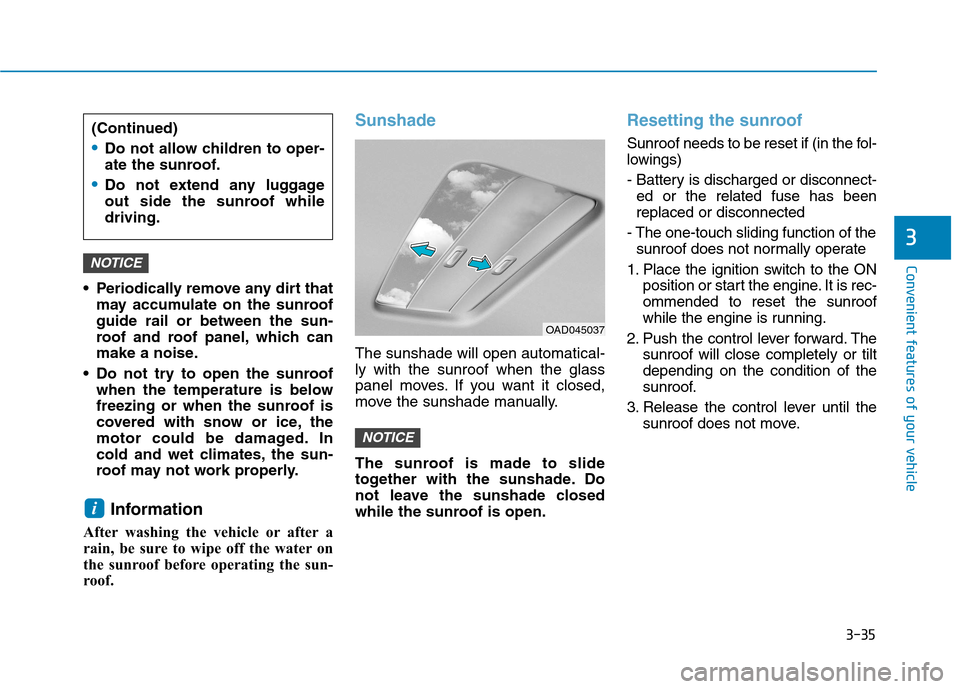
Sunshade
The sunshade will open automatical- ly with the sunroof when the glass
panel moves. If you want it closed,
move the sunshade manually.
The sunroof is made to slide
together with the sunshade. Do
not leave the sunshade closed
while the sunroof is open.
Resetting the sunroof
Sunroof needs to be reset if (in the fol-
lowings)
- Battery is discharged or disconnect- ed or the related fuse has been replaced or disconnected
- The one-touch sliding function of the sunroof does not normally operate
1. Place the ignition switch to the ON position or start the engine. It is rec-ommended to reset the sunroof
while the engine is running.
2. Push the control lever forward. The sunroof will close completely or tiltdepending on the condition of the
sunroof.
3. Release the control lever until the sunroof does not move.
NOTICE
i
NOTICE
OAD045037
(Continued)
Do not allow children to oper-
ate the sunroof.
Do not extend any luggage
out side the sunroof whiledriving.
Page 138 of 553
3-36
EEXX TTEERR IIOO RR FF EE AA TTUU RREESS
Convenient features of your vehicle
4. Push the control lever forward
about 10 seconds.
- When the sunroof is in the close position :
The glass will tilt and slightly move up and down.
- When the sunroof is in the tilt posi- tion:
The glass will slightly move up and down.
Do not release the lever until the
operation is completed.
If you release the lever during opera-
tion, try again from step 2.
5. Within 3 seconds, push the control lever forward until the sunroof
operates as follows:
Tilt down Slide Open Slide
Close.
Do not release the lever until the
operation is completed.
If you release the lever during opera-
tion, try again from step 2. 6. Release the sunroof control lever
after all operation has completed.(The sunroof system has beenreset.)
Information
If the sunroof does not reset when the vehicle battery is disconnected
or discharged, or related fuse is
blown, the sunroof may not operate
normally.
For more detailed information, we recommend that you contact an
authorized HYUNDAI dealer.Hood
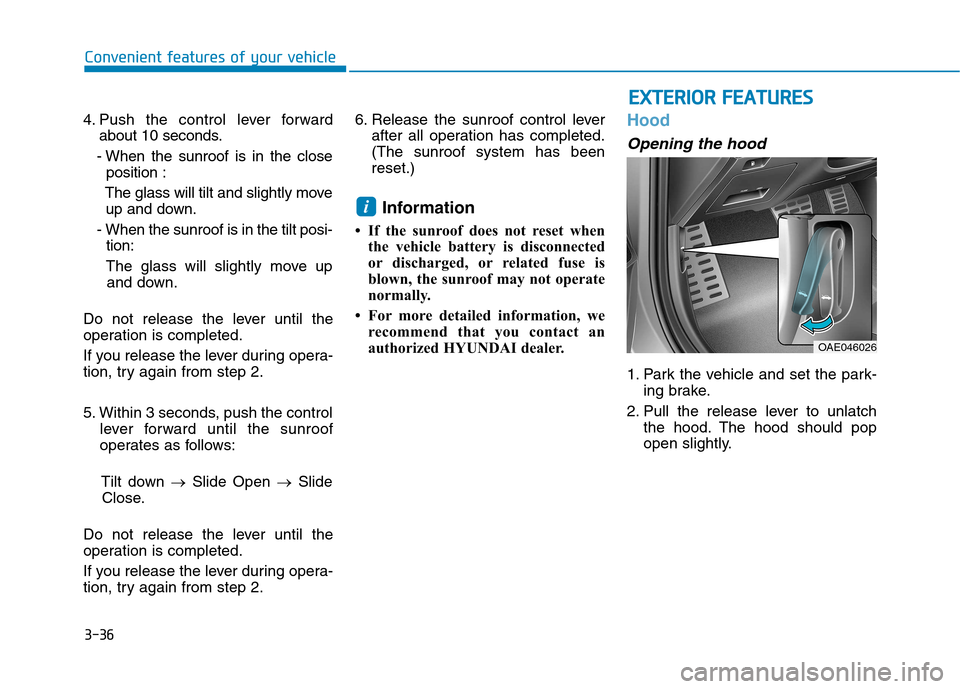
Opening the hood
1. Park the vehicle and set the park- ing brake.
2. Pull the release lever to unlatch the hood. The hood should pop
open slightly.
i
OAE046026
Page 177 of 553
3-75
Convenient features of your vehicle
3
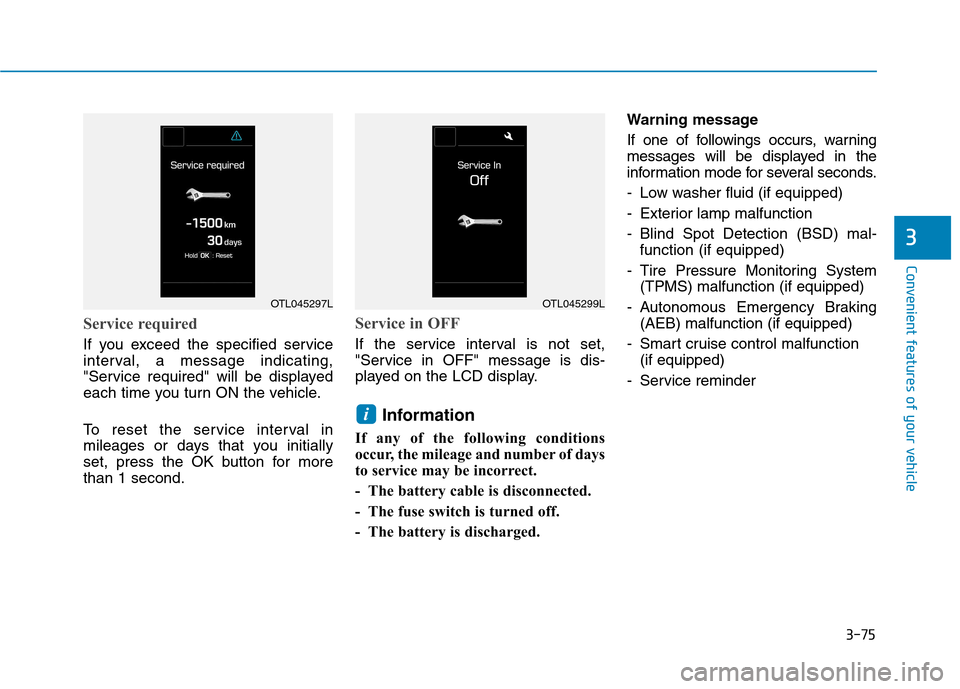
Service required
If you exceed the specified service
interval, a message indicating,
"Service required" will be displayed
each time you turn ON the vehicle.
To reset the service interval in
mileages or days that you initially
set, press the OK button for morethan 1 second.
Service in OFF
If the service interval is not set,
"Service in OFF" message is dis-
played on the LCD display.Information
If any of the following conditions
occur, the mileage and number of days
to service may be incorrect.
- The battery cable is disconnected.
- The fuse switch is turned off.
- The battery is discharged. Warning message
If one of followings occurs, warning
messages will be displayed in the
information mode for several seconds.
- Low washer fluid (if equipped)
- Exterior lamp malfunction
- Blind Spot Detection (BSD) mal-
function (if equipped)
- Tire Pressure Monitoring System (TPMS) malfunction (if equipped)
- Autonomous Emergency Braking (AEB) malfunction (if equipped)
- Smart cruise control malfunction (if equipped)
- Service reminder
i
OTL045297LOTL045299L
Page 180 of 553
3-78
Convenient features of your vehicle
If the service interval menu is acti-
vated, you may adjust the time and
distance.Information
To use the service interval menu, con-
sult an authorized HYUNDAI dealer.
If the service interval is activated and the time and distance is adjusted,
messages are displayed in the fol-
lowing situations each time the vehi-
cle is turned on.
- Service in : Displayed to inform the driver theremaining mileage and days to
service.
- Service required
: Displayed when the mileage anddays to service has been reachedor passed.
Information
If any of the following conditions
occur, the mileage and number of days
to service may be incorrect. - The battery cable is disconnected.
- The fuse switch is turned off.
- The battery is discharged.
7. Other Features
- Off: The average fuel economy will
not reset automatically whenever refueling.
- After Ignition: The average fuel economy will reset automatically
whenever it has passed 4 hours
after turning OFF the engine.
- After Refueling: The average fuel economy will reset automaticallywhen refueling.
For more information, refer to
"Trip Computer" in this chapter.
To select the fuel economy unit. (km/L, L/100, MPG)
To select the temperature unit. (°C,°F)
To select the tire pressure unit.
(psi, kPa, bar)
To select language.
8. Reset
You can reset the menus in the User
Settings Mode. All menus in the User
Settings Mode are initialized, except
language and service interval.
i
i
Page 187 of 553
3-85
Convenient features of your vehicle
3
If the service interval is activated and the time and distance is adjusted,
messages are displayed in the fol-
lowing situations each time the vehi-
cle is turned on.
- Service in: Displayed to inform the driver theremaining mileage and days to
service.
- Service required : Displayed when the mileage anddays to service has been reachedor passed.
Information
If any of the following conditions
occur, the mileage and number of days
to service may be incorrect.
- The battery cable is disconnected.
- The fuse switch is turned off.
- The battery is discharged. 7. Other Features
- Off: The average fuel economy will
not reset automatically whenever refueling.
- After Ignition: The average fuel economy will reset automatically
whenever it has passed 4 hours
after turning OFF the engine.
- After Refueling: The average fuel economy will reset automaticallywhen refueling.
For more information, refer to
"Trip Computer" in this chapter.
To select the fuel economy unit.(km/L, L/100, MPG)
To select the temperature unit.
(°C,°F)
To select the tire pressure unit.
(psi, kPa, bar)
To select language. 8. Reset
You can reset the menus in the User
Settings Mode. All menus in the User
Settings Mode are initialized, except
language and service interval.
i
Page 188 of 553
3-86
Convenient features of your vehicleT
T RR IIPP CC OO MM PPUU TTEERR
The trip computer is a microcomput-
er-controlled driver information sys-
tem that displays information related
to driving.
Information
Some driving information stored in the
trip computer (for example Average
Vehicle Speed) resets if the battery is
disconnected.Trip modes
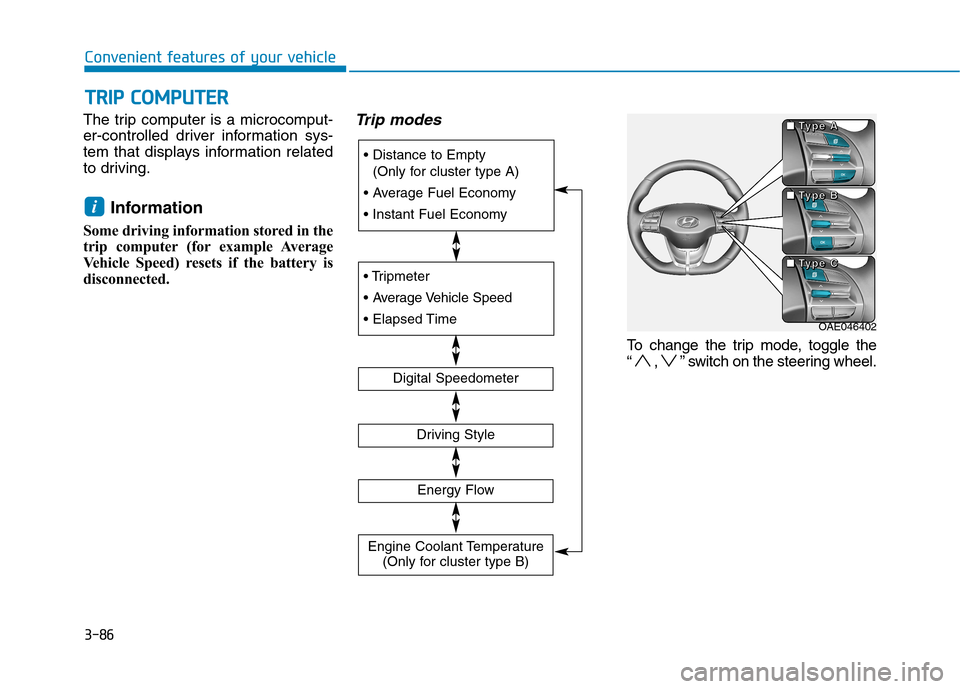
To change the trip mode, toggle the
“ , ” switch on the steering wheel.
i
(Only for cluster type A)
Digital Speedometer
Driving Style
Energy Flow
Engine Coolant Temperature (Only for cluster type B)
OAE046402
■
■■■TTTTyyyyppppeeee AAAA
■■■■TTTTyyyyppppeeee BBBB
■■■■TTTTyyyyppppeeee CCCC
Page 189 of 553
3-87
Convenient features of your vehicle
3
Distance to empty/Average fuel economy/
Instant fuel economy
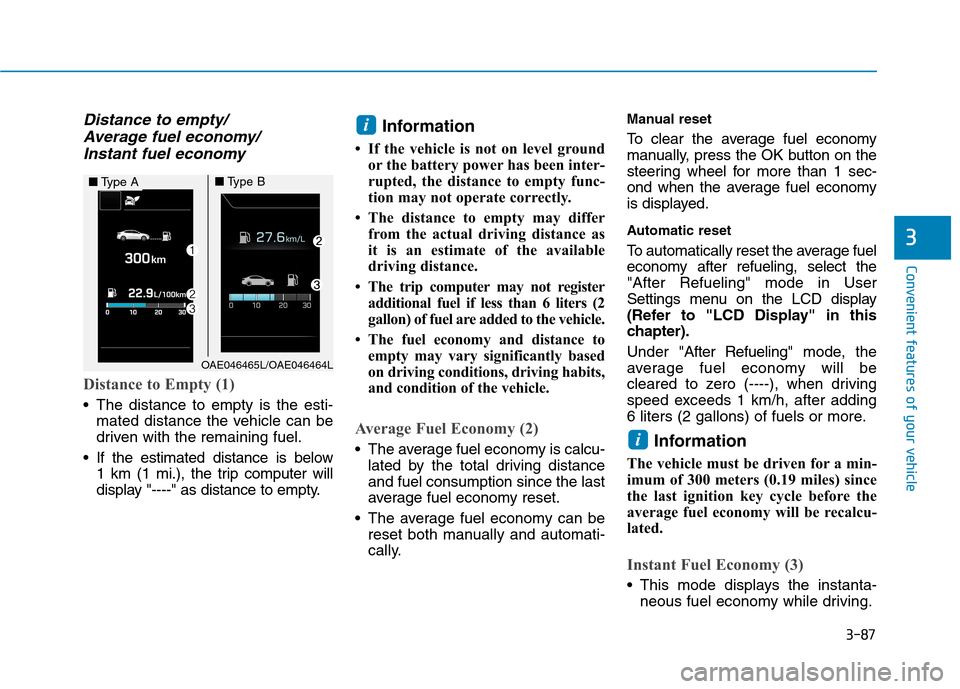
Distance to Empty (1)
The distance to empty is the esti- mated distance the vehicle can be
driven with the remaining fuel.
If the estimated distance is below 1 km (1 mi.), the trip computer will
display "----" as distance to empty. Information
If the vehicle is not on level ground or the battery power has been inter-
rupted, the distance to empty func-
tion may not operate correctly.
The distance to empty may differ from the actual driving distance as
it is an estimate of the available
driving distance.
The trip computer may not register additional fuel if less than 6 liters (2
gallon) of fuel are added to the vehicle.
The fuel economy and distance to empty may vary significantly based
on driving conditions, driving habits,
and condition of the vehicle.
Average Fuel Economy (2)
The average fuel economy is calcu-lated by the total driving distance and fuel consumption since the last
average fuel economy reset.
The average fuel economy can be reset both manually and automati-
cally. Manual reset
To clear the average fuel economy
manually, press the OK button on the
steering wheel for more than 1 sec-
ond when the average fuel economy
is displayed.
Automatic reset
To automatically reset the average fuel
economy after refueling, select the"After Refueling" mode in User
Settings menu on the LCD display
(Refer to "LCD Display" in this
chapter). Under "
After Refueling" mode, the
average fuel economy will be
cleared to zero (----), when driving
speed exceeds 1 km/h, after adding
6 liters (2 gallons) of fuels or more.
Information
The vehicle must be driven for a min-
imum of 300 meters (0.19 miles) since
the last ignition key cycle before the
average fuel economy will be recalcu-
lated.
Instant Fuel Economy (3)
This mode displays the instanta- neous fuel economy while driving.
i
i
OAE046465L/OAE046464L
■Type A■Type B
Page 220 of 553
3-118
Convenient features of your vehicle
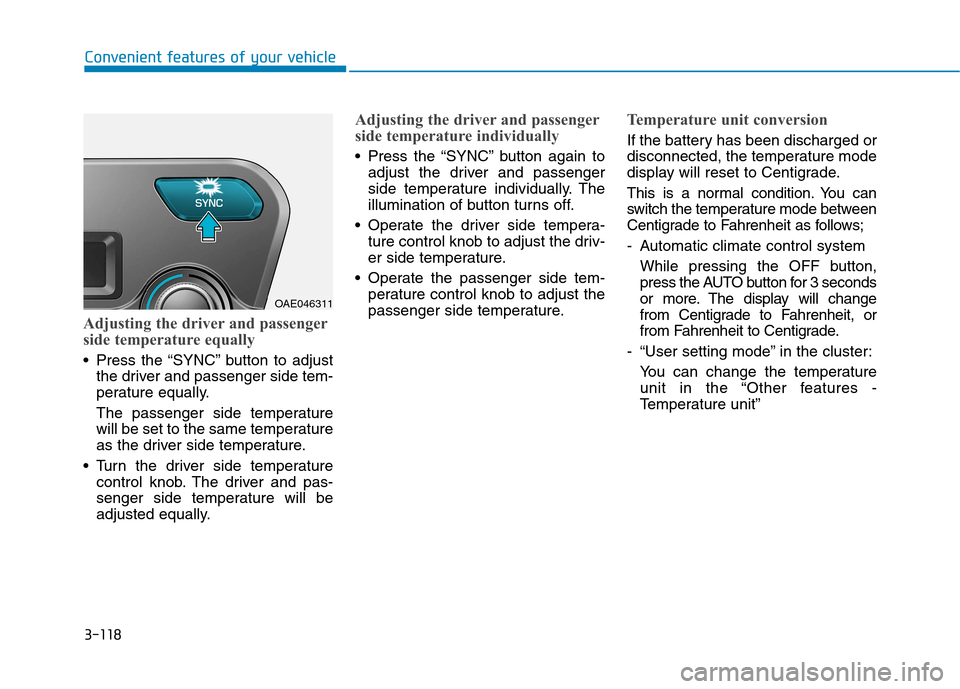
Adjusting the driver and passenger
side temperature equally
Press the “SYNC” button to adjustthe driver and passenger side tem-
perature equally.
The passenger side temperature
will be set to the same temperature
as the driver side temperature.
Turn the driver side temperature control knob. The driver and pas-
senger side temperature will be
adjusted equally.
Adjusting the driver and passenger
side temperature individually
Press the “SYNC” button again toadjust the driver and passenger
side temperature individually. The
illumination of button turns off.
Operate the driver side tempera- ture control knob to adjust the driv-
er side temperature.
Operate the passenger side tem- perature control knob to adjust the
passenger side temperature.
Temperature unit conversion
If the battery has been discharged or
disconnected, the temperature mode
display will reset to Centigrade.
This is a normal condition. You can
switch the temperature mode between
Centigrade to Fahrenheit as follows;
- Automatic climate control system
While pressing the OFF button,
press the AUTO button for 3 seconds
or more. The display will change
from Centigrade to Fahrenheit, or
from Fahrenheit to Centigrade.
- “User setting mode” in the cluster: You can change the temperature
unit in the “Other features -
Temperature unit”
OAE046311
Page 229 of 553
3-127
Convenient features of your vehicle
3
If the air-conditioning, outside (fresh)
air position and higher fan speed are
not selected automatically, adjust the
corresponding button or knob manu-
ally.
If the position is selected, lower
fan speed is controlled to higher fanspeed.To defrost outside windshield
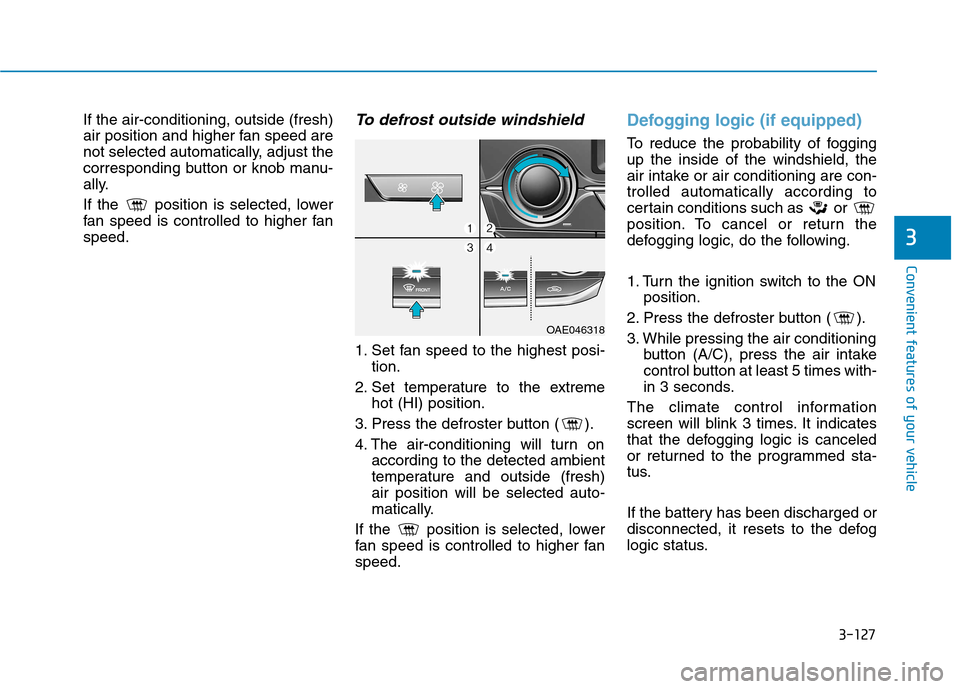
1. Set fan speed to the highest posi-tion.
2. Set temperature to the extreme hot (HI) position.
3. Press the defroster button ( ).
4. The air-conditioning will turn on according to the detected ambient
temperature and outside (fresh)air position will be selected auto-
matically.
If the position is selected, lower
fan speed is controlled to higher fanspeed.
Defogging logic (if equipped)
To reduce the probability of fogging up the inside of the windshield, the
air intake or air conditioning are con-trolled automatically according to
certain conditions such as or
position. To cancel or return the
defogging logic, do the following.
1. Turn the ignition switch to the ON position.
2. Press the defroster button ( ).
3. While pressing the air conditioning button (A/C), press the air intake
control button at least 5 times with-
in 3 seconds.
The climate control information
screen will blink 3 times. It indicates
that the defogging logic is canceled
or returned to the programmed sta-
tus.
If the battery has been discharged or
disconnected, it resets to the defog
logic status.
OAE046318
Page 257 of 553
4-16
Multimedia System
Information on status icons
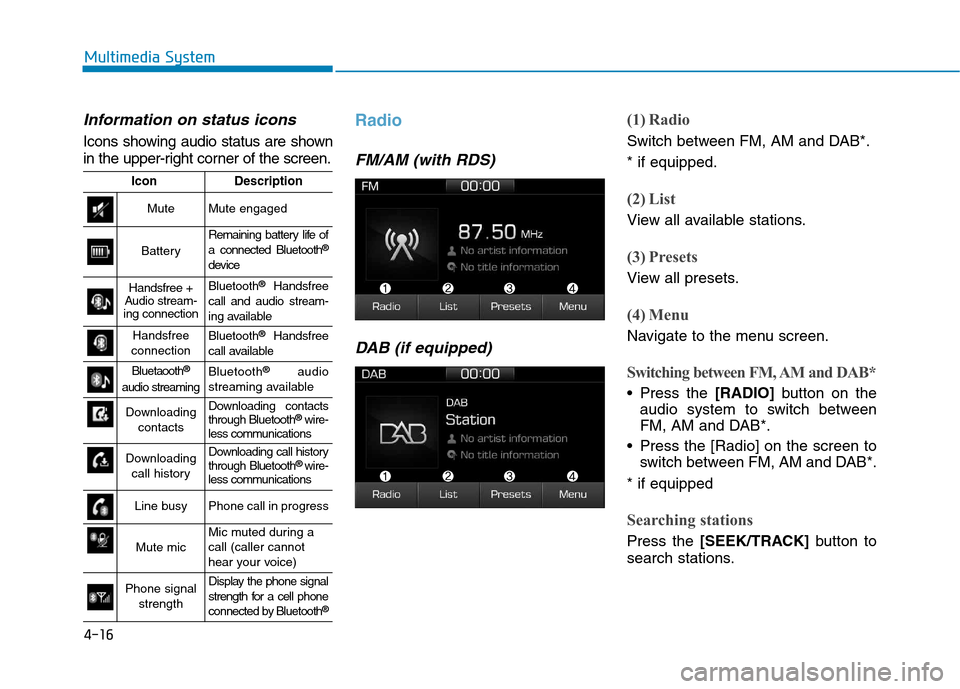
Icons showing audio status are shown
in the upper-right corner of the screen.
Radio
FM/AM (with RDS)DAB (if equipped)
(1) Radio
Switch between FM, AM and DAB*. * if equipped.
(2) List
View all available stations.
(3) Presets
View all presets.
(4) Menu
Navigate to the menu screen.
Switching between FM, AM and DAB*
Press the [RADIO]button on the
audio system to switch between
FM, AM and DAB*.
Press the [Radio] on the screen to switch between FM, AM and DAB*.
* if equipped
Searching stations
Press the [SEEK/TRACK] button to
search stations.
IconDescription
MuteMute engaged
Battery
Remaining battery life of a connected Bluetooth ®
device
Handsfree +
Audio stream-
ing connectionBluetooth ®
Handsfree
call and audio stream-
ing available
Handsfree
connectionBluetooth ®
Handsfree
call available
Bluetaooth ®
audio streamingBluetooth ®
audio
streaming available
Downloading contactsDownloading contacts through Bluetooth ®
wire-
less communications
Downloading
call historyDownloading call history through Bluetooth ®
wire-
less communications
Line busyPhone call in progress
Mute micMic muted during a call (caller cannot
hear your voice)
Phone signal
strengthDisplay the phone signal
strength for a cell phone
connected by Bluetooth ®