ESP HYUNDAI IX35 2016 Owner's Manual
[x] Cancel search | Manufacturer: HYUNDAI, Model Year: 2016, Model line: IX35, Model: HYUNDAI IX35 2016Pages: 550, PDF Size: 9.92 MB
Page 171 of 550
Features of your vehicle86
4
Self-diagnosis When the front/rear parking assist sys-
tem has a malfunction, if you operate the
system, the warning sound sounds 3
times. In this time, the indicator on switch
will blink and the warning on the cluster
will blink. However, the warning regarding
object will not sound.
In this time, we recommend that the sys-
tem be checked by a HYUNDAI autho-
rised repairer.
WARNING
Pay close attention when the vehi-
cle is driven close to objects on the
road, particularly pedestrians, and
especially children. Be aware that
some objects may not be detected
by the sensors, due to the object's
distance, size or material, all of
which can limit the effectiveness of
the sensor. Always perform a visual
inspection to make sure the vehicle
is clear of all obstructions before
moving the vehicle in any direction.
CAUTION
This system can only sense
objects within the range and loca-tion of the sensors;
It can not detect objects in otherareas where sensors are notinstalled. Also, small or slimobjects, such as poles or objects located between sensors may notbe detected by the sensors.
Always visually check front orbehind the vehicle when gettingforward or backing up.
Be sure to inform any drivers of the vehicle that may be unfamiliarwith the system regarding thesystems capabilities and limita-tions.
WARNING
Your new vehicle warranty does not
cover any accidents or damage to
the vehicle or injuries to its occu-
pants related to a parking assist
system. Always drive safely and
cautiously.
EL(FL) UK 4A.QXP 2/9/2015 9:05 PM Page 86
Page 183 of 550
Features of your vehicle98
4
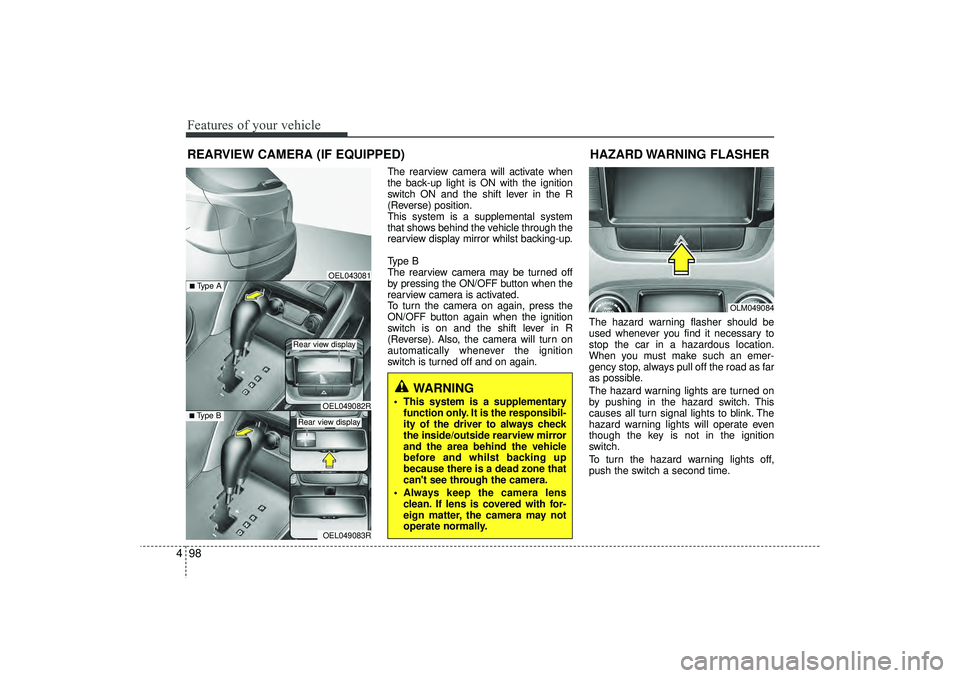
The rearview camera will activate when
the back-up light is ON with the ignition
switch ON and the shift lever in the R
(Reverse) position.
This system is a supplemental system
that shows behind the vehicle through the
rearview display mirror whilst backing-up.
Type B
The rearview camera may be turned off
by pressing the ON/OFF button when the
rearview camera is activated.
To turn the camera on again, press the
ON/OFF button again when the ignition
switch is on and the shift lever in R
(Reverse). Also, the camera will turn on
automatically whenever the ignition
switch is turned off and on again. The hazard warning flasher should be
used whenever you find it necessary to
stop the car in a hazardous location.
When you must make such an emer-
gency stop, always pull off the road as far
as possible.
The hazard warning lights are turned on
by pushing in the hazard switch. This
causes all turn signal lights to blink. The
hazard warning lights will operate even
though the key is not in the ignition
switch.
To turn the hazard warning lights off,
push the switch a second time.
REARVIEW CAMERA (IF EQUIPPED)
WARNING
This system is a supplementary
function only. It is the responsibil-
ity of the driver to always check
the inside/outside rearview mirror
and the area behind the vehicle
before and whilst backing up
because there is a dead zone that
can't see through the camera.
Always keep the camera lens clean. If lens is covered with for-
eign matter, the camera may not
operate normally.
OEL043081
OLM049084
HAZARD WARNING FLASHER
OEL049083R
■Type B
OEL049082R
■Type A
Rear view display Rear view display
EL(FL) UK 4A.QXP 2/9/2015 9:06 PM Page 98
Page 189 of 550
Features of your vehicle104
4Daytime running light
(if equipped)Daytime Running Lights (DRL) can make
it easier for others to see the front of your
vehicle during the day. DRL can be help-
ful in many different driving conditions,
and it is especially helpful after dawn and
before sunset.
The DRL system will make the head-
lights turn OFF when:
1. The parklight switch is ON.
2. Engine stops.
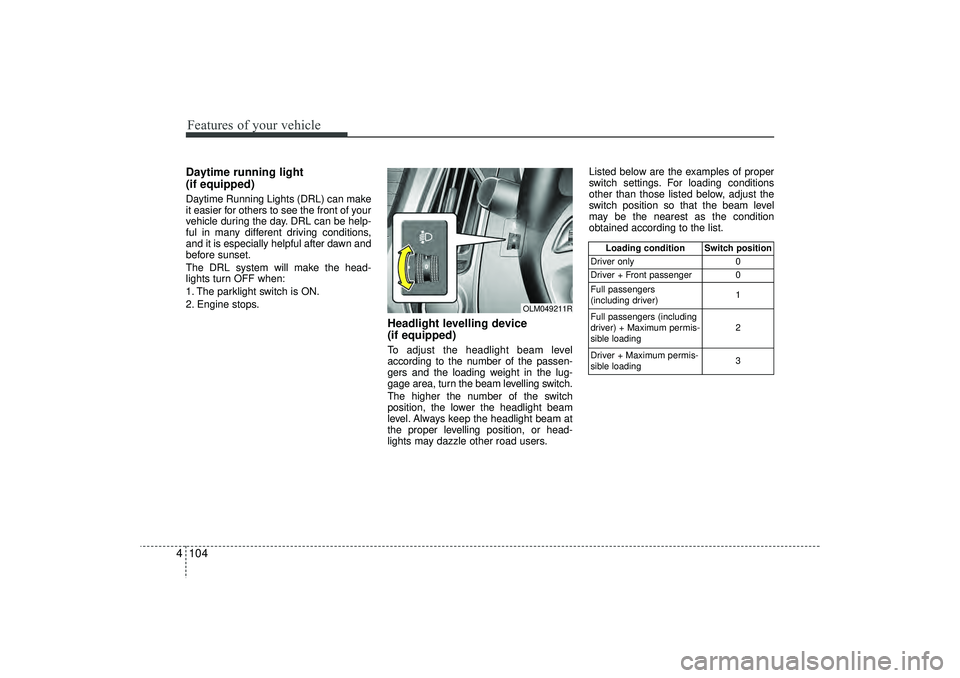
Headlight levelling device
(if equipped)To adjust the headlight beam level
according to the number of the passen-
gers and the loading weight in the lug-
gage area, turn the beam levelling switch.
The higher the number of the switch
position, the lower the headlight beam
level. Always keep the headlight beam at
the proper levelling position, or head-
lights may dazzle other road users. Listed below are the examples of proper
switch settings. For loading conditions
other than those listed below, adjust the
switch position so that the beam level
may be the nearest as the condition
obtained according to the list.
Loading condition Switch position
Driver only 0
Driver + Front passenger 0
Full passengers
(including driver) 1
Full passengers (including
driver) + Maximum permis-
sible loading 2
Driver + Maximum permis-
sible loading 3
OLM049211R
EL(FL) UK 4A.QXP 2/9/2015 9:06 PM Page 104
Page 217 of 550
Features of your vehicle132
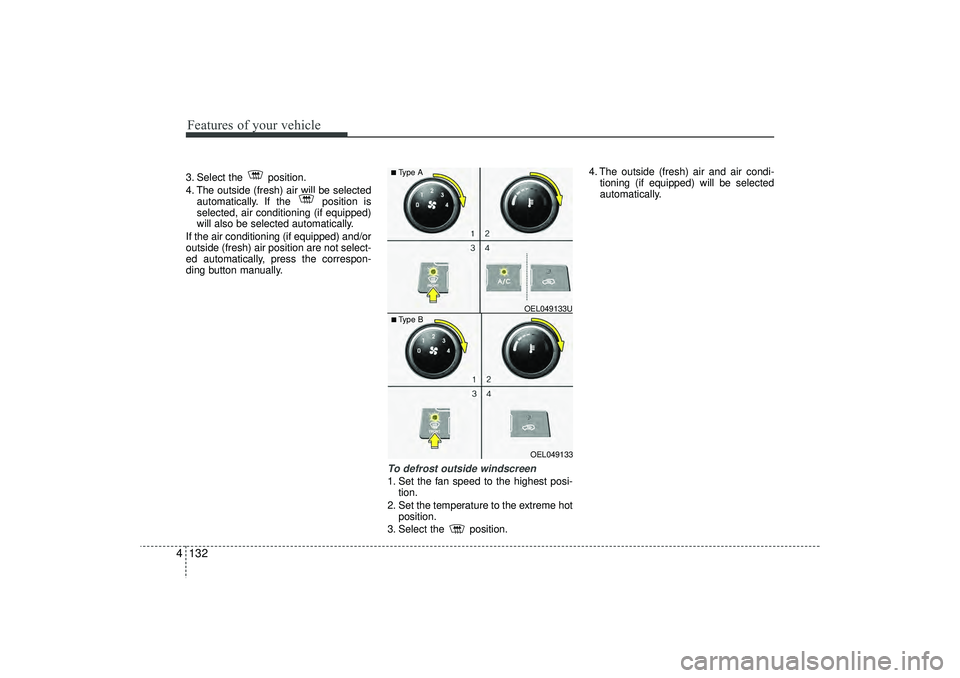
43. Select the position.
4. The outside (fresh) air will be selected
automatically. If the position is
selected, air conditioning (if equipped)
will also be selected automatically.
If the air conditioning (if equipped) and/or
outside (fresh) air position are not select-
ed automatically, press the correspon-
ding button manually.
To defrost outside windscreen 1. Set the fan speed to the highest posi- tion.
2. Set the temperature to the extreme hot position.
3. Select the position. 4. The outside (fresh) air and air condi-
tioning (if equipped) will be selected
automatically.
OEL049133
■Type B OEL049133U■Type A
EL(FL) UK 4A.QXP 2/9/2015 9:08 PM Page 132
Page 218 of 550
4 133
Features of your vehicle
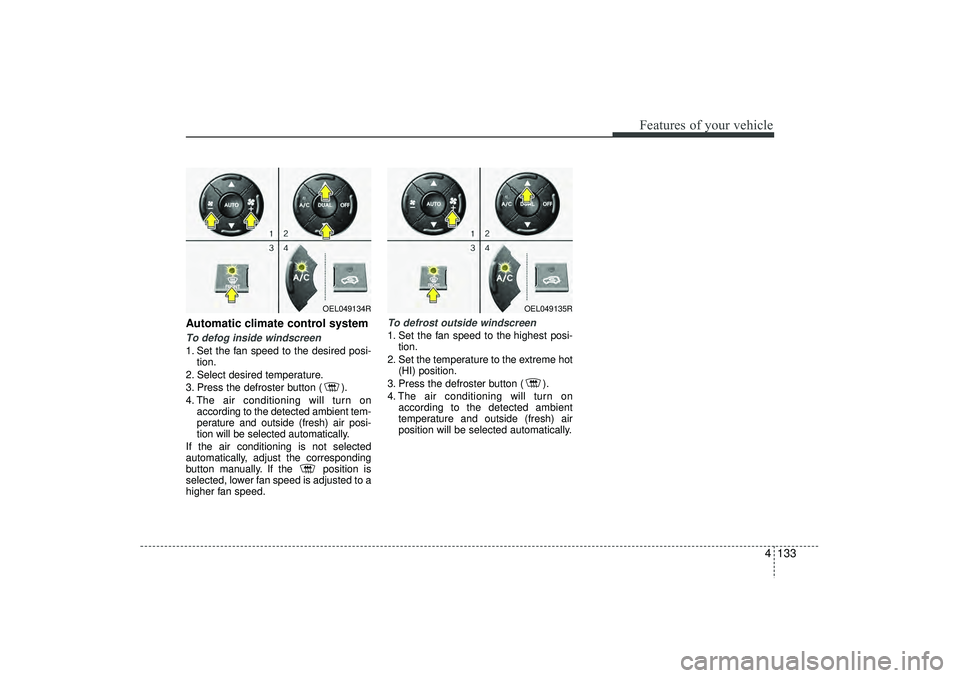
Automatic climate control systemTo defog inside windscreen 1. Set the fan speed to the desired posi-tion.
2. Select desired temperature.
3. Press the defroster button ( ).
4. The air conditioning will turn on according to the detected ambient tem-
perature and outside (fresh) air posi-
tion will be selected automatically.
If the air conditioning is not selected
automatically, adjust the corresponding
button manually. If the position is
selected, lower fan speed is adjusted to a
higher fan speed.
To defrost outside windscreen 1. Set the fan speed to the highest posi- tion.
2. Set the temperature to the extreme hot (HI) position.
3. Press the defroster button ( ).
4. The air conditioning will turn on according to the detected ambient
temperature and outside (fresh) air
position will be selected automatically.
OEL049134R
OEL049135R
EL(FL) UK 4A.QXP 2/9/2015 9:08 PM Page 133
Page 229 of 550
Features of your vehicle144
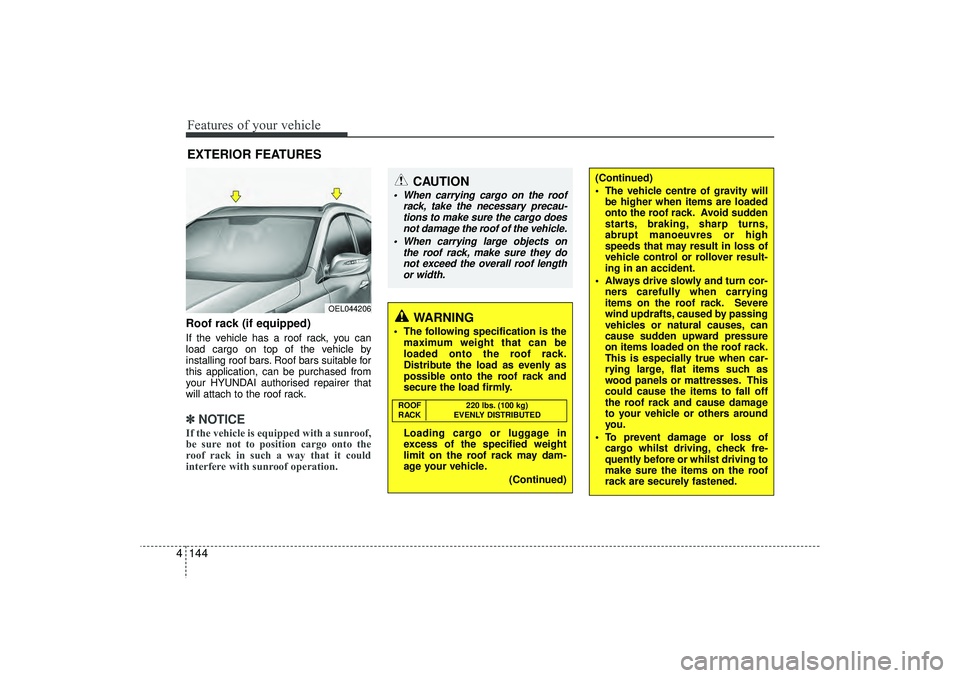
4Roof rack (if equipped)If the vehicle has a roof rack, you can
load cargo on top of the vehicle by
installing roof bars. Roof bars suitable for
this application, can be purchased from
your HYUNDAI authorised repairer that
will attach to the roof rack.✽ ✽
NOTICEIf the vehicle is equipped with a sunroof,
be sure not to position cargo onto the
roof rack in such a way that it could
interfere with sunroof operation.EXTERIOR FEATURES
(Continued)
The vehicle centre of gravity will
be higher when items are loaded
onto the roof rack. Avoid sudden
starts, braking, sharp turns,
abrupt manoeuvres or high
speeds that may result in loss of
vehicle control or rollover result-
ing in an accident.
Always drive slowly and turn cor- ners carefully when carrying
items on the roof rack. Severe
wind updrafts, caused by passing
vehicles or natural causes, can
cause sudden upward pressure
on items loaded on the roof rack.
This is especially true when car-
rying large, flat items such as
wood panels or mattresses. This
could cause the items to fall off
the roof rack and cause damage
to your vehicle or others around
you.
To prevent damage or loss of cargo whilst driving, check fre-
quently before or whilst driving to
make sure the items on the roof
rack are securely fastened.
CAUTION
When carrying cargo on the roof
rack, take the necessary precau-tions to make sure the cargo does not damage the roof of the vehicle.
When carrying large objects on the roof rack, make sure they donot exceed the overall roof lengthor width.
WARNING
The following specification is the maximum weight that can be
loaded onto the roof rack.
Distribute the load as evenly as
possible onto the roof rack and
secure the load firmly.
Loading cargo or luggage in
excess of the specified weight
limit on the roof rack may dam-
age your vehicle.
(Continued)ROOF220 lbs. (100 kg)
RACK EVENLY DISTRIBUTED
OEL044206
EL(FL) UK 4A.QXP 2/9/2015 9:09 PM Page 144
Page 235 of 550
Features of your vehicle150
4
WARNING
Do not stare at the screen whilst
driving. Staring at the screen for
prolonged periods of time could
lead to traffic accidents.
Do not disassemble, assemble, or modify the audio system. Such
acts could result in accidents,
fire, or electric shock.
Using the phone whilst driving may lead to a lack of attention of
traffic conditions and increase
the likelihood of accidents. Use
the phone feature after parking
the vehicle.
Heed caution not to spill water or introduce foreign objects into the
device. Such acts could lead to
smoke, fire, or product malfunc-
tion.
(Continued)
(Continued)
Driving whilst distracted canresult in a loss of vehicle control
that may lead to an accident,
severe personal injury, and death.
The driver’s primary responsibili-
ty is in the safe and legal opera-
tion of a vehicle, and use of any
handheld devices, other equip-
ment, or vehicle systems which
take the driver’s eyes, attention
and focus away from the safe
operation of a vehicle or which
are not permissible by law should
never be used during operation
of the vehicle.
(Continued)
Please refrain from use if thescreen is blank or no sound can
be heard as these signs may indi-
cate product malfunction.
Continued use in such conditions
could lead to accidents(fires,
electric shock) or product mal-
functions.
Do not touch the antenna during thunder or lightening as such
acts may lead to lightning
induced electric shock.
Do not stop or park in parking- restricted areas to operate the
product. Such acts could lead to
traffic accidents.
Use the system with the vehicle ignition turned on. Prolonged use
with the ignition turned off could
result in battery discharge.
(Continued)
EL(FL) UK 4B AUDIO.QXP 3/13/2015 4:19 PM Page 150
Page 254 of 550
4 169
Features of your vehicle
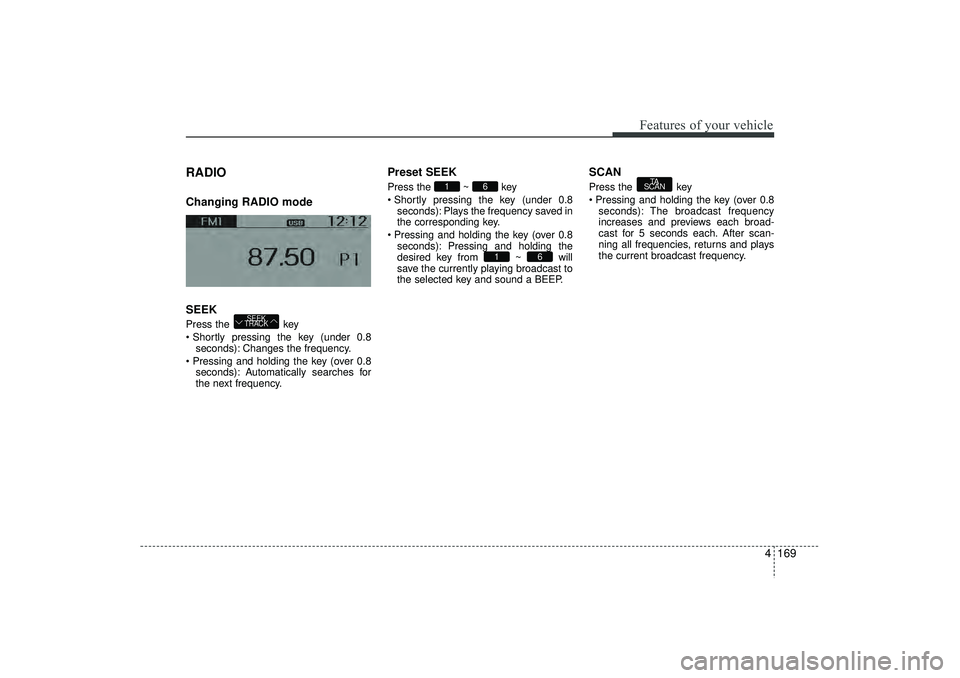
RADIO Changing RADIO mode
SEEKPress the key
Shortly pressing the key (under 0.8seconds): Changes the frequency.
Pressing and holding the key (over 0.8 seconds): Automatically searches for
the next frequency.
Preset SEEKPress the ~ key
Shortly pressing the key (under 0.8seconds): Plays the frequency saved in
the corresponding key.
Pressing and holding the key (over 0.8 seconds): Pressing and holding the
desired key from ~ will
save the currently playing broadcast to
the selected key and sound a BEEP.
SCANPress the key
Pressing and holding the key (over 0.8seconds): The broadcast frequency
increases and previews each broad-
cast for 5 seconds each. After scan-
ning all frequencies, returns and plays
the current broadcast frequency.
TA
SCAN
6
1
6
1
SEEK
TRACK
EL(FL) UK 4B AUDIO.QXP 3/13/2015 4:19 PM Page 169
Page 263 of 550
Features of your vehicle178
4Bluetooth
®Wireless
Technology AUDIO
(if equipped)
What is
Bluetooth
®Wireless
Technology?
Bluetooth
®Wireless Technology allows
devices to be connected in a short dis-
tance, including hands-free devices,
stereo headsets, wireless remote con-
trollers, etc. For more information, visit
the
Bluetooth
®
Wireless Technology
website at
www
.Bluetooth.com
Before using
Bluetooth
®
Wireless
Technology audio features
Bluetooth
®Wireless Technology audio
may not be supported depending on
the compatibility of your
Bluetooth
®
Wireless Technology mobile phone.
In order to use
Bluetooth
®
Wireless
Technology audio, you must first pair
and connect the
Bluetooth
®Wireless
Technology mobile phone. The
Bluetooth
®
word mark and logos
are registered trademarks owned by
Bluetooth
®
SIG, Inc. and any use of
such marks is under license. Other
trademarks and trade names are those
of their respective owners. A
Bluetooth
®
enabled cell phone is required to useBluetooth
®Wireless Technology
Bluetooth
®Wireless Technology audio
can be used only when the [Audio
Streaming] of Phone is turned On.
❈ Setting
Bluetooth
®Wireless Technology
Audio Streaming : Press the
key Select [Phone] through the tune
knob Select [Audio Streaming] through
the TUNE knob Set /
Starting
Bluetooth
®Wireless
Technology Audio
Press the key to change the
mode in order of CD ➟ USB ➟ AUX ➟
My Music ➟ BT Audio.
If BT Audio is selected,
Bluetooth
®
Wireless Technology audio will start
playing.
❈ Audio may not automatically start play-
ing in some mobile phones.Using the
Bluetooth
®
Wireless
Technology
audio features
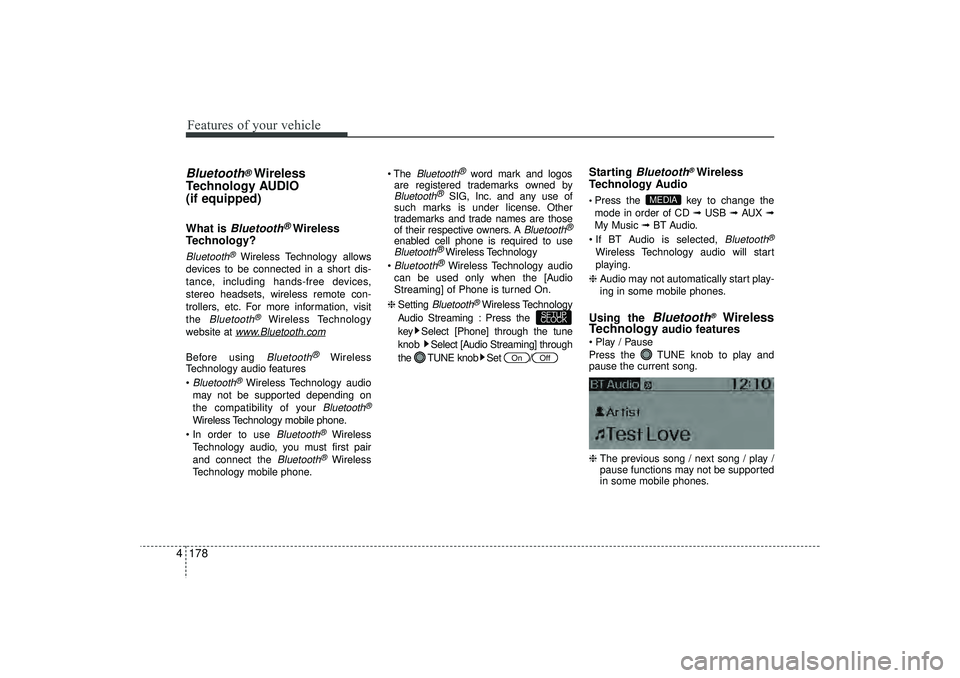
Play / Pause
Press the TUNE knob to play and
pause the current song.
❈ The previous song / next song / play /
pause functions may not be supported
in some mobile phones.
MEDIA
Off
On
SETUP
CLOCK
EL(FL) UK 4B AUDIO.QXP 3/13/2015 4:19 PM Page 178
Page 271 of 550
Features of your vehicle186
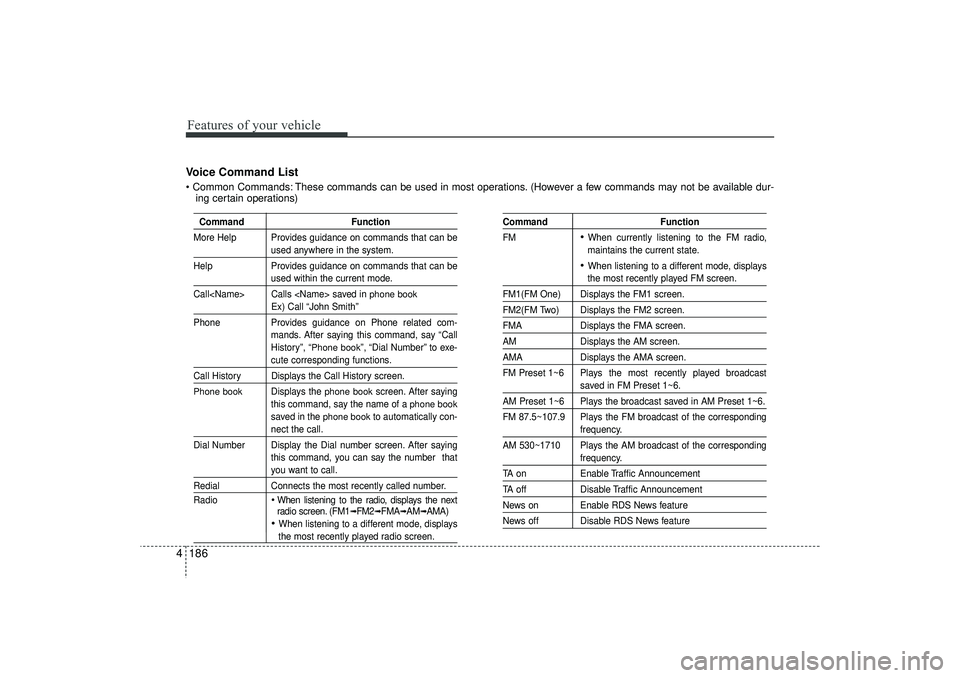
4Voice Command List Common Commands: These commands can be used in most operations. (However a few commands may not be available dur-
ing certain operations)
Command Function
More Help Provides guidance on commands that can be
used anywhere in the system.
Help Provides guidance on commands that can beused within the current mode.
Call
phone book
Ex) Call “John Smith”
Phone Provides guidance on Phone related com-
mands. After saying this command, say “Call
History”, “
Phone book
”, “Dial Number” to exe-
cute corresponding functions.
Call History Displays the Call History screen.Phone book
Displays the
phone book
screen. After saying
this command, say the name of a
phone book
saved in the
phone book
to automatically con-
nect the call.
Dial Number Display the Dial number screen. After saying this command, you can say the number thatyou want to call.
RedialConnects the most recently called number.
Radio
When listening to the radio, displays the next
radio screen. (FM1
➟FM2
➟FMA
➟AM
➟AMA)
When listening to a different mode, displaysthe most recently played radio screen.
Command Function
FM
When currently listening to the FM radio,
maintains the current state. When listening to a different mode, displaysthe most recently played FM screen.
FM1(FM One) Displays the FM1 screen.FM2(FM Two) Displays the FM2 screen.FMA Displays the FMA screen.AMDisplays the AM screen.AMADisplays the AMA screen.
FM Preset 1~6 Plays the most recently played broadcast
saved in FM Preset 1~6.
AM Preset 1~6 Plays the broadcast saved in AM Preset 1~6.
FM 87.5~107.9 Plays the FM broadcast of the corresponding
frequency.
AM 530~1710 Plays the AM broadcast of the correspondingfrequency.
TA on Enable Traffic AnnouncementTA offDisable Traffic AnnouncementNews on Enable RDS News featureNews off Disable RDS News feature
EL(FL) UK 4B AUDIO.QXP 3/13/2015 4:19 PM Page 186