lights Hyundai Kona 2018 - RHD (UK, Australia) User Guide
[x] Cancel search | Manufacturer: HYUNDAI, Model Year: 2018, Model line: Kona, Model: Hyundai Kona 2018Pages: 497, PDF Size: 11.7 MB
Page 117 of 497
3-39
Convenient features of your vehicle
3
Instrument cluster control
Instrument panel illumination
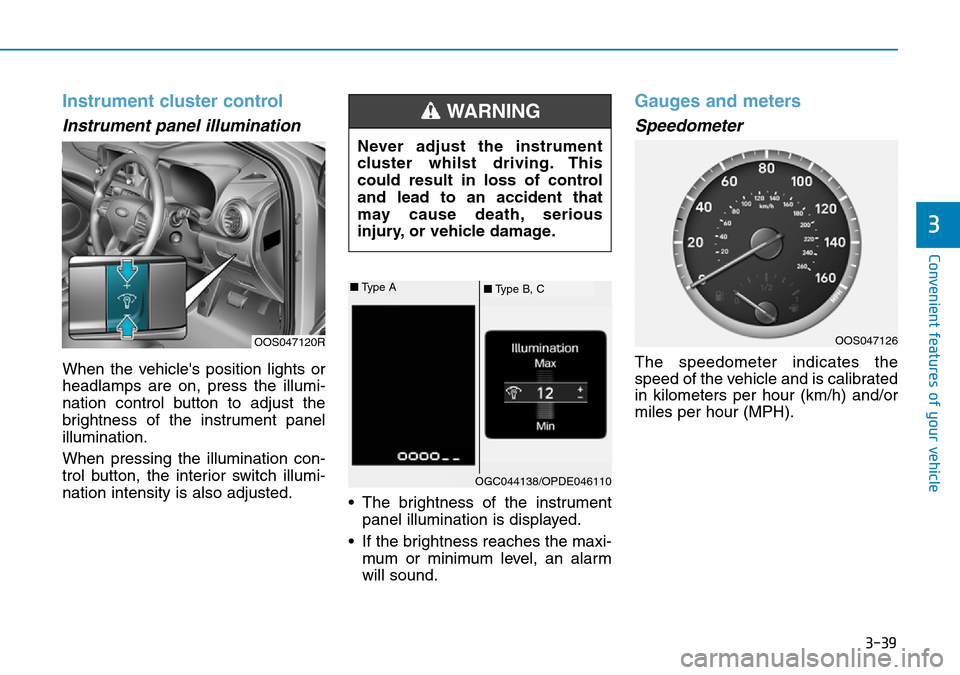
When the vehicle's position lights or
headlamps are on, press the illumi-
nation control button to adjust the
brightness of the instrument panel
illumination.
When pressing the illumination con-
trol button, the interior switch illumi-
nation intensity is also adjusted.• The brightness of the instrument
panel illumination is displayed.
• If the brightness reaches the maxi- mum or minimum level, an alarm
will sound.
Gauges and meters
Speedometer
The speedometer indicates the
speed of the vehicle and is calibrated
in kilometers per hour (km/h) and/or
miles per hour (MPH).
OOS047120R
Never adjust the instrument
cluster whilst driving. This
could result in loss of control
and lead to an accident that
may cause death, serious
injury, or vehicle damage.
WARNING
■ Type B, C
■
Type A
OGC044138/OPDE046110
OOS047126
Page 123 of 497
3-45
Convenient features of your vehicle
3
Warning and indicator lightsInformation
Make sure that all warning lights are
OFF after starting the engine. If any
light is still ON, this indicates a situa-
tion that needs attention.
Air Bag Warning Light
This warning light illuminates:
• When you turn the ignition switchor the Engine Start/Stop button to
the ON position.
- It illuminates for approximately 6seconds and then goes off.
• When there is a malfunction with the SRS.
In this case, we recommend that
you have the vehicle inspected by
a HYUNDAI authorised repairer.
Seat Belt Warning Light
This warning light informs the driver
that the seat belt is not fastened.
For more details, refer to “Seat
Belts” in chapter 2.
Parking Brake & BrakeFluid Warning Light
This warning light illuminates:
• When you set the ignition switch or
the Engine Start/Stop button to the
ON position.
- It illuminates for approximately 3seconds
- It remains on if the parking brake is applied.
• When the parking brake is applied.
• When the brake fluid level in the reservoir is low.
- If the warning light illuminateswith the parking brake released, it
indicates the brake fluid level in
the reservoir is low.
i
Page 125 of 497
3-47
Convenient features of your vehicle
3
Electronic Brake ForceDistribution (EBD)System Warning Light
These two warning lights illuminate
at the same time whilst driving:
• When the ABS and regular brake
system may not work normally.
In this case, we recommend that
you have the vehicle inspected by
a HYUNDAI authorised repairer.
Information - Electronic
Brake Force Distribution
(EBD) System Warning Light
When the ABS Warning Light is on or
both ABS and Parking Brake & Brake
Fluid Warning Lights are on, the
speedometer, odometer, or tripmeter
may not work. Also, the EPS Warning
Light may illuminate and the steering
effort may increase or decrease.
In this case, we recommend you have
the vehicle inspected by a HYUNDAI
authorised repairer as soon as possi-
ble.i
Electronic Brake Force
Distribution (EBD) System
Warning Light
When both ABS and Parking
Brake & Brake Fluid Warning
Lights are on, the brake system
will not work normally and you
may experience an unexpected
and dangerous situation during
sudden braking.
In this case, avoid high speed
driving and abrupt braking.
We recommend you have the
vehicle inspected by a
HYUNDAI authorised repairer
as soon as possible.
WARNING
Page 131 of 497
3-53
Convenient features of your vehicle
3
AUTO STOP IndicatorLight (if equipped)
This indicator light illuminates:
• When the engine enters the Idle
Stop mode of the ISG (Idle Stop and
Go) system.
This indicator light blinks:
• When the automatic starting occurs,the AUTO STOP indicator on the
cluster will blink for 5 seconds.
For more details, refer to the “ISG
(Idle Stop and Go) system” in chap-
ter 5.
Information
When the engine automatically starts
by the ISG system, some warning
lights(ABS, ESC, ESC OFF, EPS or
Parking brake warning light) may
turn on for a few seconds.
This happens because of low battery
voltage. It does not mean the system
has malfunctioned.
Immobiliser Indicator Light (without smart key)(if equipped)
This indicator light illuminates:
• When the vehicle detects the
immobiliser in the key with the igni-
tion switch in the ON position.
- At this time, you can start theengine.
- The indicator light goes off after starting the engine.
This indicator light blinks:
• When there is a malfunction with the immobiliser system.
In this case, we recommend that
you have the vehicle inspected by
a HYUNDAI authorised repairer.
Immobiliser IndicatorLight (with smart key) (if equipped)
This indicator light illuminates for
up to 30 seconds:
• When the vehicle detects the
smart key in the vehicle with the
Engine Start/Stop button in the
ACC or ON position.
- At this time, you can start theengine.
- The indicator light goes off after starting the engine.
This indicator light blinks for a few
seconds:
• When the smart key is not in the vehicle.
- At this time, you cannot start theengine.i
Page 132 of 497
3-54
Convenient features of your vehicle
This indicator light illuminates for
2 seconds and goes off:
• If the smart key is in the vehicleand the Engine Start/Stop button is
ON, but the vehicle cannot detect
the smart key.
In this case, we recommend that
you have the vehicle inspected by
a HYUNDAI authorised repairer.
This indicator light blinks:
• When the battery voltage of thesmart key is low.
- At this time, you cannot start theengine. However, you can start
the engine if you press the
Engine Start/Stop button with the
smart key. (For more details,
refer to "Starting the Engine"
in chapter 5).
• When there is a malfunction with the immobiliser system.
In this case, we recommend that
you have the vehicle inspected by
a HYUNDAI authorised repairer.
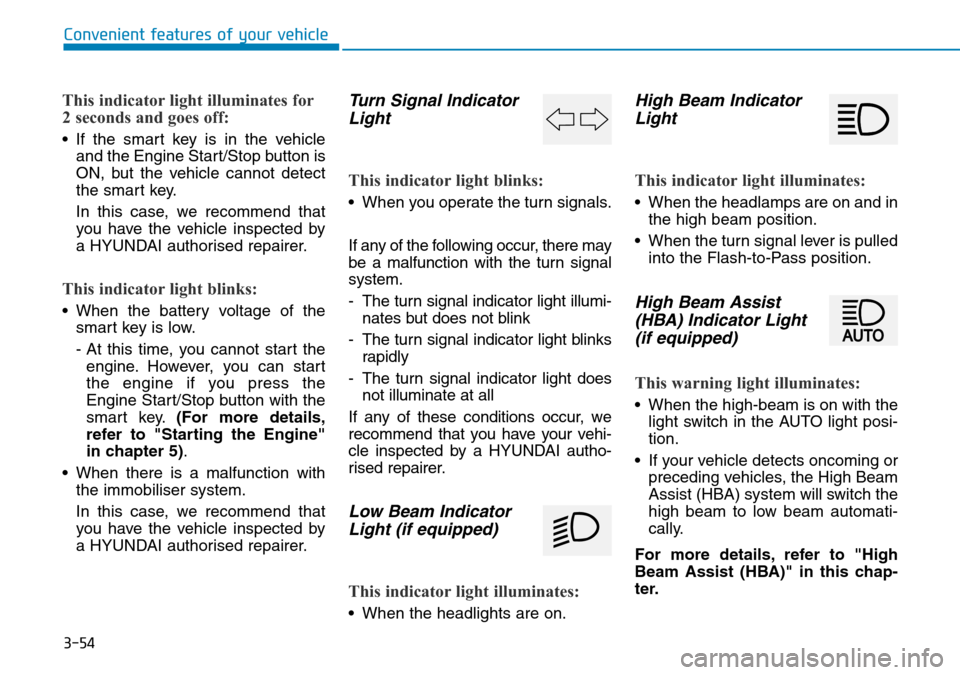
Turn Signal IndicatorLight
This indicator light blinks:
• When you operate the turn signals.
If any of the following occur, there may
be a malfunction with the turn signal
system.
- The turn signal indicator light illumi-
nates but does not blink
- The turn signal indicator light blinks rapidly
- The turn signal indicator light does not illuminate at all
If any of these conditions occur, we
recommend that you have your vehi-
cle inspected by a HYUNDAI autho-
rised repairer.
Low Beam Indicator Light (if equipped)
This indicator light illuminates:
• When the headlights are on.
High Beam IndicatorLight
This indicator light illuminates:
• When the headlamps are on and in
the high beam position.
• When the turn signal lever is pulled into the Flash-to-Pass position.
High Beam Assist(HBA) Indicator Light(if equipped)
This warning light illuminates:
• When the high-beam is on with the
light switch in the AUTO light posi-
tion.
• If your vehicle detects oncoming or preceding vehicles, the High Beam
Assist (HBA) system will switch the
high beam to low beam automati-
cally.
For more details, refer to "High
Beam Assist (HBA)" in this chap-
ter.
Page 133 of 497
3-55
Convenient features of your vehicle
3
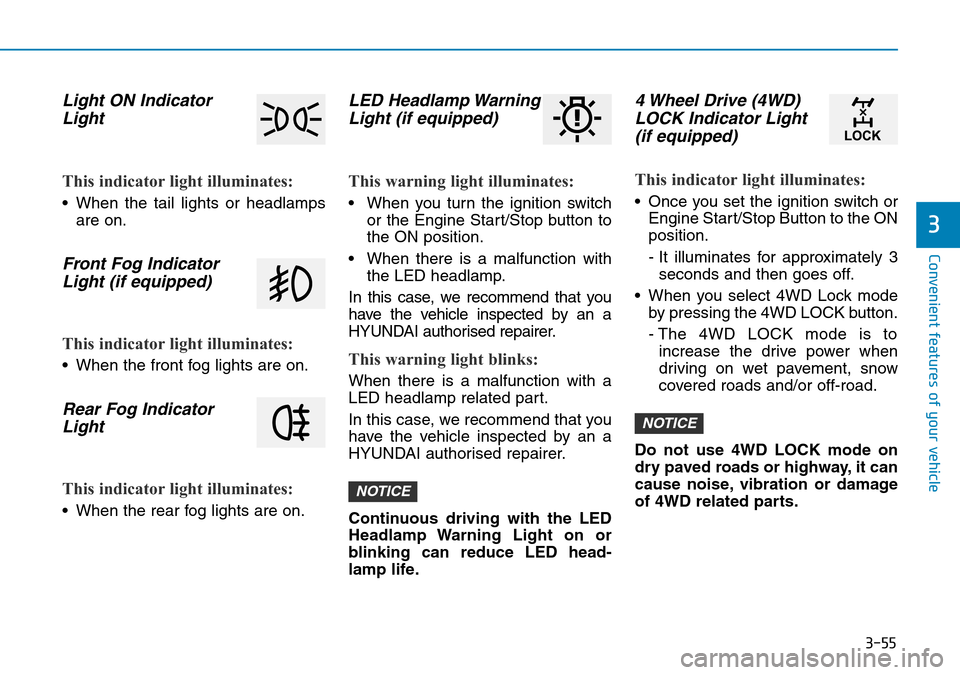
Light ON IndicatorLight
This indicator light illuminates:
• When the tail lights or headlamps
are on.
Front Fog IndicatorLight (if equipped)
This indicator light illuminates:
• When the front fog lights are on.
Rear Fog IndicatorLight
This indicator light illuminates:
• When the rear fog lights are on.
LED Headlamp WarningLight (if equipped)
This warning light illuminates:
• When you turn the ignition switch
or the Engine Start/Stop button to
the ON position.
• When there is a malfunction with the LED headlamp.
In this case, we recommend that you
have the vehicle inspected by an a
HYUNDAI authorised repairer.
This warning light blinks:
When there is a malfunction with a
LED headlamp related part.
In this case, we recommend that you
have the vehicle inspected by an a
HYUNDAI authorised repairer.
Continuous driving with the LED
Headlamp Warning Light on or
blinking can reduce LED head-
lamp life.
4 Wheel Drive (4WD) LOCK Indicator Light(if equipped)
This indicator light illuminates:
• Once you set the ignition switch or
Engine Start/Stop Button to the ON
position.
- It illuminates for approximately 3seconds and then goes off.
• When you select 4WD Lock mode by pressing the 4WD LOCK button.
- The 4WD LOCK mode is toincrease the drive power when
driving on wet pavement, snow
covered roads and/or off-road.
Do not use 4WD LOCK mode on
dry paved roads or highway, it can
cause noise, vibration or damage
of 4WD related parts.
NOTICE
NOTICE
Page 138 of 497
3-60
Convenient features of your vehicle
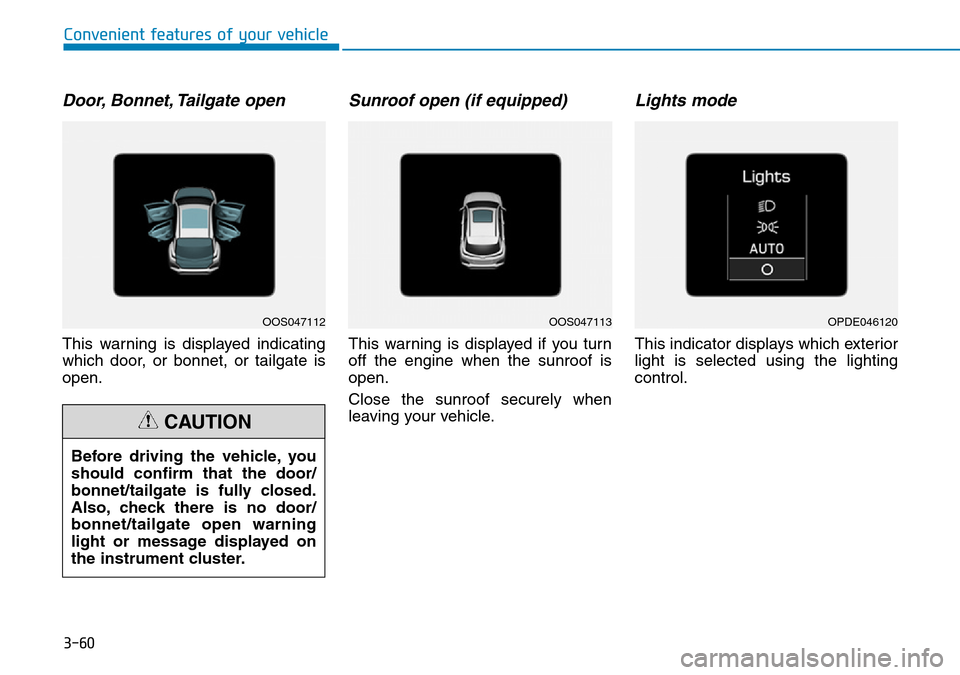
Door, Bonnet, Tailgate open
This warning is displayed indicating
which door, or bonnet, or tailgate is
open.
Sunroof open (if equipped)
This warning is displayed if you turn
off the engine when the sunroof is
open.
Close the sunroof securely when
leaving your vehicle.
Lights mode
This indicator displays which exterior
light is selected using the lighting
control.
Before driving the vehicle, you
should confirm that the door/
bonnet/tailgate is fully closed.
Also, check there is no door/
bonnet/tailgate open warning
light or message displayed on
the instrument cluster.
CAUTION
OOS047112OOS047113OPDE046120
Page 146 of 497
3-68
Convenient features of your vehicle
User settings mode
In this mode, you can change the
settings of the instrument cluster,
doors, lamps, etc.
1. Head-up display (if equipped)
2. Driver assistance
3. Door
4. Lights
5. Sound
6. Convenience
7. Service interval
8. Other features
9. Languages
10. Reset
The information provided may dif-
fer depending on which functions
are applicable to your vehicle.
1. Head up display (if equipped)
• Display height- Adjust the height of the HUDimage on the display.
• Rotation - Adjust the angle of the image. • Brightness
- Adjust the intensity of the HUDillumination.
• Content select - Tu r n b y Tu r n
- Traffic information
- Cruise control
- Lane keeping assist (LKA) sys-tem
- Blind-spot Collision Warning (BCW) system
• Speedometer size - Choose the speedometer fontsize of the HUD. (Large, Medium,
Small)
• Speedometer colour - Choose the speedometer fontcolour of the HUD. (White,
Orange, Green) 2. Driver assistance
• DAW (Driver Attention Warning)
- Off/Normal sensitivity/ High sensitivity
To adjust the sensitivity of the Driver
Attention Warning (DAW).
For more information, refer to the
"Driver Attention Warning (DAW)
system " in chapter 5.
• Lane Safety - Lane Departure Warning
- Standard LKA
- Active LKA
To adjust the Lane Keeping Assist
(LKA) function.
For more information, refer to the
"Lane Keeping Assist (LKA) sys-
tem " in chapter 5.
• FCA (Forward Collision-Avoidance Assist)
To activate or deactivate the Forward
Collision-Avoidance Assist (FCA).
For more information, refer to the
"Forward Collision-Avoidance
Assist (FCA) system" in chapter 5.
Page 148 of 497
3-70
Convenient features of your vehicle
4. Lights
• One touch turn indicator
- Off: The one touch turn signal func- tion will be deactivated.
- 3, 5, 7 Flashes: The turn signal indi- cator will blink 3, 5, or 7 times when
the turn signal lever is moved slightly.
For more information, refer to
"Light" in this chapter.
• Head lamp delay
To activate or deactivate the head-
lamp delay function.
For more information, refer to
"Light" in this chapter 5. Sound
• Park Assist System Volume
- Softer/Louder
To adjust the Park Assist System
volume.
• Welcome Sound
To activate or deactivate the wel-
come sound.
6. Convenience
• Welcome mirror
To activate or deactivate the wel-
come mirror function.
When all the doors (and tailgate) are
closed and locked, the outside mirror
will unfold if any of the below is per-
formed.
- When the door unlock button is pressed on the remote key or
smart key.
- When the button of the outside door handle is pressed with the
smart key in possession. • Wiper/Lights display
To activate or deactivate the Wiper/
Light mode.
When activated, the LCD display
shows the selected Wiper/Light
mode whenever you changed the
mode.
• Auto rear wiper (reverse)
To activate or deactivate the rear
wiper whilst the vehicle is in reverse
with the front wiper ON.
• Gear position pop-up
To activate or deactivate the gear
position pop-up.
When activated, the gear position
will be displayed on the LCD display.
(if equipped with dual clutch trans-
mission)
• Icy road warning
To activate or deactivate the Icy
Road Warning function.
Page 160 of 497
3-82
Convenient features of your vehicle
Head Up Display Information
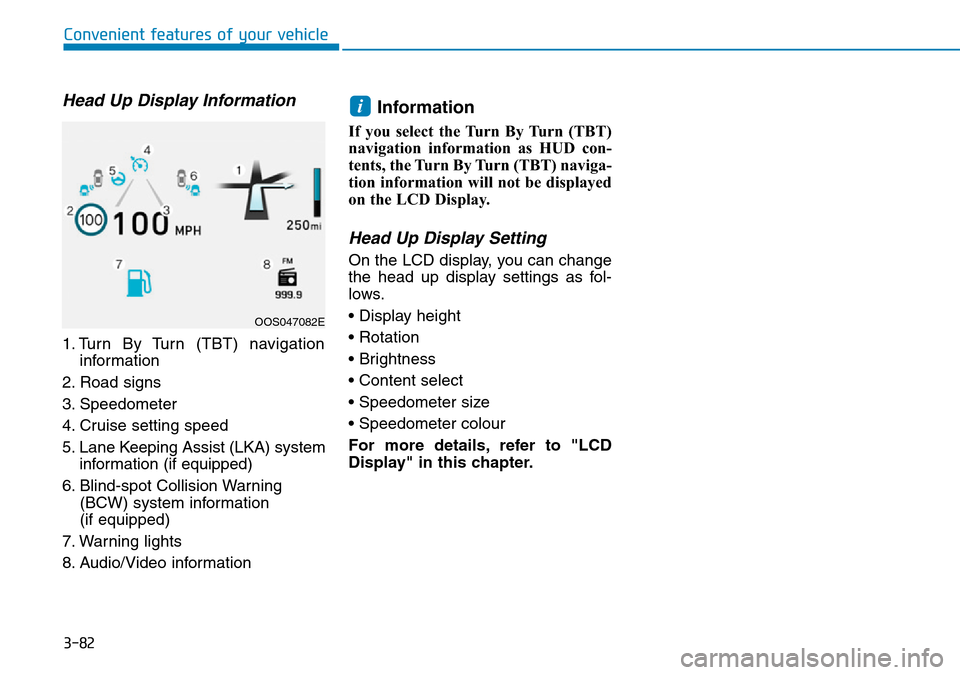
1. Turn By Turn (TBT) navigationinformation
2. Road signs
3. Speedometer
4. Cruise setting speed
5. Lane Keeping Assist (LKA) system information (if equipped)
6. Blind-spot Collision Warning (BCW) system information
(if equipped)
7. Warning lights
8. Audio/Video information
Information
If you select the Turn By Turn (TBT)
navigation information as HUD con-
tents, the Turn By Turn (TBT) naviga-
tion information will not be displayed
on the LCD Display.
Head Up Display Setting
On the LCD display, you can change
the head up display settings as fol-
lows.
• Display height
• Rotation
• Brightness
• Content select
• Speedometer size
• Speedometer colour
For more details, refer to "LCD
Display" in this chapter.
i
OOS047082E