height Hyundai Kona 2018 User Guide
[x] Cancel search | Manufacturer: HYUNDAI, Model Year: 2018, Model line: Kona, Model: Hyundai Kona 2018Pages: 523, PDF Size: 33.6 MB
Page 50 of 523
2-31
Safety system of your vehicle
2
Small children are best protected
from injury in an accident when prop-
erly restrained in the rear seat by a
Child Restraint System that meets
the requirements of the Safety
Standards of your country. Before
buying any Child Restraint System,
make sure that it has a label certify-
ing that it meets Safety Standard of
your country.The Child Restraint System must be
appropriate for your child's height
and weight. Check the label on the
Child Restraint System for this infor-
mation. Refer to “Child Restraint
Systems” in this chapter.
Larger children
Children under age 13 and who are
too large for a booster seat should
always occupy the rear seat and use
the available lap/shoulder belts. Aseat belt should lie across the upper
thighs and be snug across the shoul-
der and chest to restrain the child
safely. Check belt fit periodically. A
child's squirming could put the belt
out of position. In the event of an acci-
dent, children are afforded the best
safety restrained by a proper Child
Restraint System in the rear seats.
If a larger child over age 13 must be seated in the front seat, the child
must be securely restrained by the
available lap/shoulder belt and theseat should be placed in the rear-most position.
If the shoulder belt portion slightly
touches the child’s neck or face, tryplacing the child closer to the center
of the vehicle. If the shoulder belt still
touches their face or neck, they need
to be returned to an appropriatebooster seat in the rear seat.
Seat belt use and injured people
A seat belt should be used when an
injured person is being transported.
Consult a physician for specific rec-
ommendations.
ALWAYS properly restrain
infants and small children in a
Child Restraint System appropri-
ate for the child’s height andweight.
To reduce the risk of serious
injury or death to a child and
other passengers, NEVER hold a
child in your lap or arms when
the vehicle is moving. The violent
forces created during an acci-
dent will tear the child from your
arms and throw the child against
the interior of the vehicle.
WARNING
Always make sure larger chil-
dren’s seat belts are worn and
properly adjusted.
NEVER allow the shoulder
belt to contact the child’s
neck or face.
Do not allow more than one
child to use a single seat belt.
WARNING
Page 52 of 523
2-33
Safety system of your vehicle
2
CCHH IILL DD RR EESSTT RR AA IINN TT SS YY SSTT EEMM (( CC RR SS))
Our recommendation:
Children always in the rear
Children under age 13 should always
ride in the rear seats and must
always be properly restrained to min-
imize the risk of injury in an accident,
sudden stop or sudden maneuver.
According to accident statistics, chil-
dren are safer when properly
restrained in the rear seats than in
the front seat. Children too large for a
Child Restraint System must use the
seat belts provided. Most countries have regulations
which require children to travel in
approved Child Restraint Systems.
The laws governing the age or
height/weight restrictions at whichseat belts can be used instead of
Child Restraint System differs
among countries, so you should be
aware of the specific requirements in
your country, and where you are trav-elling.
Child Restraint Systems must be
properly installed in the vehicle seat.
Always use a commercially available
Child Restraint System that meets
the requirements of your country.
Child Restraint System (CRS)
Infants and younger children must be
restrained in an appropriate rearward-
facing or forward-facing CRS that has
first been properly secured to the seat
of the vehicle. Read and comply with
the instructions for installation and
use provided by the manufacturer of
the Child Restraint System.
Always properly restrain children
in the vehicle. Children of all ages
are safer when riding in the rear
seats. Never place a rearward-facing Child Restraint System on
the front passenger seat, unless
the air bag is deactivated.
WARNING
Always follow the Child Restraint
System manufacturer’s instruc-
tions for installation and use.
Always properly restrain your
child in the Child RestraintSystem.
Do not use an infant carrier or
a child safety seat that “hooks”
over a seatback, it may not pro-
vide adequate protection in an
accident.
After an accident, we recom-
mend a HYUNDAI dealer to
check the Child Restraint
System, seat belts, ISOFIX
anchorages and top-tether
anchorages.
WARNING
Page 53 of 523
2-34
Safety system of your vehicle
Selecting a Child Restraint System (CRS)
When selecting a Child Restraint
System for your child, always:
Make sure the Child RestraintSystem has a label certifying that it
meets applicable Safety Standards
of your country.
A Child Restraint System may only
be installed if it was approved inaccordance with the requirements ofECE-R44 or ECE-R129.
Select a Child Restraint System based on your child’s height and
weight. The required label or the
instructions for use typically pro-
vide this information.
Select a Child Restraint System that fits the vehicle seating positionwhere it will be used.
Read and comply with the warn- ings and instructions for installation
and use provided with the Child
Restraint System.
Child Restraint System types
There are three main types of Child
Restraint Systems: rearward-facing,
forward-facing and booster Child
Restraint Systems.
They are classified according to the
child’s age, height and weight.
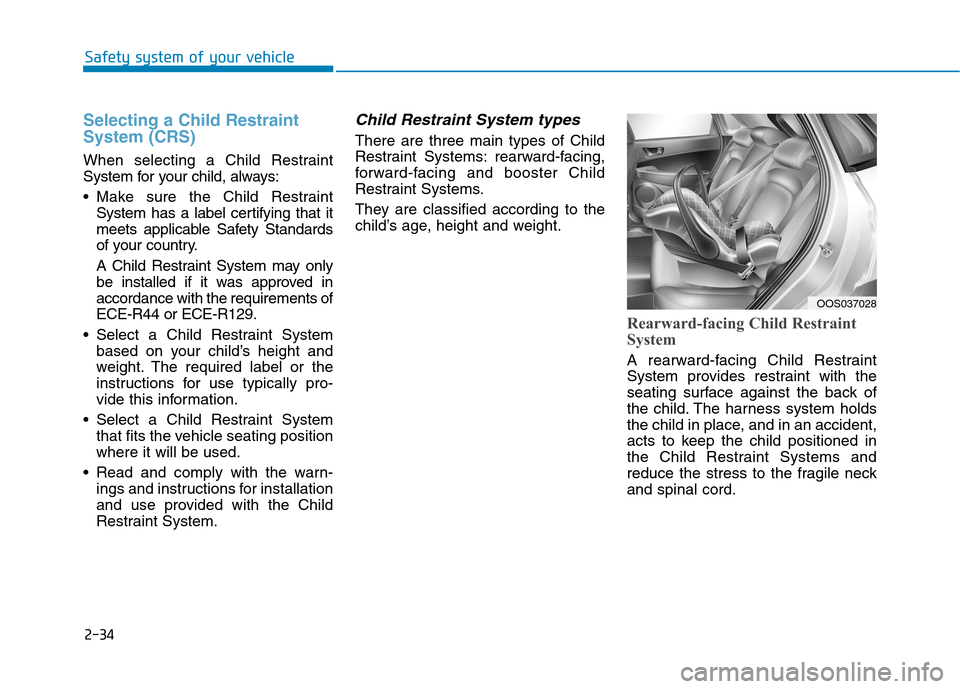
Rearward-facing Child Restraint
System
A rearward-facing Child Restraint
System provides restraint with the
seating surface against the back of
the child. The harness system holds
the child in place, and in an accident,
acts to keep the child positioned in
the Child Restraint Systems and
reduce the stress to the fragile neckand spinal cord.
OOS037028
Page 54 of 523
2-35
Safety system of your vehicle
2
All children under the age of one year
must always ride in a rearward-facing
Child Restraint System. There are dif-
ferent types of rearward-facing Child
Restraint Systems: infant-only Child
Restraint Systems can only be used
rearward-facing. Convertible and 3-in-
1 Child Restraint Systems typically
have higher height and weight limits
for the rearward-facing position, allow-
ing you to keep your child rearward-
facing for a longer period of time.
Keep using Child Restraint Systems
in the rearward-facing position as longas children fit within the height and
weight limits allowed by the Child
Restraint System's manufacturer.
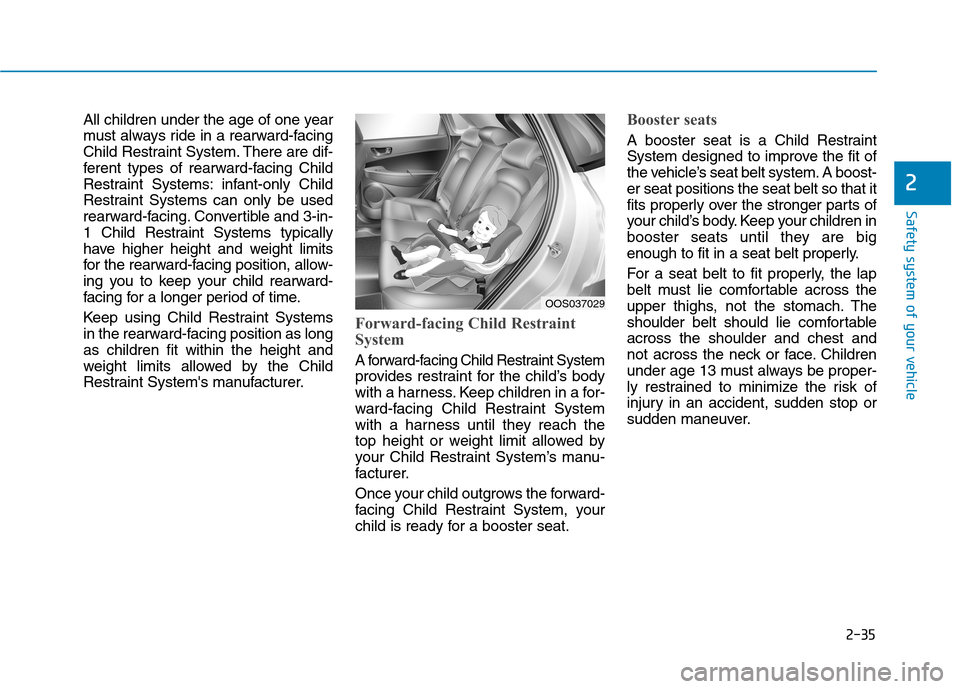
Forward-facing Child Restraint
System
A forward-facing Child Restraint System
provides restraint for the child’s body
with a harness. Keep children in a for-
ward-facing Child Restraint System
with a harness until they reach the
top height or weight limit allowed by
your Child Restraint System’s manu-
facturer.
Once your child outgrows the forward-
facing Child Restraint System, your
child is ready for a booster seat.
Booster seats
A booster seat is a Child Restraint
System designed to improve the fit of
the vehicle’s seat belt system. A boost-er seat positions the seat belt so that it
fits properly over the stronger parts of
your child’s body. Keep your children in
booster seats until they are big
enough to fit in a seat belt properly.
For a seat belt to fit properly, the lap
belt must lie comfortable across the
upper thighs, not the stomach. The
shoulder belt should lie comfortableacross the shoulder and chest and
not across the neck or face. Children
under age 13 must always be proper-
ly restrained to minimize the risk of
injury in an accident, sudden stop or
sudden maneuver.
OOS037029
Page 59 of 523
2-40
Safety system of your vehicle
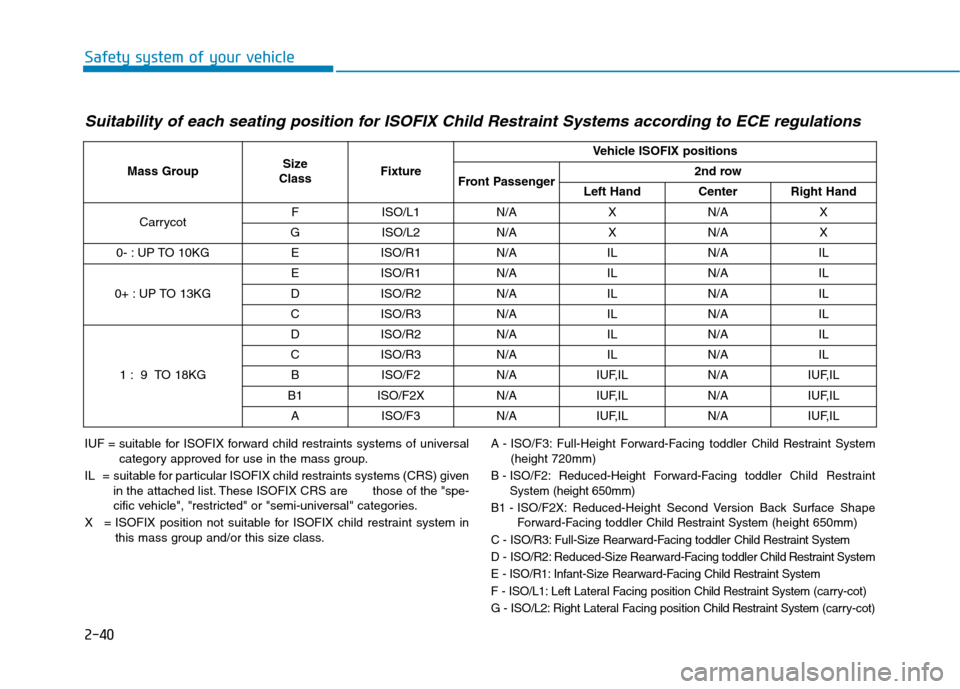
Suitability of each seating position for ISOFIX Child Restraint Systems according to ECE regulations
IUF = suitable for ISOFIX forward child restraints systems of universalcategory approved for use in the mass group.
IL = suitable for particular ISOFIX child restraints systems (CRS) given in the attached list. These ISOFIX CRS are those of the "spe-
cific vehicle", "restricted" or "semi-universal" categories.
X = ISOFIX position not suitable for ISOFIX child restraint system in this mass group and/or this size class.A - ISO/F3: Full-Height Forward-Facing toddler Child Restraint System
(height 720mm)
B - ISO/F2: Reduced-Height Forward-Facing toddler Child Restraint
System (height 650mm)
B1 - ISO/F2X: Reduced-Height Second Version Back Surface Shape Forward-Facing toddler Child Restraint System(height 650mm)
C - ISO/R3: Full-Size Rearward-Facing toddler Child Restraint System
D - ISO/R2: Reduced-Size Rearward-Facing toddler Child Restraint System
E - ISO/R1: Infant-Size Rearward-Facing Child Restraint System
F - ISO/L1: Left Lateral Facing position Child Restraint System(carry-cot)
G - ISO/L2: Right Lateral Facing position Child Restraint System (carry-cot)
Mass GroupSize
ClassFixture
Vehicle ISOFIX positions
Front Passenger2nd row
Left HandCenterRight Hand
CarrycotFISO/L1N/AXN/AX
GISO/L2N/AXN/AX
0- : UP TO 10KGEISO/R1N/AILN/AIL
0+ : UP TO 13KG
EISO/R1N/AILN/AIL
DISO/R2N/AILN/AIL
CISO/R3N/AILN/AIL
1 : 9 TO 18KG
DISO/R2N/AILN/AIL
CISO/R3N/AILN/AIL
BISO/F2N/AIUF,ILN/AIUF,IL
B1ISO/F2XN/AIUF,ILN/AIUF,IL
AISO/F3N/AIUF,ILN/AIUF,IL
Page 62 of 523
2-43
Safety system of your vehicle
2
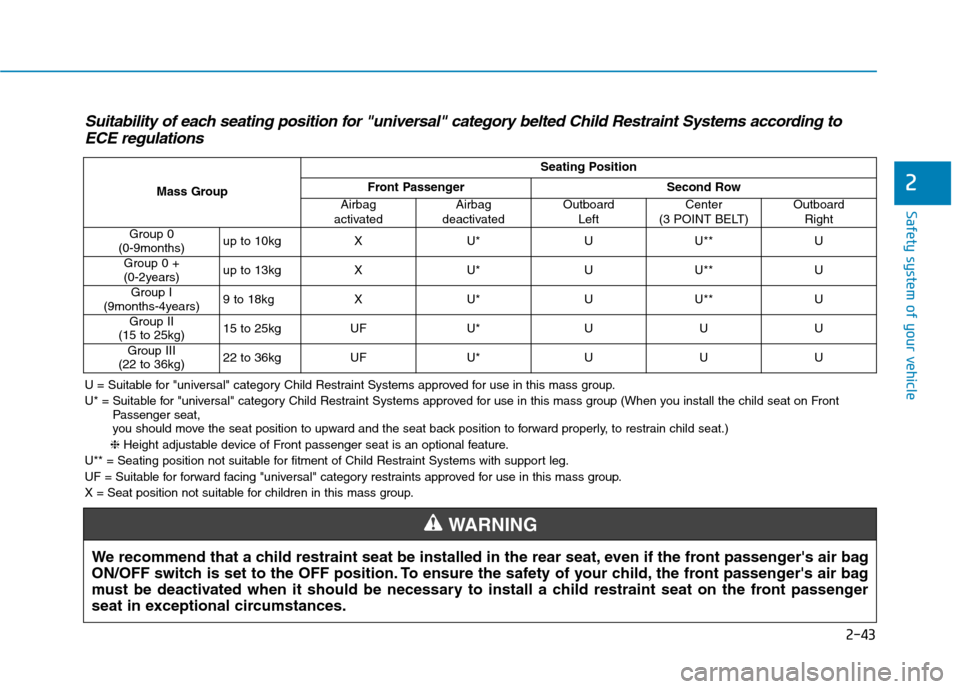
Suitability of each seating position for "universal" category belted Child Restraint Systems according toECE regulations
U = Suitable for "universal" category Child Restraint Systems approved for use in this mass group.
U* = Suitable for "universal" category Child Restraint Systems approved for use in this mass group (When you install the child seat on Front Passenger seat,
you should move the seat position to upward and the seat back position to forward properly, to restrain child seat.)
❈ Height adjustable device of Front passenger seat is an optional feature.
U** = Seating position not suitable for fitment of Child Restraint Systems with support leg.
UF = Suitable for forward facing "universal" category restraints approved for use in this mass group.
X = Seat position not suitable for children in this mass group.
We recommend that a child restraint seat be installed in the rear seat, even if the front passenger's air bag
ON/OFF switch is set to the OFF position. To ensure the safety of your child, the front passenger's air bag
must be deactivated when it should be necessary to install a child restraint seat on the front passenger
seat in exceptional circumstances.
WARNING
Mass Group
Seating Position
Front PassengerSecond Row
Airbag
activatedAirbag
deactivatedOutboard LeftCenter
(3 POINT BELT)Outboard Right
Group 0
(0-9months)up to 10kgXU*UU**U
Group 0 +
(0-2years)up to 13kgXU*UU**U
Group I
(9months-4years)9 to 18kgXU*UU**U
Group II
(15 to 25kg)15 to 25kgUFU*UUU
Group III
(22 to 36kg)22 to 36kgUFU*UUU
Page 83 of 523
Additional safety precautions
Passengers should not move out of
or change seats while the vehicle is
moving.A passenger who is not
wearing a seat belt during a crash or
emergency stop can be thrown
against the inside of the vehicle,
against other occupants, or be ejected
from the vehicle.
Do not use any accessories on seat belts. Devices claiming to improve
occupant comfort or reposition theseat belt can reduce the protection
provided by the seat belt and increase
the chance of serious injury in a crash.
Do not modify the front seats. Modification of the front seats could
interfere with the operation of the sup-
plemental restraint system sensing
components or side air bags.
Do not place items under the front seats. Placing items under the front
seats could interfere with the opera-
tion of the supplemental restraint sys-
tem sensing components and wiring
harnesses.
Do not cause impact to the doors. Impact to the doors when the ignition
switch is in the ON position may cause
the air bags to inflate.
Adding equipment to or modify-
ing your air bag equipped vehicle
If you modify your vehicle by changing
your vehicle's frame, bumper system,
front end or side sheet metal or ride
height, this may affect the operation of
your vehicle's air bag system.
Air bag warning labels
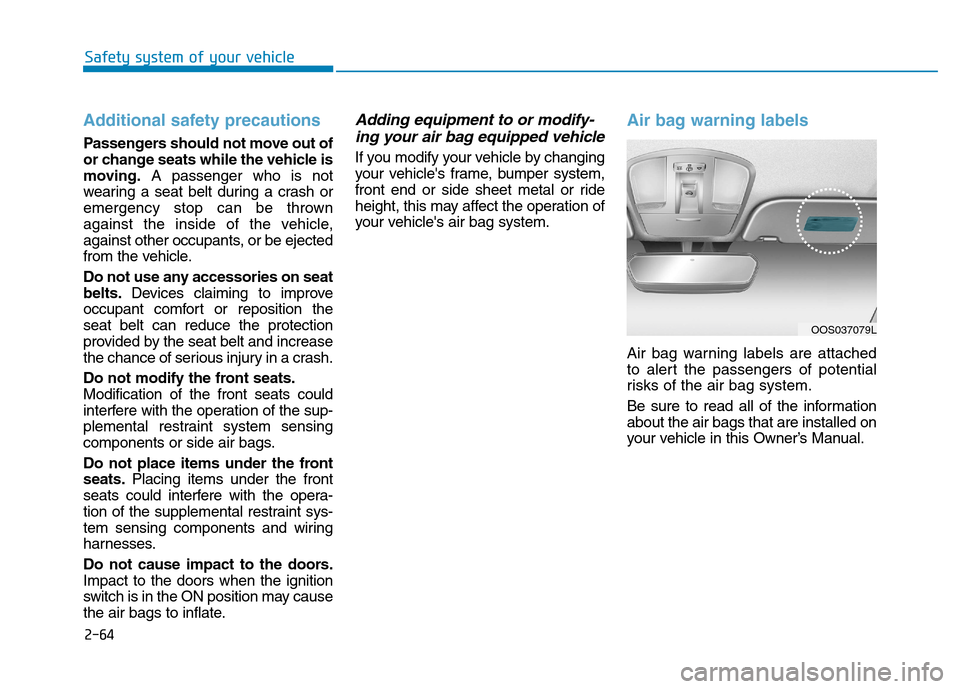
Air bag warning labels are attached
to alert the passengers of potential
risks of the air bag system.
Be sure to read all of the information about the air bags that are installed on
your vehicle in this Owner’s Manual.
Safety system of your vehicle
2-64
OOS037079L
Page 151 of 523
3-68
Convenient features of your vehicle
User settings mode
In this mode, you can change the
settings of the instrument cluster,
doors, lamps, etc.
1. Head-up display (if equipped)
2. Driver Assistance
3. Door
4. Lights
5. Sound
6. Convenience
7. Service interval
8. Other Features
9. Languages
10. Reset
The information provided may dif-
fer depending on which functions
are applicable to your vehicle.
1. Head Up display (if equipped)
Display Height- Adjust the height of the HUDimage on the display.
Rotation - Adjust the angle of the image. Brightness
- Adjust the intensity of the HUDillumination.
Content Select - Tu r n b y Tu r n
- Traffic information
- Cruise control
- Lane keeping assist (LKA) sys-tem
- Blind-spot Collision Warning (BCW) system
Speedometer Size - Choose the speedometer fontsize of the HUD. (Large, Medium, Small)
Speedometer Color - Choose the speedometer fontcolor of the HUD. (White, Orange,Green) 2. Driver Assistance
Driver Attention Warning (DAW)
system
- Off/Normal Sensitivity/ High Sensitivity
To adjust the sensitivity of the Driver
Attention Warning (DAW).
For more information, refer to the
"Driver Attention Warning (DAW)
system " in chapter 5.
Lane Safety - Lane Departure Warning - Standard LKA
- Active LKA
To adjust the Lane Keeping Assist (LKA) function.
For more information, refer to the
"Lane Keeping Assist (LKA) sys-
tem " in chapter 5.
Forward Collision-Avoidance Assist
To activate or deactivate the Forward
Collision-Avoidance Assist (FCA).
For more information, refer to the
"Forward Collision-Avoidance
Assist (FCA) system" in chapter 5.
Page 164 of 523
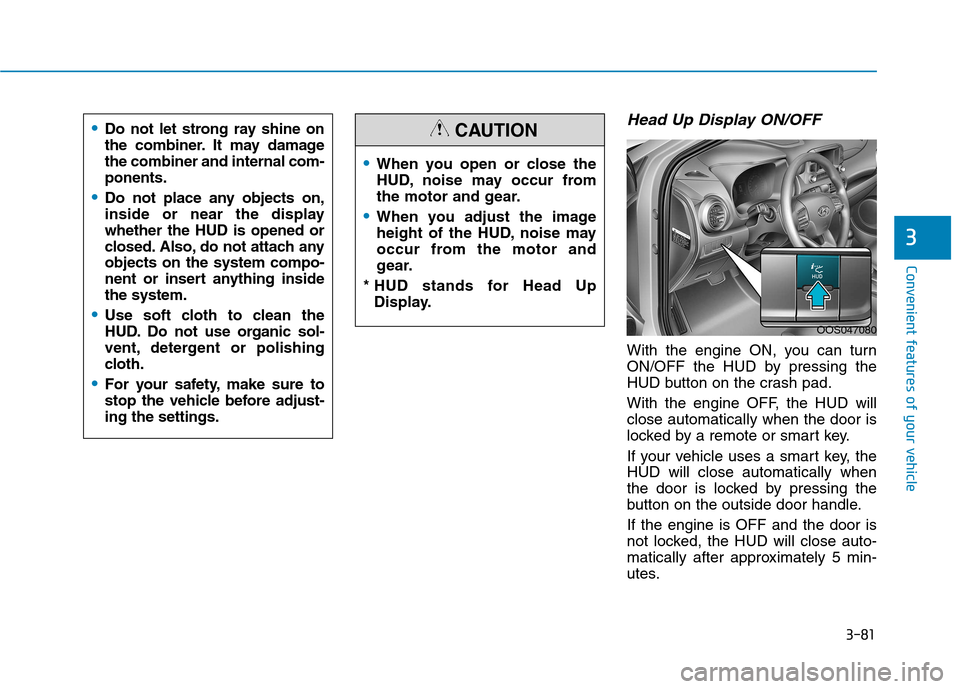
3-81
Convenient features of your vehicle
Head Up Display ON/OFF
With the engine ON, you can turn
ON/OFF the HUD by pressing the
HUD button on the crash pad.
With the engine OFF, the HUD will close automatically when the door is
locked by a remote or smart key.
If your vehicle uses a smart key, the HUD will close automatically when
the door is locked by pressing the
button on the outside door handle. If the engine is OFF and the door is
not locked, the HUD will close auto-
matically after approximately 5 min-
utes.
3
When you open or close the
HUD, noise may occur from
the motor and gear.
When you adjust the image
height of the HUD, noise may
occur from the motor and
gear.
* HUD stands for Head Up Display.
CAUTION
OOS047080
Do not let strong ray shine on
the combiner. It may damagethe combiner and internal com-ponents.
Do not place any objects on,
inside or near the displaywhether the HUD is opened or
closed. Also, do not attach anyobjects on the system compo-
nent or insert anything insidethe system.
Use soft cloth to clean the
HUD. Do not use organic sol-
vent, detergent or polishing
cloth.
For your safety, make sure to
stop the vehicle before adjust-ing the settings.
Page 185 of 523

3-102
Convenient features of your vehicle
Non-operational conditions ofParking Distance Warning
(Reverse) system
The Parking Distance Warning
(Reverse) system may not operate
normally when:
Moisture is frozen to the sensor.
Sensor is covered with foreign mat- ter, such as snow or water, or the
sensor cover is blocked.
There is a possibility of the Parking
Distance Warning (Reverse) system
malfunction when:
Driving on uneven road surfacessuch as unpaved roads, gravel,
bumps, or gradient.
Objects generating excessive noise such as vehicle horns, loud motor-
cycle engines, or truck air brakes
can interfere with the sensor.
Heavy rain or water spray is present.
Wireless transmitters or mobile phones are present near the sensor.
The sensor is covered with snow.
Any non-factory equipment or acces- sories have been installed, or if the
vehicle bumper height or sensorinstallation has been modified.
Detecting range may decrease when:
Outside air temperature is extreme-ly hot or cold.
Undetectable objects smaller than 1 m (40 inches) and narrower than
14 cm (6 inches) in diameter.