Automatic Hyundai Kona 2018 Service Manual
[x] Cancel search | Manufacturer: HYUNDAI, Model Year: 2018, Model line: Kona, Model: Hyundai Kona 2018Pages: 523, PDF Size: 33.6 MB
Page 211 of 523
3-128
Convenient features of your vehicleS
S TT OO RRAA GG EE CC OO MM PPAA RRTTMM EENN TT
To avoid possible theft, do not
leave valuables in the storage
compartments.
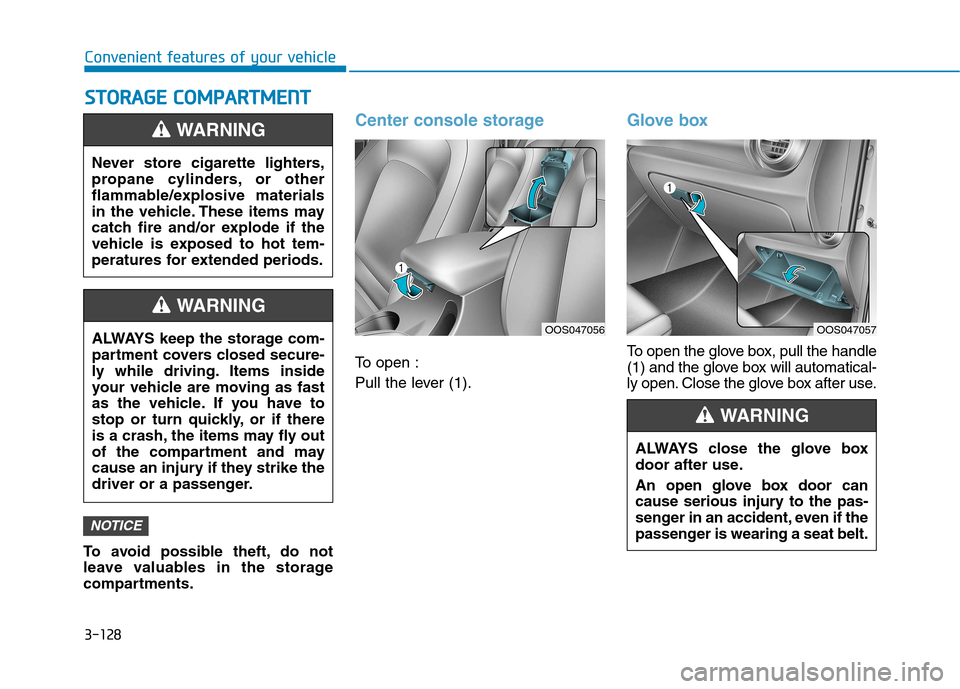
Center console storage
To open :
Pull the lever (1).
Glove box
To open the glove box, pull the handle
(1) and the glove box will automatical-
ly open. Close the glove box after use.
NOTICE
Never store cigarette lighters,
propane cylinders, or other
flammable/explosive materials
in the vehicle. These items may
catch fire and/or explode if the
vehicle is exposed to hot tem-
peratures for extended periods.
WARNING
ALWAYS keep the storage com-
partment covers closed secure-
ly while driving. Items inside
your vehicle are moving as fast
as the vehicle. If you have to
stop or turn quickly, or if there
is a crash, the items may fly out
of the compartment and may
cause an injury if they strike the
driver or a passenger.
WARNING
OOS047056
ALWAYS close the glove box
door after use.
An open glove box door can
cause serious injury to the pas-
senger in an accident, even if the
passenger is wearing a seat belt.
WARNING
OOS047057
Page 231 of 523
4-10
Multimedia System
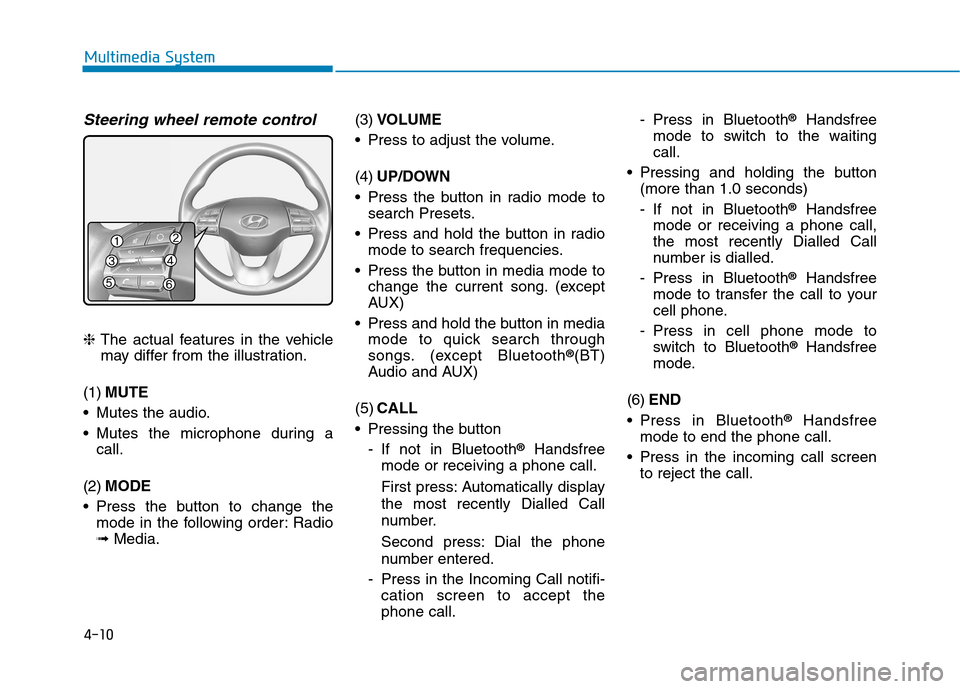
Steering wheel remote control
❈The actual features in the vehicle
may differ from the illustration.
(1) MUTE
Mutes the audio.
Mutes the microphone during a call.
(2) MODE
Press the button to change the mode in the following order: Radio ➟ Media. (3)
VOLUME
Press to adjust the volume. (4) UP/DOWN
Press the button in radio mode to search Presets.
Press and hold the button in radio mode to search frequencies.
Press the button in media mode to change the current song. (except
AUX)
Press and hold the button in media mode to quick search through
songs. (except Bluetooth ®
(BT)
Audio and AUX)
(5) CALL
Pressing the button
- If not in Bluetooth ®
Handsfree
mode or receiving a phone call.
First press: Automatically display
the most recently Dialled Call
number.
Second press: Dial the phone
number entered.
- Press in the Incoming Call notifi- cation screen to accept the phone call. - Press in Bluetooth
®
Handsfree
mode to switch to the waitingcall.
Pressing and holding the button (more than 1.0 seconds)
- If not in Bluetooth ®
Handsfree
mode or receiving a phone call,
the most recently Dialled Call
number is dialled.
- Press in Bluetooth ®
Handsfree
mode to transfer the call to your
cell phone.
- Press in cell phone mode to switch to Bluetooth ®
Handsfree
mode.
(6) END
Press in Bluetooth ®
Handsfree
mode to end the phone call.
Press in the incoming call screen to reject the call.
Page 238 of 523
4-17
Multimedia System
4
Operation of HDD, CF, SD andmemory stick devices is not guaran-
teed.
DRM (Digital Rights Management) files cannot be played.
SD-type USB memory, CF-type USB memory, and other USB mem-
ory devices that require adapters
for connection are not supported.
Proper operation of USB HDDs or USB drives with connectors that
loosen due to vehicle vibrations is
not guaranteed. (iStick, etc.)
USB products that are used as key chains or
cell phone accessories
may damage the USB
jack and affect proper
file playback. Please refrain from
use. Use only products with plug
connectors, as shown in the follow-
ing illustration.
When MP3 devices or cell phones are connected simultaneously
through AUX, BT Audio and USB
modes, a popping noise or malfunc-
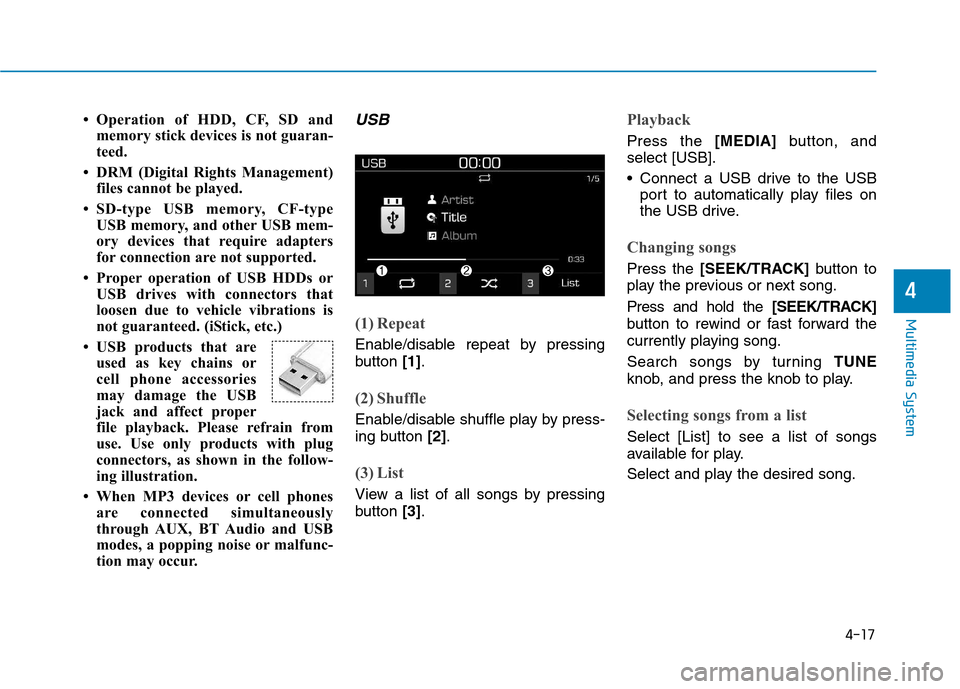
tion may occur.USB
(1) Repeat
Enable/disable repeat by pressing
button [1].
(2) Shuffle
Enable/disable shuffle play by press-
ing button [2].
(3) List
View a list of all songs by pressing
button [3].
Playback
Press the [MEDIA]button, and
select [USB].
Connect a USB drive to the USB port to automatically play files on
the USB drive.
Changing songs
Press the [SEEK/TRACK] button to
play the previous or next song. Press and hold the [SEEK/TRACK]
button to rewind or fast forward the
currently playing song.
Search songs by turning TUNE
knob, and press the knob to play.
Selecting songs from a list
Select [List] to see a list of songs
available for play.
Select and play the desired song.
Page 242 of 523
![Hyundai Kona 2018 Service Manual 4-21
Multimedia System
4
Playing iPod files
Select [iPod files] to play songs
saved on your iPod®
.
If there are no songs saved on your
iPod ®
, the [iPod files] is disabled.
Information
Operation](/img/35/16231/w960_16231-241.png "Hyundai Kona 2018 Service Manual 4-21
Multimedia System
4
Playing iPod files
Select [iPod files] to play songs
saved on your iPod®
.
If there are no songs saved on your
iPod ®
, the [iPod files] is disabled.
Information
Operation")
4-21
Multimedia System
4
Playing iPod files
Select [iPod files] to play songs
saved on your iPod®
.
If there are no songs saved on your
iPod ®
, the [iPod files] is disabled.
Information
Operation cannot be carried out cor-
rectly due to iPod ®
application mal-
function. Information
- Using Bluetooth
®
(BT) Audio
Bluetooth ®
Audio mode can only be
used if a Bluetooth ®
-enabled phone
is connected. Only devices that sup-
port Bluetooth ®
audio can be used.
If the Bluetooth ®
-enabled phone is
disconnected during play, the music
stops.
When the TRACK UP/DOWN but- tons are used during Bluetooth ®
audio streaming, a popping noise or
sound interruptions may occur,
depending on the cell phone device.
Depending on the cell phone model, the audio streaming function may
not be supported.
If a phone call is made or received when music is playing in Bluetooth ®
Audio mode, the call may mix with
the music.
When returning to Bluetooth ®
Audio mode after ending a call, play
might not resume automatically for
some cell phone models. Bluetooth
®
Handsfree is a fea-
ture that enables drivers to prac-
tice safe driving. Connecting thecar audio system with aBluetooth ®
phone allows the
user to conveniently make calls,
receive calls, and manage the
phone book. Before using the
Bluetooth®Wireless Technology,
carefully read the contents of
this user’s manual.
Excessive use or operations while driving may lead to negli-
gent driving practices and bethe cause of accidents.
Do not operate the device exces- sively while driving.
Viewing the screen for pro- longed periods of time is dan-
gerous and may lead to acci-dents.
When driving, view the screen only for short periods of time.
NOTICEi
i
Page 245 of 523
4-24
Multimedia System
Precautions when connecting
Bluetooth®
devices
The vehicle supports the following
Bluetooth ®
functions. Some
Bluetooth ®
devices may not sup-
port some functions.
1) Bluetooth ®
Handsfree phone
calls
2) Operations during a call (Private, Switch, Mic Vol. con- trols)
3) Download call history saved to the Bluetooth ®
device
4) Download contacts saved to the Bluetooth ®
device
5) Automatic contacts/call history download when Bluetooth ®
is
connected
6) Automatic Bluetooth ®
device
connection when the vehicle is
started
7) Bluetooth ®
audio streaming
playback
Before connecting the audio sys- tem to your device, make sure your
device supports Bluetooth ®
. Even if your device supports
Bluetooth ®
, a Bluetooth ®
connec-
tion cannot be established if the
device’s Bluetooth ®
function is
switched off. Search and connectwith the Bluetooth ®
function
enabled.
Pair or connect Bluetooth ®
devices
to the audio system with the vehi-cle at a standstill.
If a Bluetooth ®
connection is lost
due to abnormal conditions while aBluetooth ®
device is connected
(communication range exceeded,
device power OFF, communication
errors, etc.), the disconnectedBluetooth ®
device is searched for
and automatically reconnected.
If you want to disable the Bluetooth ®
device auto-connect
function, turn the Bluetooth ®
func-
tion OFF on your device. Consult
the user manuals for individual
devices to see whether Bluetooth ®
is supported.
Handsfree call quality and volume may vary depending on the type ofBluetooth ®
device. Some Bluetooth
®
devices are sub-
ject to intermittent Bluetooth ®
con-
nection failures. In this case, use
the following method.
1) Turn the Bluetooth ®
function off
on your Bluetooth ®
device ➟
Turn it on and try again.
2) Delete the paired device from both the audio system and Bluetooth ®
device, then pair
again.
3) Power down your Bluetooth ®
device ➟Turn it on and try
again.
4) Completely remove the battery from your Bluetooth ®
device;
reinsert it, reboot, and attemptconnection.
5) Restart the vehicle and reat- tempt connection.
Page 247 of 523
![Hyundai Kona 2018 Service Manual 4-26
Multimedia System
Information
The 6-digit passkey in the image
above is an example. Refer to your
vehicle for the actual passkey.
Pairing a second Bluetooth ®
device
Press the [SETUP/CLOCK] bu](/img/35/16231/w960_16231-246.png "Hyundai Kona 2018 Service Manual 4-26
Multimedia System
Information
The 6-digit passkey in the image
above is an example. Refer to your
vehicle for the actual passkey.
Pairing a second Bluetooth ®
device
Press the [SETUP/CLOCK] bu")
4-26
Multimedia System
Information
The 6-digit passkey in the image
above is an example. Refer to your
vehicle for the actual passkey.
Pairing a second Bluetooth ®
device
Press the [SETUP/CLOCK] button
on the audio system ➟Select
[Bluetooth] ➟Select [Connections]
➟ Select [Add new device].
- The pairing procedure from this point is identical to [Pairing the first
Bluetooth device]. Information
Bluetooth ®
standby mode lasts for
three minutes. If a device is not
paired within three minutes, pairing
is canceled. Start over from the
beginning.
For most Bluetooth ®
devices, a con-
nection is established automatically
after pairing. Some devices, howev-
er, require separate confirmation
when connecting after pairing. Be
sure to check your Bluetooth ®
device after pairing to confirm that
it has connected.
Connecting Bluetooth®devices
If there are no connected devices
Press the [PHONE]button on the
audio system or the [CALL]button in
the steering wheel remote control ➟
List of paired Bluetooth ®
devices ➟
Select the desired Bluetooth ®
device
from the list ➟Connect Bluetooth ®
.
ii
Page 252 of 523
![Hyundai Kona 2018 Service Manual 4-31
Multimedia System
4
Setup
Access Display, Sound, Date/Time,
Bluetooth, System and Display Off
settings. Press the [SETUP/CLOCK] button
on the audio system.
Display
Press the [SETUP/CLOCK] butt](/img/35/16231/w960_16231-251.png "Hyundai Kona 2018 Service Manual 4-31
Multimedia System
4
Setup
Access Display, Sound, Date/Time,
Bluetooth, System and Display Off
settings. Press the [SETUP/CLOCK] button
on the audio system.
Display
Press the [SETUP/CLOCK] butt")
4-31
Multimedia System
4
Setup
Access Display, Sound, Date/Time,
Bluetooth, System and Display Off
settings. Press the [SETUP/CLOCK] button
on the audio system.
Display
Press the [SETUP/CLOCK] button
on the audio system ➟Select
[Display].
Dimming mode: Brightness is auto- matically adjusted according to the
headlight use.
Brightness: The brightness of the audio screen can be changed.
Screensaver: Set the information displayed when the audio system
is switched off or the screen is
turned off.
Sound
Press the [SETUP/CLOCK] button
on the audio system ➟Select
[Sound].
Position: Sound balance and fader can be adjusted.
Equaliser: Sound tone color can be adjusted.
Speed dependent volume control: Automatically adjust volume based
on vehicle speed.
Rear parking sensors prioritised: Automatically lower audio volume
while reversing.
Date/Time
Press the [SETUP/CLOCK] button
on the audio system ➟Select
[Date/Time].
Set time: Set the time displayed on the audio screen.
Time format: Choose betw een 12-
hour and 24-hour time formats.
Set date: Set the date displayed on the audio screen.
Page 264 of 523
5-10
Driving your vehicle
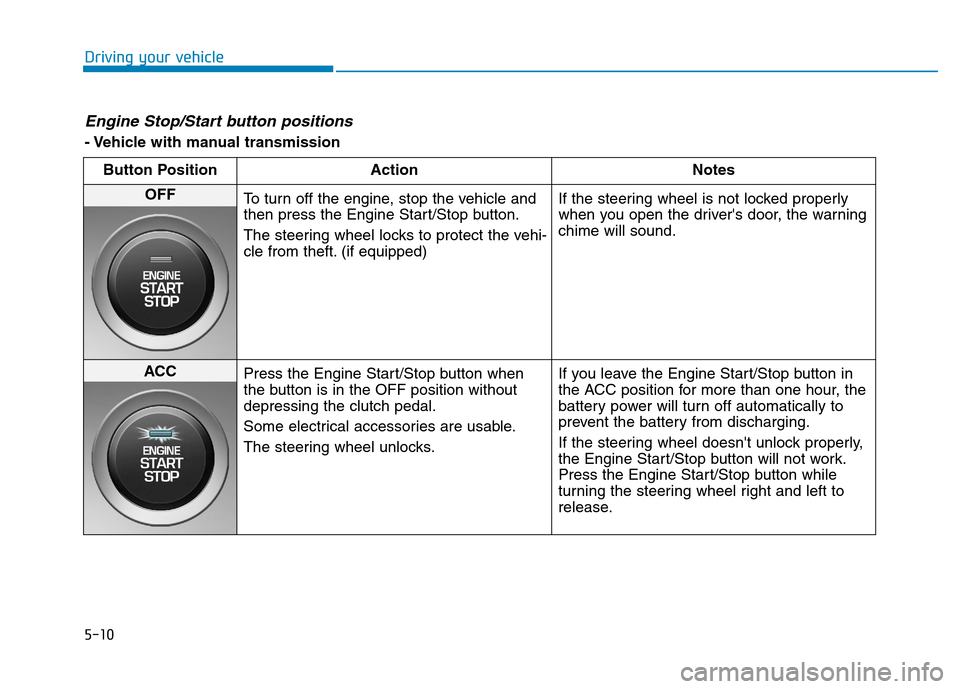
Engine Stop/Start button positions
- Vehicle with manual transmissionButton Position Action Notes
OFF
To turn off the engine, stop the vehicle and
then press the Engine Start/Stop button.
The steering wheel locks to protect the vehi-
cle from theft. (if equipped) If the steering wheel is not locked properly
when you open the driver's door, the warningchime will sound.
ACC
Press the Engine Start/Stop button when
the button is in the OFF position withoutdepressing the clutch pedal.
Some electrical accessories are usable.
The steering wheel unlocks. If you leave the Engine Start/Stop button in
the ACC position for more than one hour, the
battery power will turn off automatically to
prevent the battery from discharging.
If the steering wheel doesn't unlock properly,
the Engine Start/Stop button will not work.
Press the Engine Start/Stop button while
turning the steering wheel right and left to
release.
Page 266 of 523
5-12
Driving your vehicle
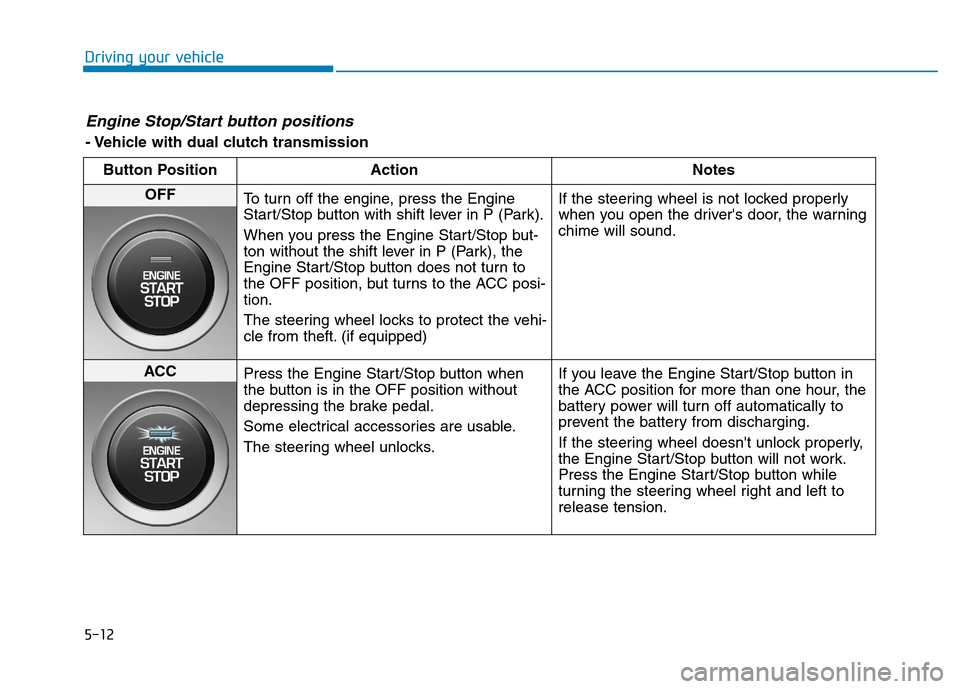
Engine Stop/Start button positions
- Vehicle with dual clutch transmissionButton Position Action Notes
OFF
To turn off the engine, press the Engine
Start/Stop button with shift lever in P (Park).
When you press the Engine Start/Stop but-
ton without the shift lever in P (Park), the
Engine Start/Stop button does not turn to
the OFF position, but turns to the ACC posi-tion.
The steering wheel locks to protect the vehi-
cle from theft. (if equipped) If the steering wheel is not locked properly
when you open the driver's door, the warningchime will sound.
ACC
Press the Engine Start/Stop button when
the button is in the OFF position without
depressing the brake pedal.
Some electrical accessories are usable.
The steering wheel unlocks. If you leave the Engine Start/Stop button in
the ACC position for more than one hour, the
battery power will turn off automatically to
prevent the battery from discharging.
If the steering wheel doesn't unlock properly,
the Engine Start/Stop button will not work.
Press the Engine Start/Stop button while
turning the steering wheel right and left torelease tension.
Page 273 of 523
5-19
Driving your vehicle
5
The dual clutch transmission canbe thought of as an automatically
shifting manual transmission. It
gives the driving feel of a manual
transmission, yet provides the
ease of a fully automatic transmis-sion.
When D (Drive) is selected, the transmission will automatically shiftthrough the gears similar to a con-
ventional automatic transmission.
Unlike a traditional automatic
transmission, the gear shifting can
sometimes be felt and heard as theactuators engage the clutches andthe gears are selected.
The dual clutch transmission incor- porates a dry-type dual clutch
mechanism, which allows for better
acceleration performance and
increased fuel efficiency while driv-
ing. But it differs from a conven-
tional automatic transmission
because it does not incorporate a
torque converter. Instead, the tran-
sition from one gear to the next is
managed by clutch slip, especially
at lower speeds.
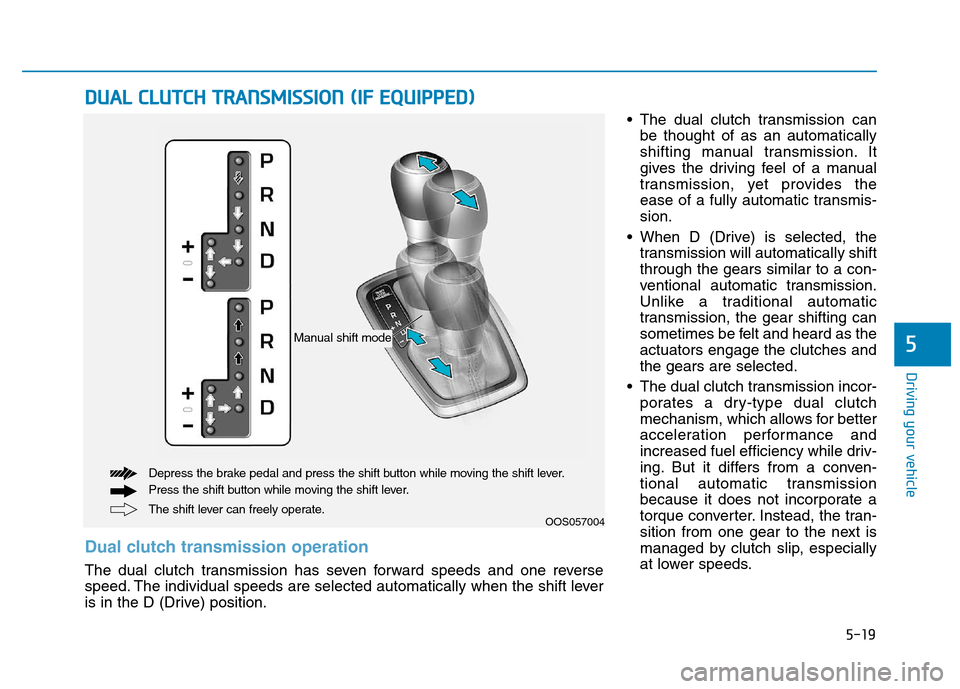
DDUU AALL CC LLUU TTCCHH TT RR AA NN SSMM IISS SSIIOO NN (( IIFF EE QQ UUIIPP PP EEDD ))
OOS057004
The shift lever can freely operate.
Depress the brake pedal and press the shift button while moving the shift lever.
Press the shift button while moving the shift lever.
Manual shift mode
Dual clutch transmission operation
The dual clutch transmission has seven forward speeds and one reverse
speed. The individual speeds are selected automatically when the shift lever
is in the D (Drive) position.