Automatic Hyundai Kona 2018 Repair Manual
[x] Cancel search | Manufacturer: HYUNDAI, Model Year: 2018, Model line: Kona, Model: Hyundai Kona 2018Pages: 523, PDF Size: 33.6 MB
Page 315 of 523

5-61
Driving your vehicle
5
- A trailer or carrier is installed. Touse the BCW system, remove the
trailer or carrier from your vehicle.
If any of these conditions occur, the
light on the BCW switch and the sys-
tem will turn off automatically.
When the BCW canceled warning
message is displayed in the cluster,
check to make sure that the rear
bumper is free from any dirt or snowin the areas where the sensor is
located. Remove any dirt, snow, or
foreign material that could interfere
with the radar sensors.
After any dirt or debris is removed,
the BCW system should operate nor-
mally after about 10 minutes of driv-
ing the vehicle.
If the system still does not operate
normally have your vehicle inspected
by an authorized HYUNDAI dealer.
Information
Turn off the system by pressing the
BCW switch and deselecting Rear
Cross-Traffic Collision warning
(RCCW) from the User Settings mode
on the cluster, when using a trailer or
carrier behind your vehicle.
Check Blind-Spot Collision
Warning (BCW) system
If there is a problem with the BCW
system, a warning message will
appear and the light on the switch
will turn off. The system will turn off
automatically. We recommend that
you have your vehicle inspected by
an authorized HYUNDAI dealer.
Limitations of the system
The driver must be cautious in the
below situations, because the sys-
tem may not detect other vehicles or
objects in certain circumstances.
When a trailer or carrier is installed.
The vehicle drives in inclement weather such as heavy rain or
snow.
The sensor is polluted with rain, snow, mud, etc.
The rear bumper where the sensor is located is covered with a foreign
object such as a bumper sticker, a
bumper guard, a bike rack, etc.
The rear bumper is damaged, or the sensor is out of the original
default position.
The vehicle height gets lower or higher due to heavy loading in the
luggage compartment, abnormal
tire pressure, etc.
When the temperature near the rear bumper area is high or low.
i
■Type A■Type B
OOS057078L/OOS057079L
Page 319 of 523
5-65
Driving your vehicle
5
FCA warning message and
system control
The FCA produces warning mes-
sages and warning alarms in accor-
dance with the collision risk levels,
such as abrupt stopping of the vehi-
cle in front, insufficient braking dis-
tance, or pedestrian detection. Also,
it controls the brakes in accordance
with the collision risk levels.
The driver can select the initial warn-
ing activation time in the User
Settings in the LCD display. The
options for the initial Forward
Collision Warning include Early,
Normal or Late initial warning time.
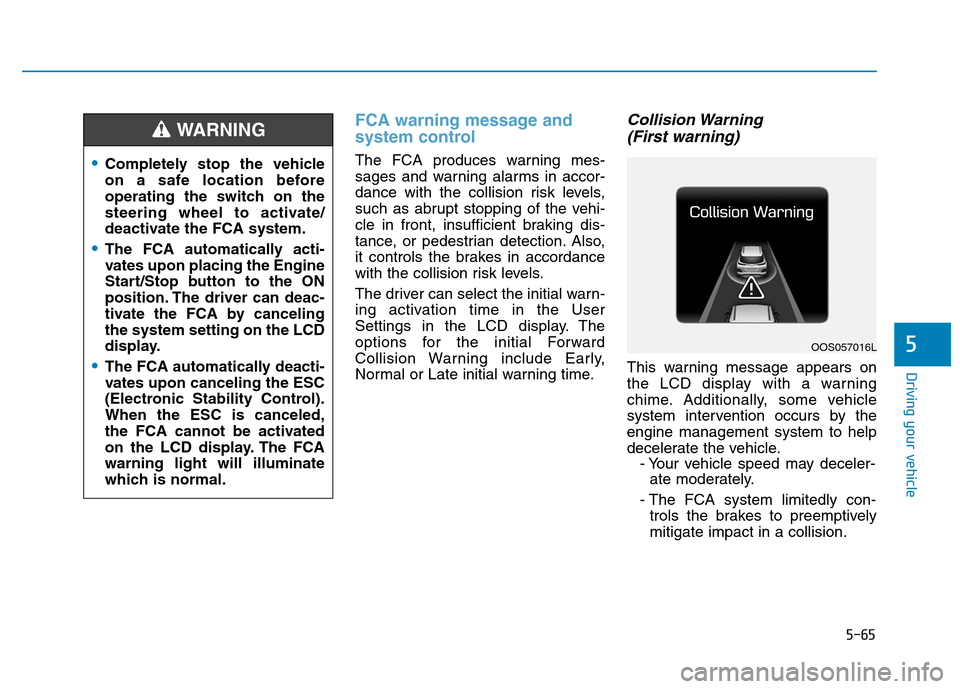
Collision Warning (First warning)
This warning message appears on
the LCD display with a warning
chime. Additionally, some vehicle
system intervention occurs by theengine management system to help
decelerate the vehicle. - Your vehicle speed may deceler-ate moderately.
- The FCA system limitedly con- trols the brakes to preemptivelymitigate impact in a collision.
Completely stop the vehicle
on a safe location before
operating the switch on the
steering wheel to activate/
deactivate the FCA system.
The FCA automatically acti-
vates upon placing the Engine
Start/Stop button to the ON
position. The driver can deac-
tivate the FCA by cancelingthe system setting on the LCD
display.
The FCA automatically deacti-
vates upon canceling the ESC
(Electronic Stability Control).When the ESC is canceled,
the FCA cannot be activated
on the LCD display. The FCAwarning light will illuminate
which is normal.
WARNING
OOS057016L
Page 320 of 523
5-66
Driving your vehicle
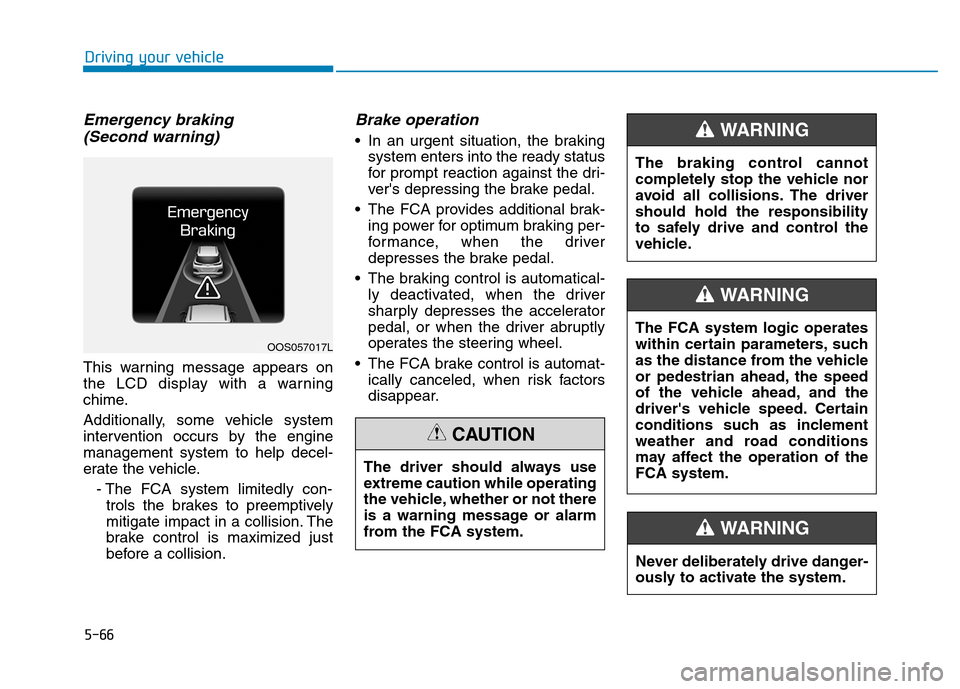
Emergency braking (Second warning)
This warning message appears on
the LCD display with a warning
chime.
Additionally, some vehicle system
intervention occurs by the enginemanagement system to help decel-
erate the vehicle.
- The FCA system limitedly con-trols the brakes to preemptively
mitigate impact in a collision. The
brake control is maximized just
before a collision.
Brake operation
In an urgent situation, the braking system enters into the ready status
for prompt reaction against the dri-
ver's depressing the brake pedal.
The FCA provides additional brak- ing power for optimum braking per-
formance, when the driver
depresses the brake pedal.
The braking control is automatical- ly deactivated, when the driver
sharply depresses the accelerator
pedal, or when the driver abruptly
operates the steering wheel.
The FCA brake control is automat- ically canceled, when risk factors
disappear.
OOS057017L
The driver should always use
extreme caution while operating
the vehicle, whether or not there
is a warning message or alarm
from the FCA system.
CAUTION
The braking control cannot
completely stop the vehicle nor
avoid all collisions. The drivershould hold the responsibility
to safely drive and control the
vehicle.
WARNING
Never deliberately drive danger-
ously to activate the system.
WARNING
The FCA system logic operates
within certain parameters, such
as the distance from the vehicle
or pedestrian ahead, the speed
of the vehicle ahead, and the
driver's vehicle speed. Certain
conditions such as inclement
weather and road conditions
may affect the operation of theFCA system.
WARNING
Page 331 of 523
5-77
Driving your vehicle
5
LKA operation
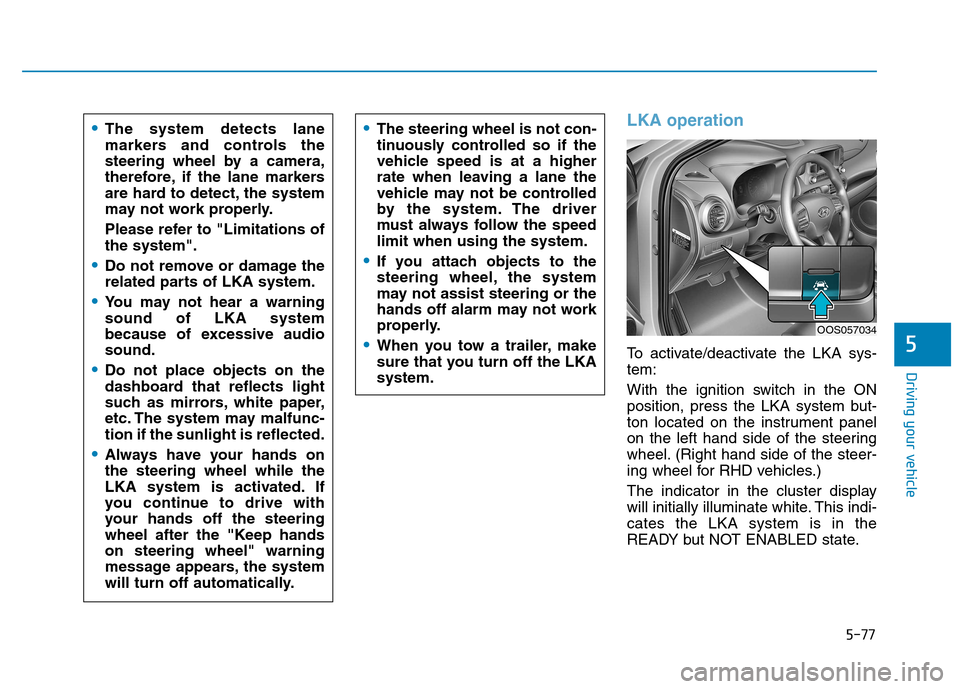
To activate/deactivate the LKA sys- tem:
With the ignition switch in the ON
position, press the LKA system but-
ton located on the instrument panel
on the left hand side of the steering
wheel. (Right hand side of the steer-
ing wheel for RHD vehicles.)
The indicator in the cluster display
will initially illuminate white. This indi-cates the LKA system is in the
READY but NOT ENABLED state.
The system detects lane
markers and controls the
steering wheel by a camera,
therefore, if the lane markers
are hard to detect, the system
may not work properly.
Please refer to "Limitations of the system".
Do not remove or damage the
related parts of LKA system.
You may not hear a warning sound of LKA system
because of excessive audiosound.
Do not place objects on the
dashboard that reflects light
such as mirrors, white paper,
etc. The system may malfunc-tion if the sunlight is reflected.
Always have your hands on the steering wheel while the
LKA system is activated. If
you continue to drive with
your hands off the steering
wheel after the "Keep handson steering wheel" warning
message appears, the system
will turn off automatically.
The steering wheel is not con-
tinuously controlled so if the
vehicle speed is at a higher
rate when leaving a lane the
vehicle may not be controlled
by the system. The driver
must always follow the speedlimit when using the system.
If you attach objects to the
steering wheel, the system
may not assist steering or the
hands off alarm may not work
properly.
When you tow a trailer, make
sure that you turn off the LKAsystem.
OOS057034
Page 337 of 523
5-83
Driving your vehicle
5
Driving on a steep grade, over ahill, or when driving on a curved road.
The adverse road conditions cause excessive vehicle vibrations while
driving.
The surrounding of the inside rear view mirror temperature is highdue to direct sunlight, etc.
When front visibility is poor
The windshield or the LKAS cam- era lens is blocked with dirt or
debris.
The windshield glass is fogged up; a clear view of the road is obstruct-ed.
Placing objects on the dashboard, etc.
The sensor cannot detect the lane because of fog, heavy rain or snow.LKA system function change
The driver can change LKA to Lane
Departure Warning (LDW) system orchange the LKA system mode
between Standard LKA and Active
LKA from the LCD display. Go to the"User Settings Driver Assistance
Lane Keeping Assist Lane
Departure Warning/Standard
LKA/Active LKA". The system is automatically set to Standard LKA if a function is notselected.
Lane Departure Warning
LDW system alerts the driver with a
visual warning and a warning alarm
when the system detects the vehicle
departing the lane. The steeringwheel will not be controlled.
Standard LKA
The Standard LKA mode guides the
driver to help keep the vehicle within
the lanes. It rarely controls the steer-
ing wheel, when the vehicle drives
well inside the lanes. However, it
starts to control the steering wheel,
when the vehicle is about to deviate
out of the lanes.
Active LKA
The Active LKA mode provides more
frequent steering wheel control in
comparison with the Standard LKA
mode. Active LKA can reduce the dri-
ver’s fatigue to assist the steering for
maintaining the vehicle in the middle
of the lane.
Page 392 of 523
6-25
What to do in an emergency
6
When driving with the compact spare
tire mounted to your vehicle:
Check the tire pressure afterinstalling the compact spare tire. The compact spare tire should be
inflated to 420 kPa (60 psi).
Do not take this vehicle through an automatic car wash while the com-pact spare tire is installed.
Do not use the compact spare tire on any other vehicle because thistire has been designed especially
for your vehicle.
The compact spare tire's tread life is shorter than a regular tire. Inspect
your compact spare tire regularly
and replace worn compact spare
tires with the same size and design,mounted on the same wheel.
Do not use more than one compact spare tire at a time.
Do not tow a trailer while the com- pact spare tire is installed. When the original tire and wheelare repaired and reinstalled on the
vehicle, the lug nut torque must be
set correctly. The correct lug nut
tightening torque is 11~13 kgf·m(79~94 lbf·ft).NOTICE
To prevent damaging the com-
pact spare tire and your vehicle:
Drive slowly enough for the
road conditions to avoid all
hazards, such as a potholesor debris.
Avoid driving over obstacles. The compact spare tire diame-ter is smaller than the diame-
ter of a conventional tire and
reduces the ground clearance
approximately 25 mm (1 inch).
Do not use tire chains on the
compact spare tire. Because
of the smaller size, a tire chain
will not fit properly.
Do not use the compact spare
tire on any other wheels, nor
should standard tires, snow
tires, wheel covers or trimrings be used with the com-pact spare wheel.
CAUTION
Page 436 of 523
7-24
Maintenance
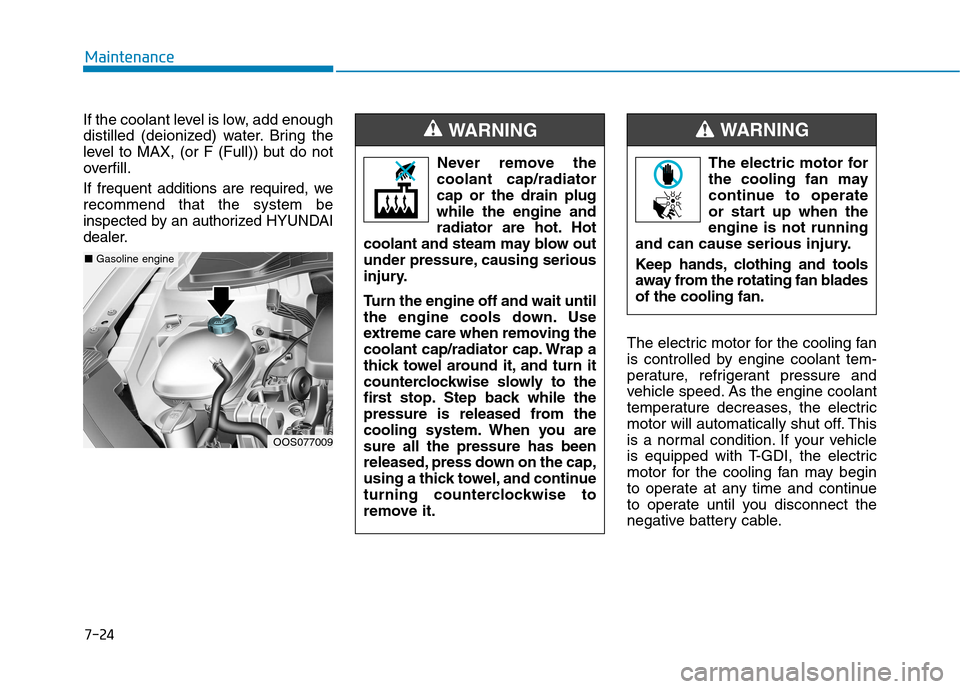
If the coolant level is low, add enough
distilled (deionized) water. Bring the
level to MAX, (or F (Full)) but do not
overfill.
If frequent additions are required, werecommend that the system be
inspected by an authorized HYUNDAI
dealer.
The electric motor for the cooling fan
is controlled by engine coolant tem-
perature, refrigerant pressure and
vehicle speed. As the engine coolant
temperature decreases, the electric
motor will automatically shut off. This
is a normal condition. If your vehicle
is equipped with T-GDI, the electric
motor for the cooling fan may begin
to operate at any time and continue
to operate until you disconnect the
negative battery cable.
OOS077009
■Gasoline engine The electric motor for
the cooling fan may
continue to operate
or start up when theengine is not running
and can cause serious injury.
Keep hands, clothing and tools
away from the rotating fan bladesof the cooling fan.
WARNING
Never remove the
coolant cap/radiator cap or the drain plugwhile the engine and
radiator are hot. Hot
coolant and steam may blow out
under pressure, causing serious
injury.
Turn the engine off and wait until
the engine cools down. Use
extreme care when removing the
coolant cap/radiator cap. Wrap a
thick towel around it, and turn it
counterclockwise slowly to the
first stop. Step back while the
pressure is released from the
cooling system. When you aresure all the pressure has been
released, press down on the cap,
using a thick towel, and continue
turning counterclockwise to
remove it.
WARNING
Page 447 of 523
7-35
7
Maintenance
By jump starting
After a jump start from a good bat-
tery, drive the vehicle for 20-30 min-
utes before it is shutoff. The vehicle
may not restart if you shut it off
before the battery had a chance to
adequately recharge. See “Jump
Starting” in chapter 6 for more infor-
mation on jump starting procedures.Information An inappropriately disposedbattery can be harmful to
the environment and human
health.
Dispose of the battery according to
your local law(s) or regulations.
Reset items
The following items may need to be
reset after the battery has been dis-
charged or the battery has been dis-connected.
Auto up/down window
Sunroof
Trip computer
Climate control system
Driver position memory system
Clock
Audio system
i
AGM battery (if equipped)
Absorbent Glass Matt (AGM) batteries are maintenance-free and we recommend that
the AGM battery be serviced
by an authorized HYUNDAI
dealer. For charging your
AGM battery, use only fully
automatic battery chargers
that are specially developed
for AGM batteries.
When replacing the AGM bat-
tery, we recommend that you
use parts for replacement
from an authorized HYUNDAI
dealer.
Do not open or remove the
cap on top of the battery. This
may cause leaks of internal
electrolyte that could result in
severe injury.
CAUTION
Page 475 of 523
7-63
7
Maintenance
LLIIGG HH TT BB UU LLBB SS
Consult an authorized HYUNDAI
dealer to replace most vehicle light
bulbs. It is difficult to replace vehicle
light bulbs because other parts of the
vehicle must be removed before you
can get to the bulb. This is especially
true for removing the headlamp
assembly to get to the bulb(s).
Removing/installing the headlamp
assembly can result in damage to
the vehicle. Be sure to replace the burned-out
bulb with one of the same wattage
rating. Otherwise, it may cause
damage to the fuse or electricalwiring system.
Information
After heavy driving rain or washing,
headlamp and tail lamp lenses could
appear frosty. This condition is caused
by the temperature difference between
the lamp inside and outside. This is
similar to the condensation on your
windows inside your vehicle when
raining and doesn’t indicate a problem
with your vehicle. If the water leaks
into the lamp bulb circuitry, we rec-
ommend that the system be checked
by an authorized HYUNDAI dealer. Information
The headlamp aiming should be adjust-
ed after an accident or after the head-
lamp assembly is reinstalled at an
authorized HYUNDAI dealer.
Information - Traffic Change
(for Europe)
The low beam light distribution is
asymmetric. If you go abroad to a coun-
try with opposite traffic direction, this
asymmetric part will dazzle oncoming
car driver. To prevent dazzle, ECE reg-
ulation demand several technical solu-
tions (ex. automatic change system,
adhesive sheet, down aiming). These
headlamps are designed not to dazzle
opposite drivers. So, you need not
change your headlamps in a country
with opposite traffic direction.
i
i
i
NOTICE
Prior to working on a light, firmly
apply the parking brake, ensure
that the ignition switch is in theLOCK/OFF position and turn off
the lights to avoid sudden move-
ment of the vehicle and burning
your fingers or receiving an elec-
tric shock.
WARNING
Page 513 of 523
I-2Air bag warning labels .................................................2-64
Air bags.........................................................................2-45
Driver's air bag .........................................................2-48
Passenger's front air bag ..........................................2-48
Passenger's front air bag ON/OFF switch................2-49
Side air bags .............................................................2-51
Curtain air bags ........................................................2-52
How does the air bags system operate? ...................2-53
SRS components and functions ...............................2-53
SRS warning light ....................................................2-54
What to expect after an air bag inflates ...................2-57
Do not install a child restraint on the front passenger seat ........................................................2-58
Air bag collision sensors ..........................................2-58
Why didn't my air bag go off in a collision .............2-58
Air bag inflation conditions .....................................2-60
Air bag non-inflation conditions ..............................2-61
SRS Care ..................................................................2-63
Additional safety precautions ..................................2-63
Air bag warning labels .............................................2-64
Air cleaner ....................................................................7-28
Air conditioner compressor label .................................8-11
Air conditioning refrigerant label .......................3-115, 123
Air conditioning system specification ............................8-5
Alarm system ................................................................3-16
Antenna ...........................................................................4-2
Anti-lock brake system (ABS) .....................................5-31 Appearance care ...........................................................7-78
Exterior care .............................................................7-78
Interior care ..............................................................7-82
Armrest .........................................................................2-14
Audio / Video / Navigation system ................................4-4
Auto defogging system ...............................................3-126
Auto light position ........................................................3-83
Automatic climate control system ..............................3-116
Automatic ventilation .................................................3-127
Aux, USB and iPod ........................................................4-2
Battery...........................................................................7-32 Battery recharging ....................................................7-34
Battery saver function...................................................3-90
Before driving .................................................................5-4
Blade type fuse .............................................................7-48
Blind-spot Collsion Warning (BCW) system ...............5-55
Bluetooth ®
Wireless Technology hands-free ..................4-4
Bottle holder ...............................................................3-131
Brake system.................................................................5-28 Power brakes ............................................................5-28
Disc brakes wear indicator.......................................5-29
Parking brake ...........................................................5-29
Anti-lock brake system (ABS).................................5-31
Electronic stability control (ESC) ............................5-33
Vehicle stability management (VSM) ......................5-36
Hill-start assist control (HAC) .................................5-37
Index
A
B