Infotainment system HYUNDAI KONA 2022 User Guide
[x] Cancel search | Manufacturer: HYUNDAI, Model Year: 2022, Model line: KONA, Model: HYUNDAI KONA 2022Pages: 579, PDF Size: 35.31 MB
Page 429 of 579

07
7-97
Highway Driving Assist may
inadvertently operate or turn off
depending on road conditions
(navigation information) and
surroundings.
Lane Following Assist function may
be temporarily disabled when the
front view camera cannot detect
lanes properly or the hands-off
warning is on.
You may not hear the warning sound
of Highway Driving Assist if the
surrounding is noisy.
If the vehicle is driven at high speed
above a certain speed at a curve,
your vehicle may drive to one side or
may depart from the driving lane.
When you are towing a trailer or
another vehicle, we recommend that
Highway Driving Assist is turned off
due to safety reasons.
The hands–off warning message
may appear early or late depending
on how the steering wheel is held or
road conditions. Always have your
hands on the steering wheel while
driving.
For your safety, please read the
owner's manual before using the
Highway Driving Assist.
Highway Driving Assist will not
operate when the engine is started,
or when the detecting sensors or
navigation is being initialized.
Limitations of Highway Driving
Assist
Highway Driving Assist may not operate
normally, or may not operate under the
following circumstances:
The map information and the
actual road is different because the
navigation is not updated
The map information and the actual
road is different because of real-time
GPS data or map information error
The infotainment system is overloaded
by simultaneously performing
functions such as route search, video
playback, voice recognition, etc.
GPS signals are blocked in areas such
as a tunnel
The driver goes off course or the
route to the destination is changed or
canceled by resetting the navigation
The vehicle enters a service station or
rest area
Android Auto or Car Play is operating
The navigation cannot detect the
current vehicle position (ex: elevated
roads including overpass adjacent to
general roads or nearby roads exist in
a parallel way)
Information
Page 437 of 579
07
7-105
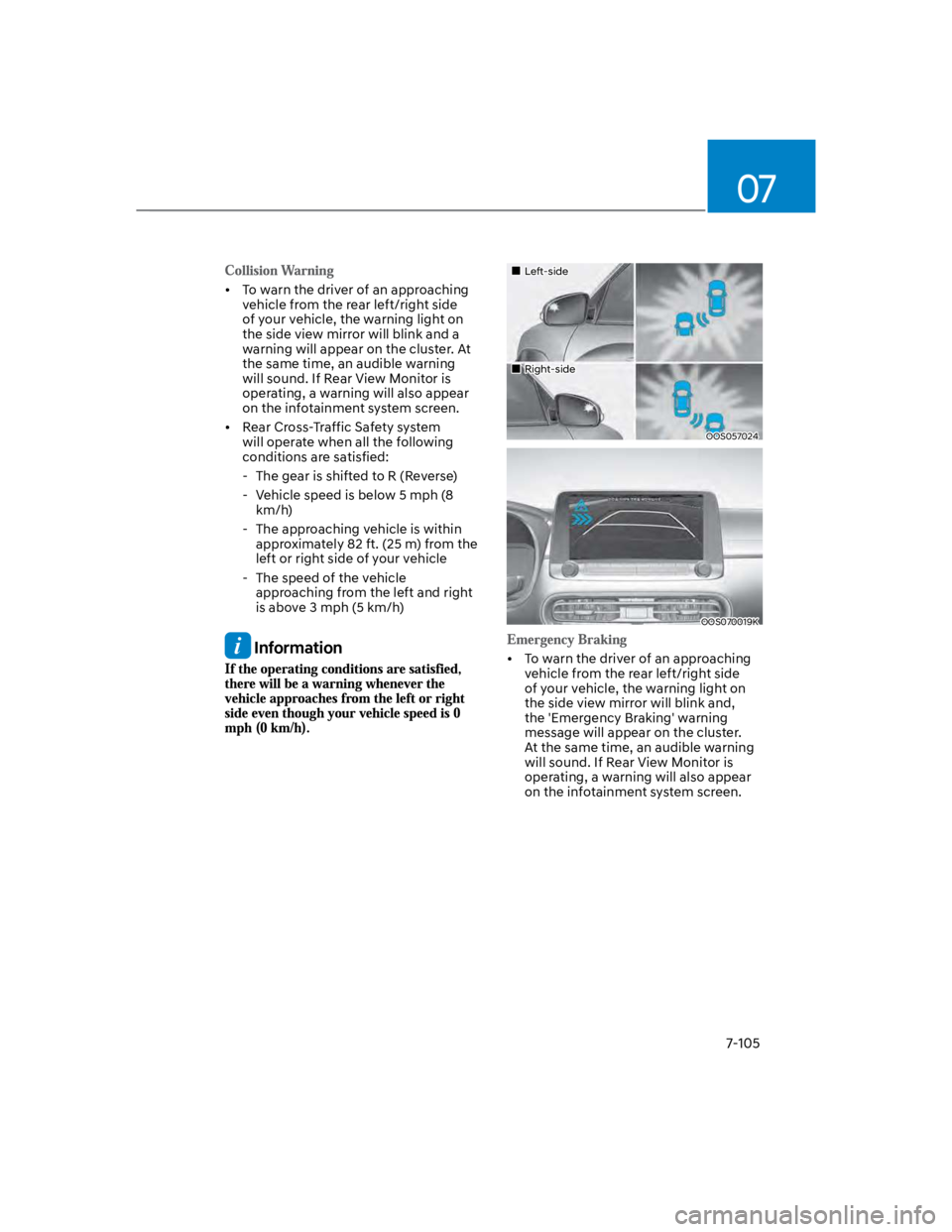
To warn the driver of an approaching
vehicle from the rear left/right side
of your vehicle, the warning light on
the side view mirror will blink and a
warning will appear on the cluster. At
the same time, an audible warning
will sound. If Rear View Monitor is
operating, a warning will also appear
on the infotainment system screen.
Rear Cross-Traffic Safety system
will operate when all the following
conditions are satisfied:
- The gear is shifted to R (Reverse)
- Vehicle speed is below 5 mph (8
km/h)
- The approaching vehicle is within
approximately 82 ft. (25 m) from the
left or right side of your vehicle
- The speed of the vehicle
approaching from the left and right
is above 3 mph (5 km/h)
Information
Left-side
Right-side
OOS057024
OOS070019K
To warn the driver of an approaching
vehicle from the rear left/right side
of your vehicle, the warning light on
the side view mirror will blink and,
the 'Emergency Braking' warning
message will appear on the cluster.
At the same time, an audible warning
will sound. If Rear View Monitor is
operating, a warning will also appear
on the infotainment system screen.
Page 518 of 579

Maintenance
9-32
By jump starting
After a jump start from a good battery,
drive the vehicle for 20-30 minutes
before it is shutoff. The vehicle may
not restart if you shut it off before the
battery had a chance to adequately
recharge. See “Jump Starting” in chapter
8 for more information on jump starting
procedures.
Information
Reset items
The following items may need to be reset
after the battery has been discharged or
the battery has been disconnected.
Auto up/down window (see chapter 5)
Sunroof (see chapter 5)
Trip computer (see chapter 5)
Climate control system (see chapter 5)
Clock (see chapter 5)
Infotainment system (see
infotainment system manual)
Page 573 of 579

I
I-7
Ignition switch ....................................................................................................... 6-5
Key ignition switch ............................................................................................ 6-5
Key ignition switch positions ............................................................................. 6-6
Starting the engine.............................................................................................. 6-7
Important safety precautions.................................................................................. 3-2
Air bag hazards................................................................................................... 3-2
Always wear your seat belt ................................................................................ 3-2
Control your speed ............................................................................................. 3-2
Driver distraction................................................................................................ 3-2
Keep your vehicle in safe condition ................................................................... 3-2
Restrain all children ........................................................................................... 3-2
In case of an emergency while driving .................................................................. 8-2
If the engine stalls at a crossroad or crossing ..................................................... 8-2
If the engine stalls while driving ........................................................................ 8-2
If you have a flat tire while driving .................................................................... 8-3
Infotainment system........................................................................................... 5-116
Antenna .......................................................................................................... 5-116
Audio / Video / Navigation system (AVN) ................................................... 5-118
Bluetooth® Wireless Technology .................................................................... 5-118
How vehicle radio works................................................................................ 5-119
Steering wheel remote controls ...................................................................... 5-117
USB and iPod® port ....................................................................................... 5-116
Voice recognition............................................................................................ 5-118
Infotainment System specifications .................................................................. 5-122
Bluetooth ........................................................................................................ 5-123
USB ................................................................................................................ 5-122
Instrument cluster .................................................................................................. 4-4
Gauges and meters ............................................................................................. 4-5
Instrument cluster control................................................................................... 4-5
LCD display messages ..................................................................................... 4-22
Transmission shift indicator ............................................................................... 4-9
Warning and indicator lights ............................................................................ 4-10
Intelligent variable transmission .......................................................................... 6-13
Good driving practices ..................................................................................... 6-17
Intelligent variable transmission operation ...................................................... 6-13
Parking ............................................................................................................. 6-16