Change HYUNDAI KONA 2022 Owner's Guide
[x] Cancel search | Manufacturer: HYUNDAI, Model Year: 2022, Model line: KONA, Model: HYUNDAI KONA 2022Pages: 579, PDF Size: 35.31 MB
Page 210 of 579

Convenient features
5-76
When it is affected by an external
condition
When there is a similar shaped lamp
with the vehicle front vehicle’s
lamps.
When the headlamp is not repaired
or replaced at an authorized dealer.
When headlamp aiming is not
properly adjusted.
When driving on a narrow winding
road or rough road.
When driving downhill or uphill.
When only part of the vehicle in
front is visible on a crossroad or on a
corner.
When there is a traffic light,
reflecting sign, flashing sign or
mirror.
When the road conditions are bad
such as being wet or covered with
snow.
When a vehicle suddenly appears
from around a corner.
When the vehicle is tilted from a flat
tire or being towed.
When the front visibility is poor
When the light from the on-coming
or vehicle in front is not detected
because of exhaust fume, smoke,
fog, snow, Heavy rain, dust, etc.
When the front window is covered
with foreign matter.
WARNING
Do not disassemble a front view
camera temporarily for tinted
window or attaching any types
of coatings and accessories. If
you disassemble the camera and
assemble it again, take your vehicle
to an authorized HYUNDAI dealer
and have the function checked to
need a calibration.
When you replace or reinstall the
windshield glass, front view camera,
we recommend that you take your
vehicle to an authorized HYUNDAI
dealer and have the function
checked.
Be careful that water doesn’t get into
High Beam Assist unit and do not
remove or damage related parts of
High Beam Assist.
Do not place objects on the crash
pad that reflect light such as mirrors,
white paper, etc. The function may
malfunction if sunlight is reflected.
At times, High Beam Assist may
not work properly. The function is
for your convenience only. It is the
responsibility of the driver for safe
driving practices and always check
the road conditions for your safety.
When the function does not operate
normally, change the lamp position
manually between the high beam
and low beam.
Page 212 of 579
Convenient features
5-78
AUTO (Automatic) control
(if equipped)
OOS047322N
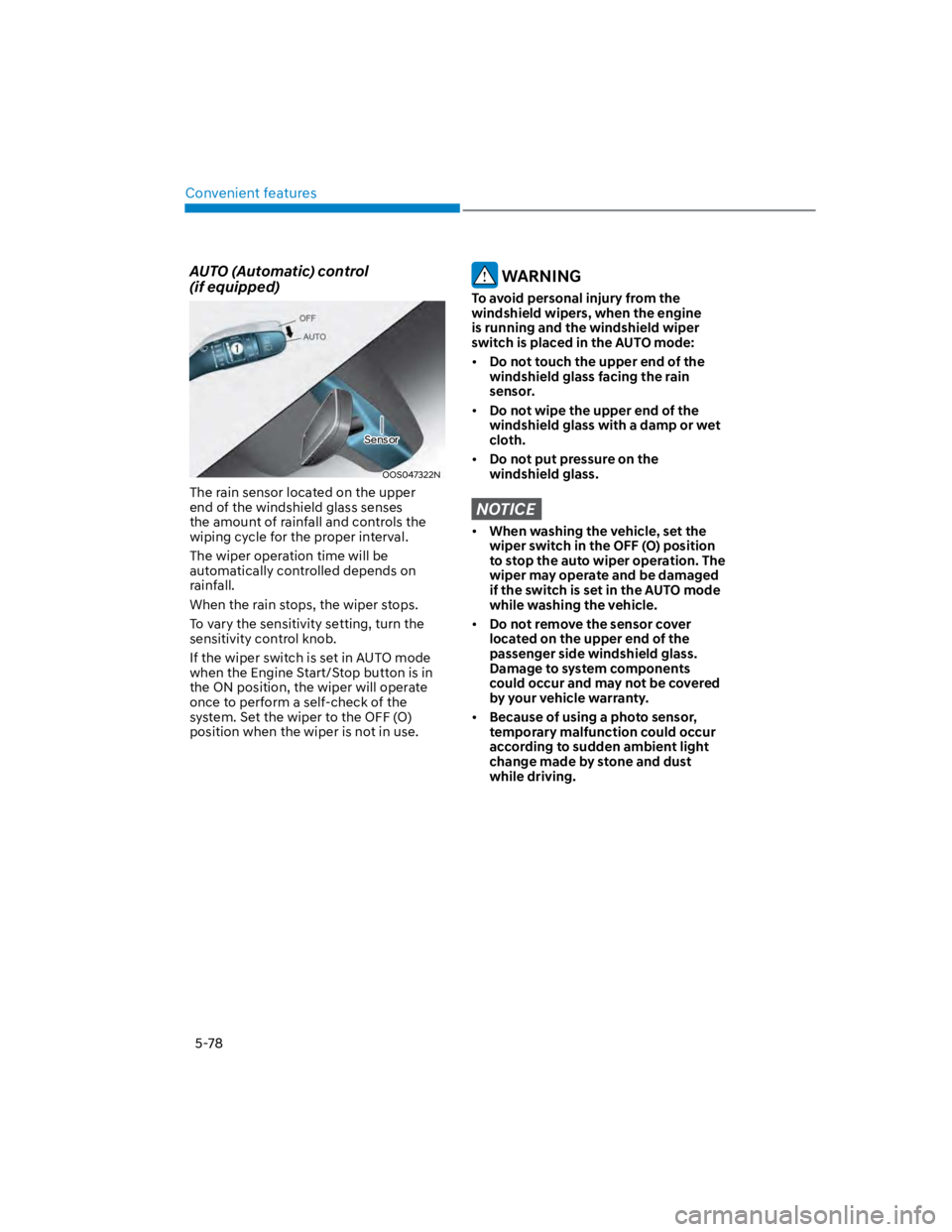
The rain sensor located on the upper
end of the windshield glass senses
the amount of rainfall and controls the
wiping cycle for the proper interval.
The wiper operation time will be
automatically controlled depends on
rainfall.
When the rain stops, the wiper stops.
To vary the sensitivity setting, turn the
sensitivity control knob.
If the wiper switch is set in AUTO mode
when the Engine Start/Stop button is in
the ON position, the wiper will operate
once to perform a self-check of the
system. Set the wiper to the OFF (O)
position when the wiper is not in use.
WARNING
To avoid personal injury from the
windshield wipers, when the engine
is running and the windshield wiper
switch is placed in the AUTO mode:
Do not touch the upper end of the
windshield glass facing the rain
sensor.
Do not wipe the upper end of the
windshield glass with a damp or wet
cloth.
Do not put pressure on the
windshield glass.
NOTICE
When washing the vehicle, set the
wiper switch in the OFF (O) position
to stop the auto wiper operation. The
wiper may operate and be damaged
if the switch is set in the AUTO mode
while washing the vehicle.
Do not remove the sensor cover
located on the upper end of the
passenger side windshield glass.
Damage to system components
could occur and may not be covered
by your vehicle warranty.
Because of using a photo sensor,
temporary malfunction could occur
according to sudden ambient light
change made by stone and dust
while driving.
Sensor
Page 221 of 579
05
5-87
If the vehicle has been parked in
direct sunlight during hot weather,
open the windows for a short time
to let the hot air inside the vehicle
escape.
After sufficient cooling has been
achieved, switch back from the
recirculated air to the fresh outside air
position.
To help reduce moisture inside of
the windows on rainy or humid
days, decrease the humidity inside
the vehicle by operating the air
conditioning system with the windows
and sunroof closed.
Use the air conditioning system every
month for a few minutes to ensure
maximum system performance.
If you operate the air conditioner
excessively, the difference between
the temperature of the outside air and
that of the windshield could cause
the outer surface of the windshield to
fog up, causing loss of visibility. In this
case, set the mode selection knob to
the position and set the fan speed
control knob to the lowest speed
setting.
System maintenance
Cabin air filter
OIK047401L
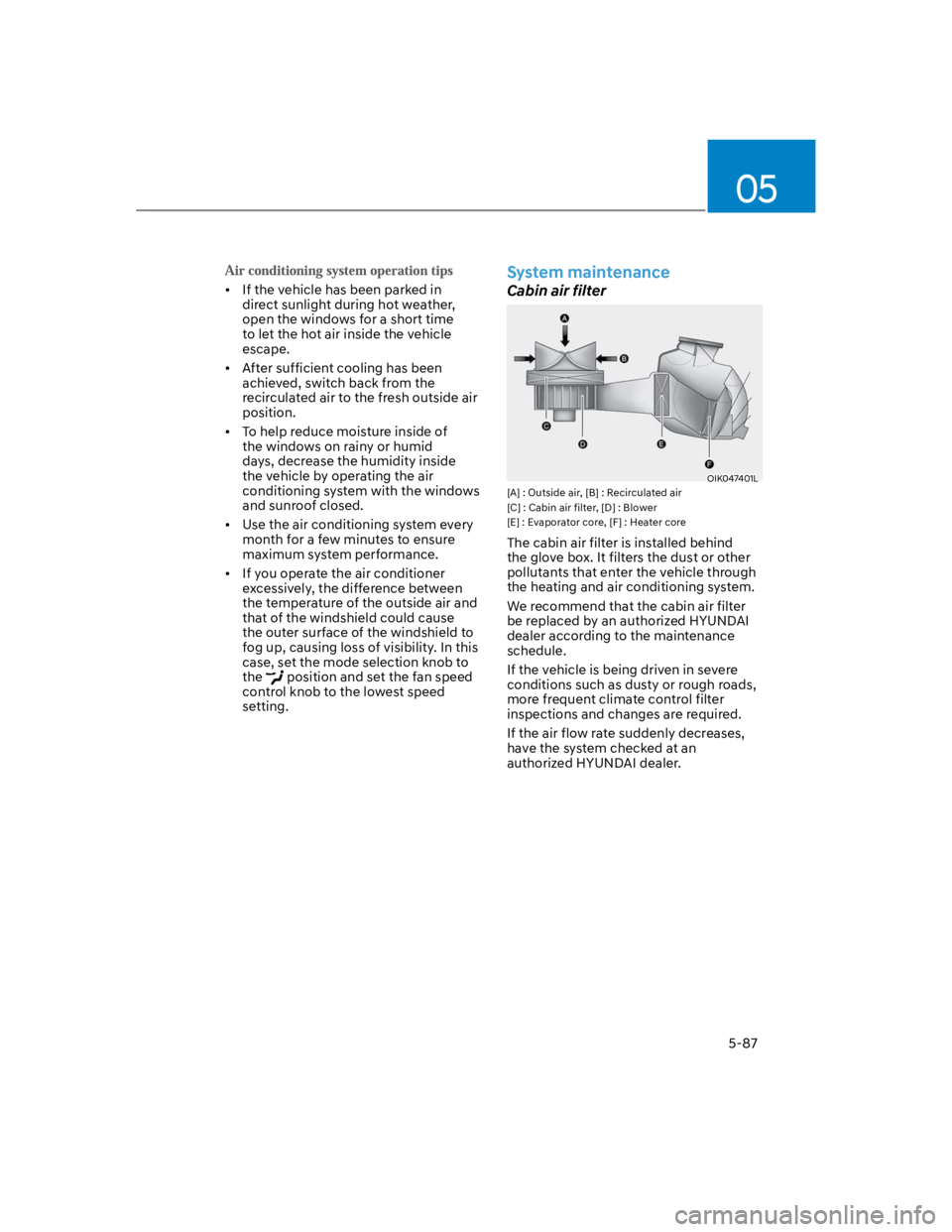
[A] : Outside air, [B] : Recirculated air
[C] : Cabin air filter, [D] : Blower
[E] : Evaporator core, [F] : Heater core
The cabin air filter is installed behind
the glove box. It filters the dust or other
pollutants that enter the vehicle through
the heating and air conditioning system.
We recommend that the cabin air filter
be replaced by an authorized HYUNDAI
dealer according to the maintenance
schedule.
If the vehicle is being driven in severe
conditions such as dusty or rough roads,
more frequent climate control filter
inspections and changes are required.
If the air flow rate suddenly decreases,
have the system checked at an
authorized HYUNDAI dealer.
Page 227 of 579
05
5-93
Air intake control (9)
This is used to select the outside (fresh)
air position or recirculated air position.
To change the air intake control position,
push the control button.
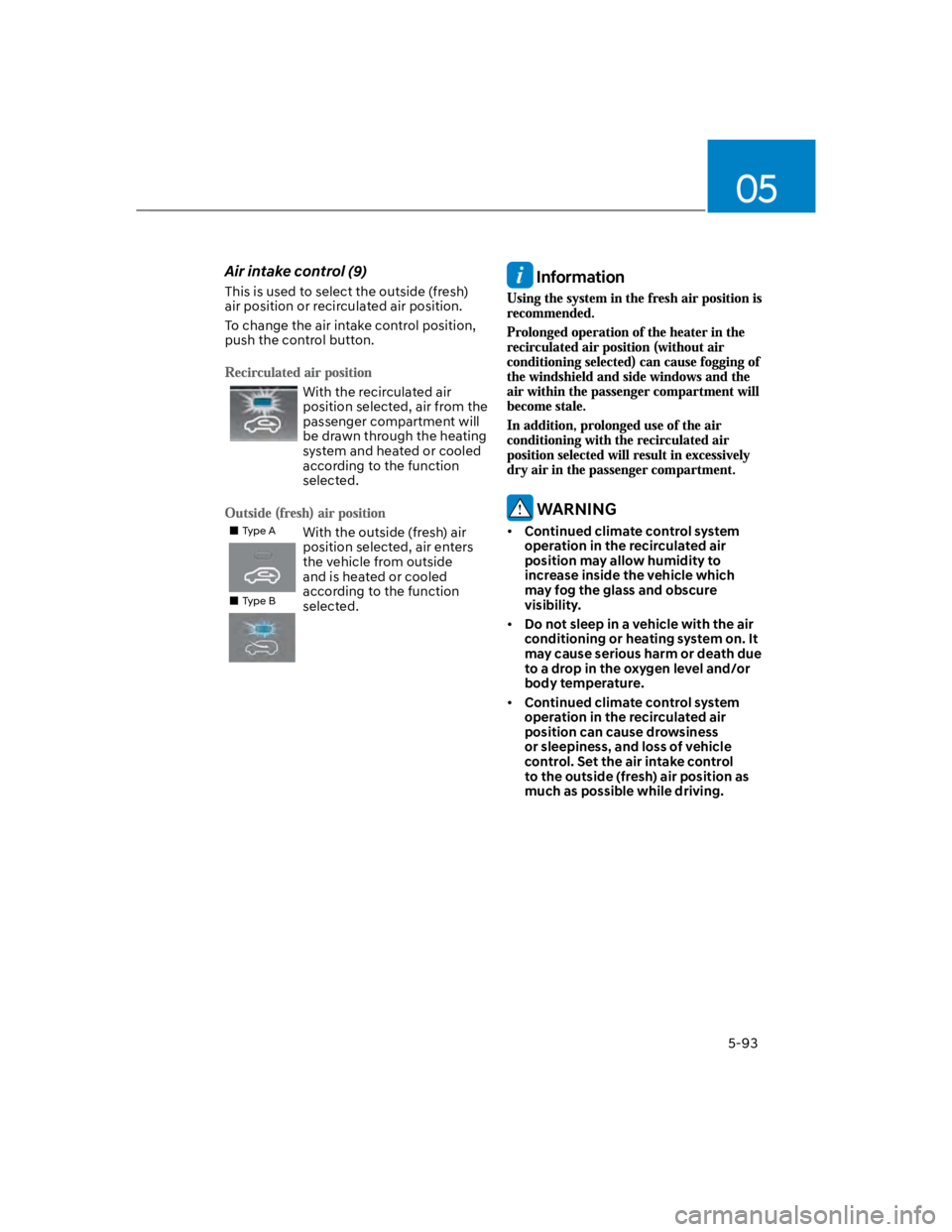
With the recirculated air
position selected, air from the
passenger compartment will
be drawn through the heating
system and heated or cooled
according to the function
selected.
Type A
Type B
With the outside (fresh) air
position selected, air enters
the vehicle from outside
and is heated or cooled
according to the function
selected.
Information
WARNING
Continued climate control system
operation in the recirculated air
position may allow humidity to
increase inside the vehicle which
may fog the glass and obscure
visibility.
Do not sleep in a vehicle with the air
conditioning or heating system on. It
may cause serious harm or death due
to a drop in the oxygen level and/or
body temperature.
Continued climate control system
operation in the recirculated air
position can cause drowsiness
or sleepiness, and loss of vehicle
control. Set the air intake control
to the outside (fresh) air position as
much as possible while driving.
Page 230 of 579
Convenient features
5-96
If the vehicle has been parked in
direct sunlight during hot weather,
open the windows for a short time
to let the hot air inside the vehicle
escape.
After sufficient cooling has been
achieved, switch back from the
recirculated air to the fresh outside air
position.
To help reduce moisture inside of
the windows on rainy or humid
days, decrease the humidity inside
the vehicle by operating the air
conditioning system with the windows
and sunroof closed.
Use the air conditioning system every
month for a few minutes to ensure
maximum system performance.
If you operate the air conditioner
excessively, the difference between
the temperature of the outside air and
that of the windshield could cause
the outer surface of the windshield to
fog up, causing loss of visibility. In this
case, set the mode selection button to
the position and set the fan speed
control knob to the lowest speed
setting.
System maintenance
Cabin air filter
OIK047401L
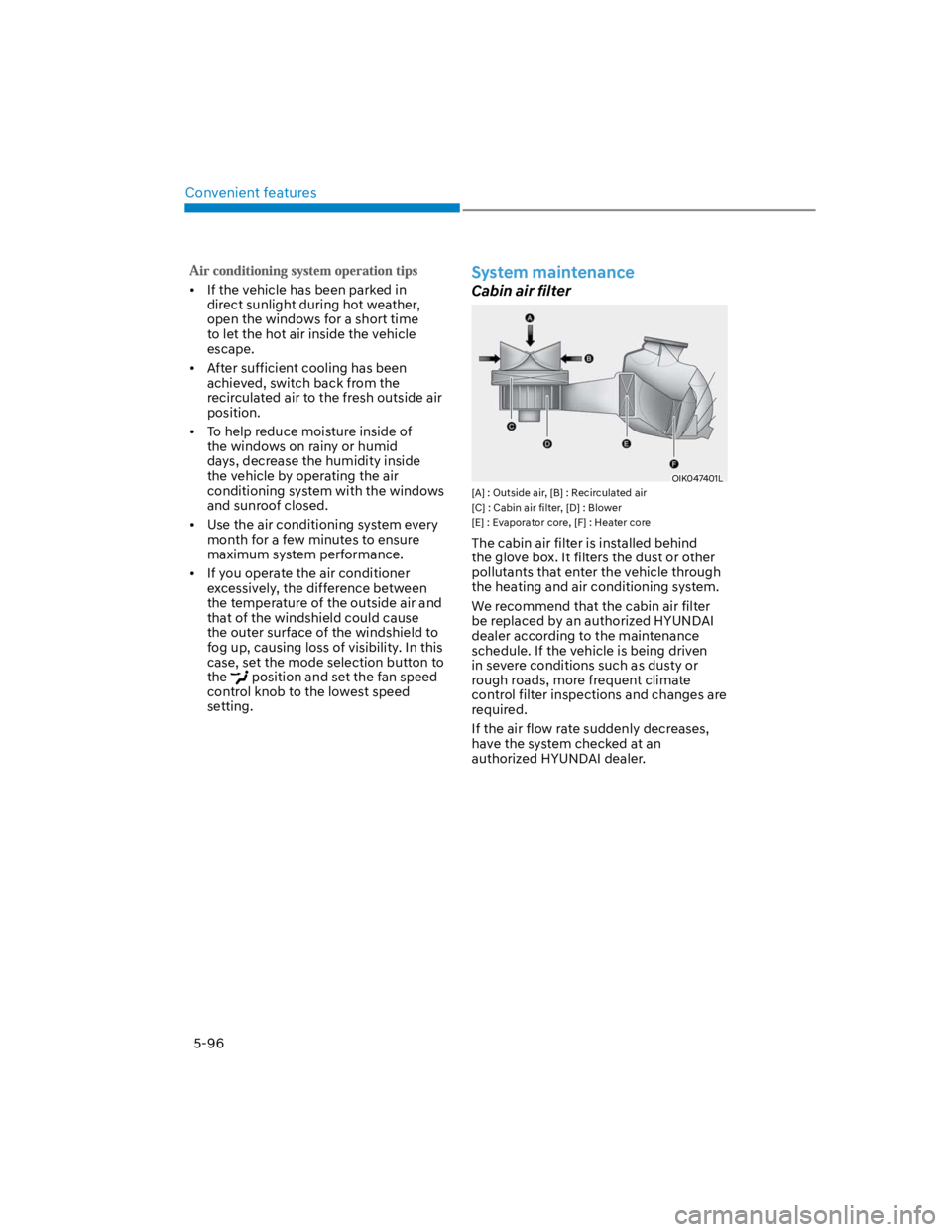
[A] : Outside air, [B] : Recirculated air
[C] : Cabin air filter, [D] : Blower
[E] : Evaporator core, [F] : Heater core
The cabin air filter is installed behind
the glove box. It filters the dust or other
pollutants that enter the vehicle through
the heating and air conditioning system.
We recommend that the cabin air filter
be replaced by an authorized HYUNDAI
dealer according to the maintenance
schedule. If the vehicle is being driven
in severe conditions such as dusty or
rough roads, more frequent climate
control filter inspections and changes are
required.
If the air flow rate suddenly decreases,
have the system checked at an
authorized HYUNDAI dealer.
Page 235 of 579
05
5-101
When the Auto Defogging
System operates, the
indicator will illuminate.
If a high amount of humidity is detected
in the vehicle, the Auto Defogging
System will be enabled. The following
steps will be performed automatically:
Step 1) The air intake control will change
to Fresh mode.
Step 2) The A/C button will turn ON.
Step 3) The mode will be changed to
defrost to direct airflow to the
windshield.
Step 4) The fan speed will be set to MAX.
If the air conditioning is off or
recirculated air position is manually
selected while Auto Defogging System is
ON, the Auto Defogging System Indicator
will blink 3 times to signal that the
manual operation has been canceled.
Press the front windshield defroster
button for 3 seconds when the ignition
switch is in the ON position. When the
Auto Defogging System is canceled, the
ADS OFF symbol will blink 3 times and
ADS OFF will be displayed on the climate
control information screen.
When the Auto Defogging System is
reset, the ADS OFF symbol will blink 6
times without a signal.
Information
NOTICE
Do not remove the sensor cover located
on the upper end of the windshield
glass.
Damage to system parts could occur
and may not be covered by your vehicle
warranty.
Page 237 of 579
05
5-103
Automatic Ventilation
When the ignition switch is in the ON
position or when the engine is running
and temperature is below 59°F (15°C)
with the recirculation mode selected
more than five minutes, the air intake
position will automatically change to
fresh mode.
When the air conditioning system is on,
press the mode selection button and
the recirculation mode button five times
within three seconds. (Automatic climate
control system)
When the air conditioning system is on,
press the recirculation mode button
for 3 seconds. (Manual climate control
system)
When the Automatic Ventilation feature
is enabled, the Recirculation button LED
indicator will blink 6 times.
When the Automatic Ventilation feature
is disabled, the Recirculation button LED
indicator will blink 3 times.
Sunroof Inside Air Recirculation
When the sunroof is opened, outside
(fresh) air will be automatically selected.
At this time, if you press the air intake
control button, recirculated air position
will be selected but will change back
to outside (fresh) air after 3 minutes.
When the sunroof is closed, the air
intake position will return to the original
position that was selected.
Inside air circulation while
operating the washer fluid
When the washer liquid is sprayed, it is
changed and maintained for a certain
period of time to prevent the smell of
washer liquid from entering the room.
However, in case of low outside
temperature, the outside (fresh) air mode
is maintained to prevent the cause of
window fogging.
Automatic heater and air
conditioner Function setting
1. Turn on the engine.
2. Set the mode to the () position.
3. When the air conditioning system
is on, press the recirculation mode
button more than 4 times within 2
seconds.
When the function is enabled, the
recirculation button LED indicator will
blink 6 times.
Function release
1. Turn on the engine.
2. Set the mode to the () position.
3. When the air conditioning system
is on, press the recirculation mode
button more than 4 times within 2
seconds.
When the function is disabled, the
recirculation button LED indicator will
blink 3 times.
Page 244 of 579
![HYUNDAI KONA 2022 Owners Guide Convenient features
5-110
Wireless smart phone charging
system (if equipped)
OOS050015K
[A] : Indicator light, [B] : Charging pad
On certain models, the vehicle comes
equipped with a wireless smart](/img/35/41169/w960_41169-243.png "HYUNDAI KONA 2022 Owners Guide Convenient features
5-110
Wireless smart phone charging
system (if equipped)
OOS050015K
[A] : Indicator light, [B] : Charging pad
On certain models, the vehicle comes
equipped with a wireless smart")
Convenient features
5-110
Wireless smart phone charging
system (if equipped)
OOS050015K
[A] : Indicator light, [B] : Charging pad
On certain models, the vehicle comes
equipped with a wireless smart phone
charger.
The system is available when all doors
are closed, and when the Engine Start/
Stop button is in the ACC or ON (or
START) position.
To charge a cellular phone
The wireless smart phone charging
system charges only the Qi-enabled
smart phones (). Read the label on
the smart phone accessory cover or
visit your smart phone manufacturer’s
website to check whether your smart
phone supports the Qi technology.
The wireless charging process starts
when you put a Qi-enabled smart phone
on the wireless charging unit.
1. Remove other items, including the
smart key, from the wireless charging
unit. If not, the wireless charging
process may be interrupted. Place
the smart phone on the center of the
charging pad.
2. The indicator light is orange when the
smart phone is charging. The indicator
light will turn blue when phone
charging is complete.
3. You can turn ON or OFF the wireless
charging function from the Settings
menu on the instrument cluster.
Select:
-
If your smart phone is not charging:
- Slightly change the position of the
smart phone on the charging pad.
- Make sure the indicator light is
orange.
The indicator light will blink orange for 10
seconds if there is a malfunction in the
wireless charging system.
In this case, temporarily stop the
charging process, and re-attempt to
charge your smart phone again.
The system warns you with a message on
the LCD display if the smart phone is still
on the wireless charging unit after the
vehicle is turned OFF and the front door
is opened.
For some manufacturer’s smart phones,
the system may not warn you even
though the smart phone is left on the
wireless charging unit. This is due to the
particular characteristic of the smart
phone and not a malfunction of the
wireless charging.
Information
Page 245 of 579
05
5-111
NOTICE
The wireless smart phone charging
system may not support certain
smart phones, which are not verified
for the Qi specification ().
When placing your smart phone on
the charging pad, position the phone
in the middle of the mat for optimal
charging performance. If your smart
phone is off to the side, the charging
rate may be less and in some cases
the smart phone may experience
higher heat conduction.
In some cases, the wireless charging
may stop temporarily when the
smart key is used, either when
starting the vehicle or locking/
unlocking the doors, etc.
When charging certain smart
phones, the charging indicator may
not change to blue when the smart
phone is fully charged.
The wireless charging process may
temporarily stop, when temperature
abnormally increases inside the
wireless smart phone charging
system. The wireless charging
process restarts, when temperature
falls to a certain level.
The wireless charging process may
temporarily stop when there is
any metallic item, such as a coin,
between the wireless smart phone
charging system and smart phone.
When charging some smart phones
with a self-protection feature,
the wireless charging speed may
decrease and the wireless charging
may stop.
If the smart phone has a thick cover,
the wireless charging may not be
possible.
If the smart phone is not completely
contacting the charging pad,
wireless charging may not operate
properly.
Some magnetic items like credit
cards, phone cards or rail tickets may
be damaged if left with the smart
phone during the charging process.
When any smart phone without
a wireless charging function or a
metallic object is placed on the
charging pad, a small noise may
sound. This small sound is due to the
vehicle discerning compatibility of
the object placed on the charging
pad. It does not affect your vehicle or
the smart phone in any way.
Information
Information
1.
2.
3.
Page 256 of 579

Convenient features
5-122
USB
Supported audio formats
Audio file specification
- WAVeform audio format
- MPEG1/2/2.5 Audio Layer3
- Windows Media Audio Ver 7.X/8.X
Bit rates
- MPEG1 (Layer3):
32/40/48/56/64/80/96/112/128/160
/192/224/256/320 kbps
- MPEG2 (Layer3):
8/16/24/32/40/48/56/64/80/96/112
/128/144/160 kbps
- MPEG2.5 (Layer3):
8/16/24/32/40/48/56/64/80/96/112
/128/144/160 kbps
- WMA (High Range):
48/64/80/96/128/160/192 kbps
Bits Per Sample
- WAV (PCM(Stereo)): 24 bit
- WAV (IMA ADPCM): 4 bit
- WAV (MS ADPCM): 4 bit
Sampling frequency
- MPEG1: 44100/48000/32000 Hz
- MPEG2: 22050/24000/16000 Hz
- MPEG2.5: 11025/12000/8000 Hz
- WMA: 32000/44100/48000 Hz
- WAV: 44100/48000 Hz
Maximum length of folder/file names
(Based on Unicode): 40 English or
Korean characters
Supported characters for folder/
file names (Unicode support): 2,604
Korean characters, 94 alphanumeric
characters, 4,888 Chinese characters
in common use, 986 special
characters
Maximum number of folders: 1,000
Maximum number of files: 5,000
NOTICE
Files that are not in a supported
format may not be recognised or
played, or information about them,
such as the file name, may not be
displayed properly.
Only files with .mp3/.wma/.wav
extensions can be recognised by the
system. If the file is not in supported
format, change the file format by
using the latest encoding software.
The device will not support files
locked by DRM (Digital Rights
Management).
For MP3/WMA compression files and
WAV file, differences in sound quality
will occur depending on the bitrate.
(Music files with a higher bitrate
have a better sound quality.)
Japanese or Simplified Chinese
characters in folder or file names
may not be displayed properly.