Drive mode HYUNDAI KONA 2022 Service Manual
[x] Cancel search | Manufacturer: HYUNDAI, Model Year: 2022, Model line: KONA, Model: HYUNDAI KONA 2022Pages: 579, PDF Size: 35.31 MB
Page 318 of 579
06
6-61
SMART mode
SMART mode selects the proper
driving mode among NORMAL,
ECO and SPORT by judging
the driver's driving habits (i.e.
mild or dynamic) from the
brake pedal depression or the
steering wheel operation.
Rotate the DRIVE MODE knob to
activate SMART mode. When SMART
mode is activated, the indicator
illuminates on the instrument cluster.
The vehicle starts in SMART mode,
when the engine was turned OFF in
SMART mode.
SMART mode automatically controls
gear shifting patterns, engine torque,
in accordance with the driver's driving
habits.
Information
The driving mode automatically
changes to ECO mode after a certain
period of time, when you gently
depress the accelerator pedal (Your
driving is categorized to be mild.).
The driving mode automatically
changes from SMART ECO mode to
SMART NORMAL mode after a certain
period of time, when you sharply or
repetitively depress the accelerator
pedal.
The driving mode automatically
changes to SMART NORMAL mode
with the same driving patterns, when
the vehicle starts to drive on an
upward slope of a certain angle. The
driving mode automatically returns to
SMART ECO mode, when the vehicle
enters a leveled road.
The driving mode automatically
changes to SMART SPORT, when
you abruptly accelerate the vehicle
or repetitively operate the steering
wheel (Your driving is categorized
to be sporty.). In this mode, your
vehicle drives in a lower gear for
abrupt accelerating/decelerating
and increases the engine brake
performance.
You may still sense the engine brake
performance, even when you release
the accelerator pedal in SMART
SPORT mode. It is because your
vehicle remains to be in a lower gear
over a certain period of time for next
acceleration. Thus, it is a normal
driving situation, not indicating any
malfunction.
The driving mode automatically
changes to SMART SPORT mode
only in harsh driving situations. In
most of the normal driving situations,
the driving mode sets to be either
in SMART ECO mode or in SMART
NORMAL mode.
Page 319 of 579

Driving your vehicle
6-62
The SMART mode may be limited in
following situations. (The OFF indicator
illuminates in those situations.)
The driver manually moves the shift
lever : It deactivates SMART mode.
The vehicle drives, as the driver
manually moves the shift lever.
Cruise Control is activated : The cruise
system may deactivate the SMART
mode. When a higher system is set
by the cruise system, it starts to
control vehicle speed and deactivates
SMART mode. (SMART mode is not
deactivated just by activating the
cruise system.)
The transmission oil temperature is either
extremely low or extremely high : The
SMART mode can be active in most of
the normal driving situations. However,
an extremely high/ low transmission oil
temperature may temporarily deactivate
the SMART mode, because the
transmission condition is out of normal
operation condition.
Page 322 of 579
06
6-65
Driving in flooded areas
Avoid driving through flooded areas
unless you are sure the water is no
higher than the bottom of the wheel hub.
Drive through any water slowly. Allow
adequate stopping distance because
brake performance may be reduced.
After driving through water, dry the
brakes by gently applying them several
times while the vehicle is moving slowly.
Highway driving
Tires
Adjust the tire inflation, as specified.
Under-inflation may overheat or damage
the tires.
Do not install worn-out or damaged tires,
which may reduce traction or fail the
braking operation.
Information
Fuel, engine coolant and engine oil
Driving at higher speeds on the highway
consumes more fuel and is less efficient
than driving at a slower, more moderate
speed. Maintain a moderate speed in
order to conserve fuel when driving on
the highway.
Be sure to check both the engine coolant
level and the engine oil before driving.
Drive belt
A loose or damaged drive belt may
overheat the engine.
Reducing the risk of a rollover
Your multi-purpose passenger vehicle is
defined as a Sports Utility Vehicle (SUV).
SUV’s have higher ground clearance
and a narrower track to make them
capable of performing in a wide variety
of off-road applications. The specific
design characteristics give them a higher
center of gravity than ordinary vehicles
making them more likely to roll over if
you make abrupt turns. Utility vehicles
have a significantly higher rollover rate
than other types of vehicles. Due to this
risk, driver and passengers are strongly
recommended to buckle their seat belts.
In a rollover crash, an unbelted person
is significantly more likely to die than a
person wearing a seat belt.
There are steps that a driver can make
to reduce the risk of a rollover. If at all
possible, avoid sharp turns or abrupt
maneuvers, do not load your vehicle
with heavy cargo on the roof, and never
modify your vehicle in any way.
WARNING
Utility vehicles have a significantly
higher rollover rate than other types of
vehicles. To prevent rollovers or loss of
control:
Take corners at slower speeds than
you would with a passenger vehicle.
Avoid sharp turns and abrupt
maneuvers.
Do not modify your vehicle in any
way that you would raise the center
of gravity.
Keep tires properly inflated.
Do not carry heavy cargo on the roof.
WARNING
In a rollover crash, an unbelted person
is significantly more likely to die than a
person wearing a seat belt. Make sure
all passengers are wearing their seat
belts.
Page 394 of 579
Driver assistance system
7-62
To temporarily cancel Cruise Control
OOS070011K
Cruise Control will be paused when:
Depressing the brake pedal.
Pushing the button.
Shifting the gear to N (Neutral).
Decreasing vehicle speed to less than
approximately 20 mph (30 km/h).
ESC (Electronic Stability Control) is
operating.
Downshifting to 2nd gear when in
Manual Shift mode.
The set speed will turn off but the Cruise
() indicator will stay on.
To resume Cruise Control
OOS070012K
Push the +, - switch or button.
If you push the + switch up or - switch
down, vehicle speed will be set to the
current speed on the cluster.
If you push the button, vehicle
speed will resume to the preset speed.
Vehicle speed must be above 20 mph
(30 km/h) for the function to resume.
To turn off Cruise Control
OOS070008E
Press the Driving Assist button to turn
Cruise Control off. The Cruise ()
indicator will go off.
Always press the Driving Assist button to
turn Cruise Control off when not in use.
Page 401 of 579
07
7-69
Overtaking Acceleration Assist will
operate when the turn signal indicator
is turned on to the left (left-hand drive)
or turned on to the right (right-hand
drive) while Smart Cruise Control is
operating, and the following conditions
are satisfied:
Your vehicle speed is above 40 mph
(60 km/h)
The hazard warning flasher is off
A vehicle is detected in front of your
vehicle
Deceleration is not needed to
maintain distance with the vehicle in
front
WARNING
When the turn signal indicator is
turned on to the left (left-hand drive)
or turned on to the right (right-
hand drive) while there is a vehicle
ahead, the vehicle may accelerate
temporarily. Pay attention to the
road conditions at all times.
Regardless of your countries driving
direction, Overtaking Acceleration
Assist will operate when the
conditions are satisfied. When
using the function in countries with
different driving direction, always
check the road conditions at all
times.
Smart Cruise Control display and
control
Basic function
You can see the status of the Smart
Cruise Control operation in the Driving
Assist mode on the cluster. Refer to “LCD
Display Modes” section in chapter 4.
Smart Cruise Control will be displayed
as below depending on the status of the
function.
OTM070245E
When operating
(1) Whether there is a vehicle ahead
and the selected distance level are
displayed.
(2) Set speed is displayed.
(3) Whether there is a vehicle ahead
and the target vehicle distance are
displayed.
Page 426 of 579
Driver assistance system
7-94
Highway Driving Assist
operation
You can see the status of the Highway
Driving Assist operation in the Driving
Assist mode on the cluster. Refer to “LCD
Display Modes” section in chapter 4.
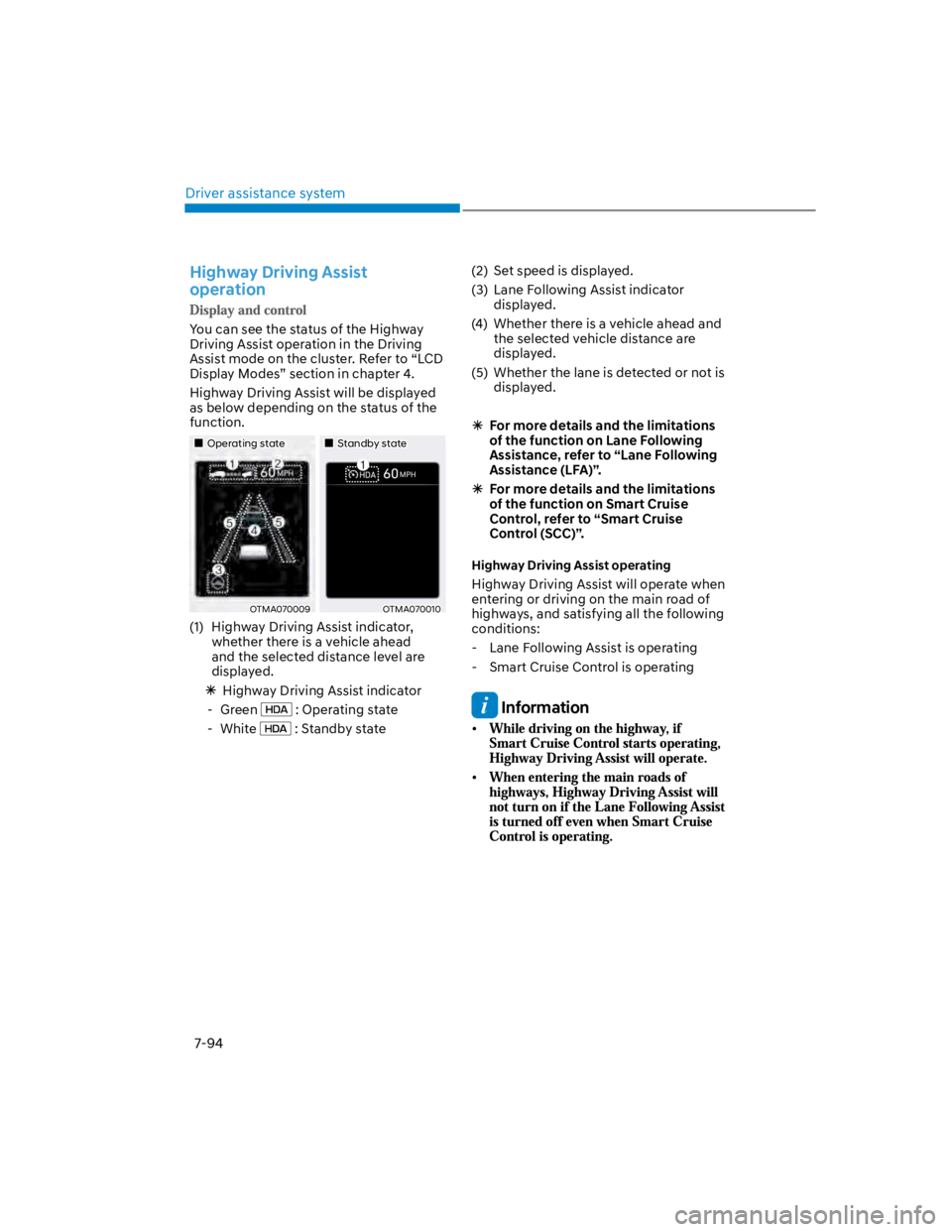
Highway Driving Assist will be displayed
as below depending on the status of the
function.
Operating stateStandby state
OTMA070009OTMA070010
(1) Highway Driving Assist indicator,
whether there is a vehicle ahead
and the selected distance level are
displayed.
Highway Driving Assist indicator
- Green : Operating state
- White : Standby state
(2) Set speed is displayed.
(3) Lane Following Assist indicator
displayed.
(4) Whether there is a vehicle ahead and
the selected vehicle distance are
displayed.
(5) Whether the lane is detected or not is
displayed.
For more details and the limitations
of the function on Lane Following
Assistance, refer to “Lane Following
Assistance (LFA)”.
For more details and the limitations
of the function on Smart Cruise
Control, refer to “Smart Cruise
Control (SCC)”.
Highway Driving Assist operating
Highway Driving Assist will operate when
entering or driving on the main road of
highways, and satisfying all the following
conditions:
- Lane Following Assist is operating
- Smart Cruise Control is operating
Information
Page 463 of 579
08
8-13
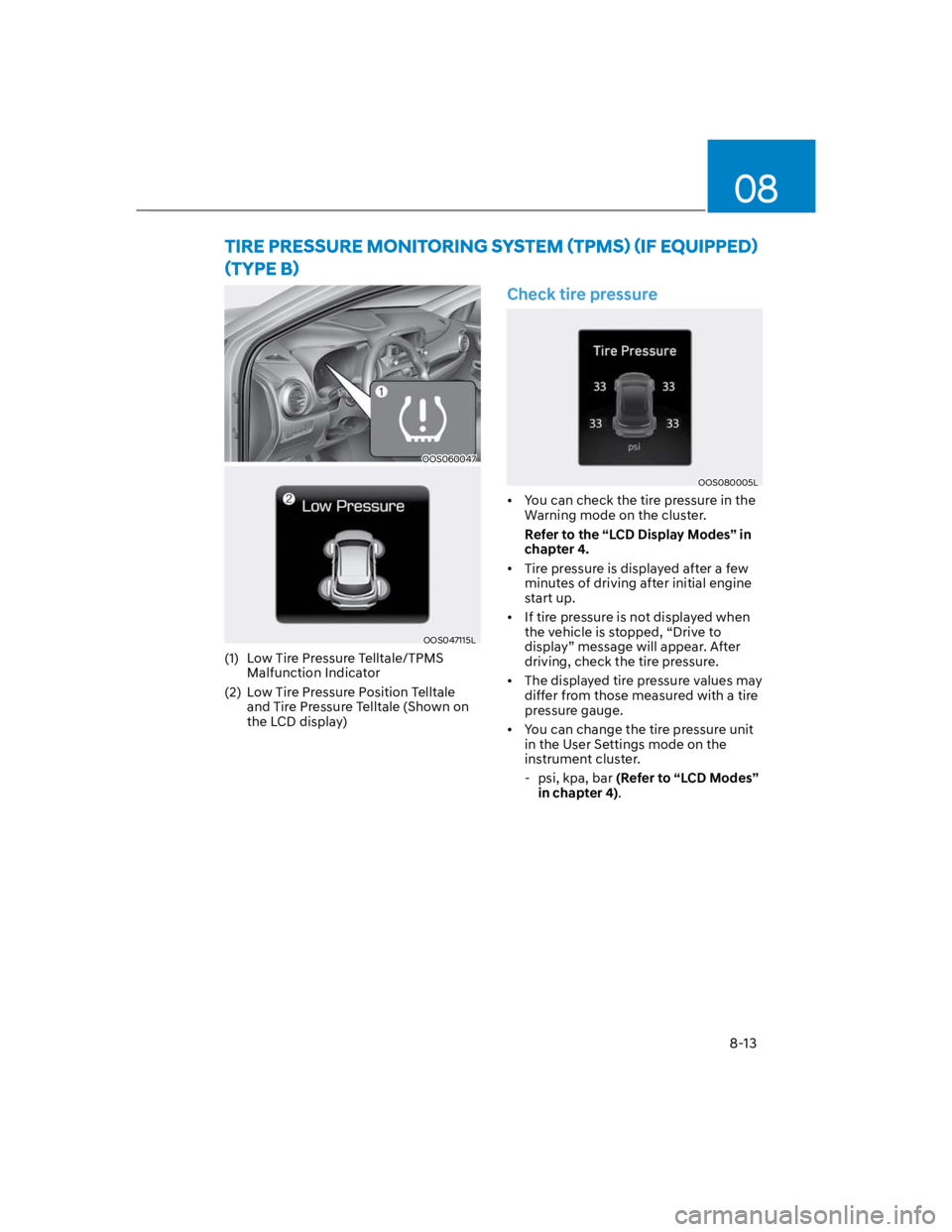
OOS060047
OOS047115L
(1) Low Tire Pressure Telltale/TPMS
Malfunction Indicator
(2) Low Tire Pressure Position Telltale
and Tire Pressure Telltale (Shown on
the LCD display)
Check tire pressure
OOS080005L
You can check the tire pressure in the
Warning mode on the cluster.
Refer to the “LCD Display Modes” in
chapter 4.
Tire pressure is displayed after a few
minutes of driving after initial engine
start up.
If tire pressure is not displayed when
the vehicle is stopped, “Drive to
display” message will appear. After
driving, check the tire pressure.
The displayed tire pressure values may
differ from those measured with a tire
pressure gauge.
You can change the tire pressure unit
in the User Settings mode on the
instrument cluster.
- psi, kpa, bar (Refer to “LCD Modes”
in chapter 4).
Page 529 of 579

09
9-43
Traction
The friction between the tire and
the road surface. The amount of grip
provided.
Tread
The portion of a tire that comes into
contact with the road.
Treadwear Indicators
Narrow bands, sometimes called “wear
bars”, that show across the tread of a tire
when only 1/16 inch of tread remains.
UTQGS
Uniform Tire Quality Grading Standards
is a tire information system that provides
consumers with ratings for a tire’s
traction, temperature and treadwear.
Ratings are determined by tire
manufacturers using government testing
procedures. The ratings are molded into
the sidewall of the tire.
Vehicle Capacity Weight
The number of designated seating
positions multiplied by 150 lbs. (68 kg)
plus the rated cargo and luggage load.
Vehicle Maximum Load on the Tire
Load on an individual tire due to curb
and accessory weight plus maximum
occupant and cargo weight.
Vehicle Normal Load on the Tire
Load on an individual tire that is
determined by distributing to each axle
its share of the curb weight, accessory
weight, and normal occupant weight and
dividing by 2.
Vehicle Placard
A label permanently attached to a vehicle
showing the original equipment tire size
and recommended inflation pressure.
All Season Tires
HYUNDAI specifies all season tires
on some models to provide good
performance for use all year round,
including snowy and icy road conditions.
All season tires are identified by ALL
SEASON and/or M+S (Mud and Snow) on
the tire sidewall. Snow tires have better
snow traction than all season tires and
may be more appropriate in some areas.
Summer Tires
HYUNDAI specifies summer tires on
some models to provide superior
performance on dry roads. Summer tire
performance is substantially reduced in
snow and ice. Summer tires do not have
the tire traction rating M+S (Mud and
Snow) on the tire side wall. If you plan
to operate your vehicle in snowy or icy
conditions, HYUNDAI recommends the
use of snow tires or all season tires on all
four wheels.
Snow Tires
If you equip your car with snow tires,
they should be the same size and have
the same load capacity as the original
tires. Snow tires should be installed on
all four wheels; otherwise, poor handling
may result. Snow tires should carry 4
psi (28 kPa) more air pressure than the
pressure recommended for the standard
tires on the tire label on the driver’s
side of the center pillar, or up to the
maximum pressure shown on the tire
sidewall, whichever is less. Do not drive
faster than 75 mph (120 km/h) when your
vehicle is equipped with snow tires.
Page 570 of 579

Index
I-4
D
Declaration of conformity ................................................................................. 7-116
Front radar ...................................................................................................... 7-116
Rear corner radar ............................................................................................ 7-118
Dimensions ............................................................................................................ 2-9
Door locks............................................................................................................ 5-30
Auto door lock/unlock features ........................................................................ 5-33
Child-protector rear door locks ........................................................................ 5-33
Operating door locks from inside the vehicle .................................................. 5-31
Operating door locks from outside the vehicle ................................................ 5-30
Rear Occupant Alert (ROA) ............................................................................ 5-34
Drive mode integrated control system ................................................................. 6-60
Driver Attention Warning (DAW) ...................................................................... 7-54
Driver Attention Warning malfunction and limitations.................................... 7-57
Driver Attention Warning operation ................................................................. 7-55
Driver Attention Warning settings .................................................................... 7-54
Dual clutch transmission...................................................................................... 6-18
Dual clutch transmission operation .................................................................. 6-18
Good driving practices .................................................................................... 6-25
Parking ............................................................................................................. 6-24
E
Emission control system ...................................................................................... 9-77
Gasoline Particulate Filter (GPF) .................................................................... 9-79
Engine .................................................................................................................... 2-9
Engine compartment ........................................................................................ 2-8,9-3
Engine coolant ..................................................................................................... 9-18
Changing coolant.............................................................................................. 9-20
Checking the coolant level ............................................................................... 9-18
Engine number..................................................................................................... 2-16
Engine oil............................................................................................................. 9-15
Checking the engine oil and filter .................................................................... 9-16
Checking the engine oil level ........................................................................... 9-15