trans HYUNDAI KONA 2022 Service Manual
[x] Cancel search | Manufacturer: HYUNDAI, Model Year: 2022, Model line: KONA, Model: HYUNDAI KONA 2022Pages: 579, PDF Size: 35.31 MB
Page 282 of 579

06
6-25
Good driving practices
Never move the shift lever from P
(Park) or N (Neutral) to any other
position with the accelerator pedal
depressed.
Never move the shift lever into P
(Park) when the vehicle is in motion.
Be sure the vehicle is completely
stopped before you attempt to shift
into R (Reverse) or D (Drive).
Do not move the shift lever to N
(Neutral) when driving. Doing so
may result in an accident because
of a loss of engine braking and the
transmission could be damaged.
Driving uphill or downhill, always shift
to D (Drive) when driving forward or to
R (Reverse) when driving backwards,
and check the gear position indicated
on the cluster before driving. If you
drive in the opposite direction of the
selected gear, the engine will turn
off and a serious accident might be
occurred due to the degraded brake
performance.
Do not drive with your foot resting
on the brake pedal. Even light, but
consistent pedal pressure can result
in the brakes overheating, brake wear
and possibly even brake failure.
Depressing both accelerator
and brake pedals at the same
time can trigger logic for engine
power reduction to assure vehicle
deceleration. Vehicle acceleration
will resume after the brake pedal is
released.
When driving in Manual Shift mode,
slow down before shifting to a lower
gear. Otherwise, the lower gear may
not be engaged if the engine rpms are
outside of the allowable range.
When driving with shifter paddles,
slow down before shifting to a lower
gear. Otherwise, the lower gear may
not be engaged if the engine rpms are
outside of the allowable range.
Always apply the parking brake when
leaving the vehicle. Do not depend on
placing the transmission in P (Park) to
keep the vehicle from moving.
Exercise extreme caution when
driving on a slippery surface. Be
especially careful when braking,
accelerating or shifting gears. On a
slippery surface, an abrupt change
in vehicle speed can cause the drive
wheels to lose traction and may cause
loss of vehicle control resulting in an
accident.
Optimum vehicle performance and
economy is obtained by smoothly
depressing and releasing the
accelerator.
WARNING
To reduce the risk of SERIOUS INJURY
or DEATH:
ALWAYS wear your seatbelt. In a
collision, an unbelted occupant
is significantly more likely to be
seriously injured or killed than a
properly belted occupant.
Avoid high speeds when cornering or
turning.
Do not make quick steering wheel
movements, such as sharp lane
changes or fast, sharp turns.
The risk of rollover is greatly
increased if you lose control of your
vehicle at highway speeds.
Loss of control often occurs if two or
more wheels drop off the roadway
and the driver over steers to reenter
the roadway.
In the event your vehicle leaves
the roadway, do not steer sharply.
Instead, slow down before pulling
back into the travel lanes.
HYUNDAI recommends you follow all
posted speed limits.
Page 297 of 579
Driving your vehicle
6-40
NOTICE
Driving with wheels and tires with
different sizes may cause the ESC
system to malfunction. Before replacing
tires, make sure all four tires and wheels
are the same size. Never drive the
vehicle with different sized wheels and
tires installed.
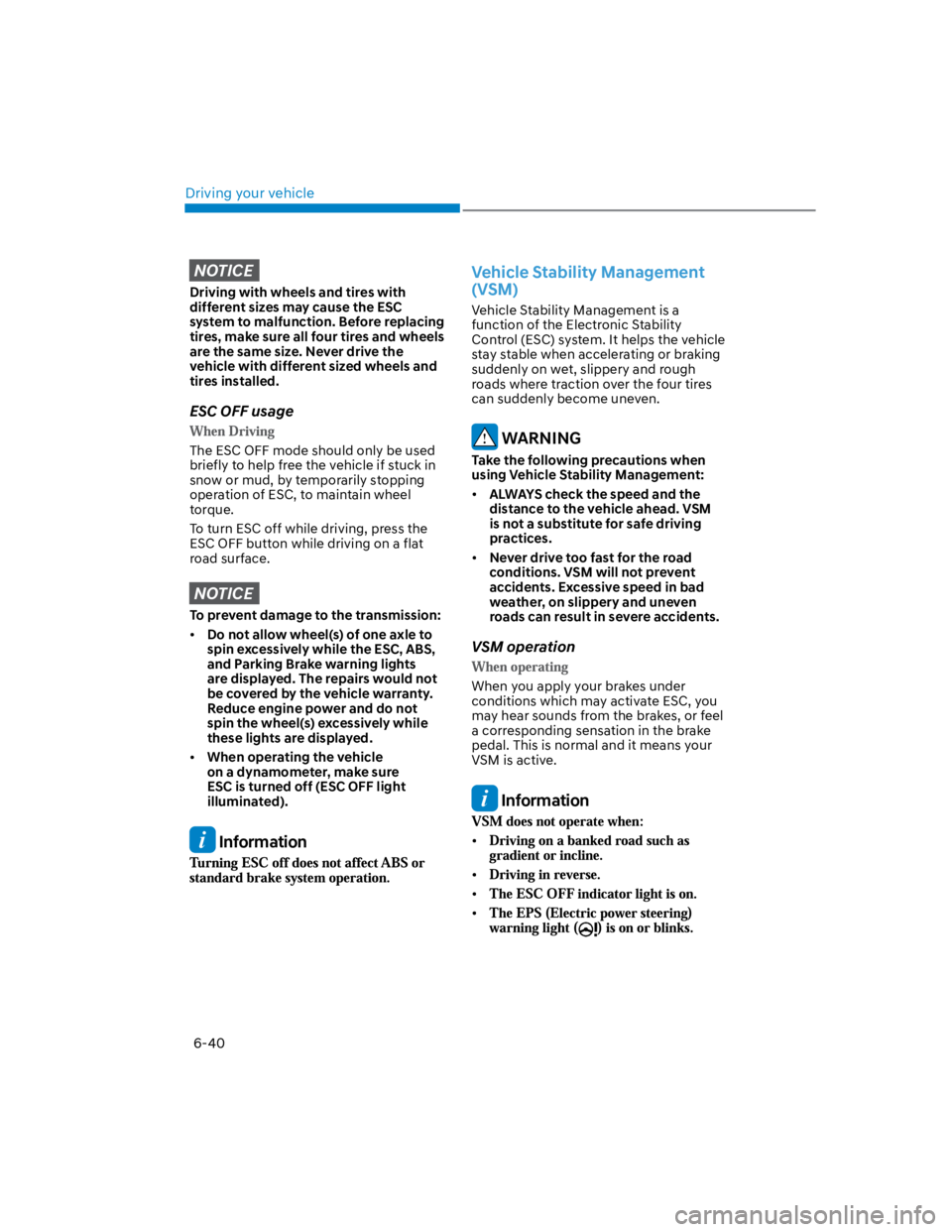
ESC OFF usage
The ESC OFF mode should only be used
briefly to help free the vehicle if stuck in
snow or mud, by temporarily stopping
operation of ESC, to maintain wheel
torque.
To turn ESC off while driving, press the
ESC OFF button while driving on a flat
road surface.
NOTICE
To prevent damage to the transmission:
Do not allow wheel(s) of one axle to
spin excessively while the ESC, ABS,
and Parking Brake warning lights
are displayed. The repairs would not
be covered by the vehicle warranty.
Reduce engine power and do not
spin the wheel(s) excessively while
these lights are displayed.
When operating the vehicle
on a dynamometer, make sure
ESC is turned off (ESC OFF light
illuminated).
Information
Vehicle Stability Management
(VSM)
Vehicle Stability Management is a
function of the Electronic Stability
Control (ESC) system. It helps the vehicle
stay stable when accelerating or braking
suddenly on wet, slippery and rough
roads where traction over the four tires
can suddenly become uneven.
WARNING
Take the following precautions when
using Vehicle Stability Management:
ALWAYS check the speed and the
distance to the vehicle ahead. VSM
is not a substitute for safe driving
practices.
Never drive too fast for the road
conditions. VSM will not prevent
accidents. Excessive speed in bad
weather, on slippery and uneven
roads can result in severe accidents.
VSM operation
When you apply your brakes under
conditions which may activate ESC, you
may hear sounds from the brakes, or feel
a corresponding sensation in the brake
pedal. This is normal and it means your
VSM is active.
Information
Page 304 of 579
06
6-47
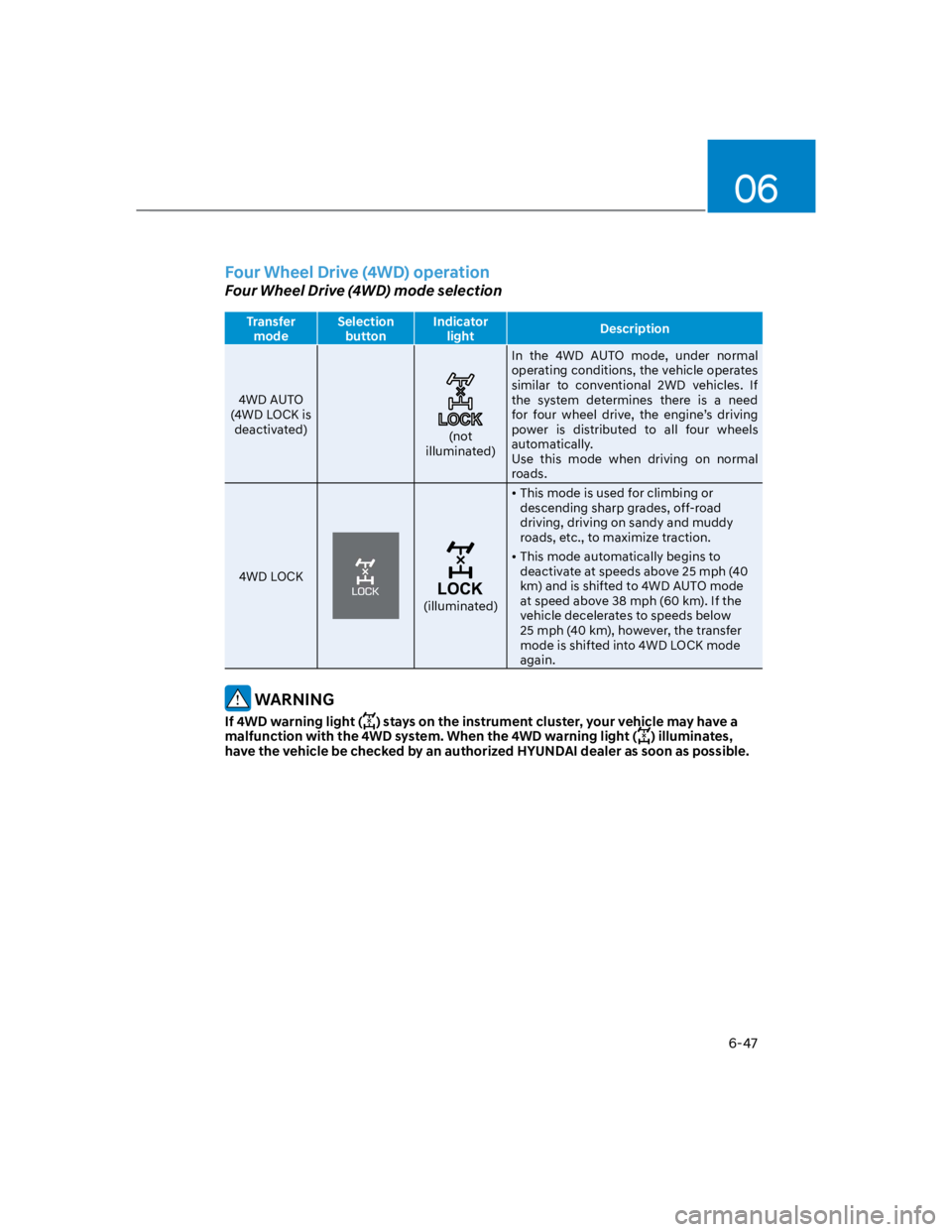
Four Wheel Drive (4WD) operation
Four Wheel Drive (4WD) mode selection
Transfer
mode
Selection
button
Indicator
lightDescription
4WD AUTO
(4WD LOCK is
deactivated)(not
illuminated)
In the 4WD AUTO mode, under normal
operating conditions, the vehicle operates
similar to conventional 2WD vehicles. If
the system determines there is a need
for four wheel drive, the engine’s driving
power is distributed to all four wheels
automatically.
Use this mode when driving on normal
roads.
4WD LOCK
(illuminated)
This mode is used for climbing or
descending sharp grades, off-road
driving, driving on sandy and muddy
roads, etc., to maximize traction.
This mode automatically begins to
deactivate at speeds above 25 mph (40
km) and is shifted to 4WD AUTO mode
at speed above 38 mph (60 km). If the
vehicle decelerates to speeds below
25 mph (40 km), however, the transfer
mode is shifted into 4WD LOCK mode
again.
WARNING
If 4WD warning light () stays on the instrument cluster, your vehicle may have a
malfunction with the 4WD system. When the 4WD warning light () illuminates,
have the vehicle be checked by an authorized HYUNDAI dealer as soon as possible.
Page 306 of 579
06
6-49
Maintain slow and constant speed.
Operate the accelerator pedal slowly
to ensure safe driving (wheel-slip
prevention).
Keep sufficient distance between your
vehicle and the vehicle in front of you.
Reduce vehicle speed and always
check the road condition.
Avoid speeding, rapid acceleration,
sudden brake applications, and sharp
turns to prevent getting stuck.
When the vehicle is stuck in snow,
sand or mud, the tires may not
operate.
This is to protect the transmission and
not a malfunction.
CAUTION
When the vehicle is stuck in snow, sand
or mud, place a non-slip material under
the drive wheels to provide traction
OR slowly spin the wheels in forward
and reverse directions which causes
a rocking motion that may free the
vehicle. However, avoid running the
engine continuously at high rpm, doing
so may damage the 4WD system.
OLMB053017
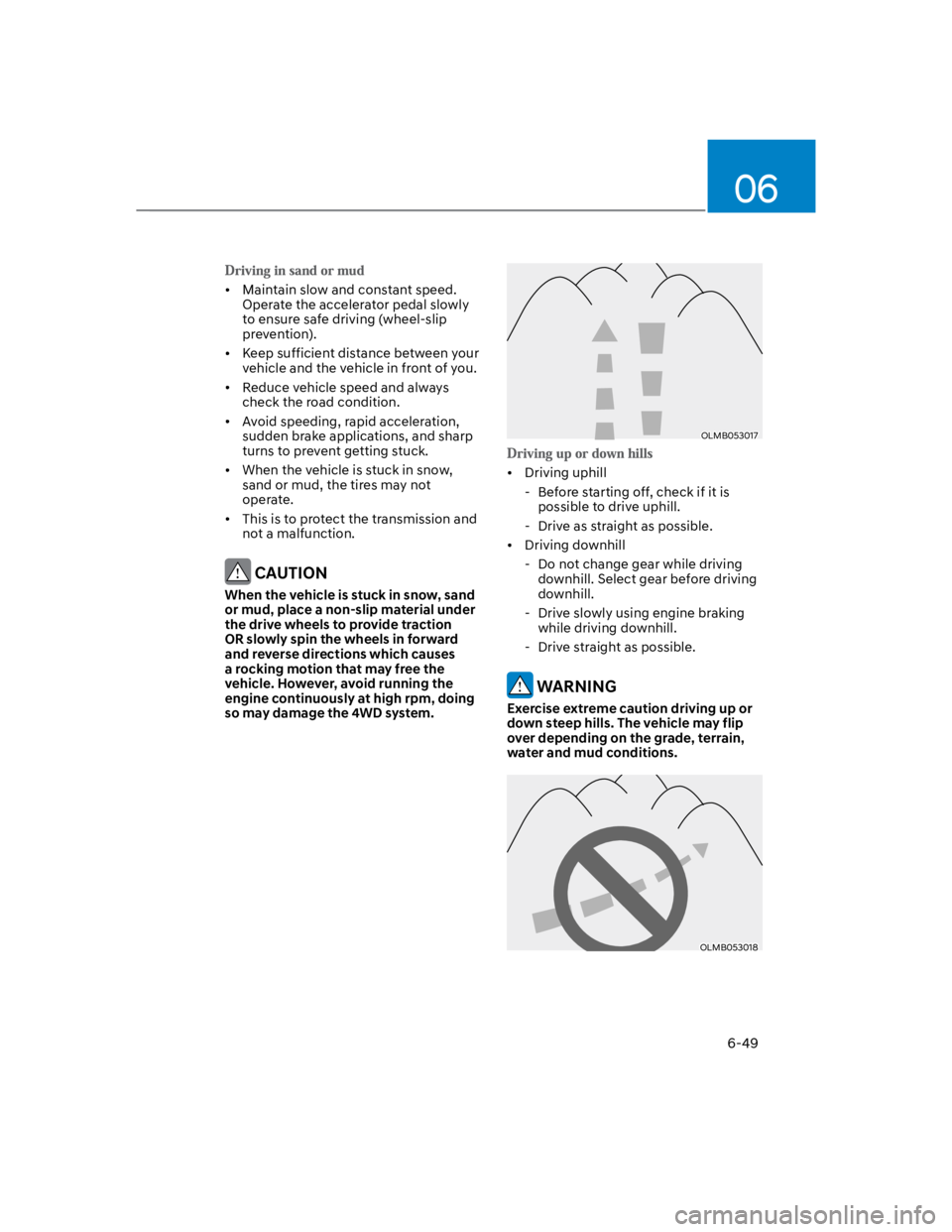
Driving uphill
- Before starting off, check if it is
possible to drive uphill.
- Drive as straight as possible.
Driving downhill
- Do not change gear while driving
downhill. Select gear before driving
downhill.
- Drive slowly using engine braking
while driving downhill.
- Drive straight as possible.
WARNING
Exercise extreme caution driving up or
down steep hills. The vehicle may flip
over depending on the grade, terrain,
water and mud conditions.
OLMB053018
Page 312 of 579
06
6-55
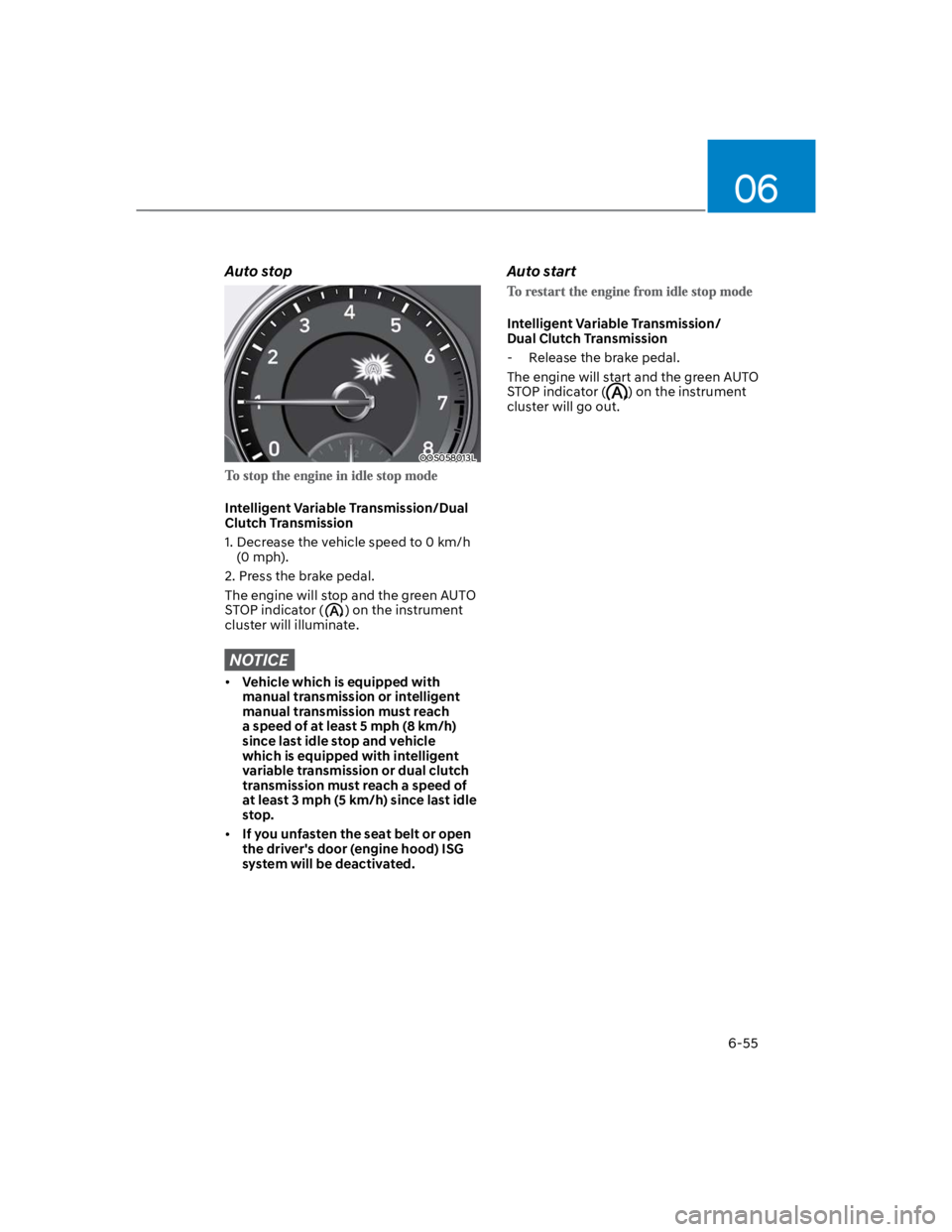
Auto stop
OOS058013L
Intelligent Variable Transmission/Dual
Clutch Transmission
1. Decrease the vehicle speed to 0 km/h
(0 mph).
2. Press the brake pedal.
The engine will stop and the green AUTO
STOP indicator () on the instrument
cluster will illuminate.
NOTICE
Vehicle which is equipped with
manual transmission or intelligent
manual transmission must reach
a speed of at least 5 mph (8 km/h)
since last idle stop and vehicle
which is equipped with intelligent
variable transmission or dual clutch
transmission must reach a speed of
at least 3 mph (5 km/h) since last idle
stop.
If you unfasten the seat belt or open
the driver's door (engine hood) ISG
system will be deactivated.
Auto start
Intelligent Variable Transmission/
Dual Clutch Transmission
- Release the brake pedal.
The engine will start and the green AUTO
STOP indicator () on the instrument
cluster will go out.
Page 317 of 579
Driving your vehicle
6-60
OOS060012N
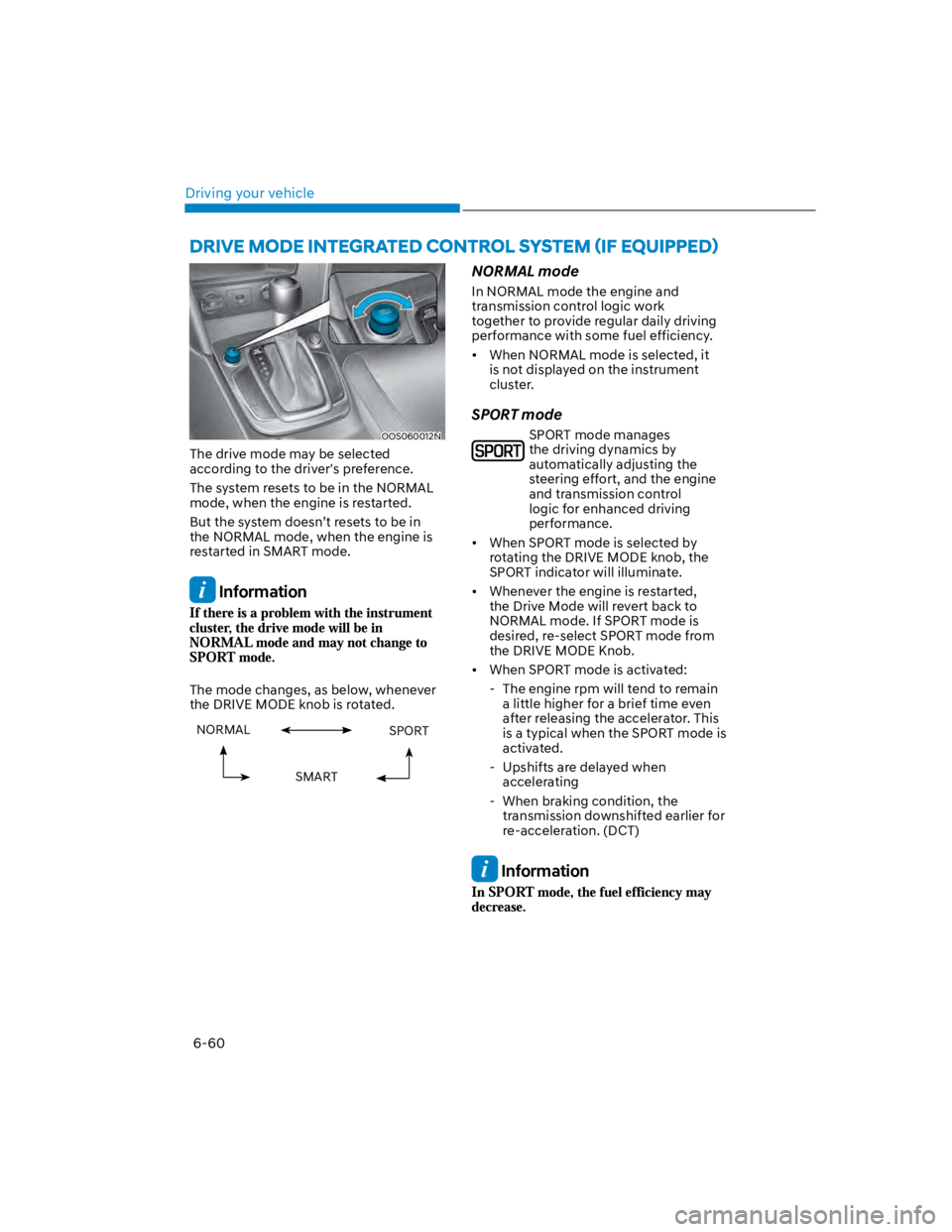
The drive mode may be selected
according to the driver's preference.
The system resets to be in the NORMAL
mode, when the engine is restarted.
But the system doesn’t resets to be in
the NORMAL mode, when the engine is
restarted in SMART mode.
Information
The mode changes, as below, whenever
the DRIVE MODE knob is rotated.
NORMAL SPORT
SMART
NORMAL mode
In NORMAL mode the engine and
transmission control logic work
together to provide regular daily driving
performance with some fuel efficiency.
When NORMAL mode is selected, it
is not displayed on the instrument
cluster.
SPORT mode
SPORT mode manages
the driving dynamics by
automatically adjusting the
steering effort, and the engine
and transmission control
logic for enhanced driving
performance.
When SPORT mode is selected by
rotating the DRIVE MODE knob, the
SPORT indicator will illuminate.
Whenever the engine is restarted,
the Drive Mode will revert back to
NORMAL mode. If SPORT mode is
desired, re-select SPORT mode from
the DRIVE MODE Knob.
When SPORT mode is activated:
- The engine rpm will tend to remain
a little higher for a brief time even
after releasing the accelerator. This
is a typical when the SPORT mode is
activated.
- Upshifts are delayed when
accelerating
- When braking condition, the
transmission downshifted earlier for
re-acceleration. (DCT)
Information
Page 319 of 579

Driving your vehicle
6-62
The SMART mode may be limited in
following situations. (The OFF indicator
illuminates in those situations.)
The driver manually moves the shift
lever : It deactivates SMART mode.
The vehicle drives, as the driver
manually moves the shift lever.
Cruise Control is activated : The cruise
system may deactivate the SMART
mode. When a higher system is set
by the cruise system, it starts to
control vehicle speed and deactivates
SMART mode. (SMART mode is not
deactivated just by activating the
cruise system.)
The transmission oil temperature is either
extremely low or extremely high : The
SMART mode can be active in most of
the normal driving situations. However,
an extremely high/ low transmission oil
temperature may temporarily deactivate
the SMART mode, because the
transmission condition is out of normal
operation condition.
Page 320 of 579
06
6-63
SPECIAL DRIVING CONDITIONS
Hazardous driving conditions
When hazardous driving elements
are encountered such as water, snow,
ice, mud and sand, take the following
precautions:
Drive cautiously and maintain a longer
braking distance.
Avoid abrupt braking or steering.
When your vehicle is stuck in
snow, mud, or sand, use second
gear. Accelerate slowly to avoid
unnecessary wheel spin.
Put sand, rock salt, tire chains or other
non-slip materials under the wheels to
provide additional traction while the
vehicle becomes stuck in ice, snow,
or mud.
WARNING
Downshifting with an automatic
transmission while driving on slippery
surfaces can cause an accident. The
sudden change in tire speed could
cause the tires to skid. Be careful when
downshifting on slippery surfaces.
Rocking the vehicle
If it is necessary to rock the vehicle to
free it from snow, sand, or mud, first turn
the steering wheel right and left to clear
the area around your front wheels. Then,
shift back and forth between R (Reverse)
and a forward gear.
Try to avoid spinning the wheels, and do
not race the engine.
To prevent transmission wear, wait until
the wheels stop spinning before shifting
gears. Release the accelerator pedal
while shifting, and press lightly on the
accelerator pedal while the transmission
is in gear. Slowly spinning the wheels in
forward and reverse directions causes a
rocking motion that may free the vehicle.
WARNING
If the vehicle is stuck and excessive
wheel spin occurs, the temperature
in the tires can increase very quickly.
If the tires become damaged, a tire
blow out or tire explosion can occur.
This condition is dangerous - you and
others may be injured. Do not attempt
this procedure if people or objects are
anywhere near the vehicle.
If you attempt to free the vehicle, the
vehicle can overheat quickly, possibly
causing an engine compartment fire
or other damage. Try to avoid spinning
the wheels as much as possible to
prevent overheating of either the tires
or the engine. DO NOT allow the vehicle
to spin the wheels above 35 mph (56
km/h).
Information
Page 321 of 579
Driving your vehicle
6-64
NOTICE
If you are still stuck after rocking the
vehicle a few times, have the vehicle
pulled out by a tow vehicle to avoid
engine overheating, possible damage to
the transmission, and tire damage. See
“Towing” section in chapter 8.
Smooth cornering
Avoid braking or gear changing in
corners, especially when roads are wet.
Ideally, corners should always be taken
under gentle acceleration.
Driving at night
Night driving presents more hazards than
driving in the daylight. Here are some
important tips to remember:
Slow down and keep more distance
between you and other vehicles, as it
may be more difficult to see at night,
especially in areas where there may
not be any street lights.
Adjust your mirrors to reduce the glare
from other drivers’ headlamps.
Keep your headlamps clean and
properly aimed. Dirty or improperly
aimed headlamps will make it much
more difficult to see at night.
Avoid staring directly at the
headlamps of oncoming vehicles. You
could be temporarily blinded, and it
will take several seconds for your eyes
to readjust to the darkness.
Driving in the rain
Rain and wet roads can make driving
dangerous. Here are a few things to
consider when driving in the rain or on
slick pavement:
Slow down and allow extra following
distance. A heavy rainfall makes
it harder to see and increases the
distance needed to stop your vehicle.
Turn OFF your Cruise Control. (if
equipped)
Replace your windshield wiper blades
when they show signs of streaking or
missing areas on the windshield.
Be sure your tires have enough tread.
If your tires do not have enough tread,
making a quick stop on wet pavement
can cause a skid and possibly lead to
an accident. See “Tire replacement”
in chapter 9.
Turn on your headlamps to make it
easier for others to see you.
Driving too fast through large puddles
can affect your brakes. If you must go
through puddles, try to drive through
them slowly.
If you believe your brakes may be wet,
apply them lightly while driving until
normal braking operation returns.
Hydroplaning
If the road is wet enough and you are
going fast enough, your vehicle may
have little or no contact with the road
surface and actually ride on the water.
The best advice is SLOW DOWN when
the road is wet.
The risk of hydroplaning increases as
the depth of tire tread decreases, refer
to “Tire Tread” section in chapter 9.
Page 329 of 579

Driving your vehicle
6-72
Vehicle capacity weight
5 persons : 860 lbs. (390 kg)
Vehicle capacity weight is the maximum
combined weight of occupants and
cargo. If your vehicle is equipped with a
trailer, the combined weight includes the
tongue load.
Seating capacity
Total : 5 persons (Front seat : 2 persons,
Rear seat : 3 persons)
Seating capacity is the maximum
number of occupants including a driver,
your vehicle may carry. However, the
seating capacity may be reduced based
upon the weight of all of the occupants,
and the weight of the cargo being carried
or towed. Do not overload the vehicle as
there is a limit to the total weight, or load
limit including occupants and cargo, the
vehicle can carry.
Towing capacity
We do not recommend using this vehicle
for trailer towing.
Cargo capacity
The cargo capacity of your vehicle will
increase or decrease depending on the
weight and the number of occupants
and the tongue load, if your vehicle is
equipped with a trailer.
Steps for determining correct load
limit
1. Locate the statement "The combined
weight of occupants and cargo should
never exceed XXX kg or XXX lbs." on
your vehicle's placard.
2. Determine the combined weight of
the driver and passengers that will be
riding in your vehicle.
3. Subtract the combined weight of the
driver and passengers from XXX kg or
XXX lbs.
4. The resulting figure equals the
available amount of cargo and
luggage load capacity. For example,
if the "XXX" amount equals 1400
lbs. and there will be five 150 lb
passengers in your vehicle, the
amount of available cargo and
luggage load capacity is 650 lbs.
(1400 - 750 (5 x 150) = 650 lbs.)
5. Determine the combined weight of
luggage and cargo being loaded on
the vehicle. That weight may not
safely exceed the available cargo and
luggage load capacity calculated in
Step 4.
6. If your vehicle will be towing a
trailer, load from your trailer will be
transferred to your vehicle. Consult
this manual to determine how this
reduces the available cargo and
luggage load capacity of your vehicle.
WARNING
Do not overload the vehicle as there
is a limit to the total weight, or load
limit, including occupants and cargo,
the vehicle can carry. Overloading can
shorten the life of the vehicle. If the
GVWR or the GAWR is exceeded, parts
on the vehicle can break, and it can
change the handling of your vehicle.
These could cause you to lose control
and result in an accident.