12v Hyundai Kona EV 2019 User Guide
[x] Cancel search | Manufacturer: HYUNDAI, Model Year: 2019, Model line: Kona EV, Model: Hyundai Kona EV 2019Pages: 540, PDF Size: 21.84 MB
Page 480 of 540
H17
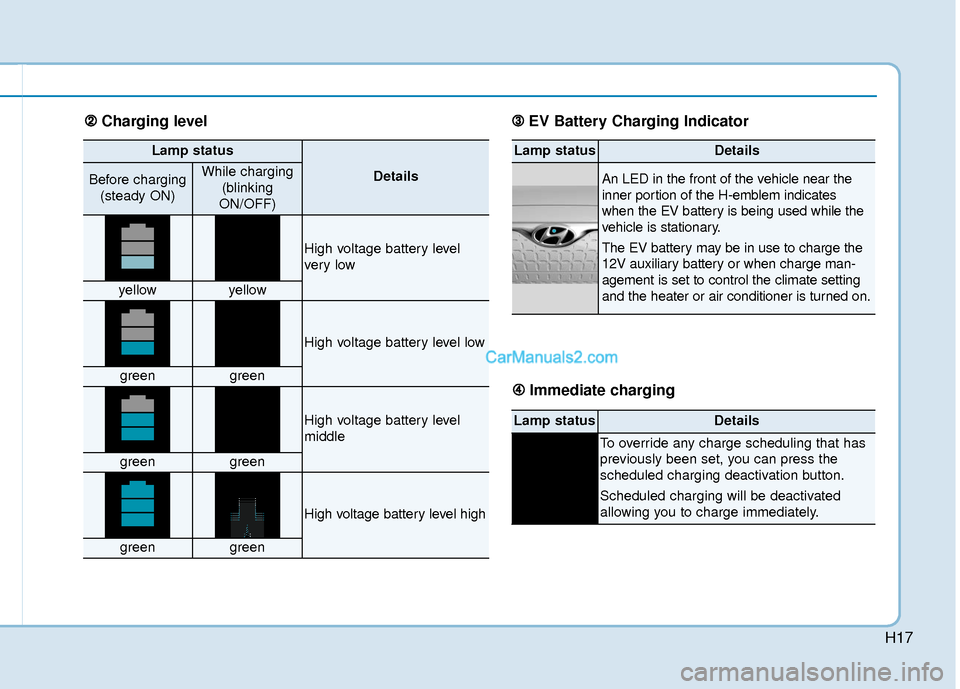
Lamp status
DetailsBefore charging(steady ON)While charging (blinking
ON/OFF)
High voltage battery level
ver y low
yellowyellow
High voltage battery level low
greengreen
High voltage battery level
middle
greengreen
High voltage battery level high
greengreen
Lamp statusDetails
An LED in the front of the vehicle near the
inner portion of the H-emblem indicates
when the EV battery is being used while the
vehicle is stationary.
The EV battery may be in use to charge the
12V auxiliary battery or when charge man-
agement is set to control the climate setting
and the heater or air conditioner is turned on.
Lamp statusDetails
To override any charge scheduling that has
previously been set, you can press the
scheduled charging deactivation button.
Scheduled charging will be deactivated
allowing you to charge immediately.
➁ ➁ Charging level ➂
➂
EV Battery Charging Indicator
➃
➃ Immediate charging
Page 520 of 540
H57
Aux. Battery Saver+
The Aux. Battery Saver+ is a function
that monitors the charging status of
the 12 V auxiliary battery.
If the auxiliary battery level is low, the
main high voltage battery charges
the auxiliary battery.
Information
The Aux. Battery Saver+ function will
be ON when the vehicle is delivered. If
the function is not needed, you may
turn it off in the Users Settings mode
on the cluster. For more information,
refer to the following page.
Mode
Cycle Mode :
When the POWER button is in the
OFF position with all doors, hood
and liftgate closed, the Aux. Battery
Saver+ activates according to the
auxiliary battery status.
Automatic Mode :
When the POWER button is in the
ON position with the charging con-
nector plugged in, the function acti-
vates according to the auxiliary bat-
tery status to prevent overdischarge
of the auxiliary battery.Information
• The Aux. Battery Saver+ activatesfor a maximum of 20 minutes. If the
Aux Battery Saver+ function acti-
vates for more than 10 times consec-
utively in automatic mode, the func-
tion will be disabled. (Note: There
may be a problem with the 12V aux-
iliary battery.)
If the vehicle is driven normally and
12V battery is able to charge nor-
mally, the Aux. Battery Saver+
function will be enabled again.
• The Aux. Battery Saver+ function cannot prevent battery discharge if
the auxiliary battery is damaged,
worn out, used as a power supply or
unauthorized electronic devices are
used.
• If the Aux. Battery Saver+ function was activated, a message will be dis-
played on the instrument cluster
and the high voltage battery level
may have decreased.
i
i
Page 522 of 540
H59
Utility Mode
The high voltage battery is used
instead of the 12V auxiliary battery
for operating the convenient features
of the vehicle. When driving is not
necessary such as while camping or
when stopping the vehicle for a long
time, it is possible to use the electri-
cal devices (audio, lights, etc.) for
long hours.
System Setting and Activation
System setting
The driver can activate the Utility
Mode function when the following
conditions are satisfied.
The vehicle is in the ready ( )mode and the gear is shifted to P
(Park).
The EPB (Electronic Parking Brake) is applied.
'User Settings → Utility Mode‘ is
selected in the cluster.
System Activation
When the system is activated:
The indicator will turn off and the indicator will illuminate on
the cluster.
All electric devices are usable but the vehicle cannot be driven.
The EPB can be cancelled by pressing the EBP switch.
Note that the vehicle cannot be shifted out of P (Park). If a shift
attempt is made, a message
“Shifting conditions not met” will be
displayed on the cluster.
System Deactivation
The Utility Mode can be deactivated
by pressing the POWER button to
the OFF position. The function can-
not be deactivated from the User
Settings mode.
OOSEV048208N