emergency Hyundai Kona EV 2019 User Guide
[x] Cancel search | Manufacturer: HYUNDAI, Model Year: 2019, Model line: Kona EV, Model: Hyundai Kona EV 2019Pages: 540, PDF Size: 21.84 MB
Page 84 of 540
2-69
Safety system of your vehicle
2
Additional Safety Precautions
Passengers should not move out of
or change seats while the vehicle is
moving.A passenger who is not
wearing a seat belt during a crash or
emergency stop can be thrown
against the inside of the vehicle,
against other occupants, or be ejected
from the vehicle.
Do not use any accessories on seat
belts. Devices claiming to improve
occupant comfort or reposition the
seat belt can reduce the protection
provided by the seat belt and increase
the chance of serious injury in a crash
Do not modify the front seats.
Modification of the front seats could
interfere with the operation of the sup-
plemental restraint system sensing
components or side air bags.
Do not place items under the front
seats. Placing items under the front
seats could interfere with the opera-
tion of the supplemental restraint sys-
tem sensing components and wiring
harnesses.
Do not cause impact to the doors.
Impact to the doors when the POWER
button is in the ON position may cause
the air bags to inflate. Modifications to accommodate
disabilities.
If you require modifica-
tion to your vehicle to accommodate
a disability, contact the HYUNDAI
Customer Connect Center at 800-
633-5151.
Adding equipment to or modify- ing your air bag equipped vehicle
If you modify your vehicle by changing
your vehicle’s frame, bumper system,
front end or side sheet metal or ride
height, this may affect the operation of
your vehicle’s air bag system.
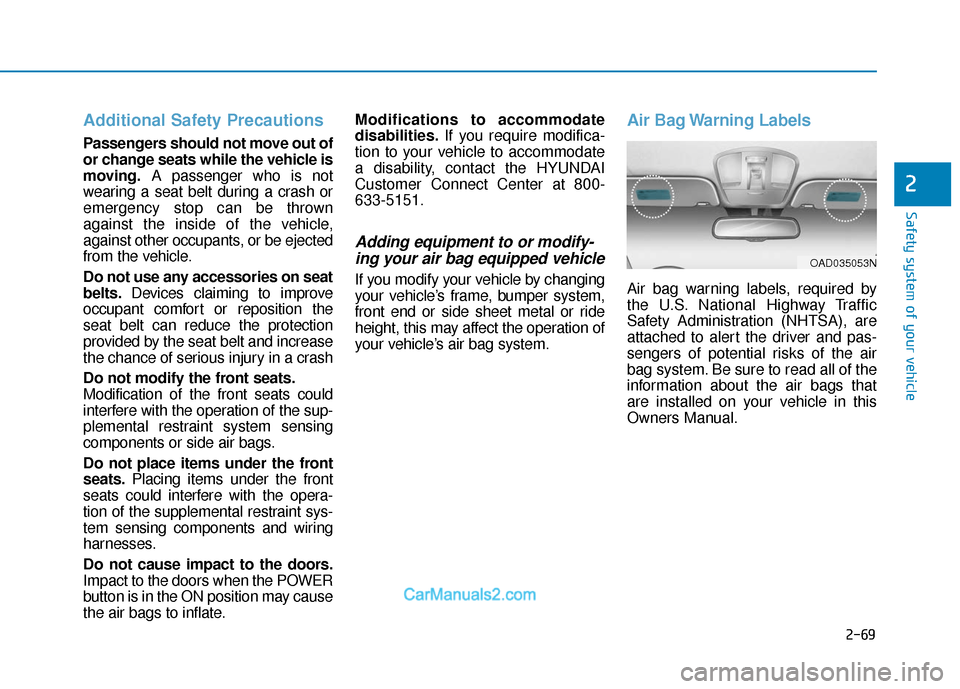
Air Bag Warning Labels
Air bag warning labels, required by
the U.S. National Highway Traffic
Safety Administration (NHTSA), are
attached to alert the driver and pas-
sengers of potential risks of the air
bag system. Be sure to read all of the
information about the air bags that
are installed on your vehicle in this
Owners Manual.
OAD035053N
Page 126 of 540
3-42
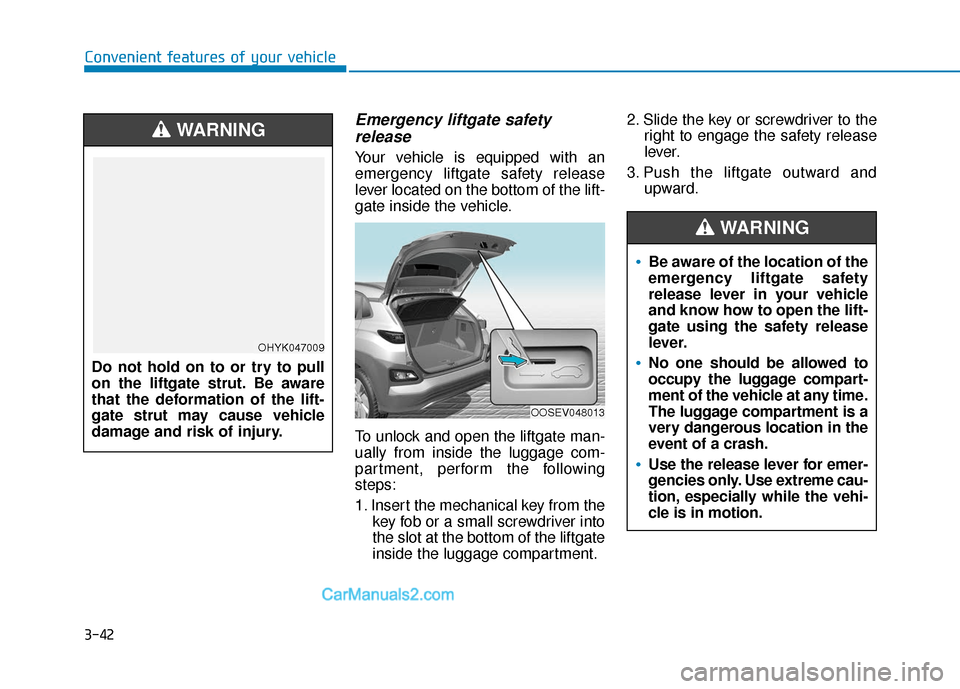
Emergency liftgate safetyrelease
Your vehicle is equipped with an
emergency liftgate safety release
lever located on the bottom of the lift-
gate inside the vehicle.
To unlock and open the liftgate man-
ually from inside the luggage com-
partment, perform the following
steps:
1. Insert the mechanical key from the
key fob or a small screwdriver into
the slot at the bottom of the liftgate
inside the luggage compartment. 2. Slide the key or screwdriver to the
right to engage the safety release
lever.
3. Push the liftgate outward and upward.
Convenient features of your vehicle
OOSEV048013
Do not hold on to or try to pull
on the liftgate strut. Be aware
that the deformation of the lift-
gate strut may cause vehicle
damage and risk of injury.
WARNING
OHYK047009
Be aware of the location of the
emergency liftgate safety
release lever in your vehicle
and know how to open the lift-
gate using the safety release
lever.
No one should be allowed to
occupy the luggage compart-
ment of the vehicle at any time.
The luggage compartment is a
very dangerous location in the
event of a crash.
Use the release lever for emer-
gencies only. Use extreme cau-
tion, especially while the vehi-
cle is in motion.
WARNING
Page 135 of 540
3-51
Convenient features of your vehicle
3
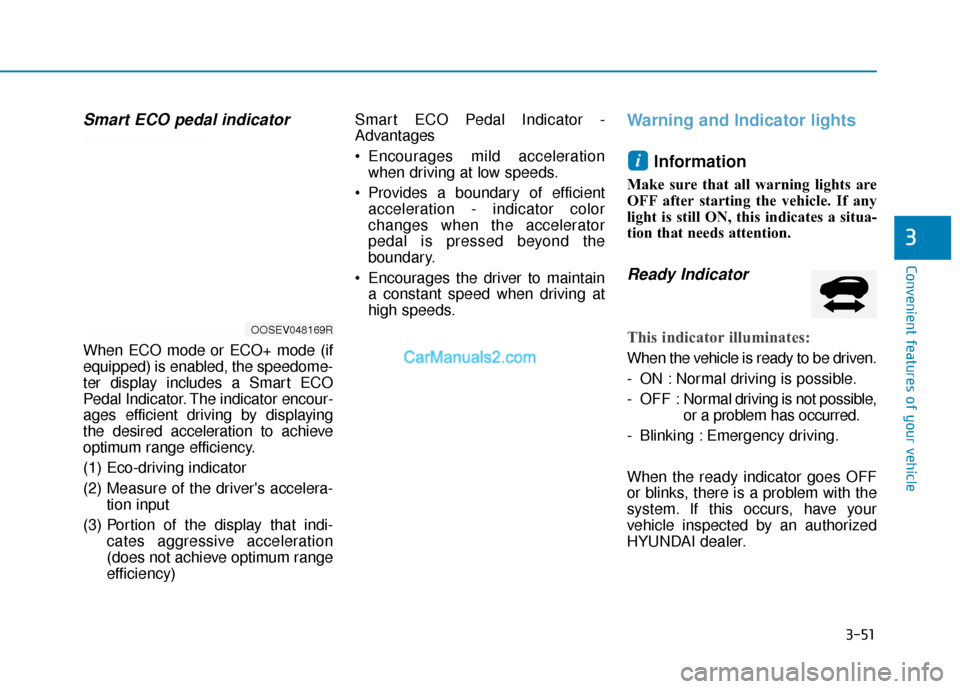
Smart ECO pedal indicator
When ECO mode or ECO+ mode (if
equipped) is enabled, the speedome-
ter display includes a Smart ECO
Pedal Indicator. The indicator encour-
ages efficient driving by displaying
the desired acceleration to achieve
optimum range efficiency.
(1) Eco-driving indicator
(2) Measure of the driver's accelera-tion input
(3) Portion of the display that indi- cates aggressive acceleration
(does not achieve optimum range
efficiency) Smart ECO Pedal Indicator -
Advantages
Encourages mild acceleration
when driving at low speeds.
Provides a boundary of efficient acceleration - indicator color
changes when the accelerator
pedal is pressed beyond the
boundary.
Encourages the driver to maintain a constant speed when driving at
high speeds.
Warning and Indicator lights
Information
Make sure that all warning lights are
OFF after starting the vehicle. If any
light is still ON, this indicates a situa-
tion that needs attention.
Ready Indicator
This indicator illuminates:
When the vehicle is ready to be driven.
- ON : Normal driving is possible.
- OFF : Nor mal driving is not possible,
or a problem has occurred.
- Blinking : Emergency driving.
When the ready indicator goes OFF
or blinks, there is a problem with the
system. If this occurs, have your
vehicle inspected by an authorized
HYUNDAI dealer.
i
OOSEV048169R
Page 239 of 540
5-6
Driving your vehicle
P
PO
O W
W E
ER
R
B
B U
U T
TT
TO
O N
N
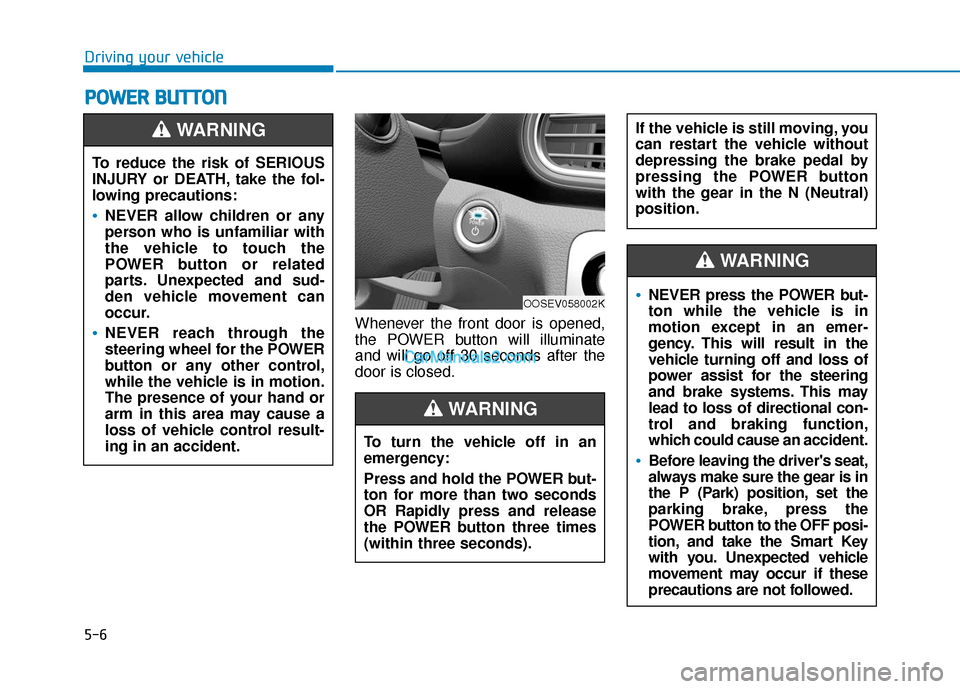
Whenever the front door is opened,
the POWER button will illuminate
and will go off 30 seconds after the
door is closed.
To reduce the risk of SERIOUS
INJURY or DEATH, take the fol-
lowing precautions:
NEVER allow children or any
person who is unfamiliar with
the vehicle to touch the
POWER button or related
parts. Unexpected and sud-
den vehicle movement can
occur.
NEVER reach through the
steering wheel for the POWER
button or any other control,
while the vehicle is in motion.
The presence of your hand or
arm in this area may cause a
loss of vehicle control result-
ing in an accident.
WARNING
OOSEV058002K
To turn the vehicle off in an
emergency:
Press and hold the POWER but-
ton for more than two seconds
OR Rapidly press and release
the POWER button three times
(within three seconds).
If the vehicle is still moving, you
can restart the vehicle without
depressing the brake pedal by
pressing the POWER button
with the gear in the N (Neutral)
position.
WARNING
NEVER press the POWER but-
ton while the vehicle is in
motion except in an emer-
gency. This will result in the
vehicle turning off and loss of
power assist for the steering
and brake systems. This may
lead to loss of directional con-
trol and braking function,
which could cause an accident.
Before leaving the driver's seat,
always make sure the gear is in
the P (Park) position, set the
parking brake, press the
POWER button to the OFF posi-
tion, and take the Smart Key
with you. Unexpected vehicle
movement may occur if these
precautions are not followed.
WARNING
Page 260 of 540
5-27
Driving your vehicle
5
The Smart Regeneration System
may not operate temporarily due
to:
Electrical interference
Modifying the suspension
Differences of tire abrasion ortire pressure
Installing different type of tires
NOTICE Vehicles moving in front of
you with frequent lane
changes may cause a delay in
the system's reaction or may
cause the system to react to a
vehicle actually in an adjacent
lane. Always drive cautiously
to prevent unexpected and
sudden situations from occur-
ring.
The Smart Regeneration
System may not recognize
complex driving situations so
always pay attention to driv-
ing conditions and control
your vehicle speed.
When using the Smart
Regeneration System take the
following precautions:
If an emergency stop is nec-
essary, you must apply the
brakes.
Keep a safe distance accord-
ing to road conditions and
vehicle speed. If the vehicle-
to-vehicle distance is too
close and the brakes are sud-
denly applied, a serious colli-
sion may result.
Always maintain sufficient
braking distance and deceler-
ate your vehicle by applying
the brakes if necessary.
The Smart Regeneration
System cannot recognize a
stopped vehicle, pedestrians
or an oncoming vehicle.
Always look ahead cautiously
to prevent unexpected and
sudden situations from occur-
ring.
WARNING
Page 264 of 540
5-31
Driving your vehicle
5
However, if Auto Hold is OFF when
the the vehicle is turned off, the EPB
will not be applied.Releasing the parking brake
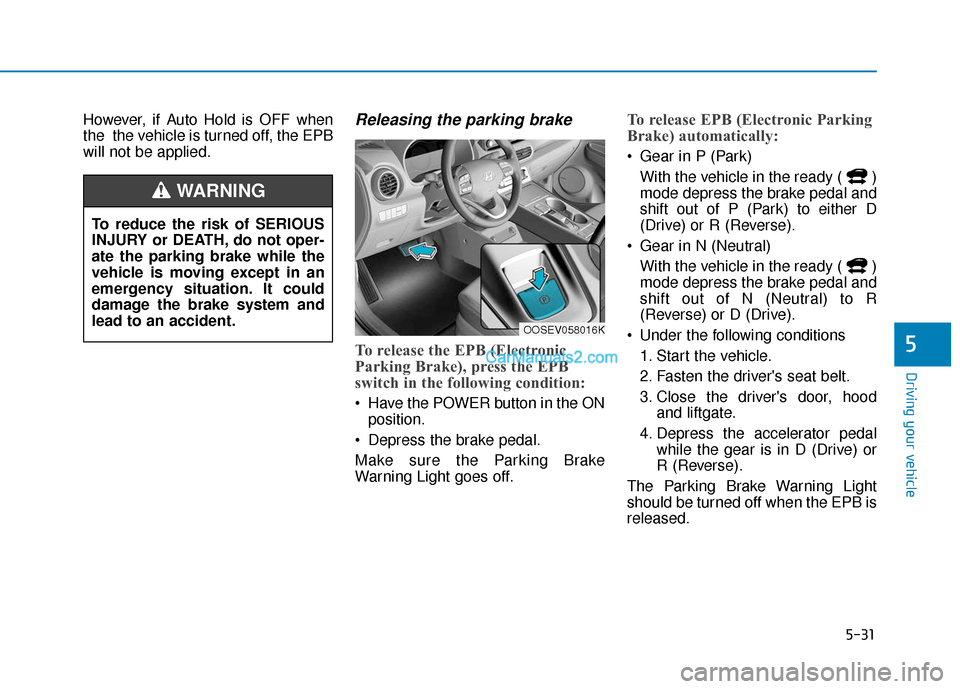
To release the EPB (Electronic
Parking Brake), press the EPB
switch in the following condition:
Have the POWER button in the ONposition.
Depress the brake pedal.
Make sure the Parking Brake
Warning Light goes off.
To release EPB (Electronic Parking
Brake) automatically:
Gear in P (Park) With the vehicle in the ready ( )
mode depress the brake pedal and
shift out of P (Park) to either D
(Drive) or R (Reverse).
Gear in N (Neutral) With the vehicle in the ready ( )
mode depress the brake pedal and
shift out of N (Neutral) to R
(Reverse) or D (Drive).
Under the following conditions 1. Start the vehicle.
2. Fasten the driver's seat belt.
3. Close the driver's door, hood and liftgate.
4. Depress the accelerator pedal while the gear is in D (Drive) or
R (Reverse).
The Parking Brake Warning Light
should be turned off when the EPB is
released.
To reduce the risk of SERIOUS
INJURY or DEATH, do not oper-
ate the parking brake while the
vehicle is moving except in an
emergency situation. It could
damage the brake system and
lead to an accident.
WARNING
OOSEV058016K
Page 268 of 540
5-35
Driving your vehicle
5
The EPB malfunction indicator may
illuminate when the ESC (Electronic
Stability Control) indicator comes on
to indicate that the ESC is not work-
ing properly, but it does not indicate a
malfunction of the EPB.
If the EPB warning light is stillon, have the system checked by
an authorized HYUNDAI dealer.
If the parking brake warning light does not illuminate or
blinks even though the EPB
switch was pulled up, the EPB
may not be applied.
If the parking brake warning light blinks when the EPB warn-
ing light is on, press the switch,
then pull it up. Once more press
it back to its original position
and pull it back up. If the EPB
warning does not go off, have
the system checked by an
authorized HYUNDAI dealer.Parking brake warning light
Check the Parking
Brake Warning Light
by placing the POWER
button to the ON posi-
tion (do not start the
vehicle).
This light will be illuminated when the
parking brake is applied with the
POWER button in the START or ON
position.
Before driving, be sure the parking
brake is released and the Brake
Warning Light is OFF.
If the Parking Brake Warning Light
remains on after the parking brake is
released while while the vehicle is in
the ready ( ) mode, there may be
a malfunction in the brake system.
Immediate attention is necessary.
If at all possible, cease driving the
vehicle immediately. If that is not pos-
sible, use extreme caution while
operating the vehicle and only con-
tinue to drive the vehicle until you
can reach a safe location.
Emergency braking
If there is a problem with the brake
pedal while driving, emergency brak-
ing is possible by pulling up and
holding the EPB switch. Braking is
possible only while you are holding
the EPB switch. However, braking
distance will be longer than normal.
Information
During emergency braking by the
EPB, the parking brake warning light
will illuminate to indicate that the sys-
tem is operating.
i
NOTICE
Do not operate the parking
brake while the vehicle is mov-
ing except in an emergency sit-
uation.
WARNING
Page 269 of 540
5-36
Driving your vehicle
If you continuously notice a noise
or burning smell when the EPB is
used for emergency braking, have
the system checked by an author-
ized HYUNDAI dealer.
When the EPB (Electronic Parking
Brake) does not release
If the EPB does not release normal-
ly, contact an authorized HYUNDAI
dealer by loading the vehicle on a
flatbed tow truck and have the sys-
tem checked.
Auto Hold
The Auto Hold feature keeps the
vehicle stationary once the vehicle
reaches a complete stop.
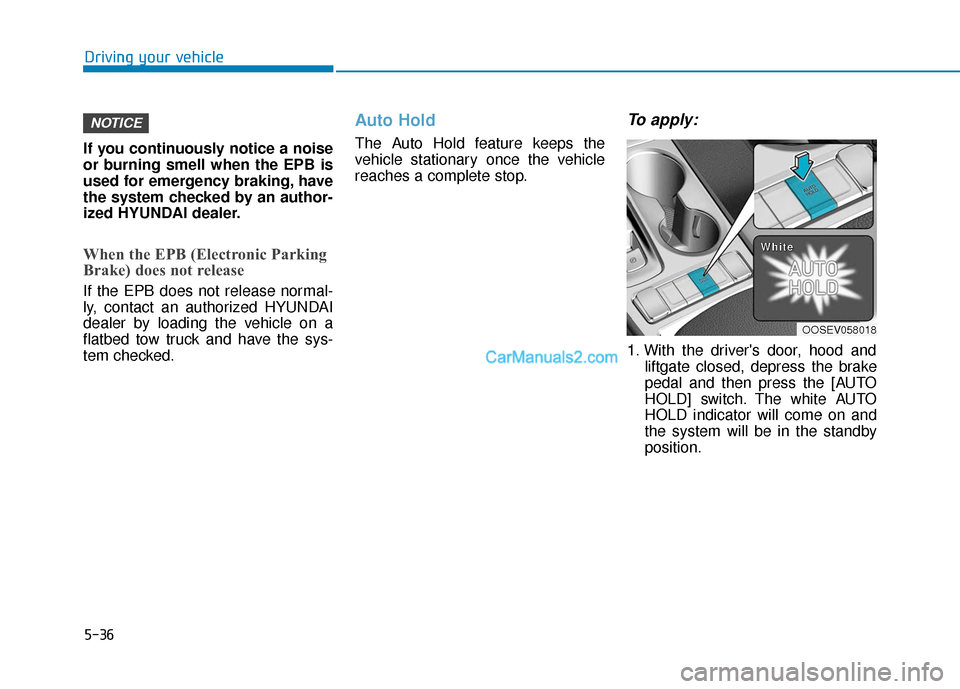
To apply:
1. With the driver's door, hood and liftgate closed, depress the brake
pedal and then press the [AUTO
HOLD] switch. The white AUTO
HOLD indicator will come on and
the system will be in the standby
position.
NOTICE
OOSEV058018
W
W
W
W
h
h
h
h
i
i
i
i
t
t
t
t
e
e
e
e
Page 273 of 540
![Hyundai Kona EV 2019 User Guide 5-40
Driving your vehicle
AUTO HOLD conditions not met.
Close door, hood and liftgate
When you press the [AUTO HOLD]
switch, if the drivers door, hood and
liftgate are not closed, a warning will
soun](/img/35/16246/w960_16246-272.png "Hyundai Kona EV 2019 User Guide 5-40
Driving your vehicle
AUTO HOLD conditions not met.
Close door, hood and liftgate
When you press the [AUTO HOLD]
switch, if the drivers door, hood and
liftgate are not closed, a warning will
soun")
5-40
Driving your vehicle
AUTO HOLD conditions not met.
Close door, hood and liftgate
When you press the [AUTO HOLD]
switch, if the driver's door, hood and
liftgate are not closed, a warning will
sound and a message will appear on
the LCD display.
Press the [AUTO HOLD] switch after
closing the driver’s door, hood and
liftgate.
Anti-lock Brake System (ABS)
ABS is an electronic braking system
that helps prevent a braking skid.
ABS allows the driver to steer and
brake at the same time.
OOSEV058076N
On roads where the road sur-
face is pitted or has different
surface height.
Tire chains are installed on
your vehicle.
The safety features of an ABS
or ESC equipped vehicle should
not be tested by high speed
driving or cornering. This could
endanger the safety of yourself
or others.An Anti-Lock Braking System
(ABS) or an Electronic Stability
Control (ESC) system will not
prevent accidents due to
improper or dangerous driving
maneuvers. Even though vehi-
cle control is improved during
emergency braking, always
maintain a safe distance
between you and objects ahead
of you. Vehicle speeds should
always be reduced during
extreme road conditions. The
braking distance for cars
equipped with ABS or ESC may
be longer than for those without
these systems in the following
road conditions.
Drive your vehicle at reduced
speeds during the following
conditions:
Rough, gravel or snow-cov-
ered roads.
WARNING
Page 274 of 540
5-41
Driving your vehicle
5
Using ABS
To obtain the maximum benefit from
your ABS in an emergency situation,
do not attempt to modulate your
brake pressure and do not try to
pump your brakes. Depress your
brake pedal as hard as possible.
When you apply your brakes under
conditions which may lock the
wheels, you may hear sounds from
the brakes, or feel a corresponding
sensation in the brake pedal. This is
normal and it means your ABS is
active.
ABS does not reduce the time or dis-
tance it takes to stop the vehicle.
Always maintain a safe distance from
the vehicle in front of you.
ABS will not prevent a skid that
results from sudden changes in
direction, such as trying to take a
corner too fast or making a sudden
lane change. Always drive at a safe
speed for the road and weather con-
ditions.ABS cannot prevent a loss of stabili-
ty. Always steer moderately when
braking hard. Severe or sharp steer-
ing wheel movement can still cause
your vehicle to veer into oncoming
traffic or off the road.
On loose or uneven road surfaces,
operation of the anti-lock brake sys-
tem may result in a longer stopping
distance than for vehicles equipped
with a conventional brake system.
The ABS warning light ( ) will stay
on for several seconds after the
POWER button is in the ON position.
During that time, the ABS will go
through self-diagnosis and the light
will go off if everything is normal. If
the light stays on, you may have a
problem with your ABS. Contact an
authorized HYUNDAI dealer as soon
as possible.
If the ABS warning light ( ) is
on and stays on, you may have
a problem with the ABS. Your
power brakes will work normal-
ly. To reduce the risk of serious
injury or death, contact your
HYUNDAI dealer as soon as
possible.
WARNING