climate control Hyundai Kona EV 2019 Owner's Guide
[x] Cancel search | Manufacturer: HYUNDAI, Model Year: 2019, Model line: Kona EV, Model: Hyundai Kona EV 2019Pages: 540, PDF Size: 21.84 MB
Page 397 of 540
7-17
7
Maintenance
C
CL
LI
IM
M A
AT
TE
E
C
C O
O N
NT
TR
R O
O L
L
A
A I
IR
R
F
F I
IL
L T
T E
ER
R
Filter Inspection
The climate control air filter should
be replaced according to the
Maintenance Schedule. If the vehi-
cle is operated in severely air-pollut-
ed cities or on dusty rough roads for
a long period, it should be inspected
more frequently and replaced earlier.
When you replace the climate control
air filter, replace it performing the fol-
lowing procedure, and be careful to
avoid damaging other components.
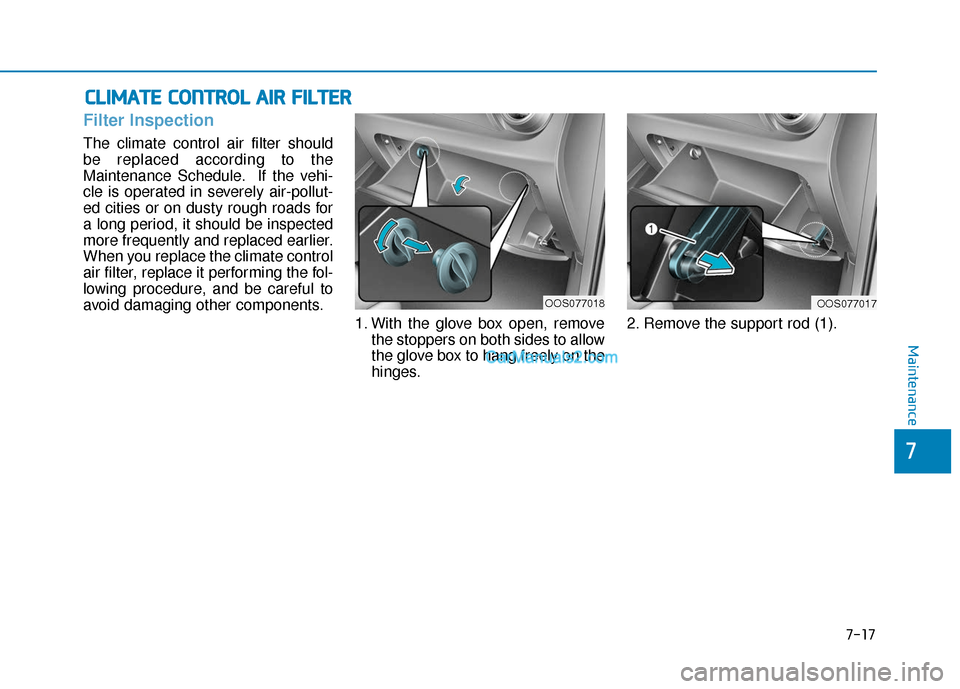
1. With the glove box open, removethe stoppers on both sides to allow
the glove box to hang freely on the
hinges. 2. Remove the support rod (1).
OOS077017OOS077018
Page 398 of 540
7-18
Maintenance
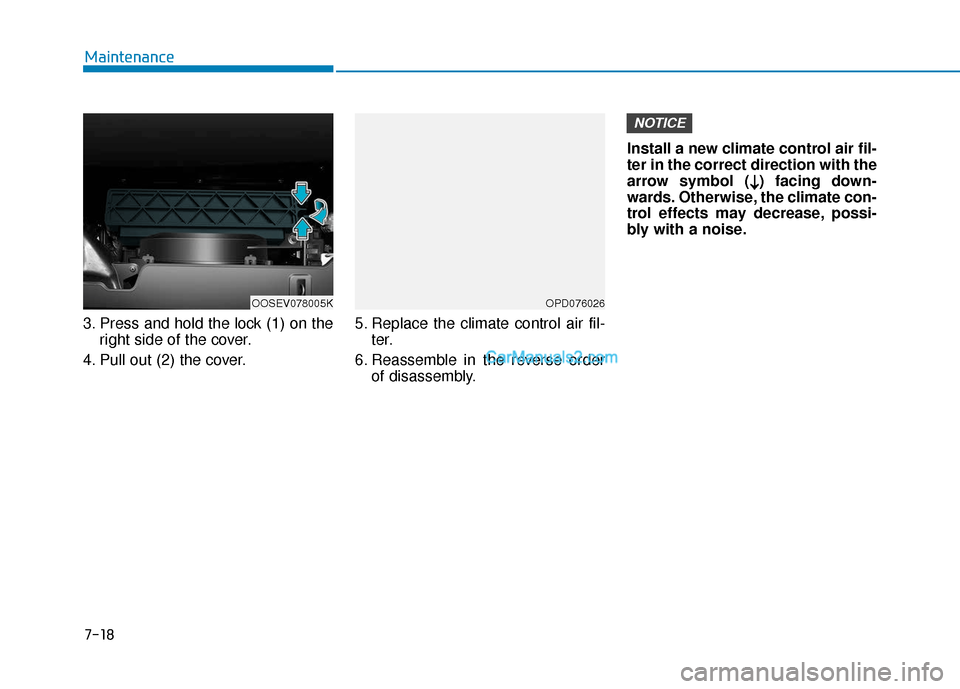
3. Press and hold the lock (1) on the right side of the cover.
4. Pull out (2) the cover. 5. Replace the climate control air fil-
ter.
6. Reassemble in the reverse order of disassembly. Install a new climate control air fil-
ter in the correct direction with the
arrow symbol (
↓ ↓) facing down-
wards. Otherwise, the climate con-
trol effects may decrease, possi-
bly with a noise.
NOTICE
OPD076026OOSEV078005K
Page 405 of 540
7-25
7
Maintenance
By jump starting
After a jump start from a good bat-
tery, drive the vehicle for 20-30 min-
utes before it is shutoff. The vehicle
may not restart if you shut it off
before the battery had a chance to
adequately recharge. See "Jump
Starting" in chapter 6 for more infor-
mation on jump starting procedures.
Information
An inappropriately disposedbattery can be harmful to
the environment and human
health. Dispose of the bat-
tery according to your local
law(s) or regulation.
Reset Features
Some items need to be reset after
the battery has been discharged or
the battery has been disconnected.
Power Windows
Trip Computer
Climate Control System
Clock
Audio System
Sunroof
i
Watch the battery during
charging, and stop or reduce
the charging rate if the battery
cells begin boiling violently.
The negative battery cable
must be removed first and
installed last when the battery
is disconnected. Disconnect
the battery charger in the fol-
lowing order:
(1) Turn off the battery charg-
er main switch.
(2) Unhook the negative
clamp from the negative
battery terminal.
(3) Unhook the positive clamp from the positive battery
terminal.
Always use a genuine
HYUNDAI approved battery
when you replace the battery.
Page 411 of 540
7-31
7
Maintenance
Wheel Replacement
When replacing the metal wheels for
any reason, make sure the new
wheels are equivalent to the original
factory units in diameter, rim width
and offset.
Tire Traction
Tire traction can be reduced if you
drive on worn tires, tires that are
improperly inflated or on slippery
road surfaces. Tires should be
replaced when tread wear indicators
appear. To reduce the possibility of
losing control, slow down whenever
there is rain, snow or ice on the road.
Tire Maintenance
In addition to proper inflation, correct
wheel alignment helps to decrease
tire wear. If you find a tire is worn
unevenly, have your dealer check the
wheel alignment.
When you have new tires installed,
make sure they are balanced. This
will increase vehicle ride comfort and
tire life. Additionally, a tire should
always be rebalanced if it is removed
from the wheel.
Tire Sidewall Labeling
This information identifies and
describes the fundamental charac-
teristics of the tire and also provides
the tire identification number (TIN)
for safety standard certification. The
TIN can be used to identify the tire in
case of a recall.
Tires degrade over time, even
when they are not being used.
Regardless of the remaining
tread, HYUNDAI recommends
that tires be replaced after six
(6) years of normal service.
When replacing tires (or
wheels), it is recommended to
replace the two front or two
rear tires (or wheels) as a pair.
Replacing just one tire can
seriously affect your vehicle's
handling.
Heat caused by hot climates
or frequent high loading con-
ditions can accelerate the
aging process. Failure to fol-
low this warning may cause
sudden tire failure, which
could lead to a loss of vehicle
control resulting in an acci-
dent.
Page 414 of 540
7-34
Maintenance
6. Maximum load rating
This number indicates the maximum
load in kilograms and pounds that
can be carried by the tire. When
replacing the tires on the vehicle,
always use a tire that has the same
load rating as the factory installed
tire.
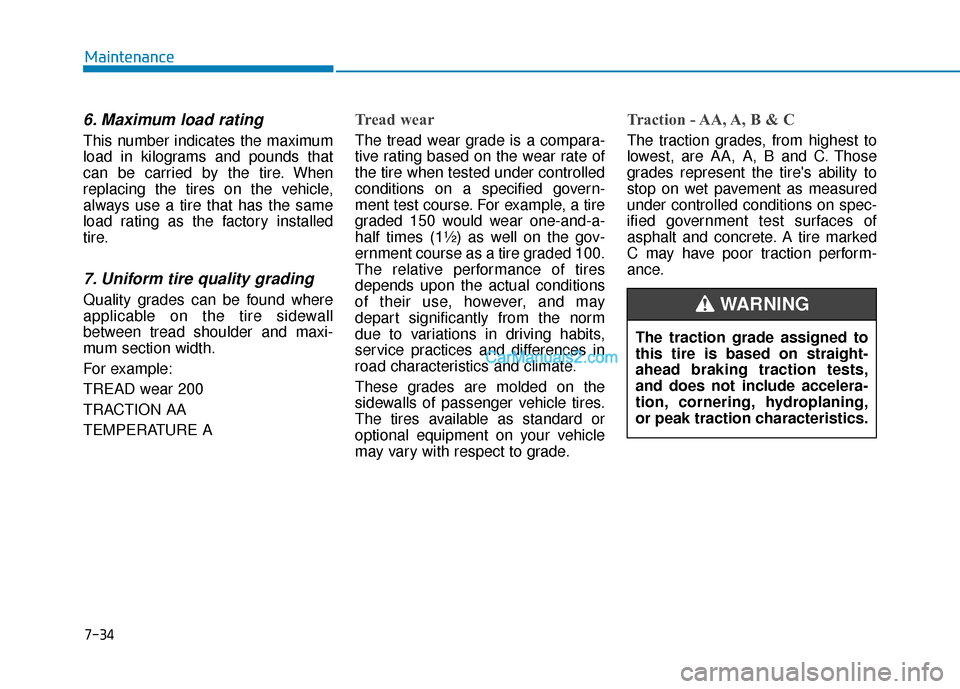
7. Uniform tire quality grading
Quality grades can be found where
applicable on the tire sidewall
between tread shoulder and maxi-
mum section width.
For example:
TREAD wear 200
TRACTION AA
TEMPERATURE A
Tread wear
The tread wear grade is a compara-
tive rating based on the wear rate of
the tire when tested under controlled
conditions on a specified govern-
ment test course. For example, a tire
graded 150 would wear one-and-a-
half times (1½) as well on the gov-
ernment course as a tire graded 100.
The relative performance of tires
depends upon the actual conditions
of their use, however, and may
depart significantly from the norm
due to variations in driving habits,
service practices and differences in
road characteristics and climate.
These grades are molded on the
sidewalls of passenger vehicle tires.
The tires available as standard or
optional equipment on your vehicle
may vary with respect to grade.
Traction - AA, A, B & C
The traction grades, from highest to
lowest, are AA, A, B and C. Those
grades represent the tire's ability to
stop on wet pavement as measured
under controlled conditions on spec-
ified government test surfaces of
asphalt and concrete. A tire marked
C may have poor traction perform-
ance.The traction grade assigned to
this tire is based on straight-
ahead braking traction tests,
and does not include accelera-
tion, cornering, hydroplaning,
or peak traction characteristics.
WARNING
Page 458 of 540
8-5
88
Specifications, Consumer information and Reporting safety defectsV
VO
O L
LU
U M
M E
E
A
A N
N D
D
W
W E
EI
IG
G H
H T
T
A
A I
IR
R
C
C O
O N
ND
DI
IT
T I
IO
O N
NI
IN
N G
G
S
S Y
Y S
ST
T E
EM
M
Contact an authorized HYUNDAI dealer for more details.
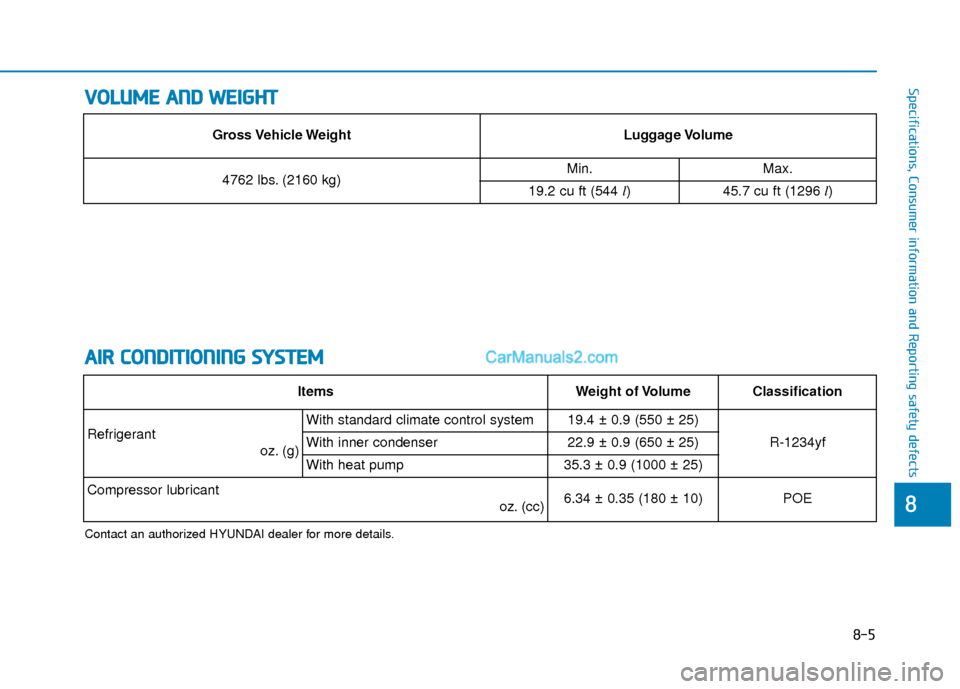
Gross Vehicle WeightLuggage Volume
4762 lbs. (2160 kg)Min.Max.
19.2 cu ft (544 l)45.7 cu ft (1296 l)
ItemsWeight of VolumeClassification
Refrigerant
oz. (g)With standard climate control system19.4 ± 0.9 (550 ± 25)
R-1234yfWith inner condenser22.9 ± 0.9 (650 ± 25)
With heat pump35.3 ± 0.9 (1000 ± 25)
Compressor lubricant oz. (cc) 6.34 ± 0.35 (180 ± 10)POE
Page 465 of 540
How to Disconnect Portable Charger .........................H41
Charging Connector Manual Release ..........................H42
Precautions When Using the Portable Charger ........H42
EV Charging Troubleshooting
- Steps to Consider ...............................................H43
How to Start the Vehicle ......................................H44
How to Stop the Vehicle.......................................H44
Virtual Engine Sound System ..............................H45
Distance to Empty .................................................H45
When destination is not set ...........................................H46
Navigation - When a Destination is Set .....................H46
Tips for Improving Range When Using the
Climate Control System ........................................H46
Tips for Improving Range While Driving ............H47
Power/Charge Gauge............................................H47
State of Charge (SOC) Gauge for
High Voltage Battery ...........................................H47
Warning and Indicator Lights .............................H48
Ready Indicator ................................................................H48
Service Warning Light .....................................................H48
Power Down Warning Light ...........................................H49
Charging Indicator Light..................................................H49
High Voltage Battery Level Warning Light .................H49
Regenerative Brake Warning Light ..............................H49
LCD Display Messages ..........................................H50
Shift to P to charge .........................................................H50
Remaining Time .................................................................H50
Unplug vehicle to start ....................................................H50
Charging Door Open ........................................................H51Charging Stopped. Check the AC/DC charger ...........H51
Charging Stopped. Check the cable connection .......H52
Check regenerative brakes/
Stop vehicle and check regenerative brakes ............H52 Low Battery........................................................................\
H52
Charge immediately. Power limited ..............................H53
Low outside temperature may limit power output.
Charge EV battery/Low EV battery temperature.
Power limited .....................................................................H53\
EV Battery Overheated! Stop vehicle..........................H54
Power limited .....................................................................H54\
Stop vehicle and check power supply .........................H55
Check Virtual Engine Sound System............................H55
Check electric vehicle system .......................................H55
Energy Flow ..........................................................H56
Vehicle Stop........................................................................\
H56
EV Propulsion ....................................................................H56
Regeneration ......................................................................H5\
6
Aux. Battery Saver+ .............................................H57
Mode ........................................................................\
............H57
System Setting...................................................................H58
LCD Message .....................................................................H58\
Utility Mode ............................................................H59
System Setting and Activation ......................................H59
System Deactivation .........................................................H59
If an Accident Occurs ...........................................H60
Additional Precautions..........................................H62
Service Interlock Connector ................................H62
Service Plug ...........................................................H62
Page 471 of 540
H8
E
EV
V
M
M O
OD
DE
E
(
( C
C O
O N
NT
T.
.)
)
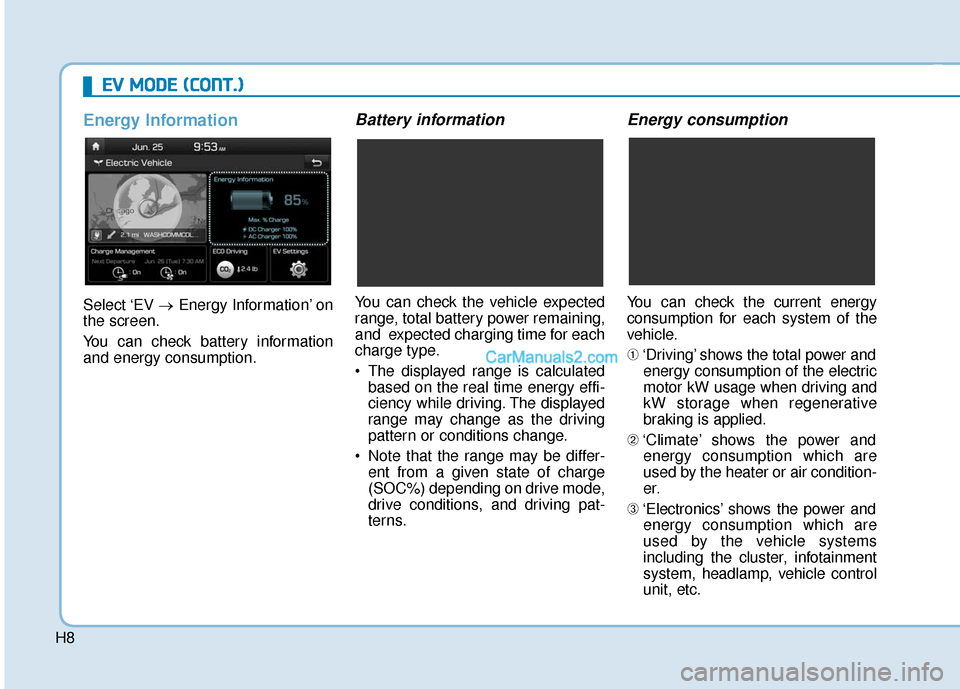
Energy Information
Select ‘EV →Energy Information’ on
the screen.
You can check battery information
and energy consumption.
Battery information
You can check the vehicle expected
range, total battery power remaining,
and expected charging time for each
charge type.
The displayed range is calculated based on the real time energy effi-
ciency while driving. The displayed
range may change as the driving
pattern or conditions change.
Note that the range may be differ- ent from a given state of charge
(SOC%) depending on drive mode,
drive conditions, and driving pat-
terns.
Energy consumption
You can check the current energy
consumption for each system of the
vehicle.
➀ ‘Driving’ shows the total power and
energy consumption of the electric
motor kW usage when driving and
kW storage when regenerative
braking is applied.
➁ ‘Climate’ shows the power and
energy consumption which are
used by the heater or air condition-
er.
➂ ‘Electronics’ shows the power and
energy consumption which are
used by the vehicle systems
including the cluster, infotainment
system, headlamp, vehicle control
unit, etc.
Page 472 of 540
H9
➃‘Battery care’ shows the momen-
tary power and energy consump-
tion which are used when:
increase the battery temperature
during winter to improve the driv-
ing performance.
ature during summer to prevent
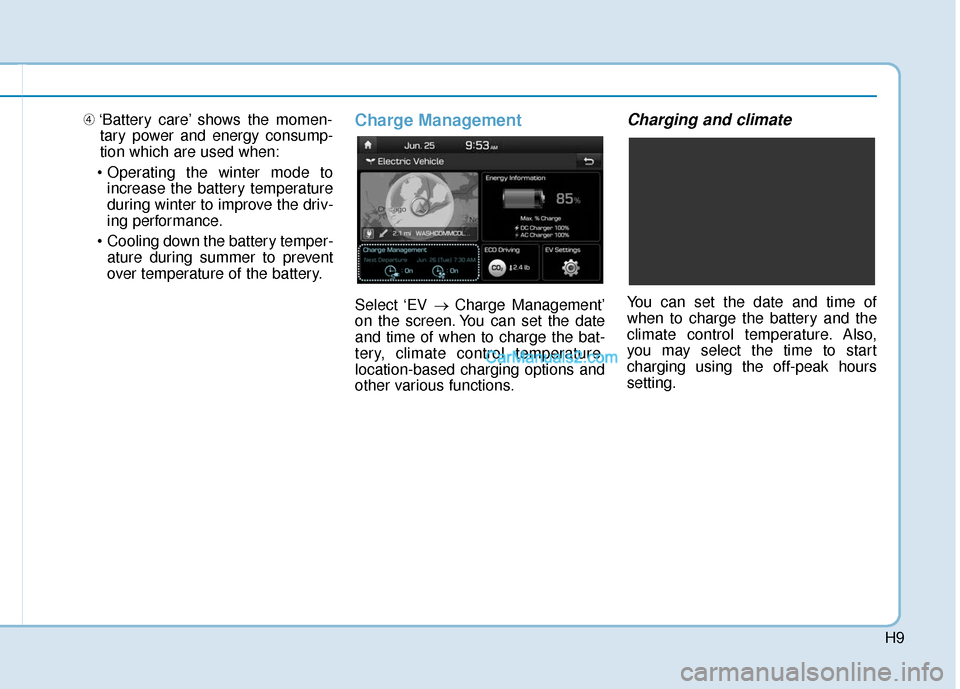
over temperature of the battery.Charge Management
Select ‘EV → Charge Management’
on the screen. You can set the date
and time of when to charge the bat-
tery, climate control temperature,
location-based charging options and
other various functions.
Charging and climate
You can set the date and time of
when to charge the battery and the
climate control temperature. Also,
you may select the time to start
charging using the off-peak hours
setting.
Page 480 of 540
H17
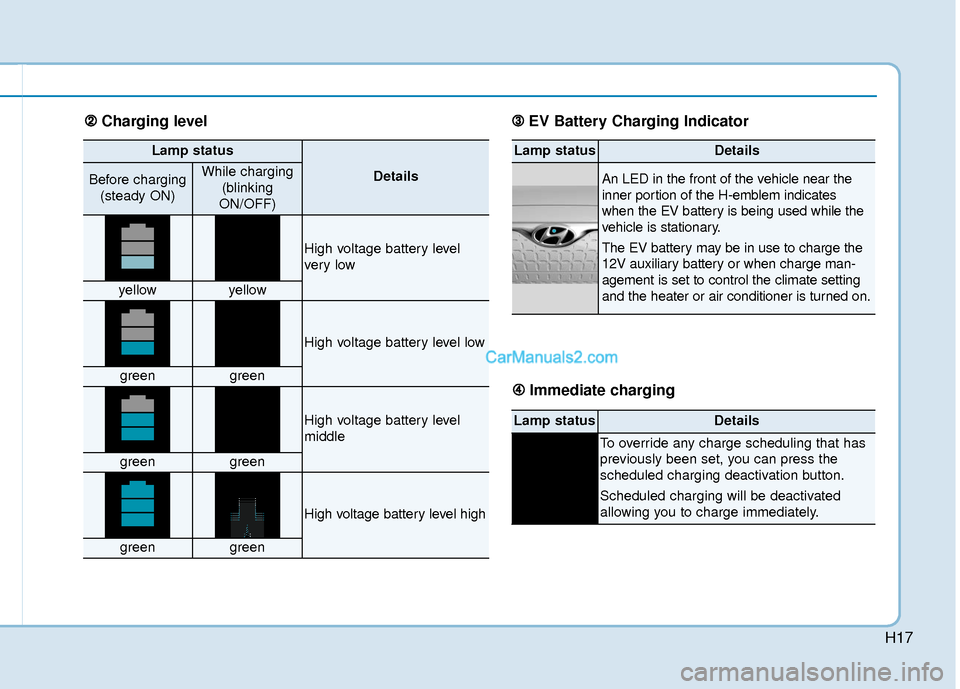
Lamp status
DetailsBefore charging(steady ON)While charging (blinking
ON/OFF)
High voltage battery level
ver y low
yellowyellow
High voltage battery level low
greengreen
High voltage battery level
middle
greengreen
High voltage battery level high
greengreen
Lamp statusDetails
An LED in the front of the vehicle near the
inner portion of the H-emblem indicates
when the EV battery is being used while the
vehicle is stationary.
The EV battery may be in use to charge the
12V auxiliary battery or when charge man-
agement is set to control the climate setting
and the heater or air conditioner is turned on.
Lamp statusDetails
To override any charge scheduling that has
previously been set, you can press the
scheduled charging deactivation button.
Scheduled charging will be deactivated
allowing you to charge immediately.
➁ ➁ Charging level ➂
➂
EV Battery Charging Indicator
➃
➃ Immediate charging