mirror Hyundai Kona EV 2019 Owner's Guide
[x] Cancel search | Manufacturer: HYUNDAI, Model Year: 2019, Model line: Kona EV, Model: Hyundai Kona EV 2019Pages: 540, PDF Size: 21.84 MB
Page 287 of 540
5-54
Driving your vehicle
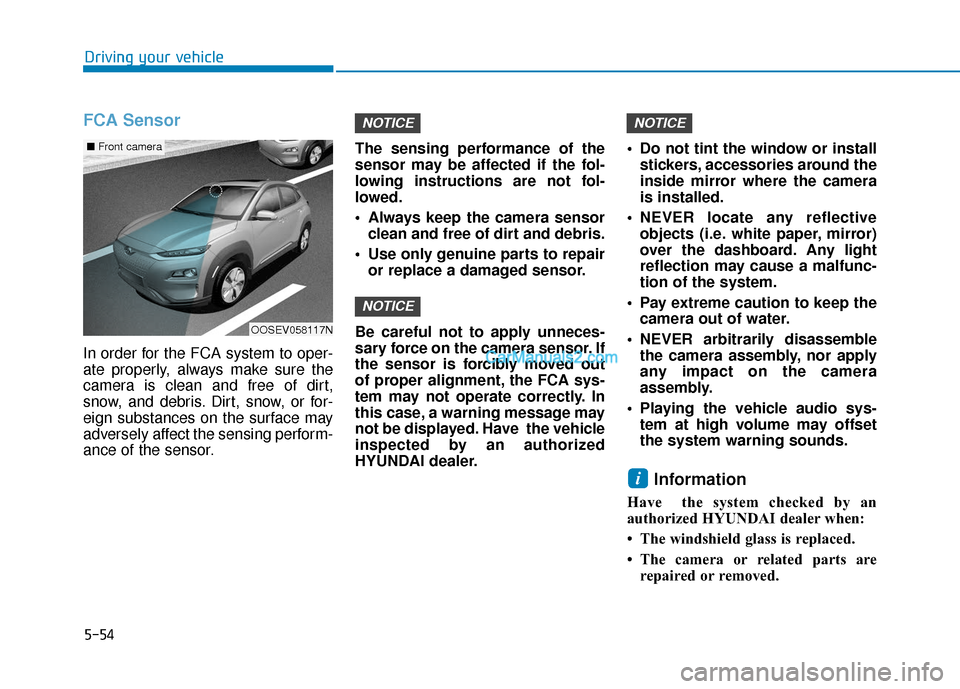
FCA Sensor
In order for the FCA system to oper-
ate properly, always make sure the
camera is clean and free of dirt,
snow, and debris. Dirt, snow, or for-
eign substances on the surface may
adversely affect the sensing perform-
ance of the sensor.The sensing performance of the
sensor may be affected if the fol-
lowing instructions are not fol-
lowed.
Always keep the camera sensor
clean and free of dirt and debris.
Use only genuine parts to repair or replace a damaged sensor.
Be careful not to apply unneces-
sary force on the camera sensor. If
the sensor is forcibly moved out
of proper alignment, the FCA sys-
tem may not operate correctly. In
this case, a warning message may
not be displayed. Have the vehicle
inspected by an authorized
HYUNDAI dealer. Do not tint the window or install
stickers, accessories around the
inside mirror where the camera
is installed.
NEVER locate any reflective objects (i.e. white paper, mirror)
over the dashboard. Any light
reflection may cause a malfunc-
tion of the system.
Pay extreme caution to keep the camera out of water.
NEVER arbitrarily disassemble the camera assembly, nor apply
any impact on the camera
assembly.
Playing the vehicle audio sys- tem at high volume may offset
the system warning sounds.
Information
Have the system checked by an
authorized HYUNDAI dealer when:
• The windshield glass is replaced.
• The camera or related parts arerepaired or removed.
i
NOTICE
NOTICE
NOTICE
OOSEV058117N
■ Front camera
Page 295 of 540
5-62
Driving your vehicle
System Description
The Blind-Spot Collision Warning
(BCW)/Rear Cross-Traffic Collision
Warning (RCCW) system uses radar
sensors in the rear bumper to moni-
tor and warn the driver of an
approaching vehicle in the driver's
blind spot area.
The system monitors the rear area of
the vehicle and provides information
to the driver with an audible alert and
an indicator on the outer side view
mirrors.
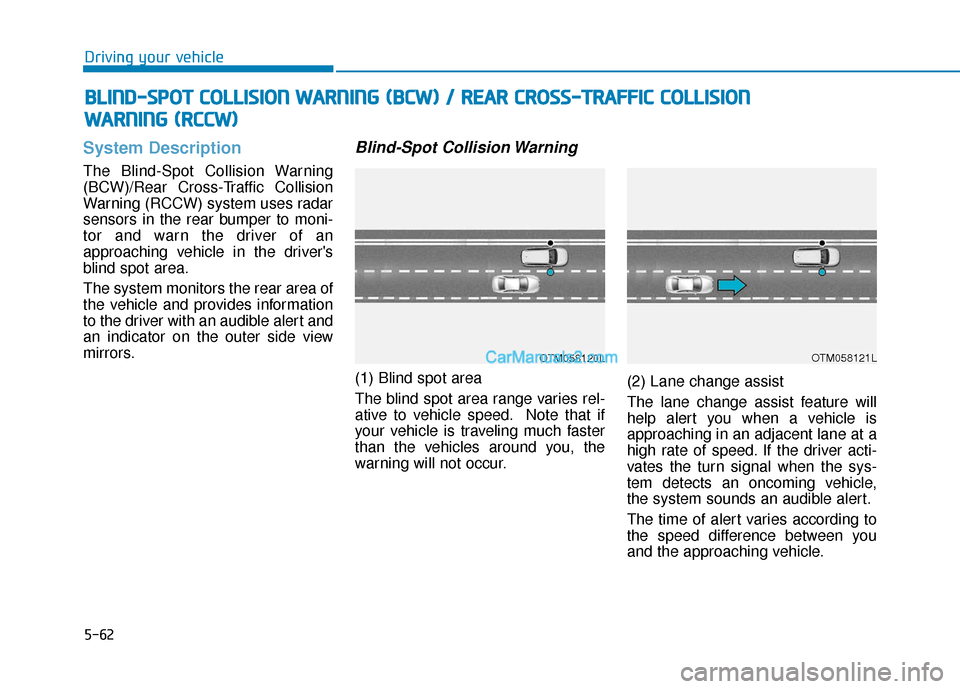
Blind-Spot Collision Warning
(1) Blind spot area
The blind spot area range varies rel-
ative to vehicle speed. Note that if
your vehicle is traveling much faster
than the vehicles around you, the
warning will not occur.(2) Lane change assist
The lane change assist feature will
help alert you when a vehicle is
approaching in an adjacent lane at a
high rate of speed. If the driver acti-
vates the turn signal when the sys-
tem detects an oncoming vehicle,
the system sounds an audible alert.
The time of alert varies according to
the speed difference between you
and the approaching vehicle.
B B
L
LI
IN
N D
D-
-S
S P
P O
O T
T
C
C O
O L
LL
LI
IS
S I
IO
O N
N
W
W A
AR
RN
N I
IN
N G
G
(
( B
B C
CW
W )
)
/
/
R
R E
EA
A R
R
C
C R
R O
O S
SS
S-
-T
T R
R A
A F
FF
FI
IC
C
C
C O
O L
LL
LI
IS
S I
IO
O N
N
W
W A
AR
RN
N I
IN
N G
G
(
( R
R C
CC
CW
W )
)
OTM058120LOTM058121L
Page 297 of 540
5-64
Driving your vehicle
To cancel:
Press the BCW switch again. The
indicator on the switch will go off.
When the system is not used, turn the
system off by turning off the switch.
Information
• If the vehicle is turned off then on again, the BCW system returns to
the previous state.
• When the system is turned on, the warning light will illuminate for 3
seconds on the outer side view mir-
ror. The function will activate when:
1. The system is on.
2. The vehicle speed is above
approximately 20 mph (30 km/h).
3. An oncoming vehicle is detected in the blind spot area.
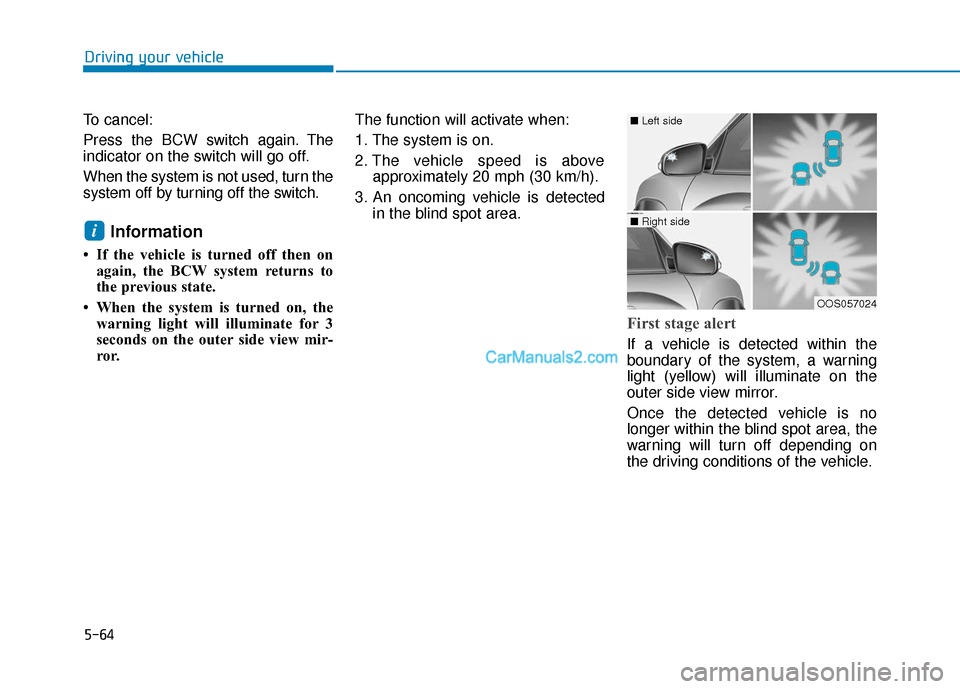
First stage alert
If a vehicle is detected within the
boundary of the system, a warning
light (yellow) will illuminate on the
outer side view mirror.
Once the detected vehicle is no
longer within the blind spot area, the
warning will turn off depending on
the driving conditions of the vehicle.
i
OOS057024
■ Left side
■ Right side
Page 298 of 540
5-65
Driving your vehicle
5
The second stage alarm may bedeactivated.
- To deactivate the warning chime:
Go to the 'User Settings → Driver
Assistance and deselect Blind-
Spot Collision Warning Sound' on
the LCD display.
- To activate the warning chime:
Go to the 'User Settings → Driver
Assistance and select Blind-Spot
Collision Warning Sound' on the
LCD display.
Information
The warning chime function helps
alert the driver. Deactivate this func-
tion only when it is necessary.
For more information, refer to
"LCD Display Modes" in chapter 3.
i
OOS057025
■ Left side
OOS057026
■ Right side
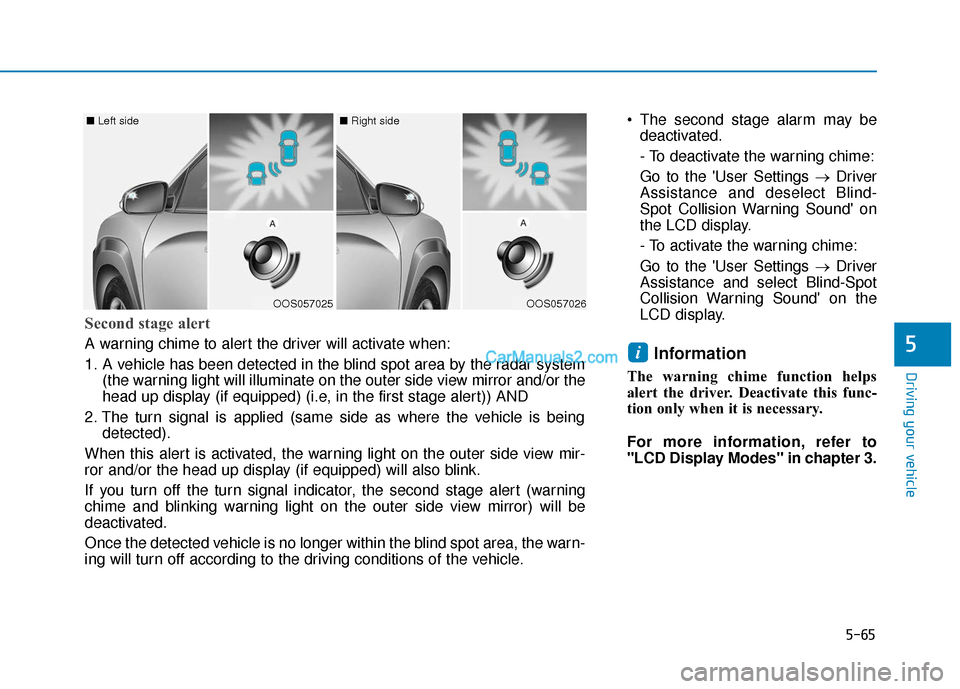
Second stage alert
A warning chime to alert the driver will activate when:
1. A vehicle has been detected in the blind spot area by the radar system
(the warning light will illuminate on the outer side view mirror and/or the
head up display (if equipped) (i.e, in the first stage alert)) AND
2. The turn signal is applied (same side as where the vehicle is being detected).
When this alert is activated, the warning light on the outer side view mir-
ror and/or the head up display (if equipped) will also blink.
If you turn off the turn signal indicator, the second stage alert (warning
chime and blinking warning light on the outer side view mirror) will be
deactivated.
Once the detected vehicle is no longer within the blind spot area, the warn-
ing will turn off according to the driving conditions of the vehicle.
Page 299 of 540
5-66
Driving your vehicle
Rear Cross-Traffic Collision
Warning (RCCW) (if equipped)
The Rear Cross-Traffic Collision
Warning (RCCW) function monitors
approaching cross traffic from the left
and right side of the vehicle when
your vehicle is in reverse.
Operating conditions
To operate:
Go to the 'User Settings →Driver
Assistance and select Rear Cross-
Traffic Collision Warning' on the LCD
display. For more details, refer to
"LCD Display Modes" in chapter 3.
The system will turn on and standby
to activate. The system will activate
when vehicle speed is below 6 mph
(10 km/h) and with the gear in R
(Reverse).
If the function is deselected from the
instrument cluster, the function will
deactivate.
Information
• The last selected setting (ON or OFF) of the RCCW is remained in
the system.
• The system will activate when vehi- cle speed is below 6.2 mph (10 km/h)
and with the gear shifted to R
(Reverse).
• The RCCW (Rear Cross-Traffic Collision Warning) detecting range
is approximately 1 ft ~ 65 ft (0.5 m ~
20 m) in the direction of both later-
al sides of the vehicle.
An approaching vehicle will be
detected if their vehicle speed is
within 2.5 ~ 22.5 mph (4 km/h ~36
km/h).
Note that the detecting range may
vary under certain conditions. As
always, use caution and pay close
attention to your surroundings
when backing up your vehicle.
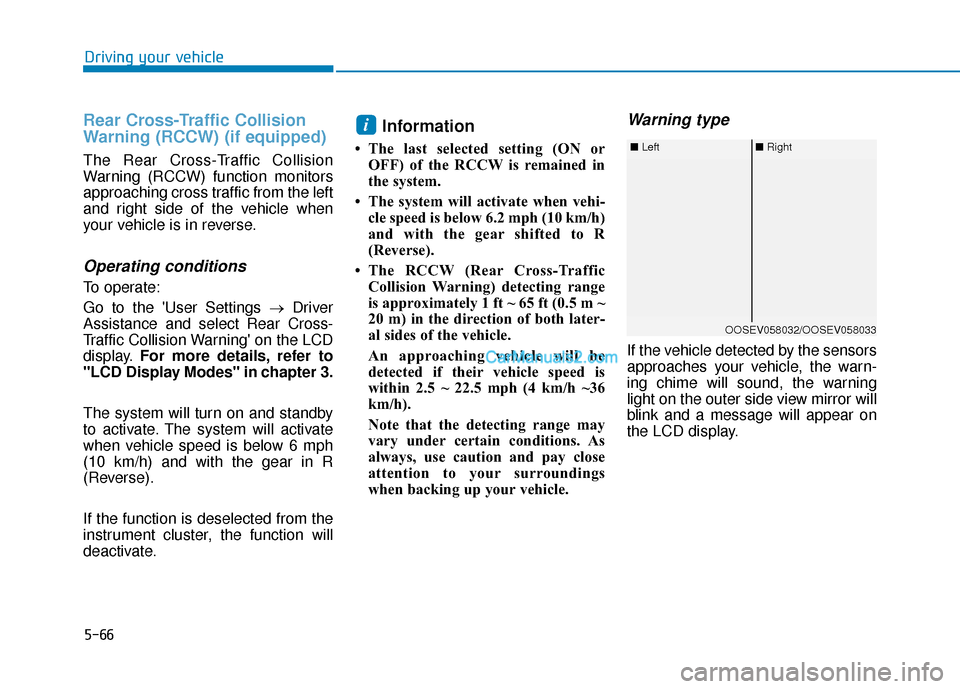
Warning type
If the vehicle detected by the sensors
approaches your vehicle, the warn-
ing chime will sound, the warning
light on the outer side view mirror will
blink and a message will appear on
the LCD display.
i
■ Left■ Right
OOSEV058032/OOSEV058033
Page 300 of 540
5-67
Driving your vehicle
5
Information
• The warning chime will turn offwhen:
- The detected vehicle moves out ofthe sensing area or
- when the vehicle is right behind your vehicle or
- when the vehicle is not approach- ing your vehicle or
- when the other vehicle slows down.
• The system may not operate proper- ly due to other factors or circum-
stances. Always pay attention to
your surrounding.
• If the sensing area near the rear bumper is blocked by either a wall
or barrier or by a parked vehicle,
the system sensing area may be
reduced. The system may not work prop-
erly when the bumper has been
damaged, or if the rear bumper
has been replaced or repaired.
The sensing range differs some- what according to the width of
the road. When the road is nar-
row, the system may detect
other vehicles in the next lane.
The system may turn off due to strong electromagnetic waves.
NOTICE
i
With the system activated, the
warning light on the outer
side view mirror will illumi-
nate whenever a vehicle is
detected at the rear side by
the system.
To avoid accidents, do not
focus only on the warning
light and neglect to see the
surrounding of the vehicle.
Drive safely even though the
vehicle is equipped with a
Blind-Spot Collision Warning
(BCW) system and Rear Cross-
Traffic Collision Warning
(RCCW) system. Do not solely
rely on the system but check
your surrounding before
changing lanes or backing the
vehicle up.
The system may not alert the
driver in some conditions so
always check your surround-
ings while driving.
WARNING The Blind-Spot Collision
Warning (BCW) system and
Rear Cross-Traffic Collision
Warning (RCCW) system are
not a substitute for proper
and safe driving practices.
Always drive safely and use
caution when changing lanes
or backing up your vehicle.
The Blind-Spot Collision
Warning (BCW) system and
Rear Cross-Traffic Collision
Warning (RCCW) system may
not detect every object along-
side the vehicle.
Page 307 of 540
5-74
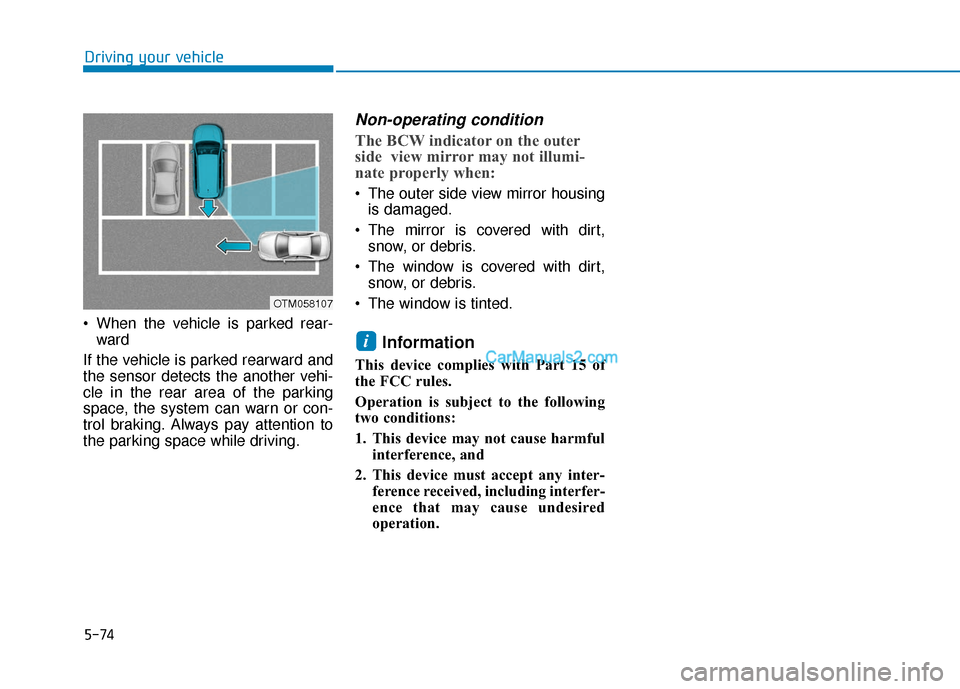
When the vehicle is parked rear-ward
If the vehicle is parked rearward and
the sensor detects the another vehi-
cle in the rear area of the parking
space, the system can warn or con-
trol braking. Always pay attention to
the parking space while driving.
Non-operating condition
The BCW indicator on the outer
side view mirror may not illumi-
nate properly when:
The outer side view mirror housing is damaged.
The mirror is covered with dirt, snow, or debris.
The window is covered with dirt, snow, or debris.
The window is tinted.
Information
This device complies with Part 15 of
the FCC rules.
Operation is subject to the following
two conditions:
1. This device may not cause harmful interference, and
2. This device must accept any inter- ference received, including interfer-
ence that may cause undesired
operation.
i
Driving your vehicle
OTM058107
Page 309 of 540
5-76
Driving your vehicle
LKA Operation
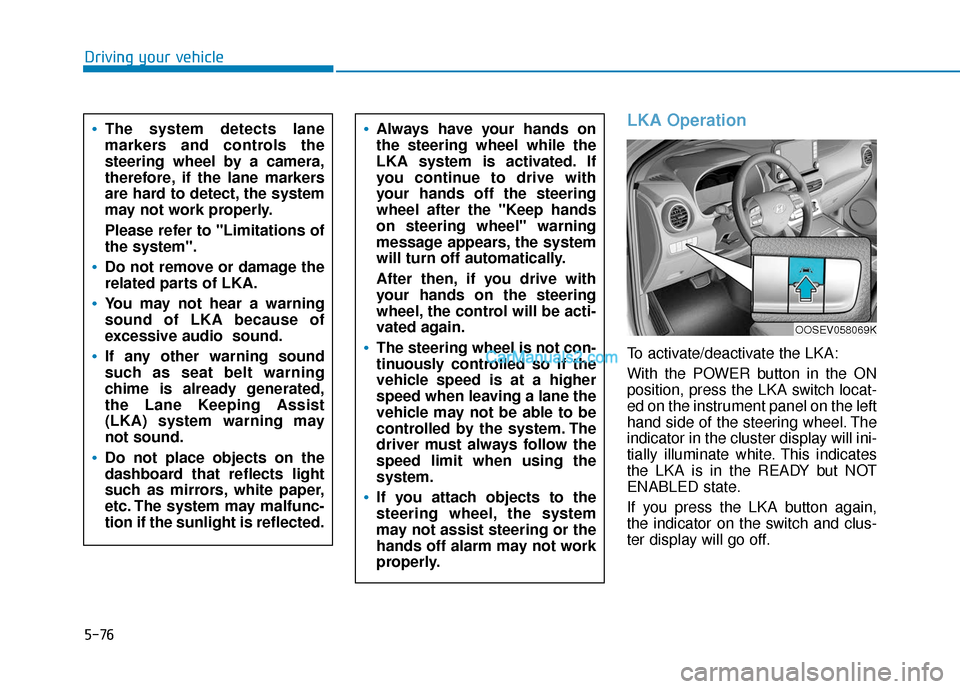
To activate/deactivate the LKA:
With the POWER button in the ON
position, press the LKA switch locat-
ed on the instrument panel on the left
hand side of the steering wheel. The
indicator in the cluster display will ini-
tially illuminate white. This indicates
the LKA is in the READY but NOT
ENABLED state.
If you press the LKA button again,
the indicator on the switch and clus-
ter display will go off.
Always have your hands on
the steering wheel while the
LKA system is activated. If
you continue to drive with
your hands off the steering
wheel after the "Keep hands
on steering wheel" warning
message appears, the system
will turn off automatically.
After then, if you drive with
your hands on the steering
wheel, the control will be acti-
vated again.
The steering wheel is not con-
tinuously controlled so if the
vehicle speed is at a higher
speed when leaving a lane the
vehicle may not be able to be
controlled by the system. The
driver must always follow the
speed limit when using the
system.
If you attach objects to the
steering wheel, the system
may not assist steering or the
hands off alarm may not work
properly.
The system detects lane
markers and controls the
steering wheel by a camera,
therefore, if the lane markers
are hard to detect, the system
may not work properly.
Please refer to "Limitations of
the system".
Do not remove or damage the
related parts of LKA.
You may not hear a warning
sound of LKA because of
excessive audio sound.
If any other warning sound
such as seat belt warning
chime is already generated,
the Lane Keeping Assist
(LKA) system warning may
not sound.
Do not place objects on the
dashboard that reflects light
such as mirrors, white paper,
etc. The system may malfunc-
tion if the sunlight is reflected.
OOSEV058069K
Page 315 of 540
5-82
Driving your vehicle
Driving on a steep grade, over a hill, or when driving on a curved road.
The adverse road conditions cause excessive vehicle vibrations while
driving.
The surrounding of the inside rear view mirror temperature is high
due to direct sunlight, etc.
When front visibility is poor
The windshield or the camera lens is blocked with dirt or debris.
The windshield glass is fogged up; a clear view of the road is obstructed.
Placing objects on the dashboard, etc.
The sensor cannot detect the lane because of fog, heavy rain or snow.
LKA Function Change
The driver can change LKA to Lane
Departure Warning from the LCD dis-
play. Go to the 'User Settings →
Driver Assistance → Lane Safety →
Lane Departure Warning/LKA/Active
LKA.
Lane Departure Warning
LDW mode alerts the driver with a
visual warning and a warning alarm
when the system detects the vehicle
departing the lane. The steering
wheel will not be controlled.
LKA
LKA mode guides the driver to help
keep the vehicle within the lanes. It
rarely controls the steering wheel,
when the vehicle drives well inside
the lanes. However, it starts to con-
trol the steering wheel, when the
vehicle is about to deviate out of the
lanes.
Active LKA
Active LKA mode provides more fre-
quent steering wheel control in com-
parison with the Standard LKA
mode. Active LKA can reduce the dri-
ver’s fatigue to assist the steering for
maintaining the vehicle in the middle
of the lane.
Page 319 of 540
5-86
Driving your vehicleThe Driver Attention Warning sys-
tem utilizes the camera sensor on
the front windshield for its opera-
tion. To keep the camera sensor in
the best condition, you should
observe the followings:
Do not disassemble the cameratemporarily to tint the window or
to attach any types of coatings
and accessories. If you disas-
semble a camera and assemble
it again, take your vehicle to an
authorized HYUNDAI dealer and
have the system checked for cal-
ibration.
NEVER locate any reflective objects (i.e. white paper, mirror)
over the dashboard. Any light
reflection may cause a malfunc-
tion of the Driver Attention Alert
(DAW) system.
Pay extreme caution to keep the camera sensor out of water.
NEVER arbitrarily disassemble the camera assembly, nor apply
any impact on the camera
assembly.
NOTICE
The Driver Attention Warning
(DAW) system is not a substi-
tute for safe driving practices,
but a convenience function
only. It is the responsibility of
the driver to always drive cau-
tiously to prevent unexpected
and sudden situations from
occurring. Pay attention to the
road conditions at all times.
The system may suggest a
break according to the dri-
ver's driving pattern or habits
even if the driver doesn't feel
fatigue.
The driver, who feels fatigued,
should take a break, even
though there is no break sug-
gestion by the Driver Attention
Warning (DAW) system.
WARNING
The Driver Attention Warning
(DAW) system may not properly
operate with limited alerting in
the following situations:
The lane detection perform-
ance is limited. (For more infor-
mation, refer to "Lane Keeping
Assist (LKA) system" in this
chapter.)
The vehicle is driven erratical-
ly or is abruptly turned for
obstacle avoidance (e.g. con-
struction area, other vehicles,
fallen objects, bumpy road).
Forward drivability of the vehi-
cle is severely undermined
(possibly due to wide variation
in tire pressures, uneven tire
wear-out, toe-in/toe-out align-
ment).
The vehicle drives on a curvy
road.
The vehicle drives on a bumpy
road.
CAUTION