temperature control Hyundai Kona EV 2019 Owner's Guide
[x] Cancel search | Manufacturer: HYUNDAI, Model Year: 2019, Model line: Kona EV, Model: Hyundai Kona EV 2019Pages: 540, PDF Size: 21.84 MB
Page 435 of 540
7-55
7
Maintenance
L
LI
IG
G H
H T
T
B
B U
U L
LB
B S
S
Consult an authorized HYUNDAI
dealer to replace most vehicle light
bulbs. It is difficult to replace vehicle
light bulbs because other parts of the
vehicle must be removed before you
can get to the bulb. This is especially
true for removing the headlamp
assembly to get to the bulb(s).
Removing/installing the headlamp
assembly can result in damage to
the vehicle. Light replacement
Be sure to replace the burned out
bulb with one of the same wattage
rating. Otherwise, it may cause
damage to the fuse or electric
wiring system.
Headlamp lens
To prevent damage, do not clean
the headlamp lens with chemical
solvents or strong detergents.
Information
After heavy rain or washing, head-
lamp and trunk lenses could appear
frosty. This condition is caused by the
temperature difference between the
lamp inside and the outside tempera-
ture. This is similar to the condensa-
tion on your windows inside your
vehicle during the rain and doesn’t
indicate a problem with your vehicle.
If the water leaks into the lamp bulb
circuitry, have your vehicle checked
by an authorized retailer of Genesis
Branded products.
Information
• A normally functioning lamp may flicker momentarily to stabilize the
vehicle’s electrical control system.
However, if the lamp goes out after
flickering momentarily, or contin-
ues to flicker, we recommend the
system be checked by an authorized
HYUNDAI dealer.
• The position lamp may not turn on when the position lamp switch is
turned on, but the position lamp and
headlamp switch may turn on when
the headlamp switch is turned on.
This may be caused by network fail-
ure or vehicle electrical control sys-
tem malfunction. If this occurs, we
recommend the system be checked
by an authorized HYUNDAI dealer.
i
i
NOTICE
NOTICE
Prior to replacing a lamp,
depress the foot brake, shift
to P (Park), apply the parking
brake, place the POWER but-
ton in the OFF position and
take the key with you when
leaving the vehicle to avoid
sudden movement of the vehi-
cle and to prevent possible
electric shock.
Be aware the bulbs may be
hot and may burn your fin-
gers.
WARNING
Page 449 of 540
7-69
7
Maintenance
Corrosion protection
Protecting your vehicle from corro-
sion
By using the most advanced design
and construction practices to combat
corrosion, HYUNDAI produces cars
of the highest quality. However, this is
only part of the job. To achieve the
long-term corrosion resistance your
vehicle can deliver, the owner’s
cooperation and assistance is also
required.
Common causes of corrosion
The most common causes of corro-
sion on your vehicle are:
Road salt, dirt and moisture that isallowed to accumulate underneath
the vehicle.
Removal of paint or protective coatings by stones, gravel, abra-
sion or minor scrapes and dents
which leave unprotected metal
exposed to corrosion.
High-corrosion areas
If you live in an area where your vehi-
cle is regularly exposed to corrosive
materials, corrosion protection is
particularly important. Some of the
common causes of accelerated cor-
rosion are road salts, dust control
chemicals, ocean air and industrial
pollution.
Moisture breeds corrosion
Moisture creates the conditions in
which corrosion is most likely to
occur. For example, corrosion is
accelerated by high humidity, partic-
ularly when temperatures are just
above freezing. In such conditions,
the corrosive material is kept in con-
tact with the car surfaces by moisture
that is slow to evaporate.+
Mud is particularly corrosive
because it is slow to dry and holds
moisture in contact with the vehicle.
Although the mud appears to be dry,
it can still retain the moisture and
promote corrosion. High temperatures can also acceler-
ate corrosion of parts that are not
properly ventilated so the moisture
can be dispersed. For all these rea-
sons, it is particularly important to
keep your vehicle clean and free of
mud or accumulations of other mate-
rials. This applies not only to the vis-
ible surfaces but particularly to the
underside of the vehicle.To help prevent corrosion
Keep your car clean
The best way to prevent corrosion is
to keep your vehicle clean and free
of corrosive materials. Attention to
the underside of the vehicle is partic-
ularly important.
If you live in a high-corrosion area
— where road salts are used, near
the ocean, areas with industrial
pollution, acid rain, etc.—, you
should take extra care to prevent
corrosion. In winter, hose off the
underside of your vehicle at least
once a month and be sure to clean
the underside thoroughly when
winter is over.
Page 465 of 540
How to Disconnect Portable Charger .........................H41
Charging Connector Manual Release ..........................H42
Precautions When Using the Portable Charger ........H42
EV Charging Troubleshooting
- Steps to Consider ...............................................H43
How to Start the Vehicle ......................................H44
How to Stop the Vehicle.......................................H44
Virtual Engine Sound System ..............................H45
Distance to Empty .................................................H45
When destination is not set ...........................................H46
Navigation - When a Destination is Set .....................H46
Tips for Improving Range When Using the
Climate Control System ........................................H46
Tips for Improving Range While Driving ............H47
Power/Charge Gauge............................................H47
State of Charge (SOC) Gauge for
High Voltage Battery ...........................................H47
Warning and Indicator Lights .............................H48
Ready Indicator ................................................................H48
Service Warning Light .....................................................H48
Power Down Warning Light ...........................................H49
Charging Indicator Light..................................................H49
High Voltage Battery Level Warning Light .................H49
Regenerative Brake Warning Light ..............................H49
LCD Display Messages ..........................................H50
Shift to P to charge .........................................................H50
Remaining Time .................................................................H50
Unplug vehicle to start ....................................................H50
Charging Door Open ........................................................H51Charging Stopped. Check the AC/DC charger ...........H51
Charging Stopped. Check the cable connection .......H52
Check regenerative brakes/
Stop vehicle and check regenerative brakes ............H52 Low Battery........................................................................\
H52
Charge immediately. Power limited ..............................H53
Low outside temperature may limit power output.
Charge EV battery/Low EV battery temperature.
Power limited .....................................................................H53\
EV Battery Overheated! Stop vehicle..........................H54
Power limited .....................................................................H54\
Stop vehicle and check power supply .........................H55
Check Virtual Engine Sound System............................H55
Check electric vehicle system .......................................H55
Energy Flow ..........................................................H56
Vehicle Stop........................................................................\
H56
EV Propulsion ....................................................................H56
Regeneration ......................................................................H5\
6
Aux. Battery Saver+ .............................................H57
Mode ........................................................................\
............H57
System Setting...................................................................H58
LCD Message .....................................................................H58\
Utility Mode ............................................................H59
System Setting and Activation ......................................H59
System Deactivation .........................................................H59
If an Accident Occurs ...........................................H60
Additional Precautions..........................................H62
Service Interlock Connector ................................H62
Service Plug ...........................................................H62
Page 472 of 540
H9
➃‘Battery care’ shows the momen-
tary power and energy consump-
tion which are used when:
increase the battery temperature
during winter to improve the driv-
ing performance.
ature during summer to prevent
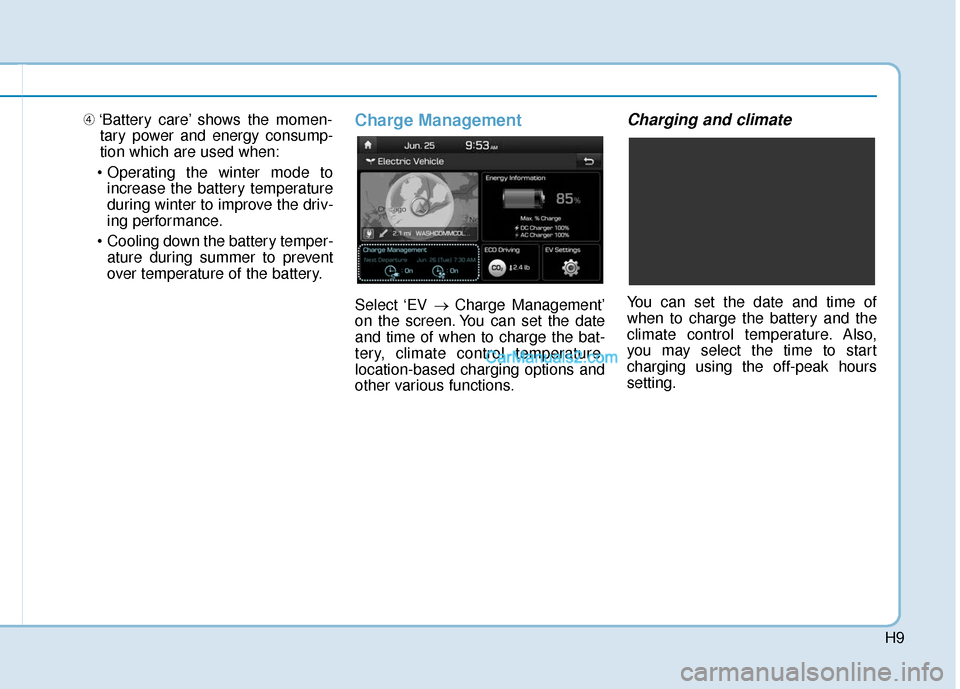
over temperature of the battery.Charge Management
Select ‘EV → Charge Management’
on the screen. You can set the date
and time of when to charge the bat-
tery, climate control temperature,
location-based charging options and
other various functions.
Charging and climate
You can set the date and time of
when to charge the battery and the
climate control temperature. Also,
you may select the time to start
charging using the off-peak hours
setting.
Page 501 of 540
H38
E
EV
V
C
C H
H A
AR
RG
G I
IN
N G
G
U
U S
SI
IN
N G
G
T
T H
H E
E
P
P O
O R
RT
TA
A B
BL
LE
E
C
C H
H A
AR
RG
G E
ER
R
(
( C
C O
O N
NT
T.
.)
)
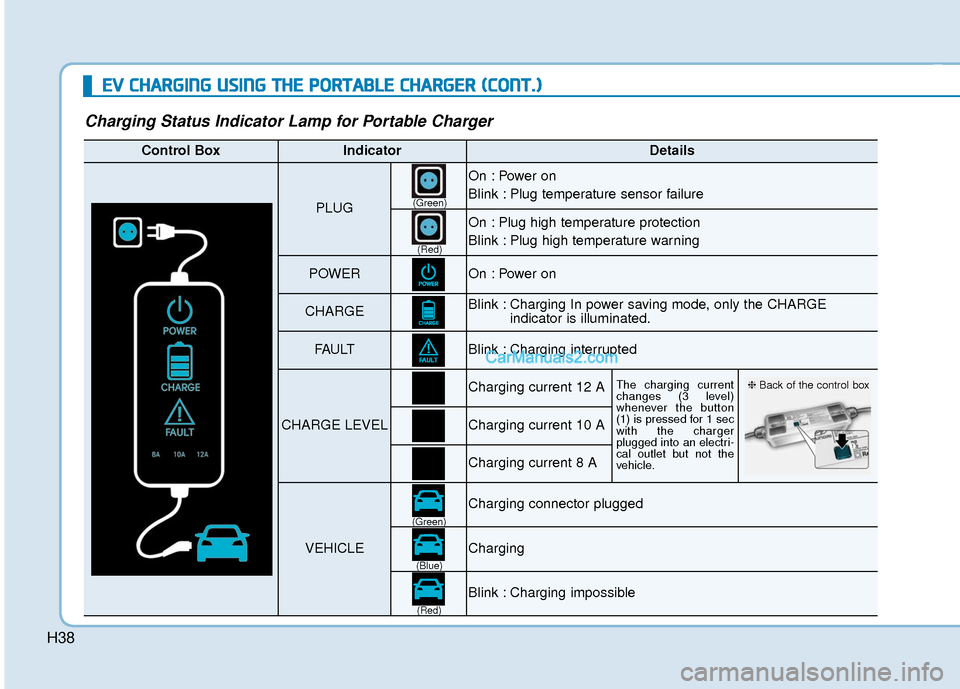
Charging Status Indicator Lamp for Portable Charger
Control BoxIndicatorDetails
PLUG
On : Power on
Blink : Plug temperature sensor failure
On : Plug high temperature protection
Blink : Plug high temperature warning
POWEROn : Power on
CHARGEBlink : Charging In power saving mode, only the CHARGE
indicator is illuminated.
FAU LTBlink : Charging interrupted
CHARGE LEVEL
Charging current 12 AThe charging current
changes (3 level)
whenever the button
(1) is pressed for 1 sec
with the charger
plugged into an electri-
cal outlet but not the
vehicle.
Charging current 10 A
Charging current 8 A
VEHICLE
Charging connector plugged
Charging
Blink : Charging impossible
(Green)
(Green) (Blue)
(Red)(Red)
❈
Back of the control box
Page 502 of 540
H39
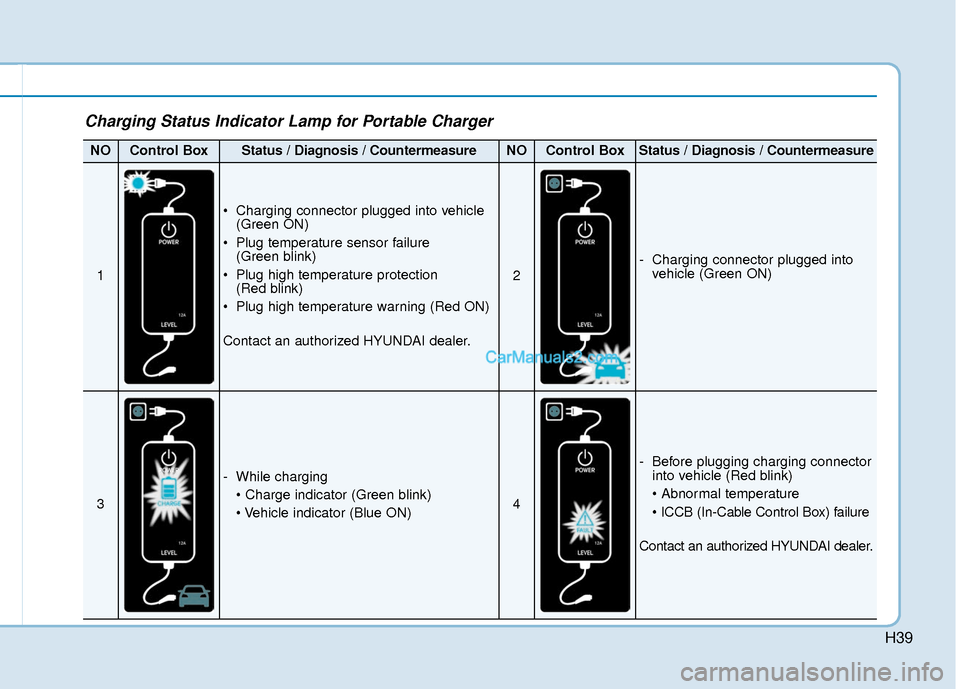
Charging Status Indicator Lamp for Portable Charger
NOControl BoxStatus / Diagnosis / CountermeasureNOControl BoxStatus / Diagnosis / Countermeasure
1
Charging connector plugged into vehicle(Green ON)
Plug temperature sensor failure (Green blink)
Plug high temperature protection (Red blink)
Plug high temperature warning (Red ON)
Contact an authorized HYUNDAI dealer.
2
- Charging connector plugged into vehicle (Green ON)
3
- While charging
4
- Before plugging charging connectorinto vehicle (Red blink)
Contact an authorized HYUNDAI dealer.
Page 503 of 540
H40
E
EV
V
C
C H
H A
AR
RG
G I
IN
N G
G
U
U S
SI
IN
N G
G
T
T H
H E
E
P
P O
O R
RT
TA
A B
BL
LE
E
C
C H
H A
AR
RG
G E
ER
R
(
( C
C O
O N
NT
T.
.)
)
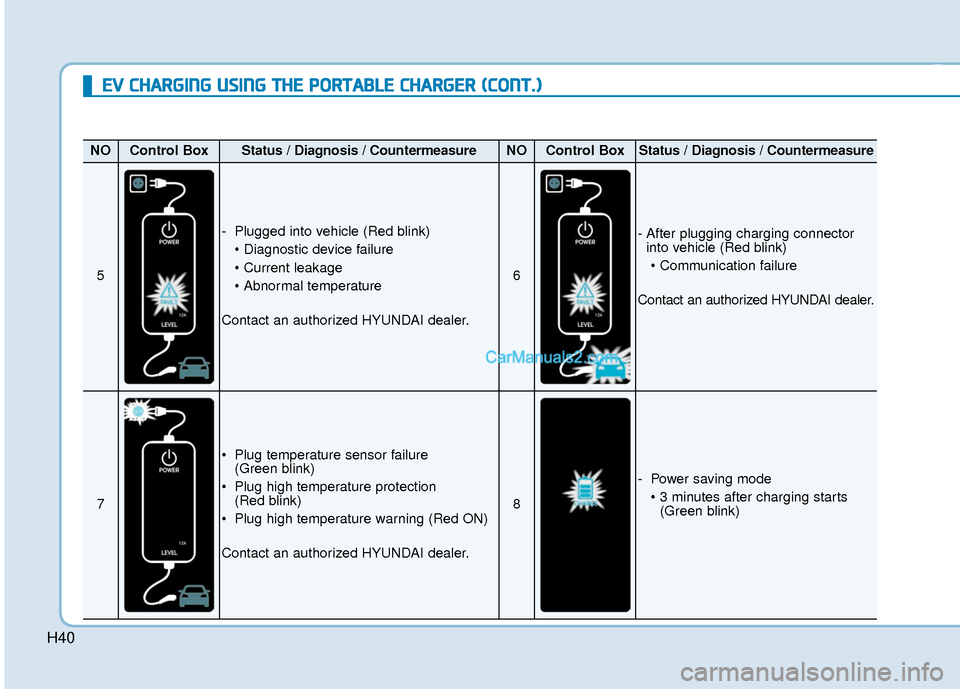
NOControl BoxStatus / Diagnosis / CountermeasureNOControl BoxStatus / Diagnosis / Countermeasure
5
- Plugged into vehicle (Red blink)
Contact an authorized HYUNDAI dealer.
6
- After plugging charging connector into vehicle (Red blink)
Contact an authorized HYUNDAI dealer.
7
Plug temperature sensor failure (Green blink)
Plug high temperature protection (Red blink)
Plug high temperature warning (Red ON)
Contact an authorized HYUNDAI dealer.
8
- Power saving mode (Green blink)
Page 505 of 540
H42
E
EV
V
C
C H
H A
AR
RG
G I
IN
N G
G
U
U S
SI
IN
N G
G
T
T H
H E
E
P
P O
O R
RT
TA
A B
BL
LE
E
C
C H
H A
AR
RG
G E
ER
R
(
( C
C O
O N
NT
T.
.)
)
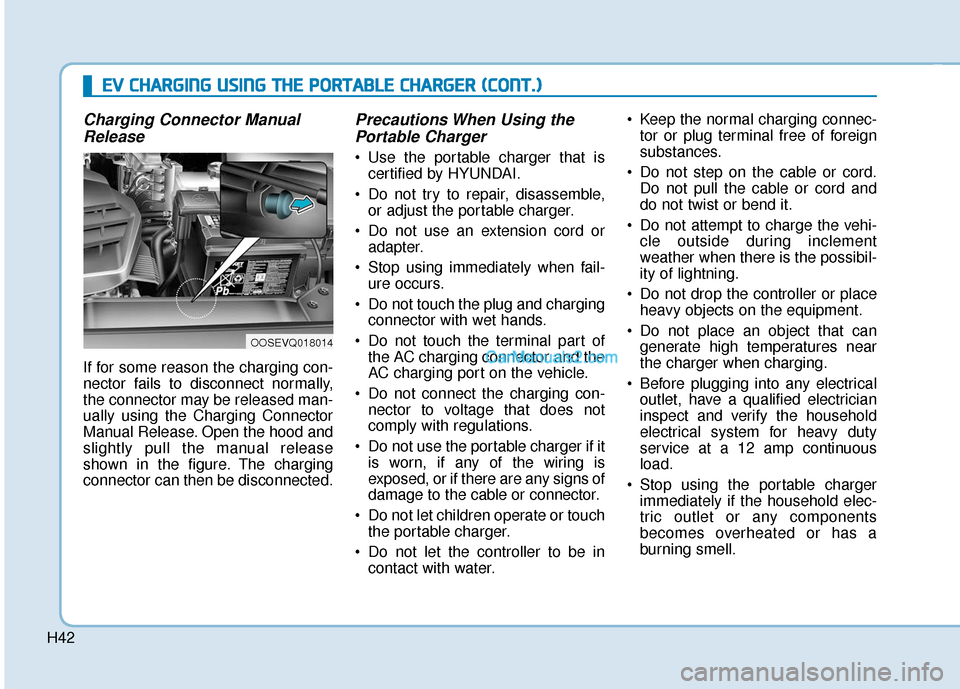
Charging Connector Manual
Release
If for some reason the charging con-
nector fails to disconnect normally,
the connector may be released man-
ually using the Charging Connector
Manual Release. Open the hood and
slightly pull the manual release
shown in the figure. The charging
connector can then be disconnected.
Precautions When Using thePortable Charger
Use the portable charger that is
certified by HYUNDAI.
Do not try to repair, disassemble, or adjust the portable charger.
Do not use an extension cord or adapter.
Stop using immediately when fail- ure occurs.
Do not touch the plug and charging connector with wet hands.
Do not touch the terminal part of the AC charging connector and the
AC charging port on the vehicle.
Do not connect the charging con- nector to voltage that does not
comply with regulations.
Do not use the portable charger if it is worn, if any of the wiring is
exposed, or if there are any signs of
damage to the cable or connector.
Do not let children operate or touch the portable charger.
Do not let the controller to be in contact with water. Keep the normal charging connec-
tor or plug terminal free of foreign
substances.
Do not step on the cable or cord. Do not pull the cable or cord and
do not twist or bend it.
Do not attempt to charge the vehi- cle outside during inclement
weather when there is the possibil-
ity of lightning.
Do not drop the controller or place heavy objects on the equipment.
Do not place an object that can generate high temperatures near
the charger when charging.
Before plugging into any electrical outlet, have a qualified electrician
inspect and verify the household
electrical system for heavy duty
service at a 12 amp continuous
load.
Stop using the portable charger immediately if the household elec-
tric outlet or any components
becomes overheated or has a
burning smell.
OOSEVQ018014
Page 509 of 540
H46
D
DR
RI
IV
V I
IN
N G
G
A
A N
N D
D
O
O P
PE
ER
R A
A T
TI
IN
N G
G
I
IN
N F
FO
O R
RM
M A
AT
TI
IO
O N
N
(
( C
C O
O N
NT
T.
.)
)
When destination is not set
On average, a vehicle can drive
about 250 miles (400 km). Under
certain circumstances where the
air conditioner/heater is ON, the
range is affected, resulting in a
possible distance range from
210~310 miles (335~500 km).
When using the heater during cold
weather or driving at high speed,
the high voltage battery consumes
a lot more electricity. This may
reduce the range significantly.
After "---" has been displayed, the vehicle can drive an additional 2~5
miles (3~8 km) depending on driv-
ing speed, heater/air conditioner,
weather, driving style, and other
factors.
The range that is displayed on the instrument cluster after completing
a recharge may vary significantly
depending on previous driving pat-
terns.
When the previous driving patterns
include aggressive or high speed
driving (e.g. predominantly high-
way miles, etc.), the estimated
range on the next full charge will be
lower than normal. When the previous driving patterns
are predominantly mild or econom-
ical (e.g. city driving), the estimated
range on the next full charge will be
increased.
Calculated range may depend on many factors such as the charge
amount of the high voltage battery,
weather, temperature, durability of
the battery, geographical features,
and driving style.
Natural degradation may occur with the high voltage battery
depending on the number of years
the vehicle is used. This may
reduce the vehicle range.
Navigation - When a Destinationis Set
When a destination is set using the
vehicle navigation system (if
equipped), the vehicle range may
change. The vehicle range is recalcu-
lated using the destination route infor-
mation. While driving, the range may
vary based on traffic conditions, driv-
ing pattern and vehicle settings, etc.
Tips for Improving Range
When Using the Climate
Control System
Operating the climate control sys-
tem consumes electrical energy
from the EV battery. Continuous use
may reduce the vehicle range.
When using the climate control sys-
tem, it is recommended to set the
control to 72°F (22°C) AUTO. The
climate control system has been
optimized to operate at this setting
for maximum comfort and efficiency.
When possible, use the DRIVER ONLY feature on the climate control
system. This will discontinue airflow
to the passenger side and reduces
climate control power consumption.
Page 528 of 540

I-2
Air bag warning labels ....................................................2-71
Air bags ........................................................................\
...2-47Additional safety precautions .....................................2-69
Air bag collision sensors ............................................2-64
Air bag inflation conditions .......................................2-65
Air bag non-inflation conditions ................................2-66
Air bag warning labels ...............................................2-69
Curtain air bags ..........................................................2-51
Driver's air bag ...........................................................2-49
How does the air bags system operate? .....................2-52
Occupant Classification System (OCS) .....................2-57
Passenger's front air bag.............................................2-49
Side air bags ...............................................................2-50
SRS Care ....................................................................2-68\
SRS components and functions..................................2-52
SRS warning light ......................................................2-53
What to expect after an air bag inflates .....................2-56
Why didn't my air bag go off in a collision ...............2-63
Air conditioning system specification ..............................8-5
Air ventilated seats .........................................................2-22
Airconditioning system .................................................3-117
Alarm system ..................................................................3-15
Antenna ........................................................................\
.....4-3
Anti-lock Brake System (ABS) ......................................5-40 Appearance care..............................................................7-65
Exterior care ...............................................................7-65
Interior care ................................................................7-70
Armrest ........................................................................\
...2-15
Audio / Video / Navigation system ..................................4-4
Auto defogging system .................................................3-131
Auto hold ........................................................................\
5-36
Auto light position ..........................................................3-97
Automatic climate control system ................................3-117 Air conditioning .......................................................3-125
Air intake control .....................................................3-123
Automatic heating and air conditioning ...................3-118
Climate control information screen selection button .3-125
Driver only ...............................................................3-124
Fan speed control .....................................................3-124
Fresh mode ...............................................................3-123
HEAT button.............................................................3-125
Manual heating and air conditioning........................3-119
Mode selection .........................................................3-120
OFF mode.................................................................3-126
Recirculation mode ..................................................3-123
System maintenance .................................................3-128
Temperature control .................................................3-122
Automatic ventilation ...................................................3-134
Auxiliary battery (12 volt) Battery recharging ......................................................7-23
Aux, USB and iPod ..........................................................4-2
Index
A