amp Hyundai Kona EV 2019 Manual Online
[x] Cancel search | Manufacturer: HYUNDAI, Model Year: 2019, Model line: Kona EV, Model: Hyundai Kona EV 2019Pages: 540, PDF Size: 21.84 MB
Page 494 of 540
H31
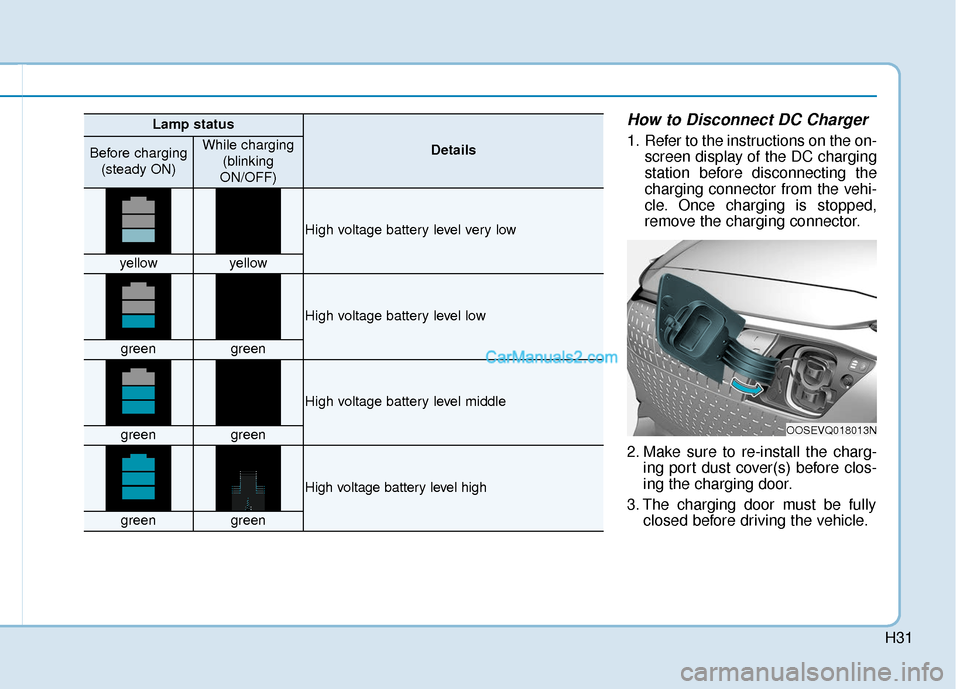
How to Disconnect DC Charger
1. Refer to the instructions on the on-screen display of the DC charging
station before disconnecting the
charging connector from the vehi-
cle. Once charging is stopped,
remove the charging connector.
2. Make sure to re-install the charg- ing port dust cover(s) before clos-
ing the charging door.
3. The charging door must be fully closed before driving the vehicle.
OOSEVQ018013N
Lamp status
DetailsBefore charging
(steady ON)While charging (blinking
ON/OFF)
High voltage battery level very low
yellowyellow
High voltage battery level low
greengreen
High voltage battery level middle
greengreen
High voltage battery level high
greengreen
Page 495 of 540
H32
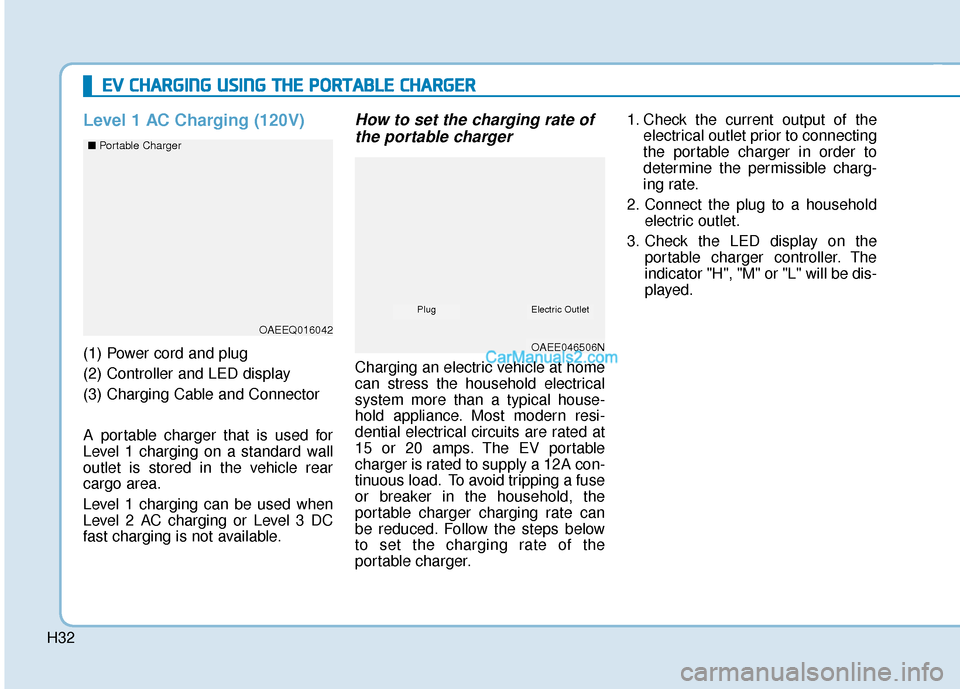
Level 1 AC Charging (120V)
(1) Power cord and plug
(2) Controller and LED display
(3) Charging Cable and Connector
A portable charger that is used for
Level 1 charging on a standard wall
outlet is stored in the vehicle rear
cargo area.
Level 1 charging can be used when
Level 2 AC charging or Level 3 DC
fast charging is not available.
How to set the charging rate ofthe portable charger
Charging an electric vehicle at home
can stress the household electrical
system more than a typical house-
hold appliance. Most modern resi-
dential electrical circuits are rated at
15 or 20 amps. The EV portable
charger is rated to supply a 12A con-
tinuous load. To avoid tripping a fuse
or breaker in the household, the
portable charger charging rate can
be reduced. Follow the steps below
to set the charging rate of the
portable charger. 1. Check the current output of the
electrical outlet prior to connecting
the portable charger in order to
determine the permissible charg-
ing rate.
2. Connect the plug to a household electric outlet.
3. Check the LED display on the portable charger controller. The
indicator "H", "M" or "L" will be dis-
played.
E EV
V
C
C H
H A
AR
RG
G I
IN
N G
G
U
U S
SI
IN
N G
G
T
T H
H E
E
P
P O
O R
RT
TA
A B
BL
LE
E
C
C H
H A
AR
RG
G E
ER
R
OAEEQ016042
OAEE046506N
■
Portable Charger
Electric OutletPlug
Page 496 of 540
H33
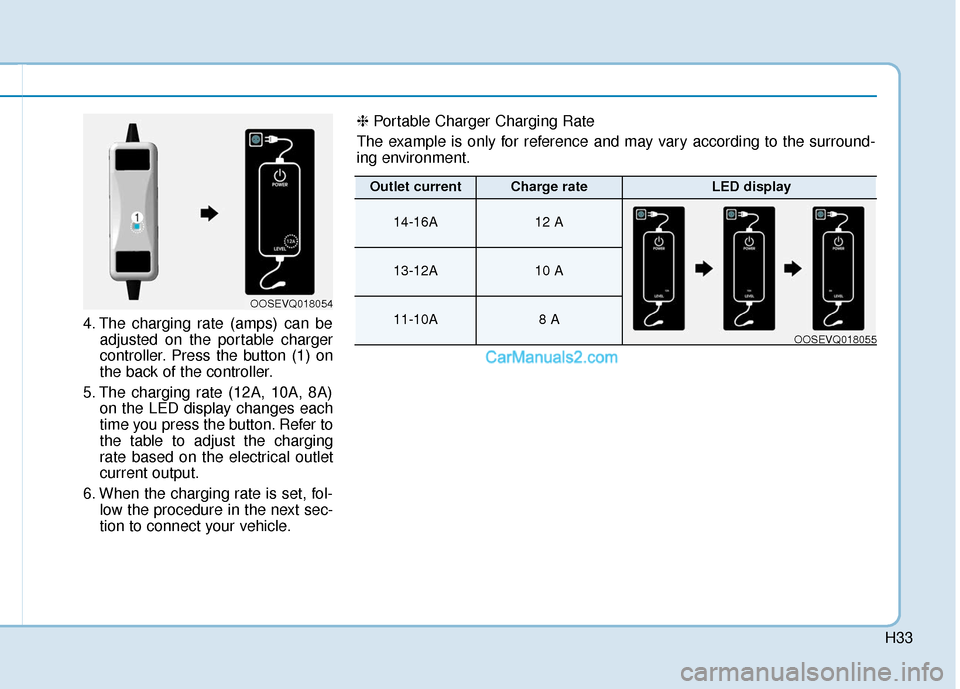
4. The charging rate (amps) can beadjusted on the portable charger
controller. Press the button (1) on
the back of the controller.
5. The charging rate (12A, 10A, 8A) on the LED display changes each
time you press the button. Refer to
the table to adjust the charging
rate based on the electrical outlet
current output.
6. When the charging rate is set, fol- low the procedure in the next sec-
tion to connect your vehicle.
OOSEVQ018054
❈ Portable Charger Charging Rate
The example is only for reference and may vary according to the surround-
ing environment.
Outlet currentCharge rateLED display
14-16A12 A
13-12A10 A
11-10A8 A
OOSEVQ018055
Page 497 of 540
H34
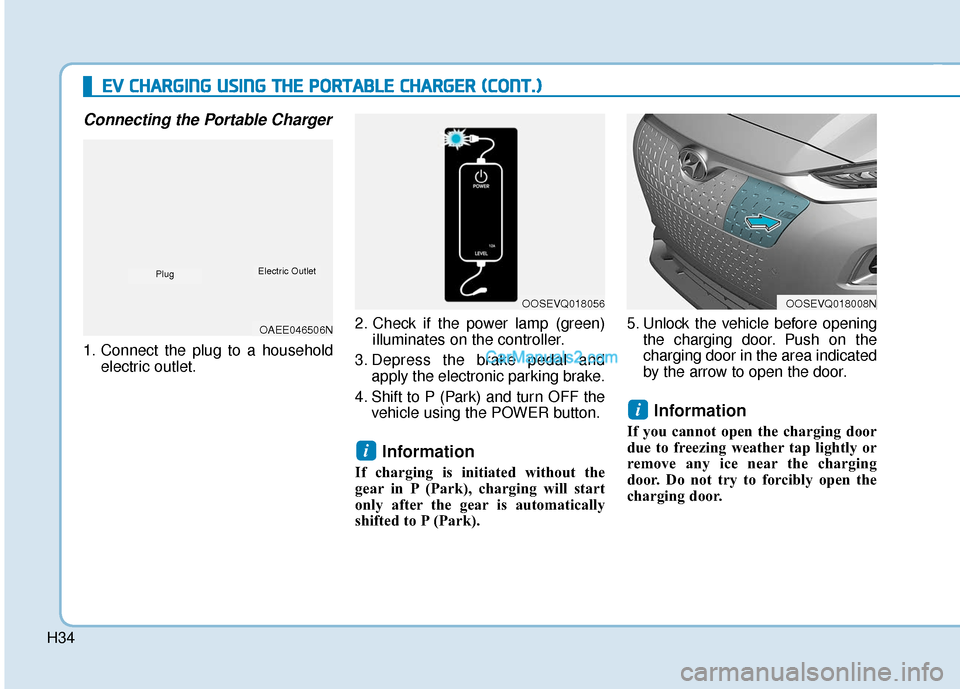
Connecting the Portable Charger
1. Connect the plug to a householdelectric outlet. 2. Check if the power lamp (green)
illuminates on the controller.
3. Depress the brake pedal and apply the electronic parking brake.
4. Shift to P (Park) and turn OFF the vehicle using the POWER button.
Information
If charging is initiated without the
gear in P (Park), charging will start
only after the gear is automatically
shifted to P (Park). 5. Unlock the vehicle before opening
the charging door. Push on the
charging door in the area indicated
by the arrow to open the door.
Information
If you cannot open the charging door
due to freezing weather tap lightly or
remove any ice near the charging
door. Do not try to forcibly open the
charging door.
i
i
E
EV
V
C
C H
H A
AR
RG
G I
IN
N G
G
U
U S
SI
IN
N G
G
T
T H
H E
E
P
P O
O R
RT
TA
A B
BL
LE
E
C
C H
H A
AR
RG
G E
ER
R
(
( C
C O
O N
NT
T.
.)
)
OOSEVQ018056OOSEVQ018008N
OAEE046506N
PlugElectric Outlet
Page 498 of 540
H35
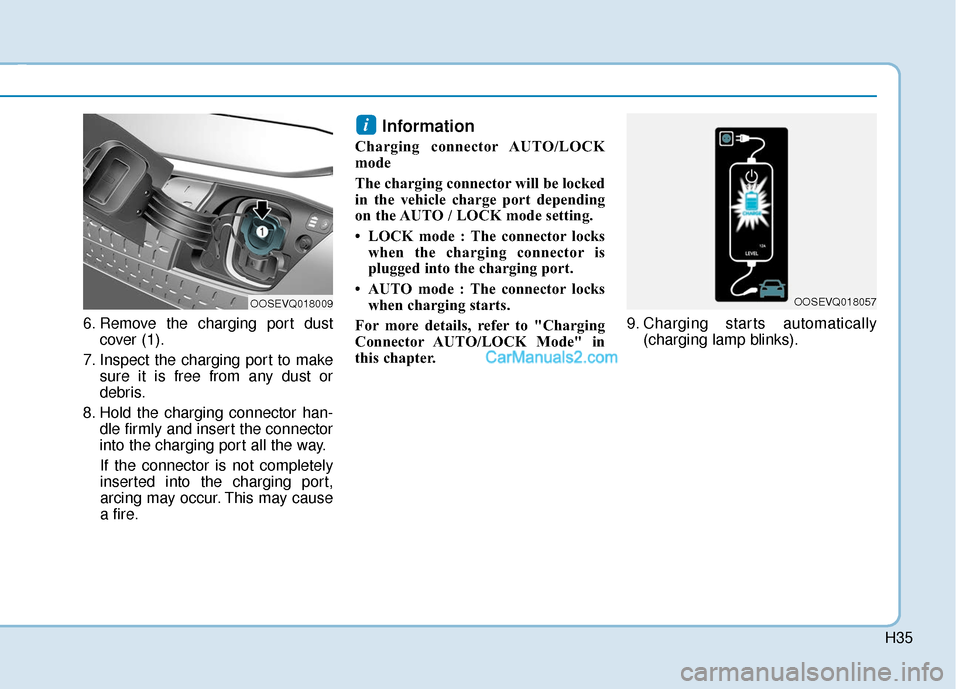
6. Remove the charging port dustcover (1).
7. Inspect the charging port to make sure it is free from any dust or
debris.
8. Hold the charging connector han- dle firmly and insert the connector
into the charging port all the way.
If the connector is not completely
inserted into the charging port,
arcing may occur. This may cause
a fire.
Information
Charging connector AUTO/LOCK
mode
The charging connector will be locked
in the vehicle charge port depending
on the AUTO / LOCK mode setting.
• LOCK mode : The connector locks when the charging connector is
plugged into the charging port.
• AUTO mode : The connector locks when charging starts.
For more details, refer to "Charging
Connector AUTO/LOCK Mode" in
this chapter. 9. Charging starts automatically
(charging lamp blinks).
i
OOSEVQ018009OOSEVQ018057
Page 500 of 540
H37
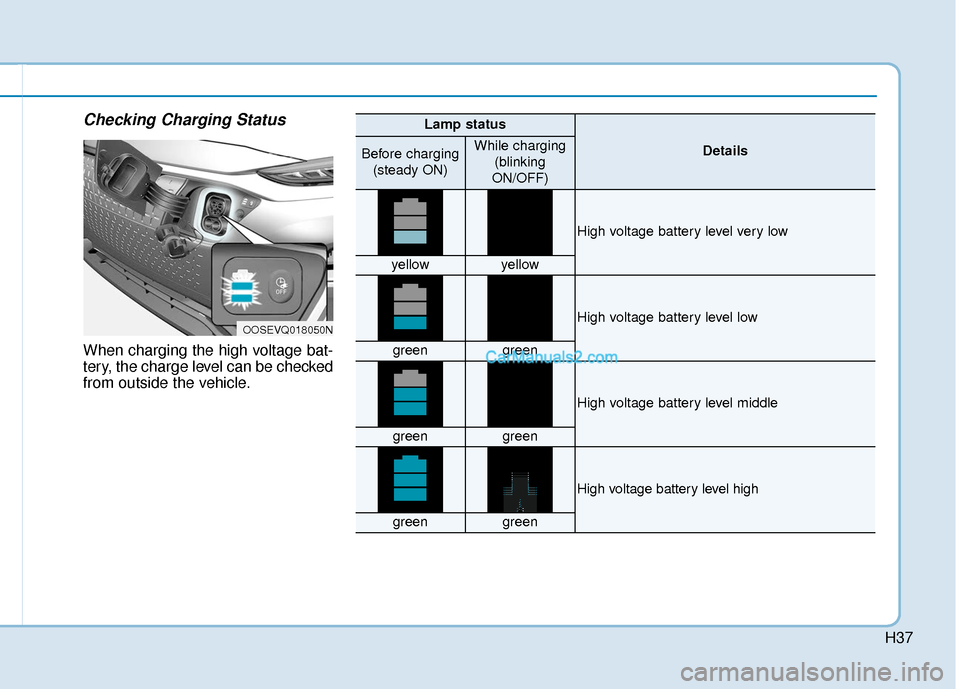
Checking Charging Status
When charging the high voltage bat-
tery, the charge level can be checked
from outside the vehicle.
OOSEVQ018050N
Lamp status
DetailsBefore charging(steady ON)While charging (blinking
ON/OFF)
High voltage battery level very low
yellowyellow
High voltage battery level low
greengreen
High voltage battery level middle
greengreen
High voltage battery level high
greengreen
Page 501 of 540
H38
E
EV
V
C
C H
H A
AR
RG
G I
IN
N G
G
U
U S
SI
IN
N G
G
T
T H
H E
E
P
P O
O R
RT
TA
A B
BL
LE
E
C
C H
H A
AR
RG
G E
ER
R
(
( C
C O
O N
NT
T.
.)
)
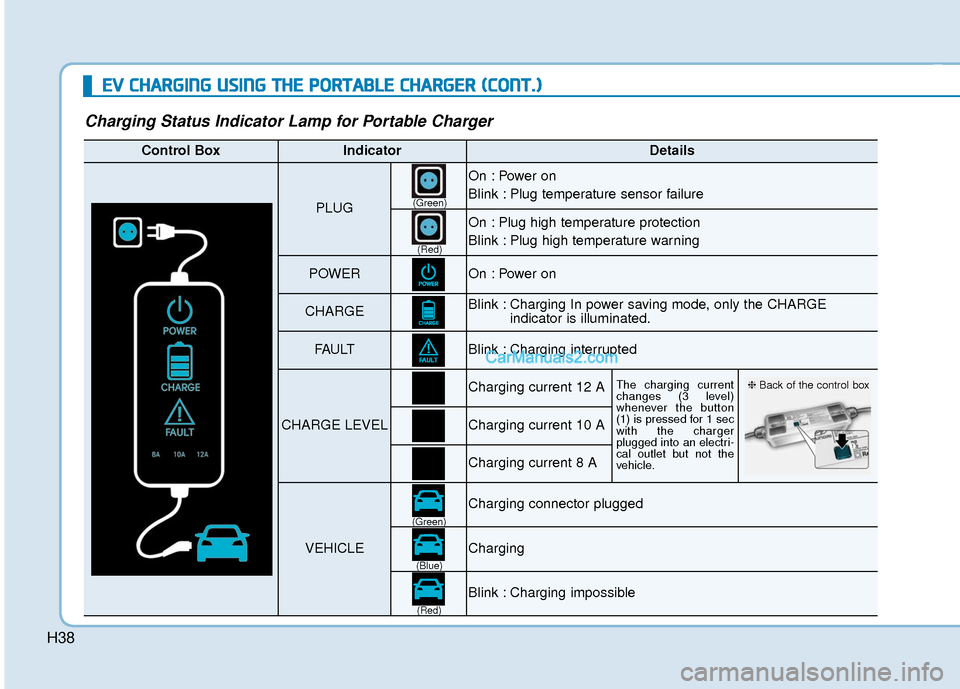
Charging Status Indicator Lamp for Portable Charger
Control BoxIndicatorDetails
PLUG
On : Power on
Blink : Plug temperature sensor failure
On : Plug high temperature protection
Blink : Plug high temperature warning
POWEROn : Power on
CHARGEBlink : Charging In power saving mode, only the CHARGE
indicator is illuminated.
FAU LTBlink : Charging interrupted
CHARGE LEVEL
Charging current 12 AThe charging current
changes (3 level)
whenever the button
(1) is pressed for 1 sec
with the charger
plugged into an electri-
cal outlet but not the
vehicle.
Charging current 10 A
Charging current 8 A
VEHICLE
Charging connector plugged
Charging
Blink : Charging impossible
(Green)
(Green) (Blue)
(Red)(Red)
❈
Back of the control box
Page 502 of 540
H39
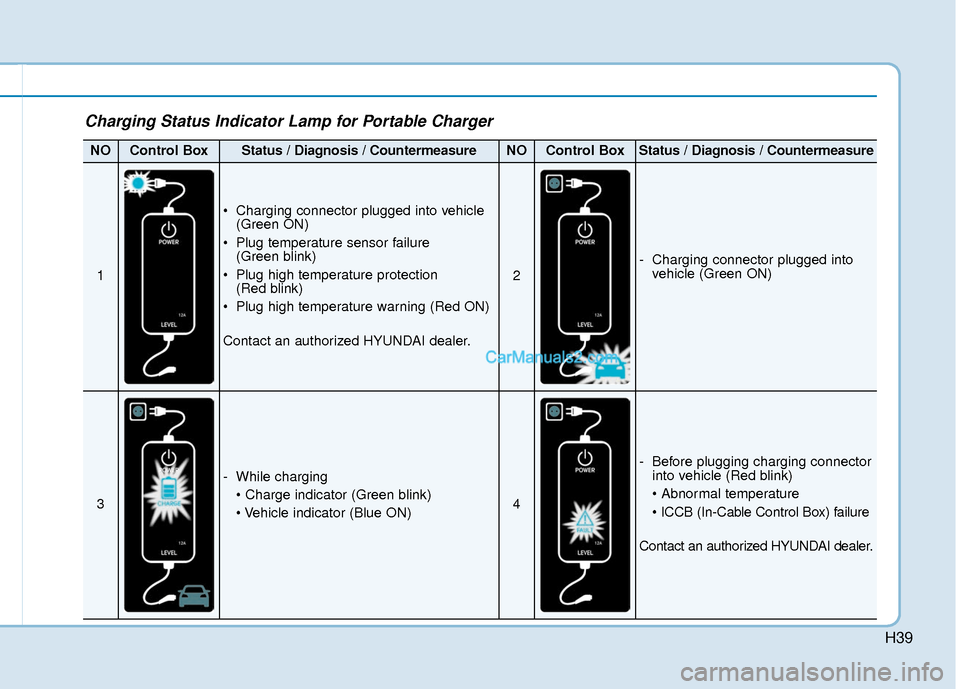
Charging Status Indicator Lamp for Portable Charger
NOControl BoxStatus / Diagnosis / CountermeasureNOControl BoxStatus / Diagnosis / Countermeasure
1
Charging connector plugged into vehicle(Green ON)
Plug temperature sensor failure (Green blink)
Plug high temperature protection (Red blink)
Plug high temperature warning (Red ON)
Contact an authorized HYUNDAI dealer.
2
- Charging connector plugged into vehicle (Green ON)
3
- While charging
4
- Before plugging charging connectorinto vehicle (Red blink)
Contact an authorized HYUNDAI dealer.
Page 505 of 540
H42
E
EV
V
C
C H
H A
AR
RG
G I
IN
N G
G
U
U S
SI
IN
N G
G
T
T H
H E
E
P
P O
O R
RT
TA
A B
BL
LE
E
C
C H
H A
AR
RG
G E
ER
R
(
( C
C O
O N
NT
T.
.)
)
Charging Connector Manual
Release
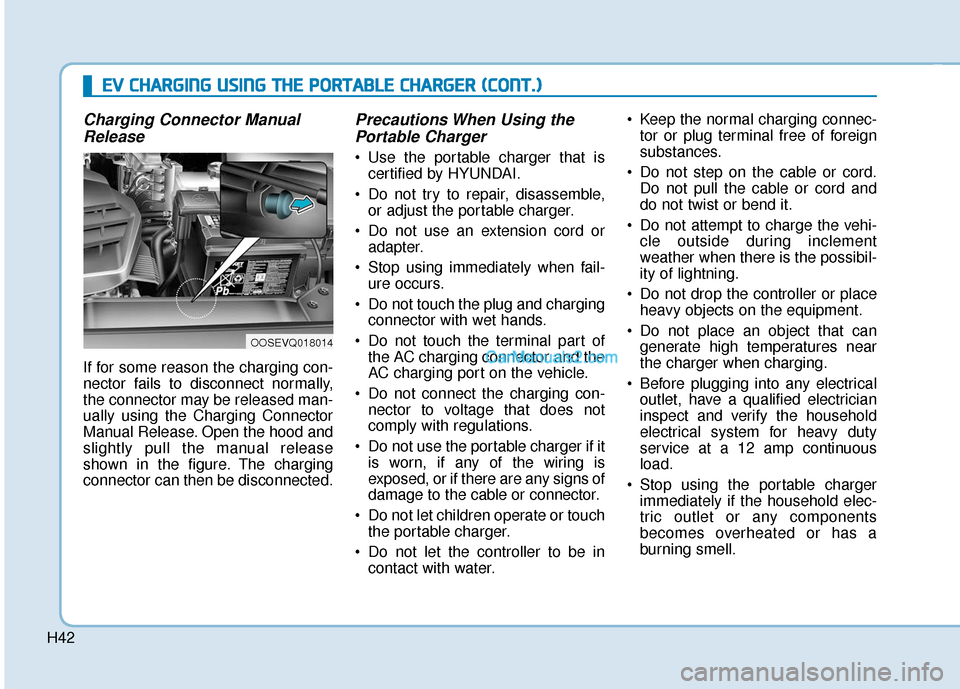
If for some reason the charging con-
nector fails to disconnect normally,
the connector may be released man-
ually using the Charging Connector
Manual Release. Open the hood and
slightly pull the manual release
shown in the figure. The charging
connector can then be disconnected.
Precautions When Using thePortable Charger
Use the portable charger that is
certified by HYUNDAI.
Do not try to repair, disassemble, or adjust the portable charger.
Do not use an extension cord or adapter.
Stop using immediately when fail- ure occurs.
Do not touch the plug and charging connector with wet hands.
Do not touch the terminal part of the AC charging connector and the
AC charging port on the vehicle.
Do not connect the charging con- nector to voltage that does not
comply with regulations.
Do not use the portable charger if it is worn, if any of the wiring is
exposed, or if there are any signs of
damage to the cable or connector.
Do not let children operate or touch the portable charger.
Do not let the controller to be in contact with water. Keep the normal charging connec-
tor or plug terminal free of foreign
substances.
Do not step on the cable or cord. Do not pull the cable or cord and
do not twist or bend it.
Do not attempt to charge the vehi- cle outside during inclement
weather when there is the possibil-
ity of lightning.
Do not drop the controller or place heavy objects on the equipment.
Do not place an object that can generate high temperatures near
the charger when charging.
Before plugging into any electrical outlet, have a qualified electrician
inspect and verify the household
electrical system for heavy duty
service at a 12 amp continuous
load.
Stop using the portable charger immediately if the household elec-
tric outlet or any components
becomes overheated or has a
burning smell.
OOSEVQ018014
Page 511 of 540
H48
D
DR
RI
IV
V I
IN
N G
G
A
A N
N D
D
O
O P
PE
ER
R A
A T
TI
IN
N G
G
I
IN
N F
FO
O R
RM
M A
AT
TI
IO
O N
N
(
( C
C O
O N
NT
T.
.)
)
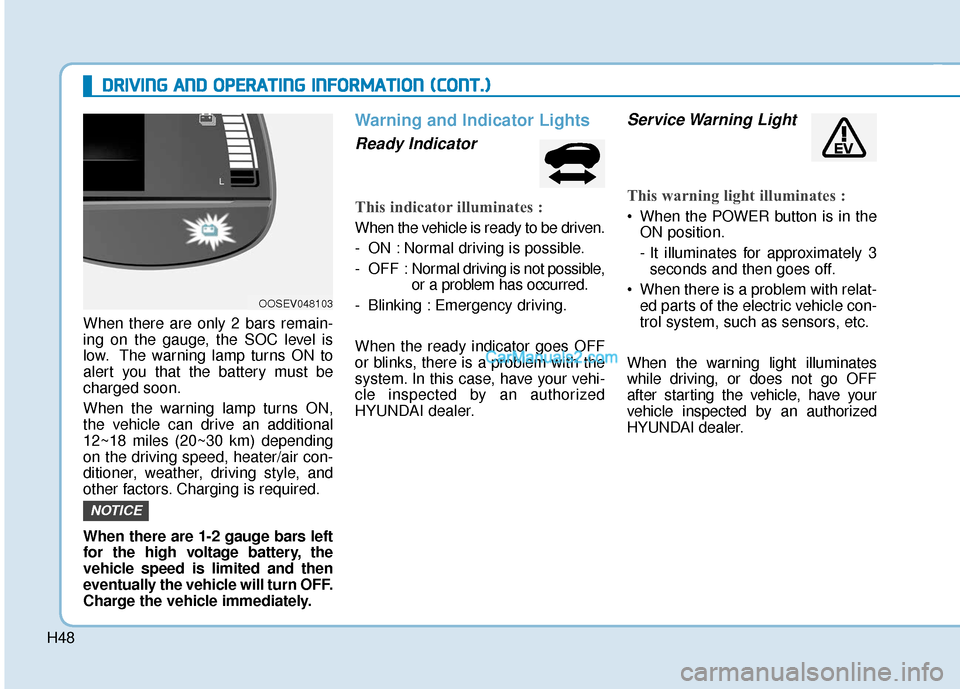
When there are only 2 bars remain-
ing on the gauge, the SOC level is
low. The warning lamp turns ON to
alert you that the battery must be
charged soon.
When the warning lamp turns ON,
the vehicle can drive an additional
12~18 miles (20~30 km) depending
on the driving speed, heater/air con-
ditioner, weather, driving style, and
other factors. Charging is required.
When there are 1-2 gauge bars left
for the high voltage battery, the
vehicle speed is limited and then
eventually the vehicle will turn OFF.
Charge the vehicle immediately.
Warning and Indicator Lights
Ready Indicator
This indicator illuminates :
When the vehicle is ready to be driven.
- ON : Normal driving is possible.
- OFF : Nor mal driving is not possible,
or a problem has occurred.
- Blinking : Emergency driving.
When the ready indicator goes OFF
or blinks, there is a problem with the
system. In this case, have your vehi-
cle inspected by an authorized
HYUNDAI dealer.
Service Warning Light
This warning light illuminates :
When the POWER button is in the ON position.
- It illuminates for approximately 3seconds and then goes off.
When there is a problem with relat- ed parts of the electric vehicle con-
trol system, such as sensors, etc.
When the warning light illuminates
while driving, or does not go OFF
after starting the vehicle, have your
vehicle inspected by an authorized
HYUNDAI dealer.
NOTICE
OOSEV048103