trip computer Hyundai Kona EV 2019 Owner's Manual
[x] Cancel search | Manufacturer: HYUNDAI, Model Year: 2019, Model line: Kona EV, Model: Hyundai Kona EV 2019Pages: 540, PDF Size: 21.84 MB
Page 85 of 540

Convenient features of your vehicle
Accessing Your Vehicle .........................................3-3
Smart Key ........................................................................\
..3-3
Immobilizer System ..........................................................3-8
Door Locks ............................................................3-10
Operating Door Locks from Outside the Vehicle ..3-10
Operating Door Locks from Inside the Vehicle ......3-11
Automatic Door Lock and Unlock Features .............3-13
Child-Protector Rear Door Locks ...............................3-14
Theft-Alarm System ............................................3-15
Steering Wheel .....................................................3-16
Electric Power Steering (EPS) .....................................3-16
Tilt Steering / Telescopic Steering .............................3-17
Horn ........................................................................\
............3-17
Heated Steering Wheel ..................................................3-18
Mirrors ...................................................................3-19
Inside Rearview Mirror ..................................................3-19
Side View Mirrors ...........................................................3-28
Windows ................................................................3-30
Power Windows ...............................................................3-31
Sunroof..................................................................3-34
Sunroof Opening and Closing ......................................3-35
Sliding the Sunroof .........................................................3-35
Tilting the Sunroof .........................................................3-36
Sunshade ........................................................................\
...3-37
Resetting the Sunroof ...................................................3-37
Sunroof Open Warning ..................................................3-38
Exterior Features .................................................3-39
Hood ........................................................................\
...........3-39
Liftgate ........................................................................\
......3-41
Charging Door ..................................................................3-43
Instrument Cluster ...............................................3-44
Instrument Cluster Control............................................3-45
Gauges and Meters ........................................................3-46
Warning and Indicator lights ........................................3-51
LCD Display Messages ..................................................3-63
LCD Display ...........................................................3-76
LCD Display Control ........................................................3-76
LCD Display Modes ......................................................\
..3-77
Trip Computer .......................................................3-90
Head Up Display (HUD) .......................................3-94
Lighting..................................................................3-97
Exterior Lights .................................................................3-97
Smart Cornering Lamp.................................................3-104
Welcome System ...........................................................3-104
Interior Lights ................................................................3-105
Wipers and Washers ........................................3-108
Front Windshield Wipers ...........................................3-108
Front Windshield Washers ........................................3-110
Rear Window Wiper and Washer..............................3-111
3
Page 128 of 540
3-44
Convenient features of your vehicle
I
IN
N S
ST
T R
R U
U M
M E
EN
N T
T
C
C L
LU
U S
ST
T E
ER
R
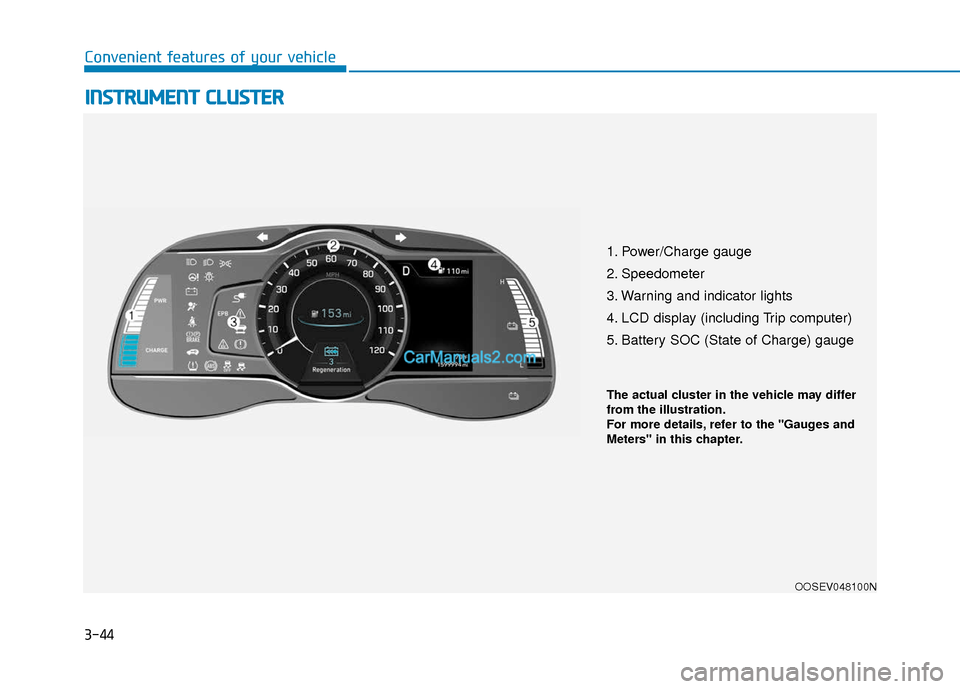
1. Power/Charge gauge
2. Speedometer
3. Warning and indicator lights
4. LCD display (including Trip computer)
5. Battery SOC (State of Charge) gauge
OOSEV048100N
The actual cluster in the vehicle may differ
from the illustration.
For more details, refer to the "Gauges and
Meters" in this chapter.
Page 161 of 540
3-77
Convenient features of your vehicle
3
The information provided may differ depending on which functions are applicable to your vehicle.
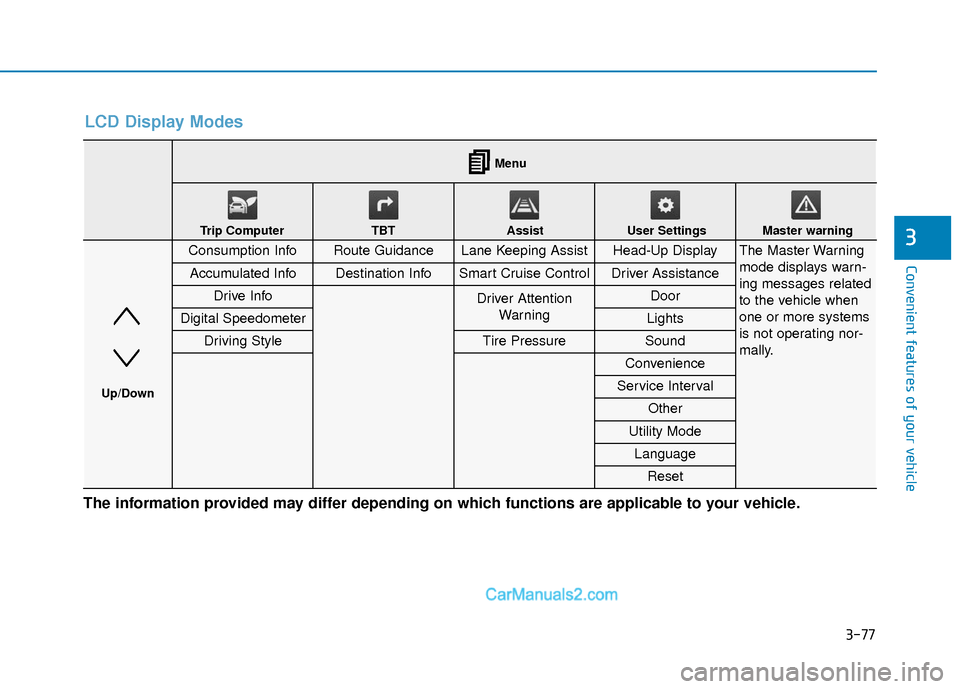
LCD Display Modes
Consumption InfoRoute GuidanceLane Keeping AssistHead-Up DisplayThe Master Warning
mode displays warn-
ing messages related
to the vehicle when
one or more systems
is not operating nor-
mally.
Accumulated InfoDestination InfoSmart Cruise ControlDriver Assistance
Drive InfoDriver AttentionWarning Door
Digital SpeedometerLights
Driving StyleTire PressureSound
Convenience
Service Interval
Other
Utility Mode
Language
Reset
Menu
Trip Computer TBT Assist User Settings Master warning
Up/Down
Page 162 of 540
3-78
Convenient features of your vehicle
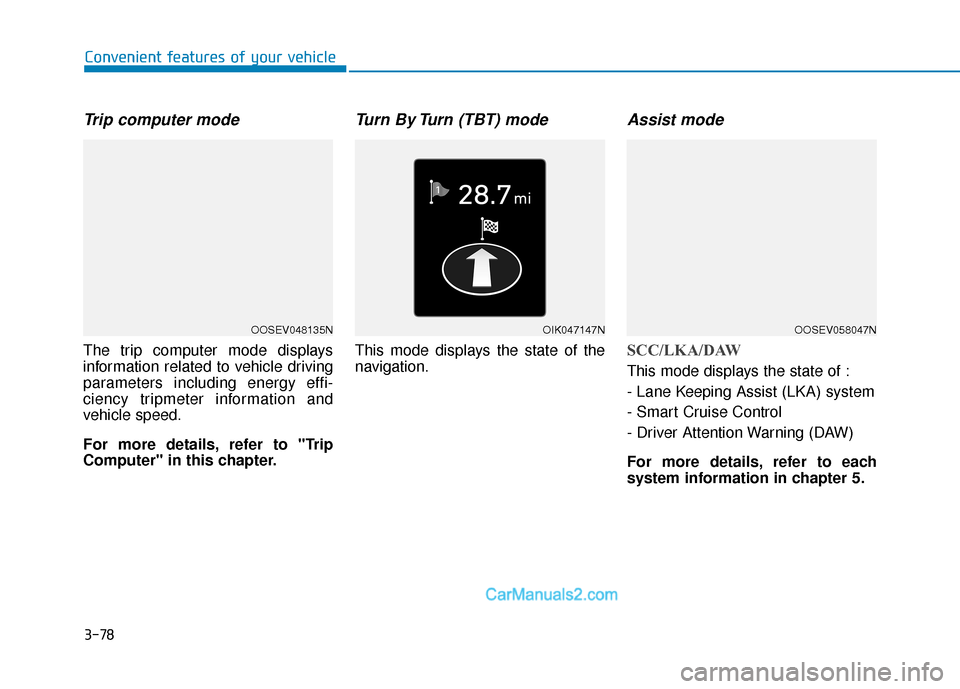
Trip computer mode
The trip computer mode displays
information related to vehicle driving
parameters including energy effi-
ciency tripmeter information and
vehicle speed.
For more details, refer to "Trip
Computer" in this chapter.
Turn By Turn (TBT) mode
This mode displays the state of the
navigation.
Assist mode
SCC/LKA/DAW
This mode displays the state of :
- Lane Keeping Assist (LKA) system
- Smart Cruise Control
- Driver Attention Warning (DAW)
For more details, refer to each
system information in chapter 5.
OOSEV048135NOIK047147NOOSEV058047N
Page 172 of 540
3-88
Convenient features of your vehicle
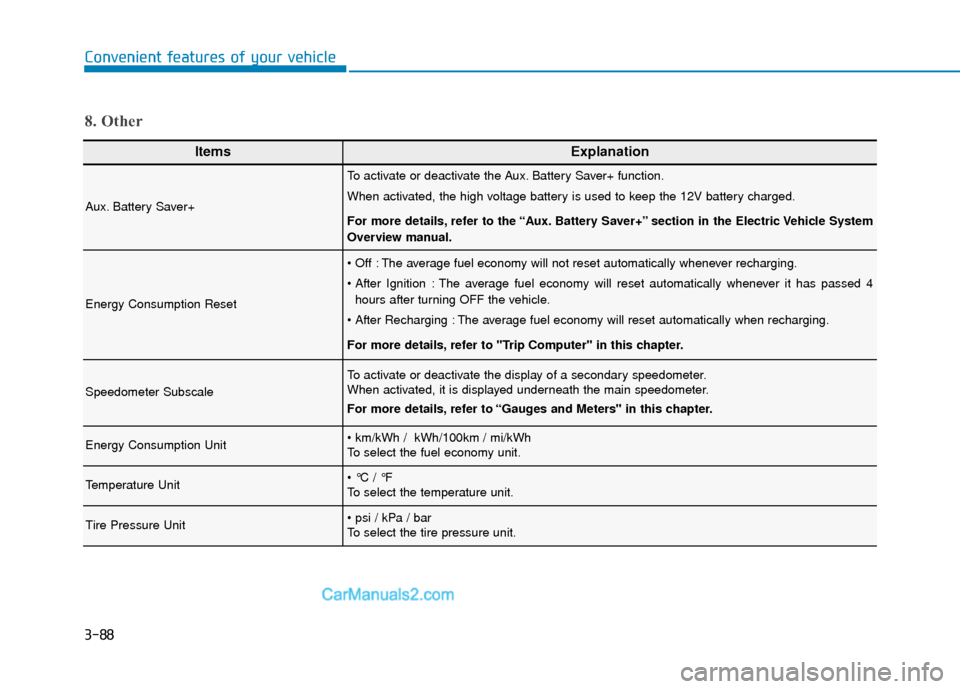
ItemsExplanation
Aux. Battery Saver+
To activate or deactivate the Aux. Battery Saver+ function.
When activated, the high voltage battery is used to keep the 12V battery charged.
For more details, refer to the “Aux. Battery Saver+” section in the Electric Vehicle System
Overview manual.
Energy Consumption Reset
The average fuel economy will not reset automatically whenever recharging.
The average fuel economy will reset automatically whenever it has passed 4hours after turning OFF the vehicle.
The average fuel economy will reset automatically when recharging.
For more details, refer to "Trip Computer" in this chapter.
Speedometer Subscale
To activate or deactivate the display of a secondary speedometer.
When activated, it is displayed underneath the main speedometer.
For more details, refer to “Gauges and Meters" in this chapter.
Energy Consumption Unit
To select the fuel economy unit.
Temperature Unit
To select the temperature unit.
Tire Pressure Unit
To select the tire pressure unit.
8. Other
Page 174 of 540
3-90
Convenient features of your vehicle
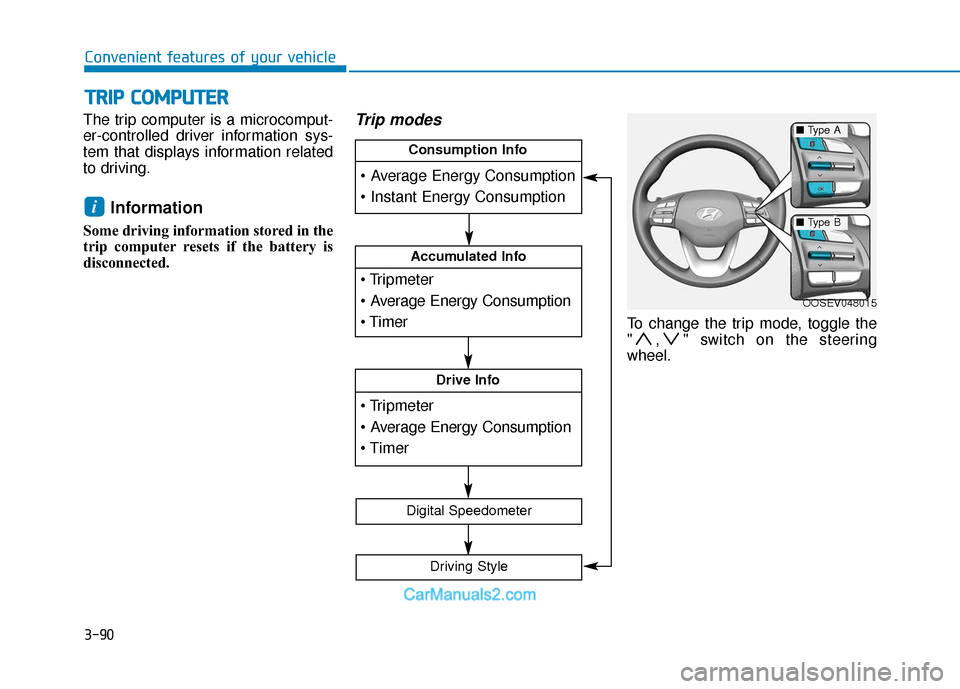
The trip computer is a microcomput-
er-controlled driver information sys-
tem that displays information related
to driving.
Information
Some driving information stored in the
trip computer resets if the battery is
disconnected.
Trip modes
To change the trip mode, toggle the
" , " switch on the steering
wheel.
i
T
T R
R I
IP
P
C
C O
O M
M P
PU
U T
TE
ER
R
OOSEV048015
Accumulated Info
Drive Info
Consumption Info
Digital Speedometer
Driving Style
■ Type A
■Type B
Page 405 of 540
7-25
7
Maintenance
By jump starting
After a jump start from a good bat-
tery, drive the vehicle for 20-30 min-
utes before it is shutoff. The vehicle
may not restart if you shut it off
before the battery had a chance to
adequately recharge. See "Jump
Starting" in chapter 6 for more infor-
mation on jump starting procedures.
Information
An inappropriately disposedbattery can be harmful to
the environment and human
health. Dispose of the bat-
tery according to your local
law(s) or regulation.
Reset Features
Some items need to be reset after
the battery has been discharged or
the battery has been disconnected.
Power Windows
Trip Computer
Climate Control System
Clock
Audio System
Sunroof
i
Watch the battery during
charging, and stop or reduce
the charging rate if the battery
cells begin boiling violently.
The negative battery cable
must be removed first and
installed last when the battery
is disconnected. Disconnect
the battery charger in the fol-
lowing order:
(1) Turn off the battery charg-
er main switch.
(2) Unhook the negative
clamp from the negative
battery terminal.
(3) Unhook the positive clamp from the positive battery
terminal.
Always use a genuine
HYUNDAI approved battery
when you replace the battery.
Page 532 of 540
I-6
If the vehicle overheats .....................................................6-6
If the vehicle stalls at a crossroad or crossing ..................6-2
If the vehicle stalls while driving .....................................6-2
If the vehicle will not start ................................................6-3
If you have a flat tire ......................................................6-14
If you have a flat tire while driving ..................................6-3
Immobilizer system...........................................................3-8
Important safety precautions.............................................2-2Air bag hazards ............................................................2-2
Always wear your seat belt ..........................................2-2
Control your speed .......................................................2-3
Driver distraction..........................................................2-2
Keep your vehicle in safe condition.............................2-3
Restrain all children .....................................................2-2
In case of emergency while driving..................................6-2
Indicator light..................................................................3-51
Inside rearview mirror ....................................................3-19
Instrument cluster ...........................................................3-44 Assist mode ................................................................3-78
Gauges and meters .....................................................3-46
Instrument panel illumination ....................................3-45
LCD display control ...................................................3-76
LCD display messages ...............................................3-63
LCD display modes ....................................................3-77
Master warning mode .................................................3-79
Regenerative braking level indicator .........................3-50 Shift indicator .............................................................3-50
Shift indicator pop-up ................................................3-50
Smart ECO pedal guide..............................................3-51
Trip computer mode ...................................................3-78
User settings mode .....................................................3-80
Warning and indicator lights ......................................3-51
Instrument panel fuse replacement .................................7-42
Instrument panel overview ...............................................1-5
Interior care .....................................................................7-7\
0
Interior features Bottle holder .............................................................3-137
Cargo area cover.......................................................3-145
Clock ........................................................................\
3-142
Coat hook .................................................................3-143
Cup holder ................................................................3-137
Floor mat anchor(s) ..................................................3-143
Luggage net (holder) ................................................3-144
Power outlet..............................................................3-139
Sunvisor ....................................................................3-13\
8
USB charger .............................................................3-140
Wireless cellular phone charging system .................3-140
Interior lamp AUTO cut................................................3-105
Interior lights.................................................................3-105 Front lamps...............................................................3-105
Interior lamp AUTO cut ...........................................3-105
Luggage compartment lamp .....................................3-106
Rear lamp .................................................................3-106
Vanity mirror lamp ...................................................3-107
Interior overview...............................................................1-4
Index
I
Page 533 of 540

I-7
Jump starting .....................................................................6-4\
LabelRefrigerant label ...........................................................8-8
Tire sidewall labeling .................................................7-31
Tire specification and pressure label ............................8-8
Vehicle certification label .............................................8-7
Lane change signals ......................................................3-102
Lane Keeping Assist (LKA) system ..............................5-75
Lap/shoulder belt ............................................................2-26
LCD display Assist mode ................................................................3-78
Assist mode ................................................................3-78
LCD display modes ....................................................3-77
Master warning mode .................................................3-79
Quick guide help ........................................................3-80
Trip computer mode ...................................................3-78
Turn By Turn (TBT) mode.........................................3-78
User settings mode .....................................................3-80
LCD display control Assist mode ................................................................3-78
LCD display modes ....................................................3-77
User settings mode .....................................................3-80 LCD display messages
Driving info display ...................................................3-63
Aux. Battery Saver+ used while parked ....................3-71
Battery discharging due to external electrical devices .3-64
Charge immediately. Power limited ...........................3-72
Charging door open ....................................................3-70
Charging stopped. Check the AC/DC charger ...........3-70
Charging stopped. Check the cable connection .........3-71
Check Blind-Spot Collision Warning (BCW) system.3-67
Check brake light ......................................................3-67
Check BRAKE SWITCH fuse ...................................3-64
Check cornering lamp ................................................3-67
Check Driver Attention Warning (DAW) system ......3-68
Check electric vehicle system ....................................3-75
Check Forward Collision Avoidance Assist system...3-67
Check headlight ..........................................................3-66
Check headlight LED .................................................3-67
Check High Beam Assist (HBA) system ...................3-67
Check Lane Keep Assist (LKA) system ....................3-68
Check regenerative brakes / Stop vehicle and check regenerative brakes ............3-72
Check Smart Cruise Control System ........................3-68
Check turn signal........................................................3-67
Check virtual engine sound ........................................3-75
Door, Hood, Liftgate open indicator .........................3-65
EV battery Overheated! Stop vehicle.........................3-73
Heated steering wheel turned off ...............................3-66
Key not detected .........................................................3-64
I
Index
J
L
Page 538 of 540
I-12
Theft-alarm system .........................................................3-15
Tilt steering / Telescopic steering ...................................3-17
Tire chains .....................................................................5-1\
16
Tire Mobility Kit (TMK) ................................................6-14
Tire Pressure Monitoring System (TPMS) .......................6-8
Tire rotation ....................................................................7-29\
Tire specification and pressure label ................................8-8
Tires and wheels .............................................................7-26Checking tire inflation pressure .................................7-28
Recommended cold tire inflation pressures ...............7-27
Tire care ......................................................................7-\
26
Tire maintenance ........................................................7-31
Tire replacement .........................................................7-30
Tire rotation ................................................................7-29
Tire sidewall labeling .................................................7-31
Tire terminology and definitions ................................7-35
Tire traction ................................................................7-31
Wheel alignment and tire balance ..............................7-30
Wheel replacement .....................................................7-31
Toque gauge ....................................................................3-47\
Towing ........................................................................\
....6-21 Emergency towing......................................................6-23
Flat towing ................................................................6-22
Removable towing hook ............................................6-22 Trip computer..................................................................3-90
Accumulated Info display ..........................................3-92
Average energy consumption .....................................3-91
Consumption info display ..........................................3-91
Digital speedometer....................................................3-93
Drive Info display ......................................................3-92
Driving style ...............................................................3-93
Energy flow ................................................................3-93
Instant energy consumption .......................................3-91
Turn signals...................................................................3-102\
USB charger ..................................................................3-140
User settings mode..........................................................3-80
Vanity mirror lamp........................................................3-107
Vehicle certification label .................................................8-7
Vehicle data collection and event data recorders .............F-8
Vehicle identification number (VIN) ................................8-7
Vehicle load limit ..........................................................5-119 Tire loading informations ........................................5-119
Vehicle modification .........................................................F-7
Vehicle Stability Management (VSM)............................5-45
Index
U
V
T