change time HYUNDAI KONA EV 2021 Owners Manual
[x] Cancel search | Manufacturer: HYUNDAI, Model Year: 2021, Model line: KONA EV, Model: HYUNDAI KONA EV 2021Pages: 478, PDF Size: 32.83 MB
Page 1 of 478
O OW
WN
NE
ER
R'
'S
S
M
MA
AN
NU
UA
AL
L
O
Op
pe
er
ra
at
ti
io
on
n
M Ma
ai
in
nt
te
en
na
an
nc
ce
e
S Sp
pe
ec
ci
if
fi
ic
ca
at
ti
io
on
ns
s
All information in this Owner's Manual is current at the time of pub-
lication. However, HYUNDAI reserves the right to make changes at
any time so that our policy of continual product improvement may be
carried out.
This manual applies to all HYUNDAI models and includes descrip-
tions and explanations of optional as well as standard equipment.
As a result, you may find material in this manual that does not apply
to your specific vehicle.
Page 24 of 478
2-9
Safety system of your vehicle
2
Seat belts must be snug against your
hips and chest to work properly.
When the seatback is reclined, the
shoulder belt cannot do its job
because it will not be snug against
your chest. Instead, it will be in front
of you. During an accident, you could
be thrown into the seat belt, causing
neck or other injuries.
The more the seatback is reclined,
the greater chance the passenger's
hips will slide under the lap belt or
the passenger's neck will strike the
shoulder belt.
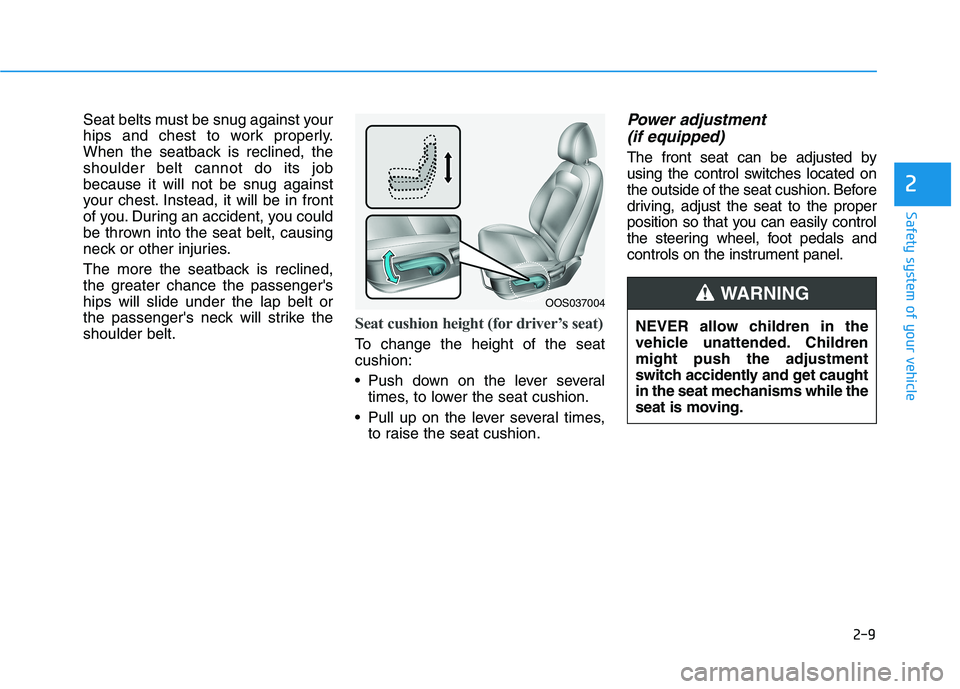
Seat cushion height (for driver’s seat)
To change the height of the seat
cushion:
Push down on the lever several
times, to lower the seat cushion.
Pull up on the lever several times,
to raise the seat cushion.
Power adjustment
(if equipped)
The front seat can be adjusted by
using the control switches located on
the outside of the seat cushion. Before
driving, adjust the seat to the proper
position so that you can easily control
the steering wheel, foot pedals and
controls on the instrument panel.
NEVER allow children in the
vehicle unattended. Children
might push the adjustment
switch accidently and get caught
in the seat mechanisms while the
seat is moving.
WARNING OOS037004
Page 35 of 478
2-20
Safety system of your vehicle
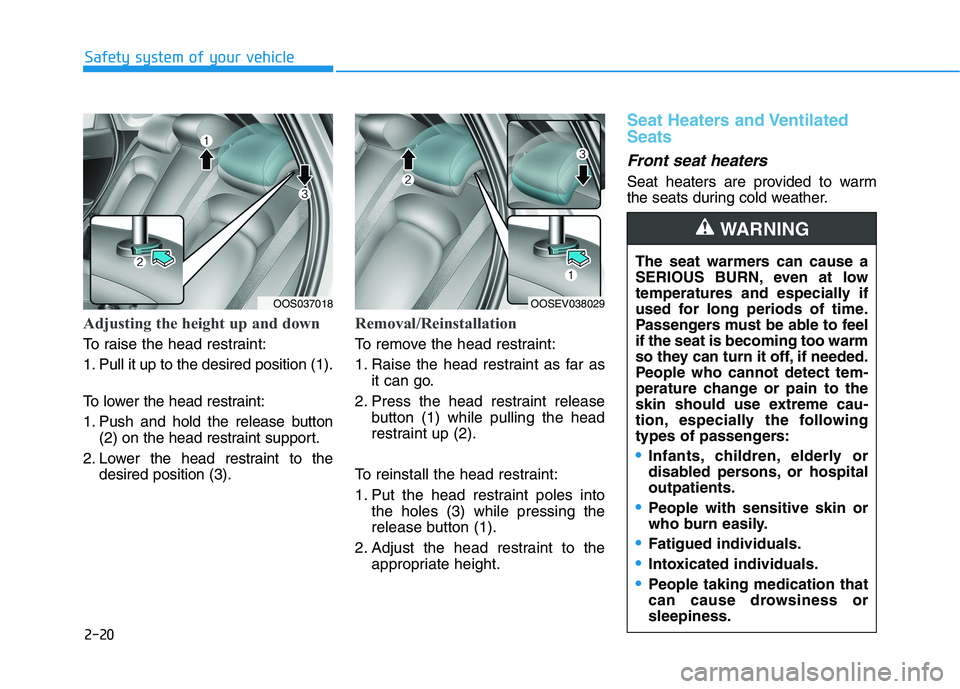
Adjusting the height up and down
To raise the head restraint:
1. Pull it up to the desired position (1).
To lower the head restraint:
1. Push and hold the release button
(2) on the head restraint support.
2. Lower the head restraint to the
desired position (3).
Removal/Reinstallation
To remove the head restraint:
1. Raise the head restraint as far as
it can go.
2. Press the head restraint release
button (1) while pulling the head
restraint up (2).
To reinstall the head restraint:
1. Put the head restraint poles into
the holes (3) while pressing the
release button (1).
2. Adjust the head restraint to the
appropriate height.
Seat Heaters and Ventilated
Seats
Front seat heaters
Seat heaters are provided to warm
the seats during cold weather.
OOSEV038029
The seat warmers can cause a
SERIOUS BURN, even at low
temperatures and especially if
used for long periods of time.
Passengers must be able to feel
if the seat is becoming too warm
so they can turn it off, if needed.
People who cannot detect tem-
perature change or pain to the
skin should use extreme cau-
tion, especially the following
types of passengers:
Infants, children, elderly or
disabled persons, or hospital
outpatients.
People with sensitive skin or
who burn easily.
Fatigued individuals.
Intoxicated individuals.
People taking medication that
can cause drowsiness or
sleepiness.
WARNING
OOS037018
Page 36 of 478
2-21
Safety system of your vehicle
2
To prevent damage to the seat
heaters and seats:
Never use a solvent such as
paint thinner, benzene, alcohol
or gasoline to clean the seats.
Do not place heavy or sharp
objects on seats equipped with
seat heaters.
Do not change the seat cover. It
may damage the seat heater.[A] : Type A, [B] : Type B
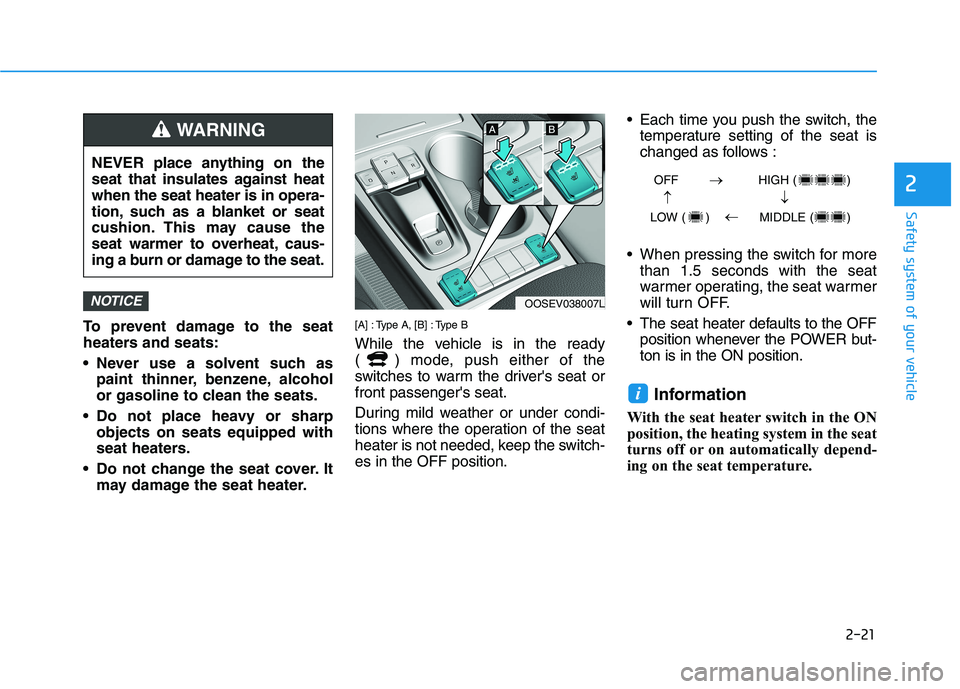
While the vehicle is in the ready
( ) mode, push either of the
switches to warm the driver's seat or
front passenger's seat.
During mild weather or under condi-
tions where the operation of the seat
heater is not needed, keep the switch-
es in the OFF position. Each time you push the switch, the
temperature setting of the seat is
changed as follows :
When pressing the switch for more
than 1.5 seconds with the seat
warmer operating, the seat warmer
will turn OFF.
The seat heater defaults to the OFF
position whenever the POWER but-
ton is in the ON position.
Information
With the seat heater switch in the ON
position, the heating system in the seat
turns off or on automatically depend-
ing on the seat temperature.
i
NOTICE
NEVER place anything on the
seat that insulates against heat
when the seat heater is in opera-
tion, such as a blanket or seat
cushion. This may cause the
seat warmer to overheat, caus-
ing a burn or damage to the seat.
WARNING
OOSEV038007L
OFF HIGH ( )
LOW ( ) MIDDLE ( )
→→
→
→
Page 37 of 478
2-22
Safety system of your vehicle
Ventilated front seats
(if equipped)
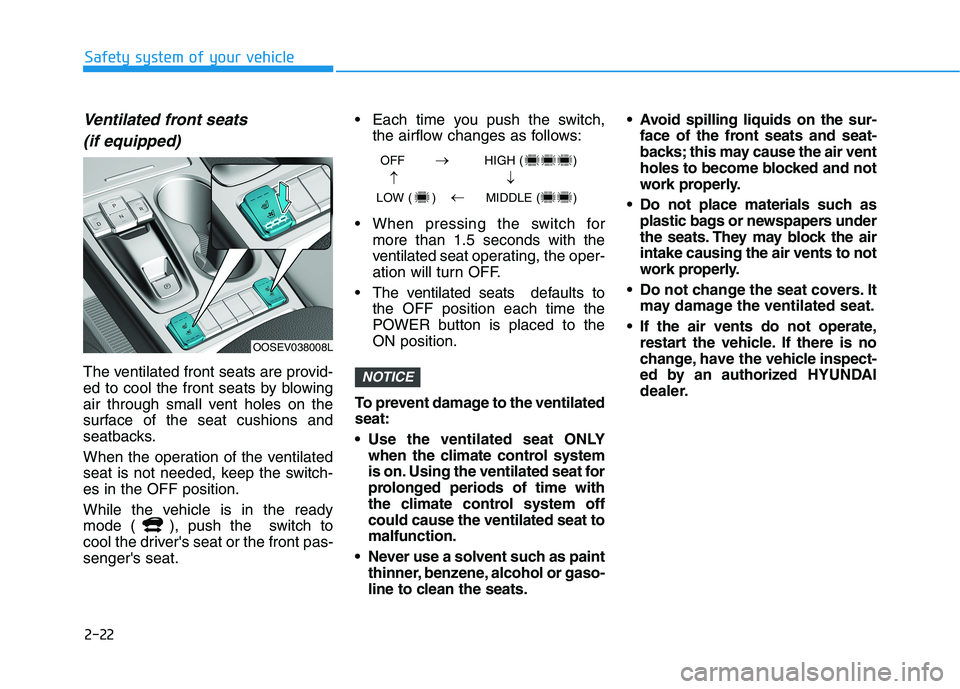
The ventilated front seats are provid-
ed to cool the front seats by blowing
air through small vent holes on the
surface of the seat cushions and
seatbacks.
When the operation of the ventilated
seat is not needed, keep the switch-
es in the OFF position.
While the vehicle is in the ready
mode ( ), push the switch to
cool the driver's seat or the front pas-
senger's seat. Each time you push the switch,
the airflow changes as follows:
When pressing the switch for
more than 1.5 seconds with the
ventilated seat operating, the oper-
ation will turn OFF.
The ventilated seats defaults to
the OFF position each time the
POWER button is placed to the
ON position.
To prevent damage to the ventilated
seat:
Use the ventilated seat ONLY
when the climate control system
is on. Using the ventilated seat for
prolonged periods of time with
the climate control system off
could cause the ventilated seat to
malfunction.
Never use a solvent such as paint
thinner, benzene, alcohol or gaso-
line to clean the seats. Avoid spilling liquids on the sur-
face of the front seats and seat-
backs; this may cause the air vent
holes to become blocked and not
work properly.
Do not place materials such as
plastic bags or newspapers under
the seats. They may block the air
intake causing the air vents to not
work properly.
Do not change the seat covers. It
may damage the ventilated seat.
If the air vents do not operate,
restart the vehicle. If there is no
change, have the vehicle inspect-
ed by an authorized HYUNDAI
dealer.NOTICE
OOSEV038008L
OFF HIGH ( )
LOW ( ) MIDDLE ( )
→→
→
→
Page 94 of 478
![HYUNDAI KONA EV 2021 Owners Manual 3-10
Convenient features of your vehicle
Operating Door Locks from
Outside the Vehicle
Mechanical key
[A] : Lock, [B] : Unlock
If you lock the drivers door with a
mechanical key, the driver’s door](/img/35/56172/w960_56172-93.png "HYUNDAI KONA EV 2021 Owners Manual 3-10
Convenient features of your vehicle
Operating Door Locks from
Outside the Vehicle
Mechanical key
[A] : Lock, [B] : Unlock
If you lock the drivers door with a
mechanical key, the driver’s door")
3-10
Convenient features of your vehicle
Operating Door Locks from
Outside the Vehicle
Mechanical key
[A] : Lock, [B] : Unlock
If you lock the driver's door with a
mechanical key, the driver’s door will
lock. If you unlock the driver's door
with a mechanical key, you can open
and close the driver’s door only.
Once the doors are unlocked, they
may be opened by pulling the door
handle. When closing the door, push
the door by hand. Make sure that
doors are closed securely.
Smart key
Press the button on the driver's out-
side door handle while carrying the
Smart Key with you or press the
Door Unlock button on the Smart
Key, the driver's door will unlock.If you press the button on the front
passenger's outside door, all doors
will unlock.
Once the doors are unlocked, they
may be opened by pulling the door
handle.
When closing the door, push the
door by hand. Make sure that doors
are closed securely.
Information
• In cold and wet climates, door lock
and door mechanisms may not
work properly due to freezing con-
ditions.
• If the door is locked/unlocked mul-
tiple times in rapid succession with
either the vehicle key or door lock
switch, the system may stop operat-
ing temporarily in order to protect
the circuit and prevent damage to
system components.
• Two press unlock setting can be
changed in the User Settings mode
on the cluster.
i
D DO
OO
OR
R
L
LO
OC
CK
KS
S
OOSEV048001
OOS047001
OPD046004
Door
UnlockDoor
Lock
Page 145 of 478
3-61
Convenient features of your vehicle
3
Icy Road Warning Light
(if equipped)
This warning light is to warn the driver
the road may be icy.
When the reading on the outside
temperature gauge is below 40°F
(4°C), the Icy Road Warning Light
and Outside Temperature Gauge
blinks and then illuminates. Also, the
warning chime sounds 1 time.
You can activate or deactivate Icy
Road Warning function from the User
Settings mode in the cluster LCD dis-
play.
Information
If the icy road warning light comes ON
while driving, it is an indication that
roads may be icy. In this situation, pay
close attention to your driving and
reduce your vehicle speed as a precau-
tion. Avoid sudden changes in accelera-
tion or braking or sudden changes in
steering in order to maintain control of
your vehicle while driving in adverse
weather conditions.
Master Warning Light
This indicator light illuminates:
When there is a malfunction in oper-
ation in any of the following systems:
- Forward Collision-Avoidance Assist
system malfunction (if equipped)
- Forward Collision-Avoidance Assist
radar blocked (if equipped)
- Blind-Spot Collision Warning sys-
tem malfunction (if equipped)
- Blind-Spot Collision Warning radar
blocked (if equipped)
- Lamp malfunction
- LED headlamp malfunction (if
equipped)
- High Beam Assist malfunction (if
equipped)
- Smart Cruise Control system mal-
function (if equipped)
- Smart Cruise Control system radar
blocked (if equipped)
- Tire Pressure Monitoring System
(TPMS) malfunction
To identify the details of the warning,
look at the LCD display.
Electronic Stability
Control (ESC) Indicator
Light
This indicator light illuminates:
When the POWER button is in the
ON position.
- It illuminates for approximately 3
seconds and then goes off.
When there is a malfunction with
the ESC system.
If this occurs, have your vehicle
inspected by an authorized
HYUNDAI dealer.
This indicator light blinks:
While the ESC is operating.
For more details, refer to
"Electronic Stability Control (ESC)"
in chapter 5.i
Page 149 of 478
3-65
Convenient features of your vehicle
3
LCD Display Messages
Driving info display
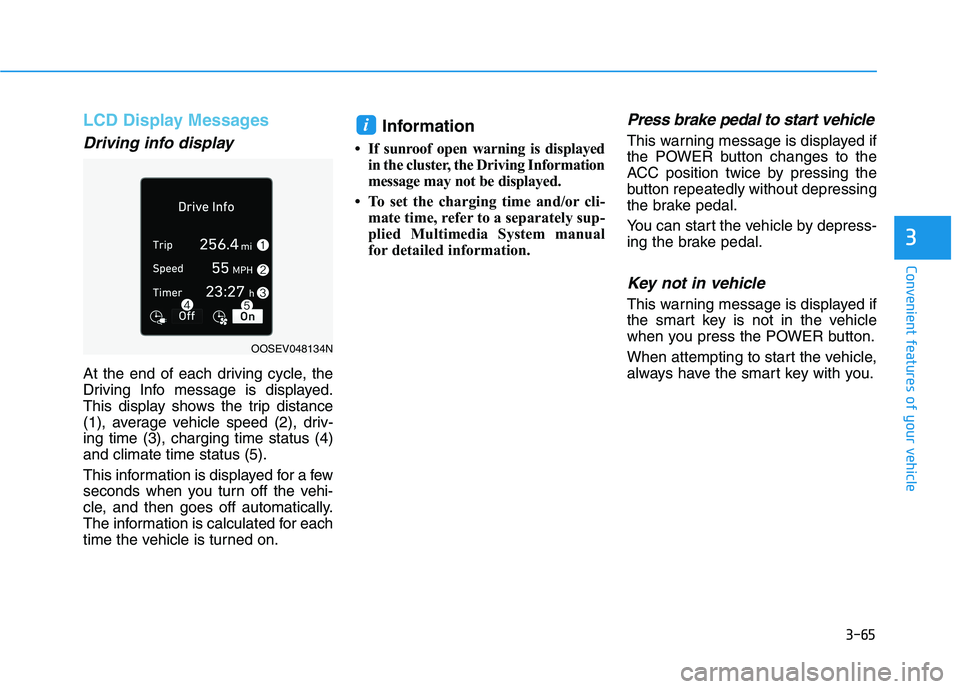
At the end of each driving cycle, the
Driving Info message is displayed.
This display shows the trip distance
(1), average vehicle speed (2), driv-
ing time (3), charging time status (4)
and climate time status (5).
This information is displayed for a few
seconds when you turn off the vehi-
cle, and then goes off automatically.
The information is calculated for each
time the vehicle is turned on.
Information
• If sunroof open warning is displayed
in the cluster, the Driving Information
message may not be displayed.
• To set the charging time and/or cli-
mate time, refer to a separately sup-
plied Multimedia System manual
for detailed information.
Press brake pedal to start vehicle
This warning message is displayed if
the POWER button changes to the
ACC position twice by pressing the
button repeatedly without depressing
the brake pedal.
You can start the vehicle by depress-
ing the brake pedal.
Key not in vehicle
This warning message is displayed if
the smart key is not in the vehicle
when you press the POWER button.
When attempting to start the vehicle,
always have the smart key with you.
i
OOSEV048134N
Page 150 of 478
3-66
Convenient features of your vehicle
Key not detected
This warning message is displayed if
the smart key is not detected when
you press the POWER button.
Press POWER button again
This message is displayed if you
were unable to start the vehicle when
the POWER button was pressed.
If this occurs, attempt to start the
vehicle by pressing the POWER but-
ton again.
If the warning message appears
each time you press the POWER
button, have your vehicle inspected
by an authorized HYUNDAI dealer.
Press POWER button with key
This warning message is displayed if
you press the POWER button while
the warning message "Key not
detected" is displayed.
Check BRAKE SWITCH fuse
This warning message is displayed if
the brake switch fuse is disconnected.
You need to replace the fuse with a
new one before starting the vehicle.
If that is not possible, you can start the
vehicle by pressing the POWER but-
ton for 10 seconds in the ACC posi-
tion.
Shift to P to start vehicle
This warning message is displayed if
you try to start the vehicle without
shifting to the P (Park) position.
Shift to P
This warning message is displayed if
you try to turn off the vehicle with the
gear in the N (Neutral) position.
At this time, the POWER button
changes to the ACC position (If you
press the POWER button once more,
it will turn to the ON position).
Low Key Battery
This warning message is displayed if
the battery of the smart key is dis-
charged while changing the POWER
button to the OFF position.
Battery discharging due to
external electrical devices
This message is displayed if the bat-
tery voltage is weak due to any non-
factory electrical accessories (ex.
dashboard camera) while parking.
Be careful that the battery is not dis-
charged.
If the warning message appears after
removing the non-factory electrical
accessories, have the vehicle inspect-
ed by an authorized HYUNDAI dealer.
Page 188 of 478
3-104
Convenient features of your vehicle
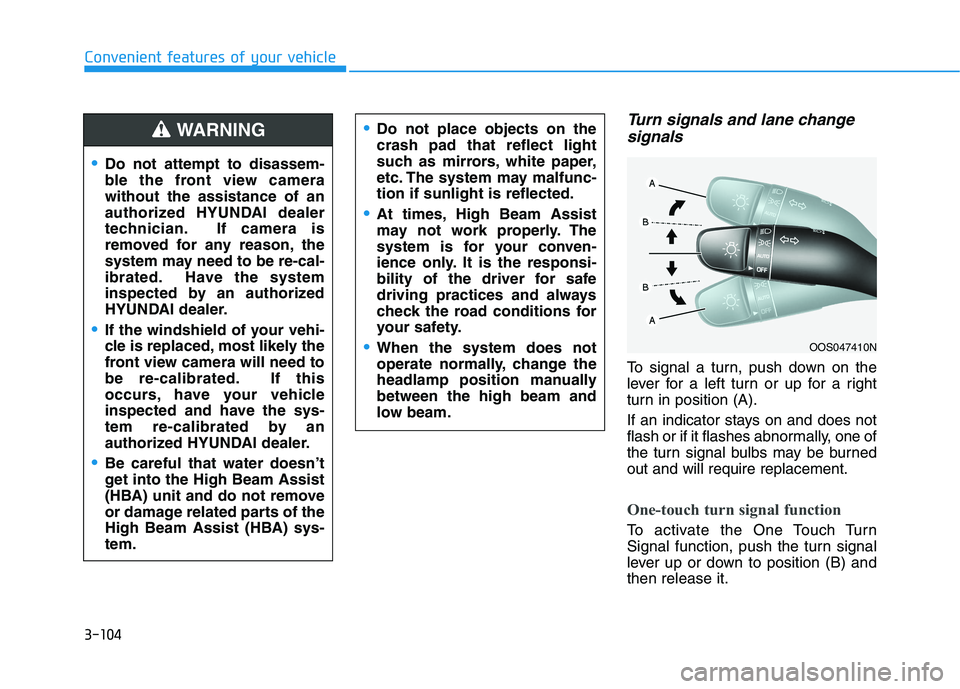
Turn signals and lane change
signals
To signal a turn, push down on the
lever for a left turn or up for a right
turn in position (A).
If an indicator stays on and does not
flash or if it flashes abnormally, one of
the turn signal bulbs may be burned
out and will require replacement.
One-touch turn signal function
To activate the One Touch Turn
Signal function, push the turn signal
lever up or down to position (B) and
then release it.
OOS047410N
Do not attempt to disassem-
ble the front view camera
without the assistance of an
authorized HYUNDAI dealer
technician. If camera is
removed for any reason, the
system may need to be re-cal-
ibrated. Have the system
inspected by an authorized
HYUNDAI dealer.
If the windshield of your vehi-
cle is replaced, most likely the
front view camera will need to
be re-calibrated. If this
occurs, have your vehicle
inspected and have the sys-
tem re-calibrated by an
authorized HYUNDAI dealer.
Be careful that water doesn’t
get into the High Beam Assist
(HBA) unit and do not remove
or damage related parts of the
High Beam Assist (HBA) sys-
tem.
Do not place objects on the
crash pad that reflect light
such as mirrors, white paper,
etc. The system may malfunc-
tion if sunlight is reflected.
At times, High Beam Assist
may not work properly. The
system is for your conven-
ience only. It is the responsi-
bility of the driver for safe
driving practices and always
check the road conditions for
your safety.
When the system does not
operate normally, change the
headlamp position manually
between the high beam and
low beam.
WARNING