ECU HYUNDAI KONA EV 2022 User Guide
[x] Cancel search | Manufacturer: HYUNDAI, Model Year: 2022, Model line: KONA EV, Model: HYUNDAI KONA EV 2022Pages: 548, PDF Size: 49.14 MB
Page 117 of 548
Safety system
3-38
OOS037032N
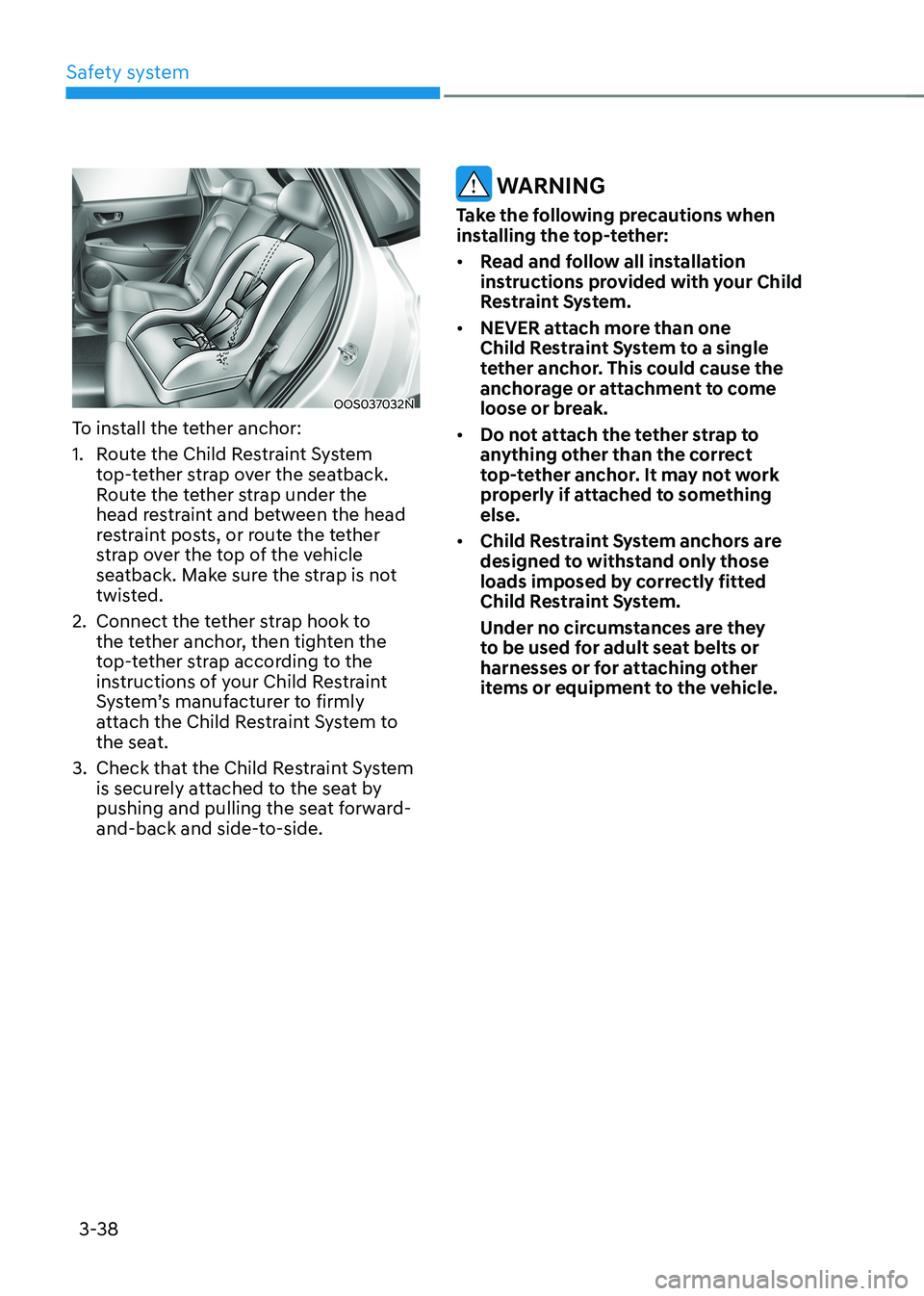
To install the tether anchor:
1. Route the Child Restraint System top-tether strap over the seatback.
Route the tether strap under the
head restraint and between the head
restraint posts, or route the tether
strap over the top of the vehicle
seatback. Make sure the strap is not
twisted.
2. Connect the tether strap hook to the tether anchor, then tighten the
top-tether strap according to the
instructions of your Child Restraint
System’s manufacturer to firmly
attach the Child Restraint System to
the seat.
3. Check that the Child Restraint System is securely attached to the seat by
pushing and pulling the seat forward-
and-back and side-to-side.
WARNING
Take the following precautions when
installing the top-tether: • Read and follow all installation
instructions provided with your Child
Restraint System.
• NEVER attach more than one
Child Restraint System to a single
tether anchor. This could cause the
anchorage or attachment to come
loose or break.
• Do not attach the tether strap to
anything other than the correct
top-tether anchor. It may not work
properly if attached to something else.
• Child Restraint System anchors are
designed to withstand only those
loads imposed by correctly fitted
Child Restraint System.
Under no circumstances are they
to be used for adult seat belts or
harnesses or for attaching other
items or equipment to the vehicle.
Page 118 of 548
03
3-39
Securing a Child Restraint System with a lap/shoulder belt
WARNING
ALWAYS place a rearward-facing Child
Restraint System in the rear seat of the
vehicle.
Placing a rearward-facing child restraint
in the front seat can result in serious
injury or death if the Child Restraint
System is struck by an inflating air bag.
When not using the LATCH system, all
Child Restraint Systems must be secured
to a rear seat with the lap part of a lap/shoulder belt.
OHI038145
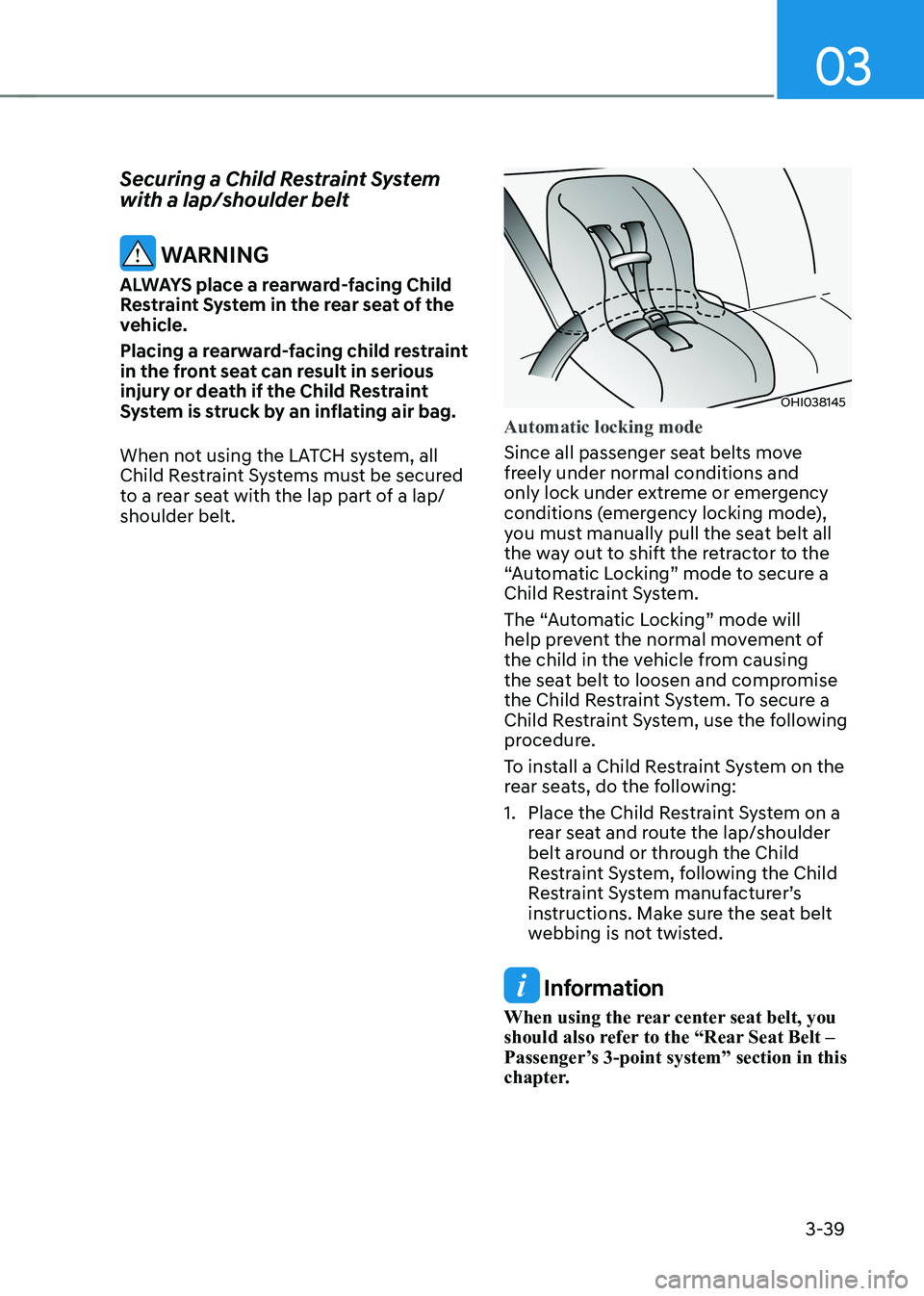
Automatic locking mode
Since all passenger seat belts move
freely under normal conditions and
only lock under extreme or emergency
conditions (emergency locking mode),
you must manually pull the seat belt all
the way out to shift the retractor to the
“Automatic Locking” mode to secure a
Child Restraint System.
The “Automatic Locking” mode will
help prevent the normal movement of
the child in the vehicle from causing
the seat belt to loosen and compromise
the Child Restraint System. To secure a
Child Restraint System, use the following
procedure.
To install a Child Restraint System on the
rear seats, do the following:
1. Place the Child Restraint System on a rear seat and route the lap/shoulder
belt around or through the Child
Restraint System, following the Child
Restraint System manufacturer’s
instructions. Make sure the seat belt
webbing is not twisted.
Information
When using the rear center seat belt, you
should also refer to the “Rear Seat Belt –
Passenger’s 3-point system” section in this
chapter.
Page 126 of 548
03
3-47
WARNING
To reduce the risk of serious injury or
death from an inflating curtain air bag,
take the following precautions: • All seat occupants must wear
seat belts at all times to help keep
occupants positioned properly.
• Properly secure Child Restraint
System as far away from the door as possible.
• Do not place any objects over the air
bag. Also, do not attach any objects
around the area where air bag
inflates such as the door, side door
glass, front and rear pillar, roof side
rail.
• Do not hang other objects except
clothes, especially hard or breakable objects.
In an accident, these may cause
vehicle damage or personal injury.
• Do not allow passengers to lean their
heads or bodies onto doors, put their
arms on the doors, stretch their arms
out of the window, or place objects
between the doors and seats.
• Do not open or repair the side curtain air bags.How does the air bags system
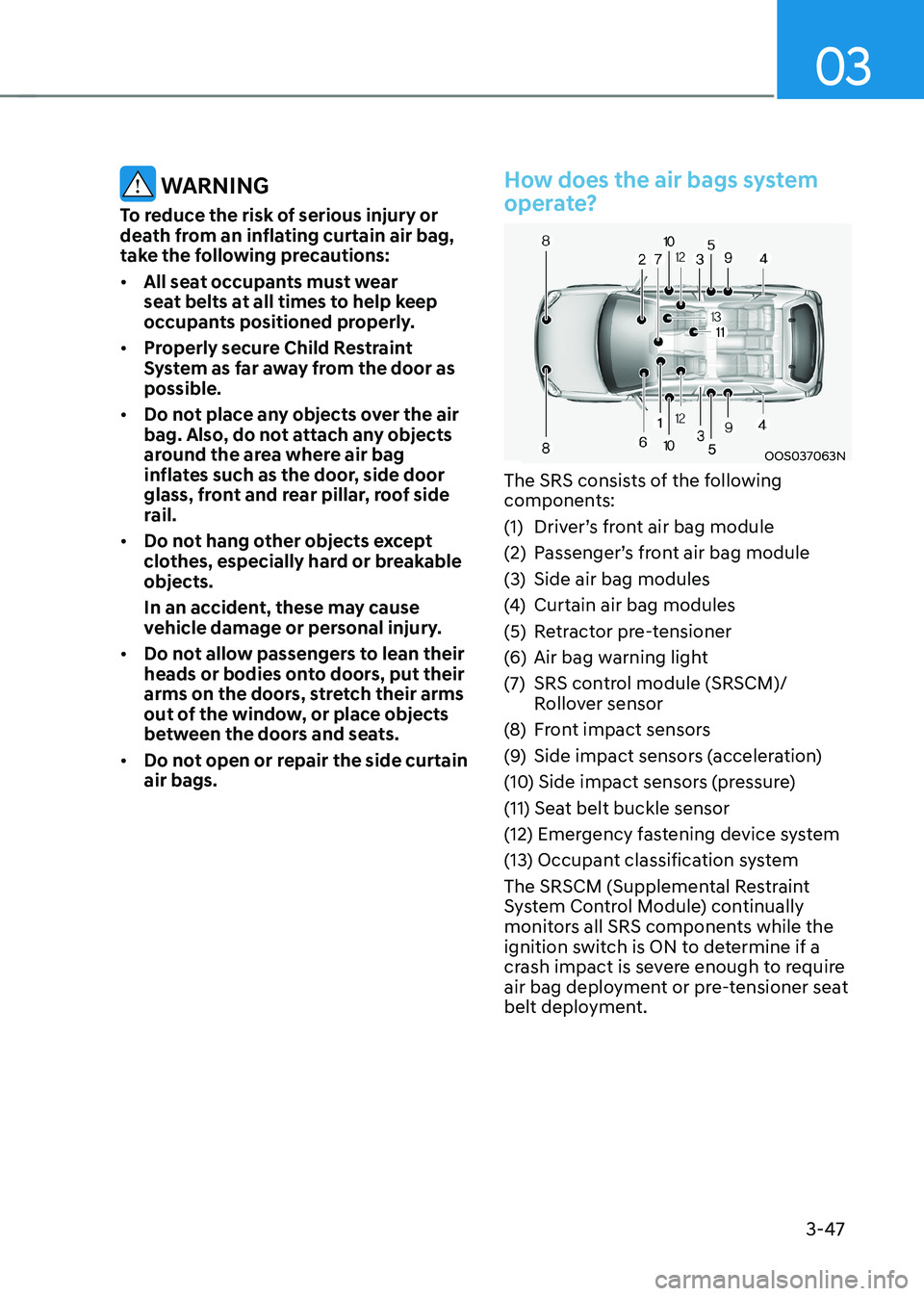
operate?
OOS037063N
The SRS consists of the following
components:
(1) Driver’s front air bag module
(2) Passenger’s front air bag module
(3) Side air bag modules
(4) Curtain air bag modules
(5) Retractor pre-tensioner
(6) Air bag warning light
(7) SRS control module (SRSCM)/ Rollover sensor
(8) Front impact sensors
(9) Side impact sensors (acceleration)
(10) Side impact sensors (pressure)
(11) Seat belt buckle sensor
(12) Emergency fastening device system
(13) Occupant classification system
The SRSCM (Supplemental Restraint
System Control Module) continually
monitors all SRS components while the
ignition switch is ON to determine if a
crash impact is severe enough to require
air bag deployment or pre-tensioner seat
belt deployment.
Page 162 of 548
04
4-19
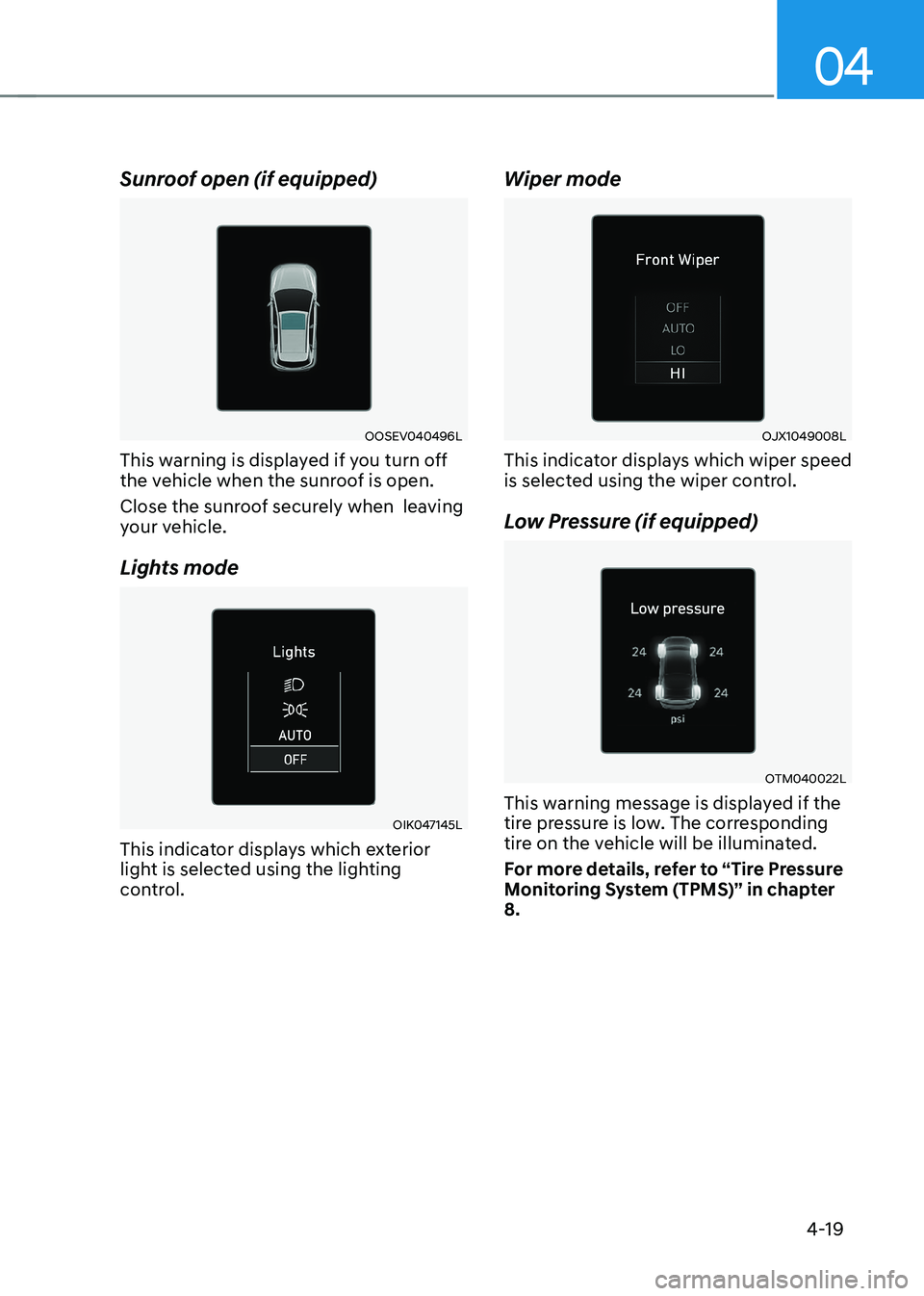
Sunroof open (if equipped)
OOSEV040496L
This warning is displayed if you turn off
the vehicle when the sunroof is open.
Close the sunroof securely when leaving
your vehicle.
Lights mode
OIK047145L
This indicator displays which exterior
light is selected using the lighting
control. Wiper mode
OJX1049008L
This indicator displays which wiper speed
is selected using the wiper control.
Low Pressure (if equipped)
OTM040022L
This warning message is displayed if the
tire pressure is low. The corresponding
tire on the vehicle will be illuminated.
For more details, refer to “Tire Pressure
Monitoring System (TPMS)” in chapter 8.
Page 177 of 548
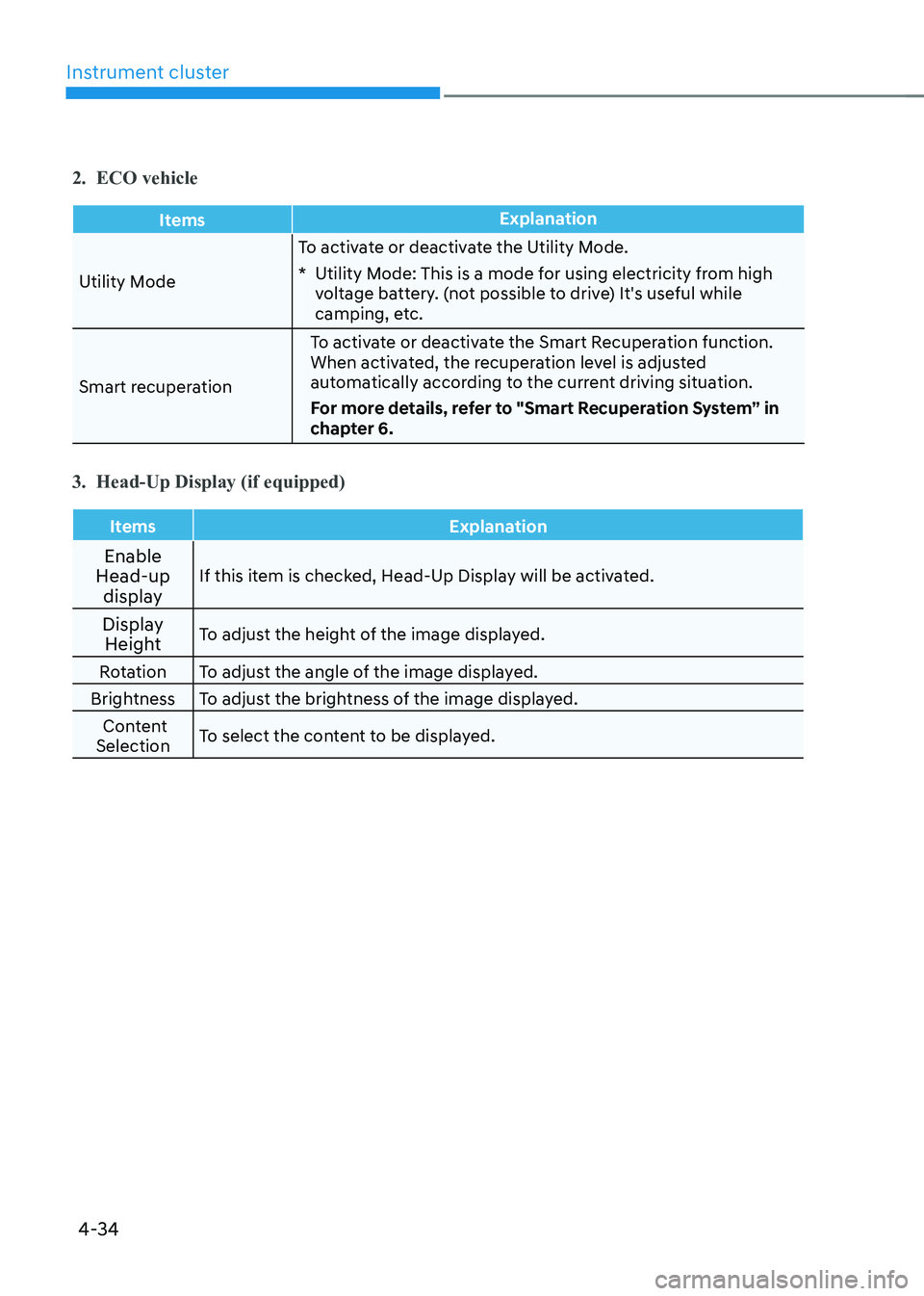
Instrument cluster
4-34
2. ECO vehicle
ItemsExplanation
Utility ModeTo activate or deactivate the Utility Mode.
* Utility Mode: This is a mode for using electricity from high
voltage battery. (not possible to drive) It's useful while
camping, etc.
Smart recuperation To activate or deactivate the Smart Recuperation function.
When activated, the recuperation level is adjusted
automatically according to the current driving situation.
For more details, refer to "Smart Recuperation System” in
chapter 6.
3. Head-Up Display (if equipped)
Items Explanation
Enable
Head-up
display If this item is checked, Head-Up Display will be activated.
Display Height To adjust the height of the image displayed.
Rotation To adjust the angle of the image displayed.
Brightness To adjust the brightness of the image displayed. Content
Selection To select the content to be displayed.
Page 194 of 548
Convenient features
5-10
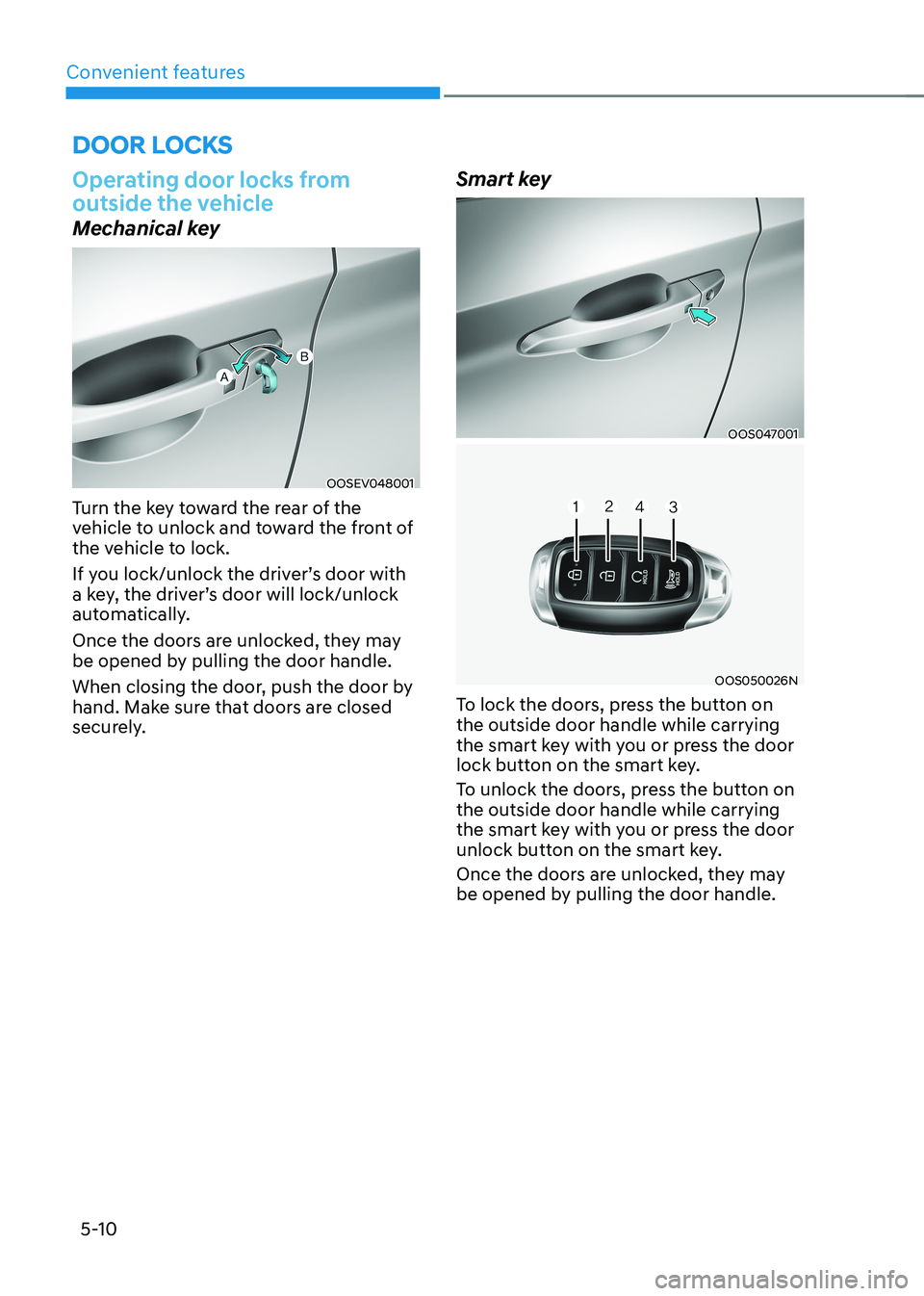
Operating door locks from
outside the vehicle
Mechanical key
OOSEV048001
Turn the key toward the rear of the
vehicle to unlock and toward the front of
the vehicle to lock.
If you lock/unlock the driver’s door with
a key, the driver’s door will lock/unlock
automatically.
Once the doors are unlocked, they may
be opened by pulling the door handle.
When closing the door, push the door by
hand. Make sure that doors are closed
securely. Smart key
OOS047001
OOS050026N
To lock the doors, press the button on the outside door handle while carrying
the smart key with you or press the door
lock button on the smart key.
To unlock the doors, press the button on the outside door handle while carrying
the smart key with you or press the door
unlock button on the smart key.
Once the doors are unlocked, they may
be opened by pulling the door handle.
Door locks
Page 195 of 548
05
5-11
When closing the door, push the door by
hand. Make sure that doors are closed
securely.
Information
• In cold and wet climates, door lock
and door mechanisms may not work
properly due to freezing conditions.
• If the door is locked/unlocked multiple
times in rapid succession with either
the vehicle key or door lock switch, the
system may stop operating temporarily
in order to protect the circuit and
prevent damage to system components.
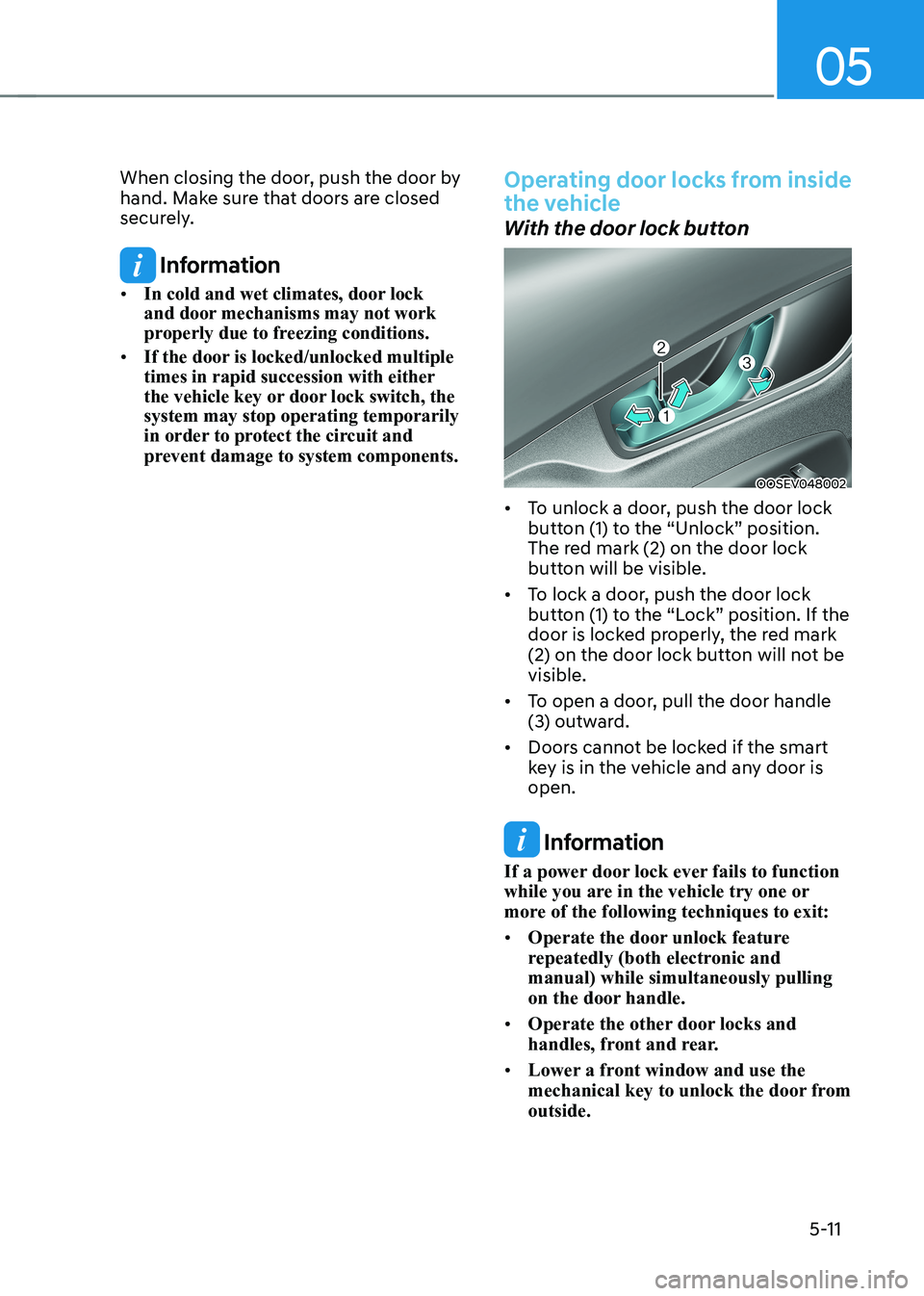
Operating door locks from inside
the vehicle
With the door lock button
OOSEV048002
• To unlock a door, push the door lock
button (1) to the “Unlock” position.
The red mark (2) on the door lock
button will be visible.
• To lock a door, push the door lock
button (1) to the “Lock” position. If the
door is locked properly, the red mark
(2) on the door lock button will not be visible.
• To open a door, pull the door handle
(3) outward.
• Doors cannot be locked if the smart
key is in the vehicle and any door is open.
Information
If a power door lock ever fails to function
while you are in the vehicle try one or
more of the following techniques to exit: • Operate the door unlock feature
repeatedly (both electronic and manual) while simultaneously pulling
on the door handle.
• Operate the other door locks and
handles, front and rear.
• Lower a front window and use the
mechanical key to unlock the door from outside.
Page 197 of 548
05
5-13
WARNING
Do not leave children or animals
unattended in your vehicle. An enclosed
vehicle can become extremely hot,
causing death or serious injury to
unattended children or animals who
cannot escape the vehicle. Children
might operate features of the vehicle
that could injure them, or they could
encounter other harm, possibly from
someone gaining entry to the vehicle.
WARNING
Leaving your vehicle unlocked increases
the potential risk to you or others from
someone hiding in your vehicle.
To secure your vehicle, while
depressing the brake, move the shift
lever to the P (Park) position, engage
the parking brake, and place the START/
STOP button OFF position, close all
windows, lock all doors, and always
take the key with you.
CAUTION
Opening a door when something is
approaching may cause damage or
injury. Be careful when opening doors
and watch for vehicles, motorcycles,
bicycles or pedestrians approaching the
vehicle in the path of the door.
WARNING
If you stay in the vehicle for a long time
while the weather is very hot or cold,
there are risks of injuries or danger to
life. Do not lock the vehicle from the
outside when someone is in the vehicle.
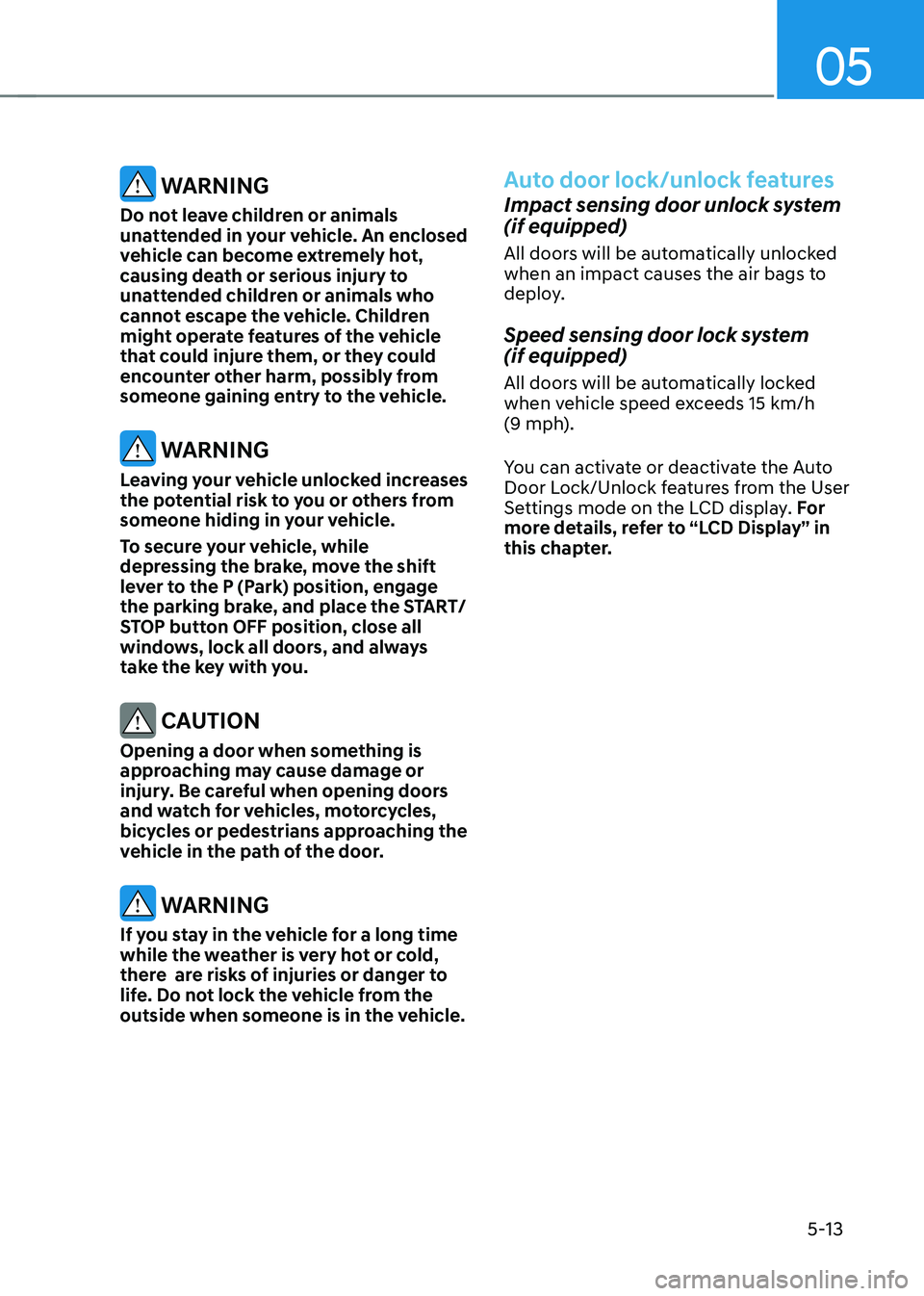
Auto door lock/unlock features
Impact sensing door unlock system (if equipped)
All doors will be automatically unlocked
when an impact causes the air bags to
deploy.
Speed sensing door lock system (if equipped)
All doors will be automatically locked
when vehicle speed exceeds 15 km/h
(9 mph).
You can activate or deactivate the Auto
Door Lock/Unlock features from the User
Settings mode on the LCD display. For
more details, refer to “LCD Display” in
this chapter.
Page 199 of 548
05
5-15
This system helps to protect your vehicle
and valuables. The horn will sound and
the hazard warning lights will blink
continuously if any of the following
occurs:
- A door is opened without using the smart key.
- The tailgate is opened without using the smart key.
- The hood is opened.
The alarm continues for 30 seconds, then
the system resets. To turn off the alarm,
unlock the doors with the smart key.
The Theft Alarm System automatically
sets 30 seconds after you lock the doors
and the tailgate. For the system to
activate, you must lock the doors and the
tailgate from outside the vehicle with the
smart key or by pressing the button on
the outside of the door handles with the
smart key in your possession.
The hazard warning lights will blink and
the chime will sound once to indicate the
system is armed.
Once the security system is set, opening
any door, the tailgate, or the hood
without using the smart key will cause
the alarm to activate.
The Theft Alarm System will not set if the
hood, the tailgate, or any door is not fully
closed. If the system will not set, check
the hood, the tailgate, or the doors are fully closed.
Do not attempt to alter this system or
add other devices to it.
Information
• Do not lock the doors until all passengers have left the vehicle. If the
remaining passenger leaves the vehicle when the system is armed, the alarm will be activated.
• If the vehicle is not disarmed with the
smart key, open the doors by using the mechanical key and start the vehicle
(for smart key) and wait for 30 seconds.
• When the system is disarmed but a
door or tailgate is not opened within 30
seconds, the system will be rearmed.
ThefT-alarm sysTem
Page 205 of 548
05
5-21
Automatic-Dimming Night Vision Safety™
(NVS®) Mirror (if equipped)
The NVS® Mirror automatically helps
reduce glare by monitoring light levels in
the front and the rear of the vehicle. Any
object that obstructs either light sensor
will degrade the automatic dimming
control feature.
For more information regarding NVS®
mirrors and other applications, please
refer to the Gentex website:
www.gentex.com
Your mirror will automatically dim
upon detecting glare from the vehicles
traveling behind you.
The mirror defaults to the ON position
each time the vehicle is started.
Integrated HomeLink® Wireless Control System
The HomeLink® Wireless Control System
provides a convenient way to replace
up to three hand held radio-frequency
transmitters used to activate compatible
devices such as gate operators, garage
door openers, entry door locks, security
systems, and home lighting.
NOTICE
HomeLink® operates while the ignition
switch is in the ACC or ON position
for safety reasons. It is to prevent
unintentional security problems from
happening when the vehicle is parked
outside the garage.
WARNING
Before programming HomeLink® to a
garage door opener or gate operator,
make sure people and objects are out
of the way of the device to prevent
potential harm or damage. Do not
use the HomeLink® with any garage
door opener that lacks the safety
stop and reverse features required
by U.S. federal safety standards (this
includes any garage door opener model
manufactured before April 1, 1982).
A garage door that cannot detect an
object - signaling the door to stop and
reverse - does not meet current U.S.
federal safety standards. Using a garage
door opener without these features
increases the risk of serious injury or
death.
For more information, contact
HomeLink® at www.homelink.com, or
call Home-Link customer support at
1-800-355-3515.
It is also recommended that a new
battery be replaced in the handheld
transmitter of the device being trained
to HomeLink® for quicker training and
accurate transmission of the radio
frequency.
1. Programming HomeLink ®
The following steps show how to
program HomeLink. If you have any
questions or are having difficulty
programming your HomeLink buttons,
refer to the HomeLink website or call the
HomeLink customer support toll-free
number. Do this, before going back to
the dealer who sold you the car.