ECU HYUNDAI KONA EV 2022 Owner's Guide
[x] Cancel search | Manufacturer: HYUNDAI, Model Year: 2022, Model line: KONA EV, Model: HYUNDAI KONA EV 2022Pages: 548, PDF Size: 49.14 MB
Page 274 of 548
Convenient features
5-90
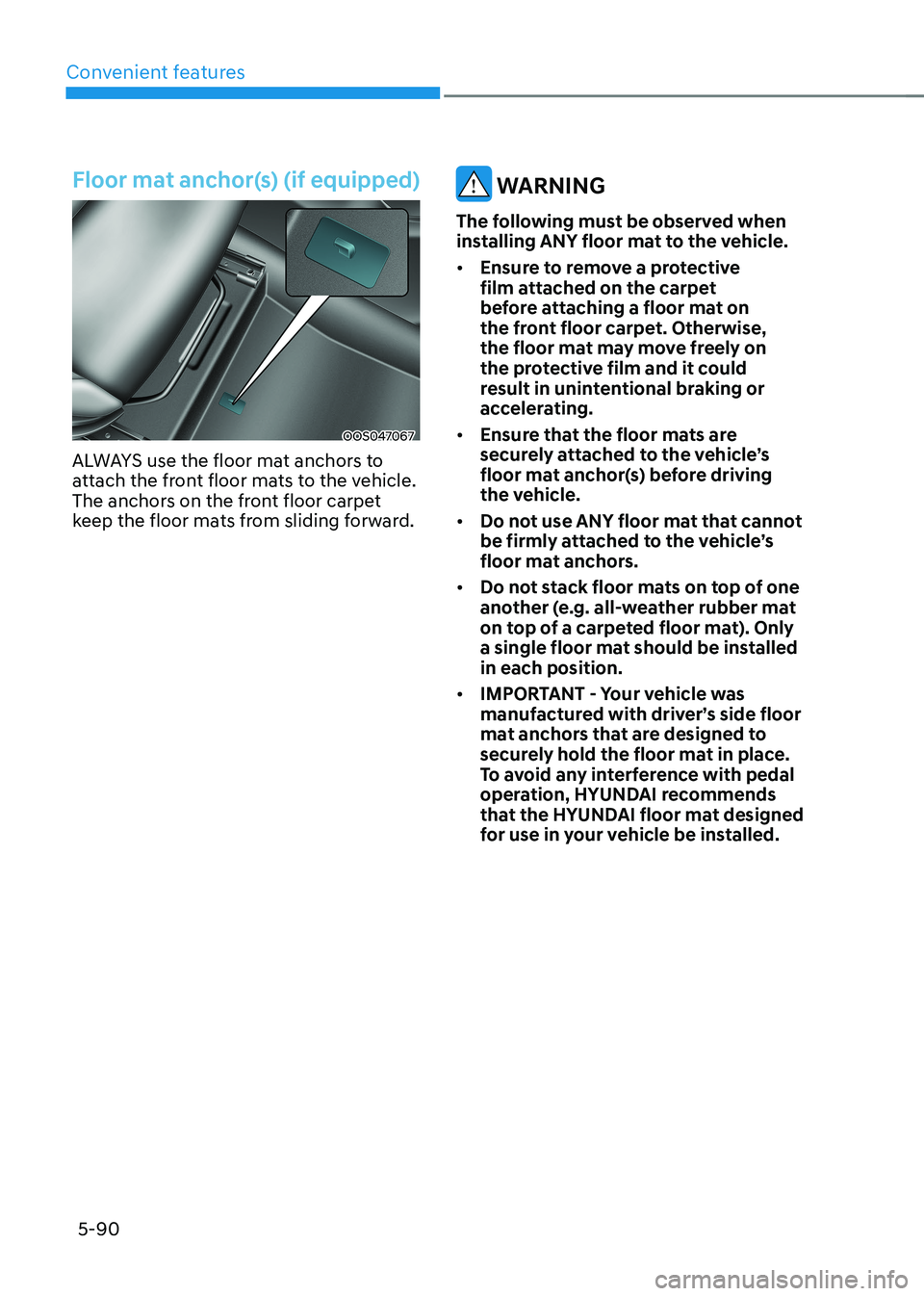
Floor mat anchor(s) (if equipped)
OOS047067
ALWAYS use the floor mat anchors to
attach the front floor mats to the vehicle.
The anchors on the front floor carpet
keep the floor mats from sliding forward.
WARNING
The following must be observed when
installing ANY floor mat to the vehicle. • Ensure to remove a protective
film attached on the carpet
before attaching a floor mat on
the front floor carpet. Otherwise,
the floor mat may move freely on
the protective film and it could
result in unintentional braking or
accelerating.
• Ensure that the floor mats are
securely attached to the vehicle’s
floor mat anchor(s) before driving
the vehicle.
• Do not use ANY floor mat that cannot
be firmly attached to the vehicle’s
floor mat anchors.
• Do not stack floor mats on top of one
another (e.g. all-weather rubber mat
on top of a carpeted floor mat). Only
a single floor mat should be installed in each position.
• IMPORTANT - Your vehicle was
manufactured with driver’s side floor
mat anchors that are designed to
securely hold the floor mat in place.
To avoid any interference with pedal
operation, HYUNDAI recommends
that the HYUNDAI floor mat designed
for use in your vehicle be installed.
Page 276 of 548
Convenient features
5-92
eXterior FeAtures
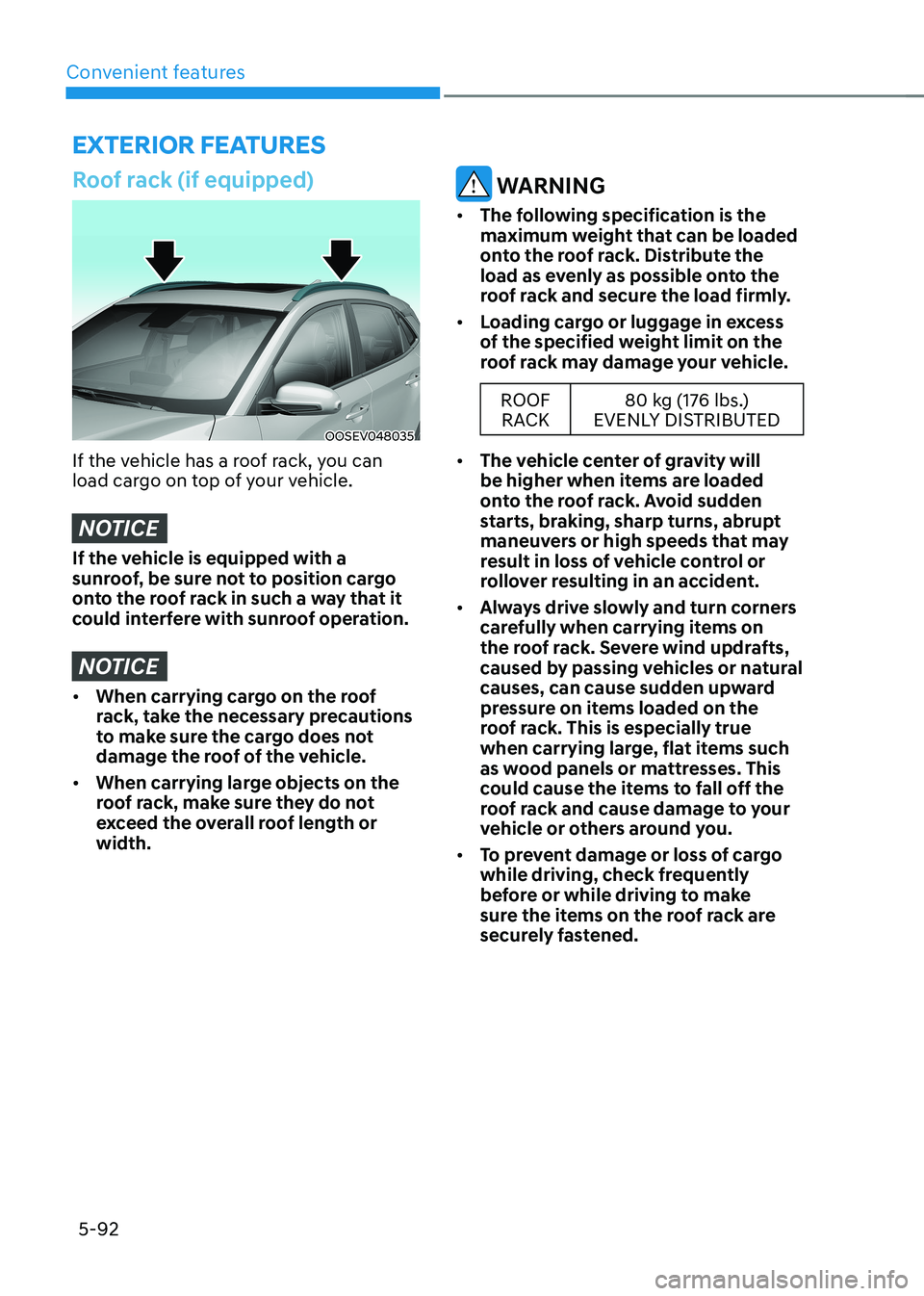
Roof rack (if equipped)
OOSEV048035
If the vehicle has a roof rack, you can
load cargo on top of your vehicle.
NOTICE
If the vehicle is equipped with a
sunroof, be sure not to position cargo
onto the roof rack in such a way that it
could interfere with sunroof operation.
NOTICE
• When carrying cargo on the roof
rack, take the necessary precautions
to make sure the cargo does not
damage the roof of the vehicle.
• When carrying large objects on the
roof rack, make sure they do not
exceed the overall roof length or width.
WARNING
• The following specification is the
maximum weight that can be loaded
onto the roof rack. Distribute the
load as evenly as possible onto the
roof rack and secure the load firmly.
• Loading cargo or luggage in excess
of the specified weight limit on the
roof rack may damage your vehicle.
ROOF
RACK 80 kg (176 lbs.)
EVENLY DISTRIBUTED
• The vehicle center of gravity will
be higher when items are loaded
onto the roof rack. Avoid sudden
starts, braking, sharp turns, abrupt
maneuvers or high speeds that may
result in loss of vehicle control or
rollover resulting in an accident.
• Always drive slowly and turn corners
carefully when carrying items on
the roof rack. Severe wind updrafts,
caused by passing vehicles or natural
causes, can cause sudden upward
pressure on items loaded on the
roof rack. This is especially true
when carrying large, flat items such
as wood panels or mattresses. This
could cause the items to fall off the
roof rack and cause damage to your
vehicle or others around you.
• To prevent damage or loss of cargo
while driving, check frequently
before or while driving to make
sure the items on the roof rack are
securely fastened.
Page 281 of 548
6
Before driving .................................................................................................... 6-3
Before entering the vehicle ........................................................................................ 6-3
Before starting ............................................................................................................. 6-3
START/STOP button .......................................................................................... 6-4
START/STOP button positions ..................................................................................... 6-5
Starting the vehicle ..................................................................................................... 6-6
Turning off the vehicle ................................................................................................. 6 -7
Reduction gear .................................................................................................. 6-8
Reduction gear operation .......................................................................................... 6-8
LCD display messages ............................................................................................... 6-10
Good driving practices ............................................................................................... 6-13
Regenerative braking system .......................................................................... 6-14
Regenerative braking (Paddle shifter) ...................................................................... 6-14
One pedal driving ....................................................................................................... 6-15
Smart recuperation system
(if equipped with smart cruise control system) ............................................6-16
System setting ............................................................................................................ 6-16
To activate smart recuperation system..................................................................... 6-16
Smart recuperation system will be temporarily cancelled when: ..........................6-18
To resume smart recuperation system ..................................................................... 6-18
To turn smart recuperation system off ..................................................................... 6-18
Vehicle-to-vehicle distance recognition sensor (front radar) .................................6-18
System malfunction ................................................................................................... 6-19
Limitations of the system .......................................................................................... 6-19
Braking system ................................................................................................ 6-22
Power brakes ............................................................................................................. 6-22
Disc brakes wear indicator ........................................................................................ 6-22
Electronic Parking Brake (EPB) .................................................................................. 6-23
Auto Hold .................................................................................................................... 6-27
Anti-Lock Brake System (ABS) ................................................................................... 6-31
Electronic Stability Control (ESC) ............................................................................. 6-32
Vehicle Stability Management (VSM) ....................................................................... 6-35
Hill-Start Assist Control (FAC) .................................................................................. 6-36
Good braking practices ............................................................................................. 6-37
Drive mode integrated control system ..........................................................6-38
Initial setting for each drive mode ............................................................................ 6-39
6. Driving your vehicle
Page 283 of 548
06
6-3
Before entering the vehicle
• Be sure all windows, outside mirror(s),
and outside lights are clean and
unobstructed.
• Remove frost, snow, or ice.
• Visually check the tires for uneven
wear and damage.
• Check under the vehicle for any sign
of leaks.
• Be sure there are no obstacles behind
you if you intend to back up.
Before starting
• Make sure the hood, the tailgate, and
the doors are securely closed and
locked.
• Adjust the position of the seat and
steering wheel.
• Adjust the inside and outside rearview
mirrors.
• Verify all the lights work.
• Fasten your seat belt. Check that all
passengers have fastened their seat belt.
• Check the gauges and indicators
in the instrument panel and the
messages on the instrument display
when the START/STOP button is in the ON position.
• Check that any items you are carrying
are stored properly or fastened down
securely.
WARNING
To reduce the risk of SERIOUS INJURY or
DEATH, take the following precautions: • ALWAYS wear your seat belt. All
passengers must be properly belted
whenever the vehicle is moving.
For more information, refer to “Seat
Belts” in chapter 3.
• Always drive defensively. Assume
other drivers or pedestrians may be
careless and make mistakes.
• Stay focused on the task of driving.
Driver distraction can cause
accidents.
• Leave plenty of space between you
and the vehicle in front of you.
WARNING
NEVER drink or take drugs and drive. Drinking or taking drugs and driving
is dangerous and may result in an
accident and SERIOUS INJURY or
DEATH. Drunk driving is the number one
contributor to the highway death
toll each year. Even a small amount
of alcohol will affect your reflexes,
perceptions and judgment. Just
one drink can reduce your ability to
respond to changing conditions and
emergencies and your reaction time
gets worse with each additional drink.
Driving while under the influence
of drugs is as dangerous or more
dangerous than driving under the
influence of alcohol.
You are much more likely to have a
serious accident if you drink or take
drugs and drive. If you are drinking or
taking drugs, don’t drive. Do not ride
with a driver who has been drinking
or taking drugs. Choose a designated
driver or call a taxi.
BEFORE DRIVING
Page 294 of 548
Driving your vehicle
6-14
REGENERATIVE BRAkING SySTEm
Regenerative braking (Paddle
shifter)
OOS057006
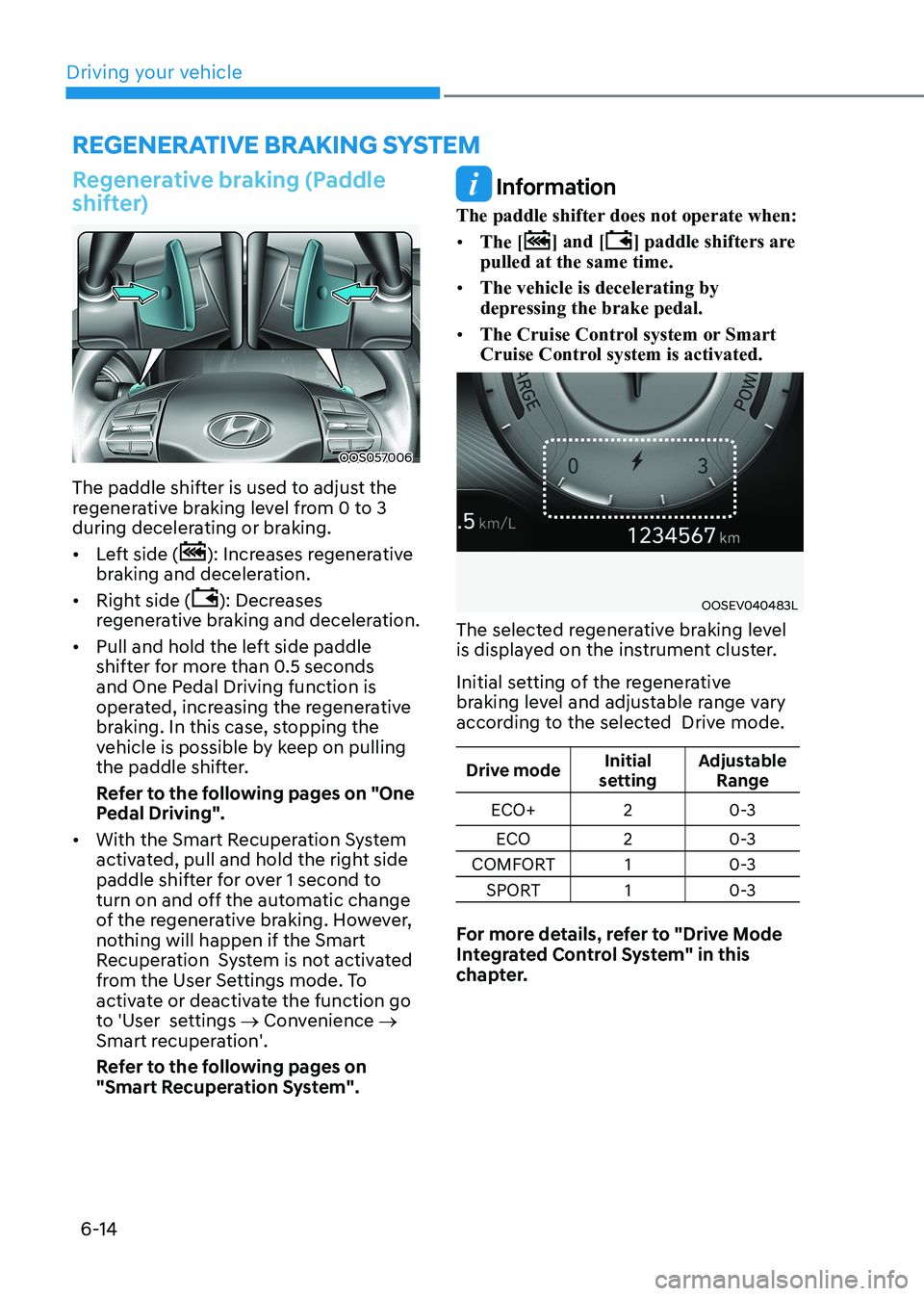
The paddle shifter is used to adjust the
regenerative braking level from 0 to 3
during decelerating or braking. • Left side (
): Increases regenerative
braking and deceleration.
• Right side (
): Decreases
regenerative braking and deceleration.
• Pull and hold the left side paddle
shifter for more than 0.5 seconds
and One Pedal Driving function is
operated, increasing the regenerative
braking. In this case, stopping the
vehicle is possible by keep on pulling
the paddle shifter.
Refer to the following pages on "One
Pedal Driving".
• With the Smart Recuperation System
activated, pull and hold the right side
paddle shifter for over 1 second to
turn on and off the automatic change
of the regenerative braking. However,
nothing will happen if the Smart
Recuperation System is not activated
from the User Settings mode. To
activate or deactivate the function go
to 'User settings → Convenience →
Smart recuperation'.
Refer to the following pages on
"Smart Recuperation System".
Information
The paddle shifter does not operate when: • The [
] and [] paddle shifters are
pulled at the same time.
• The vehicle is decelerating by
depressing the brake pedal.
• The Cruise Control system or Smart
Cruise Control system is activated.
OOSEV040483L
The selected regenerative braking level
is displayed on the instrument cluster.
Initial setting of the regenerative
braking level and adjustable range vary
according to the selected Drive mode.
Drive mode Initial
setting Adjustable
Range
ECO+ 2 0-3
ECO 20-3
COMFORT 1 0-3
SPORT 1 0-3
For more details, refer to "Drive Mode
Integrated Control System" in this
chapter.
Page 296 of 548
Driving your vehicle
6-16
The Smart Recuperation System controls
the regenerative braking automatically
according to the road gradient and
driving condition of the vehicle in front.
The system minimizes the unnecessary
operation of the brake and acceleration
pedal, improving the electric energy
efficiency and assisting the driver.
System setting
OOSEV040545L
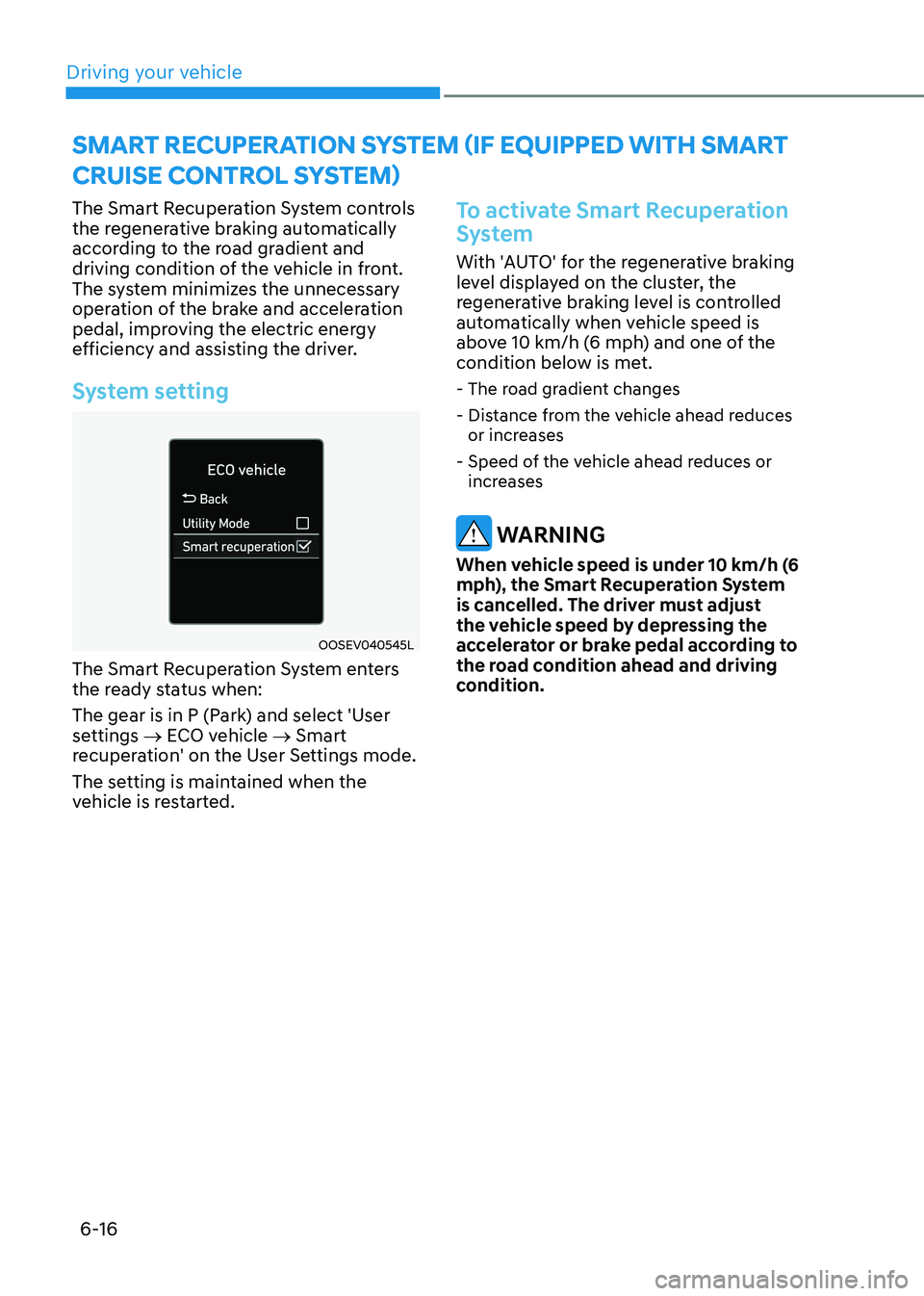
The Smart Recuperation System enters
the ready status when:
The gear is in P (Park) and select 'User
settings → ECO vehicle → Smart
recuperation' on the User Settings mode.
The setting is maintained when the
vehicle is restarted.
To activate Smart Recuperation
System
With 'AUTO' for the regenerative braking
level displayed on the cluster, the
regenerative braking level is controlled
automatically when vehicle speed is
above 10 km/h (6 mph) and one of the
condition below is met.
- The road gradient changes
- Distance from the vehicle ahead reduces or increases
- Speed of the vehicle ahead reduces or increases
WARNING
When vehicle speed is under 10 km/h (6
mph), the Smart Recuperation System
is cancelled. The driver must adjust
the vehicle speed by depressing the
accelerator or brake pedal according to
the road condition ahead and driving
condition.
SMART RECUPERATION SYSTEM (If EqUIPPEd wITh SMART
CRUISE CONTROl SYSTEM)
Page 297 of 548
06
6-17
OOSEV040487L
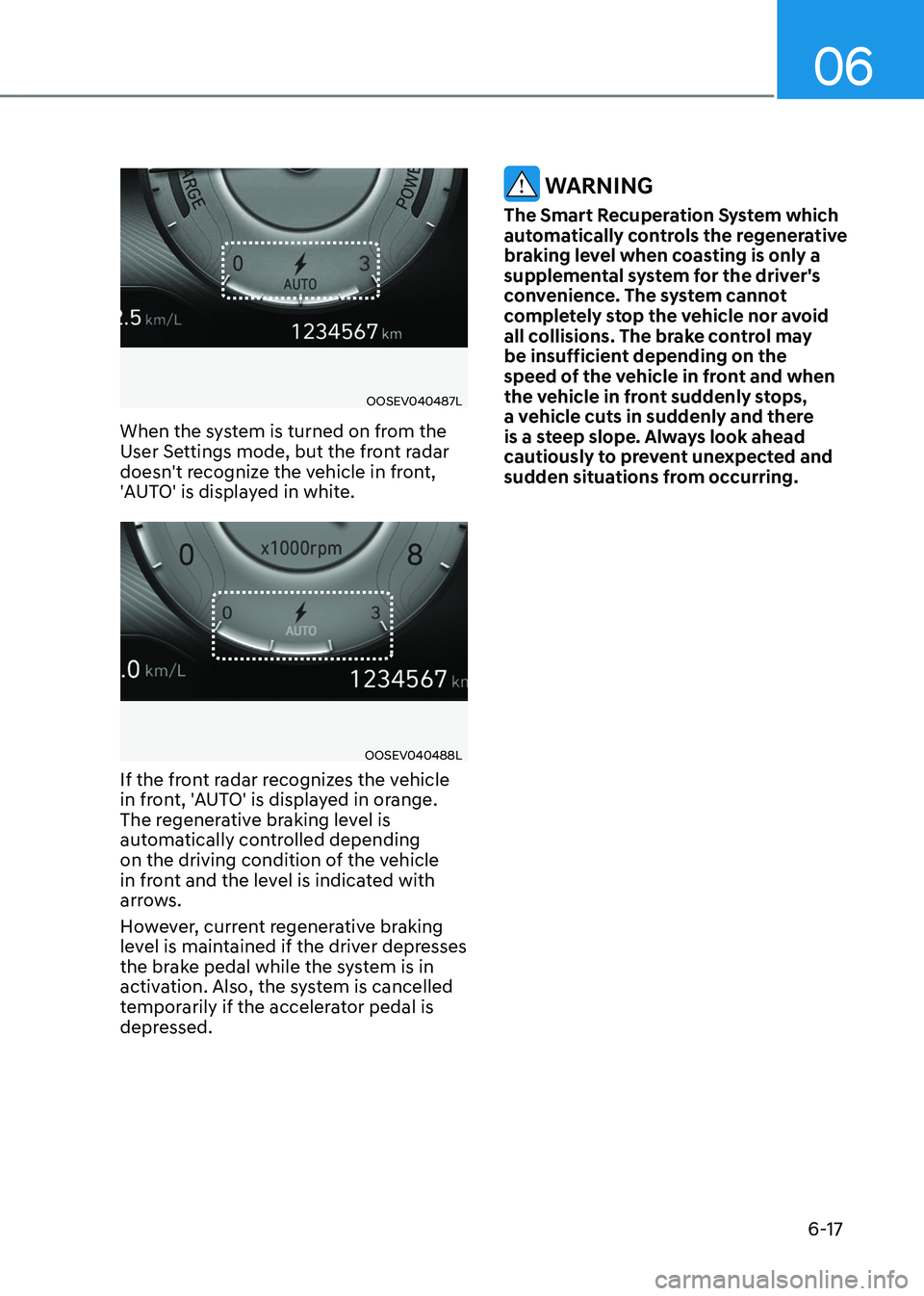
When the system is turned on from the
User Settings mode, but the front radar
doesn't recognize the vehicle in front,
'AUTO' is displayed in white.
OOSEV040488L
If the front radar recognizes the vehicle
in front, 'AUTO' is displayed in orange.
The regenerative braking level is
automatically controlled depending
on the driving condition of the vehicle
in front and the level is indicated with
arrows.
However, current regenerative braking
level is maintained if the driver depresses
the brake pedal while the system is in
activation. Also, the system is cancelled
temporarily if the accelerator pedal is
depressed.
WARNING
The Smart Recuperation System which
automatically controls the regenerative
braking level when coasting is only a
supplemental system for the driver's
convenience. The system cannot
completely stop the vehicle nor avoid
all collisions. The brake control may
be insufficient depending on the
speed of the vehicle in front and when
the vehicle in front suddenly stops,
a vehicle cuts in suddenly and there
is a steep slope. Always look ahead
cautiously to prevent unexpected and
sudden situations from occurring.
Page 298 of 548
Driving your vehicle
6-18
Smart Recuperation System will
be temporarily cancelled when:
• Cancelled manually
Pulling and holding the right side
paddle shifter for more than 1 second.
The Smart Recuperation System turns
off temporarily and AUTO for the
regenerative braking level disappears
from the cluster.
• Cancelled automatically
- The vehicle is shifted to N (Neutral), R (Reverse) or P (Park).
- Cruise Control system (including Smart Cruise Control system) is in
activation.
- The ESC (Electronic Stability Control) or ABS is operating.
WARNING
When the Smart Recuperation System
is cancelled automatically, adjust the
vehicle speed directly by depressing the
accelerator or brake pedal according to
the road condition ahead and driving
condition.
To resume Smart Recuperation
System
To re-activate the Smart Recuperation
System while driving, pull and hold the
right side paddle shifter for more than
1 second again. Then, AUTO for the
regenerative braking level will appear on
the cluster.
To turn Smart Recuperation
System off
To turn off the system, shift to P (Park)
and deselect 'User settings → ECO
vehicle → Smart recuperation' on the
User Settings mode.
Vehicle-to-Vehicle Distance
recognition sensor (Front radar)
In order for the Smart Recuperation
System to operate properly, always make
sure the radar sensor cover is clean and
free of dirt, snow, and debris. Dirt, snow,
or foreign substances on the lens may
adversely affect the sensing performance
of the sensor. In this case, the system
operation may stop temporarily and not
operate normally.
Page 299 of 548
06
6-19
CAUTION
• Do not apply license plate frame or
foreign objects such as a bumper
sticker or a bumper guard near the
radar sensor. Doing so may adversely
affect the sensing performance of
the radar.
• Always keep the radar sensor and
lens cover clean and free of dirt and debris.
• Use only a soft cloth to wash the
vehicle. Do not spray pressurized
water directly on the sensor or
sensor cover.
• Be careful not to apply unnecessary
force on the radar sensor or sensor
cover. If the sensor is forcibly
moved out of proper alignment,
the Smart Recuperation System
may not operate correctly. In this
case, a warning message may not
be displayed. We recommend that
the vehicle be inspected by an
authorized HYUNDAI dealer.
• If the front bumper becomes
damaged in the area around the
radar sensor, the Smart Recuperation
System may not operate properly.
We recommend that the vehicle be
inspected by an authorized HYUNDAI
dealer.
• Use only genuine parts or the
equivalent specified for your vehicle
to repair or replace a damaged
sensor or sensor cover. Do not apply
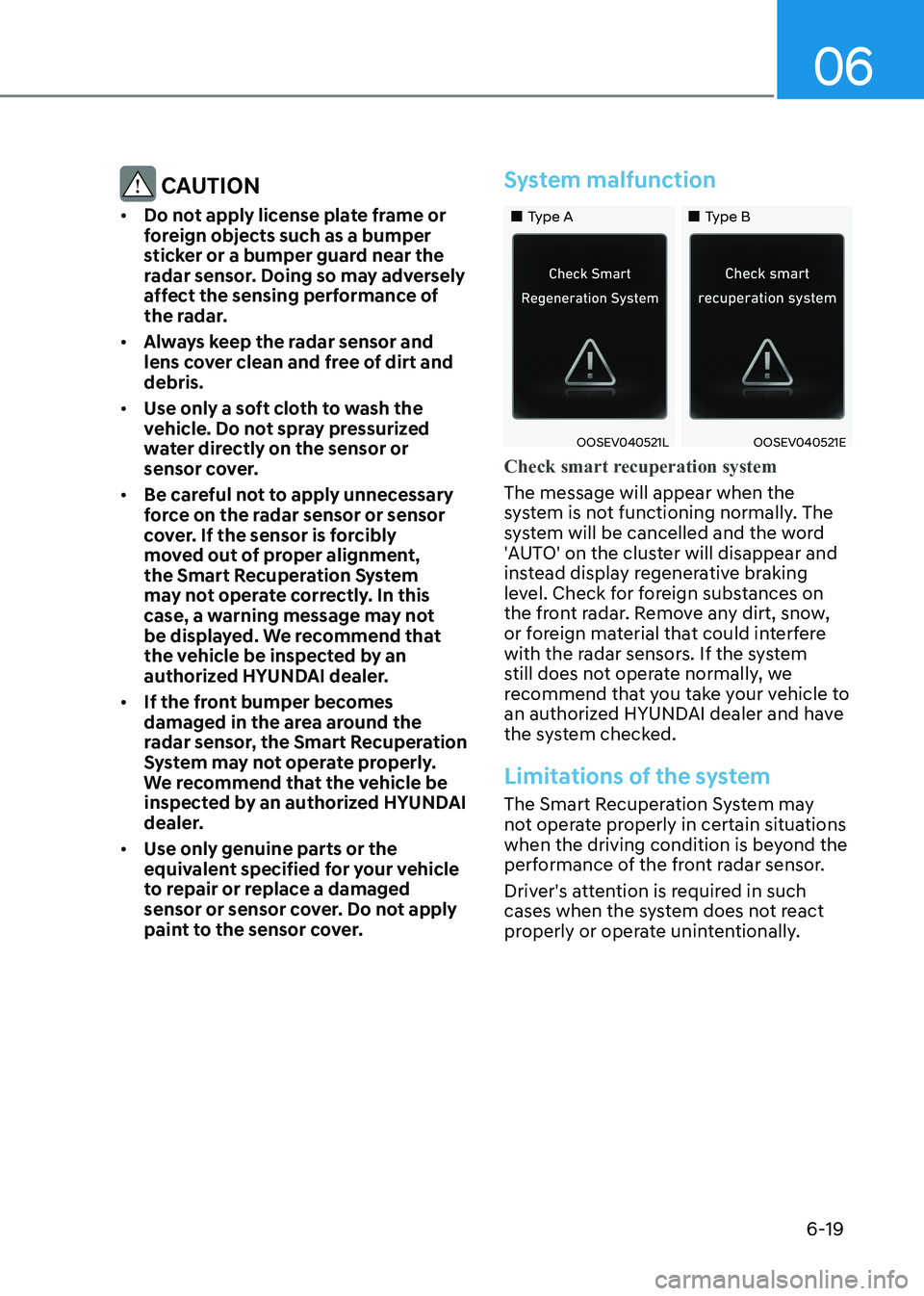
paint to the sensor cover.System malfunction
„„Type A „„Type B
OOSEV040521LOOSEV040521E
Check smart recuperation system
The message will appear when the
system is not functioning normally. The
system will be cancelled and the word
'AUTO' on the cluster will disappear and
instead display regenerative braking
level. Check for foreign substances on
the front radar. Remove any dirt, snow,
or foreign material that could interfere
with the radar sensors. If the system
still does not operate normally, we
recommend that you take your vehicle to
an authorized HYUNDAI dealer and have
the system checked.
Limitations of the system
The Smart Recuperation System may
not operate properly in certain situations
when the driving condition is beyond the
performance of the front radar sensor.
Driver's attention is required in such
cases when the system does not react
properly or operate unintentionally.
Page 300 of 548
Driving your vehicle
6-20
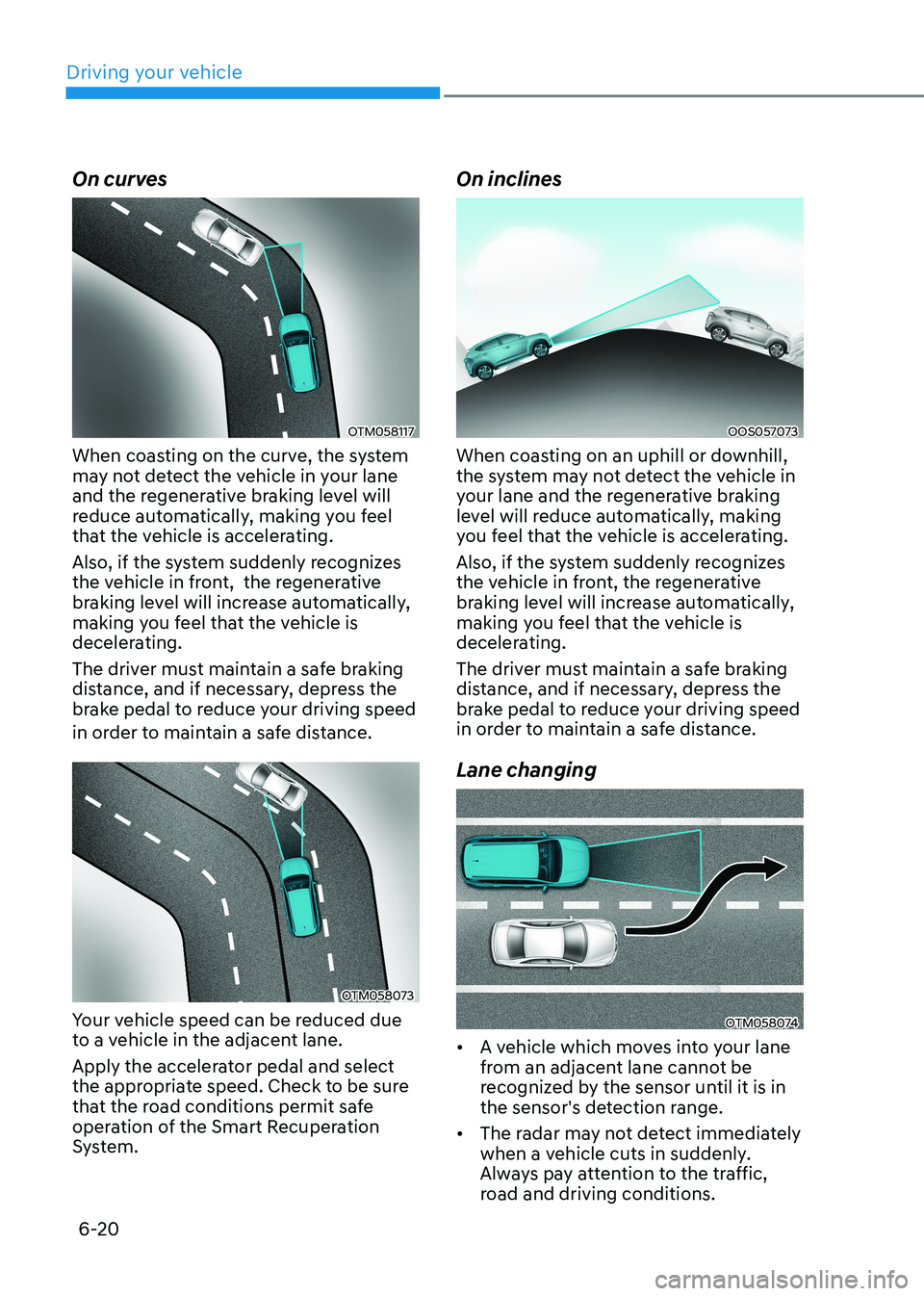
On curves
OTM058117
When coasting on the curve, the system
may not detect the vehicle in your lane
and the regenerative braking level will
reduce automatically, making you feel
that the vehicle is accelerating.
Also, if the system suddenly recognizes
the vehicle in front, the regenerative
braking level will increase automatically,
making you feel that the vehicle is
decelerating.
The driver must maintain a safe braking
distance, and if necessary, depress the
brake pedal to reduce your driving speed
in order to maintain a safe distance.
OTM058073
Your vehicle speed can be reduced due
to a vehicle in the adjacent lane.
Apply the accelerator pedal and select
the appropriate speed. Check to be sure
that the road conditions permit safe
operation of the Smart Recuperation
System. On inclines
OOS057073
When coasting on an uphill or downhill,
the system may not detect the vehicle in
your lane and the regenerative braking
level will reduce automatically, making
you feel that the vehicle is accelerating.
Also, if the system suddenly recognizes
the vehicle in front, the regenerative
braking level will increase automatically,
making you feel that the vehicle is
decelerating.
The driver must maintain a safe braking
distance, and if necessary, depress the
brake pedal to reduce your driving speed
in order to maintain a safe distance. Lane changing
OTM058074
• A vehicle which moves into your lane
from an adjacent lane cannot be
recognized by the sensor until it is in
the sensor's detection range.
• The radar may not detect immediately
when a vehicle cuts in suddenly.
Always pay attention to the traffic,
road and driving conditions.