battery HYUNDAI KONA EV 2022 User Guide
[x] Cancel search | Manufacturer: HYUNDAI, Model Year: 2022, Model line: KONA EV, Model: HYUNDAI KONA EV 2022Pages: 548, PDF Size: 49.14 MB
Page 20 of 548
01
1-15
OOSEV040494L
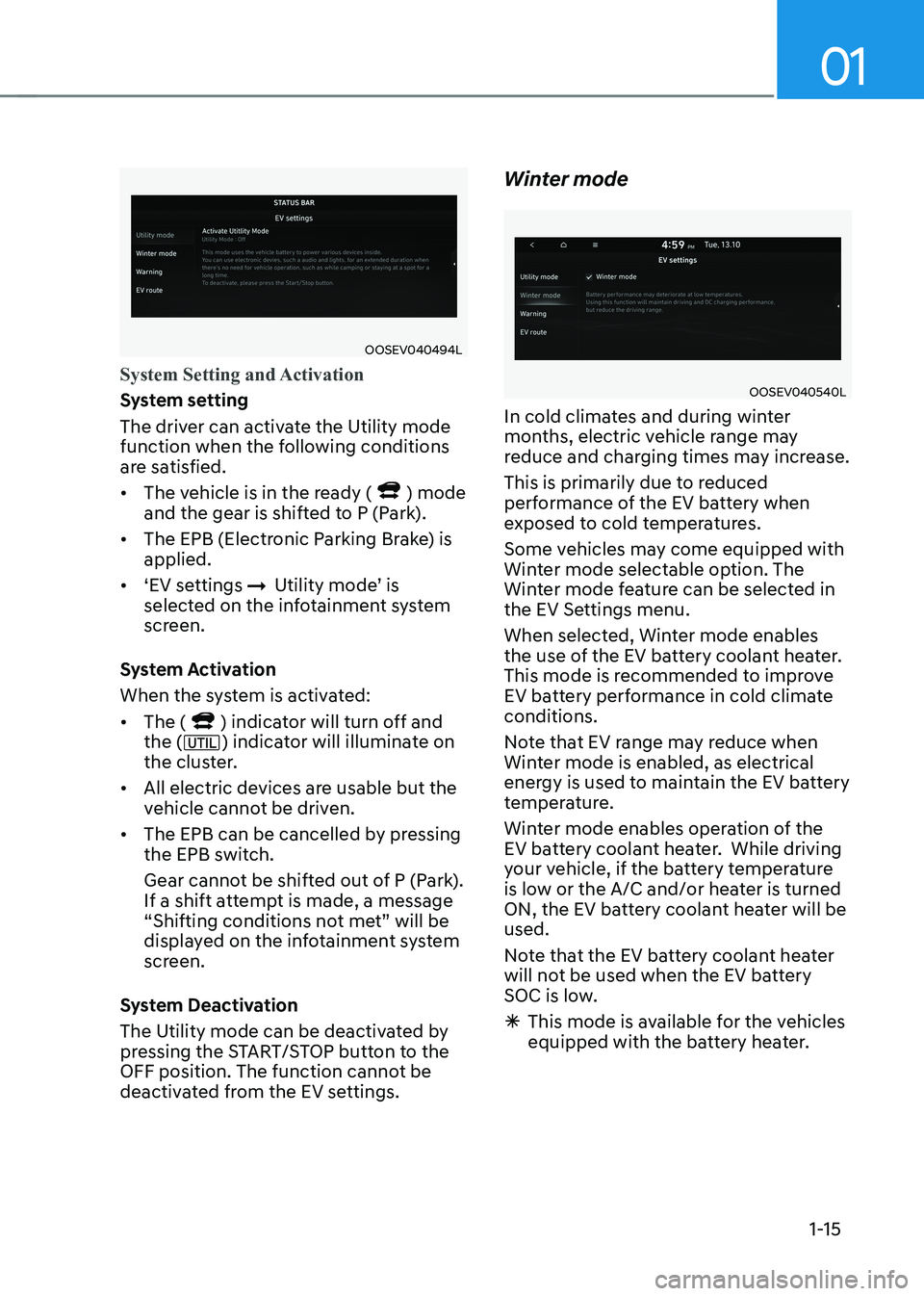
System Setting and Activation
System setting
The driver can activate the Utility mode
function when the following conditions
are satisfied. • The vehicle is in the ready (
) mode
and the gear is shifted to P (Park).
• The EPB (Electronic Parking Brake) is applied.
• ‘EV settings
ÞUtility mode’ is
selected on the infotainment system
screen.
System Activation
When the system is activated:• The (
) indicator will turn off and
the () indicator will illuminate on
the cluster.
• All electric devices are usable but the
vehicle cannot be driven.
• The EPB can be cancelled by pressing
the EPB switch.
Gear cannot be shifted out of P (Park).
If a shift attempt is made, a message
“Shifting conditions not met” will be
displayed on the infotainment system
screen.
System Deactivation
The Utility mode can be deactivated by
pressing the START/STOP button to the
OFF position. The function cannot be
deactivated from the EV settings. Winter mode
OOSEV040540L
In cold climates and during winter
months, electric vehicle range may
reduce and charging times may increase.
This is primarily due to reduced
performance of the EV battery when
exposed to cold temperatures.
Some vehicles may come equipped with
Winter mode selectable option. The
Winter mode feature can be selected in
the EV Settings menu.
When selected, Winter mode enables
the use of the EV battery coolant heater.
This mode is recommended to improve
EV battery performance in cold climate conditions.
Note that EV range may reduce when
Winter mode is enabled, as electrical
energy is used to maintain the EV battery
temperature.
Winter mode enables operation of the
EV battery coolant heater. While driving
your vehicle, if the battery temperature
is low or the A/C and/or heater is turned
ON, the EV battery coolant heater will be used.
Note that the EV battery coolant heater
will not be used when the EV battery
SOC is low.
à This mode is available for the vehicles
equipped with the battery heater.
Page 21 of 548
Foreword / Electric Vehicle System Overview
1-16
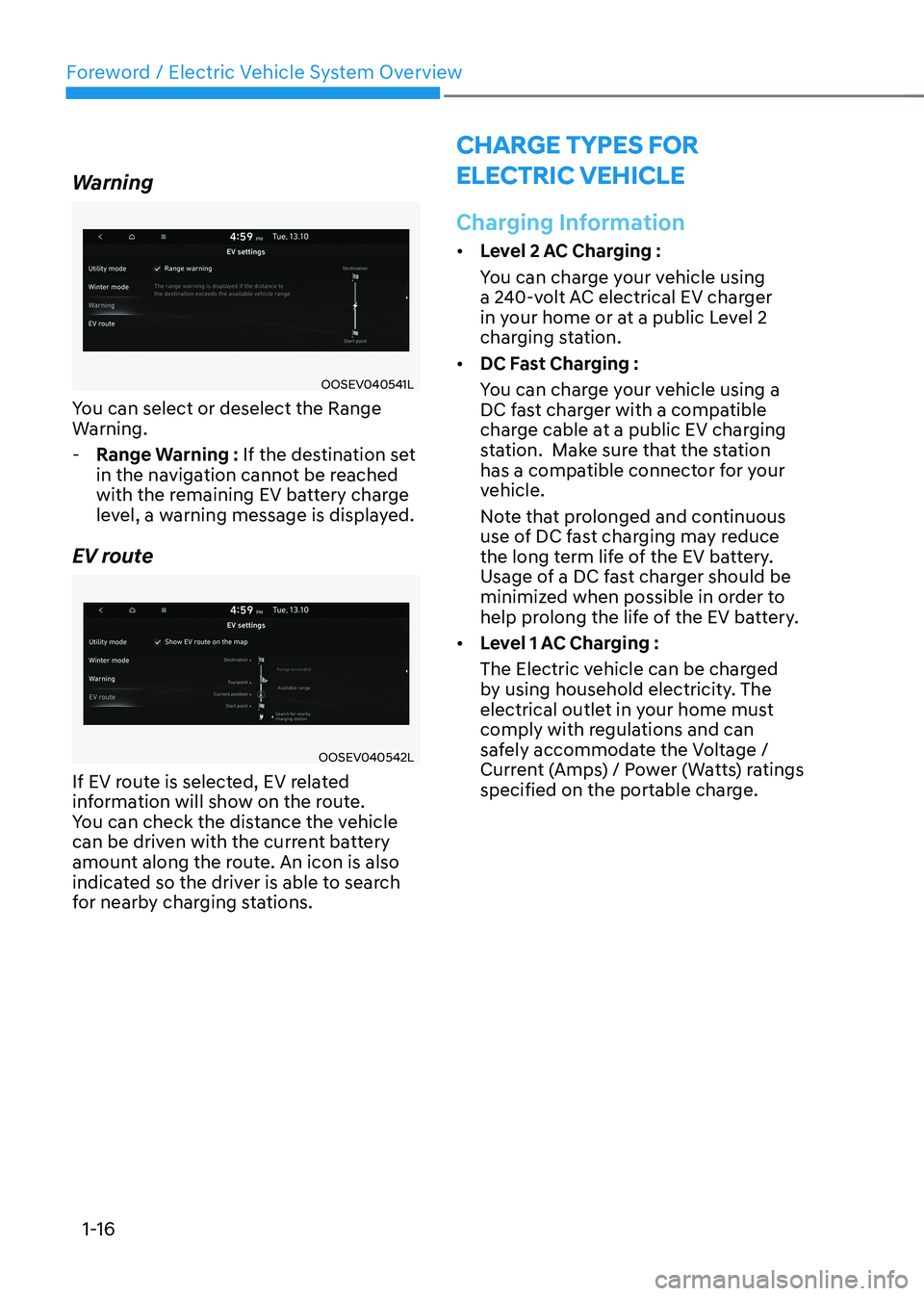
Warning
OOSEV040541L
You can select or deselect the Range
Warning.
- Range Warning : If the destination set
in the navigation cannot be reached
with the remaining EV battery charge
level, a warning message is displayed.
EV route
OOSEV040542L
If EV route is selected, EV related
information will show on the route.
You can check the distance the vehicle
can be driven with the current battery
amount along the route. An icon is also
indicated so the driver is able to search
for nearby charging stations.
CHarge Types For
eleCTriC VeHiCle
Charging Information
• Level 2 AC Charging :
You can charge your vehicle using
a 240-volt AC electrical EV charger
in your home or at a public Level 2
charging station.
• DC Fast Charging :
You can charge your vehicle using a
DC fast charger with a compatible
charge cable at a public EV charging
station. Make sure that the station
has a compatible connector for your
vehicle.
Note that prolonged and continuous
use of DC fast charging may reduce
the long term life of the EV battery.
Usage of a DC fast charger should be
minimized when possible in order to
help prolong the life of the EV battery.
• Level 1 AC Charging :
The Electric vehicle can be charged
by using household electricity. The
electrical outlet in your home must
comply with regulations and can
safely accommodate the Voltage /
Current (Amps) / Power (Watts) ratings
specified on the portable charge.
Page 22 of 548
01
1-17
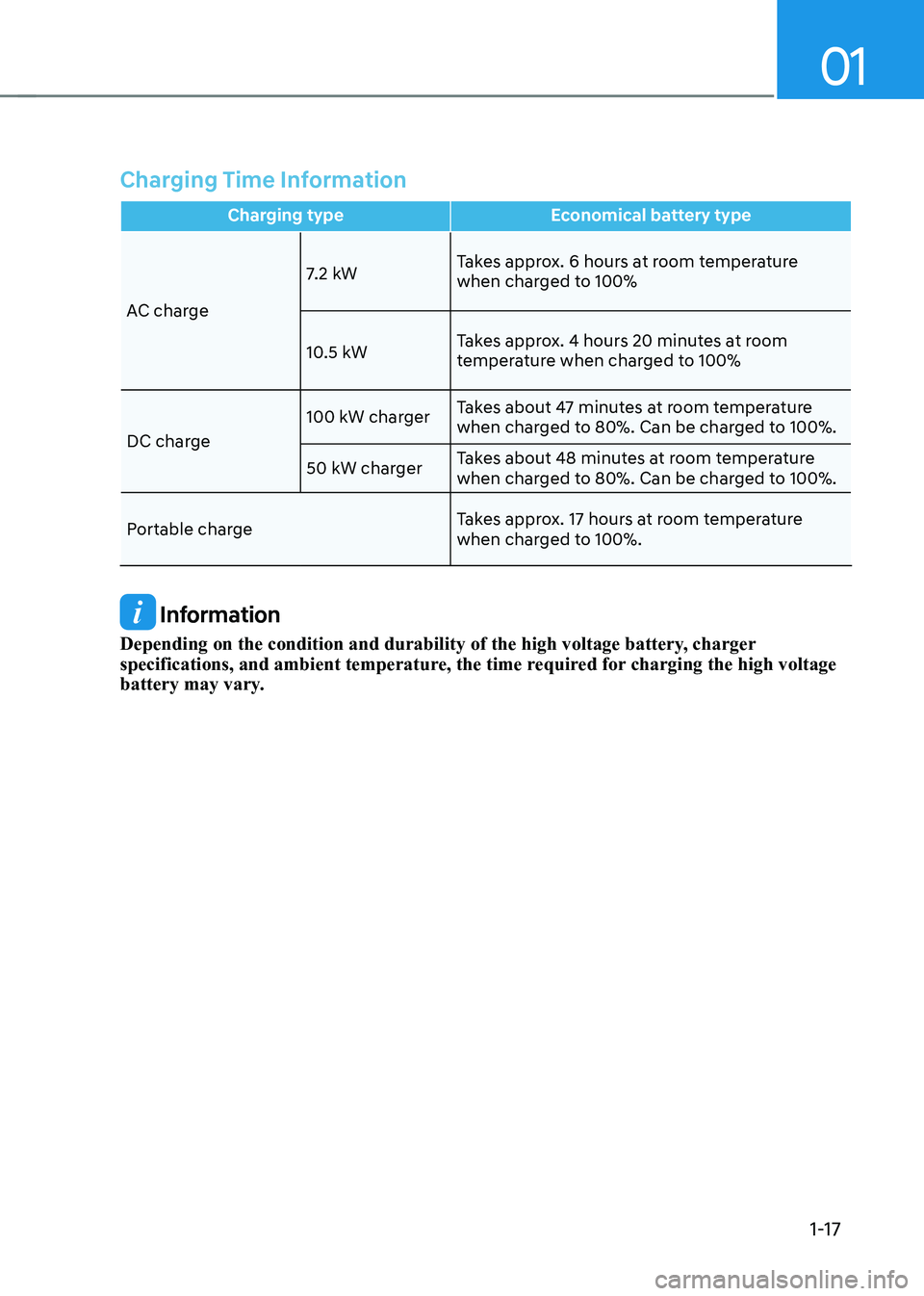
Charging Time Information
Charging type Economical battery type
AC charge7.2 kW
Takes approx. 6 hours at room temperature
when charged to 100%
10.5 kW Takes approx. 4 hours 20 minutes at room
temperature when charged to 100%
DC charge 100 kW charger
Takes about 47 minutes at room temperature
when charged to 80%. Can be charged to 100%.
50 kW charger Takes about 48 minutes at room temperature
when charged to 80%. Can be charged to 100%.
Portable charge Takes approx. 17 hours at room temperature
when charged to 100%.
Information
Depending on the condition and durability of the high voltage battery, charger
specifications, and ambient temperature, the time required for charging the high voltage
battery may vary.
Page 23 of 548
Foreword / Electric Vehicle System Overview
1-18
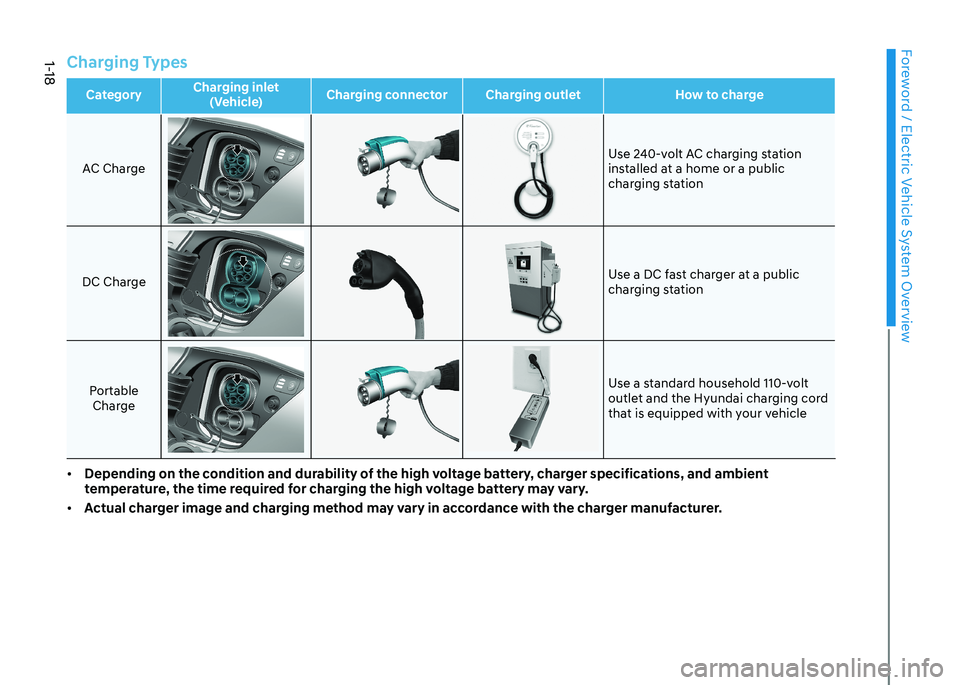
Charging Types
CategoryCharging inlet
(Vehicle) Charging connector Charging outlet How to chargeAC Charge
Use 240-volt AC charging station
installed at a home or a public
charging station
DC ChargeUse a DC fast charger at a public
charging station
Portable Charge Use a standard household 110-volt
outlet and the Hyundai charging cord
that is equipped with your vehicle
• Depending on the condition and durability of the high voltage battery, charger specifications, and ambient
temperature, the time required for charging the high voltage battery may vary.
• Actual charger image and charging method may vary in accordance with the charger manufacturer.
Page 24 of 548
01
1-19
CHarge indiCaTor lamp For eleCTriC VeHiCle
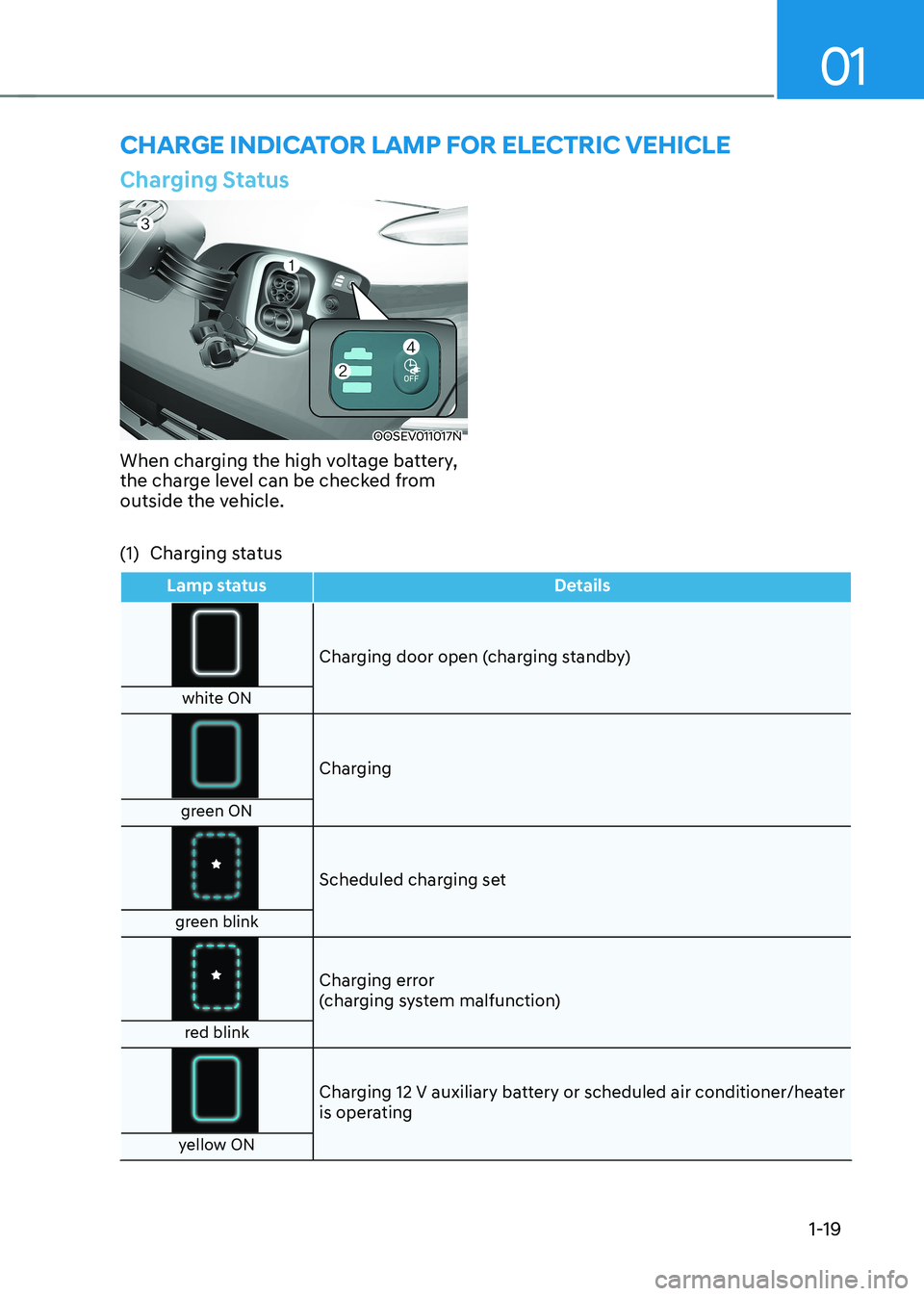
Charging Status
OOSEV011017N
When charging the high voltage battery,
the charge level can be checked from
outside the vehicle.
(1) Charging status
Lamp status Details
Charging door open (charging standby)
white ON
Charging
green ON
Scheduled charging set
green blink
Charging error
(charging system malfunction)
red blink
Charging 12 V auxiliary battery or scheduled air conditioner/heater
is operating
yellow ON
Page 25 of 548
Foreword / Electric Vehicle System Overview
1-20
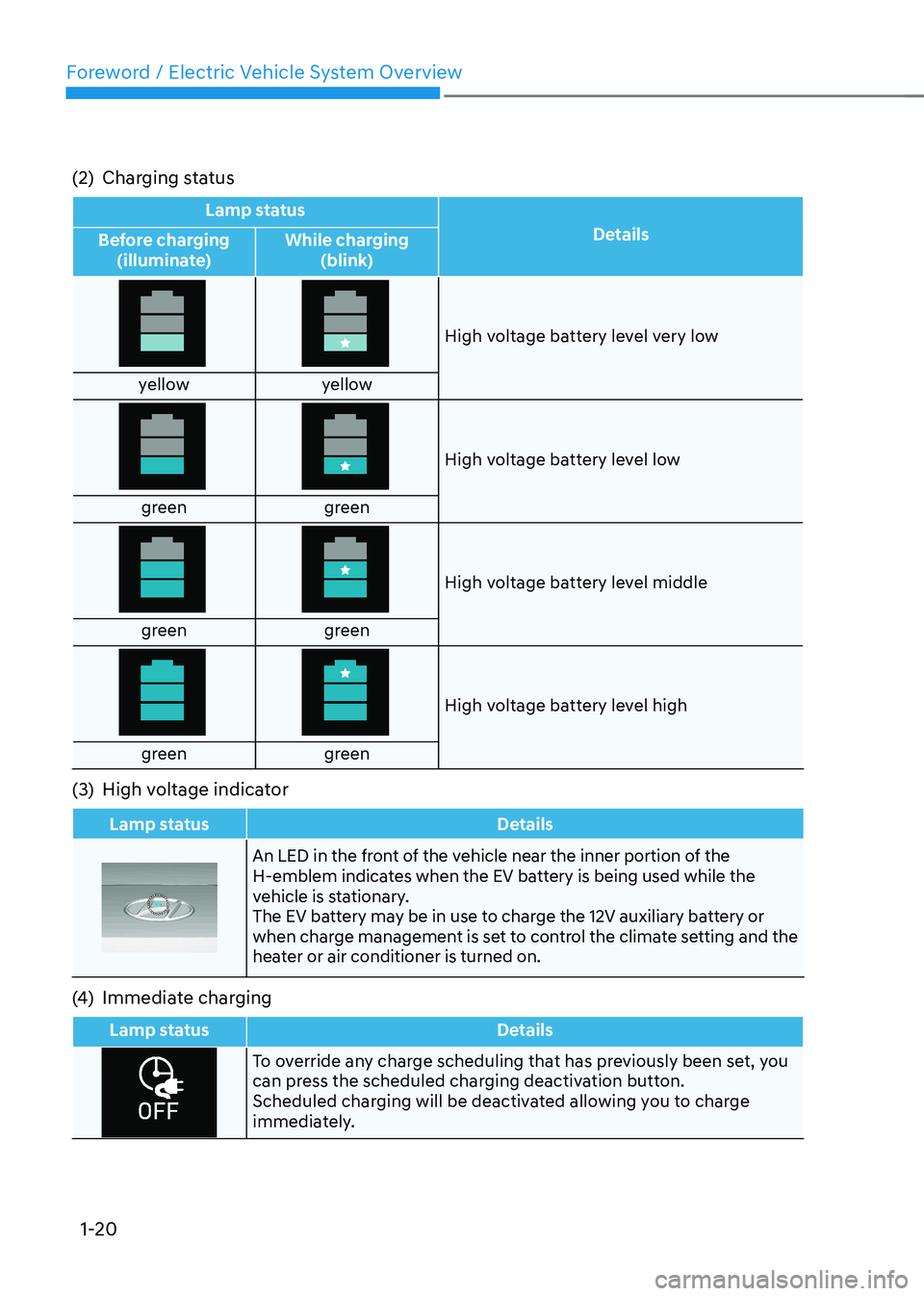
(2) Charging status
Lamp status
Details
Before charging
(illuminate) While charging
(blink)
High voltage battery level very low
yellow yellow
High voltage battery level low
green green
High voltage battery level middle
green green
High voltage battery level high
green green
(3) High voltage indicator
Lamp status Details
An LED in the front of the vehicle near the inner portion of the
H-emblem indicates when the EV battery is being used while the
vehicle is stationary.
The EV battery may be in use to charge the 12V auxiliary battery or
when charge management is set to control the climate setting and the
heater or air conditioner is turned on.
(4) Immediate charging
Lamp status Details
To override any charge scheduling that has previously been set, you
can press the scheduled charging deactivation button.
Scheduled charging will be deactivated allowing you to charge
immediately.
Page 28 of 548
01
1-23
WARNING
• Electromagnetic waves that are
generated from the charger can seriously impact medical electric
devices such as an implantable
cardiac pacemaker.
When using medical electric devices
such as an implantable cardiac
pacemaker, make sure to ask the
medical team and manufacturer
whether charging your electric
vehicle will impact the operation of
the medical electric devices such as
an implantable cardiac pacemaker.
• Inspect the charging cable connector
for any signs of water or excess
dust or dirt. Connecting the cable
when there is water or dirt on the
connector may initiate a short circuit
and cause a fire or electric shock.
WARNING
• Use caution not to touch the
charging connector or the charging
port when connecting the cable from
the charger to the charging port on
the vehicle.
• Comply with the following in order
to prevent electrical shock when
charging:
- Use caution when connecting the
charger to the charging port when
it is raining or snowing.
- Use caution when there are
adverse weather conditions such
as lightning.
- Use caution when the charging
connector or the charging plug is
wet.
WARNING
• Immediately stop charging when
you find abnormal symptoms (odor,
smoke).
• Replace the charging cable if the
cable coating is damaged to prevent electrical shock.
• When connecting or removing the
charging cable, make sure to hold
the charging connector handle and
charging plug.
If you pull the cable itself (without
using the handle), the internal wires
may disconnect or get damaged. This
may lead to electric shock or fire.
CAUTION
• Always keep the charging connector
and charging plug in clean and
dry condition. Be sure to keep the
charging cable in a condition where
there is no water or moisture.
• Before charging the battery, turn the
vehicle OFF.
• When the vehicle is switched OFF
while charging, the cooling fan
inside the motor compartment may
automatically operate. Do not touch
the cooling fan while charging.
• Be careful not to drop the charging
connector. The charging connector can be damaged.
Page 30 of 548
01
1-25
„„AC Charger
OLFP0Q4057N
7. Once the vehicle is connected,
confirm that charging has initiated
from the EV charging station display
screen.
8. Check if the charging indicator light (
) of the high voltage battery
in the instrument cluster is turned
ON. Charging is not active when the
charging indicator light (
) is OFF.
If the charging indicator light is OFF,
it may be necessary to disconnect the
charging connector from the vehicle
and repeat the connection process.
Refer to the charging station display
screen for more information.
Information
• During AC charging, the radio
reception may be bad.
• During charging, the gear cannot be
shifted from P (Park) to any other gear.
OOSEV040133L
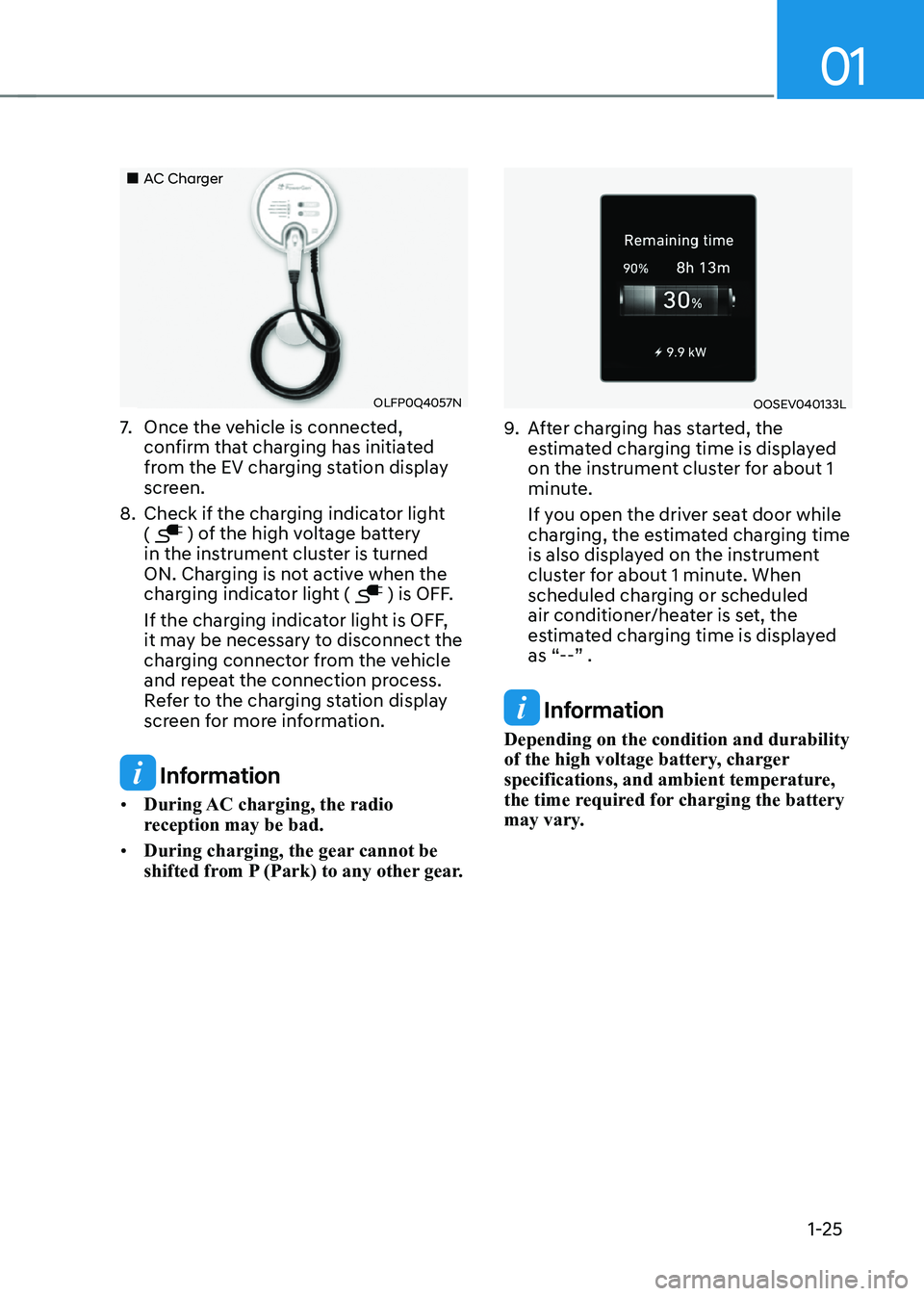
9. After charging has started, the
estimated charging time is displayed
on the instrument cluster for about 1
minute.
If you open the driver seat door while
charging, the estimated charging time
is also displayed on the instrument
cluster for about 1 minute. When
scheduled charging or scheduled
air conditioner/heater is set, the
estimated charging time is displayed
as “--” .
Information
Depending on the condition and durability
of the high voltage battery, charger
specifications, and ambient temperature,
the time required for charging the battery
may vary.
Page 31 of 548
Foreword / Electric Vehicle System Overview
1-26
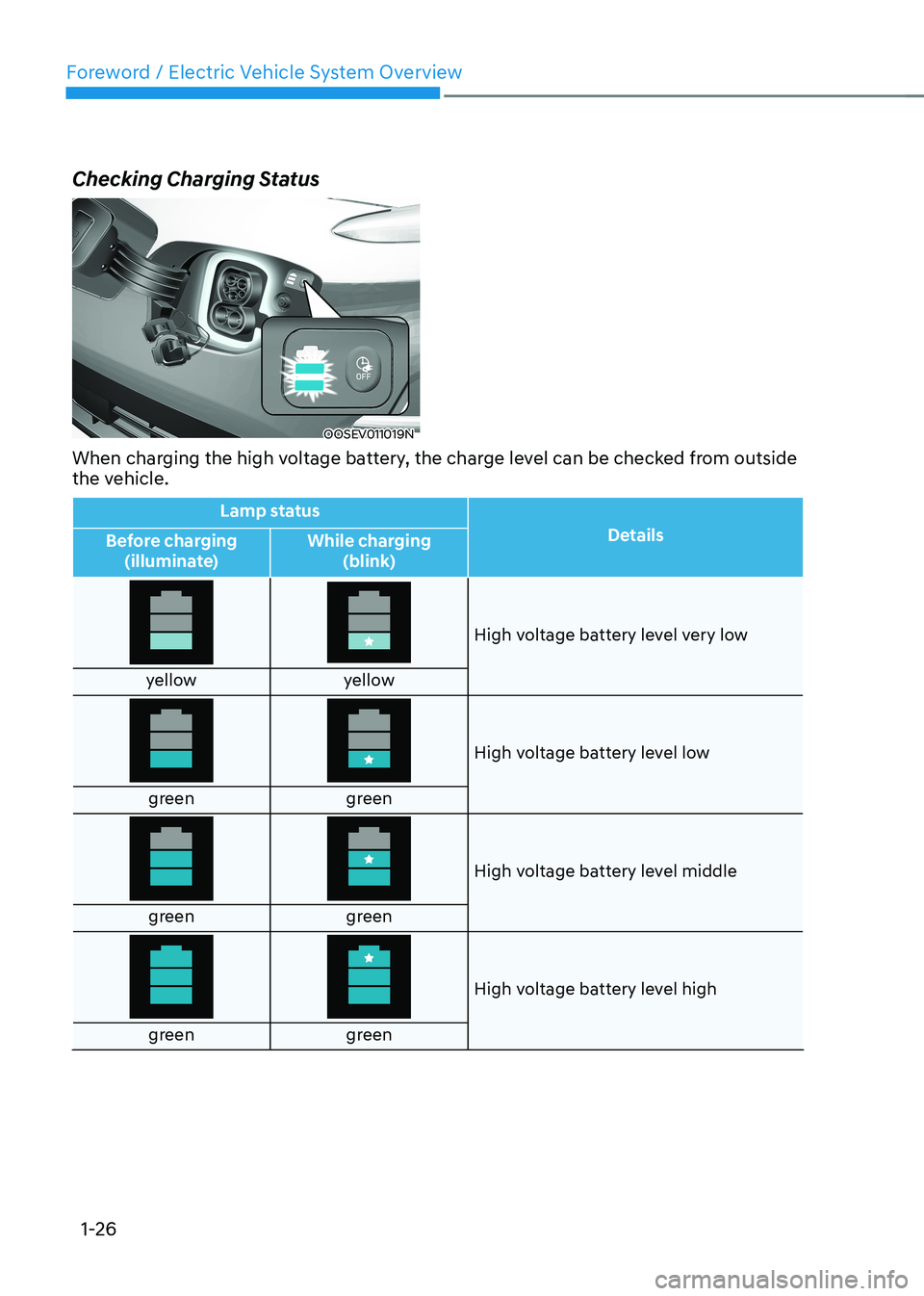
Checking Charging Status
OOSEV011019N
When charging the high voltage battery, the charge level can be checked from outside
the vehicle.
Lamp status Details
Before charging
(illuminate) While charging
(blink)
High voltage battery level very low
yellow yellow
High voltage battery level low
green green
High voltage battery level middle
green green
High voltage battery level high
green green
Page 33 of 548
Foreword / Electric Vehicle System Overview
1-28
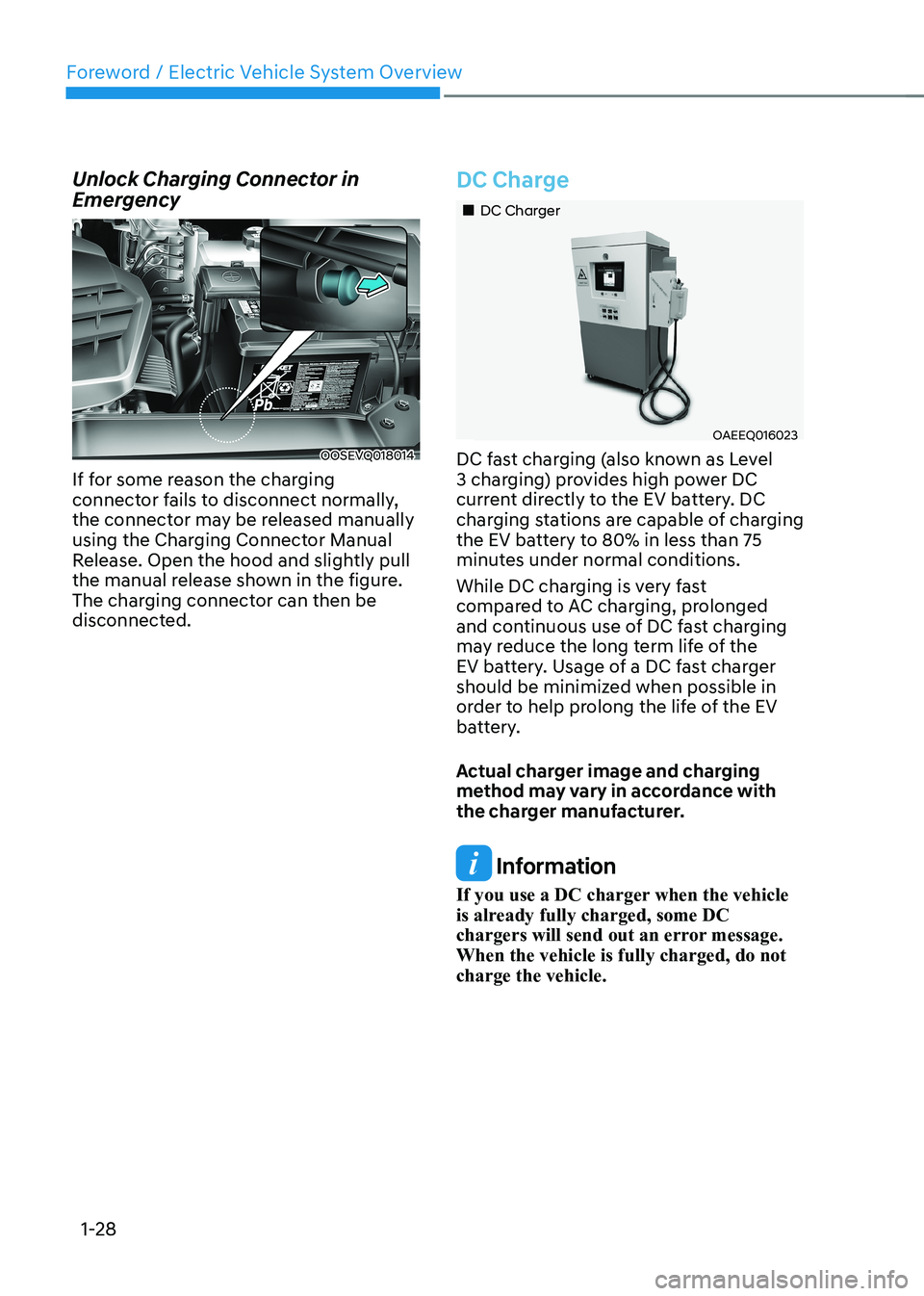
Unlock Charging Connector in
Emergency
OOSEVQ018014
If for some reason the charging
connector fails to disconnect normally,
the connector may be released manually
using the Charging Connector Manual
Release. Open the hood and slightly pull
the manual release shown in the figure.
The charging connector can then be
disconnected.
DC Charge
„„DC Charger
OAEEQ016023
DC fast charging (also known as Level
3 charging) provides high power DC
current directly to the EV battery. DC
charging stations are capable of charging
the EV battery to 80% in less than 75
minutes under normal conditions.
While DC charging is very fast
compared to AC charging, prolonged
and continuous use of DC fast charging
may reduce the long term life of the
EV battery. Usage of a DC fast charger
should be minimized when possible in
order to help prolong the life of the EV
battery.
Actual charger image and charging
method may vary in accordance with
the charger manufacturer.
Information
If you use a DC charger when the vehicle
is already fully charged, some DC
chargers will send out an error message. When the vehicle is fully charged, do not charge the vehicle.