climate HYUNDAI KONA EV 2023 User Guide
[x] Cancel search | Manufacturer: HYUNDAI, Model Year: 2023, Model line: KONA EV, Model: HYUNDAI KONA EV 2023Pages: 548, PDF Size: 49.14 MB
Page 186 of 548
5
Lighting ........................................................................................................... 5-48
Exterior lights............................................................................................................. 5-48 Welcome system ........................................................................................................ 5-51
Interior lights .............................................................................................................. 5-52
High Beam Assist (HBA) ................................................................................. 5-55
High Beam Assist setting ........................................................................................... 5-55
High Beam Assist condition ...................................................................................... 5-55
High Beam Assist Malfunction and Limitations .......................................................5-56
Wipers and washers ........................................................................................ 5-58
Front windshield wipers ............................................................................................. 5-58
Front windshield washers ......................................................................................... 5-60
Rear window wiper and washer switch .................................................................... 5-61
Automatic climate control system ................................................................. 5-62
Automatic heating and air conditioning ................................................................... 5-63
Manual heating and air conditioning ....................................................................... 5-64
System operation ........................................................................................................ 5-71
System maintenance ................................................................................................. 5-73
Windshield defrosting and defogging ............................................................5 -76
To defog inside windshield ........................................................................................ 5 -76
To defrost outside windshield ................................................................................... 5-77
Defogging logic .......................................................................................................... 5-77
Auto defogging system (only for automatic climate control system) ....................5-78
Defroster ..................................................................................................................... 5-79
Rear window defroster .............................................................................................. 5-79
Climate control additional features ............................................................... 5-80
Cluster ionizer ............................................................................................................ 5-80
Automatic ventilation ................................................................................................ 5-80
Storage compartment ..................................................................................... 5-81
Center console storage .............................................................................................. 5-81
Glove box .................................................................................................................... 5-81
Sunglasses holder ...................................................................................................... 5-82
Luggage tray ............................................................................................................... 5-82
Page 195 of 548
05
5-11
When closing the door, push the door by
hand. Make sure that doors are closed
securely.
Information
• In cold and wet climates, door lock
and door mechanisms may not work
properly due to freezing conditions.
• If the door is locked/unlocked multiple
times in rapid succession with either
the vehicle key or door lock switch, the
system may stop operating temporarily
in order to protect the circuit and
prevent damage to system components.
Operating door locks from inside
the vehicle
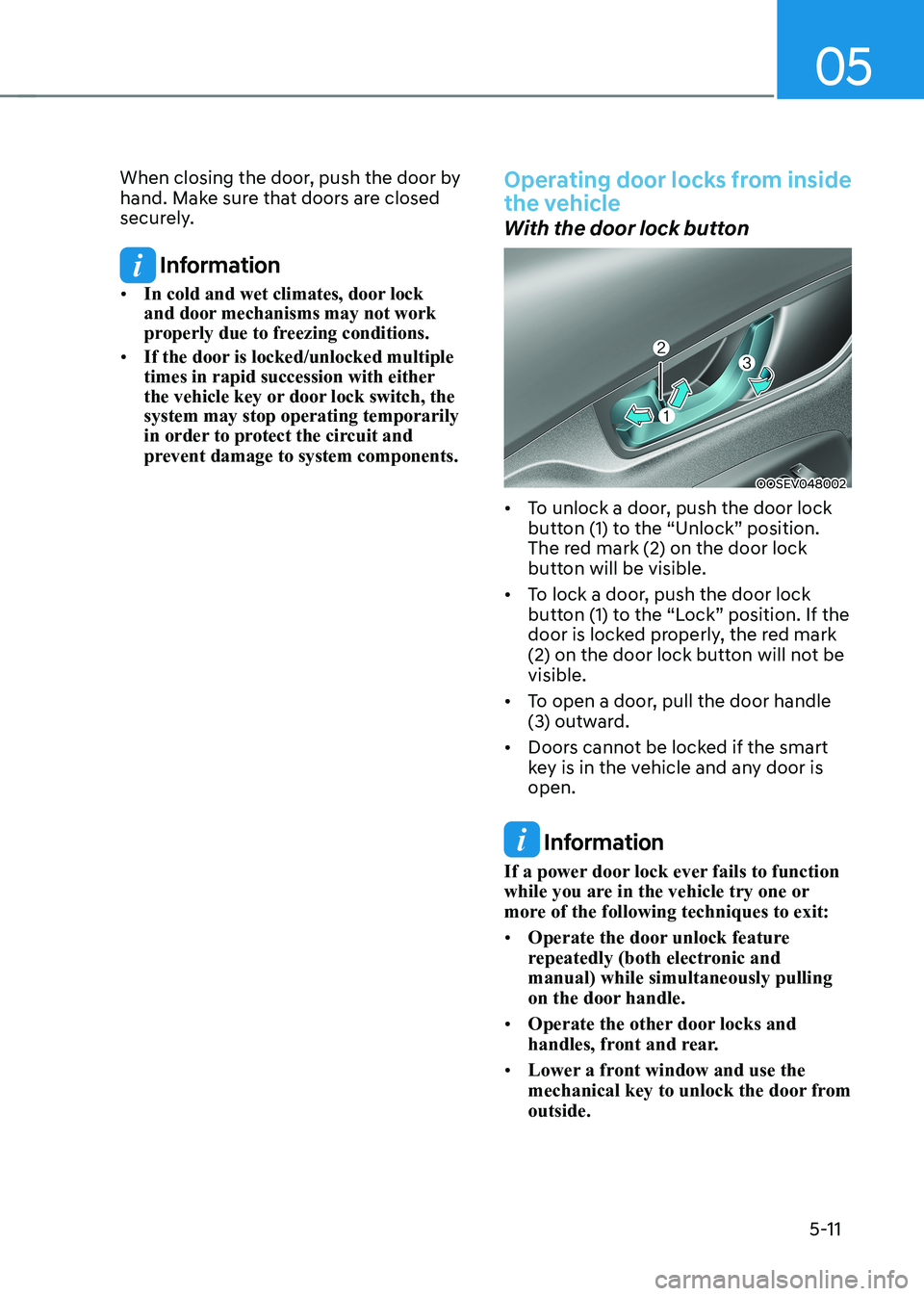
With the door lock button
OOSEV048002
• To unlock a door, push the door lock
button (1) to the “Unlock” position.
The red mark (2) on the door lock
button will be visible.
• To lock a door, push the door lock
button (1) to the “Lock” position. If the
door is locked properly, the red mark
(2) on the door lock button will not be visible.
• To open a door, pull the door handle
(3) outward.
• Doors cannot be locked if the smart
key is in the vehicle and any door is open.
Information
If a power door lock ever fails to function
while you are in the vehicle try one or
more of the following techniques to exit: • Operate the door unlock feature
repeatedly (both electronic and manual) while simultaneously pulling
on the door handle.
• Operate the other door locks and
handles, front and rear.
• Lower a front window and use the
mechanical key to unlock the door from outside.
Page 218 of 548
Convenient features
5-34
The START/STOP button must be in
the ON position to be able to raise or
lower the windows. Each door has a
Power Window switch to control that
door’s window. The driver has a Power
Window Lock switch which can block
the operation of passenger windows.
The power windows will operate for
approximately 30 seconds after the
START/STOP button is placed in the ACC
or OFF position. However, if the front
doors are opened, the Power Windows
cannot be operated even within the 10
minutes period.
WARNING
To avoid serious injury or death, do not
extend your head, arms or body outside
the windows while driving.
Information
• In cold and wet climates, power
windows may not work properly due to
freezing conditions.
• While driving with the rear windows
down or with the sunroof (if equipped)
opened (or partially opened), your vehicle may demonstrate a wind
buffeting or pulsation noise. This
noise is normal and can be reduced
or eliminated by taking the following actions. If the noise occurs with one
or both of the rear windows down,
partially lower both front windows
approximately 2.5 cm. If you
experience the noise with the sunroof
open, slightly close the sunroof. Window opening and closing
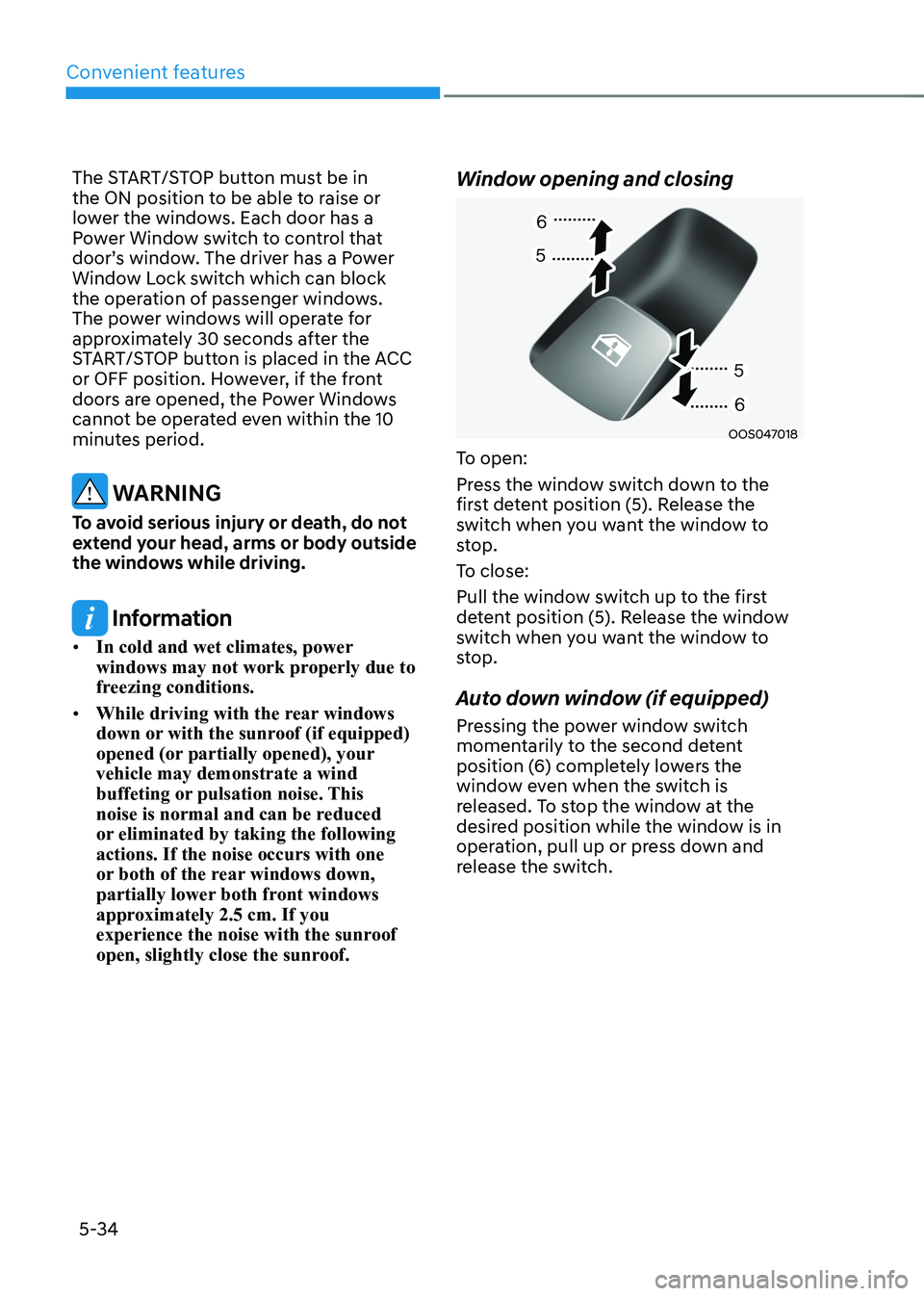
OOS047018
To open:
Press the window switch down to the
first detent position (5). Release the
switch when you want the window to
stop.
To close:
Pull the window switch up to the first
detent position (5). Release the window
switch when you want the window to
stop.
Auto down window (if equipped)
Pressing the power window switch
momentarily to the second detent
position (6) completely lowers the
window even when the switch is
released. To stop the window at the
desired position while the window is in
operation, pull up or press down and
release the switch.
Page 221 of 548
05
5-37
sunroof (if equipped)
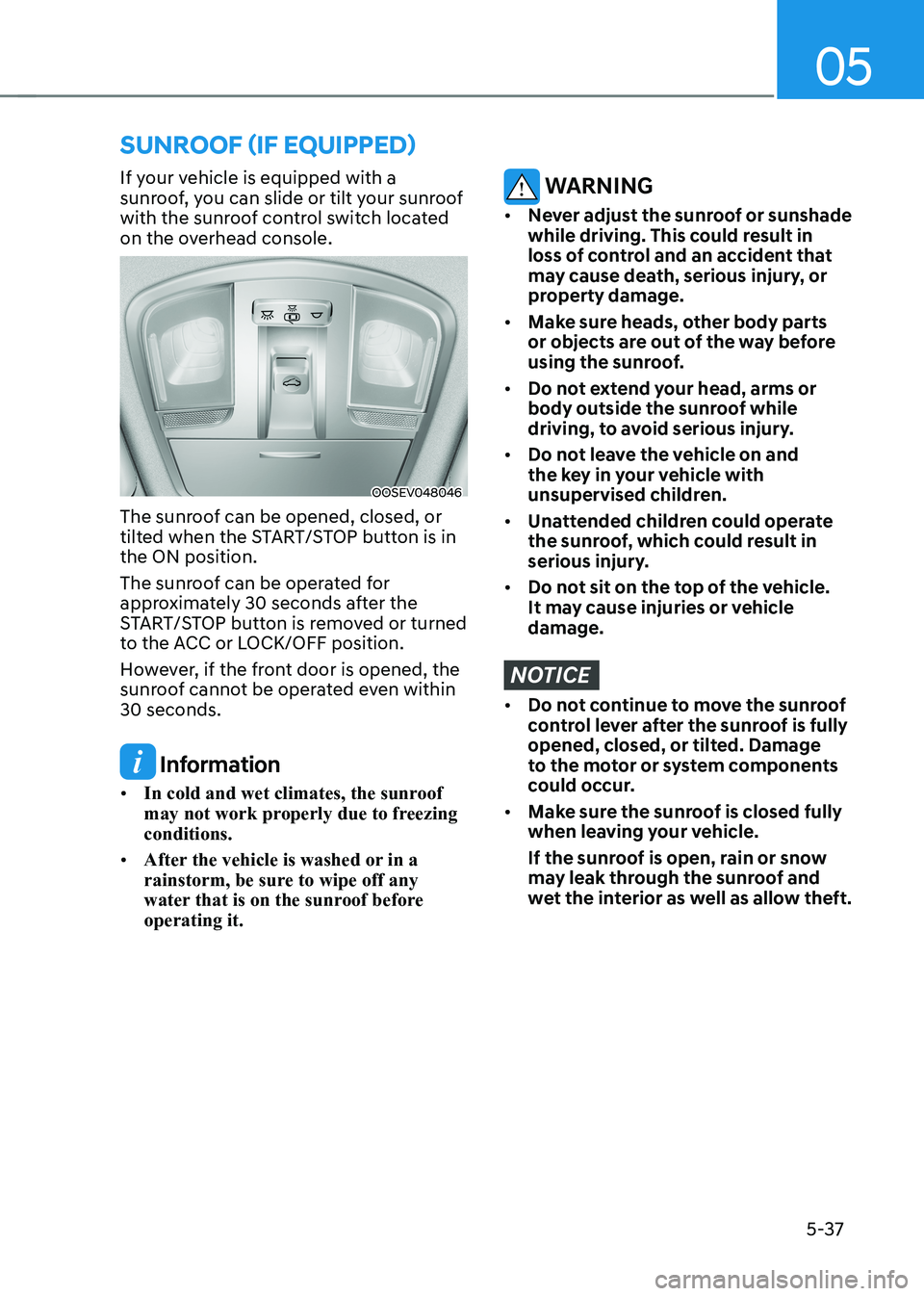
If your vehicle is equipped with a
sunroof, you can slide or tilt your sunroof
with the sunroof control switch located
on the overhead console.
OOSEV048046
The sunroof can be opened, closed, or
tilted when the START/STOP button is in the ON position.
The sunroof can be operated for
approximately 30 seconds after the
START/STOP button is removed or turned
to the ACC or LOCK/OFF position.
However, if the front door is opened, the
sunroof cannot be operated even within 30 seconds.
Information
• In cold and wet climates, the sunroof
may not work properly due to freezing conditions.
• After the vehicle is washed or in a
rainstorm, be sure to wipe off any
water that is on the sunroof before operating it.
WARNING
• Never adjust the sunroof or sunshade
while driving. This could result in
loss of control and an accident that
may cause death, serious injury, or
property damage.
• Make sure heads, other body parts
or objects are out of the way before
using the sunroof.
• Do not extend your head, arms or
body outside the sunroof while
driving, to avoid serious injury.
• Do not leave the vehicle on and
the key in your vehicle with
unsupervised children.
• Unattended children could operate
the sunroof, which could result in
serious injury.
• Do not sit on the top of the vehicle.
It may cause injuries or vehicle damage.
NOTICE
• Do not continue to move the sunroof
control lever after the sunroof is fully
opened, closed, or tilted. Damage
to the motor or system components
could occur.
• Make sure the sunroof is closed fully
when leaving your vehicle.
If the sunroof is open, rain or snow
may leak through the sunroof and
wet the interior as well as allow theft.
Page 223 of 548
05
5-39
Tilting the sunroof
OOSEV048053L
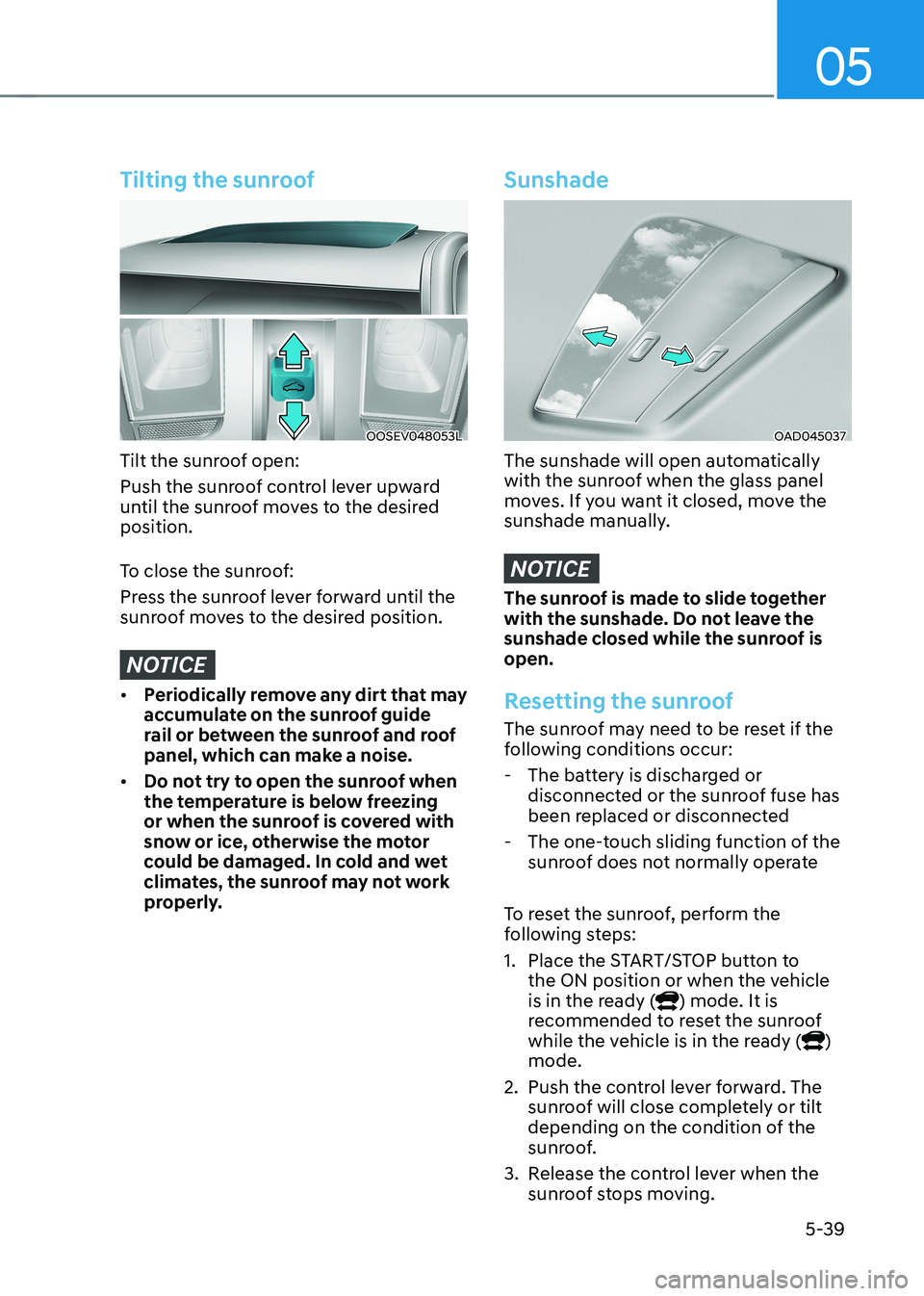
Tilt the sunroof open:
Push the sunroof control lever upward
until the sunroof moves to the desired position.
To close the sunroof:
Press the sunroof lever forward until the
sunroof moves to the desired position.
NOTICE
• Periodically remove any dirt that may
accumulate on the sunroof guide
rail or between the sunroof and roof
panel, which can make a noise.
• Do not try to open the sunroof when
the temperature is below freezing
or when the sunroof is covered with
snow or ice, otherwise the motor
could be damaged. In cold and wet
climates, the sunroof may not work
properly.
Sunshade
OAD045037
The sunshade will open automatically
with the sunroof when the glass panel
moves. If you want it closed, move the
sunshade manually.
NOTICE
The sunroof is made to slide together
with the sunshade. Do not leave the
sunshade closed while the sunroof is open.
Resetting the sunroof
The sunroof may need to be reset if the
following conditions occur:
- The battery is discharged or disconnected or the sunroof fuse has
been replaced or disconnected
- The one-touch sliding function of the sunroof does not normally operate
To reset the sunroof, perform the
following steps:
1. Place the START/STOP button to the ON position or when the vehicle
is in the ready (
) mode. It is
recommended to reset the sunroof
while the vehicle is in the ready (
)
mode.
2. Push the control lever forward. The sunroof will close completely or tilt
depending on the condition of the
sunroof.
3. Release the control lever when the sunroof stops moving.
Page 227 of 548
05
5-43
Tailgate
Opening the tailgate
OOSEV040011L
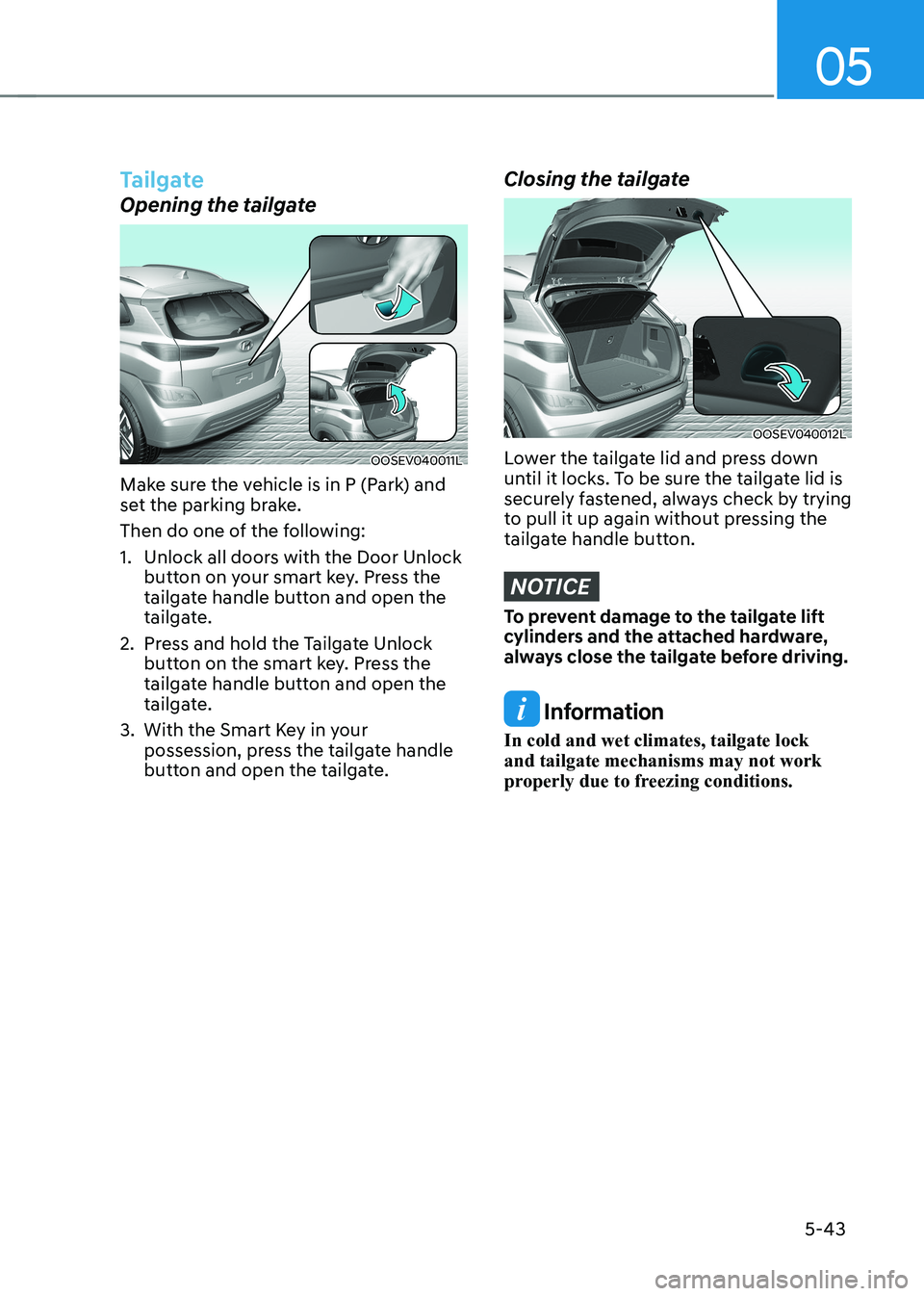
Make sure the vehicle is in P (Park) and
set the parking brake.
Then do one of the following:
1. Unlock all doors with the Door Unlock button on your smart key. Press the
tailgate handle button and open the
tailgate.
2. Press and hold the Tailgate Unlock button on the smart key. Press the
tailgate handle button and open the
tailgate.
3. With the Smart Key in your possession, press the tailgate handle
button and open the tailgate.
Closing the tailgate
OOSEV040012L
Lower the tailgate lid and press down
until it locks. To be sure the tailgate lid is
securely fastened, always check by trying
to pull it up again without pressing the
tailgate handle button.
NOTICE
To prevent damage to the tailgate lift
cylinders and the attached hardware,
always close the tailgate before driving.
Information
In cold and wet climates, tailgate lock and tailgate mechanisms may not work
properly due to freezing conditions.
Page 246 of 548
Convenient features
5-62
auTomaTiC ClimaTe ConTrol sysTem (if equipped)
OOSEV048300
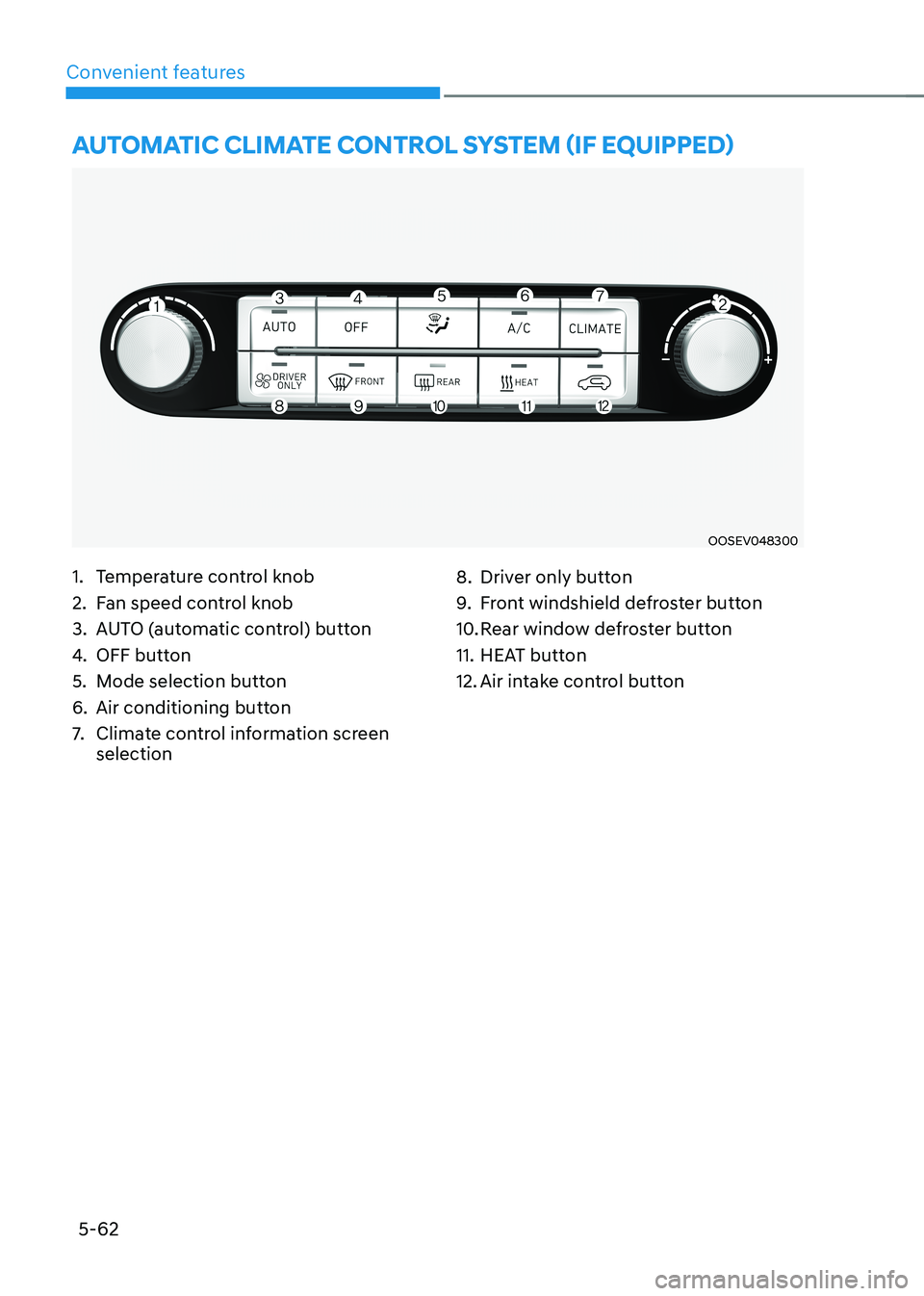
1. Temperature control knob
2. Fan speed control knob
3. AUTO (automatic control) button
4. OFF button
5. Mode selection button
6. Air conditioning button
7. Climate control information screen selection 8. Driver only button
9.
Front windshield defroster button
10. Rear window defroster button
11. HEAT button
12. Air intake control button
Page 247 of 548
05
5-63
Automatic heating and air
conditioning
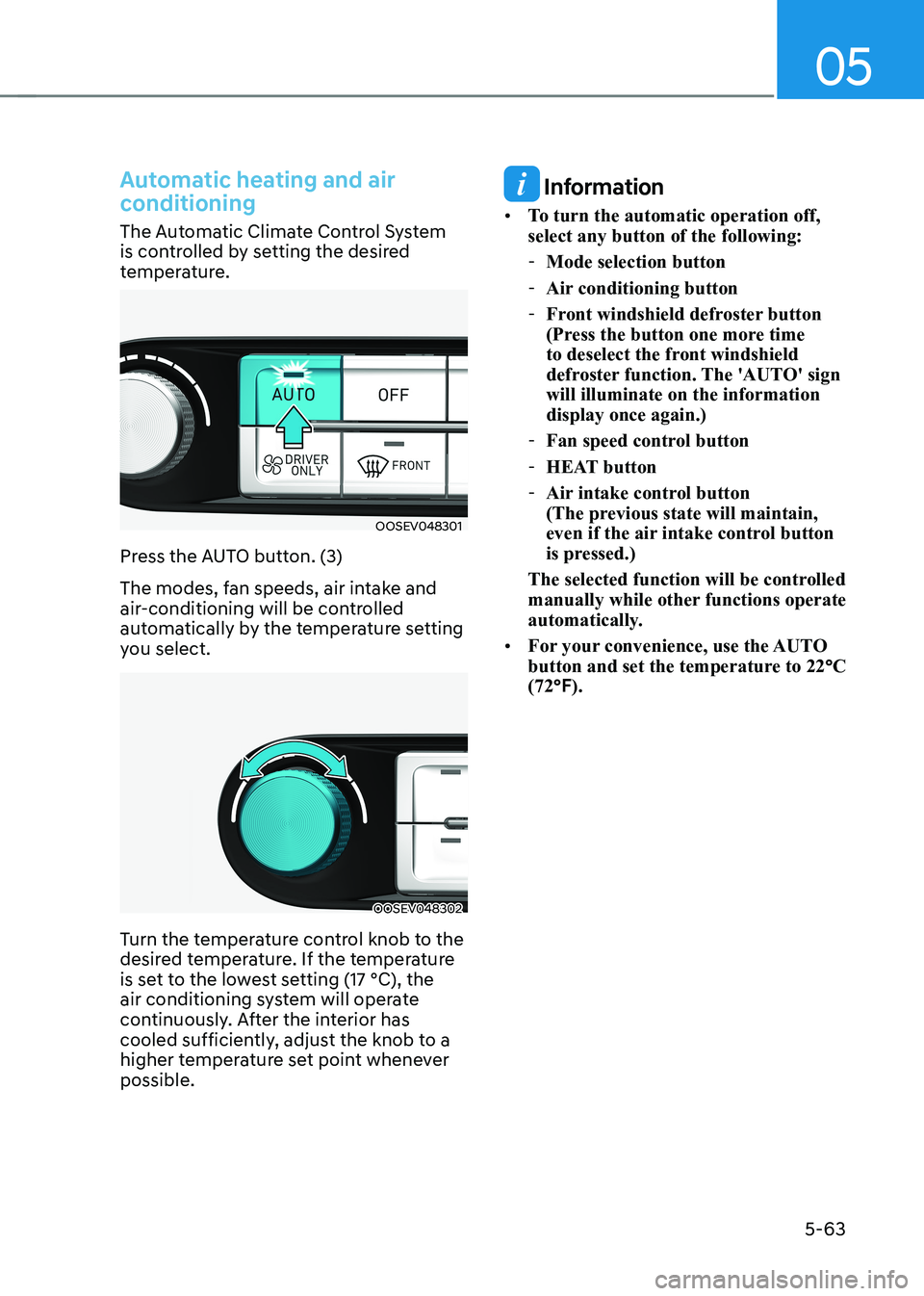
The Automatic Climate Control System
is controlled by setting the desired
temperature.
OOSEV048301
Press the AUTO button. (3)
The modes, fan speeds, air intake and
air-conditioning will be controlled
automatically by the temperature setting
you select.
OOSEV048302
Turn the temperature control knob to the
desired temperature. If the temperature
is set to the lowest setting (17 °C), the
air conditioning system will operate
continuously. After the interior has
cooled sufficiently, adjust the knob to a
higher temperature set point whenever possible.
Information
• To turn the automatic operation off, select any button of the following:
- Mode selection button
- Air conditioning button
- Front windshield defroster button
(Press the button one more time
to deselect the front windshield
defroster function. The 'AUTO' sign will illuminate on the information display once again.)
- Fan speed control button
- HEAT button
- Air intake control button
(The previous state will maintain,
even if the air intake control button
is pressed.)
The selected function will be controlled
manually while other functions operate
automatically.
• For your convenience, use the AUTO
button and set the temperature to 22 °C
(72 °F).
Page 251 of 548
05
5-67
OOSEV040306CZ
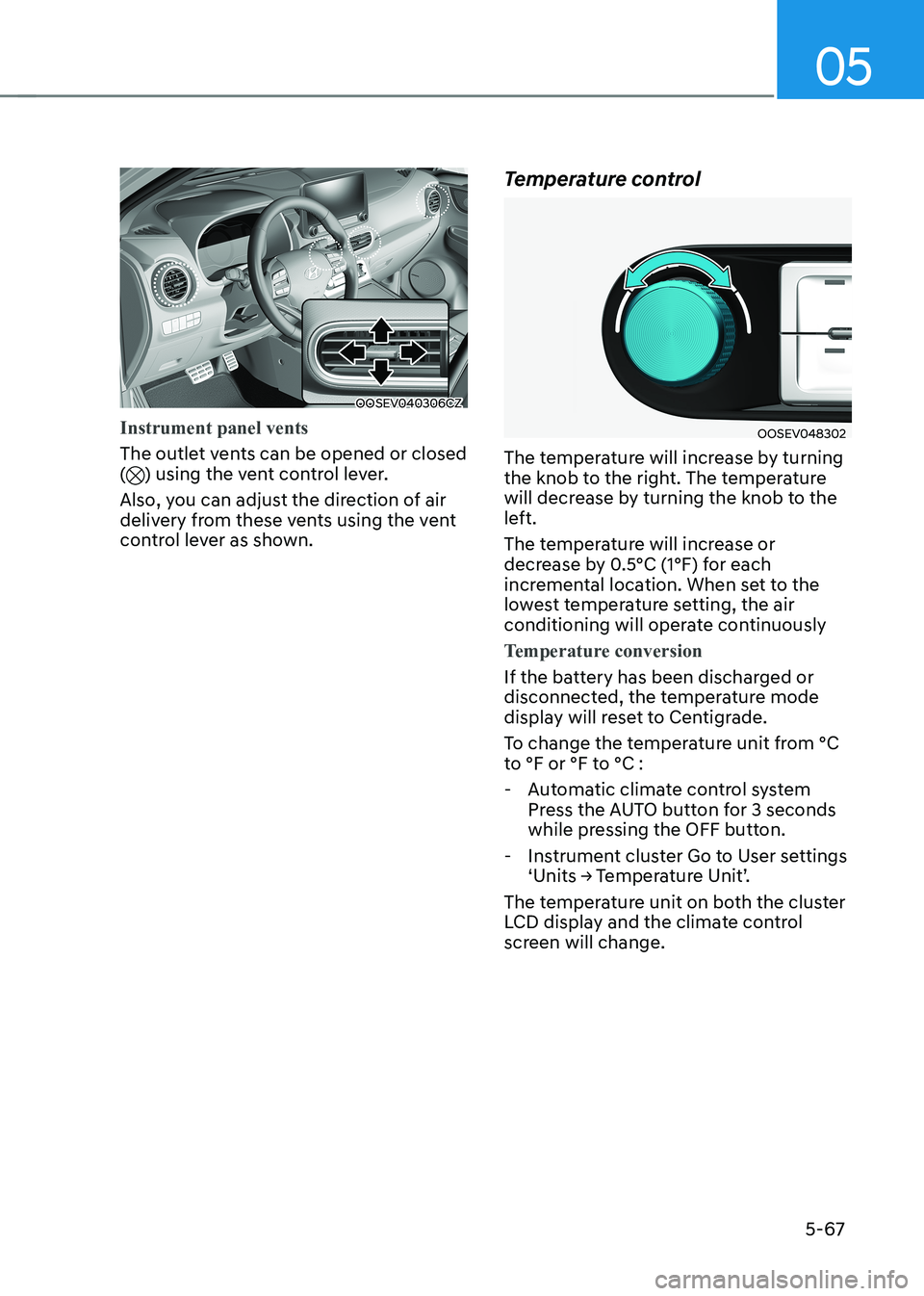
Instrument panel vents
The outlet vents can be opened or closed () using the vent control lever.
Also, you can adjust the direction of air
delivery from these vents using the vent
control lever as shown. Temperature control
OOSEV048302
The temperature will increase by turning
the knob to the right. The temperature
will decrease by turning the knob to the
left.
The temperature will increase or
decrease by 0.5°C (1°F) for each
incremental location. When set to the
lowest temperature setting, the air
conditioning will operate continuously
Temperature conversion
If the battery has been discharged or
disconnected, the temperature mode
display will reset to Centigrade.
To change the temperature unit from °C
to °F or °F to °C :
- Automatic climate control system Press the AUTO button for 3 seconds
while pressing the OFF button.
- Instrument cluster Go to User settings ‘Units → Temperature Unit’.
The temperature unit on both the cluster
LCD display and the climate control
screen will change.
Page 252 of 548
Convenient features
5-68
Air intake control
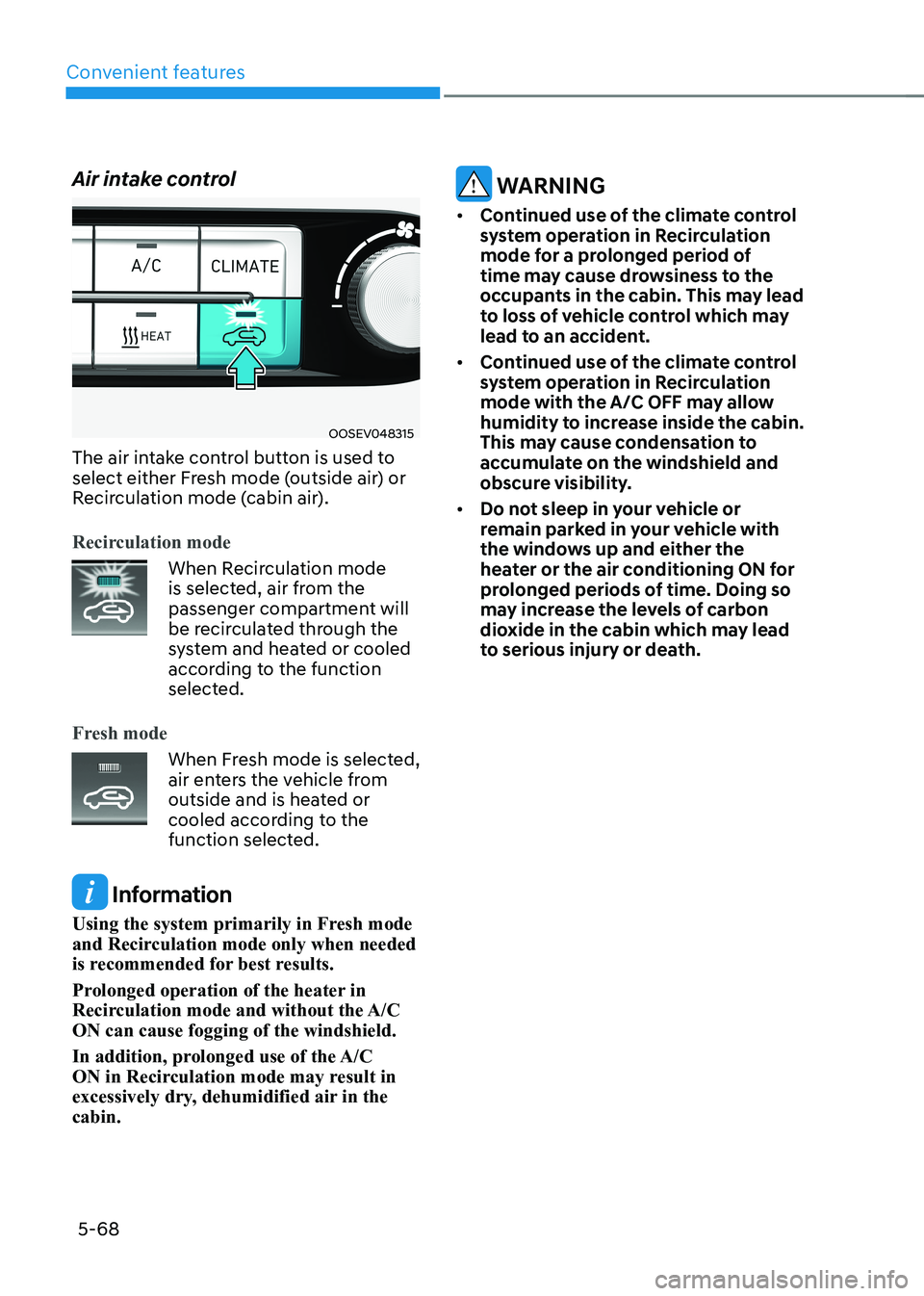
OOSEV048315
The air intake control button is used to
select either Fresh mode (outside air) or
Recirculation mode (cabin air).
Recirculation mode
When Recirculation mode
is selected, air from the
passenger compartment will
be recirculated through the
system and heated or cooled
according to the function
selected.
Fresh mode
When Fresh mode is selected,
air enters the vehicle from
outside and is heated or
cooled according to the
function selected.
Information
Using the system primarily in Fresh mode
and Recirculation mode only when needed
is recommended for best results.
Prolonged operation of the heater in
Recirculation mode and without the A/C ON can cause fogging of the windshield.
In addition, prolonged use of the A/C
ON in Recirculation mode may result in
excessively dry, dehumidified air in the cabin.
WARNING
• Continued use of the climate control
system operation in Recirculation
mode for a prolonged period of
time may cause drowsiness to the
occupants in the cabin. This may lead
to loss of vehicle control which may
lead to an accident.
• Continued use of the climate control
system operation in Recirculation
mode with the A/C OFF may allow
humidity to increase inside the cabin.
This may cause condensation to
accumulate on the windshield and
obscure visibility.
• Do not sleep in your vehicle or
remain parked in your vehicle with
the windows up and either the
heater or the air conditioning ON for
prolonged periods of time. Doing so
may increase the levels of carbon
dioxide in the cabin which may lead
to serious injury or death.